key PEUGEOT 4008 2015 Service Manual
[x] Cancel search | Manufacturer: PEUGEOT, Model Year: 2015, Model line: 4008, Model: PEUGEOT 4008 2015Pages: 389, PDF Size: 15.89 MB
Page 191 of 389
189
4008_en_Chap07_info-pratiques_ed01-2014
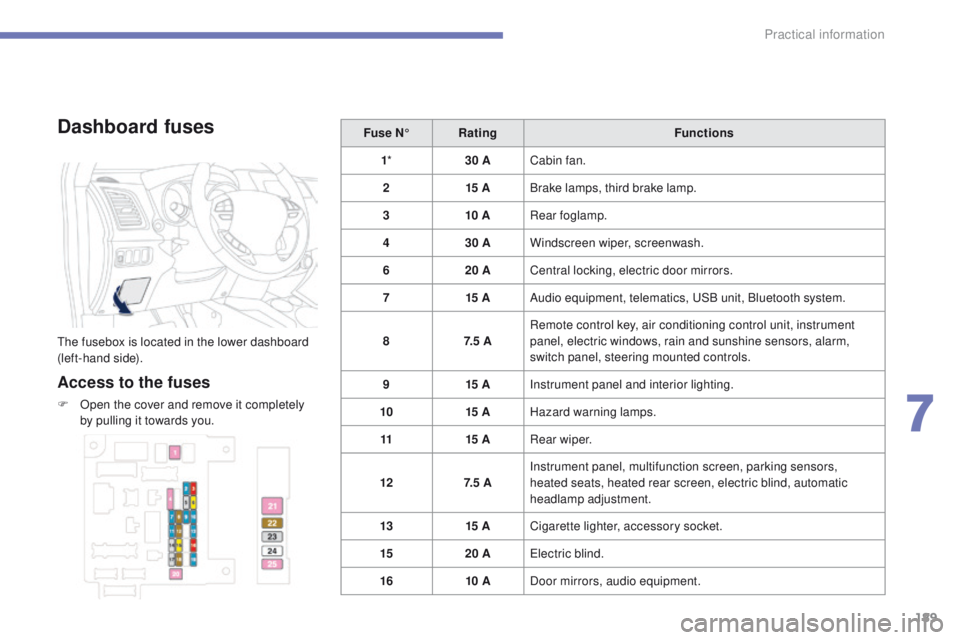
Dashboard fuses
the fusebox is located in the lower dashboard
(left-hand side).
Access to the fuses
F Open the cover and remove it completely by pulling it towards you. Fuse N°
Rating Functions
1 * 30 ACabin fan.
2 15 ABrake lamps, third brake lamp.
3 10 ARear foglamp.
4 30 AWindscreen wiper, screenwash.
6 20 ACentral locking, electric door mirrors.
7 15 AAudio equipment, telematics, u
S
B unit, Bluetooth system.
8 7. 5 ARemote control key, air conditioning control unit, instrument
panel, electric windows, rain and sunshine sensors, alarm,
switch panel, steering mounted controls.
9 15 AInstrument panel and interior lighting.
10 15 AHazard warning lamps.
11 15 ARear wiper.
12 7. 5 AInstrument panel, multifunction screen, parking sensors,
heated seats, heated rear screen, electric blind, automatic
headlamp adjustment.
13 15 ACigarette lighter, accessory socket.
15 20 A
ele
ctric blind.
16 10 ADoor mirrors, audio equipment.
7
Practical information
Page 200 of 389
198
4008_en_Chap07_info-pratiques_ed01-2014
Recovering the vehicle
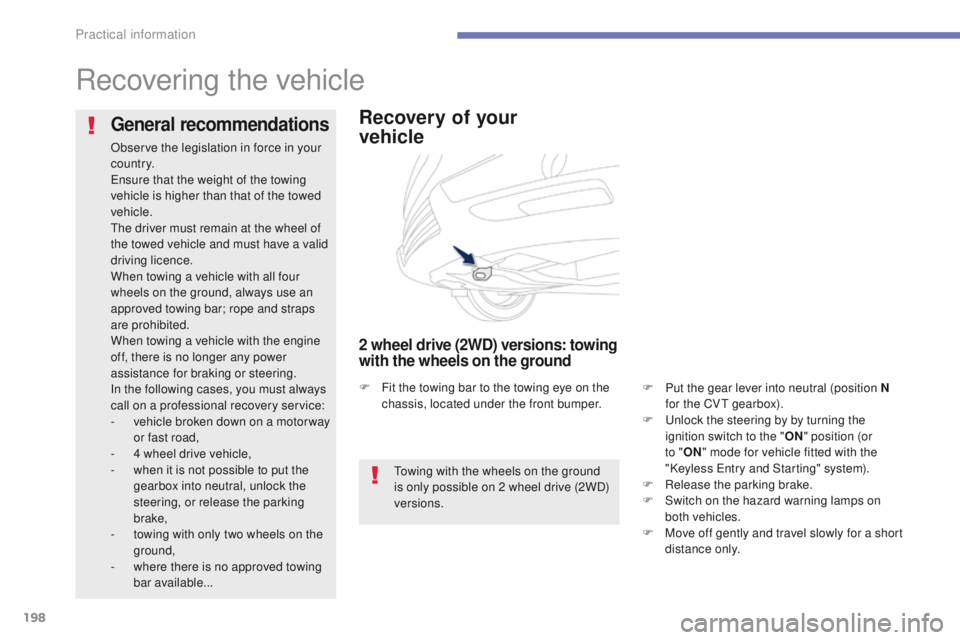
Recovery of your
vehicle
2 wheel drive (2WD) versions: towing
with the wheels on the ground
F Put the gear lever into neutral (position N for the CVt gearbox).
F
u
n
lock the steering by by turning the
ignition switch to the " ON" position (or
to " ON " mode for vehicle fitted with the
"Keyless
e
n
try and Starting" system).
F
R
elease the parking brake.
F
S
witch on the hazard warning lamps on
both vehicles.
F
M
ove off gently and travel slowly for a short
distance only.
General recommendations
Observe the legislation in force in your
c o unt r y.
en
sure that the weight of the towing
vehicle is higher than that of the towed
vehicle.
th
e driver must remain at the wheel of
the towed vehicle and must have a valid
driving licence.
When towing a vehicle with all four
wheels on the ground, always use an
approved towing bar; rope and straps
are prohibited.
When towing a vehicle with the engine
off, there is no longer any power
assistance for braking or steering.
In the following cases, you must always
call on a professional recovery service:
-
v
ehicle broken down on a motor way
or fast road,
-
4 w
heel drive vehicle,
-
w
hen it is not possible to put the
gearbox into neutral, unlock the
steering, or release the parking
brake,
-
t
owing with only two wheels on the
ground,
-
w
here there is no approved towing
bar available...
to
wing with the wheels on the ground
is only possible on 2 wheel drive (2WD)
versions.
F
F
it the towing bar to the towing eye on the
chassis, located under the front bumper.
Practical information
Page 208 of 389
206
4008_en_Chap08_verifications_ed01-2014
PeugeOt & t O tA L,
A PARtNeRSHIP tO DeL IVe R
Be
tte R
P
e
RFORMANC
e
!
Innovation, the key to success
the tOtAL Research and Development and
Pe
ugeOt teams work together to develop high
quality lubricants that meet the requirements
of P
e
uge
Ot
vehicles. For you, this is the
assurance that the performance of your engine
is optimised while also ensuring its durability.
th
e 208 HYbrid F
e
demonstrates the ability of
P
e
uge
Ot
and
tOtA
L to develop innovative
technologies and provide other ways of moving
towards the future.
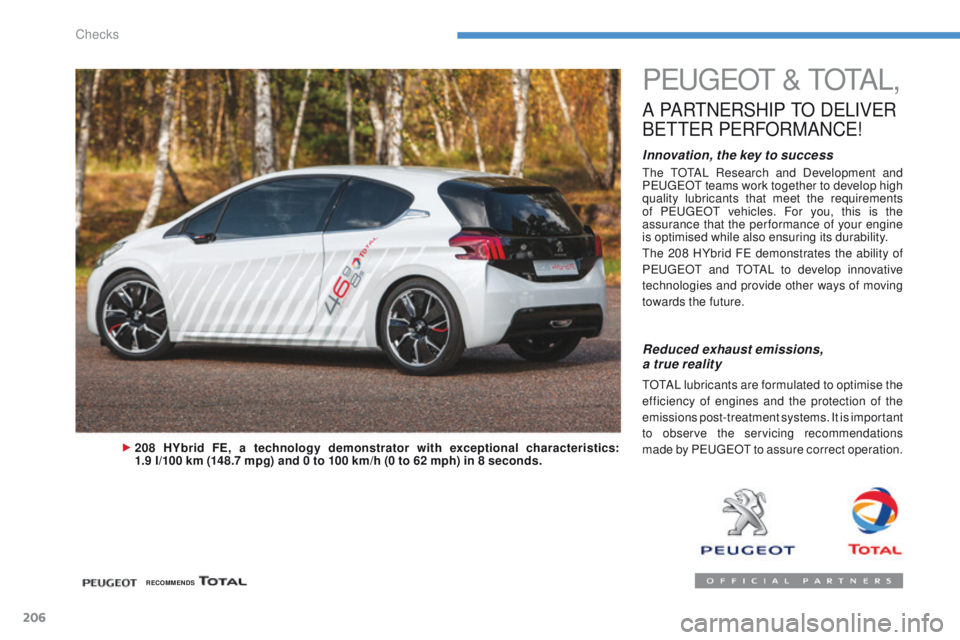
208 HYbrid FE, a technology demonstrator with exceptional characteristics:
1.9 l/100 km (148.7 mpg) and 0 to 100 km/h (0 to 62 mph) in 8 seconds.
Reduced exhaust emissions,
a true reality
tOtAL lubricants are formulated to optimise the
efficiency of engines and the protection of the
emissions post-treatment systems. It is important
to observe the servicing recommendations
made by P
e
uge
Ot
to assure correct operation.
RECOMMENDS
Checks
Page 223 of 389
221
4008_en_Chap09_caracteristiques-techniques_ed01-2014
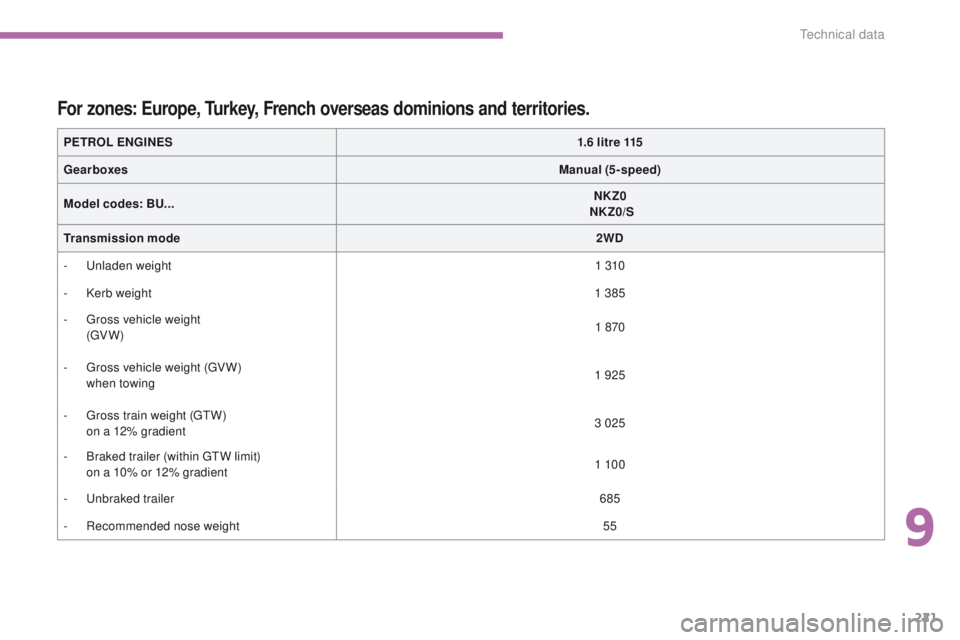
PETROL ENGINES1.6 litre 115
Gearboxes Manual (5-speed)
Model codes: BU... NKZ0
NKZ0/S
Transmission mode 2WD
-
u
n
laden weight 1 310
-
K
erb weight 1 385
-
g
r
oss vehicle weight
(
g
V
W) 1 870
-
g
r
oss vehicle weight (
gV
W)
when towing 1 925
-
g
r
oss train weight (
g
t
W
)
o
n a 12% gradient 3 025
-
B
raked trailer (within gt
W l
imit)
o
n a 10% or 12% gradient 1 10 0
-
u
nb
raked trailer 685
-
R
ecommended nose weight 55
For zones: Europe, Turkey, French overseas dominions and territories.
9
technical data
Page 230 of 389
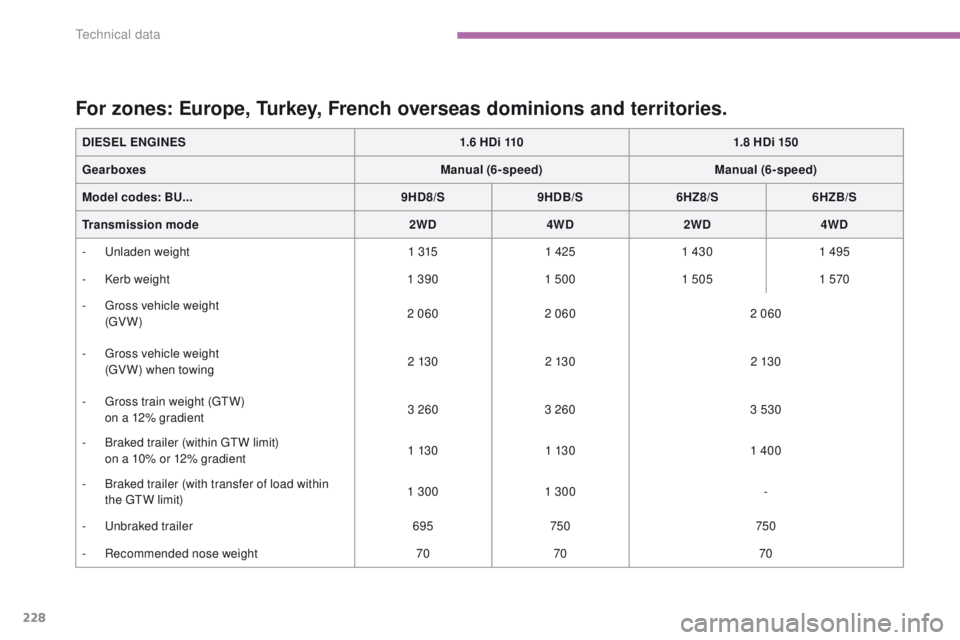
228
4008_en_Chap09_caracteristiques-techniques_ed01-2014
DIESEL ENGINES1.6 HDi 1101.8 HDi 150
Gearboxes Manual (6-speed)Manual (6-speed)
Model codes: BU... 9HD8/S9HDB/S 6HZ8/S6HZB/S
Transmission mode 2WD4WD2WD 4WD
-
u
n
laden weight 1 3151 425 1 430 1 495
-
K
erb weight 1 3901 500 1 505 1 570
-
g
r
oss vehicle weight
(
g
V
W) 2 060
2 060 2 060
-
g
r
oss vehicle weight
(
gV
W) when towing 2 13 0
2 13 0 2 13 0
-
g
r
oss train weight (
g
t
W
)
o
n a 12% gradient 3 260
3 260 3 530
-
B
raked trailer (within gt
W l
imit)
o
n a 10% or 12% gradient 1 13 0
1 13 0 1 400
-
B
raked trailer (with transfer of load within
the
gt
W l
imit) 1 300
1 300 -
-
u
nb
raked trailer 695750 750
-
R
ecommended nose weight 7070 70
For zones: Europe, Turkey, French overseas dominions and territories.
technical data
Page 267 of 389
04
265
4008_en_Chap10b_Mitsu6_ed01-2014
NAVIGATION - GUIDANCE
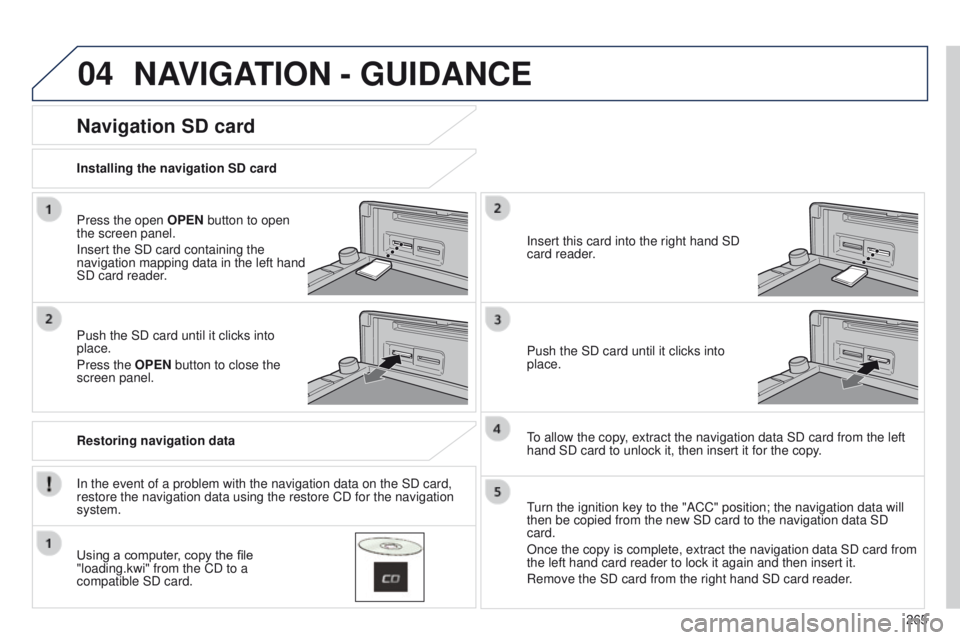
Press the open OPEN button to open
the screen panel.
Insert the SD card containing the
navigation mapping data in the left hand
SD card reader.
Push the SD card until it clicks into
place.
Press the OPEN button to close the
screen panel.
In the event of a problem with the navigation data on the SD card,
restore the navigation data using the restore CD for the navigation
system. Installing the navigation SD card
Restoring navigation data
Navigation SD card
Using a computer, copy the file
"loading.kwi" from the CD to a
compatible SD card.Insert this card into the right hand SD
card reader.
Push the SD card until it clicks into
place.
to allow the copy
, extract the navigation data SD card from the left
hand SD card to unlock it, then insert it for the copy.
turn the ignition key to the "ACC" position; the navigation data will
then be copied from the new SD card to the navigation data SD
card.
Once the copy is complete, extract the navigation data SD card from
the left hand card reader to lock it again and then insert it.
Remove the SD card from the right hand SD card reader
.
Page 269 of 389
04
267
4008_en_Chap10b_Mitsu6_ed01-2014
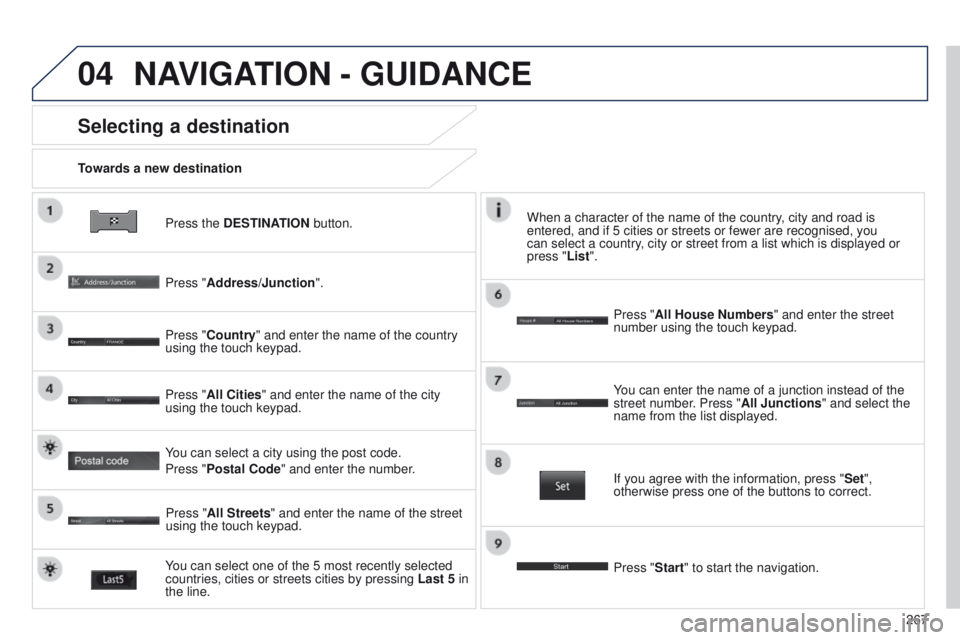
Press the DESTINATION button.
Towards a new destination
Selecting a destination
Press "Address/Junction".
Press "Country" and enter the name of the country
using the touch keypad.
You can select one of the 5 most recently selected
countries, cities or streets cities by pressing
Last 5 in
the line. Press "All Cities" and enter the name of the city
using the touch keypad.
Press "All Streets" and enter the name of the street
using the touch keypad. Press "All House Numbers" and enter the street
number using the touch keypad.
If you agree with the information, press "
Set",
otherwise press one of the buttons to correct.
Press "Start" to start the navigation. You can enter the name of a junction instead of the
street number. Press "All Junctions " and select the
name from the list displayed.
When a character of the name of the country, city and road is
entered, and if 5 cities or streets or fewer are recognised, you
can select a country, city or street from a list which is displayed or
press
"List".
You can select a city using the post code.
Press "Postal Code" and enter the number.
NAVIGATION - GUIDANCE
Page 285 of 389
283
4008_en_Chap10b_Mitsu6_ed01-2014
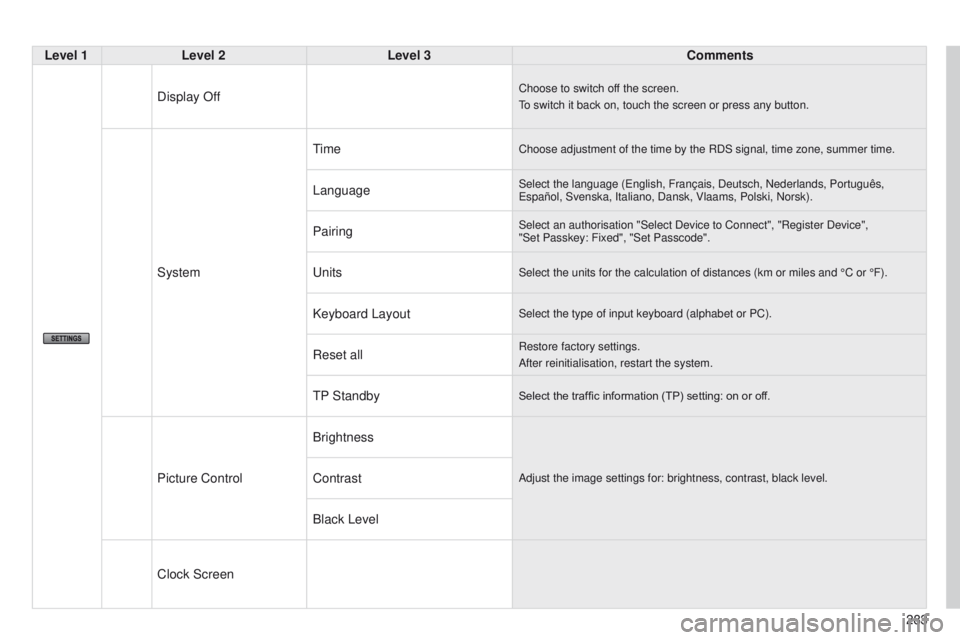
Level 1Level 2 Level 3 Comments
Display Off
Choose to switch off the screen.
to switch it back on, touch the screen or press any button.
System
timeChoose adjustment of the time by the RDS signal, time zone, summer time.\
LanguageSelect the language (english, Français, Deutsch, Nederlands, Português, e spañol, Svenska, Italiano, Dansk, Vlaams, Polski, Norsk).
PairingSelect an authorisation "Select Device to Connect", "Register Device",
"Set Passkey: Fixed", "Set Passcode".
unitsSelect the units for the calculation of distances (km or miles and °\
C or °F).
Keyboard LayoutSelect the type of input keyboard (alphabet or PC).
Reset allRestore factory settings.
After reinitialisation, restart the system.
tP StandbySelect the traffic information (TP) setting: on or off.
Picture Control BrightnessAdjust the image settings for: brightness, contrast, black level.Contrast
Black Level
Clock Screen
Page 299 of 389
297
4008_en_Chap10c_Mitsu5_ed01-2014
Level 1Level 2 Level 3 Comments
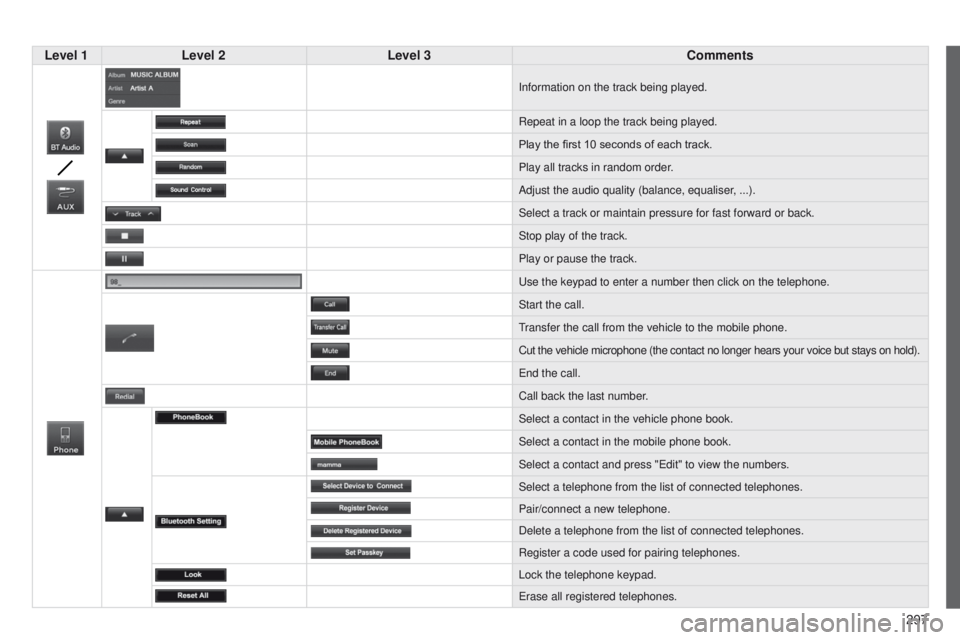
Information on the track being played.
Repeat in a loop the track being played.
Play the first 10
seconds of each track.
Play all tracks in random order.
Adjust the audio quality (balance, equaliser, ...).
Select a track or maintain pressure for fast forward or back.
Stop play of the track.
Play or pause the track.
u
se the keypad to enter a number then click on the telephone.
Start the call.
transfer the call from the vehicle to the mobile phone.
Cut the vehicle microphone (the contact no longer hears your voice but \
stays on hold).
e
nd the call.
Call back the last number.
Select a contact in the vehicle phone book.
Select a contact in the mobile phone book.
Select a contact and press "
e dit" to view the numbers.
Select a telephone from the list of connected telephones.
Pair/connect a new telephone.
Delete a telephone from the list of connected telephones.
Register a code used for pairing telephones.
Lock the telephone keypad.
e
rase all registered telephones.
Page 339 of 389
337
4008_en_Chap11_index-alpha_ed01-2014
Keeping children safe ............1 49, 151, 155 -170
Key ............................................................ 52- 61
Key, electronic
........................................... 56 - 61
Key in ignition warning
....................................98
Keyless
e
n
try and
Starting
............................................. 5 6 - 61, 9 9
Key with remote control
............................................. 5
2- 55, 102
Labels, identification
..................................... 23
5
Lamps, front
.................................................. 182
Lamps, rear
................................................... 18 6
Lamps, warning and indicator
...................13 -18
L
e
D
daytime running lamps
.........................18 4
Level, brake fluid
........................................... 2
14
Level, headlamp wash
..................................215
Levels and checks
................208, 209, 213-218
Lighting bulbs (replacement)
....................................... 182-187
Lighting control stalk
..................................... 127
Lighting dimmer
..............................
................51
Lighting, guide-me home
..............................131
Lighting, interior
............................................ 140
Lighting on reminder
..................................... 129
Loading
........................................................... 10
Long objects, transporting
.............................. 76
L
ow fuel level ................................................ 210
Luggage retaining strap
..................................96
K
Main beam ............................................ 182, 18 4
Maintenance ................................................... 10
Map (colour screen)
...................................... 26
6
Map reading lamps
....................................... 13 8
Markings, identification
.................................235
Mat
.................................................................. 91
Menu
.................................................... 253, 294
Mirror, rear view
.............................................. 79
Mirrors, door .................................................... 77
Mountings for ISOFIX seats
.........16 4, 165, 168
MP3 CD
........................................ 276, 303, 325
L
Navigation ............................................. 254-267
Navigation data ............................................. 265
Number plate lamps
.............................. 18
6, 187
M
Pair telephone ......................................2 88, 308
Panoramic glass sunroof ................................70
Parcel shelf, rear
............................................. 97
P
arking brake
........................................ 102, 218
Parking sensors, front
...................................125
Parking sensors, rear ............................123, 124
Particle filter
.......................................... 215, 217
Passenger compartment filter
............................................................. 216
Player, CD MP3
............................ 276, 303, 325
Port,
u
S
B
............................... 9
4, 278, 304, 328
Priming the fuel system
................................212
Protecting children
.................149, 151, 155 -170
Puncture
................................................ 171, 175
N
Oil filter .......................................................... 216
Oil level .......................................................... 213
Opening the bonnet
...................................... 2
07
Opening the boot
..............................
..52, 56, 63
Opening the doors
.............................. 5
2, 56, 62
Opening the fuel filler flap
.............................210
Operation indicator lamps
.........................13 -18Radio
............................................
275, 300, 301
Range
........................................................
32, 35
RCA sockets
..........................
94, 278, 304, 328
RDS
...............................................................
302
Rear foglamp ......................................... 129, 18 6
Rear screen (demisting)
..................................
89
Recharging the battery ................................. 19 4
Recirculation / exterior air intake ..............................
.........................84
Regeneration of the particle
emissions filter
............................................217
Remote control
.......................................... 5
2- 61
Removing a wheel
........................................17 7
Removing the mat
...........................................91
O
P
R
.
Alphabetical index