ESP PEUGEOT 4008 2017 User Guide
[x] Cancel search | Manufacturer: PEUGEOT, Model Year: 2017, Model line: 4008, Model: PEUGEOT 4008 2017Pages: 368, PDF Size: 12.22 MB
Page 51 of 368
49
4008_en_Chap01_Instruments-de-bord_ed01-2016
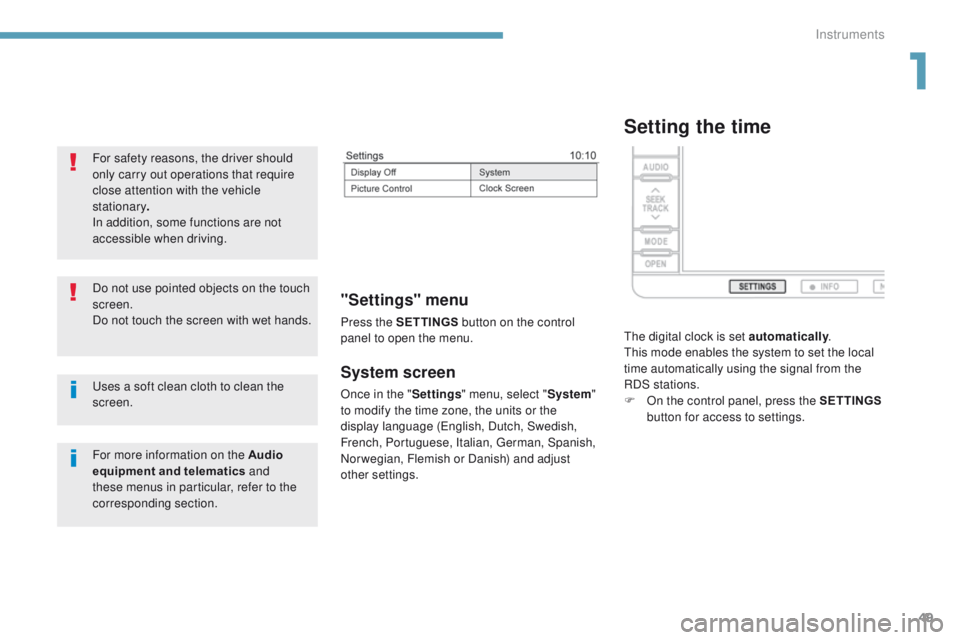
System screen
Once in the "Settings" menu, select " System"
to modify the time zone, the units or the
display language (
en
glish, Dutch, Swedish,
French, Portuguese, Italian,
g
e
rman, Spanish,
Norwegian, Flemish or Danish) and adjust
other settings.
"Settings" menu
Press the S ETTINGS button on the control
panel to open the menu.
uses a soft clean cloth to clean the
screen. Do not use pointed objects on the touch
screen.
Do not touch the screen with wet hands. For safety reasons, the driver should
only carry out operations that require
close attention with the vehicle
stationary .
In addition, some functions are not
accessible when driving.
For more information on the Audio
equipment and telematics and
these menus in particular, refer to the
corresponding section.
Setting the time
the digital clock is set automatically .th
is mode enables the system to set the local
time automatically using the signal from the
RDS stations.
F
O
n the control panel, press the SETTINGS
button for access to settings.
1
Instruments
Page 58 of 368
56
4008_en_Chap02_ouvertures_ed01-2016
"Keyless entry and Starting" system
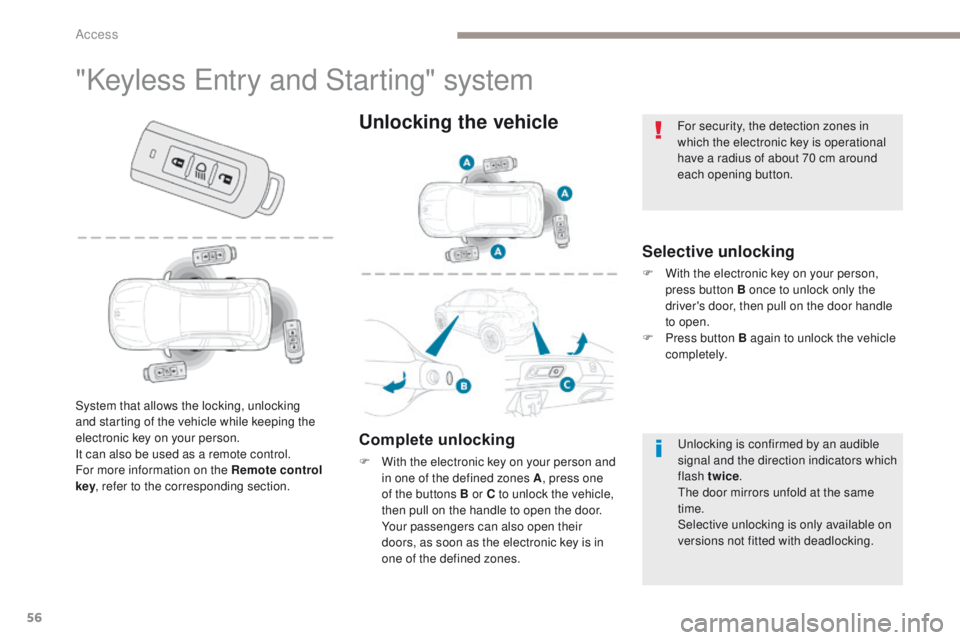
Selective unlocking
F With the electronic key on your person,
press button B once to unlock only the
driver's door, then pull on the door handle
to open.
F
P
ress button B again to unlock the vehicle
completely.
System that allows the locking, unlocking
and starting of the vehicle while keeping the
electronic key on your person.
It can also be used as a remote control.
For more information on the Remote control
key , refer to the corresponding section.
Unlocking the vehicle
Complete unlocking
F With the electronic key on your person and
in one of the defined zones A , press one
of the buttons B or C to unlock the vehicle,
then pull on the handle to open the door.
Y
our passengers can also open their
doors, as soon as the electronic key is in
one of the defined zones.
un
locking is confirmed by an audible
signal and the direction indicators which
flash twice .
th
e door mirrors unfold at the same
time.
Selective unlocking is only available on
versions not fitted with deadlocking.
For security, the detection zones in
which the electronic key is operational
have a radius of about 70 cm around
each opening button.
Access
Page 61 of 368
59
4008_en_Chap02_ouvertures_ed01-2016
emergency procedure with the Keyless en try and
Star ting system
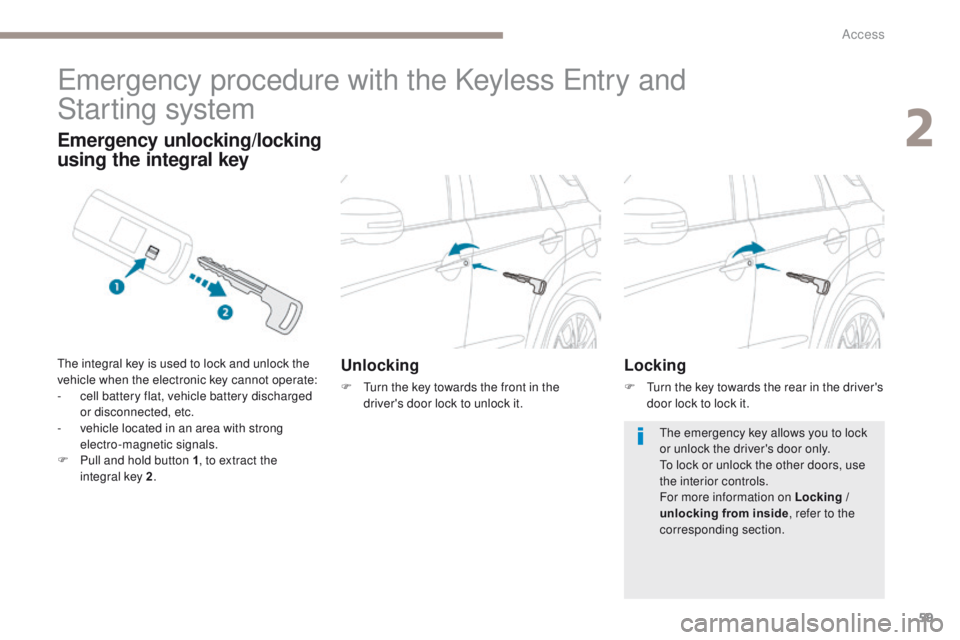
Unlocking
F turn the key towards the front in the
driver's door lock to unlock it.
Emergency unlocking/locking
using the integral key
the integral key is used to lock and unlock the
vehicle when the electronic key cannot operate:
-
c
ell battery flat, vehicle battery discharged
or disconnected, etc.
-
v
ehicle located in an area with strong
electro-magnetic signals.
F
P
ull and hold button 1 , to extract the
integral key 2 .Locking
F turn the key towards the rear in the driver's
door lock to lock it.
th
e emergency key allows you to lock
or unlock the driver's door only.
to l
ock or unlock the other doors, use
the interior controls.
For more information on Locking /
unlocking from inside , refer to the
corresponding section.
2
Access
Page 64 of 368
62
4008_en_Chap02_ouvertures_ed01-2016
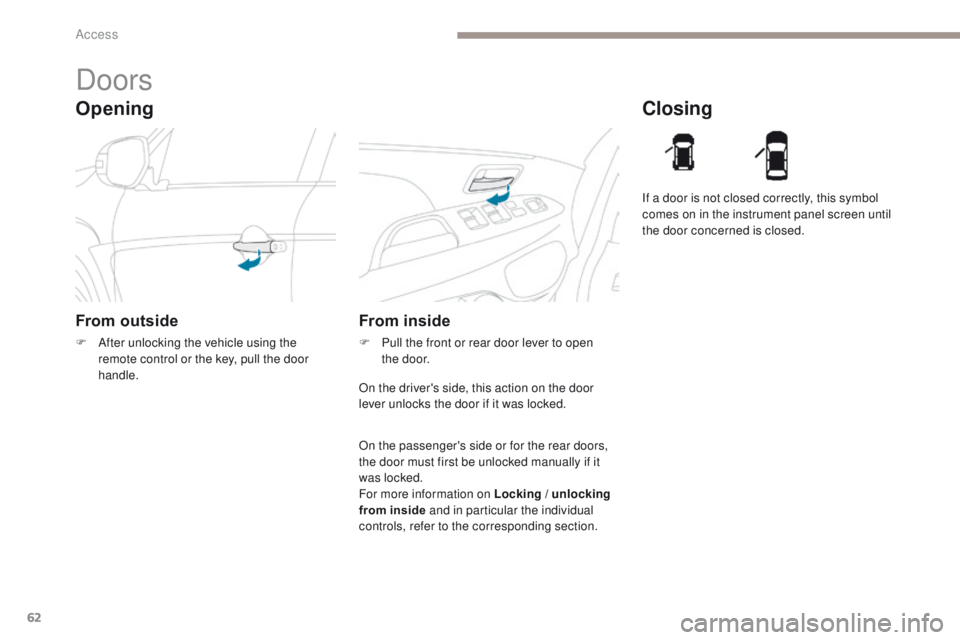
Opening
Doors
From outside
F After unlocking the vehicle using the remote control or the key, pull the door
handle.
Closing
From inside
F Pull the front or rear door lever to open the door. If a door is not closed correctly, this symbol
comes on in the instrument panel screen until
the door concerned is closed.
On the driver's side, this action on the door
lever unlocks the door if it was locked.
On the passenger's side or for the rear doors,
the door must first be unlocked manually if it
was locked.
For more information on Locking / unlocking
from inside and in particular the individual
controls, refer to the corresponding section.
Access
Page 71 of 368
69
4008_en_Chap02_ouvertures_ed01-2016
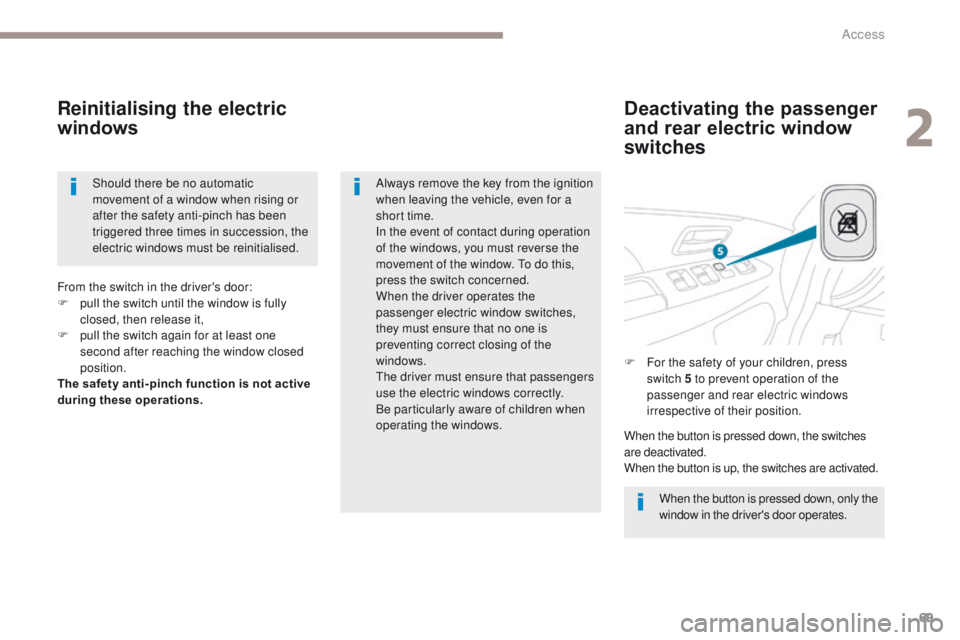
Deactivating the passenger
and rear electric window
switches
Reinitialising the electric
windows
When the button is pressed down, only the
window in the driver's door operates.
Always remove the key from the ignition
when leaving the vehicle, even for a
short time.
In the event of contact during operation
of the windows, you must reverse the
movement of the window.
t
o d
o this,
press the switch concerned.
When the driver operates the
passenger electric window switches,
they must ensure that no one is
preventing correct closing of the
windows.
the
driver must ensure that passengers
use the electric windows correctly.
Be particularly aware of children when
operating the windows. F
F
or the safety of your children, press
switch 5 to prevent operation of the
passenger and rear electric windows
irrespective of their position.
From the switch in the driver's door:
F
p
ull the switch until the window is fully
closed, then release it,
F
p
ull the switch again for at least one
second after reaching the window closed
position.
The safety anti-pinch function is not active
during these operations.
When the button is pressed down, the switches
are deactivated.
When the button is up, the switches are activated.
Should there be no automatic
movement of a window when rising or
after the safety anti-pinch has been
triggered three times in succession, the
electric windows must be reinitialised.
2
Access
Page 76 of 368
74
4008_en_Chap03_Ergonomie-et-confort_ed01-2016
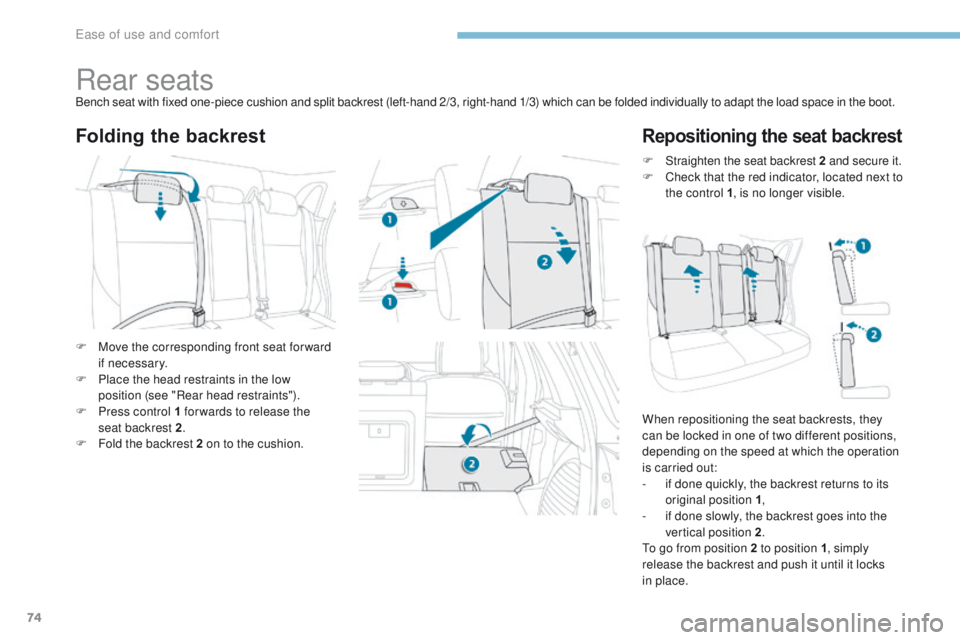
Rear seatsBench seat with fixed one-piece cushion and split backrest (left-hand 2/3, right-hand 1/3) which can be folded individually to adapt the load space in the boot.
Folding the backrestRepositioning the seat backrest
F Move the corresponding front seat for ward if necessary.
F
P
lace the head restraints in the low
position (see "Rear head restraints").
F
P
ress control 1 for wards to release the
seat backrest 2 .
F
F
old the backrest 2 on to the cushion. F
S
traighten the seat backrest 2
and secure it.
F
C
heck that the red indicator, located next to
the control 1 , is no longer visible.
When repositioning the seat backrests, they
can be locked in one of two different positions,
depending on the speed at which the operation
is carried out:
-
i
f done quickly, the backrest returns to its
original position 1 ,
-
i
f done slowly, the backrest goes into the
vertical position 2 .
to g
o from position 2 to position 1, simply
release the backrest and push it until it locks
in place.
ease of use and comfort
Page 78 of 368
76
4008_en_Chap03_Ergonomie-et-confort_ed01-2016
Mirrors
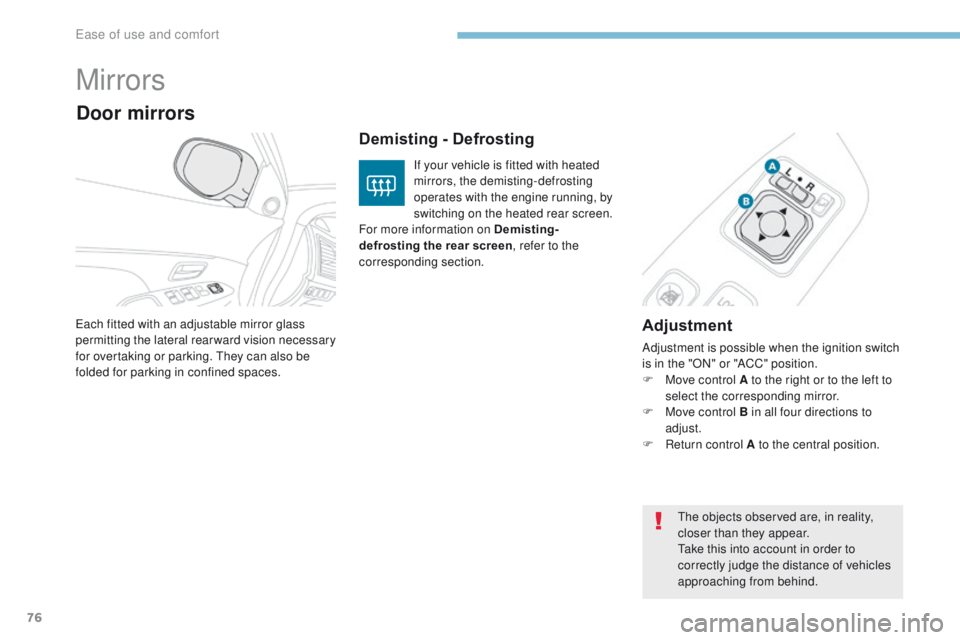
Adjustment
Adjustment is possible when the ignition switch
is in the "ON" or "ACC" position.
F
M
ove control A to the right or to the left to
select the corresponding mirror.
F
M
ove control B in all four directions to
adjust.
F
R
eturn control A to the central position.
ea
ch fitted with an adjustable mirror glass
permitting the lateral rearward vision necessary
for overtaking or parking.
th
ey can also be
folded for parking in confined spaces.
Demisting - Defrosting
Door mirrors
If your vehicle is fitted with heated
mirrors, the demisting-defrosting
operates with the engine running, by
switching on the heated rear screen.
For more information on Demisting-
defrosting the rear screen, refer to the
corresponding section.
th
e objects observed are, in reality,
closer than they appear.
ta
ke this into account in order to
correctly judge the distance of vehicles
approaching from behind.
ease of use and comfort
Page 95 of 368
93
4008_en_Chap03_Ergonomie-et-confort_ed01-2016
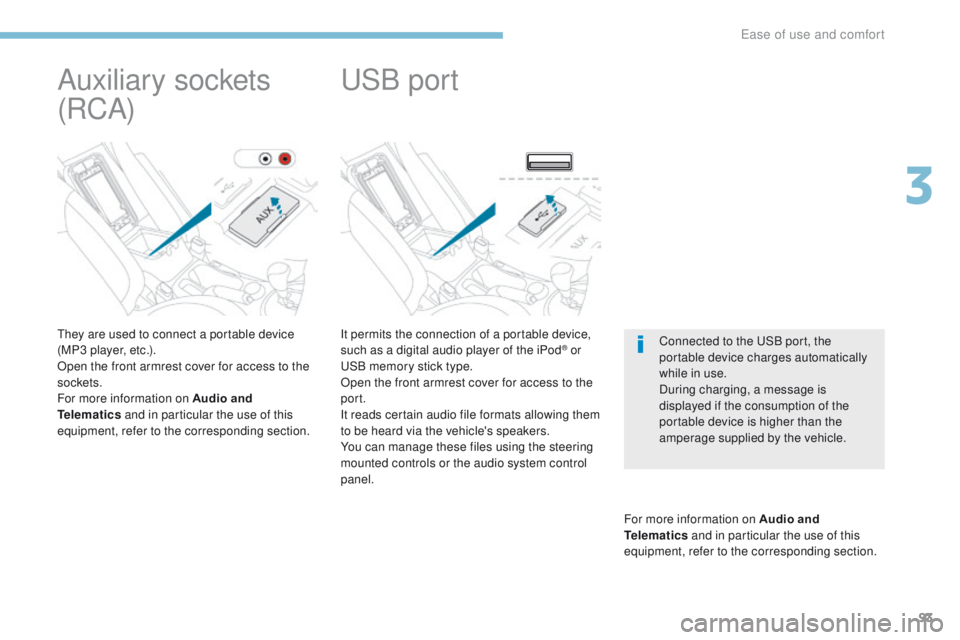
It permits the connection of a portable device,
such as a digital audio player of the iPod® or uS
B memory stick type.
Open the front armrest cover for access to the
port.
It reads certain audio file formats allowing them
to be heard via the vehicle's speakers.
You can manage these files using the steering
mounted controls or the audio system control
panel.
For more information on Audio and
Telematics and in particular the use of this
equipment, refer to the corresponding section.
uSB port
Connected to the uS B port, the
portable device charges automatically
while in use.
During charging, a message is
displayed if the consumption of the
portable device is higher than the
amperage supplied by the vehicle.
Auxiliary sockets
(RCA)
they are used to connect a portable device
(MP3 player, etc.).
Open the front armrest cover for access to the
sockets.
For more information on Audio and
Telematics and in particular the use of this
equipment, refer to the corresponding section.
3
ease of use and comfort
Page 100 of 368
98
4008_en_Chap04_conduite_ed01-2016
Starting - switching off the engine with the key
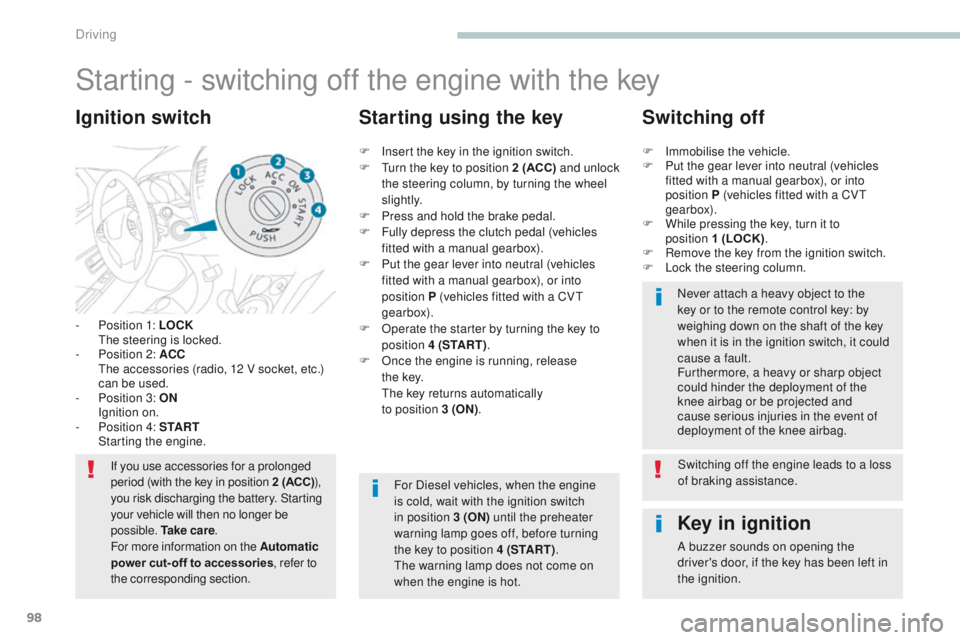
- Position 1: LOCK the steering is locked.
-
P
osition 2: ACC
t
h
e accessories (radio, 12 V socket, etc.)
can be used.
-
P
osition 3: ON
I
gnition on.
-
P
osition 4: S TA R T
S
tarting the engine.
Ignition switch
If you use accessories for a prolonged
period (with the key in position 2 (ACC) ),
you risk discharging the battery. Starting
your vehicle will then no longer be
possible. Ta k e c a r e .
For more information on the Automatic
power cut- off to accessories, refer to
the corresponding section.
Key in ignition
A buzzer sounds on opening the
driver's door, if the key has been left in
the ignition.
F
I
nsert the key in the ignition switch.
F
t
u
rn the key to position 2 (ACC)
and unlock
the steering column, by turning the wheel
s li g ht l y.
F
P
ress and hold the brake pedal.
F
F
ully depress the clutch pedal (vehicles
fitted with a manual gearbox).
F
P
ut the gear lever into neutral (vehicles
fitted with a manual gearbox), or into
position P (vehicles fitted with a CV
t
gearbox).
F
O
perate the starter by turning the key to
position 4 (S TA R T ) .
F
O
nce the engine is running, release
t h e
key.
t
h
e key returns automatically
to position 3 (ON) .
Starting using the key Switching off
F Immobilise the vehicle.
F
P ut the gear lever into neutral (vehicles
fitted with a manual gearbox), or into
position P (vehicles fitted with a CV
t
gearbox).
F
W
hile pressing the key, turn it to
position 1 (LOCK) .
F
R
emove the key from the ignition switch.
F
L
ock the steering column.Never attach a heavy object to the
key or to the remote control key: by
weighing down on the shaft of the key
when it is in the ignition switch, it could
cause a fault.
Furthermore, a heavy or sharp object
could hinder the deployment of the
knee airbag or be projected and
cause serious injuries in the event of
deployment of the knee airbag.
For Diesel vehicles, when the engine
is cold, wait with the ignition switch
in position 3 (ON) until the preheater
warning lamp goes off, before turning
the key to position 4 (S TA R T ) .
th
e warning lamp does not come on
when the engine is hot. Switching off the engine leads to a loss
of braking assistance.
Driving
Page 101 of 368
99
4008_en_Chap04_conduite_ed01-2016
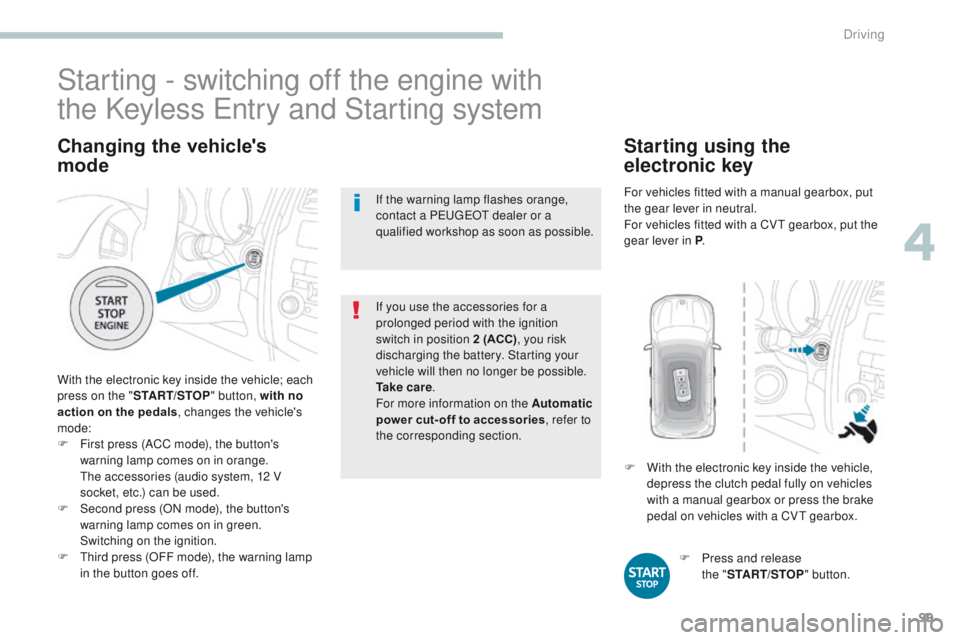
Changing the vehicle's
mode
With the electronic key inside the vehicle; each
press on the "START/STOP " button, with no
action on the pedals , changes the vehicle's
mode:
F
F
irst press (ACC mode), the button's
warning lamp comes on in orange.
t
h
e accessories (audio system, 12 V
socket, etc.) can be used.
F
S
econd press (ON mode), the button's
warning lamp comes on in green.
S
witching on the ignition.
F
t
h
ird press (OFF mode), the warning lamp
in the button goes off. If you use the accessories for a
prolonged period with the ignition
switch in position 2 (ACC)
, you risk
discharging the battery. Starting your
vehicle will then no longer be possible.
Ta k e c a r e .
For more information on the Automatic
power cut- off to accessories , refer to
the corresponding section.
Starting - switching off the engine with
the Keyless e
n
try and Starting system
If the warning lamp flashes orange,
contact a Pe
ugeOt dealer or a
qualified workshop as soon as possible.
F
P
ress and release
the
"START/STOP " button.
F
W
ith the electronic key inside the vehicle,
depress the clutch pedal fully on vehicles
with a manual gearbox or press the brake
pedal on vehicles with a CV
t
gearbox.
Starting using the
electronic key
For vehicles fitted with a manual gearbox, put
the gear lever in neutral.
For vehicles fitted with a CV
t
gearbox, put the
gear lever in P .
4
Driving