reset PEUGEOT 4008 2017 User Guide
[x] Cancel search | Manufacturer: PEUGEOT, Model Year: 2017, Model line: 4008, Model: PEUGEOT 4008 2017Pages: 368, PDF Size: 12.22 MB
Page 302 of 368
 may prevent reception, even in RDS station tracking mode. this phenomenon is n")
04
300
Selecting an FM / MW / LW station
the exterior environment (hills, buildings, tunnel, car park, below grou\
nd...) may prevent reception, even in RDS station tracking mode. this phenomenon is normal in the propagation of radio waves and is in no \
way indicative of a fault with the audio system. Select "FM" or "MW" or "LW
".
Press MENU to display the choice of source.
Select a radio station in the list (1 to 6) or
press "Tune" to change the frequency.
Maintain pressure on " Tune" until a beep is
heard, for an automatic search for the next
station.
RADIO
Press the arrow to adjust the RDS or the audio
settings (balance, equaliser, ...). Press "Station list " to display the list of radio
stations received locally.
A long press on one of the numbered buttons
presets the current station.
Preset up to 12 stations between FM1 and
FM2.
Page 316 of 368
01
314
4008_en_Chap10d_Mitsu4_ed01-2016
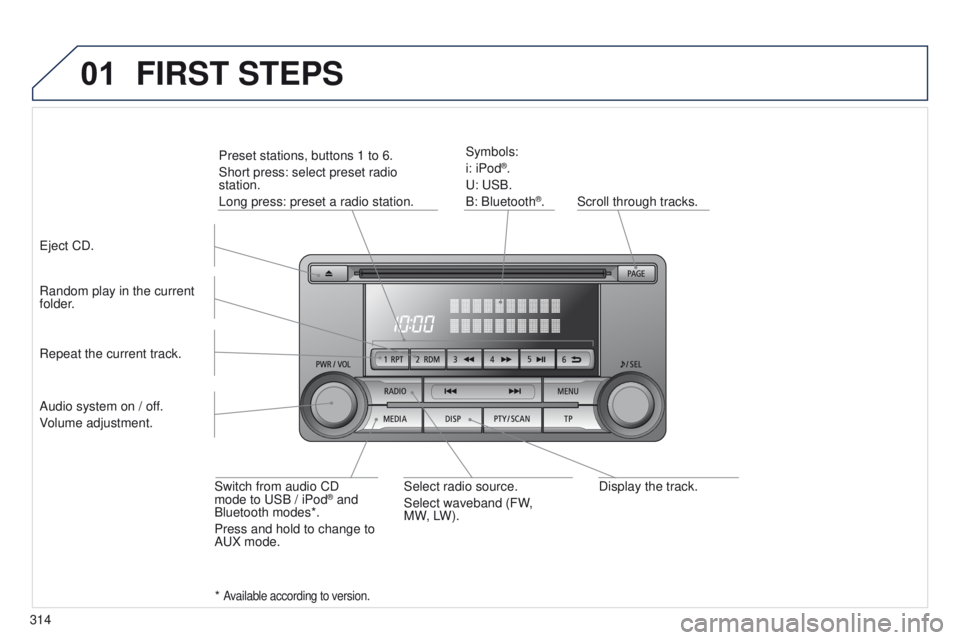
Display the track.
Scroll through tracks.
Symbols:
i: iPod
®.
u
:
u
SB.
B: Bluetooth
®.
Random play in the current
folder.
Switch from audio CD
mode to
u
SB / iPod
® and
Bluetooth modes*.
Press and hold to change to
A
u
X mode.
Repeat the current track.
FIRST STEPS
Audio system on / off.
Volume adjustment.
Select radio source.
Select waveband (FW,
MW,
LW).
*
Available according to version.
eject CD. Preset stations, buttons 1 to 6.
Short press: select preset radio
station.
Long press: preset a radio station.
Page 321 of 368
04
319
4008_en_Chap10d_Mitsu4_ed01-2016
RADIO
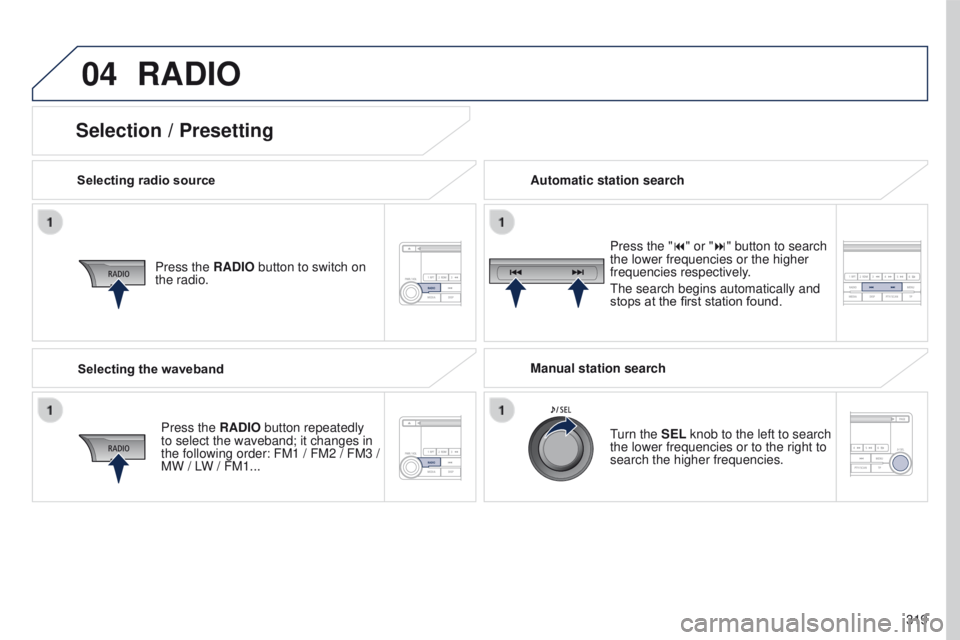
Selecting radio sourcePress the RADIO button to switch on
the radio.
Press the RADIO button repeatedly
to select the waveband; it changes in
the following order: FM1 / FM2 / FM3 /
MW / LW
/ FM1... Automatic station search
Manual station search
turn the
SEL knob to the left to search
the lower frequencies or to the right to
search the higher frequencies. Press the "9" or ":" button to search
the lower frequencies or the higher
frequencies respectively.
t
he search begins automatically and
stops at the first station found.
Selecting the waveband
Selection / Presetting
Page 322 of 368
04
320
4008_en_Chap10d_Mitsu4_ed01-2016
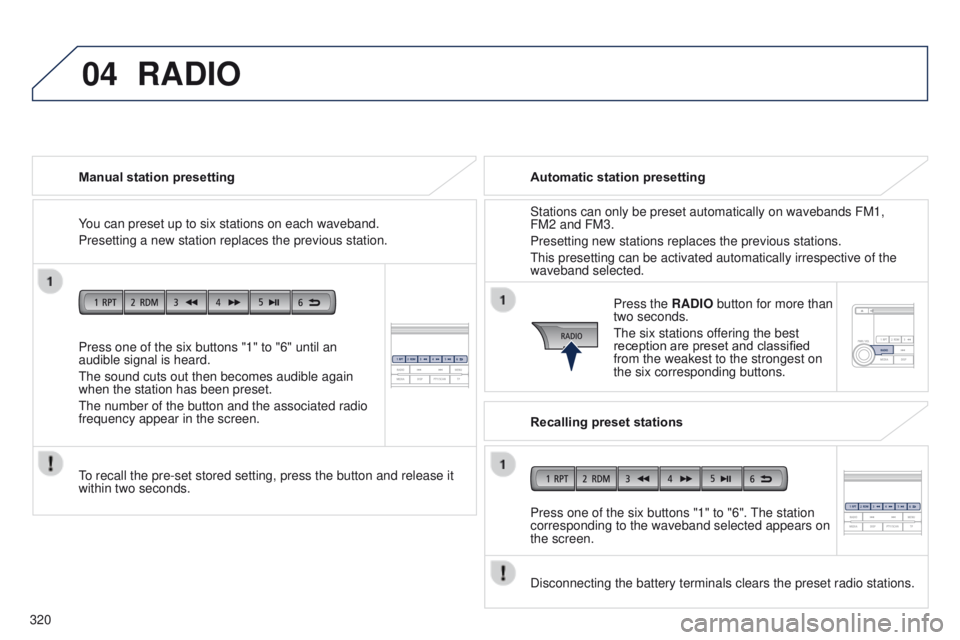
Press one of the six buttons "1" to "6" until an
audible signal is heard.
t
he sound cuts out then becomes audible again
when the station has been preset.
t
he number of the button and the associated radio
frequency appear in the screen. Manual station presetting
to recall the pre-set stored setting, press the button and release it
within two seconds.
RADIO
You can preset up to six stations on each waveband.
Presetting a new station replaces the previous station. Automatic station presetting
Disconnecting the battery terminals clears the preset radio stations. Stations can only be preset automatically on wavebands FM1,
FM2 and FM3.
Presetting new stations replaces the previous stations.
t
his presetting can be activated automatically irrespective of the
waveband selected.
Press the RADIO button for more than
two seconds.
t
he six stations offering the best
reception are preset and classified
from the weakest to the strongest on
the six corresponding buttons.
Recalling preset stations
Press one of the six buttons "1" to "6".
t
he station
corresponding to the waveband selected appears on
the screen.
Page 325 of 368
04
323
4008_en_Chap10d_Mitsu4_ed01-2016
RADIO
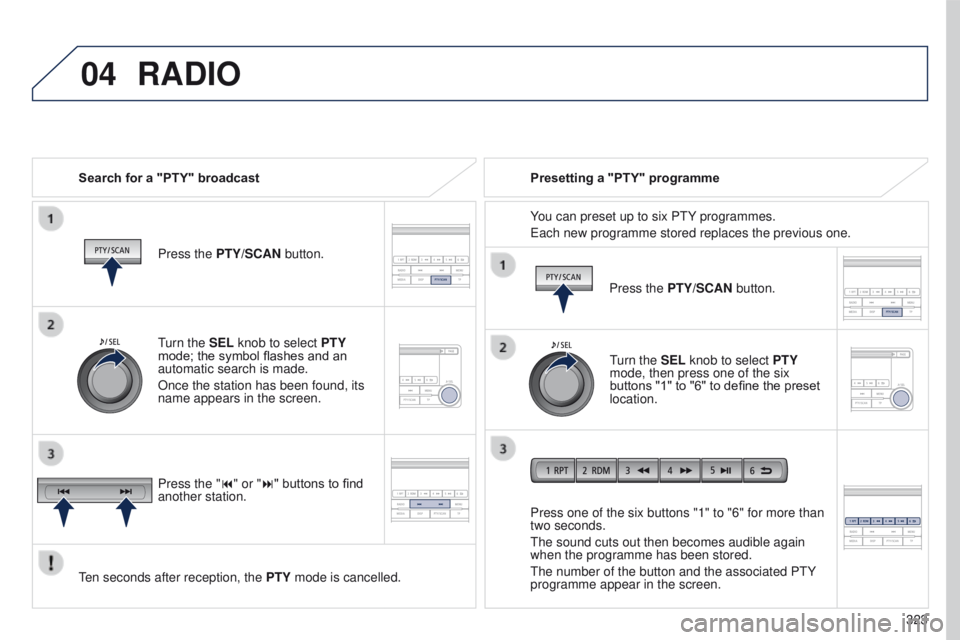
Search for a "PTY" broadcastPress the PTY/SCAN button.
ten seconds after reception, the PTY
mode is cancelled. Press one of the six buttons "1" to "6" for more than
two seconds.
t
he sound cuts out then becomes audible again
when the programme has been stored.
t
he number of the button and the associated P t Y
programme appear in the screen. Presetting a "PTY" programme
You can preset up to six P
t Y programmes.
e
ach new programme stored replaces the previous one.
turn the
SEL knob to select PTY
mode; the symbol flashes and an
automatic search is made.
Once the station has been found, its
name appears in the screen.
Press the "9" or ":" buttons to find
another station. Press the PTY/SCAN button.
turn the
SEL knob to select PTY
mode, then press one of the six
buttons "1" to "6" to define the preset
location.