ECO mode Peugeot 407 2010 User Guide
[x] Cancel search | Manufacturer: PEUGEOT, Model Year: 2010, Model line: 407, Model: Peugeot 407 2010Pages: 249, PDF Size: 14.69 MB
Page 142 of 249
1010PRACTICAL INFORMATION
123
The electrical system of your
vehicle is designed to oper-
ate with standard or optional
equipment.
Before installing other electrical equip-
ment or accessories on your vehicle,
contact a PEUGEOT dealer.
PEUGEOT will not accept responsi-
bility for the cost incurred in repairing
your vehicle or for rectifying the mal-
functions resulting from the installation
of accessories not supplied and not
recommended by PEUGEOT and not
installed in accordance with its instruc-
tions, in particular when the combined
consumption of all of the additional
equipment connected exceeds 10 mil-
liamperes.
The maxi-fuses provide additional pro-
tection for the electrical systems. All work
must be carried out by a PEUGEOT
dealer.
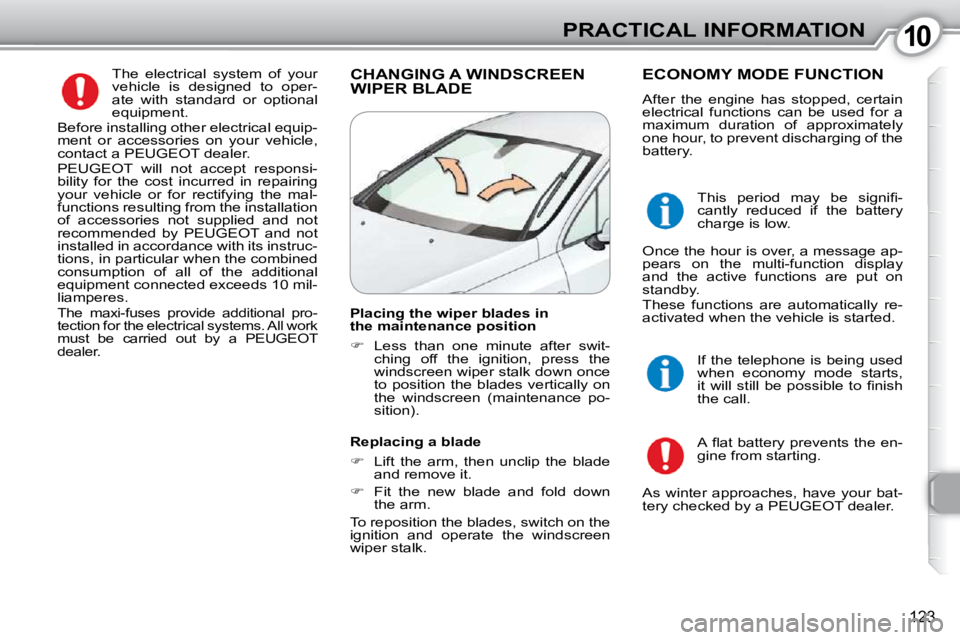
CHANGING A WINDSCREEN WIPER BLADE ECONOMY MODE FUNCTION
After the engine has stopped, certain
electrical functions can be used for a
maximum duration of approximately
one hour, to prevent discharging of the
battery.
A fl at battery prevents the en-
gine from starting.
If the telephone is being used
when economy mode starts,
it will still be possible to fi nish
the call.
Placing the wiper blades in
the maintenance position
Less than one minute after swit-
ching off the ignition, press the
windscreen wiper stalk down once
to position the blades vertically on
the windscreen (maintenance po-
sition).
Replacing a blade
Lift the arm, then unclip the blade
and remove it.
Fit the new blade and fold down
the arm.
To reposition the blades, switch on the
ignition and operate the windscreen
wiper stalk. This period may be signifi -
cantly reduced if the battery
charge is low.
Once the hour is over, a message ap-
pears on the multi-function display
and the active functions are put on
standby.
These functions are automatically re-
activated when the vehicle is started.
As winter approaches, have your bat-
tery checked by a PEUGEOT dealer.
Page 143 of 249
1010PRACTICAL INFORMATION
123
The electrical system of your
vehicle is designed to oper-
ate with standard or optional
equipment.
Before installing other electrical equip-
ment or accessories on your vehicle,
contact a PEUGEOT dealer.
PEUGEOT will not accept responsi-
bility for the cost incurred in repairing
your vehicle or for rectifying the mal-
functions resulting from the installation
of accessories not supplied and not
recommended by PEUGEOT and not
installed in accordance with its instruc-
tions, in particular when the combined
consumption of all of the additional
equipment connected exceeds 10 mil-
liamperes.
The maxi-fuses provide additional pro-
tection for the electrical systems. All work
must be carried out by a PEUGEOT
dealer.
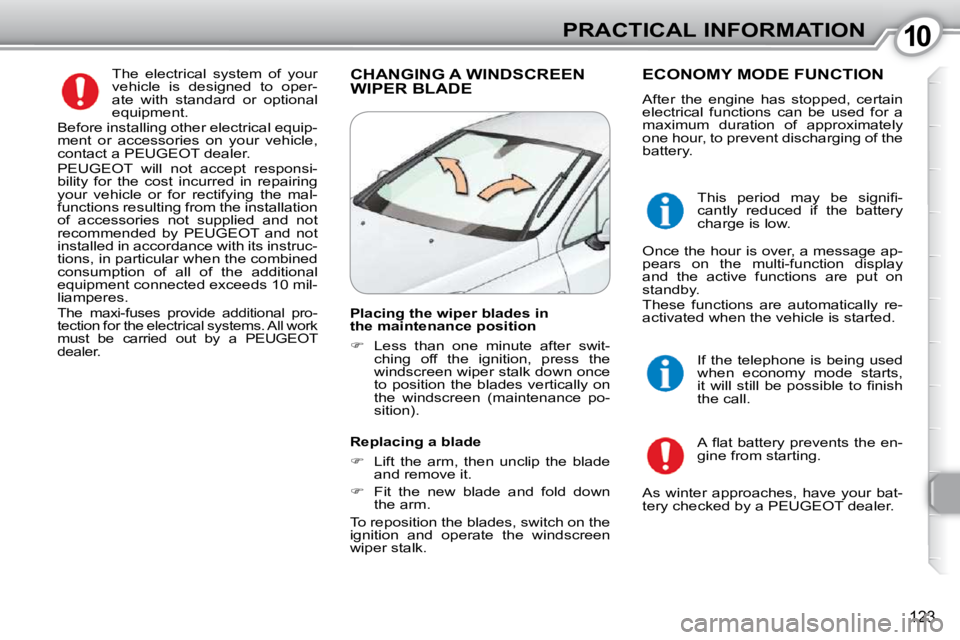
CHANGING A WINDSCREEN WIPER BLADE ECONOMY MODE FUNCTION
After the engine has stopped, certain
electrical functions can be used for a
maximum duration of approximately
one hour, to prevent discharging of the
battery.
A fl at battery prevents the en-
gine from starting.
If the telephone is being used
when economy mode starts,
it will still be possible to fi nish
the call.
Placing the wiper blades in
the maintenance position
Less than one minute after swit-
ching off the ignition, press the
windscreen wiper stalk down once
to position the blades vertically on
the windscreen (maintenance po-
sition).
Replacing a blade
Lift the arm, then unclip the blade
and remove it.
Fit the new blade and fold down
the arm.
To reposition the blades, switch on the
ignition and operate the windscreen
wiper stalk. This period may be signifi -
cantly reduced if the battery
charge is low.
Once the hour is over, a message ap-
pears on the multi-function display
and the active functions are put on
standby.
These functions are automatically re-
activated when the vehicle is started.
As winter approaches, have your bat-
tery checked by a PEUGEOT dealer.
Page 147 of 249
1010PRACTICAL INFORMATION
127
In all cases, pay attention to the coolant
temperature. Lighting TOWING A TRAILER, BOAT, CARAVAN, ETC...
We recommend the use of original
PEUGEOT towbars and their harness-
es which have been tested and ap-
proved from the design stage of your
vehicle and that you entrust the fi tting
of the towbar to a PEUGEOT dealer.
If the towbar is not fi tted by a PEUGEOT
dealer, it is imperative that it is fi tted us-
ing the electrical pre-equipment installed
at the rear of the vehicle, in accordance
with the manufacturer's instructions.
Driving advice
Distribution of loads: distribute the
load in the trailer so that the heavi-
est loads are as close as possible to
the axle and the nose weight is close
to the maximum authorised without,
however, exceeding it.
Cooling: towing a trailer on a slope in-
creases the coolant temperature.
As the fan is electrically controlled, its
cooling capacity is not dependent on
the engine speed.
In the case of vehicles fi tted with an
HDI engine, it is advisable, following
intensive use (towing on a motorway,
prolonged driving, ...), to leave the en-
gine running at idle for approximately
20 seconds before switching off the ig-
nition. This limits any increase in the
temperature of the engine after it has
been switched off.
Note: in certain cases of par-
ticularly arduous use (towing
the maximum load in high
temperatures on a steep
slope), the engine automatically lim-
its its power and selects the appropri-
ate automatic gearbox gear in manual
mode. In this case, switching off the air
conditioning saves engine power and
increases towing capacity.
If the coolant temperature
warning lamp comes on, stop
the vehicle and switch off the
engine as soon as possible.
Tyres: check the tyre pressures of the
towing vehicle (label on the central
door pillar on the driver's side) and of
the trailer towed, observing the recom-
mended pressures.
Brakes: towing increases the braking
distance. Drive at a moderate speed,
change down early and brake gradu-
ally.
Side wind: sensitivity to side wind is
increased. Drive smoothly and at a
moderate speed. Automatic adjustment
To avoid causing a nuisance to other
road users, this system automatical-
ly corrects the height of the beam of
xenon bulbs in relation to the vehicle
load after approximately 2 minutes.
The driver is then assured of having
optimum lighting.
Page 178 of 249
159
11
22
33
44
11
22
33
44
AUDIO/VIDEO
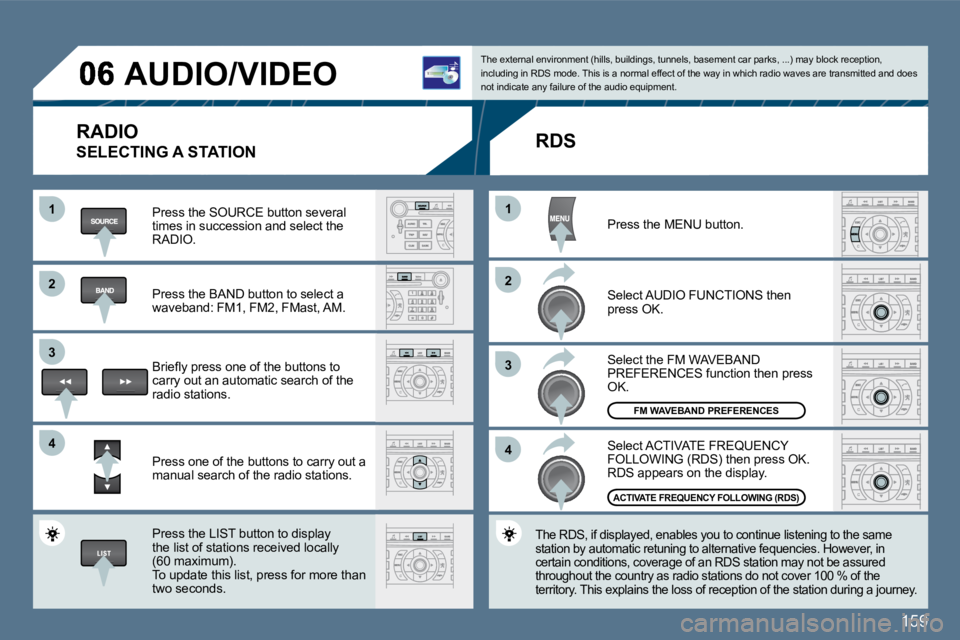
RADIO
SELECTING A STATION
Press the SOURCE button several times in succession and select the RADIO.
Press the BAND button to select a waveband: FM1, FM2, FMast, AM.
Briefl y press one of the buttons to carry out an automatic search of the radio stations.
Press one of the buttons to carry out a manual search of the radio stations.
Press the LIST button to display the list of stations received locally (60 maximum). To update this list, press for more than two seconds.
The external environment (hills, buildings, tunnels, basement car parks, ...) may block reception, including in RDS mode. This is a normal effect of t he way in which radio waves are transmitted and doe s not indicate any failure of the audio equipment.
RDS
Select ACTIVATE FREQUENCY FOLLOWING (RDS) then press OK. RDS appears on the display.
Select the FM WAVEBAND PREFERENCES function then press OK.
Select AUDIO FUNCTIONS then press OK.
Press the MENU button.
The RDS, if displayed, enables you to continue lis tening to the same station by automatic retuning to alternative fequen cies. However, in certain conditions, coverage of an RDS station may not be assured throughout the country as radio stations do not cover 100 % of the territory. This explains the loss of reception of the station during a journey.
ACTIVATE FREQUENCY FOLLOWING (RDS)
FM WAVEBAND PREFERENCES
Page 188 of 249
169
33
22
11
44
07
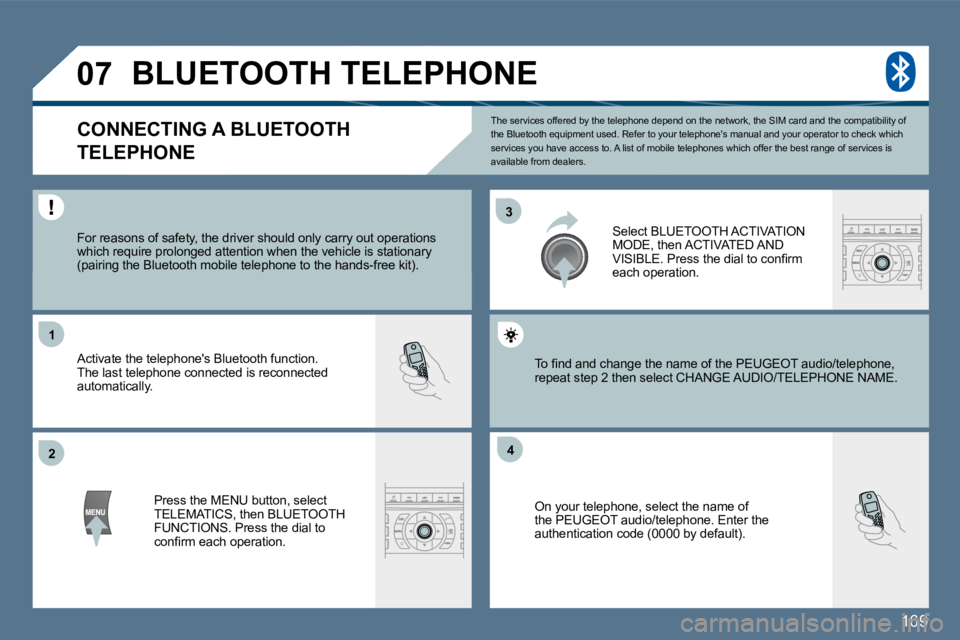
The services offered by the telephone depend on the network, the SIM card and the compatibility of the Bluetooth equipment used. Refer to your telepho ne's manual and your operator to check which services you have access to. A list of mobile telephones which offer the best range of services is available from dealers.
BLUETOOTH TELEPHONE
CONNECTING A BLUETOOTH
TELEPHONE
For reasons of safety, the driver should only car ry out operations which require prolonged attention when the vehicle is stationary (pairing the Bluetooth mobile telephone to the hands-free kit).
Activate the telephone's Bluetooth function. The last telephone connected is reconnected automatically.
Select BLUETOOTH ACTIVATION MODE, then ACTIVATED AND VISIBLE. Press the dial to confi rm each operation.
Press the MENU button, select TELEMATICS, then BLUETOOTH FUNCTIONS. Press the dial to confi rm each operation.
On your telephone, select the name of the PEUGEOT audio/telephone. Enter the authentication code (0000 by default).
To fi nd and change the name of the PEUGEOT audio/ telephone, To fi nd and change the name of the PEUGEOT audio/telephone, repeat step 2 then select CHANGE AUDIO/TELEPHONPHONE NAME.
Page 196 of 249
177
1
4
2
3
3
3
4
4
2
4
3
4
4
4
4
4
3
2
3
4
4
4
4
3
3
3
3
4
4
3
3
5
5
5
3
3
2
3
5
5
3
2
4
3
5
4
3
4
3
4
4
3
3
4
4
4
4
4
3
5
4
5
5
2
3
4
4
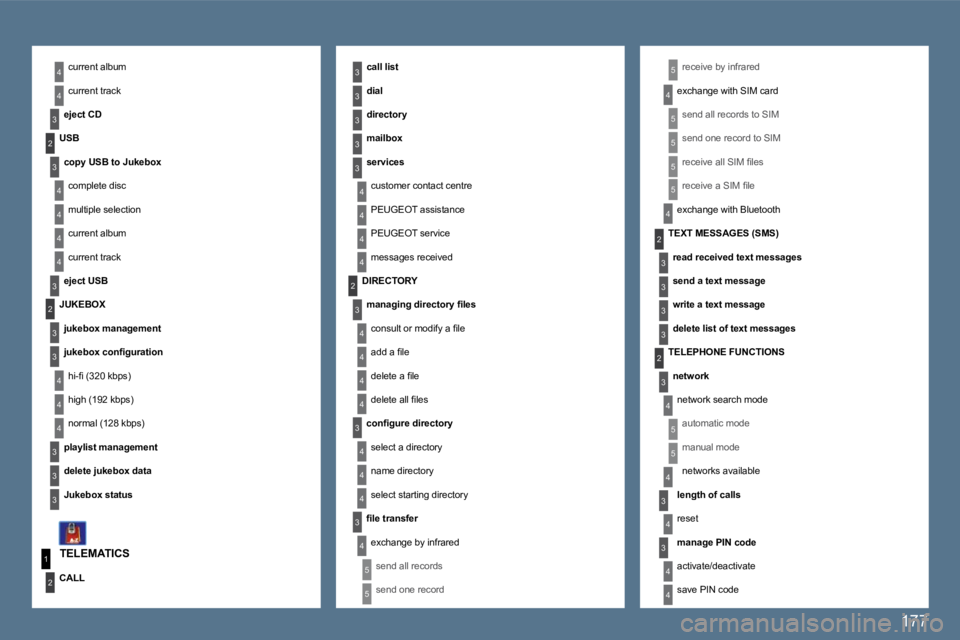
current album
current track
eject CD
receive by infrared
exchange with SIM card
send all records to SIM
send one record to SIM
receive all SIM fi les
receive a SIM fi le
exchange with Bluetooth
TELEMATICS
call list
dial
directory
mailbox
services
customer contact centre
PEUGEOT assistance
PEUGEOT service
messages received
USB
copy USB to Jukebox
complete disc
multiple selection
current album
current track
eject USB
CALL
DIRECTORY
managing directory fi les
consult or modify a fi le
add a fi le
delete a fi le
delete all fi les
confi gure directory
select a directory
name directory
select starting directory
fi le transfer
exchange by infrared
send all records
send one record
TEXT MESSAGES (SMS)
read received text messages
send a text message
write a text message
delete list of text messages
TELEPHONE FUNCTIONS
network
network search mode
automatic mode
manual mode
networks available
length of calls
reset
manage PIN code
activate/deactivate
save PIN code
JUKEBOX
jukebox management
jukebox confi guration
hi-fi (320 kbps)
high (192 kbps)
normal (128 kbps)
playlist management
delete jukebox data
Jukebox status
Page 199 of 249
180
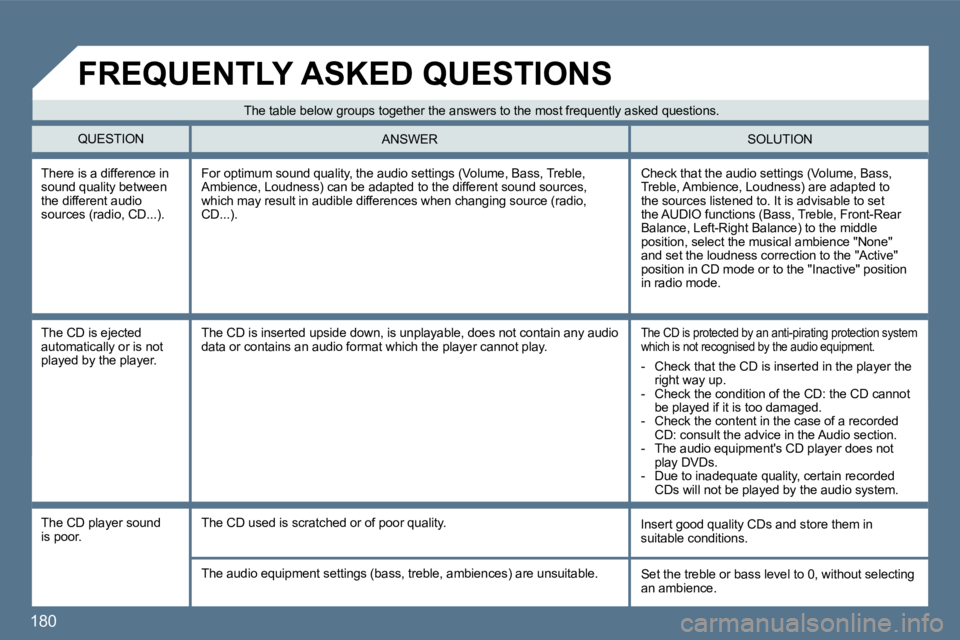
There is a difference in sound quality between the different audio sources (radio, CD...).
Check that the audio settings (Volume, Bass, Treble, Ambience, Loudness) are adapted to the sources listened to. It is advisable to set the AUDIO functions (Bass, Treble, Front-Rear Balance, Left-Right Balance) to the middle position, select the musical ambience "None" and set the loudness correction to the "Active" position in CD mode or to the "Inactive" position in radio mode.
For optimum sound quality, the audio settings (Volume, Bass, Treble, Ambience, Loudness) can be adapted to the different sound sources, which may result in audible differences when changing source (radio, CD...).
The CD is ejected automatically or is not played by the player.
The CD is protected by an anti-pirating protection system which is not recognised by the audio equipment. The CD is inserted upside down, is unplayable, doe s not contain any audio data or contains an audio format which the player cannot play.
The CD player sound is poor. Insert good quality CDs and store them in suitable conditions. The CD used is scratched or of poor quality.
The audio equipment settings (bass, treble, ambien ces) are unsuitable. Set the treble or bass level to 0, without selecting an ambience.
The table below groups together the answers to the most frequently asked questions.
QUESTION SOLUTION ANSWER
FREQUENTLY ASKED QUESTIONS
- Check that the CD is inserted in the player the right way up. - Check the condition of the CD: the CD cannot be played if it is too damaged. - Check the content in the case of a recorded CD: consult the advice in the Audio section. - The audio equipment's CD player does not play DVDs. - Due to inadequate quality, certain recorded CDs will not be played by the audio system.
Page 200 of 249
181
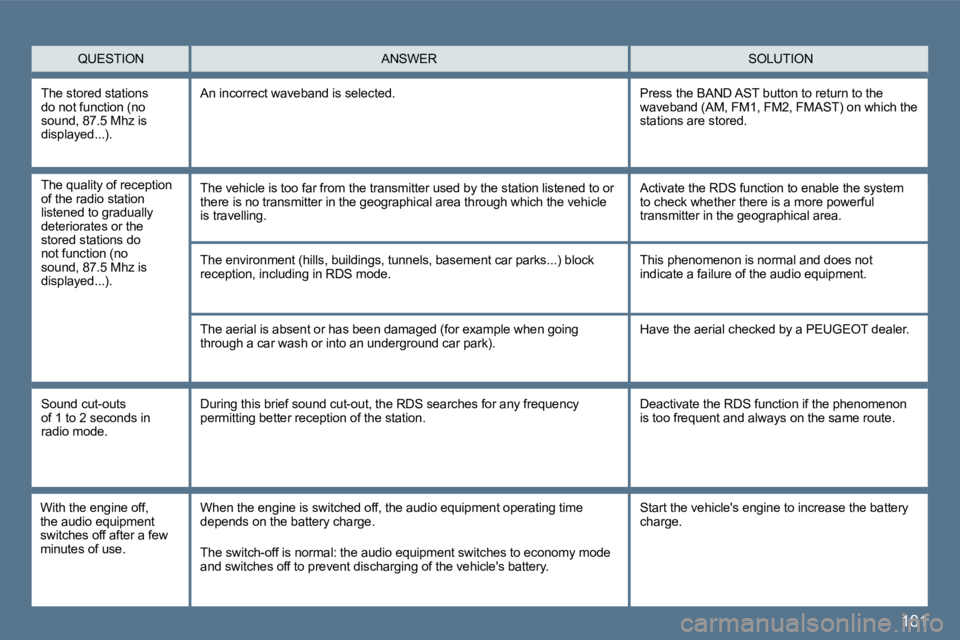
QUESTION SOLUTION ANSWER
The environment (hills, buildings, tunnels, basement car parks...) block reception, including in RDS mode.
The aerial is absent or has been damaged (for exam ple when going through a car wash or into an underground car park).
This phenomenon is normal and does not indicate a failure of the audio equipment.
Have the aerial checked by a PEUGEOT dealer.
Sound cut-outs of 1 to 2 seconds in radio mode.
During this brief sound cut-out, the RDS searches for any frequency permitting better reception of the station. Deactivate the RDS function if the phenomenon is too frequent and always on the same route.
With the engine off, the audio equipment switches off after a few minutes of use.
When the engine is switched off, the audio equipme nt operating time depends on the battery charge.
The switch-off is normal: the audio equipment switches to economy mode and switches off to prevent discharging of the vehicle's battery.
The stored stations do not function (no sound, 87.5 Mhz is displayed...) .
An incorrect waveband is selected. Press the BAND AST button to return to the waveband (AM, FM1, FM2, FMAST) on which the stations are stored.
Start the vehicle's engine to increase the battery charge.
The quality of reception of the radio station listened to gradually deteriorates or the stored stations do not function (no sound, 87.5 Mhz is displayed...).
The vehicle is too far from the transmitter used by the station listened to or there is no transmitter in the geographical area th rough which the vehicle is travelling.
Activate the RDS function to enable the system to check whether there is a more powerful transmitter in the geographical area.