bonnet PEUGEOT 408 2023 User Guide
[x] Cancel search | Manufacturer: PEUGEOT, Model Year: 2023, Model line: 408, Model: PEUGEOT 408 2023Pages: 244, PDF Size: 7.37 MB
Page 154 of 244
152
Practical information
Wearers of pacemakers or equivalent
devices should consult a doctor to
enquire about any applicable precautionary
measures, or contact the manufacturer of their
implanted electronic medical device to check that
it is guaranteed to operate in an environment
compliant with the ICNIRP guidelines.
If in doubt , during charging, do not remain
inside or near the vehicle, near the charging
cable or the charging unit, even for a short time.
Before charging
Depending on the context:
►
Have a professional check that the
electrical system to be used complies with
applicable standards and is compatible with
the vehicle.
►
Have a professional electrician install
a dedicated domestic power socket or
accelerated charging unit (W
allbox)
compatible with the vehicle.
Use the charging cable supplied with the
vehicle.
For more information, contact a PEUGEOT
dealer or a qualified workshop.
During charging
As a safety measure, the engine will
not start if the charging cable is plugged into
the connector on the vehicle. A warning is
displayed on the instrument panel.
While charging is in progress, unlocking the
vehicle will cause the charging to stop.
If no action is taken on one of the openings
(door or boot) or on the charging nozzle, the
vehicle will lock again after 30 seconds and
charging will resume automatically.
Never work under the bonnet:
–
Some areas remain very hot, even an hour
after charging ends - risk of burns!
–
The fan may start at any time - risk of cuts
or strangulation!
After charging
Check that the charging flap is closed.
Do not leave the cable connected to the
domestic power socket - risk of short-circuit
or electrocution in the event of contact with or
immersion in water!
Charging procedure
Connection
► Before charging, check that the gear selector
is in mode P and the ignition is off, otherwise
charging is impossible.
►
Press on the rear of the charging flap to open
it and check that there are no foreign bodies on
the vehicle's charging connector
.
The light guides in the flap come on white.
Domestic charging (mode 2)
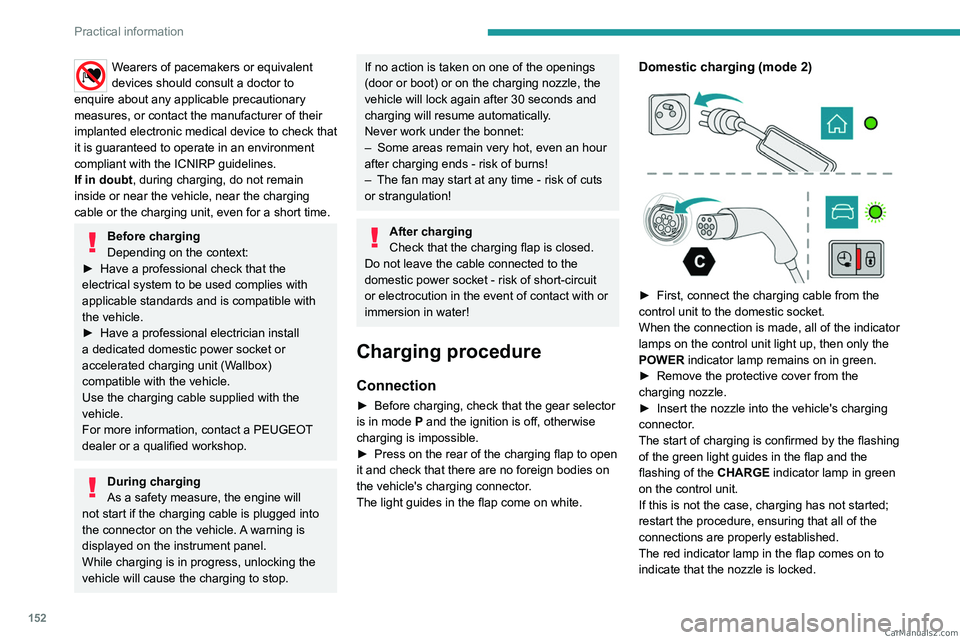
► First, connect the charging cable from the
control unit to the domestic socket.
When the connection is made, all of the indicator
lamps on the control unit light up, then only the
POWER
indicator lamp remains on in green.
►
Remove the protective cover from the
charging nozzle.
►
Insert the nozzle into the vehicle's charging
connector
.
The start of charging is confirmed by the flashing
of the green light guides in the flap and the
flashing of the
CHARGE indicator lamp in green
on the control unit.
If this is not the case, charging has not started;
restart the procedure, ensuring that all of the
connections are properly established.
The red indicator lamp in the flap comes on to
indicate that the nozzle is locked. CarM an uals 2 .c o m
Page 162 of 244

160
Practical information
To recharge the battery, avoid repeatedly or
continuously restarting the engine.
A flat battery prevents the engine from starting.
For more information on the 12
V battery,
refer to the corresponding section.
Load reduction mode
This system manages the use of certain
functions according to the level of charge
remaining in the battery.
When the vehicle is being driven, the load
reduction function temporarily deactivates certain
functions, such as the air conditioning and the
heated rear screen.
The deactivated functions are reactivated
automatically as soon as conditions permit.
Bonnet
For more information on the Active bonnet,
refer to the corresponding section.
Stop & Start
Before doing anything under the bonnet,
you must switch off the ignition to avoid any
risk of the engine restarting automatically.
Take care with objects or clothing that could
be caught in the blades of the cooling fan
or in certain moving components - risk of
strangulation and serious injury!
Rechargeable hybrid vehicles
Before any work is carried out under the
bonnet, it is essential to switch off the ignition
and disconnect the charging connector nozzle
if it is connected, check that the READY
indicator lamp is off on the instrument panel
and wait 4 minutes - risk of serious injury!
The location of the interior bonnet release lever prevents the bonnet being
opened when the left-hand front door is
closed.
When the engine is hot, handle the
exterior safety catch and the bonnet stay
with care (risk of burns), using the protected
area.
When the bonnet is open, take care not to
damage the safety catch.
Do not open the bonnet under very windy
conditions.
Cooling of the engine when stopped
The engine cooling fan may start after
the engine has been switched off.
Take care with objects or clothing that
could be caught in the blades of the fan!
Opening
► Open the left- hand front door.
► Pull the interior release lever , located at the
bottom of the door frame, towards you.
CarM an uals 2 .c o m
Page 163 of 244
161
Practical information
7► Lift the exterior safety catch and raise the
bonnet.
►
Unclip the stay from its housing and place it
in the support slot to hold the bonnet open.
Closing
► Lower the bonnet and release it near the end
of its travel.
►
Check the locking.
Because of the presence of electrical
equipment under the bonnet, it is strongly
recommended that exposure to water (rain,
washing, etc.) be limited.
Engine compartment
The engine shown here is an example for
illustrative purposes only.
The locations of the following components may
vary:
–
Air filter
.
–
Engine oil dipstick.
–
Engine oil filler cap.
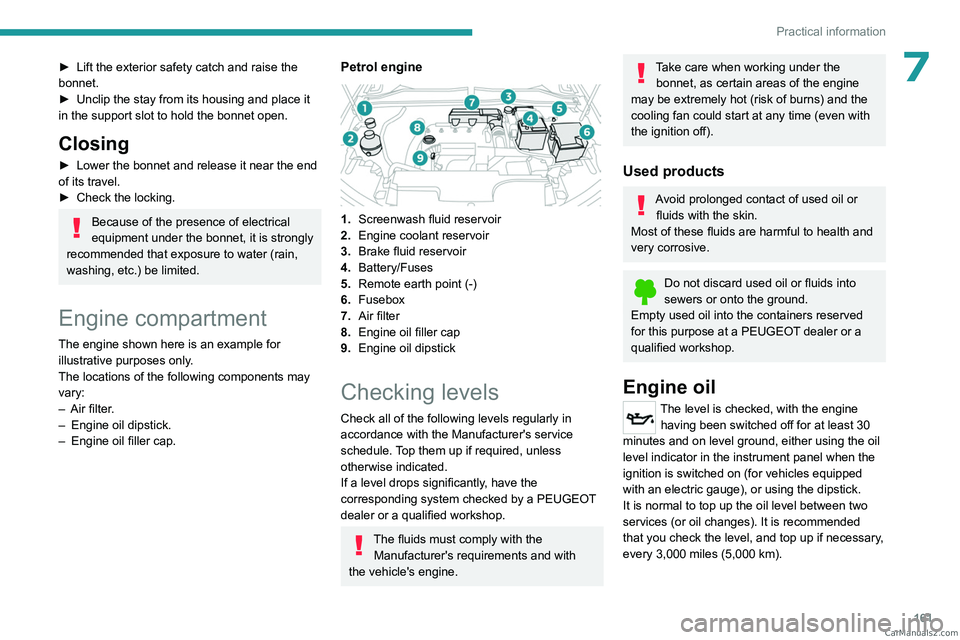
Petrol engine
1. Screenwash fluid reservoir
2. Engine coolant reservoir
3. Brake fluid reservoir
4. Battery/Fuses
5. Remote earth point (-)
6. Fusebox
7. Air filter
8. Engine oil filler cap
9. Engine oil dipstick
Checking levels
Check all of the following levels regularly in
accordance with the Manufacturer's service
schedule. Top them up if required, unless
otherwise indicated.
If a level drops significantly, have the
corresponding system checked by a PEUGEOT
dealer or a qualified workshop.
The fluids must comply with the
Manufacturer's requirements and with
the vehicle's engine.
Take care when working under the bonnet, as certain areas of the engine
may be extremely hot (risk of burns) and the
cooling fan could start at any time (even with
the ignition off).
Used products
Avoid prolonged contact of used oil or fluids with the skin.
Most of these fluids are harmful to health and
very corrosive.
Do not discard used oil or fluids into
sewers or onto the ground.
Empty used oil into the containers reserved
for this purpose at a PEUGEOT dealer or a
qualified workshop.
Engine oil
The level is checked, with the engine having been switched off for at least 30
minutes and on level ground, either using the oil
level indicator in the instrument panel when the
ignition is switched on (for vehicles equipped
with an electric gauge), or using the dipstick.
It is normal to top up the oil level between two
services (or oil changes). It is recommended
that you check the level, and top up if necessary,
every 3,000 miles (5,000 km). CarM an uals 2 .c o m
Page 180 of 244
178
In the event of a breakdown
Accessing the battery
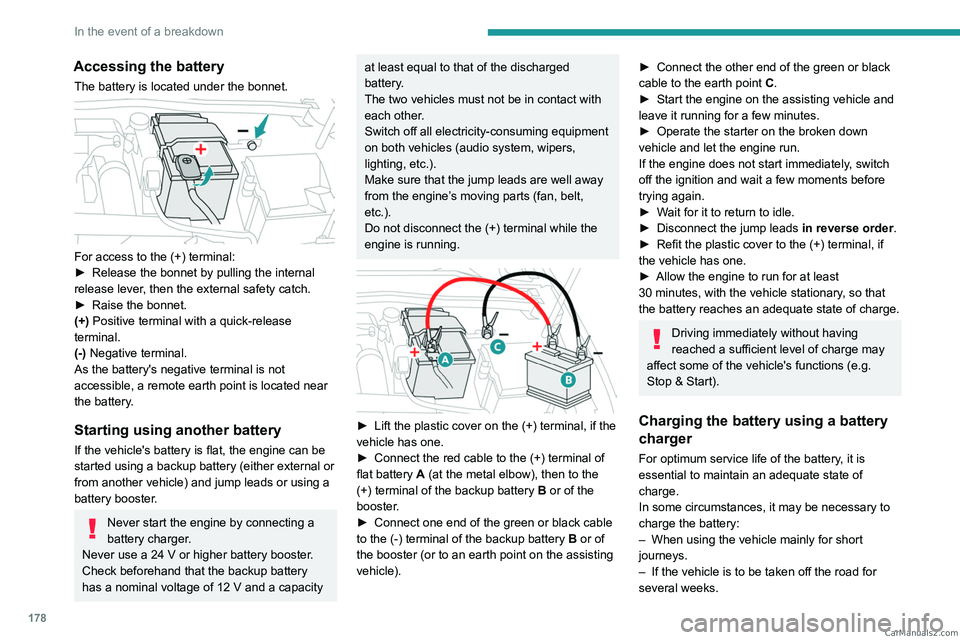
The battery is located under the bonnet.
For access to the (+) terminal:
► Release the bonnet by pulling the internal
release lever
, then the external safety catch.
►
Raise the bonnet.
(+)
Positive terminal with a quick-release
terminal.
(-) Negative terminal.
As the battery's negative terminal is not
accessible, a remote earth point is located near
the battery.
Starting using another battery
If the vehicle's battery is flat, the engine can be
started using a backup battery (either external or
from another vehicle) and jump leads or using a
battery booster.
Never start the engine by connecting a
battery charger.
Never use a 24
V or higher battery booster.
Check beforehand that the backup battery
has a nominal voltage of 12
V and a capacity
at least equal to that of the discharged
battery.
The two vehicles must not be in contact with
each other.
Switch off all electricity-consuming equipment
on both vehicles (audio system, wipers,
lighting, etc.).
Make sure that the jump leads are well away
from the engine’s moving parts (fan, belt,
etc.).
Do not disconnect the (+) terminal while the
engine is running.
► Lift the plastic cover on the (+) terminal, if the
vehicle has one.
►
Connect the red cable to the (+) terminal of
flat battery
A (at the metal elbow), then to the
(+) terminal of the backup battery
B or of the
booster.
►
Connect one end of the green or black cable
to the (-) terminal of the backup battery
B or of
the booster (or to an earth point on the assisting
vehicle).
► Connect the other end of the green or black
cable to the earth point C .
►
Start the engine on the assisting vehicle and
leave it running for a few minutes.
►
Operate the starter on the broken down
vehicle and let the engine run.
If the engine does not start immediately
, switch
off the ignition and wait a few moments before
trying again.
►
W
ait for it to return to idle.
►
Disconnect the jump leads in reverse order.
►
Refit the plastic cover to the (+) terminal, if
the vehicle has one.
►
Allow the engine to run for at least
30
minutes, with the vehicle stationary, so that
the battery reaches an adequate state of charge.
Driving immediately without having
reached a sufficient level of charge may
affect some of the vehicle's functions (e.g.
Stop & Start).
Charging the battery using a battery
charger
For optimum service life of the battery, it is
essential to maintain an adequate state of
charge.
In some circumstances, it may be necessary to
charge the battery:
–
When using the vehicle mainly for short
journeys.
–
If the vehicle is to be taken off the road for
several weeks. CarM an uals 2 .c o m
Page 182 of 244
180
In the event of a breakdown
Reconnecting the (+) terminal
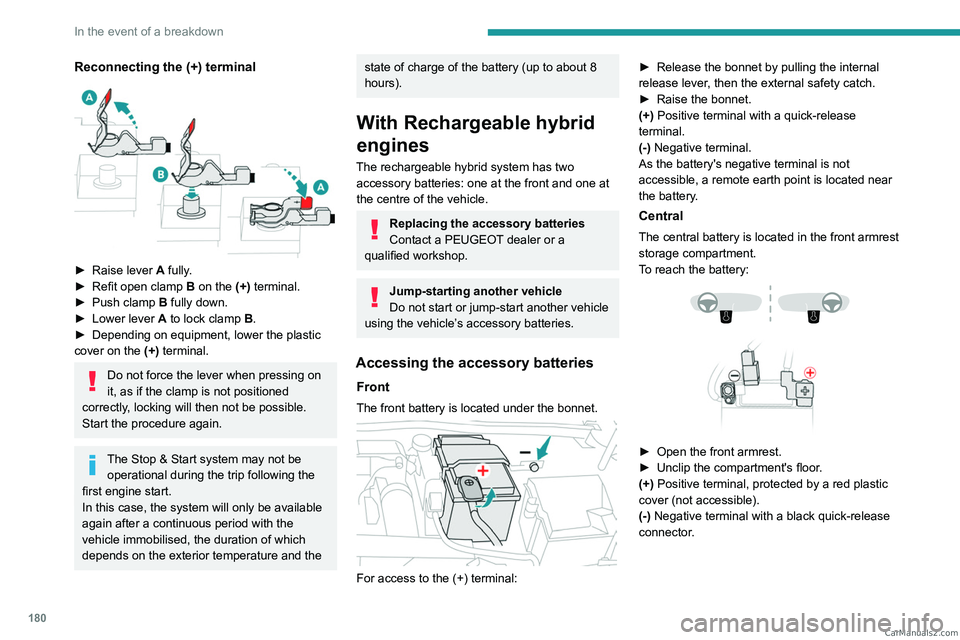
► Raise lever A fully.
► Refit open clamp B on the (+) terminal.
►
Push clamp
B fully down.
►
Lower lever
A
to lock clamp B.
►
Depending on equipment, lower the plastic
cover on the
(+) terminal.
Do not force the lever when pressing on
it, as if the clamp is not positioned
correctly, locking will then not be possible.
Start the procedure again.
The Stop & Start system may not be operational during the trip following the
first engine start.
In this case, the system will only be available
again after a continuous period with the
vehicle immobilised, the duration of which
depends on the exterior temperature and the
state of charge of the battery (up to about 8
hours).
With Rechargeable hybrid
engines
The rechargeable hybrid system has two accessory batteries: one at the front and one at
the centre of the vehicle.
Replacing the accessory batteries
Contact a PEUGEOT dealer or a
qualified workshop.
Jump-starting another vehicle
Do not start or jump-start another vehicle
using the vehicle’s accessory batteries.
Accessing the accessory batteries
Front
The front battery is located under the bonnet.
For access to the (+) terminal: ►
Release the bonnet by pulling the internal
release lever
, then the external safety catch.
►
Raise the bonnet.
(+)
Positive terminal with a quick-release
terminal.
(-) Negative terminal.
As the battery's negative terminal is not
accessible, a remote earth point is located near
the battery.
Central
The central battery is located in the front armrest
storage compartment.
To reach the battery:
► Open the front armrest.
► Unclip the compartment's floor .
(+) Positive terminal, protected by a red plastic
cover (not accessible).
(-) Negative terminal with a black quick-release
connector. CarM an uals 2 .c o m
Page 190 of 244
188
Technical data
Dimensions (mm)
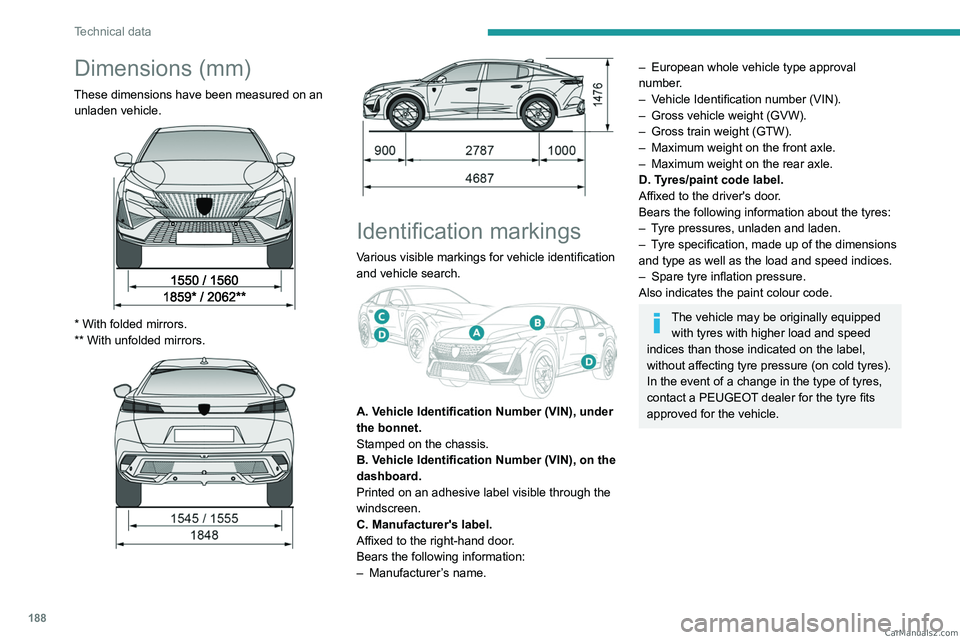
These dimensions have been measured on an unladen vehicle.
* With folded mirrors.
** With unfolded mirrors.
Identification markings
Various visible markings for vehicle identification
and vehicle search.
A. Vehicle Identification Number (VIN), under
the bonnet.
Stamped on the chassis.
B. Vehicle Identification Number (VIN), on the
dashboard.
Printed on an adhesive label visible through the
windscreen.
C. Manufacturer's label.
Affixed to the right-hand door.
Bears the following information:
–
Manufacturer
’s name.
– European whole vehicle type approval
number .
–
V
ehicle Identification number (VIN).
–
Gross vehicle weight (GVW).
–
Gross train weight (GTW).
–
Maximum weight on the front axle.
–
Maximum weight on the rear axle.
D. T
yres/paint code label.
Affixed to the driver's door.
Bears the following information about the tyres:
–
T
yre pressures, unladen and laden.
–
T
yre specification, made up of the dimensions
and type as well as the load and speed indices.
–
Spare tyre inflation pressure.
Also indicates the paint colour code.
The vehicle may be originally equipped with tyres with higher load and speed
indices than those indicated on the label,
without affecting tyre pressure (on cold tyres).
In the event of a change in the type of tyres,
contact a PEUGEOT dealer for the tyre fits
approved for the vehicle. CarM an uals 2 .c o m
Page 210 of 244
208
Alphabetical index
A
ABS 75
Accelerated charging unit (Wallbox)
146–147
Accessories
72
Active LED Vision
63, 65
Active Safety Brake
126–127, 129
Adjusting headlamps
62
Adjusting head restraints
41
Adjusting seat
41–42
Adjusting the air distribution
49, 51
Adjusting the air flow
49, 51
Adjusting the headlamp beam height
62
Adjusting the height and reach of
the steering wheel
45
Adjusting the lumbar support
42
Adjusting the seat angle
42
Adjusting the temperature
50
Adjusting the time
203
Advice on care and maintenance
145, 165
Advice on driving
8, 91–92
Airbags
80–82, 84
Airbags, curtain
81–82
Airbags, front
80–81, 85
Airbags, lateral
81–82
Air conditioning
49, 52
Air conditioning, automatic
52
Air conditioning, dual-zone automatic
49
Air intake
51–52
Air vents
48
Alarm
35–36
Amplifier, audio
57
Anti-lock braking system (ABS)
75
Antitheft / Immobiliser 25
Applications
21–22
Armrest, front
56
Armrest, rear
58
Assistance call
73–74
Assistance, emergency braking
76, 128
Audio streaming (Bluetooth)
200
B
Battery, 12 V 159, 163, 177–181
Battery, ancillaries
177
Battery, charging
177–178, 181
Battery, remote control
29–30
Blanking screen (snow shield)
158
Blind
38
Bluetooth (hands-free)
197
Bluetooth (telephone)
197–198
Bodywork
165
Bonnet
160
Bonnet, active
82
Boot
31, 34, 60
Brake discs
163–164
Brake lamps
176
Brakes
163–164
Braking
98
Braking assistance system
75–76
Braking, automatic emergency
126–127, 129
Braking, dynamic emergency
95–96
Bulbs (changing)
175–176
C
Capacity, fuel tank 143
Care of the bodywork
165
Central locking
27–28
Changing a bulb
175–176
Changing a fuse
177
Changing a wheel
168, 172
Changing a wiper blade
71
Changing the remote control battery
29
Changing to free-wheeling
164
Charge level indicator (Rechargeable
hybrid)
19
Charger, induction
55
Charger, wireless
55
Charging cable
148
Charging cable (Rechargeable
hybrid)
146–147, 152
Charging connector (Rechargeable
hybrid)
146, 151–153
Charging flap (Rechargeable
hybrid)
146, 151–153
Charging the traction battery
(Rechargeable hybrid)
18, 144, 151–153
CHECK
19
Checking the engine oil level
17
Checking the levels
161–162
Checking tyre pressures
(using the kit)
169, 171
Checks
161, 163–164
Checks, routine
163–164
Child lock
90
Children
79, 85–87 CarM an uals 2 .c o m
Page 213 of 244
2 11
Alphabetical index
Lamps with Full LED technology 63, 65
Lane assist
114–115, 119–121
Lane keeping assist
131
Leather (care)
167
LEDs - Light-emitting diodes
62, 176
Level, brake fluid
162
Level, engine coolant
18, 162
Level, engine oil
17, 161
Levels and checks
161–162
Level, screenwash fluid
69, 162
Light-emitting diodes - LEDs
62, 176
Lighting, boot
60
Lighting dimmer
19
Lighting, exterior
61, 64
Lighting, guide-me home
63
Lighting, interior
57–58
Lighting, mood
58
Lighting, welcome
63–64
Loading
157–158
Load reduction mode
160
Load space cover
59
Locating your vehicle
25
Locking
25, 27
Locking from the inside
28
Locking the doors
28
Log, alerts
19
Long-distance blind spot monitoring
134
Long objects, transporting
59
Lumbar
42M
Mains socket (domestic network) 146–147
Maintenance (advice)
145, 165
Maintenance, routine
105, 163–164
Manoeuvring aids (recommendations)
104
Map reading lamps
57
Markings, identification
188
Massage function
44
Massage, multi-point
44
Mat
57, 106
Menu, shortcuts
21
Mirror, rear view
46
Mirrors, door
45–46, 52, 134
Mirror, vanity
54
Mobile application
22, 53, 151, 153
Motor, electric
100, 144, 187
Motorised tailgate
31–32, 34
Mountings, ISOFIX
85, 88–89
N
Net, luggage retaining 59
Night vision
67
Night Vision
67
O
Obstacle detection 135
Oil change
161
Oil consumption
161
Oil, engine 161
On-board tools
60, 168–169
Opening the bonnet
160
Opening the boot
26, 31
Opening the doors
26, 31
P
Pads, brake 163
Paint
165, 188
Paint colour code
188
Parcel shelf, rear
59
Parking brake, electric
94–96, 164
Parking (sensors)
135
Parking sensors, audible and visual
135
Parking sensors, front
136
Parking sensors, rear
135
Passenger compartment temperature pre-
conditioning (Rechargeable hybrid)
22, 53
Pedestrian horn (Rechargeable hybrid)
73
Personalisation
10, 22
Plates, identification
188
Port, USB
55, 58
Post Collision Safety Brake
76
Power
18
Power indicator (Rechargeable hybrid)
9, 18
Pressures, tyres
164, 170, 188
Pre-tensioning (seat belts)
79
Profiles
190
Protecting children
80, 83–87
Proximity Keyless Entry and Start
26
Puncture
169–170, 172 CarM an uals 2 .c o m
Page 214 of 244
212
Alphabetical index
R
Radar (warnings) 105
Radio
199–200
Reading lamps
57
Reading lamps, touch-sensitive
58
READY (warning lamp)
160
Rear bench seat
47
Rear cross traffic alert
140
Rear screen (demisting)
52
Rechargeable
hybrid engine
9, 21, 160, 183, 187
Rechargeable
hybrid system
6, 9, 21, 93, 100, 144
Recharging the battery
177–178, 181
Recharging the traction battery
148
Recharging the traction battery
(Rechargeable hybrid)
144, 151–153
Recirculation, air
51–52
Recorder, trip distance
19
Reduction of electrical load (mode)
160
Regenerative braking (deceleration by
engine braking)
98
Reinitialising the remote control
30
Reinitialising the under-inflation detection
system
104
Reminder, lighting on
61
Remote control
24–27, 29
Remote functions
153
Remotely operable functions (Rechargeable
hybrid)
22, 53
Removing a wheel
172–174
Removing the mat
57
Replacing bulbs 175–176
Replacing fuses
177
Replacing the air filter
163
Replacing the oil filter
163
Replacing the passenger compartment
filter
163
Reservoir, screenwash
162
Resetting the trip
19–20
Reversing camera
105, 136–138
Reversing lamps
176
Roof bars
157–158
Roof, opening
38
S
Safety, children 80, 83–87
Screen, cold climate
158
Screenwash
69
Screenwash, front
69
Seat angle
42
Seat belts
78–79, 85
Seat belts, rear
78
Seats, electric
42–43
Seats, front
41–43
Seats, heated
43–44
Seats, rear
47–48, 83
Selector, gear
96–99
Semi-automatic lane changing
122
Sensors (warnings)
105
Serial number, vehicle
188
Servicing
17, 163–164
Settings, equipment
10, 21
Shield, snow 158
Sidelamps
62, 176
Silent vehicle warning sound (Rechargeable
hybrid)
73
Smartphone
22–23, 55
Snow chains
103, 159
Snow screen
158
Socket, 12 V
54
Socket, 12 V accessory
54, 60
Speakers
57
Speed limiter
109–112
Speed limit recognition
107, 109
Speedometer
10, 106
Sport mode
99–100
Spotlamps, side
64
Stability control (ESC)
75, 77
Starting/Stopping the vehicle
92
Starting the engine
92–93
Starting the vehicle
93, 98
Starting using another battery
94, 178
State of charge, battery
21
Station, radio
199–200
Stay, engine bonnet
160
Steering wheel
106
Steering wheel (adjustment)
45
Stickers, customising
166
Stopping the vehicle
93, 98–99
Stop & Start
20, 49, 52, 101–103,
143, 160, 163, 180
Storage
54, 56, 58
Storage box
60
Storage wells
60
Storing driving positions
43 CarM an uals 2 .c o m