light PEUGEOT 5008 2010.5 Repair Manual
[x] Cancel search | Manufacturer: PEUGEOT, Model Year: 2010.5, Model line: 5008, Model: PEUGEOT 5008 2010.5Pages: 345, PDF Size: 22.77 MB
Page 261 of 345
228
04
2
ABC 3
DEF
5
JKL
4
GHI 6
MNO8
TUV
7
PQRS 9
WXYZ0
* #
1
RADIO MEDIA
NAVESC TRAFFIC
SETUP
ADDR
BOOK
2
ABC 3
DEF
5
JKL
4
GHI 6
MNO8
TUV
7
PQRS 9
WXYZ0
* #
1
RADIO MEDIA
NAV ESC TRAFFIC
SETUP
ADDR
BOOK
NAV
1
2
3
4
5
6
2
ABC 3
DEF
5
JKL
4
GHI 6
MNO8
TUV
7
PQRS 9
WXYZ0
* #
1
RADIO MEDIA
NAV ESC TRAFFIC
SETUP
ADDR
BOOK
2
ABC 3
DEF
5
JKL
4
GHI 6
MNO8
TUV
7
PQRS 9
WXYZ0
* #
1
RADIO MEDIA
NAV ESC TRAFFIC
SETUP
ADDR
BOOK
2
ABC 3
DEF
5
JKL
4
GHI 6
MNO8
TUV
7
PQRS 9
WXYZ0
* #
1
RADIO MEDIA
NAV ESC TRAFFIC
SETUP
ADDR
BOOK
2
ABC 3
DEF
5
JKL
4
GHI 6
MNO8
TUV
7
PQRS 9
WXYZ0
* #
1
RADIO MEDIA
NAV ESC TRAFFIC
SETUP
ADDR
BOOK
NAVIGATION - GUIDANCE
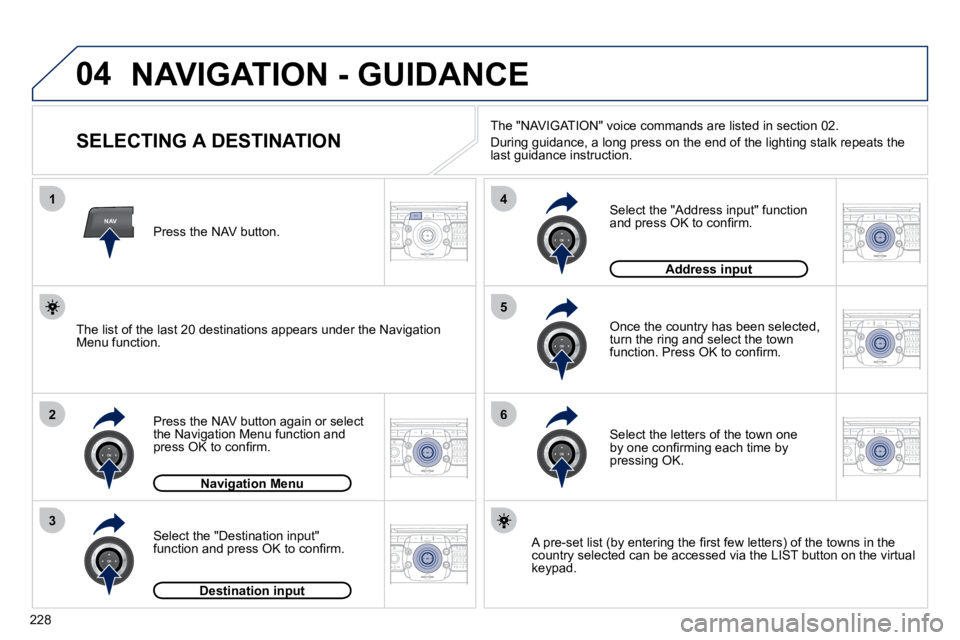
SELECTING A DESTINATION
Press the NAV button again or select the Navigation Menu function and press OK to confi rm.
Select the "Destination input" function and press OK to confi rm.
Press the NAV button.
Select the letters of the town one by one confi rming each time by pressing OK.
Once the country has been selected, turn the ring and select the town function. Press OK to confi rm.
Navigation MenuNavigation Menu
Destination inputDestination input
A pre-set list (by entering the fi rst few letters) of the tow
ns in the country selected can be accessed via the LIST button on the virtu al keypad.
Select the "Address input" function and press OK to confi rm.
Address inputAddress input
The list of the last 20 destinations appears under the Navigation Menu function.
The "NAVIGATION" voice commands are listed in section 02.
During guidance, a long press on the end of the lighting stalk repeats the last guidance instruction.
Page 287 of 345
254
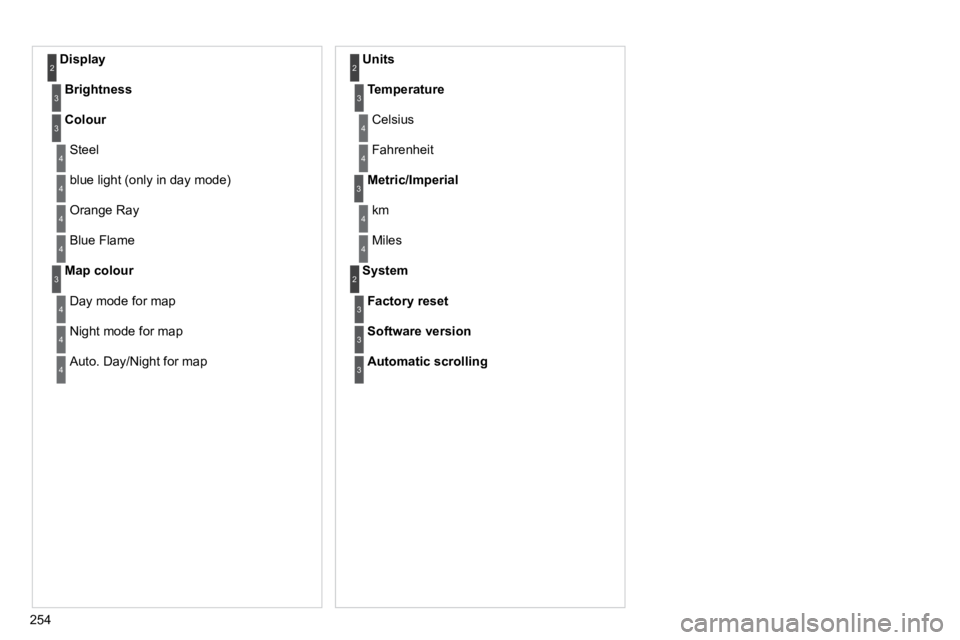
Display 2
Brightness3
Colour3
Steel 4
blue light (only in day mode) 4
Orange Ray 4
Blue Flame 4
Map colour3
Day mode for map 4
Night mode for map 4
Auto. Day/Night for map 4
Units 2
Temperature3
Celsius 4
Fahrenheit 4
Metric/Imperial3
km 4
Miles 4
System 2
Factory reset3
Software version3
Automatic scrolling3
Page 300 of 345
04
7
8
9
268
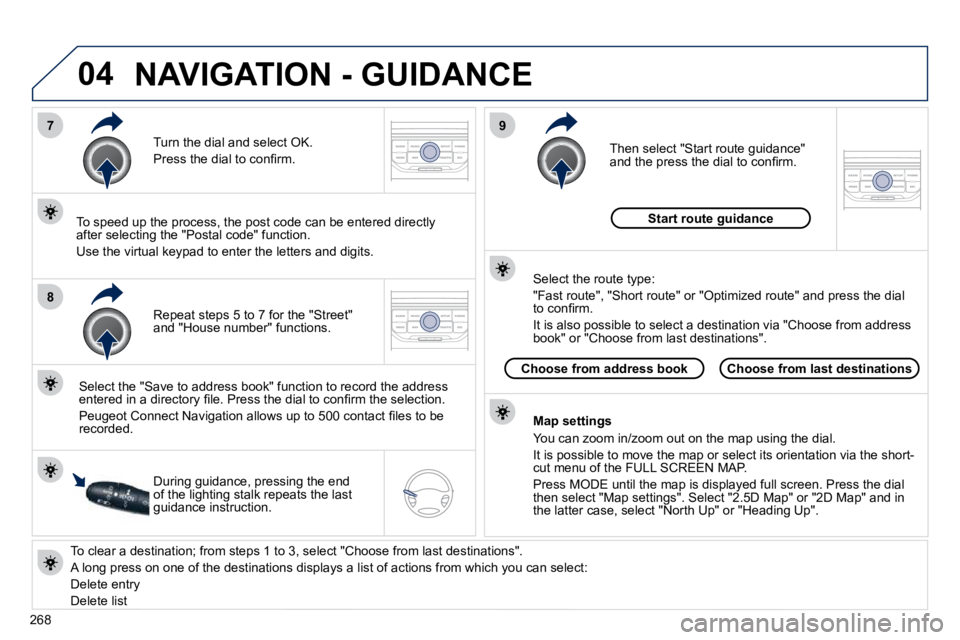
To clear a destination; from steps 1 to 3, select "Choose from last destinations".
A long press on one of the destinations displays a list of actions from which you can select:
Delete entry
Delete list
Repeat steps 5 to 7 for the "Street" and "House number" functions.
Turn the dial and select OK.
Press the dial to confi rm.
Select the "Save to address book" function to record the address entered in a directory fi le. Press the dial to confi rm the select ion.
Peugeot Connect Navigation allows up to 500 contact fi les to be recorded.
To speed up the process, the post code can be entered direct ly after selecting the "Postal code" function.
Use the virtual keypad to enter the letters and digits.
Then select "Start route guidance" and the press the dial to confi rm.
During guidance, pressing the end of the lighting stalk repeats the last guidance instruction.
Map settings
You can zoom in/zoom out on the map using the dial.
It is possible to move the map or select its orientation via the short-cut menu of the FULL SCREEN MAP.
Press MODE until the map is displayed full screen. Press the dial then select "Map settings". Select "2.5D Map" or "2D Map" and in the latter case, select "North Up" or "Heading Up".
Select the route type:
"Fast route", "Short route" or "Optimized route" and press the dial to confi rm.
It is also possible to select a destination via "Choose from a ddress book" or "Choose from last destinations".
Choose from last destinationsChoose from address book
Start route guidance
NAVIGATION - GUIDANCE