trip computer PEUGEOT 5008 2011.5 User Guide
[x] Cancel search | Manufacturer: PEUGEOT, Model Year: 2011.5, Model line: 5008, Model: PEUGEOT 5008 2011.5Pages: 340, PDF Size: 16.4 MB
Page 57 of 340
M
U
55
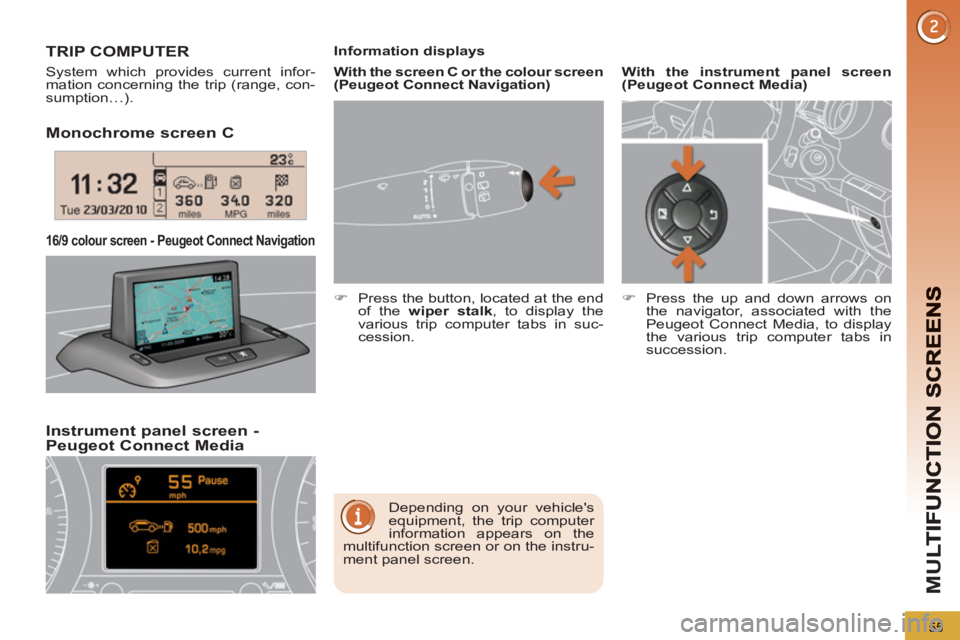
Monochrome screen C
Instrument
panel screen - Peugeot Connect Media
16/9 colour screen - Peugeot Connect Navigation
TRIP COMPUTER
System which provides current infor-
mation concerning the trip (range, con-
sumption…).
Depending on your vehicle's
equipment, the trip computer
information appears on the
multifunction screen or on the instru-
ment panel screen.
Information displays
)
Press the button, located at the end
of the wiper stalk
, to display the
various trip computer tabs in suc-
cession.
With the instrument panel screen
(Peugeot Connect Media)
)
Press the up and down arrows on
the navigator, associated with the
Peugeot Connect Media, to display
the various trip computer tabs in
succession.
With the screen C or the colour screen
(Peugeot Connect Navigation)
Page 59 of 340
M
U
57
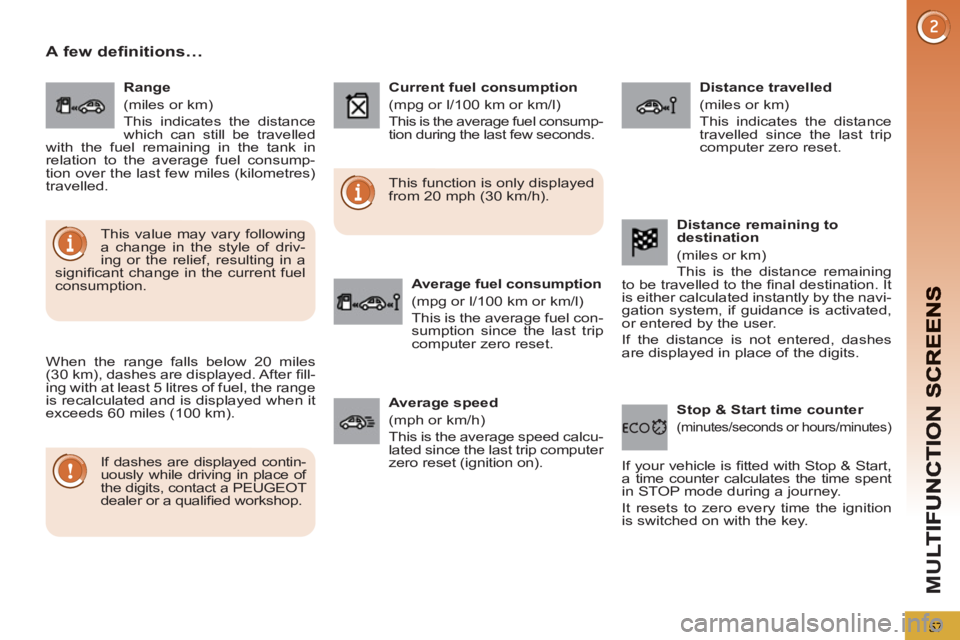
A few definitions…
When the range falls below 20 miles
(30 km), dashes are displayed. After fi ll-
ing with at least 5 litres of fuel, the range
is recalculated and is displayed when it
exceeds 60 miles (100 km).
If dashes are displayed contin-
uously while driving in place of
the digits, contact a PEUGEOT
dealer or a qualifi ed workshop. This function is only displayed
from 20 mph (30 km/h).
This value may vary following
a change in the style of driv-
ing or the relief, resulting in a
signifi cant change in the current fuel
consumption.
Range
(miles or km)
This indicates the distance
which can still be travelled
with the fuel remaining in the tank in
relation to the average fuel consump-
tion over the last few miles (kilometres)
travelled.
Current fuel consumption
(mpg or l/100 km or km/l)
This is the average fuel consump-
tion during the last few seconds.
Average fuel consumption
(mpg or l/100 km or km/l)
This is the average fuel con-
sumption since the last trip
computer zero reset.
Distance travelled
(miles or km)
This indicates the distance
travelled since the last trip
computer zero reset.
Average speed
(mph or km/h)
This is the average speed calcu-
lated since the last trip computer
zero reset (ignition on).
Stop & Start time counter
(minutes/seconds or hours/minutes)
If your vehicle is fi tted with Stop & Start,
a time counter calculates the time spent
in STOP mode during a journey.
It resets to zero every time the ignition
is switched on with the key.
Distance remaining to
destination
(miles or km)
This is the distance remaining
to be travelled to the fi nal destination. It
is either calculated instantly by the navi-
gation system, if guidance is activated,
or entered by the user.
If the distance is not entered, dashes
are displayed in place of the digits.
Page 274 of 340
272
01
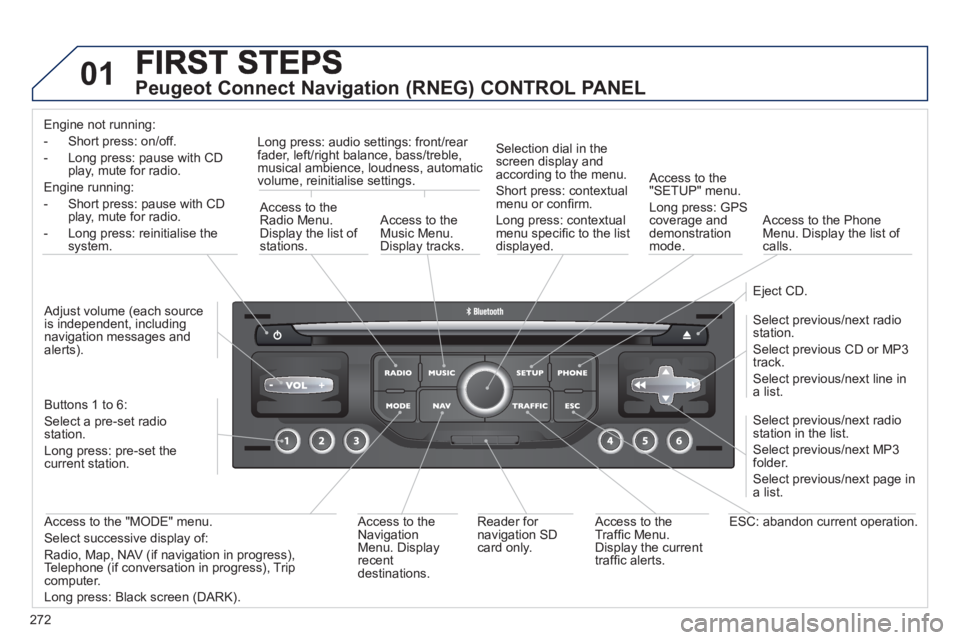
Peugeot Connect Navigation (RNEG) CONTROL PANEL
Engine not running:
-
Short press: on/off.
- Long press: pause with
CD play, mute for radio.
Engine running:
- Short
press: pause with CD play, mute for radio.
-
Long press: reinitialise thesystem.
Access to theRadio Menu.Display the list of stations.
Access to theMusic Menu. Display tracks. Lon
g press: audio settings: front/rear fader, left/right balance, bass/treble,
musical ambience, loudness, automatic
volume, reinitialise settings.
Selection dial in the
screen display and according to the menu.
Short press: contextual
menu or confi rm.
Long press: contextual
menu specifi c to the list
displayed.
A
ccess to the"SETUP" menu.
Lon
g press: GPS coverage anddemonstration
mode.
Access to the PhoneMenu. Display the list of calls.
E
ject CD.
Select previous/next radio station.
Select previous CD or MP3
track.
Select previous/next line in a list.
Select
previous/next radio station in the list.
Select previous/next MP3
folder.
Select previous/next page in a list.
E
SC: abandon current operation.
Access to theTraffi c Menu. Display the current
traffi c alerts. R
eader for navigation SDcard only.
A
ccess to theNavigation Menu. Displayrecent destinations.
A
ccess to the "MODE" menu.
Select successive display of:
Radio, Map, NAV (if navigation in progress),
Telephone (if conversation in progress), Tripcomputer.
Long press: Black screen (DARK). Buttons 1 to
6:
Select a pre-set radiostation.
Long press: pre-set the current station.
Ad
just volume (each source
is independent, including
navigation messages andalerts).
Page 277 of 340
275
03GENERAL OPERATION
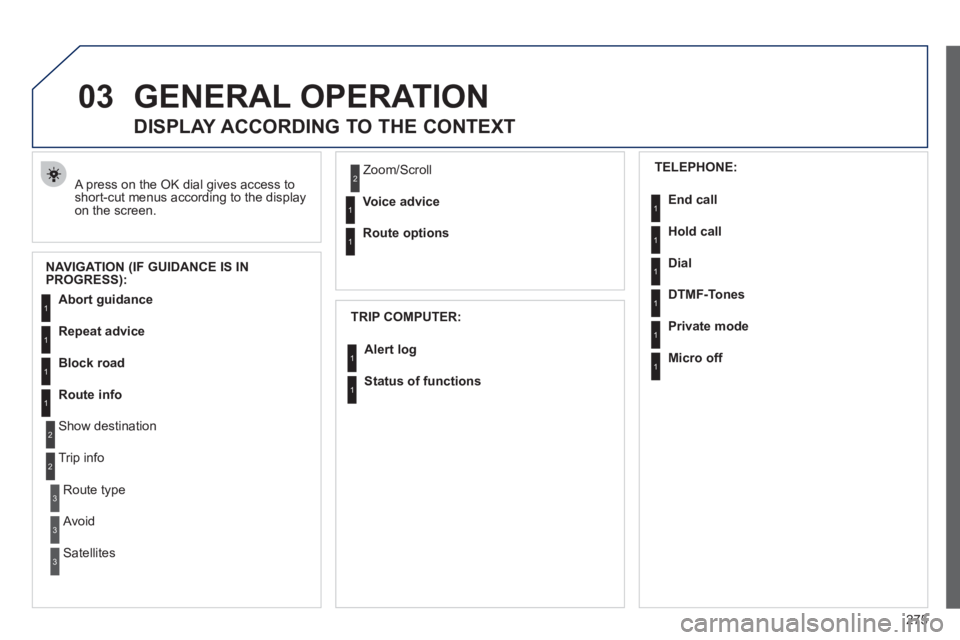
A press on the OK dial gives access to short-cut menus according to the displayon the screen.
DISPLAY ACCORDING TO THE CONTEXT
NAVIGATION (IF GUIDANCE IS IN
PROGRESS):
TRIP COMPUTER:
Abort guidance
Repeat advice
Block road
Route info
Show destination
Trip info
Route t
ype
Avoid
SatellitesZ
oom/Scroll
Voice advice
Route options
Alert log
Status of functions
1
2
3
3
2
1
1
1
3
1
1
1
1
2
TELEPHONE:
End call
Hold call
Dial
DTMF-Tones
Private mod
e
Micro off
1
1
1
1
1
1
Page 306 of 340
304
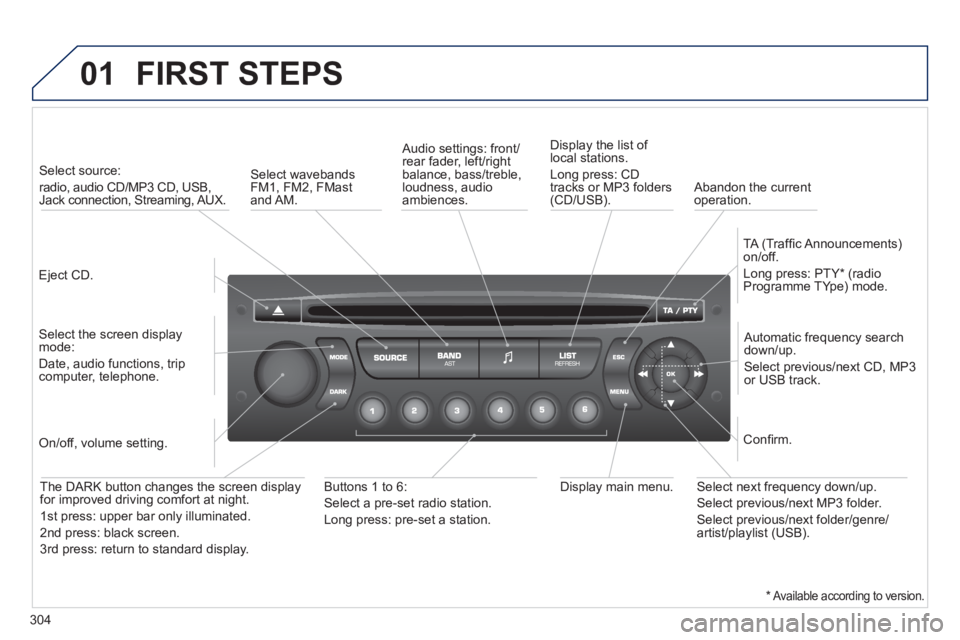
01 FIRST STEPS
Eject CD.
Select source:
radio, audio CD/MP3 CD, USB,Jack connection, Streaming, AUX.
Select the screen displaymode:
Date, audio functions, tripcomputer, telephone.
Automatic frequency search
down/up.
Select previous/next CD, MP3
or USB track.
Audio settings: front/rear fader, left/right
balance, bass/treble, loudness, audio ambiences. Displa
y the list of local stations.
Lon
g press: CD
tracks or MP3 folders(CD/USB).
TA
(Traffi c Announcements)
on/off.
Lon
g press: PTY * (radio
Programme TYpe) mode.
Display main menu. The DARK button changes the screen display
for improved driving comfort at night.
1stpress: upper bar only illuminated.
2ndpress: black screen.
3rdpress: return to standard display.
On/off, volume setting.
Buttons 1 to 6:
Select a pre-set radio station.
Lon
g press: pre-set a station.
Select next frequency down/up.
Select previous/next MP3 folder.
Select previous/next folder/genre/artist/playlist (USB).
Confi rm.
Select wavebandsFM1, FM2, FMast and AM.
Abandon the current
operation.
*Available according to version.
Page 308 of 340
306
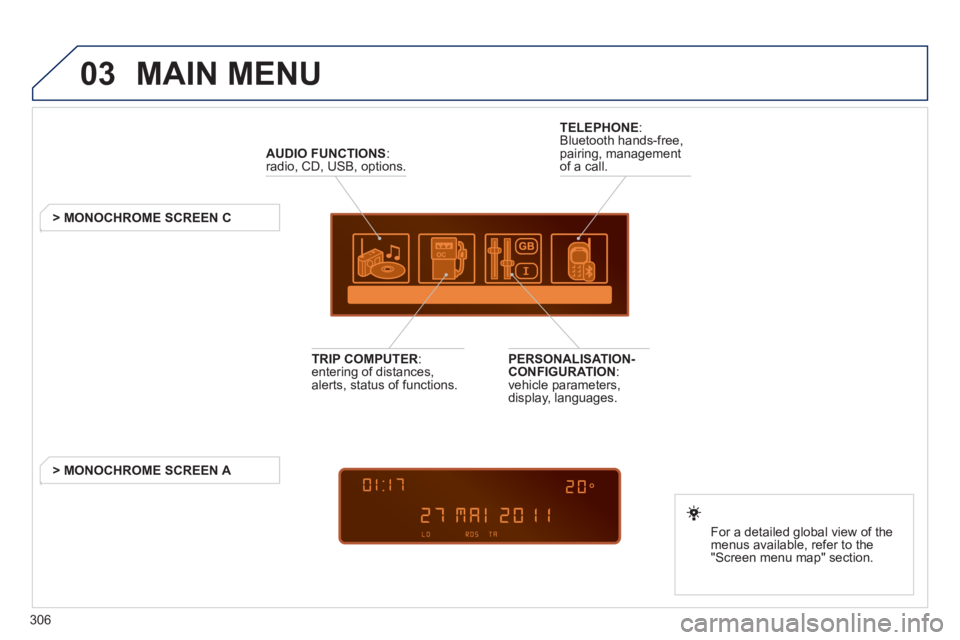
03 MAIN MENU
AUDIO FUNCTIONS
:radio, CD, USB, options.
> MONOCHROME SCREEN C
For a detailed
global view of the
menus available, refer to the
"Screen menu ma
p" section.
TELEPHONE
:
Bluetooth hands-free,
pairing, managementof a call.
PERSONALISATION-
CONFIGURATION:
vehicle parameters,
display, languages.
TRIP COMPUTER: entering of distances,alerts, status of functions.
> MONOCHROME
SCREEN A
Page 323 of 340
321
08
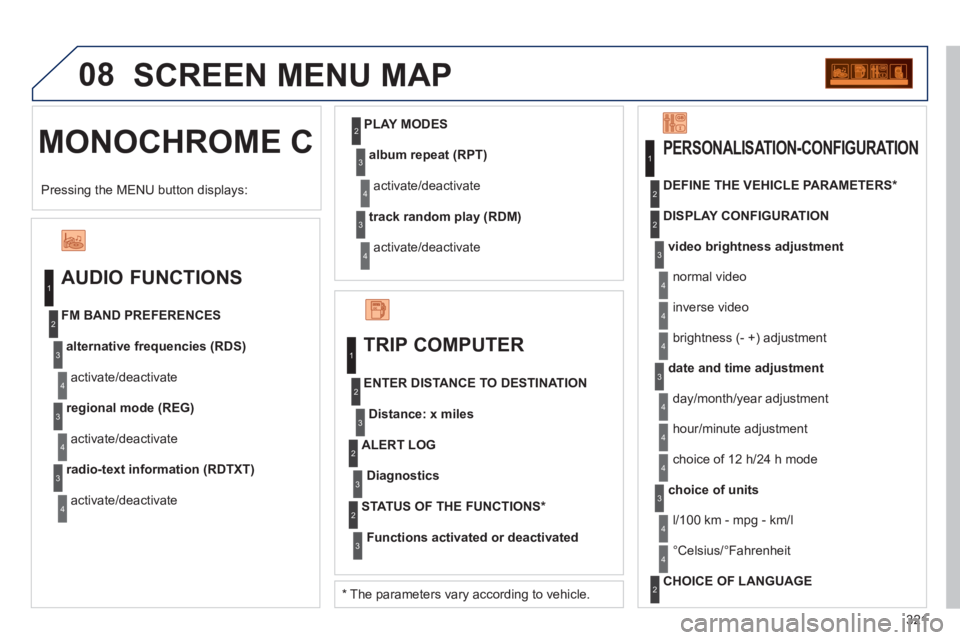
MONOCHROME C SCREEN MENU MAP
AUDIO FUNCTIONS
alternative frequencies (RDS)
activate/deactivate FM BAND PREFERENCES
regional mode (REG)
activate/deactivate
radio-text information (RDTXT)
activate/deactivate
1
2
3
4
3
4
3
4
PLAY MODES
album repeat (RPT)
activate/deactivate
track random play (RDM)
activate/deactivate
2
3
4
3
4
TRIP COMPUTER
Distance: x miles
ENTER DISTANCE TO DESTINATION
Diagnostic s
ALERT LOG
Functions activated or deactivated
STATUS OF THE FUNCTIONS *
1
2
3
3
2
3
2
video brightness adjustment
DISPLAY CONFIGURATION DEFINE THE VEHICLE PARAMETERS *
PERSONALISATION-CONFIGURATION
normal video
inverse video
brightness (- +) adjustment
date and time adjustmen
t
day/month/year adjustment
hour
/minute adjustment
choice of 12 h/24 h mode
choice of units
l/100 km - mp
g - km/l
°
Celsius/°Fahrenheit
CHOICE OF LANGUAGE
1
2
4
3
2
4
4
3
4
4
2
3
4
4
Pressing the MENU button displays:
*
The parameters vary according to vehicle.
4
Page 331 of 340
ALPHABETICAL INDEX
329
Warning lamps .............30, 33, 34
Wash-wipe, rear ......................97
Weights ..................215, 217, 220
Welcome lighting .............93, 100
Window controls ......................83
Wiper, rear ...............................97
Wiper control stalk ............. 96-98
Wipers ...............................96, 98
W
Xenon headlamps..................194
X
Vehicle
identifi cation ........................222
Ventilation .......................... 58-60
Voice commands ...................230
V
Under-infl ation
(detection) ...........................129
Under fl oor storage ................ 114
Unlocking .................................76
Unlocking from
the inside ..............................86
Update risk areas ..........245, 284
Updating POIs .......................245
Updating
the date ...............260, 316, 317
Updating
the time ...............260, 316, 317
USB
(Peugeot Connect) ......104, 310
U
Traffi c information
(TMC) ..........247, 248, 285, 286
Trip computer ..............54, 55, 57
Trip distance recorder ..............41
Tyre pressures .......................222
Tyres ........................................25
Tyre under-infl ation
detection .............................129
Page 335 of 340
VISUAL SEARCH
333
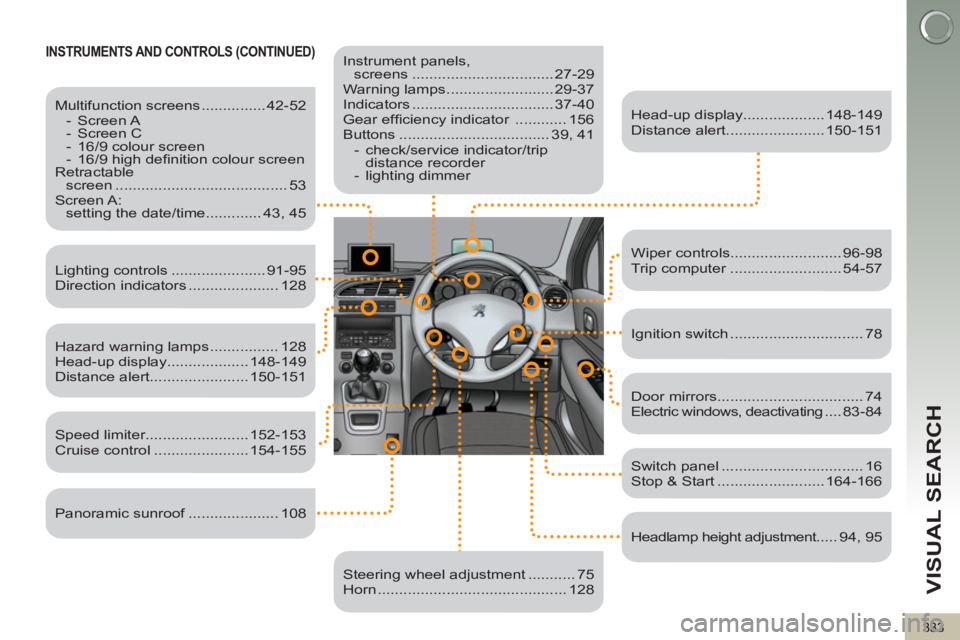
INSTRUMENTS AND CONTROLS (CONTINUED)
Instrument panels,
screens ................................. 27-29
Warning lamps ......................... 29-37
Indicators ................................. 37-40
Gear effi ciency indicator ............ 156
Buttons ................................... 39, 41
- check/service indicator/trip
distance recorder
- lighting dimmer
Head-up display................... 148-149
Distance alert....................... 150-151
Lighting controls ...................... 91-95
Direction indicators ..................... 128
Speed limiter........................ 152-153
Cruise control ...................... 154-155
Switch panel ................................. 16
Stop & Start ......................... 164-166
Door mirrors .................................. 74
Electric windows, deactivating .... 83-84
Headlamp height adjustment..... 94, 95
Steering wheel adjustment ........... 75
Horn ............................................ 128
Multifunction screens ............... 42-52
- Screen A
- Screen C
- 16/9 colour screen
- 16/9 high defi nition colour screen
Retractable
screen ........................................ 53
Screen A:
setting the date/time ............. 43, 45
Hazard warning lamps ................ 128
Head-up display................... 148-149
Distance alert....................... 150-151
Wiper controls.......................... 96-98
Trip computer .......................... 54-57
Ignition switch ............................... 78
Panoramic sunroof ..................... 108