audio PEUGEOT 5008 2012 Owner's Manual
[x] Cancel search | Manufacturer: PEUGEOT, Model Year: 2012, Model line: 5008, Model: PEUGEOT 5008 2012Pages: 340, PDF Size: 16.42 MB
Page 210 of 340
PRACTICAL INFORMATION
208
Let the engine run for the
duration specifi ed to ensure
that the battery charge is suf-
fi cient.
Do not repeatedly and continuously
restart the engine in order to charge
the battery.
A fl at battery prevents the engine
from starting (refer to the "Battery"
paragraph). If the telephone is being used
at this time:
- i
t will be maintained for 5 minutes with
the hands-free kit of your Peugeot
Connect Sound or Peugeot Connect
Navigation,
- it will still be possible to fi nish the
call with the Peugeot Connect
Media.
Exiting economy mode
These functions are reactivated auto-
matically next time the vehicle is driven.
To restore the use of these functions im-
mediately, start the engine and let it run
for at least 5 minutes.
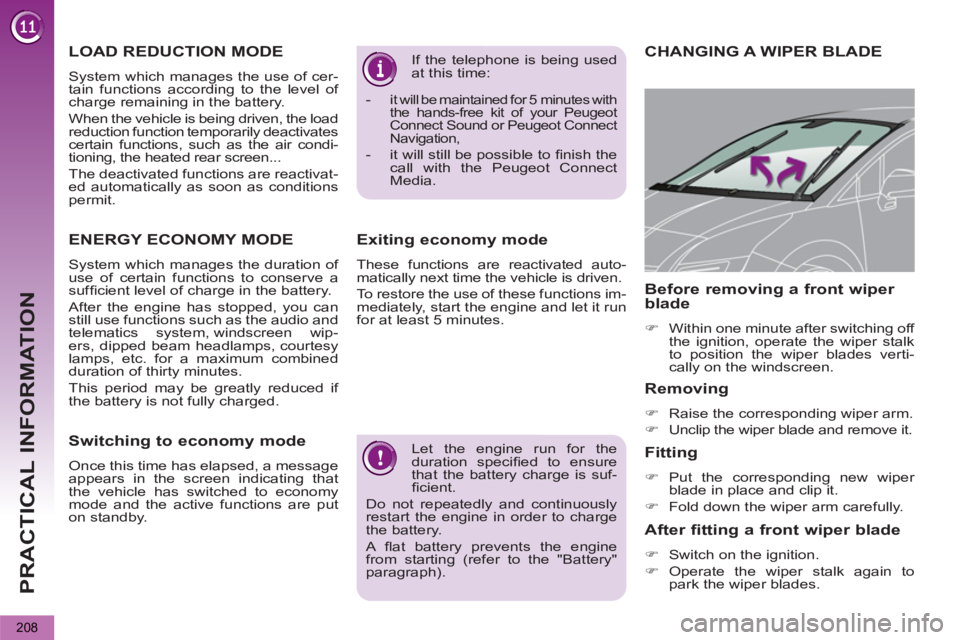
CHANGING A WIPER BLADE
Removing
)
Raise the corresponding wiper arm.
)
Unclip the wiper blade and remove it.
Fitting
)
Put the corresponding new wiper
blade in place and clip it.
)
Fold down the wiper arm carefully.
Before removing a front wiper
blade
)
Within one minute after switching off
the ignition, operate the wiper stalk
to position the wiper blades verti-
cally on the windscreen.
After fitting a front wiper blade
)
Switch on the ignition.
)
Operate the wiper stalk again to
park the wiper blades.
LOAD REDUCTION MODE
System which manages the use of cer-
tain functions according to the level of
charge remaining in the battery.
When the vehicle is being driven, the load
reduction function temporarily deactivates
certain functions, such as the air condi-
tioning, the heated rear screen...
The deactivated functions are reactivat-
ed automatically as soon as conditions
permit.
ENERGY ECONOMY MODE
System which manages the duration of
use of certain functions to conserve a
suffi cient level of charge in the battery.
After the engine has stopped, you can
still use functions such as the audio and
telematics system, windscreen wip-
ers, dipped beam headlamps, courtesy
lamps, etc. for a maximum combined
duration of thirty minutes.
This period may be greatly reduced if
the battery is not fully charged.
Switching to economy mode
Once this time has elapsed, a message
appears in the screen indicating that
the vehicle has switched to economy
mode and the active functions are put
on standby.
Page 215 of 340
PRACTICAL INFORMATION
213
"Multimedia":
audio systems, amplifi ers, satellite navigation
systems, Bluetooth hands-free system, CD
changer, speakers, DVD player, USB Box,
front and rear parking sensors, additional
Bluetooth wireless headphones, Bluetooth
audio headphones mains charger.
Installation of radio
communication
transmitters
Before installing any after-market ra-
dio communication transmitter, you
can contact a PEUGEOT dealer for
the specifi cation of transmitters which
can be fi tted (frequency, maximum
power, aerial position, specifi c instal-
lation requirements), in line with the
Vehicle Electromagnetic Compatibility
Directive (2004/104/EC).
"Protection":
mats * , boot tray, luggage net, coat
hanger fi xed on head restraint, stainless
steel or carbon fi bre style door sills.
*
To avoid any risk of jamming of the
pedals:
- ensure that the mat is positioned
and secured correctly,
- never fi t one mat on top of another.
ACCESSORIES
A wide range of accessories and genu-
ine parts is available from the PEUGEOT
dealer network.
These accessories and parts have been
tested and approved for reliability and
safety.
They are all adapted to your vehicle and
benefi t from PEUGEOT's recommenda-
tion and warranty.
"Safety and security":
anti-theft alarm, window etching, wheel
security bolts, fi rst aid kit, breathalyzer,
warning triangle, high visibility vest, sto-
len vehicle tracking system, dog guard,
snow chains.
"Style":
seat covers compatible with lateral air-
bags, leather gear lever knob, foglamps,
door defl ectors, spoiler, styling strips,
alloy wheels, trims, chrome-plated door
handle shells.
Depending on the legislation
in force in the country, it may
be compulsory to have a high
visibility safety vest, warning triangle
and spare bulbs and fuses available
in the vehicle.
The fi tting of electrical equip-
ment or accessories which
are not recommended by
PEUGEOT may result in a failure of
your vehicle's electronic system and
excessive electrical consumption.
Please note this precaution. You are
advised to contact a PEUGEOT rep-
resentative to be shown the range
of recommended equipment and ac-
cessories.
"Transport solutions":
For leisure pursuits: roof bars, bicycle
carrier on towbar, bicycle carrier on roof
bars, ski carrier, roof box, booster seats
and child seats, side blinds, under shelf
storage.
Trailer towbar, which must be fi tted by a
PEUGEOT dealer.
You can also obtain cleaning and main-
tenance products (exterior and interior),
products for topping up (screenwash
fl uid...) and refi lls (sealant cartridge
for the temporary puncture repair kit...)
from PEUGEOT dealers.
Page 229 of 340
227
2ABC3DEF5JKL4GHI6MNO8TUV7PQRS9WXYZ0*#
1
RADIO MEDIANAV ESC TRAFFIC
SETUPADDR
BOOK
The Peugeot Connect Media is protected in such a
way that it will only operate in your vehicle. If it is to be
installed in another vehicle, contact a PEUGEOT dealer for confi guration of the system.
Certain functions described in this handbook will
become available during the course of the year.
Peugeot ConnectMedia
For safety reasons, it is imperative that the driver carries out operations which require prolonged attention
while the vehicle is stationary.
When the en
gine is switched off and to prevent
discharging of the battery, the Peugeot Connect Mediaswitches off following the activation of the Energy Economy mode.
01 First steps
02 Voice commands and
steering mounted controls
03 General operation
04 Navigation - Guidance
05 Traffic information
06 Radio
07 Music media players
08 Using the telephone
09 Configuration
10 Screen menu map p.
p.
p.
p.
p.
p.
p.
p.
p.
p. 228
230
233
238
247
249
250
255
260
261
CONTENTS
Frequently asked questions p. 2
66
MULTIMEDIA AUDIO SYSTEM/BLUETOOTH TELEPHONE
GPS EUROPE
Page 230 of 340
228
01FIRST STEPS
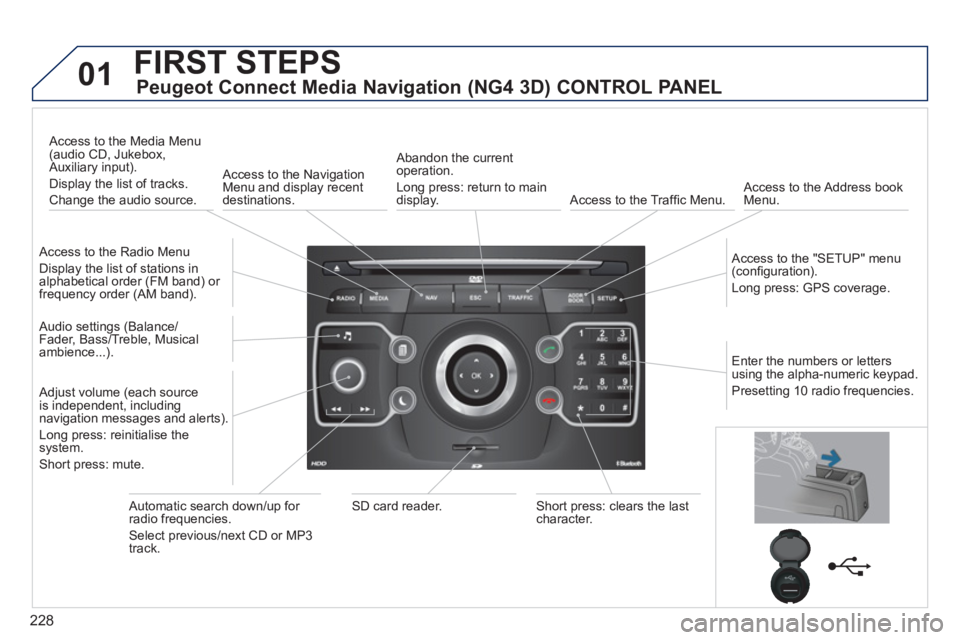
Peugeot Connect Media Navigation (NG4 3D) CONTROL PANEL
Access to the Radio Menu
Display the list of stations in
alphabetical order (FM band) or frequency order (AM band).
Access to the Media Menu(audio CD, Jukebox,
Auxiliary input).
Display the list o
f tracks.
Change the audio source.
Access to the NavigationMenu and display recentdestinations.
Abandon the current
operation.
Long press: return to main
displa
y. Access to the Traffi c Menu.
Access to the Address book Menu.
A
ccess to the "SETUP" menu (confi guration).
Lon
g press: GPS coverage.
Audio settings (Balance/
Fader, Bass/Treble, Musical
ambience...
).
Adjust volume (each source
is independent, including
navigation messages and alerts).
Lon
g press: reinitialise thesystem.
Short press: mute.
Automatic search down/up for radio frequencies.
Select
previous/next CD or MP3
track.
SD card reader.Short press: clears the last character.
Enter the numbers or lettersusing the alpha-numeric keypad.
Presettin
g 10 radio frequencies.
Page 233 of 340
231
02
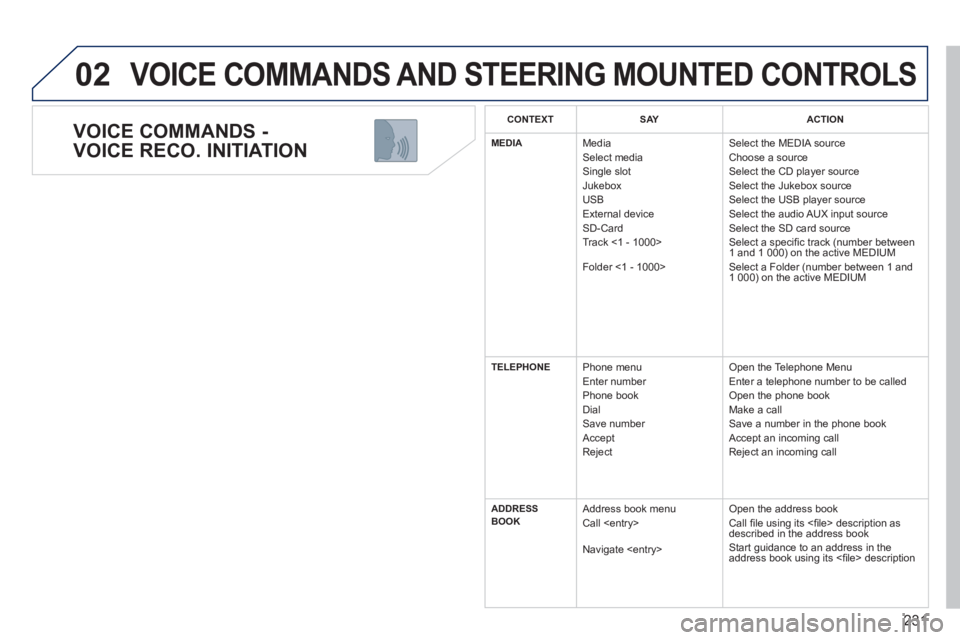
VOICE COMMANDS -
VOICE RECO. INITIATION
VOICE COMMANDS AND STEERING MOUNTED CONTROLS
CONTEXTSAYACTION
MEDIA Media
Select media
Single slot
Jukebox
USB
Ext
ernal device SD-Card
Track <1 - 1000>
F
older <1 - 1000> Select the MEDIA source
Choose a source
Select the CD player source
Select the Jukebox source Select the USB player source
Select the audio AUX input source
Select the SD card source
Select a specifi c track (number between
1 and 1 000) on the active MEDIUM
Select a Folder (number between 1 and
1 000
) on the active MEDIUM
TELEPHONE Phone menu
Enter number
Phone book
Dial
Save number
Accept
Re
ject Open the Telephone Menu
Enter a telephone number to be called
Open the phone book
Make a call
Save a number in the phone book
Accept an incomin
g call
Reject an incoming call
ADDRESS
BOOK Address book menu
Call
Navigate
Open the address book
Call fi le using its <fi le> description asdescribed in the address book
Start guidance to an address in the
address book using its <fi le> description
Page 234 of 340
232
02 VOICE COMMANDS AND STEERING MOUNTED CONTROLS
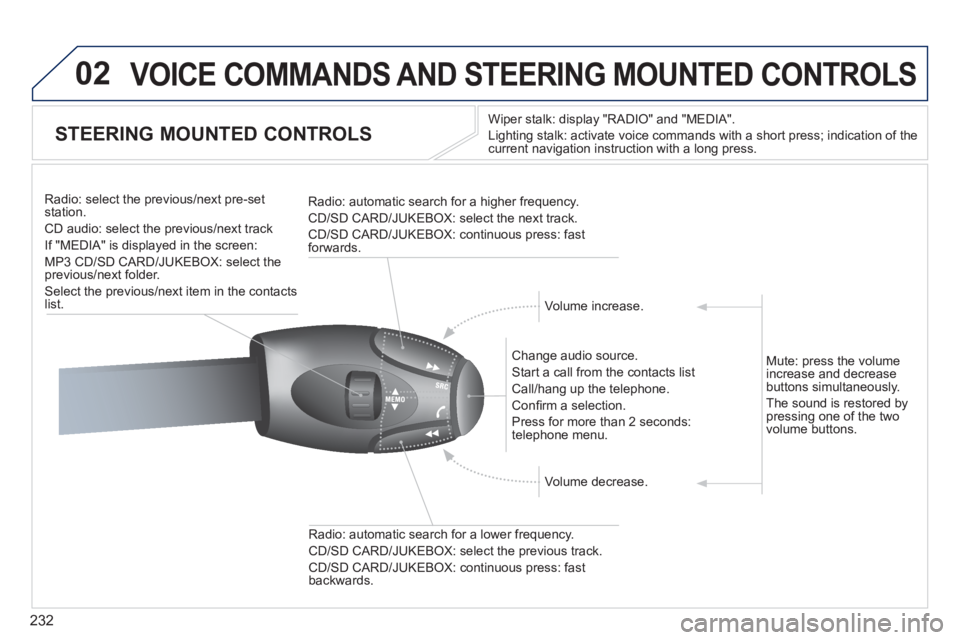
STEERING MOUNTED CONTROLS
Wiper stalk: display "RADIO" and "MEDIA".
Li
ghting stalk: activate voice commands with a short press; indication of the current navigation instruction with a long press.
Change audio source.
Start a call from the contacts list
Call/han
g up the telephone.
Confi rm a selection.
Pr
ess for more than 2 seconds:
telephone menu.
Radio: automatic search for a lower frequenc
y.
CD/SD CARD/JUKEBOX: select the previous track.
CD/SD CARD/JUKEBOX: continuous press: fast backwards. Radio: select the previous
/next pre-setstation.
CD audio: select the previous/next track
If "MEDIA" is displa
yed in the screen:
MP
3 CD/SD CARD/JUKEBOX: select the
previous/next folder.
Select the previous/next item in the contacts list.
Radio: automatic search
for a higher frequency.
CD/SD CARD/JUKEBOX: select the next track.
CD/SD CARD/JUKEBOX: continuous press: fast
forwards.
Volume increase.
Volume decrease. Mute: press the volume
increase and decreasebuttons simultaneously.
The sound is restored b
y pressing one of the two
volume buttons.
Page 235 of 340
233
03
SETUP
TRAFFIC
MEDIA
GENERAL OPERATION
For a detailed global view of the menus available, refer to the "Screen menu map" section of this handbook.
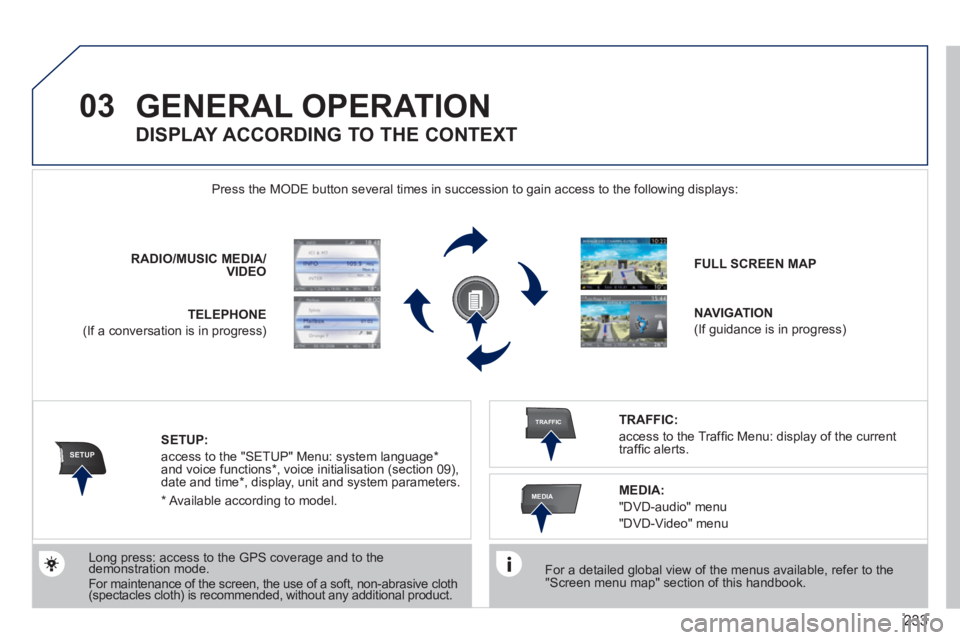
Press the M
ODE button several times in succession to gain access to the following displays:
Long press: access to the GPS coverage and to the demonstration mode. gpgp
For maintenance of the screen, the use of a soft, non-abrasive cloth (spectacles cloth) is recommended, without any additional product. RADIO
/MUSICMEDIA/VIDEO
TELEPHONE
(If a conversation is in progress)
FULL SCREEN MAP
NAVIGATION
(If guidance is in progress)
SETUP:
access to the "SETUP" Menu: system language *
and voice functions * , voice initialisation (section 09),
date and time * , display, unit and system parameters.
TRAFFIC:
access to the Traffi c Menu: display of the current
traffi c alerts.
DISPLAY ACCORDING TO THE CONTEXT
MEDIA:
"DVD-audio" menu
"DVD-Video" menu
*
Available accordin
g to model.
Page 237 of 340
235
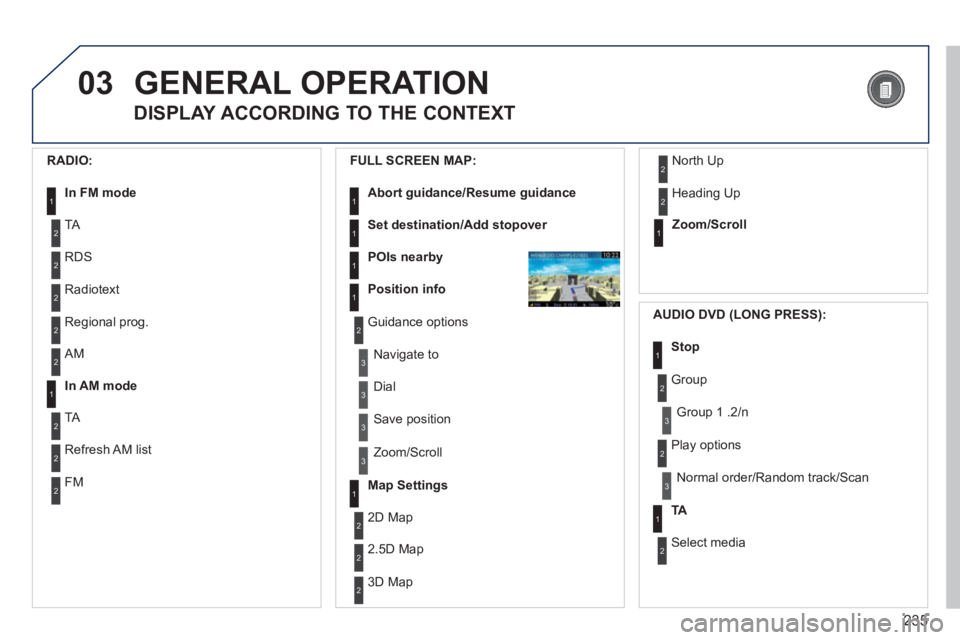
03GENERAL OPERATION
DISPLAY ACCORDING TO THE CONTEXT
RADIO:
In FM mode1
2
2
TA
RDS
2Radiotext
2Regional prog.
FULL
SCREEN MAP:
Abort guidance/Resume guidance1
1
1
1
Set destination/Add stopover
POIs nearby
Position info
2Guidance options
3
3
Navigate to
Dial
3 Save position
3
Zoom/Scroll
Map Settings1
1Zoom/Scroll
2
2
2D Map
2.5D Map
23D Map
2 North Up
2
Heading Up
AUDIO DVD (LONG PRESS):
1Stop
2 Group
3Group 1 .2/n
TA1
2 Select media
2
Play options
3Normal order/Random track/Scan
AM
In AM mode
TA
Refresh AM list
FM
2
1
2
2
2
Page 238 of 340
236
03
3
3
DVD menu
DVD top menu
3
List of titles
3
List of chapters
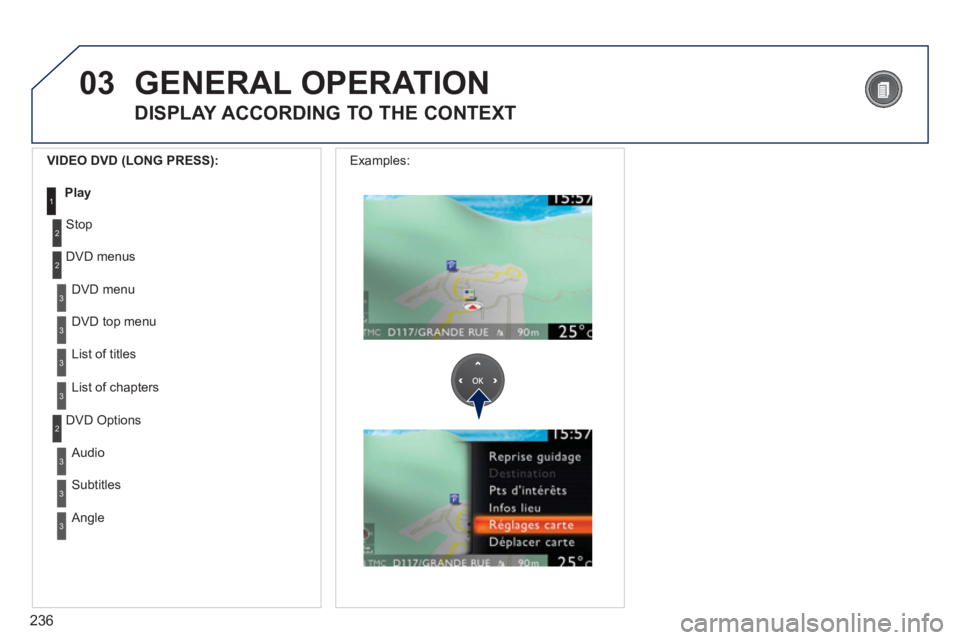
VIDEO DVD (LONG PRESS):
Play1
GENERAL OPERATION
DISPLAY ACCORDING TO THE CONTEXT
2
2
Stop
DVD menus
3
3
Audio
Subtitles
3 Angle
2 DVD Options Examples:
Page 250 of 340
248
05
21
2
3
2ABC3DEF5JKL4GHI6MNO8TUV7PQRS9WXYZ0*#
1RADIO MEDIANAV ESC TRAFFIC
SETUPADDR
BOOK
2ABC3DEF5JKL4GHI6MNO8TUV7PQRS9WXYZ0*#
1RADIO MEDIANAV ESC TRAFFIC
SETUPADDR
BOOK
TRAFFIC INFORMATION
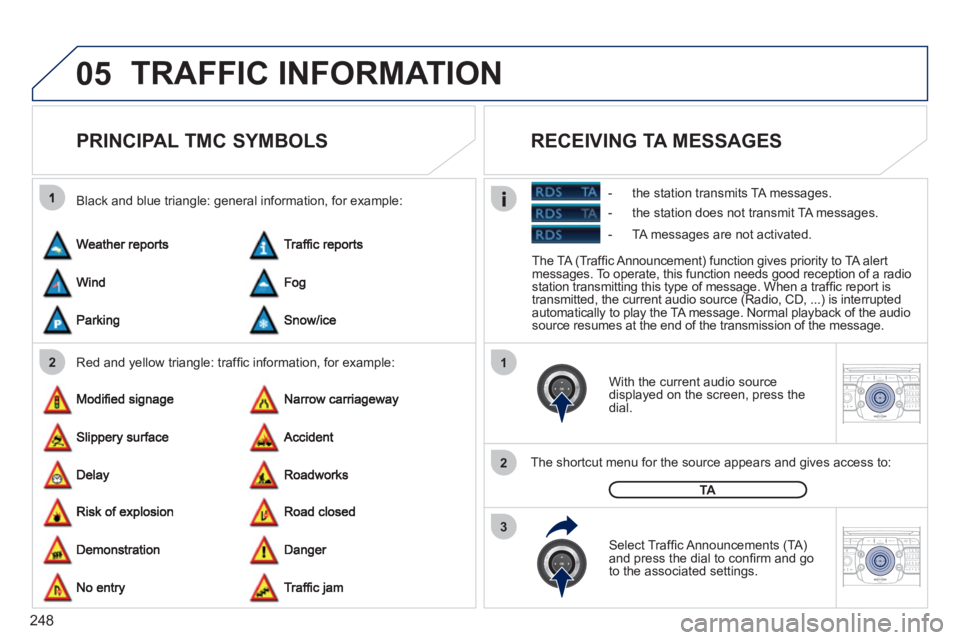
PRINCIPAL TMC SYMBOLS
Red and yellow triangle: traffi c information, for example: Black and blue trian
gle: general information, for example:
With the current audio source
displayed on the screen, press the
dial.
The shortcut menu for the source appears and
gives access to:
Select Traffi c Announcements
(TA)and press the dial to confi rm and go
to the associated settings.
TA
The TA (Traffi c Announcement) function gives priority to TA alert messages. To operate, this function needs good reception of a radio station transmitting this type of message. When a traffi c report is
transmitted, the current audio source (Radio, CD, ...) is interrupted
automatically to play the TA message. Normal playback of the audio source resumes at the end of the transmission of the message.
RECEIVING TA MESSAGES
- the station transmits TA messages.
- the station does not transmit TA messa
ges.
- TA messa
ges are not activated.