service PEUGEOT 5008 2012 Owner's Manual
[x] Cancel search | Manufacturer: PEUGEOT, Model Year: 2012, Model line: 5008, Model: PEUGEOT 5008 2012Pages: 340, PDF Size: 16.42 MB
Page 258 of 340
256
08
1
4
5
3
2
2ABC3DEF5JKL4GHI6MNO8TUV7PQRS9WXYZ0*#
1RADIO MEDIANAV ESC TRAFFIC
SETUPADDR
BOOK
2ABC3DEF5JKL4GHI6MNO8TUV7PQRS9WXYZ0*#
1RADIO MEDIANAV ESC TRAFFIC
SETUPADDR
BOOK
2ABC3DEF5JKL4GHI6MNO8TUV7PQRS9WXYZ0*#
1RADIO MEDIANAV ESC TRAFFIC
SETUPADDR
BOOK
2ABC3DEF5JKL4GHI6MNO8TUV7PQRS9WXYZ0*#
1RADIO MEDIANAV ESC TRAFFIC
SETUPADDR
BOOK
2ABC3DEF5JKL4GHI6MNO8TUV7PQRS9WXYZ0*#
1RADIO MEDIANAV ESC TRAFFIC
SETUPADDR
BOOK2ABC3DEF5JKL4GHI6MNO8TUV7PQRS9WXYZ0*#
1RADIO MEDIANAV ESC TRAFFIC
SETUPADDR
BOOK
*
The services available via the telephone depend on the network, the SIMcard and the compatibility of the Bluetooth equipment used. Refer to your
telephone's manual and your operator to check which services you haveaccess to.
USING THE TELEPHONE
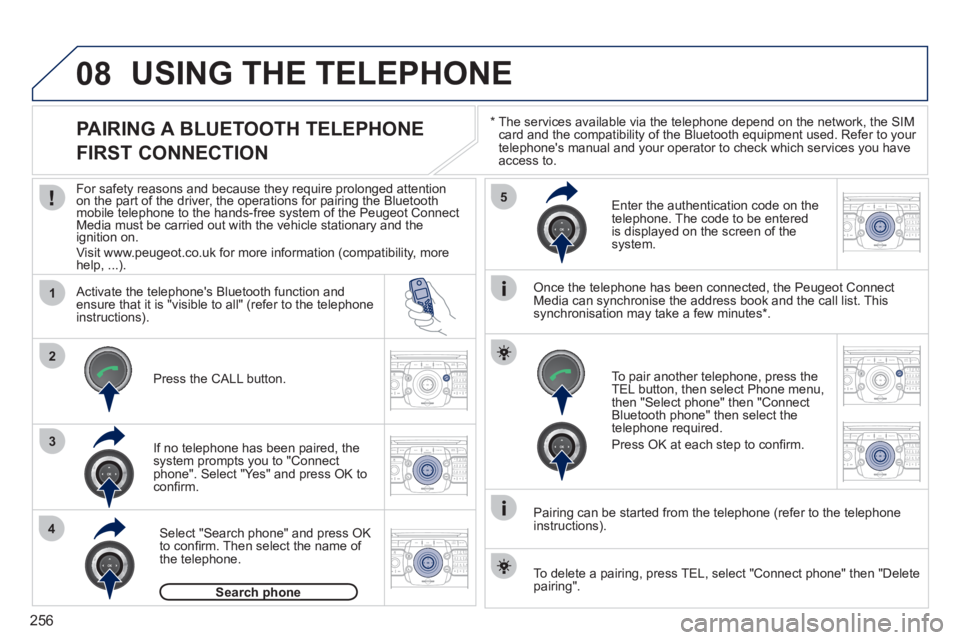
PAIRING A BLUETOOTH TELEPHONE
FIRST CONNECTION
For safety reasons and because they require prolonged attentionon the part of the driver, the operations for pairing the Bluetooth yygy
mobile telephone to the hands-free system of the Peugeot ConnectMedia must be carried out with the vehicle stationary and the
ignition on.
Visit www.peugeot.co.uk for more information (compatibility, morehelp, ...).
Activate the tele
phone's Bluetooth function andensure that it is "visible to all" (refer to the telephone
instructions).
If no tele
phone has been paired, the
system prompts you to "Connect
phone". Select "Yes" and press OK to confi rm.
Ent
er the authentication code on thetelephone. The code to be entered
is displayed on the screen of the system.
To pair another telephone, press the
TEL button, then select Phone menu,then "Select phone" then "Connect Bluetooth phone" then select the
telephone required.
Press
OK at each step to confi rm.
Once the telephone has been connected, the Peugeot ConnectMedia can synchronise the address book and the call list. This
synchronisation may take a few minutes * .
Pairin
g can be started from the telephone (refer to the telephone
instructions). Press the
CALL button.
Select "Search phone" and press OK
to confi rm. Then select the name of
the telephone.
Search phonep
To delete a pairing, press TEL, select "Connect phone" then "Delete
pairing".
Page 259 of 340
257
08
1
2
2ABC3DEF5JKL4GHI6MNO8TUV7PQRS9WXYZ0*#
1RADIO MEDIANAV ESC TRAFFIC
SETUPADDR
BOOK
*
The services available via the telephone depend on the network, the SIM card and the compatibility of the Bluetooth equipment used. Refer toyour telephone's manual and your operator to check which services you have access to. A list of mobile telephones which offer the best range of services is available from dealers.
USING THE TELEPHONE
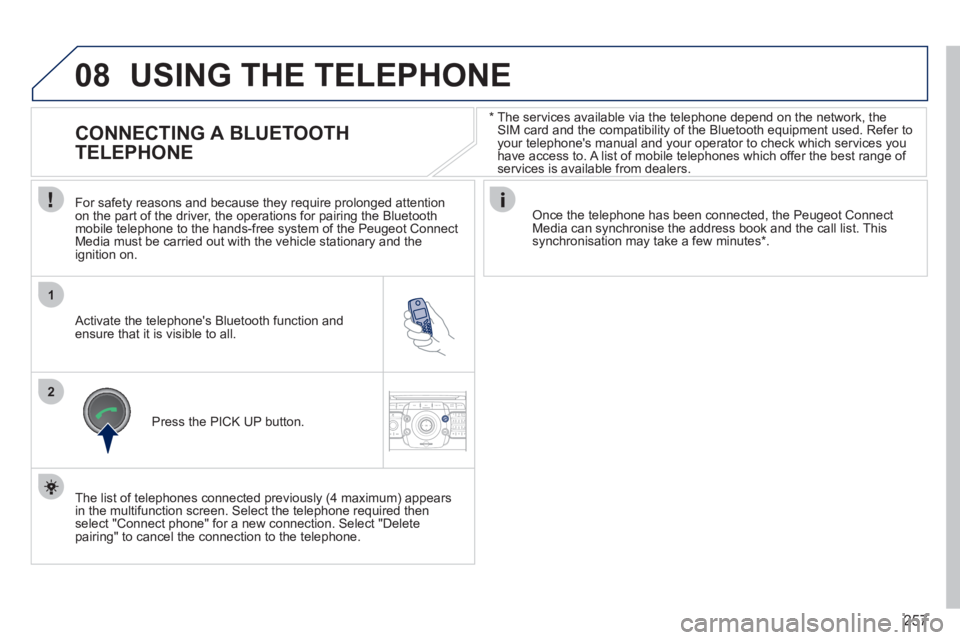
CONNECTING A BLUETOOTH
TELEPHONE
For safety reasons and because they require prolonged attention
on the part of the driver, the operations for pairing the Bluetoothmobile telephone to the hands-free system of the Peugeot ConnectMedia must be carried out with the vehicle stationary and the
ignition on.
Activate the telephone's Bluetooth function and ensure that it is visible to all.
Once the telephone has been connected, the Peugeot Connect Media can synchronise the address book and the call list. This synchronisation may take a few minutes * .
Press the PI
CK UP button.
The list of telephones connected previousl
y (4 maximum) appears
in the multifunction screen. Select the telephone required then
select "Connect phone" for a new connection. Select "Delete pairing" to cancel the connection to the telephone.
Page 260 of 340
258
08
14
5
2ABC3DEF5JKL4GHI6MNO8TUV7PQRS9WXYZ0*#
1
3
2
2ABC3DEF5JKL4GHI6MNO8TUV7PQRS9WXYZ0*#
1RADIO MEDIANAV ESC TRAFFIC
SETUPADDR
BOOK
2ABC3DEF5JKL4GHI6MNO8TUV7PQRS9WXYZ0*#
1NAV ESC TRAFFICADDR
BOOKSETUP2ABC3DEF5JKL4GHI6MNO8TUV7PQRS9WXYZ0*#
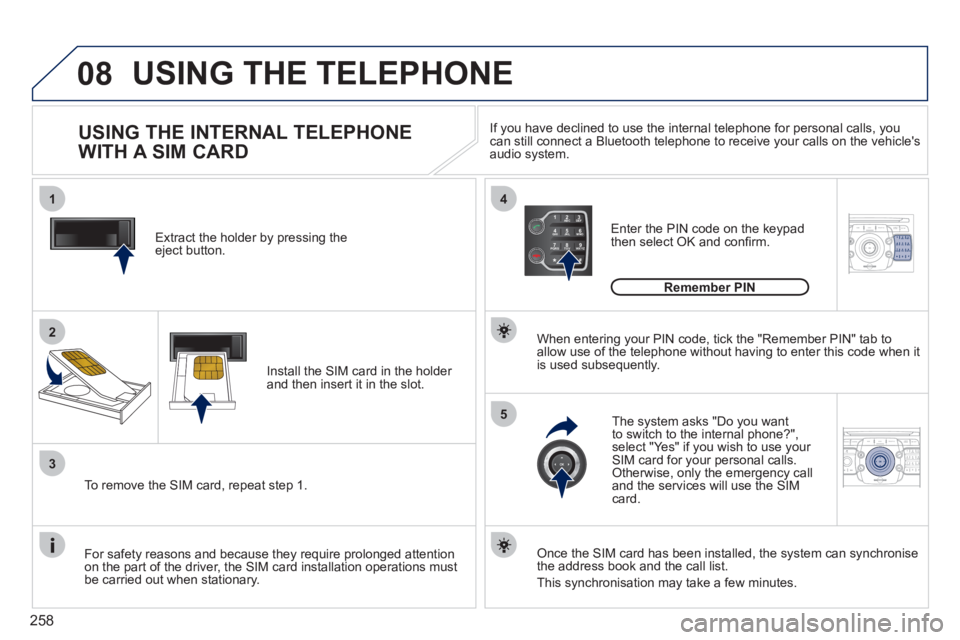
1Extract the holder by pressing theeject button.
Install the
SIM card in the holder and then insert it in the slot.
To remove the
SIM card, repeat step 1.
For safet
y reasons and because they require prolonged attention
on the part of the driver, the SIM card installation operations must
be carried out when stationary.
Enter the PIN code on the keypad
then select OK and confi rm.
The s
ystem asks "Do you want
to switch to the internal phone?", select "Yes" if you wish to use your SIM card for your personal calls. Otherwise, only the emergency call
and the services will use the SIMcard.
Remember PIN
When enterin
g your PIN code, tick the "Remember PIN" tab toallow use of the telephone without having to enter this code when itis used subsequently.
USING THE INTERNAL TELEPHONE
WITH A SIM CARD
USING THE TELEPHONE
Once the SIM card has been installed, the system can synchronise
the address book and the call list.
This synchronisation may take a
few minutes. I
f you have declined to use the internal telephone for personal calls, you can still connect a Bluetooth telephone to receive your calls on the vehicle's audio system.
Page 265 of 340
263
ADDR
BOOK
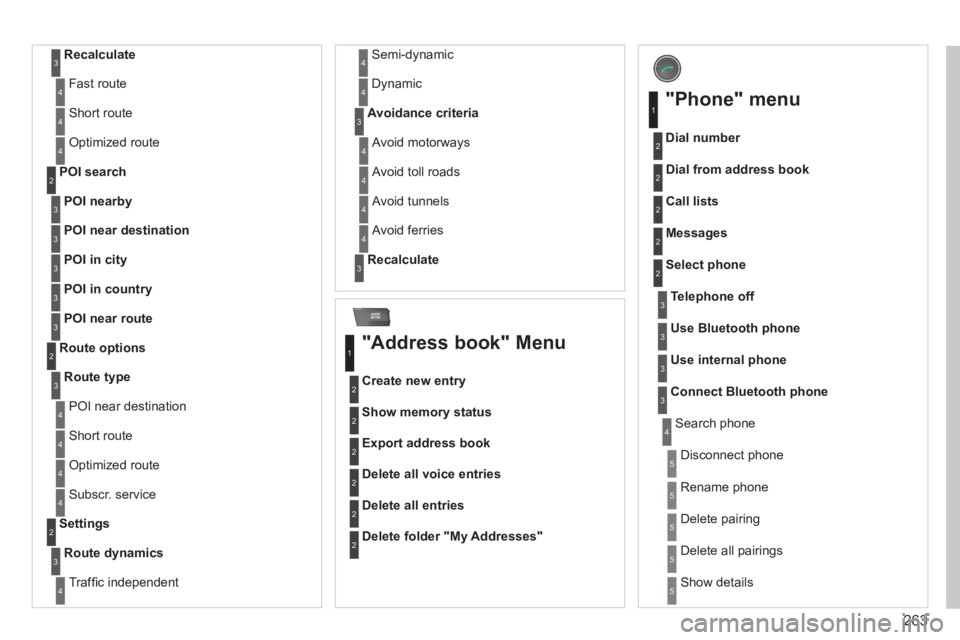
Recalculate3
Fast route4
Short route 4
Optimized route 4
POI nearby
POI search2
3
POI near destination3
POI in city3
POI in country3
POI near route3
Route type
Route options2
3
POI near destination4
Short route 4
Optimized route 4
Subscr. service4
Route dynamics
Settings2
3
Traffi c independent4
Semi-dynamic4
Dynamic 4
Avoidance criteria3
Avoid motorways4
Avoid toll roads 4
Avoid tunnels4
Avoid ferries 4
Recalculate3
"Address book" Menu
Create new entry
1
2
Show memory status2
Export address book2
Delete all voice entries 2
Delete all entries 2
Delete folder "My Addresses"2
"Phone" menu
Dial number
1
2
Dial from address book2
Call lists2
Messages 2
Select phone2
Search phone4
Telephone off3
Use Bluetooth phone3
Use internal phone3
Connect Bluetooth phone3
Disconnect phone5
Rename phone 5
Delete pairing 5
Delete all pairings 5
Show details5
Page 284 of 340
282
04
8
6
7
4
3
5
2
1
NAVIGATION - GUIDANCE
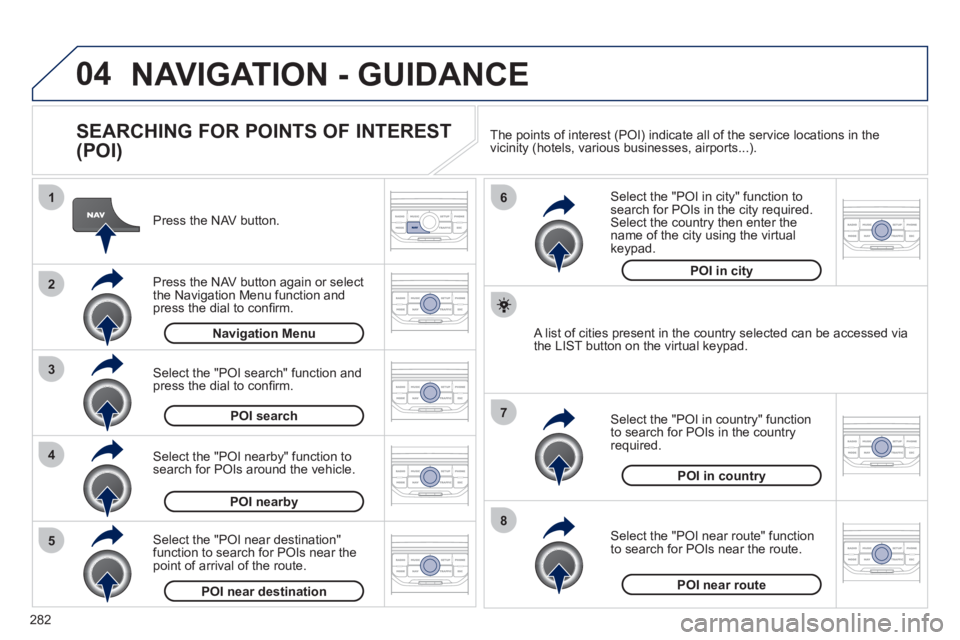
SEARCHING FOR POINTS OF INTEREST
(POI)
Press the NAV button.
Press the NAV button again or select
the Navigation Menu function and press the dial to confi rm.
Select the "POI nearby" function to search for POIs around the vehicle.
Select the "POI search" function and press the dial to confi rm. Navigation Menu
POI search
POI nearby
Select the "POI in city" function tosearch for POIs in the city required.Select the country then enter the name of the city using the virtual
keypad.
Select the "POI near route" function
to search for POIs near the route.
Select the "P
OI in country" function
to search for POIs in the country
required.
Select the "POI near destination"function to search for POIs near thepoint of arrival of the route.
POI near destinationPOI near route
POI in country
POI in city
A list of cities present in the country selected can be accessed via
the LIST button on the virtual keypad. The points o
f interest (POI) indicate all of the service locations in the
vicinity (hotels, various businesses, airports...).
Page 293 of 340
291
08
1
2
3
4
BLUETOOTH TELEPHONE
*
The services available depend on the network, the SIM card and thecompatibility of the Bluetooth telephone used. Check the telephone
manual and with your network provider for details of the servicesavailable to you.
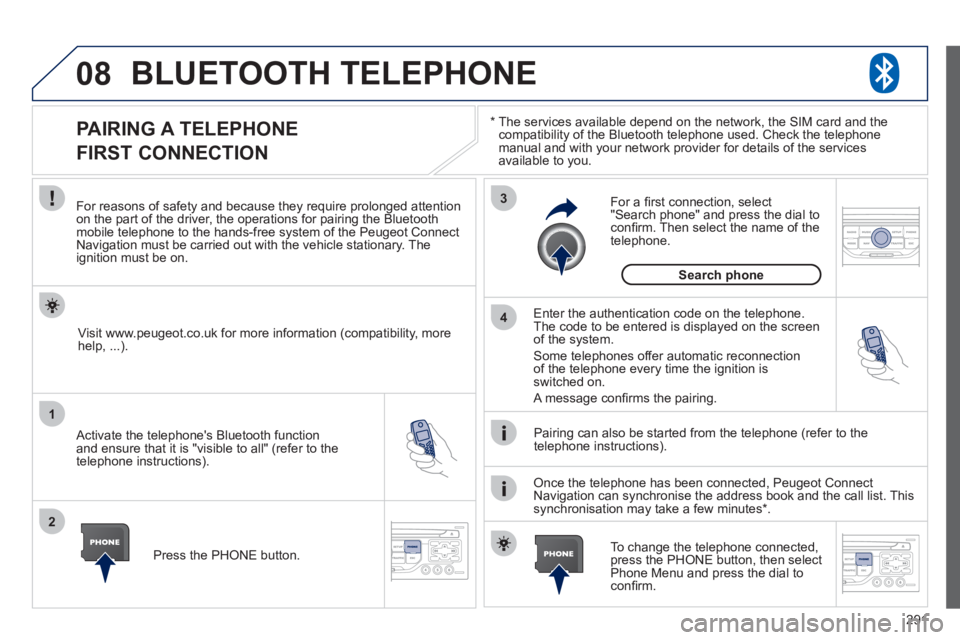
PAIRING A TELEPHONE
FIRST CONNECTION
For reasons of safety and because they require prolonged attentionon the part of the driver, the operations for pairing the Bluetooth mobile telephone to the hands-free system of the Peugeot ConnectNavigation must be carried out with the vehicle stationary. Theignition must be on.
Activate the telephone's Bluetooth
function
and ensure that it is "visible to all" (refer to the
telephone instructions).
Enter the authentication code on the telephone. The code to be entered is displayed on the screen
of the system.
Some telephones offer automatic reconnection
of the telephone every time the ignition is switched on.
A messa
ge confi rms the pairing.
To change the telephone connected, press the PHONE button, then select Phone Menu and press the dial toconfi rm.
Once the telephone has been connected, Peugeot Connect
Navigation can synchronise the address book and the call list. This
synchronisation may take a few minutes * . Pairin
g can also be started from the telephone (refer to the
telephone instructions). Visit www.peu
geot.co.uk for more information (compatibility, more
help, ...).
Press the PH
ONE button.
For a
fi rst connection, select"Search phone" and press the dial to confi rm. Then select the name of thetelephone.
Search
phone
Page 294 of 340
292
08
1
2
2
1
*
The services available depend on the network, the SIM card and the compatibility of the Bluetooth telephone used. Check the telephone manual and with your network provider for details of the services
available to you.
BLUETOOTH TELEPHONE
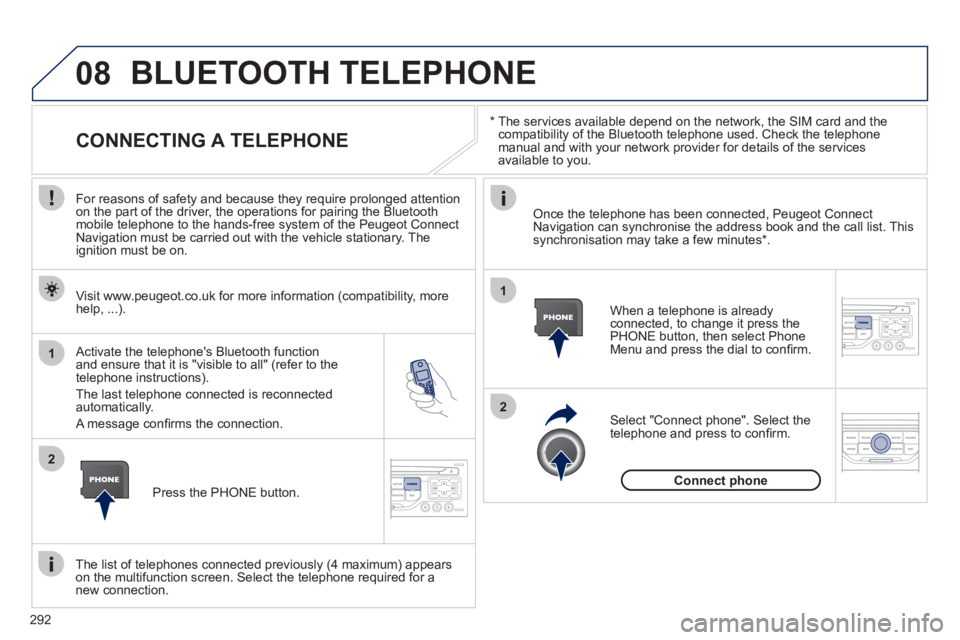
CONNECTING A TELEPHONE
For reasons of safety and because they require prolonged attention
on the part of the driver, the operations for pairing the Bluetooth
mobile telephone to the hands-free system of the Peugeot Connect
Navigation must be carried out with the vehicle stationary. The
ignition must be on.
Activate the tele
phone's Bluetooth function and ensure that it is "visible to all" (refer to the
telephone instructions).
The last telephone connected is reconnected automatically.
A messa
ge confi rms the connection. When a telephone is alread
yconnected, to change it press the
PHONE button, then select PhoneMenu and press the dial to confi rm.
Once the telephone has been connected, Peugeot Connect Navigation can synchronise the address book and the call list. This synchronisation may take a few minutes *
.
The list o
f telephones connected previously (4 maximum) appearson the multifunction screen. Select the telephone required for a
new connection. Visit www.peu
geot.co.uk for more information (compatibility, more
help, ...).
Press the PH
ONE button.Select "Connect
phone". Select the
telephone and press to confi rm.
Connect
phone
Page 315 of 340
313
06
1
2
3
4
5
6
7
8
9
MENU
OK
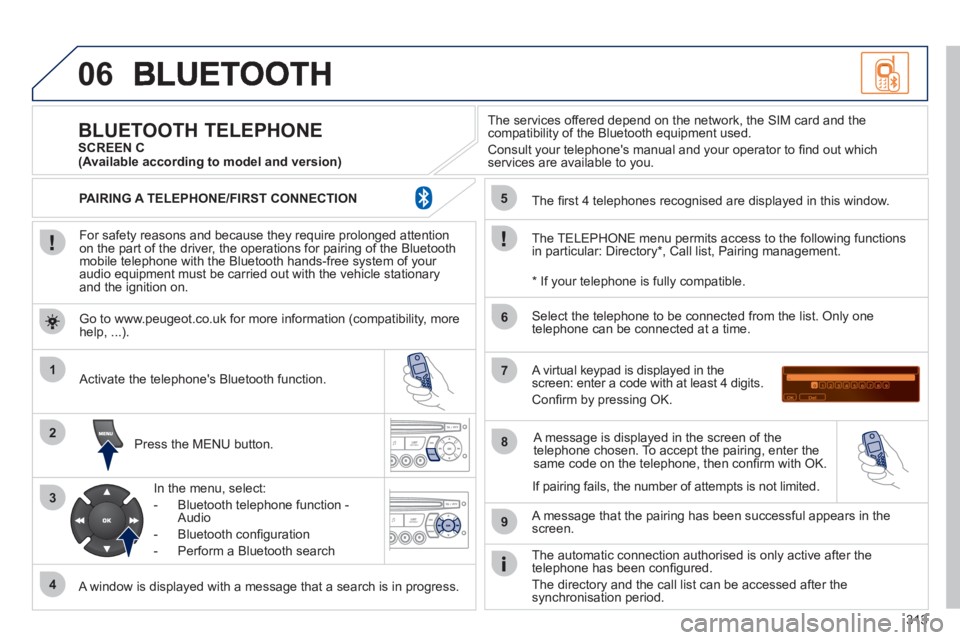
For safety reasons and because they require prolonged attentionon the part of the driver, the operations for pairing of the Bluetooth mobile telephone with the Bluetooth hands-free system of your
audio equipment must be carried out with the vehicle stationary
and the ignition on.
Pr
ess the MENU button.
A window is displayed with a message that a search is in progress.
Activate the telephone's Bluetooth
function.
In the menu, select:
- Bluetooth telephone
function -
Audio
- Bluetooth confi
guration
- P
erform a Bluetooth search
The services o
ffered depend on the network, the SIM card and thecompatibility of the Bluetooth equipment used.
Consult your telephone's manual and your operator to fi nd out which
services are available to you.
BLUETOOTH TELEPHONE SCREEN C
The TELEPH
ONE menu permits access to the following functions
in particular: Directory * , Call list, Pairing management.
The
fi rst 4 telephones recognised are displayed in this window.
A virtual ke
ypad is displayed in thescreen: enter a code with at least 4 digits.
Confi rm by pressing OK.
A messa
ge that the pairing has been successful appears in thescreen.
Select the telephone to be connected from the list. Only one
telephone can be connected at a time.
A messa
ge is displayed in the screen of the
telephone chosen. To accept the pairing, enter the same code on the telephone, then confi rm with OK.
The automatic connection authorised is onl
y active after the
telephone has been confi gured.
The directory and the call list can be accessed a
fter thesynchronisation period.
(Available according to model and version)
*
If your telephone is fully compatible.
I
f pairing fails, the number of attempts is not limited. Go to www.peu
geot.co.uk for more information (compatibility, more help, ...).
PAIRING A TELEPHONE/FIR
ST CONNECTION
Page 329 of 340
ALPHABETICAL INDEX
327
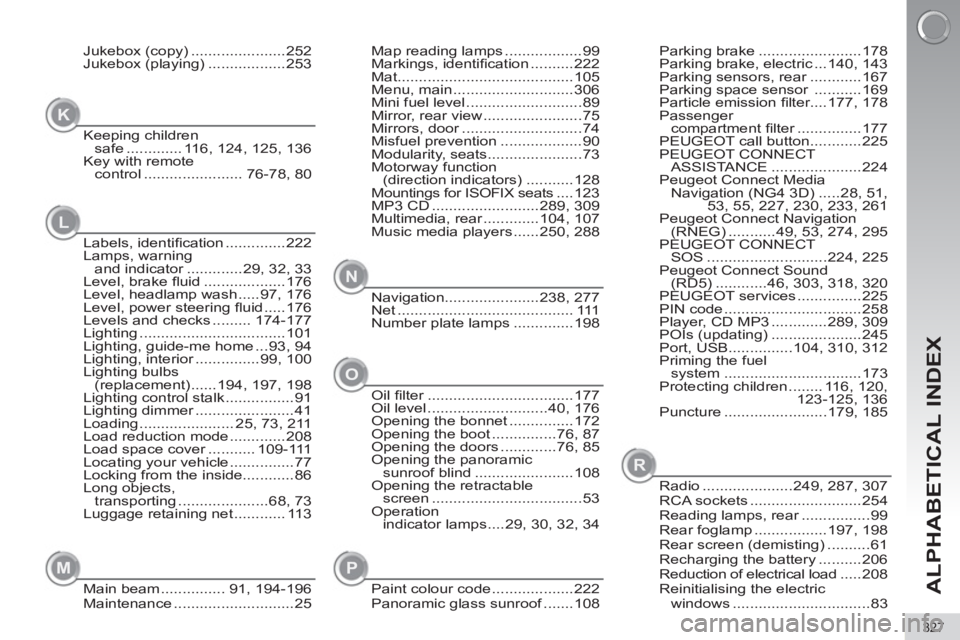
Map reading lamps ..................99
Markings, identifi cation ..........222
Mat.........................................105
Menu, main ............................306
Mini fuel level ...........................89
Mirror, rear view .......................75
Mirrors, door ............................74
Misfuel prevention ...................90
Modularity, seats ......................73
Motorway function
(direction indicators) ...........128
Mountings for ISOFIX seats ....123
MP3 CD .........................289, 309
Multimedia, rear .............104, 107
Music media players ......250, 288
Navigation......................238, 277
Net ......................................... 111
Number plate lamps ..............198
N
Parking brake ........................178
Parking brake, electric ...140, 143
Parking sensors, rear ............167
Parking space sensor ...........169
Particle emission fi lter....177, 178
Passenger
compartment fi lter ...............177
PEUGEOT call button ............225
PEUGEOT CONNECT
ASSISTANCE .....................224
Peugeot Connect Media
Navigation (NG4 3D) .....28, 51,
53, 55, 227, 230, 233, 261
Peugeot Connect Navigation
(RNEG) ...........49, 53, 274, 295
PEUGEOT CONNECT
SOS ............................224, 225
Peugeot Connect Sound
(RD5) ............46, 303, 318, 320
PEUGEOT services ...............225
PIN code ................................258
Player, CD MP3 .............289, 309
POIs (updating) .....................245
Port, USB...............104, 310, 312
Priming the fuel
system ................................173
Protecting children ........ 116, 120,
123-125, 136
Puncture ........................179, 185Jukebox (copy) ......................252
Jukebox (playing) ..................253
Keeping children
safe ............. 116, 124, 125, 136
Key with remote
control ....................... 76-78, 80
K
Labels, identifi cation ..............222
Lamps, warning
and indicator .............29, 32, 33
Level, brake fl uid ...................176
Level, headlamp wash .....97, 176
Level, power steering fl uid .....176
Levels and checks ......... 174-177
Lighting ..................................101
Lighting, guide-me home ...93, 94
Lighting, interior ...............99, 100
Lighting bulbs
(replacement) ......194, 197, 198
Lighting control stalk ................91
Lighting dimmer .......................41
Loading ...................... 25, 73, 211
Load reduction mode .............208
Load space cover ........... 109-111
Locating your vehicle ...............77
Locking from the inside............86
Long objects,
transporting .....................68, 73
Luggage retaining net ............ 113
L
Main beam ............... 91, 194-196
Maintenance ............................25
M
Oil fi lter ..................................177
Oil level ............................40, 176
Opening the bonnet ...............172
Opening the boot ...............76, 87
Opening the doors .............76, 85
Opening the panoramic
sunroof blind .......................108
Opening the retractable
screen ...................................53
Operation
indicator lamps ....29, 30, 32, 34
O
Paint colour code ...................222
Panoramic glass sunroof .......108
P
Radio .....................249, 287, 307
RCA sockets ..........................254
Reading lamps, rear ................99
Rear foglamp .................197, 198
Rear screen (demisting) ..........61
Recharging the battery ..........206
Reduction of electrical load .....208
Reinitialising the electric
windows ................................83
R
Page 330 of 340
ALPHABETICAL INDEX
328
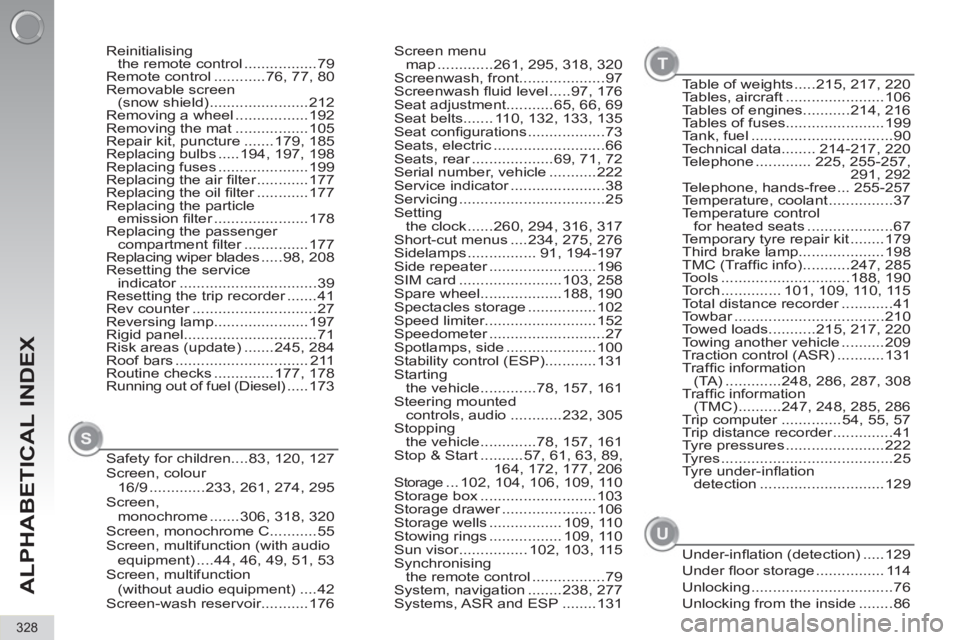
Screen menu
map .............261, 295, 318, 320
Screenwash, front....................97
Screenwash fl uid level .....97, 176
Seat adjustment...........65, 66, 69
Seat belts....... 110, 132, 133, 135
Seat confi gurations ..................73
Seats, electric ..........................66
Seats, rear ...................69, 71, 72
Serial number, vehicle ...........222
Service indicator ......................38
Servicing ..................................25
Setting
the clock ......260, 294, 316, 317
Short-cut menus ....234, 275, 276
Sidelamps ................ 91, 194-197
Side repeater .........................196
SIM card ........................103, 258
Spare wheel...................188, 190
Spectacles storage ................102
Speed limiter..........................152
Speedometer ...........................27
Spotlamps, side .....................100
Stability control (ESP)............131
Starting
the vehicle .............78, 157, 161
Steering mounted
controls, audio ............232, 305
Stopping
the vehicle .............78, 157, 161
Stop & Start ..........57, 61, 63, 89,
164, 172, 177, 206
Storage ... 102, 104, 106, 109, 110
Storage box ...........................103
Storage drawer ......................106
Storage wells ................. 109, 110
Stowing rings ................. 109, 110
Sun visor................ 102, 103, 115
Synchronising
the remote control .................79
System, navigation ........238, 277
Systems, ASR and ESP ........131 Reinitialising
the remote control .................79
Remote control ............76, 77, 80
Removable screen
(snow shield) .......................212
Removing a wheel .................192
Removing the mat .................105
Repair kit, puncture .......179, 185
Replacing bulbs .....194, 197, 198
Replacing fuses .....................199
Replacing the air fi lter ............177
Replacing the oil fi lter ............177
Replacing the particle
emission fi lter ......................178
Replacing the passenger
compartment fi lter ...............177
Replacing wiper blades .....98, 208
Resetting the service
indicator ................................39
Resetting the trip recorder .......41
Rev counter .............................27
Reversing lamp......................197
Rigid panel...............................71
Risk areas (update) .......245, 284
Roof bars ............................... 211
Routine checks ..............177, 178
Running out of fuel (Diesel) .....173
Safety for children....83, 120, 127
Screen, colour
16/9 .............233, 261, 274, 295
Screen,
monochrome .......306, 318, 320
Screen, monochrome C...........55
Screen, multifunction (with audio
equipment) ....44, 46, 49, 51, 53
Screen, multifunction
(without audio equipment) ....42
Screen-wash reservoir...........176
S
Table of weights .....215, 217, 220
Tables, aircraft .......................106
Tables of engines...........214, 216
Tables of fuses.......................199
Tank, fuel .................................90
Technical data........ 214-217, 220
Telephone ............. 225, 255-257,
291, 292
Telephone, hands-free ... 255-257
Temperature, coolant ...............37
Temperature control
for heated seats ....................67
Temporary tyre repair kit ........179
Third brake lamp....................198
TMC (Traffi c info) ...........247, 285
Tools ..............................188, 190
Torch .............. 101, 109, 110, 115
Total distance recorder ............41
Towbar ...................................210
Towed loads...........215, 217, 220
Towing another vehicle ..........209
Traction control (ASR) ...........131
Traffi c information
(TA) .............248, 286, 287, 308
Traffi c information
(TMC) ..........247, 248, 285, 286
Trip computer ..............54, 55, 57
Trip distance recorder ..............41
Tyre pressures .......................222
Tyres ........................................25
Tyre under-infl ation
detection .............................129
T
Under-infl ation (detection) .....129
Under fl oor storage ................ 114
Unlocking .................................76
Unlocking from the inside ........86
U