stop start PEUGEOT 5008 2012 Owner's Guide
[x] Cancel search | Manufacturer: PEUGEOT, Model Year: 2012, Model line: 5008, Model: PEUGEOT 5008 2012Pages: 340, PDF Size: 16.42 MB
Page 270 of 340
268
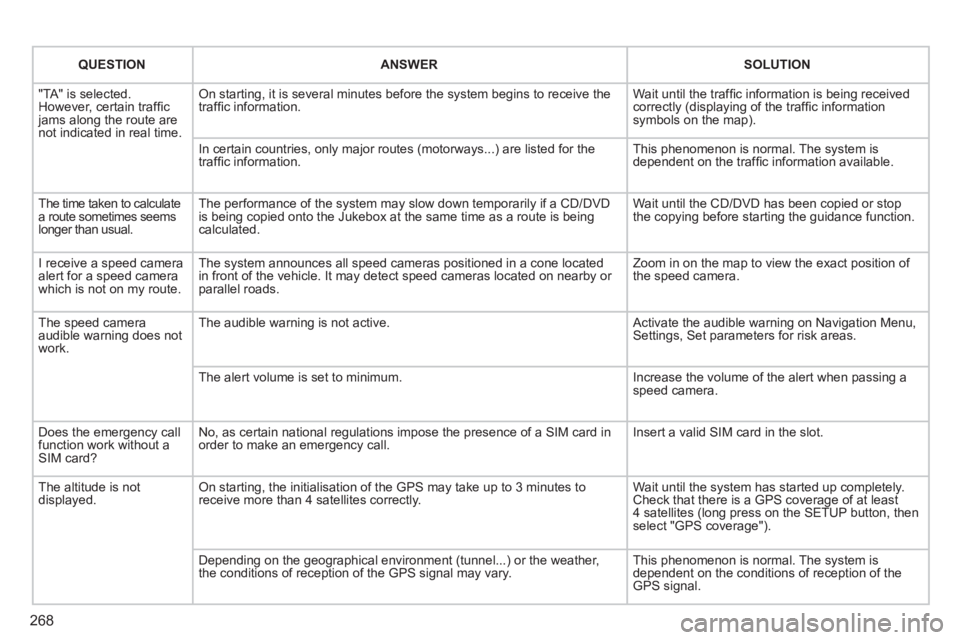
QUESTIONANSWERSOLUTION
"TA" is selected. However, certain traffi c jams along the route arenot indicated in real time.
On starting, it is several minutes before the system begins to receive thetraffi c information.
Wait until the traffi c information is being received correctly (displaying of the traffi c information symbols on the map).
In certain countries, only major routes (motorways...) are listed for thetraffi c information.
This phenomenon is normal. The system isdependent on the traffi c information available.
The time taken to calculatea route sometimes seemslonger than usual.
The performance of the system may slow down temporarily if a CD/DVDis being copied onto the Jukebox at the same time as a route is being calculated.
Wait until the CD/DVD has been copied or stop the copying before starting the guidance function.
I receive a speed camera alert for a speed camera which is not on my route.
The system announces all speed cameras positioned in a cone located in front of the vehicle. It may detect speed cameras located on nearby or parallel roads.
Zoom in on the map to view the exact position of the speed camera.
The speed camera audible warning does not work.
The audible warning is not active. Activate the audible warning on Navigation Menu,Settings, Set parameters for risk areas.
The alert volume is set to minimum.
Increase the volume of the alert when passing aspeed camera.
Does the emergency call function work without a SIM card?
No, as certain national regulations impose the presence of a SIM card inorder to make an emergency call.
Insert a valid SIM card in the slot.
The altitude is not displayed. On starting, the initialisation of the GPS may take up to 3 minutes toreceive more than 4 satellites correctly.
Wait until the system has started up completely. Check that there is a GPS coverage of at least4 satellites (long press on the SETUP button, then select "GPS coverage").
Depending on the geographical environment (tunnel...) or the weather, the conditions of reception of the GPS signal may vary.
This phenomenon is normal. The system isdependent on the conditions of reception of the GPS signal.
Page 298 of 340
296
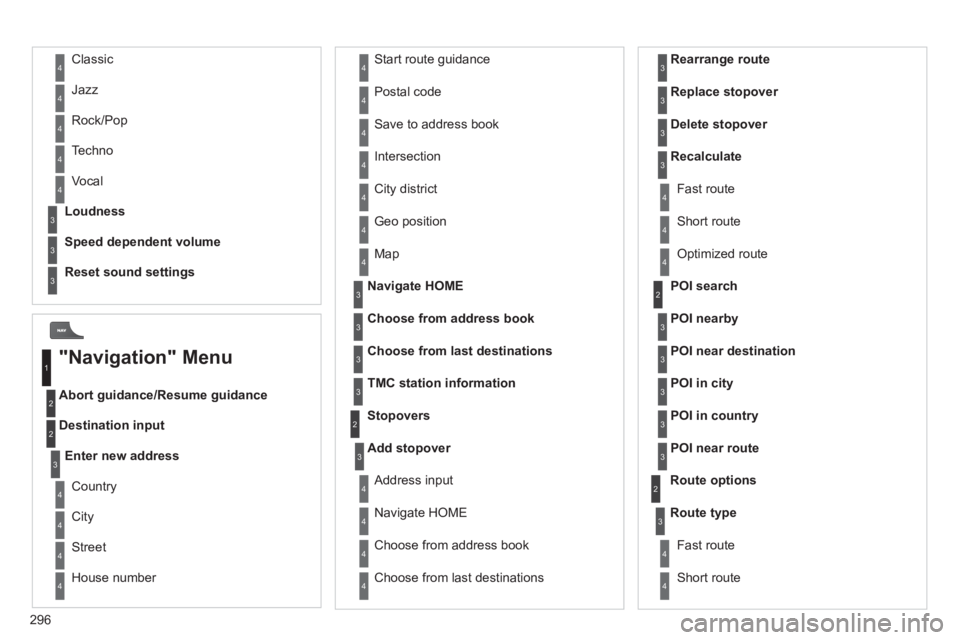
Abort guidance/Resume guidance
Destination input Geo
position
Ma
p
Stopovers
Add stopover
Navi
gate HOME
Choose from address book Rearran
ge route
Choose from last destinations Replace stopover
Delete stopover
Recalculate
Fast route
Short route
Optimized route
POI search
POI nearby
Route options
Route t
ype
Short route F
ast route
"Navigation" Menu
City
Street
Enter new address
Country
Navigate HOME Cit
y district
H
ouse number Start route
guidance
P
ostal code
Save to address book
Int
ersection
Address in
put
POI near destination
POI in city
POI in country
POI near route
Choose from address book
3
3
Choose from last destinations
TMC station information Lou
dness
S
peed dependent volume
Reset sound settings
3
3
3
1
2
4
4
4
4
4
4
4
4
4
4
4
3
2
3
3
2
3
4
4
4
4
3
3
3
3
4
4
4
2
4
2
3
3
3
3
3
3
4
Classic
Jazz
Rock/Pop
Techno
Vocal
4
4
4
4
4
Page 326 of 340
324
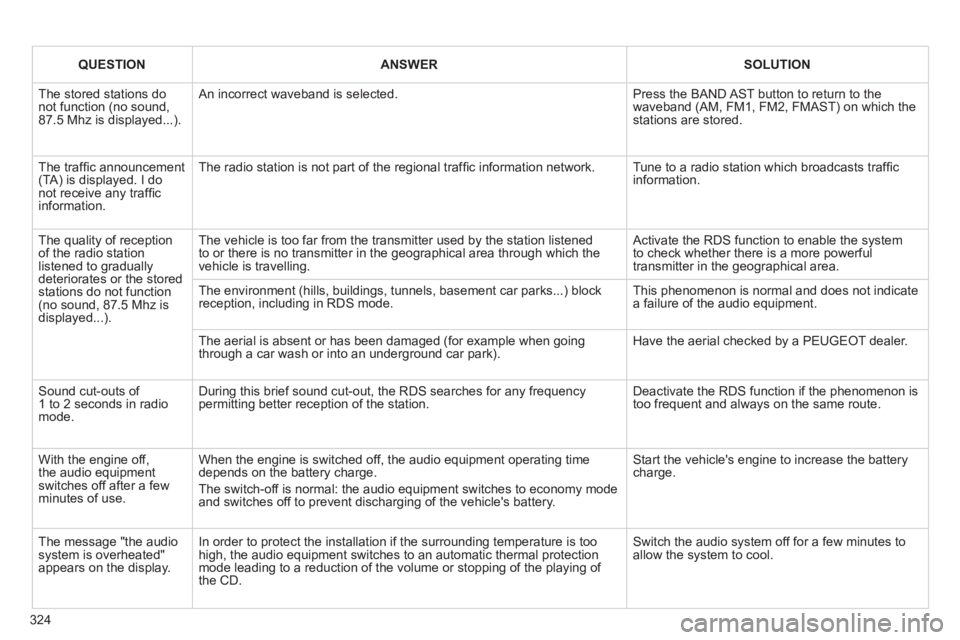
QUESTIONANSWERSOLUTION
The stored stations donot function (no sound, 87.5 Mhz is displayed...).
An incorrect waveband is selected.
Press the BAND AST button to return to the waveband (AM, FM1, FM2, FMAST) on which thestations are stored.
The traffi c announcement(TA) is displayed. I donot receive any traffi c information.
The radio station is not part of the regional traffi c information network.
Tune to a radio station which broadcasts traffi c information.
The quality of receptionof the radio station listened to graduallydeteriorates or the stored stations do not function(no sound, 87.5 Mhz is displayed...).
The vehicle is too far from the transmitter used by the station listenedto or there is no transmitter in the geographical area through which the vehicle is travelling.
Activate the RDS function to enable the system to check whether there is a more powerful transmitter in the geographical area.
The environment (hills, buildings, tunnels, basement car parks...) block reception, including in RDS mode. This phenomenon is normal and does not indicate a failure of the audio equipment.
The aerial is absent or has been damaged (for example when goingthrough a car wash or into an underground car park).
Have the aerial checked by a PEUGEOT dealer.
Sound cut-outs of 1 to 2 seconds in radiomode.
During this brief sound cut-out, the RDS searches for any frequency permitting better reception of the station.
Deactivate the RDS function if the phenomenon is too frequent and always on the same route.
With the engine off, the audio equipment switches off after a few minutes of use.
When the engine is switched off, the audio equipment operating timedepends on the battery charge.
The switch-off is normal: the audio equipment switches to economy mode and switches off to prevent discharging of the vehicle's battery.
Start the vehicle's engine to increase the batterycharge.
The message "the audio system is overheated" appears on the display.
In order to protect the installation if the surrounding temperature is toohigh, the audio equipment switches to an automatic thermal protectionmode leading to a reduction of the volume or stopping of the playing of the CD.
Switch the audio system off for a few minutes toallow the system to cool.
Page 330 of 340
ALPHABETICAL INDEX
328
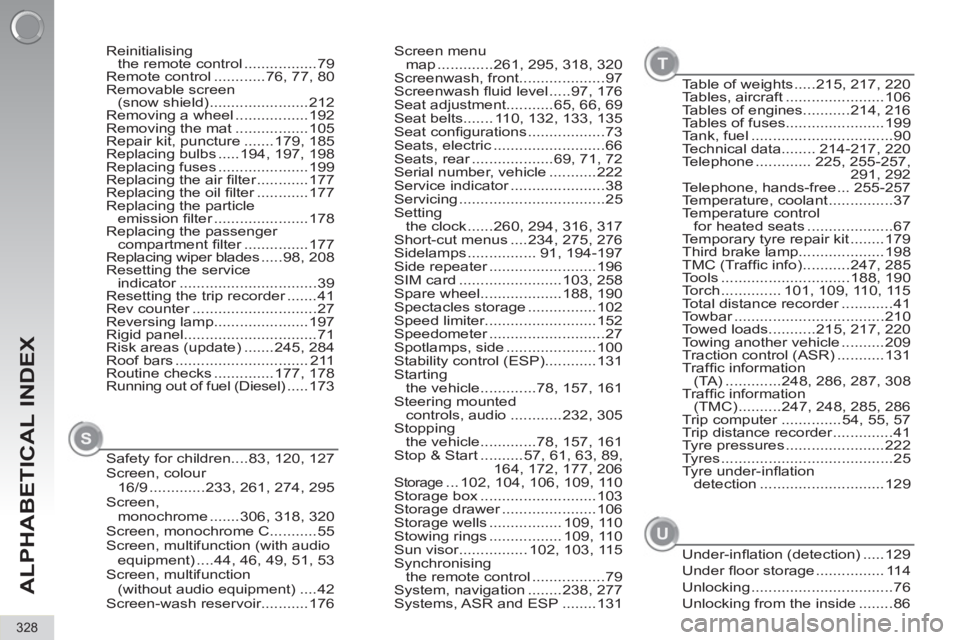
Screen menu
map .............261, 295, 318, 320
Screenwash, front....................97
Screenwash fl uid level .....97, 176
Seat adjustment...........65, 66, 69
Seat belts....... 110, 132, 133, 135
Seat confi gurations ..................73
Seats, electric ..........................66
Seats, rear ...................69, 71, 72
Serial number, vehicle ...........222
Service indicator ......................38
Servicing ..................................25
Setting
the clock ......260, 294, 316, 317
Short-cut menus ....234, 275, 276
Sidelamps ................ 91, 194-197
Side repeater .........................196
SIM card ........................103, 258
Spare wheel...................188, 190
Spectacles storage ................102
Speed limiter..........................152
Speedometer ...........................27
Spotlamps, side .....................100
Stability control (ESP)............131
Starting
the vehicle .............78, 157, 161
Steering mounted
controls, audio ............232, 305
Stopping
the vehicle .............78, 157, 161
Stop & Start ..........57, 61, 63, 89,
164, 172, 177, 206
Storage ... 102, 104, 106, 109, 110
Storage box ...........................103
Storage drawer ......................106
Storage wells ................. 109, 110
Stowing rings ................. 109, 110
Sun visor................ 102, 103, 115
Synchronising
the remote control .................79
System, navigation ........238, 277
Systems, ASR and ESP ........131 Reinitialising
the remote control .................79
Remote control ............76, 77, 80
Removable screen
(snow shield) .......................212
Removing a wheel .................192
Removing the mat .................105
Repair kit, puncture .......179, 185
Replacing bulbs .....194, 197, 198
Replacing fuses .....................199
Replacing the air fi lter ............177
Replacing the oil fi lter ............177
Replacing the particle
emission fi lter ......................178
Replacing the passenger
compartment fi lter ...............177
Replacing wiper blades .....98, 208
Resetting the service
indicator ................................39
Resetting the trip recorder .......41
Rev counter .............................27
Reversing lamp......................197
Rigid panel...............................71
Risk areas (update) .......245, 284
Roof bars ............................... 211
Routine checks ..............177, 178
Running out of fuel (Diesel) .....173
Safety for children....83, 120, 127
Screen, colour
16/9 .............233, 261, 274, 295
Screen,
monochrome .......306, 318, 320
Screen, monochrome C...........55
Screen, multifunction (with audio
equipment) ....44, 46, 49, 51, 53
Screen, multifunction
(without audio equipment) ....42
Screen-wash reservoir...........176
S
Table of weights .....215, 217, 220
Tables, aircraft .......................106
Tables of engines...........214, 216
Tables of fuses.......................199
Tank, fuel .................................90
Technical data........ 214-217, 220
Telephone ............. 225, 255-257,
291, 292
Telephone, hands-free ... 255-257
Temperature, coolant ...............37
Temperature control
for heated seats ....................67
Temporary tyre repair kit ........179
Third brake lamp....................198
TMC (Traffi c info) ...........247, 285
Tools ..............................188, 190
Torch .............. 101, 109, 110, 115
Total distance recorder ............41
Towbar ...................................210
Towed loads...........215, 217, 220
Towing another vehicle ..........209
Traction control (ASR) ...........131
Traffi c information
(TA) .............248, 286, 287, 308
Traffi c information
(TMC) ..........247, 248, 285, 286
Trip computer ..............54, 55, 57
Trip distance recorder ..............41
Tyre pressures .......................222
Tyres ........................................25
Tyre under-infl ation
detection .............................129
T
Under-infl ation (detection) .....129
Under fl oor storage ................ 114
Unlocking .................................76
Unlocking from the inside ........86
U
Page 334 of 340
VISUAL SEARCH
332
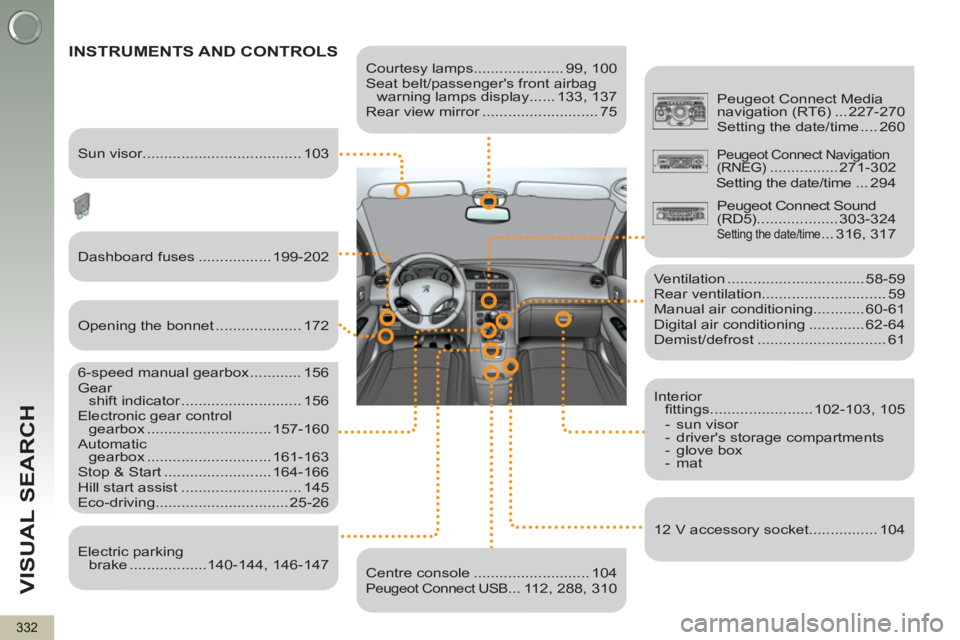
Courtesy lamps..................... 99, 100
Seat belt/passenger's front airbag
warning lamps display ...... 133, 137
Rear view mirror ........................... 75
INSTRUMENTS AND CONTROLS
Dashboard fuses ................. 199-202
6-speed manual gearbox ............ 156
Gear
shift indicator ............................ 156
Electronic gear control
gearbox ............................. 157-160
Automatic
gearbox ............................. 161-163
Stop & Start ......................... 164-166
Hill start assist ............................ 145
Eco-driving............................... 25-26
Ventilation ................................ 58-59
Rear ventilation............................. 59
Manual air conditioning............ 60-61
Digital air conditioning ............. 62-64
Demist/defrost .............................. 61
Centre console ........................... 104
Peugeot Connect USB... 112, 288, 310
Peugeot Connect Media
navigation (RT6) ... 227-270
Setting the date/time .... 260
Sun visor..................................... 103
Opening the bonnet .................... 172
Electric parking
brake ..................140-144, 146-147
Interior
fi ttings ........................ 102-103, 105
- sun visor
- driver's storage compartments
- glove box
- mat
12 V accessory socket................ 104
Peugeot Connect Navigation
(RNEG) ................ 271-302
Setting the date/time ...294
Peugeot Connect Sound
(RD5) ................... 303-324
Setting the date/time ... 316, 317
Page 335 of 340
VISUAL SEARCH
333
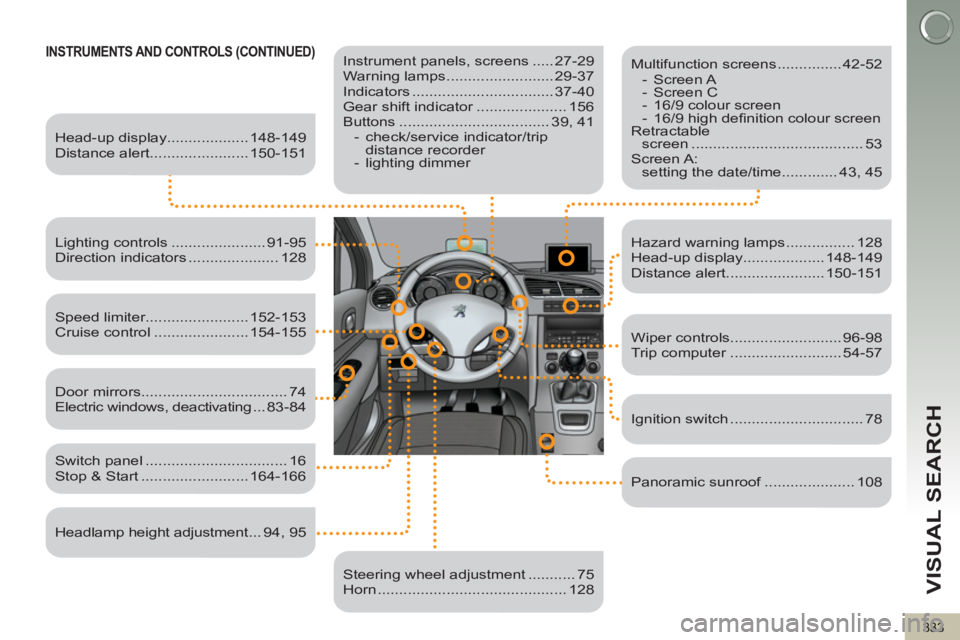
INSTRUMENTS AND CONTROLS (CONTINUED)
Instrument panels, screens ..... 27-29
Warning lamps ......................... 29-37
Indicators ................................. 37-40
Gear shift indicator ..................... 156
Buttons ................................... 39, 41
- check/service indicator/trip
distance recorder
- lighting dimmer
Head-up display................... 148-149
Distance alert....................... 150-151
Lighting controls ...................... 91-95
Direction indicators ..................... 128
Speed limiter........................ 152-153
Cruise control ...................... 154-155
Switch panel ................................. 16
Stop & Start ......................... 164-166
Door mirrors .................................. 74
Electric windows, deactivating ...83-84
Headlamp height adjustment ... 94, 95
Steering wheel adjustment ........... 75
Horn ............................................ 128
Multifunction screens ............... 42-52
- Screen A
- Screen C
- 16/9 colour screen
- 16/9 high defi nition colour screen
Retractable
screen ........................................ 53
Screen A:
setting the date/time ............. 43, 45
Hazard warning lamps ................ 128
Head-up display................... 148-149
Distance alert....................... 150-151
Wiper controls.......................... 96-98
Trip computer .......................... 54-57
Ignition switch ............................... 78
Panoramic sunroof ..................... 108