display PEUGEOT 5008 2013 Owners Manual
[x] Cancel search | Manufacturer: PEUGEOT, Model Year: 2013, Model line: 5008, Model: PEUGEOT 5008 2013Pages: 364, PDF Size: 16.24 MB
Page 345 of 364
343
07
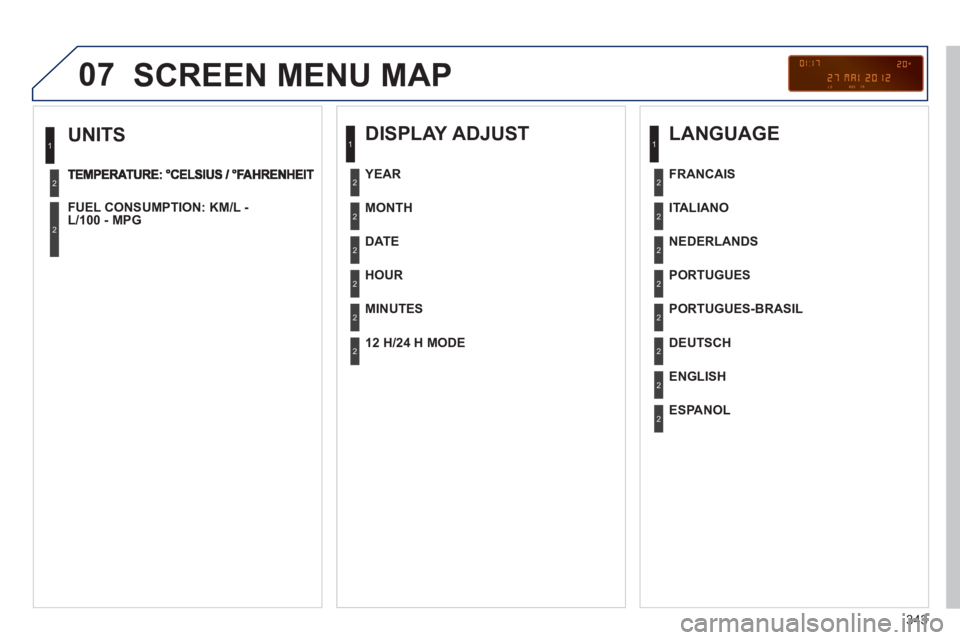
UNITS
FUEL CONSUMPTION: KM/L -L/100 - MPG
1
2
2
SCREEN MENU MAP
DISPLAY ADJUST
MONTH
DATE
HOUR
MINUTES
YEAR
12 H/24 H MODE
LANGUAGE
ITALIANO
NEDERLANDS
PORTUGUES
PORTUGUES-BRASIL
FRANCAIS
DEUTSCH
ENGLISH
ESPANOL
1
2
2
2
2
2
2
1
2
2
2
2
2
2
2
2
Page 346 of 364
344
07SCREEN MENU MAP
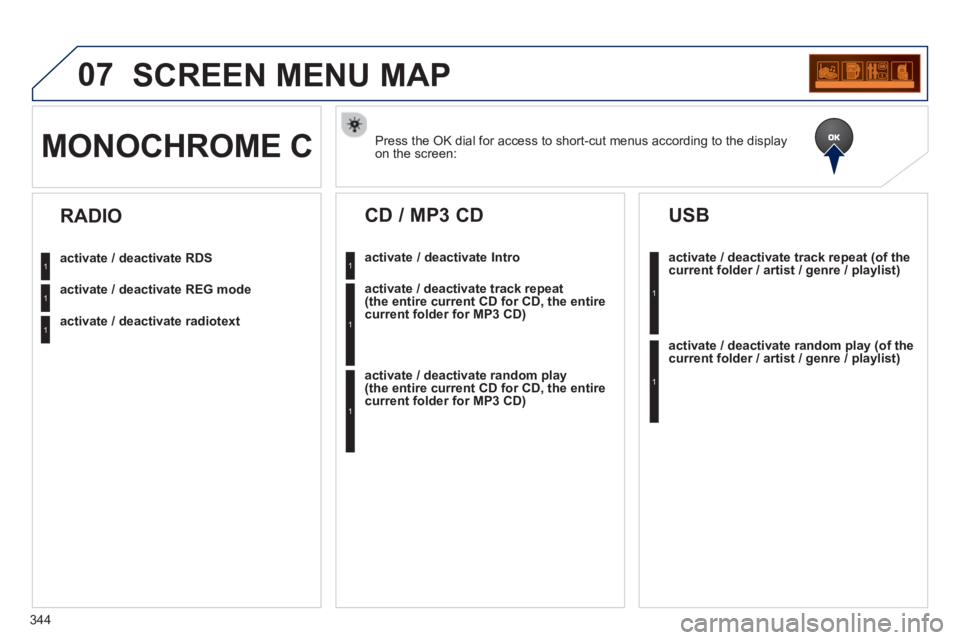
Press the OK dial for access to short-cut menus according to the displayon the screen: MONOCHROME C
activate / deactivate RDS
activate / deactivate REG mode
activate / deactivate radiotext
RADIO
activate / deactivate Intro
CD / MP3 CD
activate / deactivate track repeat (the entire current CD for CD, the entire current folder for MP3 CD)
activate / deactivate random play (the entire current CD for CD, the entire current folder for MP3 CD)
activate / deactivate track repeat (of the current folder / artist / genre / playlist)
USB
activate / deactivate random play(of thecurrent folder / artist / genre / playlist)
1
1
1
1
1
1
1
1
Page 347 of 364
345
07 SCREEN MENU MAP
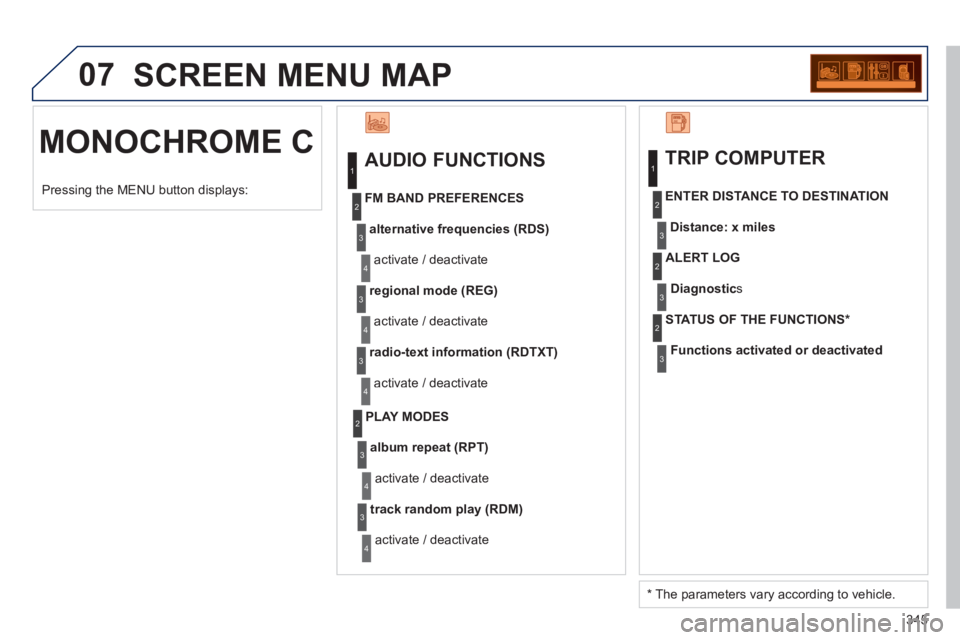
MONOCHROME C
AUDIO FUNCTIONS
alternative frequencies (RDS)
activate / deactivate
FM BAND PREFERENCES
regional mode (REG)
activate / deactivate
radio-text information (RDTXT)
activate / deactivate
1
2
3
4
3
4
3
4
PLAY MODES
album repeat (RPT)
activate / deactivate
track random pla
y (RDM)
activate / deactivate
2
3
4
3
4
TRIP COMPUTER
Distance: x miles ENTER DISTANCE TO DESTINATION
Diagnostic s
ALERT LOG
Functions activated or deactivated STATUS OF THE FUNCTIONS *
1
2
3
3
2
3
2
Pressing the MENU button displays:
*
The parameters vary according to vehicle.
Page 348 of 364
346
07SCREEN MENU MAP
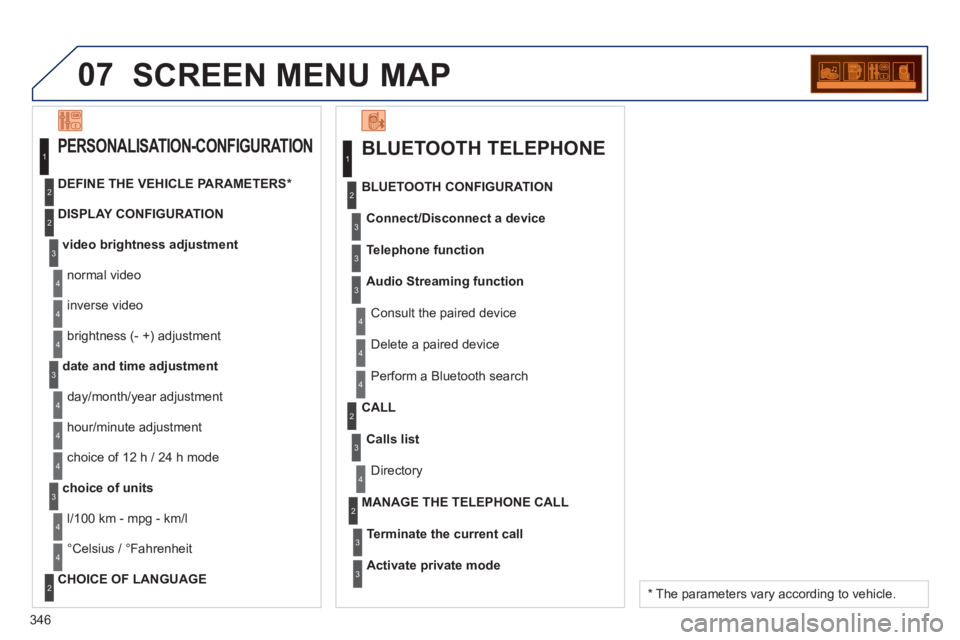
BLUETOOTH TELEPHONE
Connect/Disconnect a device
Consult the paired device
BLUETOOTH CONFIGURATION
Telephone function
Audio Streamin
g function
Delete a paired device
P
erform a Bluetooth search
Calls lis
t
CALL
Directory
Terminate the current call
MANAGE THE TELEPHONE CALL
Activate private mod
e
1
2
3
3
3
4
4
4
2
3
4
2
3
3
video brightness adjustment
DISPLAY CONFIGURATION DEFINE THE VEHICLE PARAMETERS *
PERSONALISATION-CONFIGURATION
normal video
inverse video
bri
ghtness (- +) adjustment
date and time adjustment
day/month/year adjustment
hour
/minute adjustment
choice of 12 h / 24 h mode
choice of units
l/100 km - mp
g - km/l
°
Celsius / °Fahrenheit
CHOICE OF LANGUAGE
1
2
4
3
2
4
4
3
4
4
2
3
4
4
4
* The parameters vary according to vehicle.
Page 349 of 364
347
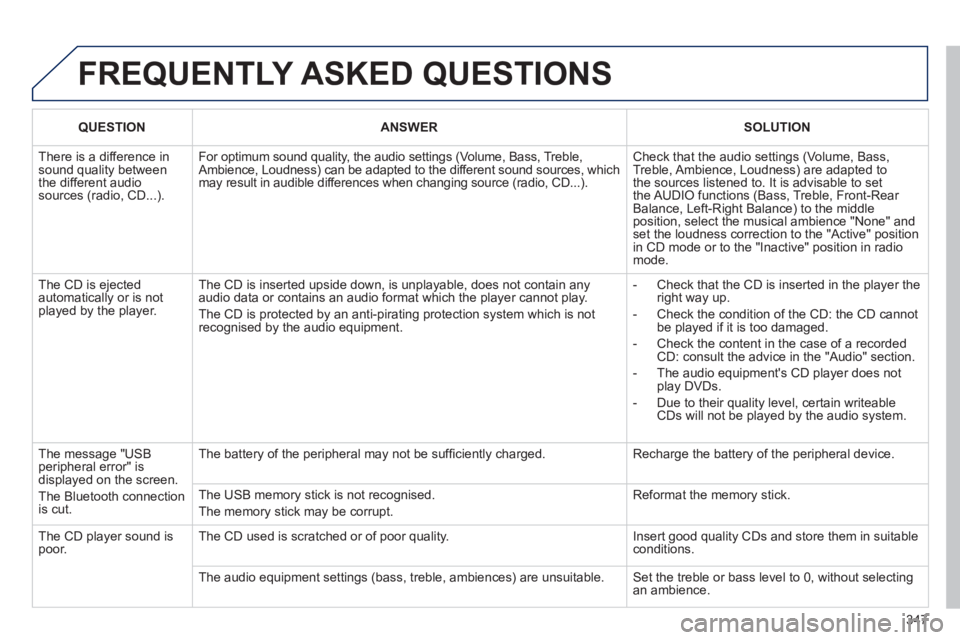
FREQUENTLY ASKED QUESTIONS
QUESTIONANSWERSOLUTION
There is a difference in sound quality betweenthe different audiosources (radio, CD...).
For optimum sound quality, the audio settings (Volume, Bass, Treble,Ambience, Loudness) can be adapted to the different sound sources, whichmay result in audible differences when changing source (radio, CD...).
Check that the audio settings (Volume, Bass, Treble, Ambience, Loudness) are adapted tothe sources listened to. It is advisable to setthe AUDIO functions (Bass, Treble, Front-Rear Balance, Left-Right Balance) to the middle position, select the musical ambience "None" and set the loudness correction to the "Active" position in CD mode or to the "Inactive" position in radio mode.
The CD is ejected automatically or is not played by the player.
The CD is inserted upside down, is unplayable, does not contain any audio data or contains an audio format which the player cannot play.
The CD is protected by an anti-pirating protection system which is not recognised by the audio equipment.
- Check that the CD is inserted in the player the right way up.
- Check the condition of the CD: the CD cannot be played if it is too damaged.
- Check the content in the case of a recordedCD: consult the advice in the "Audio" section.
- The audio equipment's CD player does notplay DVDs.
- Due to their quality level, certain writeableCDs will not be played by the audio system.
The message "USB peripheral error" isdisplayed on the screen.
The Bluetooth connectionis cut.
The battery of the peripheral may not be suffi ciently charged.
Recharge the battery of the peripheral device.
The USB memory stick is not recognised.
The memory stick may be corrupt.
Reformat the memory stick.
The CD player sound ispoor.The CD used is scratched or of poor quality.
Insert good quality CDs and store them in suitable conditions.
The audio equipment settings (bass, treble, ambiences) are unsuitable. Set the treble or bass level to 0, without selectingan ambience.
Page 350 of 364
348
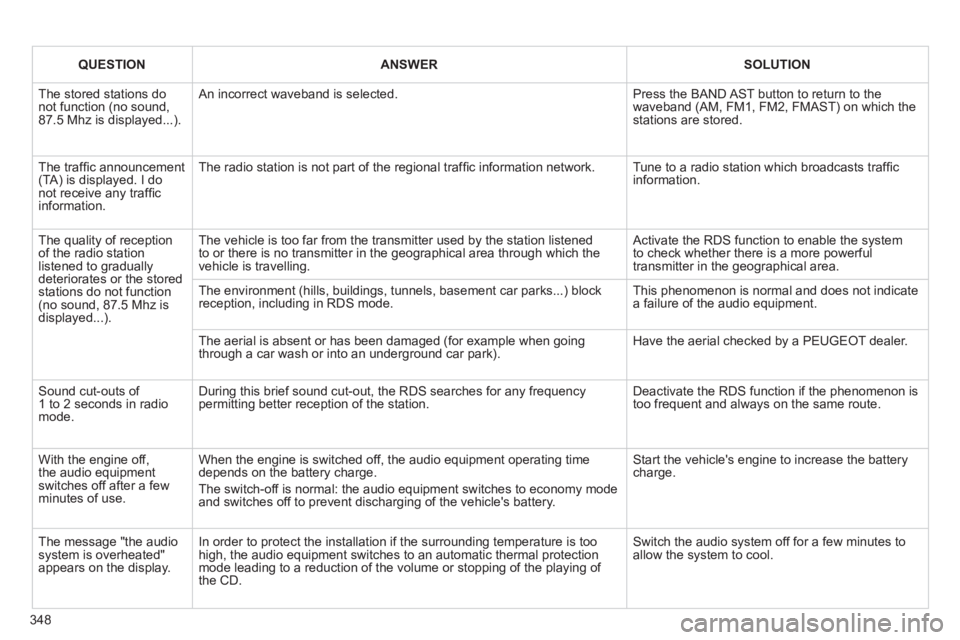
QUESTIONANSWERSOLUTION
The stored stations donot function (no sound, 87.5 Mhz is displayed...).
An incorrect waveband is selected.
Press the BAND AST button to return to the waveband (AM, FM1, FM2, FMAST) on which thestations are stored.
The traffi c announcement(TA) is displayed. I donot receive any traffi c information.
The radio station is not part of the regional traffi c information network.
Tune to a radio station which broadcasts traffi c information.
The quality of receptionof the radio station listened to graduallydeteriorates or the stored stations do not function(no sound, 87.5 Mhz is displayed...).
The vehicle is too far from the transmitter used by the station listenedto or there is no transmitter in the geographical area through which the vehicle is travelling.
Activate the RDS function to enable the system to check whether there is a more powerful transmitter in the geographical area.
The environment (hills, buildings, tunnels, basement car parks...) block reception, including in RDS mode. This phenomenon is normal and does not indicate a failure of the audio equipment.
The aerial is absent or has been damaged (for example when goingthrough a car wash or into an underground car park).
Have the aerial checked by a PEUGEOT dealer.
Sound cut-outs of 1 to 2 seconds in radiomode.
During this brief sound cut-out, the RDS searches for any frequency permitting better reception of the station.
Deactivate the RDS function if the phenomenon is too frequent and always on the same route.
With the engine off, the audio equipment switches off after a few minutes of use.
When the engine is switched off, the audio equipment operating timedepends on the battery charge.
The switch-off is normal: the audio equipment switches to economy mode and switches off to prevent discharging of the vehicle's battery.
Start the vehicle's engine to increase the batterycharge.
The message "the audio system is overheated" appears on the display.
In order to protect the installation if the surrounding temperature is toohigh, the audio equipment switches to an automatic thermal protectionmode leading to a reduction of the volume or stopping of the playing of the CD.
Switch the audio system off for a few minutes toallow the system to cool.
Page 352 of 364
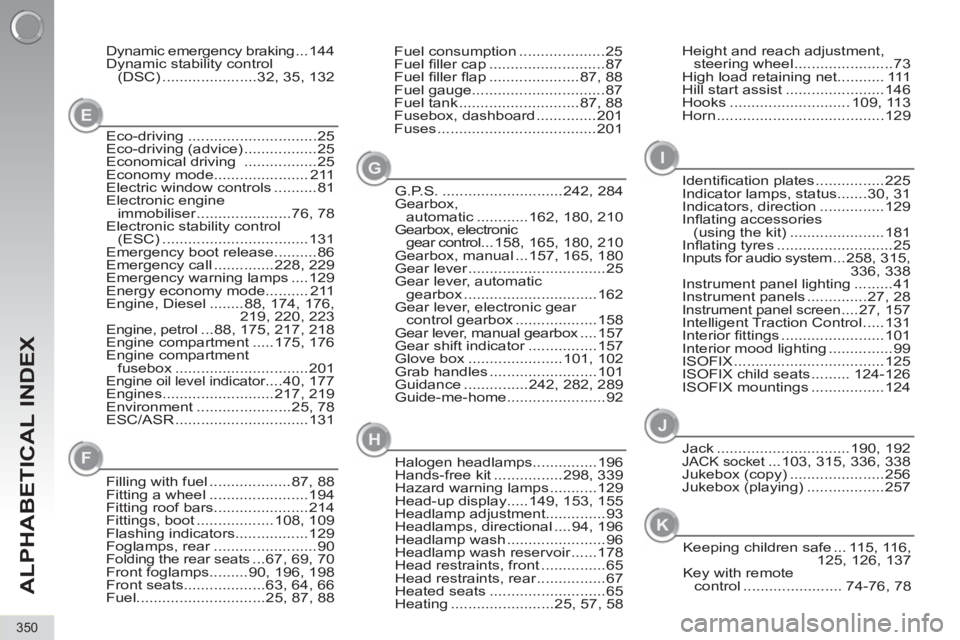
ALPHABETICAL INDEX
350
Jack ...............................190, 192JACK socket ...103, 315, 336, 338
Jukebox (copy) ......................256
Jukebox (playing) ..................257
Keeping children safe ... 115, 116,
125, 126, 137
Key with remote
control ....................... 74-76, 78
I
J
Eco-driving ..............................25
Eco-driving (advice) .................25
Economical driving .................25
Economy mode...................... 211
Electric window controls ..........81
Electronic engine
immobiliser ......................76, 78
Electronic stability control
(ESC) ..................................131
Emergency boot release..........86
Emergency call ..............228, 229
Emergency warning lamps ....129
Energy economy mode.......... 211
Engine, Diesel ........88, 174, 176,
219, 220, 223
Engine, petrol ...88, 175, 217, 218
Engine compartment .....175, 176
Engine compartment
fusebox ...............................201
Engine oil level indicator ....40, 177
Engines..........................217, 219
Environment ......................25, 78
ESC/ASR ...............................131Height and reach adjustment,
steering wheel .......................73
High load retaining net........... 111
Hill start assist .......................146
Hooks ............................ 109, 113
Horn .......................................129 Fuel consumption ....................25
Fuel fi ller cap ...........................87
Fuel fi ller fl ap .....................87, 88
Fuel gauge...............................87
Fuel tank ............................87, 88
Fusebox, dashboard ..............201
Fuses .....................................201 Dynamic emergency braking ... 144
Dynamic stability control
(DSC) ......................32, 35, 132
E
G
F
Filling with fuel ...................87, 88
Fitting a wheel .......................194
Fitting roof bars......................214
Fittings, boot ..................108, 109
Flashing indicators.................129
Foglamps, rear ........................90
Folding the rear seats ...67, 69, 70
Front foglamps.........90, 196, 198
Front seats...................63, 64, 66
Fuel..............................25, 87, 88G.P.S. ............................242, 284
Gearbox,
automatic ............162, 180, 210
Gearbox, electronic
gear control ...158, 165, 180, 210
Gearbox, manual ...157, 165, 180
Gear lever ................................25
Gear lever, automatic
gearbox ...............................162
Gear lever, electronic gear
control gearbox ...................158
Gear lever, manual gearbox ....157
Gear shift indicator ................157
Glove box ......................101, 102
Grab handles .........................101
Guidance ...............242, 282, 289
Guide-me-home.......................92Identifi cation plates ................225
Indicator lamps, status.......30, 31
Indicators, direction ...............129
Infl ating accessories
(using the kit) ......................181
Infl ating tyres ...........................25
Inputs for audio system ...258, 315,
336, 338
Instrument panel lighting .........41
Instrument panels ..............27, 28
Instrument panel screen ....27, 157
Intelligent Traction Control .....131
Interior fi ttings ........................101
Interior mood lighting ...............99
ISOFIX ...................................125
ISOFIX child seats ......... 124-126
ISOFIX mountings .................124
Halogen headlamps...............196
Hands-free kit ................298, 339
Hazard warning lamps ...........129
Head-up display.....149, 153, 155
Headlamp adjustment..............93
Headlamps, directional ....94, 196
Headlamp wash .......................96
Headlamp wash reservoir ......178
Head restraints, front ...............65
Head restraints, rear ................67
Heated seats ...........................65
Heating ........................25, 57, 58
H
K
Page 358 of 364
VISUAL SEARCH
356
Courtesy lamps....................... 98, 99
Seat belt / passenger's front airbag
warning lamps display ...... 134, 138
Rear view mirror ........................... 73
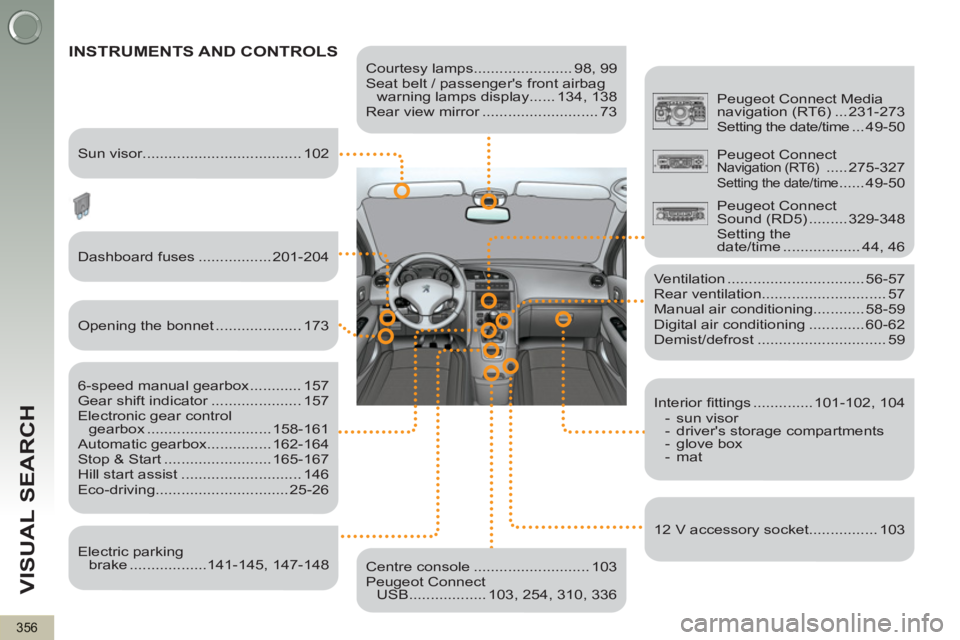
INSTRUMENTS AND CONTROLS
Dashboard fuses ................. 201-204
6-speed manual gearbox ............ 157
Gear shift indicator ..................... 157
Electronic gear control
gearbox ............................. 158-161
Automatic gearbox............... 162-164
Stop & Start ......................... 165-167
Hill start assist ............................ 146
Eco-driving............................... 25-26
Ventilation ................................ 56-57
Rear ventilation............................. 57
Manual air conditioning............ 58-59
Digital air conditioning ............. 60-62
Demist/defrost .............................. 59
Centre console ........................... 103
Peugeot Connect
USB .................. 103, 254, 310, 336
Peugeot Connect Media
navigation (RT6) ... 231-273
Setting the date/time ...49-50
Sun visor..................................... 102
Opening the bonnet .................... 173
Electric parking
brake ..................141-145, 147-148
Interior fi ttings .............. 101-102, 104
- sun visor
- driver's storage compartments
- glove box
- mat
12 V accessory socket................ 103
Peugeot Connect
Navigation (RT6) ..... 275-327
Setting the date/time ...... 49-50
Peugeot Connect
Sound (RD5) ......... 329-348
Setting the
date/time .................. 44, 46
Page 359 of 364
VISUAL SEARCH
357
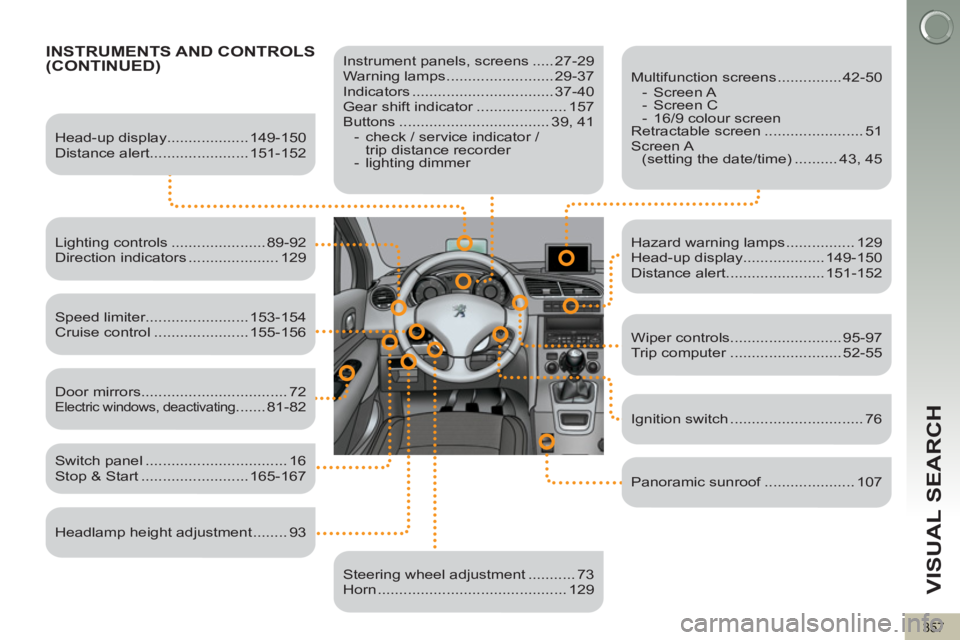
INSTRUMENTS AND CONTROLS(CONTINUED)
Instrument panels, screens ..... 27-29
Warning lamps ......................... 29-37
Indicators ................................. 37-40
Gear shift indicator ..................... 157
Buttons ................................... 39, 41
- check / service indicator /
trip distance recorder
- lighting dimmer
Head-up display................... 149-150
Distance alert....................... 151-152
Lighting controls ...................... 89-92
Direction indicators ..................... 129
Speed limiter........................ 153-154
Cruise control ...................... 155-156
Switch panel ................................. 16
Stop & Start ......................... 165-167
Door mirrors .................................. 72
Electric windows, deactivating ....... 81-82
Headlamp height adjustment ........ 93
Steering wheel adjustment ........... 73
Horn ............................................ 129
Multifunction screens ............... 42-50
- Screen A
- Screen C
- 16/9 colour screen
Retractable screen ....................... 51
Screen A
(setting the date/time) .......... 43, 45
Hazard warning lamps ................ 129
Head-up display................... 149-150
Distance alert....................... 151-152
Wiper controls.......................... 95-97
Trip computer .......................... 52-55
Ignition switch ............................... 76
Panoramic sunroof ..................... 107