USB PEUGEOT 5008 2013 User Guide
[x] Cancel search | Manufacturer: PEUGEOT, Model Year: 2013, Model line: 5008, Model: PEUGEOT 5008 2013Pages: 364, PDF Size: 16.24 MB
Page 275 of 364
273
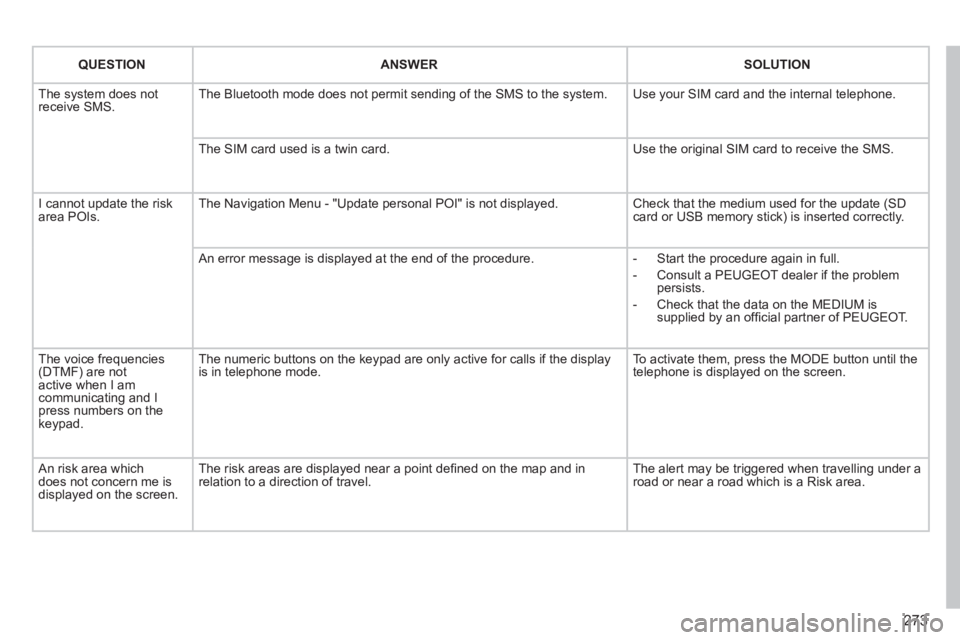
QUESTIONANSWERSOLUTION
The system does notreceive SMS. The Bluetooth mode does not permit sending of the SMS to the system.
Use your SIM card and the internal telephone.
The SIM card used is a twin card.
Use the original SIM card to receive the SMS.
I cannot update the risk area POIs. The Navigation Menu - "Update personal POI" is not displayed. Check that the medium used for the update (SDcard or USB memory stick) is inserted correctly.
An error message is displayed at the end of the procedure.
- Start the procedure again in full.
- Consult a PEUGEOT dealer if the problempersists.
- Check that the data on the MEDIUM issupplied by an offi cial partner of PEUGEOT.
The voice frequencies(DTMF) are not active when I am communicating and I press numbers on thekeypad.
The numeric buttons on the keypad are only active for calls if the display is in telephone mode.
To activate them, press the MODE button until the telephone is displayed on the screen.
An risk area whichdoes not concern me isdisplayed on the screen.
The risk areas are displayed near a point defi ned on the map and in relation to a direction of travel.
The alert may be triggered when travelling under a road or near a road which is a Risk area.
Page 278 of 364
276
01 FIRST STEPS
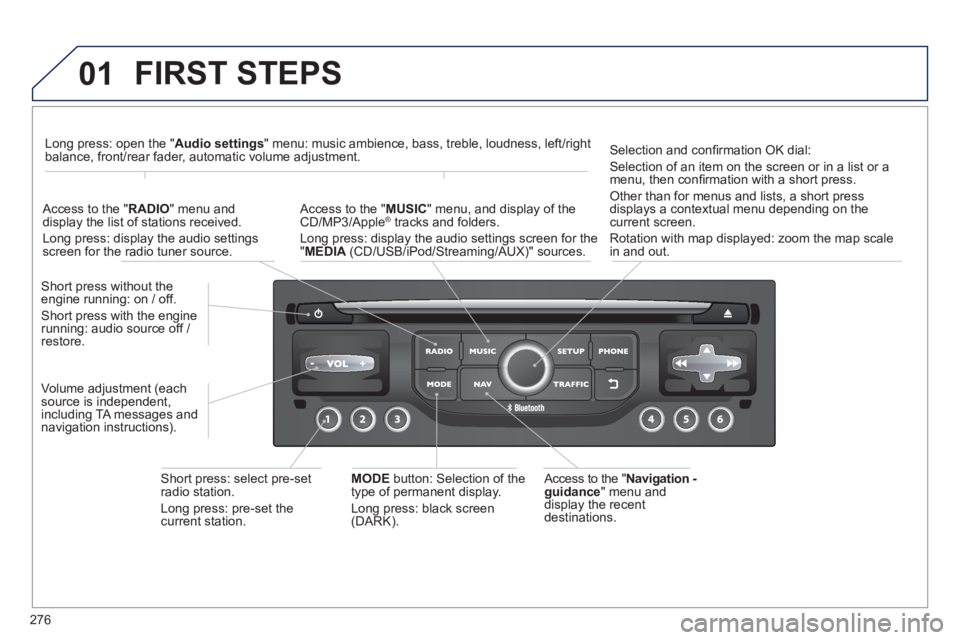
Access to the "Navigation -guidance
" menu anddisplay the recentdestinations. Short
press without the engine running: on / off.
Short press with the enginerunning: audio source off / restore.
Short press: select pre-set radio station.
Lon
g press: pre-set thecurrent station.
MODE
button: Selection of the
type of permanent display.
Lon
g press: black screen(DARK).
A
ccess to the " MUSIC
" menu, and display of the CD/MP3/Apple®
tracks and folders. ®
Long press: display the audio settings screen for the"MEDIA
(CD/USB/iPod/Streaming/AUX)" sources.
Long press: open the "Audio settings" menu: music ambience, bass, treble, loudness, left/right
balance, front/rear fader, automatic volume adjustment.
A
ccess to the "RADIO
" menu anddisplay the list of stations received.
Lon
g press: display the audio settingsscreen for the radio tuner source.
Selection and confi rmation OK dial:
Selection of an item on the screen or in a list or a
menu, then confi rmation with a short press.
Other than for menus and lists, a short press
displays a contextual menu depending on the current screen.
Rotation with map displa
yed: zoom the map scalein and out.
Volume ad
justment (each
source is independent,
includin
g TA messages and
navigation instructions).
Page 282 of 364
280
03
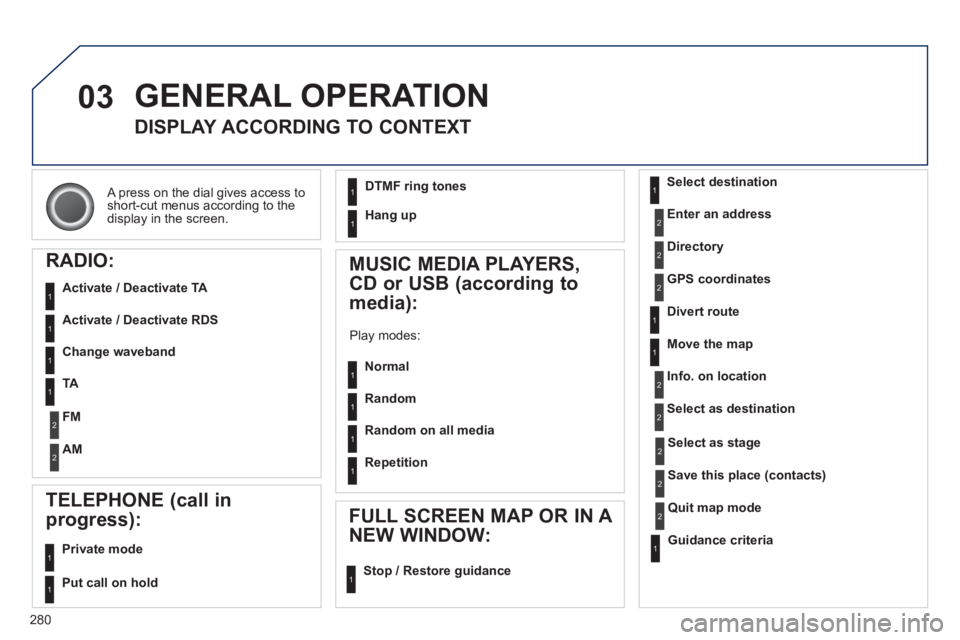
A press on the dial gives access to short-cut menus according to thedisplay in the screen.
GENERAL OPERATION
DISPLAY ACCORDING TO CONTEXT
RADIO:
Activate / Deactivate TA
Activate / Deactivate RDS
MUSIC MEDIA PLAYERS,
CD or USB
(according to
media):
Play modes:
Normal
Random
Random on all media
Repetition
TELEPHONE (call in
pro
gress):
Private mode
FULL SCREEN MAP OR IN A
NEW WINDOW:
Stop / Restore guidance Select destination
Enter an address
Directory
GPS coordinates
Divert route
Move the map
Info. on location
Select as destination
Select as sta
ge
Save this place (contacts)
Quit map mode
Guidance criteria
Put call on hold
DTMF ring tones
Hang up
1
1
1
1
1
1
1
1
2
2
2
2
2
1
2
2
2
1
1
1
1
1
1
Change waveband
F
M
AM
2
2
1
TA 1
Page 298 of 364
296
05TRAFFIC INFORMATION
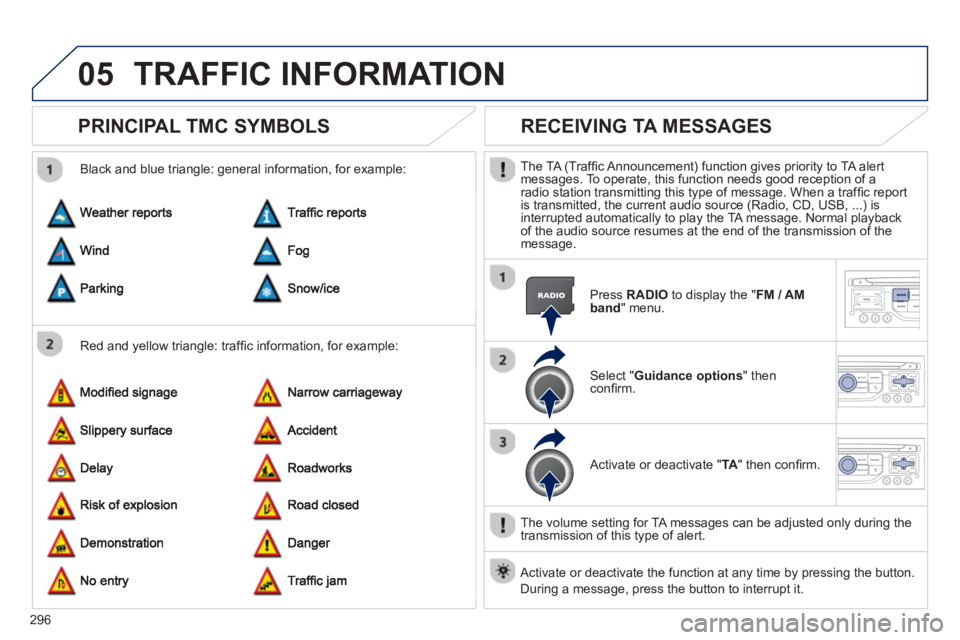
PRINCIPAL TMC SYMBOLS
Red and yellow triangle: traffi c information, for example:
Black and blue trian
gle: general information, for example:
RECEIVING TA MESSAGES
The TA (Traffi c Announcement) function gives priority to TA alert messages. To operate, this function needs good reception of a radio station transmitting this type of message. When a traffi c report
is transmitted, the current audio source (Radio, CD, USB, ...) isinterrupted automatically to play the TA message. Normal playbackof the audio source resumes at the end of the transmission of themessage.
Pr
ess RADIO
to display the "FM / AMband " menu.
Select " Guidance options
" then confi rm.
A
ctivate or deactivate " TA
" then confi rm.
The volume settin
g for TA messages can be adjusted only during the
transmission of this type of alert.
Activate or deactivate the function at any time by pressing the button.
Durin
g a message, press the button to interrupt it.
Page 313 of 364
311
08
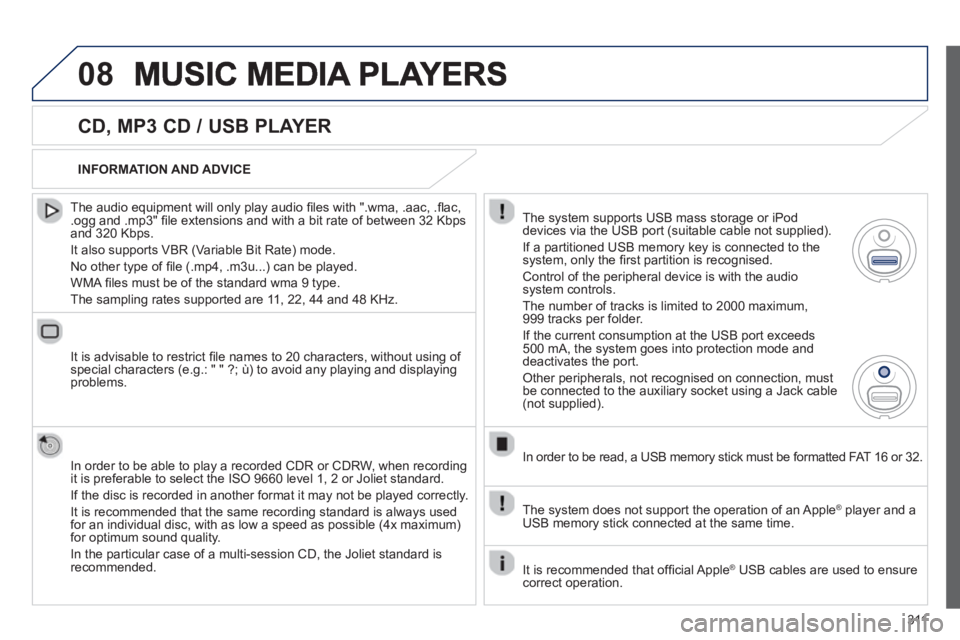
CD, MP3 CD / USB PLAYER
The audio equipment will only play audio fi les with ".wma, .aac, .fl ac, .ogg and .mp3" fi le extensions and with a bit rate of between 32 Kbps
and 320 Kbps.
It also supports VBR
(Variable Bit Rate) mode.
No other t
ype of fi le (.mp4, .m3u...) can be played.
WMA
fi les must be of the standard wma 9 type.
The samplin
g rates supported are 11, 22, 44 and 48 KHz.
It is advisable to restrict fi le names to 20 characters, without usin
g of special characters (e.g.: " " ?; ù) to avoid any playing and displayingproblems.
In order to be able to pla
y a recorded CDR or CDRW, when recording
it is preferable to select the ISO 9660 level 1, 2 or Joliet standard.
If the disc is recorded in another format it ma
y not be played correctly.
It is recommended that the same recordin
g standard is always used
for an individual disc, with as low a speed as possible (4x maximum)for optimum sound quality.
In the particular case o
f a multi-session CD, the Joliet standard isrecommended.
INFORMATION AND ADVICE
The s
ystem supports USB mass storage or iPod
devices via the USB port (suitable cable not supplied).
I
f a partitioned USB memory key is connected to the system, only the fi rst partition is recognised.
Control of the peripheral device is with the audiosystem controls.
The number of tracks is limited to 2000 maximum,
999 tracks per folder.
I
f the current consumption at the USB port exceeds 500 mA, the system goes into protection mode and
deactivates the port.
Other peripherals, not recognised on connection, must
be connected to the auxiliary socket using a Jack cable (not supplied).
In order to be read, a USB memor
y stick must be formatted FAT 16 or 32.
The s
ystem does not support the operation of an Apple Æplayer and a USB memory stick connected at the same time.
It is recommended that o
ffi cial Apple Æ USB cables are used to ensure Æ
correct operation.
Page 314 of 364
312
08MUSIC MEDIA PLAYERS
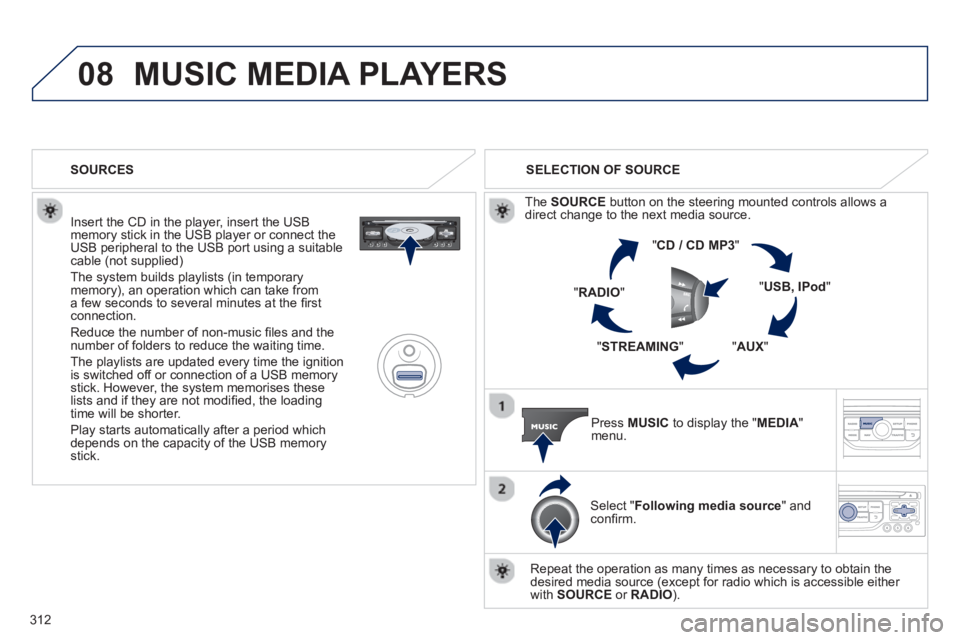
Insert the CD in the player, insert the USBmemory stick in the USB player or connect theUSB peripheral to the USB port using a suitablecable (not supplied)
The system builds playlists (in temporarymemory), an operation which can take froma few seconds to several minutes at the fi rstconnection.
R
educe the number of non-music fi les and the number of folders to reduce the waiting time.
The pla
ylists are updated every time the ignition
is switched off or connection of a USB memory stick. However, the system memorises these
lists and if they are not modifi ed, the loadingtime will be shorter.
Pla
y starts automatically after a period which
depends on the capacity of the USB memory stick. SELECTION OF SOURCE
Th
e SOURCE
button on the steering mounted controls allows adirect change to the next media source.
" CD / CD MP
3
"
"
USB, IPod"
"AUX
" "
STREAMING
" "RADIO
"
Pr
ess MUSICto display the "MEDIA
" menu.
Select "Following media source " and confi rm.
Repeat the operation as many times as necessary to obtain the
desired media source (except for radio which is accessible either
with SOURCE
or RADIO). SOURCES
Page 315 of 364
313
08
/
/
//
//
/
+/
/
/
MUSIC MEDIA PLAYERS
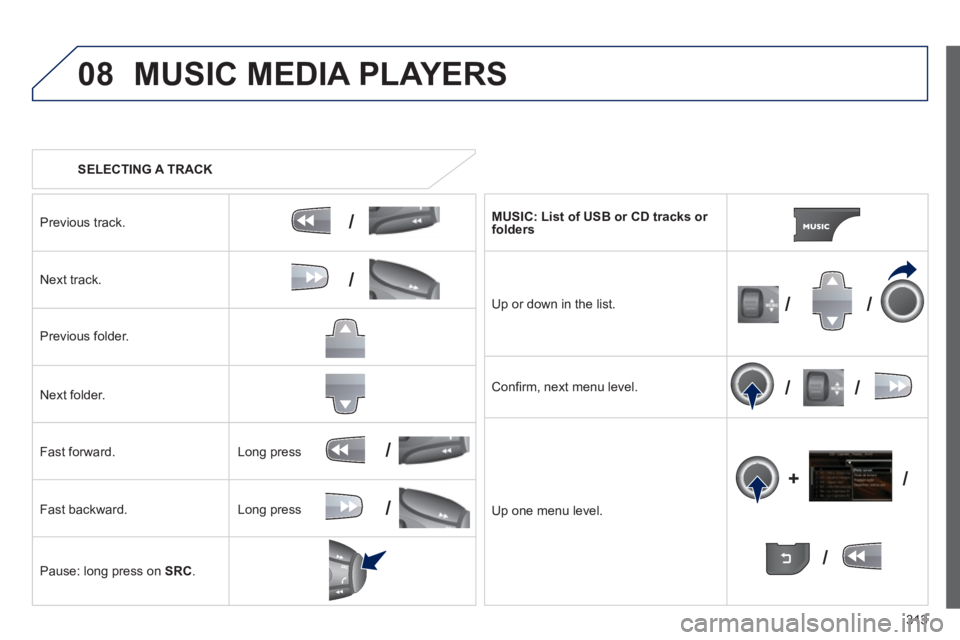
SELECTING A TRACK
Previous track.
N
ext track.
Pr
evious folder.
N
ext folder.
F
ast forward.
F
ast backward.
Pause: lon
g press on SRC.
MU
SIC: List of USB or CD tracks or folders
Up or down in the list.
Confi rm, next menu level.
Up one menu level.
Long press
Lon
g press
Page 316 of 364
314
08
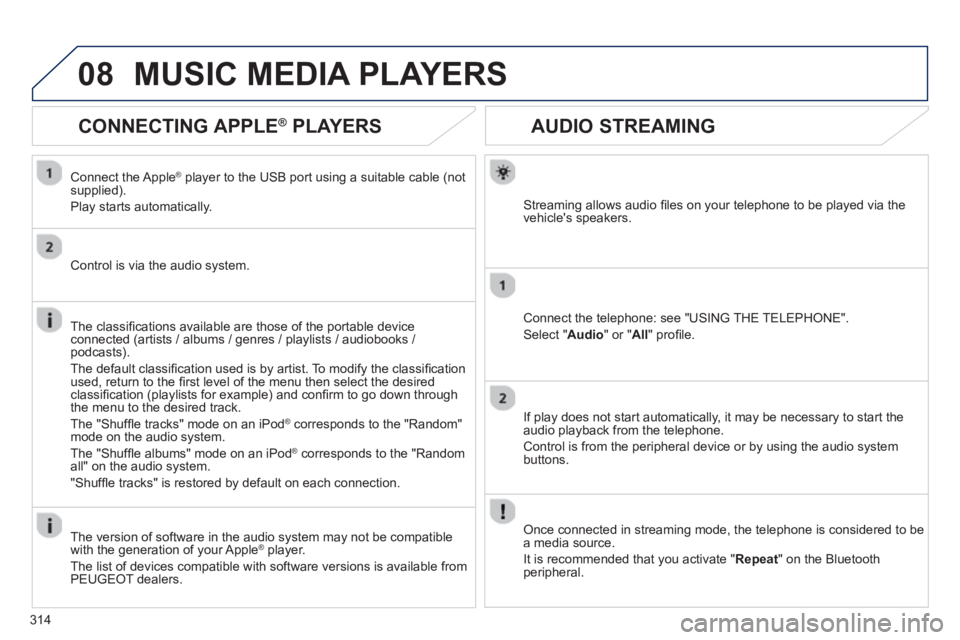
AUDIO STREAMING
Streaming allows audio fi les on your telephone to be played via the
vehicle's speakers.
Connect the telephone: see "USING THE TELEPHONE".
Select " Audio" or " All" profi le.
I
f play does not start automatically, it may be necessary to start the audio playback from the telephone.
Control is from the peripheral device or b
y using the audio system buttons.
Once connected in streaming mode, the telephone is considered to bea media source.
It is recommended that
you activate " Repeat" on the Bluetooth
peripheral.
MUSIC MEDIA PLAYERS
CONNECTING APPLE®
PLAYERS ®
Connect the Apple ®player to the USB port using a suitable cable (not
supplied).
Play starts automatically.
Control is via the audio system.
The classifi cations available are those of the portable device
connected (artists / albums / genres / playlists / audiobooks / podcasts).
The de
fault classifi cation used is by artist. To modify the classifi cationused, return to the fi rst level of the menu then select the desired classifi cation (playlists for example) and confi rm to go down through
the menu to the desired track.
The "
Shuffl e tracks" mode on an iPod®
corresponds to the "Random" ®
mode on the audio system.
The "
Shuffl e albums" mode on an iPod®
corresponds to the "Random ®
all" on the audio system.
"
Shuffl e tracks" is restored by default on each connection.
The version of software in the audio s
ystem may not be compatible
with the generation of your Apple Æplayer.
The list of devices compatible with software versions is available from
PEU
GEOT dealers.
Page 317 of 364
315
08MUSIC MEDIA PLAYERS
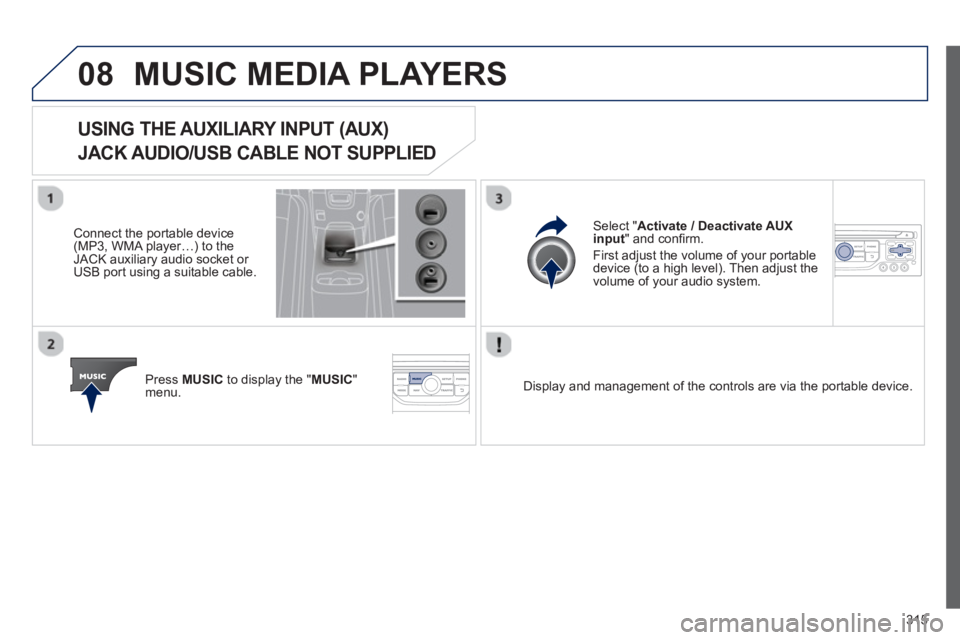
USING THE AUXILIARY INPUT (AUX)
JACK AUDIO/USB CABLE NOT SUPPLIED
Connect the portable device(MP3, WMA player…) to theJACK auxiliary audio socket or USB port using a suitable cable.
Pr
ess MUSICto display the "MUSIC
"
menu.
Select "Activate / Deactivate AUXinput
" and confi rm.
First ad
just the volume of your portable
device (to a high level). Then adjust the
volume of your audio system.
Displa
y and management of the controls are via the portable device.
Page 322 of 364
320
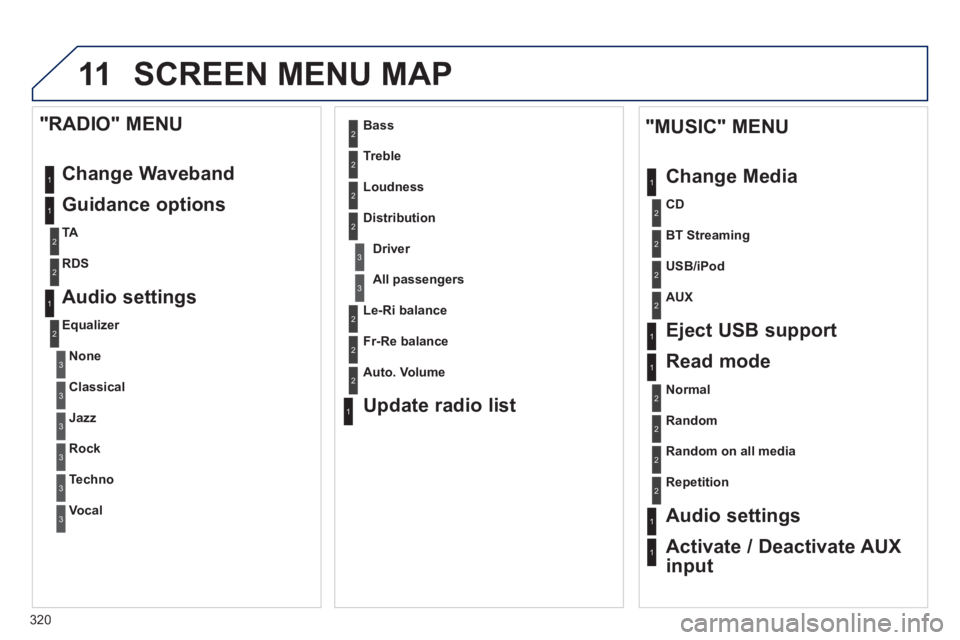
11 SCREEN MENU MAP
1
1
1
2
1
1
2
2
2
2
2
2
2
3
3
2
2
2
1
Random on all media
Repetition
Audio settings
Activate / Deactivate AUX
input
"MUSIC" MENU
Chan
ge Media
E
ject USB support
Read mode
Normal
Random
All passengers
Le-Ri balance
Fr-Re balance
Auto. Volume
Update radio list
Bass
Treble
Loudness
Distribution
Driver
1
2
2
1
1
3
3
3
3
3
3
2
Equalizer
"RADIO" MENU
Chan
ge Waveband
Guidance o
ptions
TA
RDS
Audio settings
None
Classical
Jaz
z
Rock
Techno
Vocal
2
2
2
2
USB/iPod
AUX
CD
BT Streamin
g