trip computer PEUGEOT 5008 2013 User Guide
[x] Cancel search | Manufacturer: PEUGEOT, Model Year: 2013, Model line: 5008, Model: PEUGEOT 5008 2013Pages: 364, PDF Size: 16.24 MB
Page 55 of 364
M
U
53
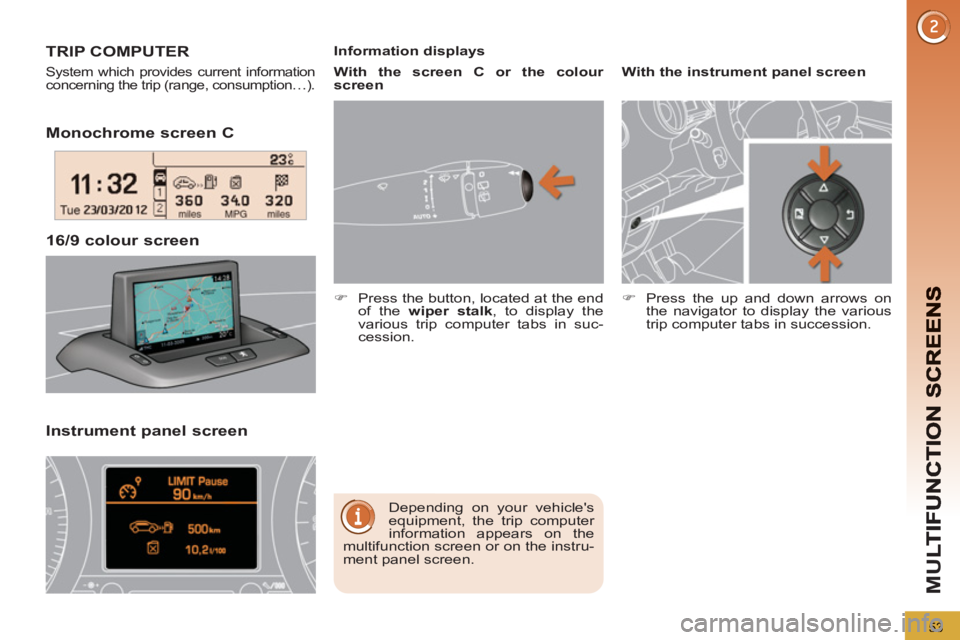
Monochrome screen C
Instrument
panel screen 16/9 colour screen
TRIP COMPUTER
System which provides current information
concerning the trip (range, consumption…).
Depending on your vehicle's
equipment, the trip computer
information appears on the
multifunction screen or on the instru-
ment panel screen.
Information displays
)
Press the button, located at the end
of the wiper stalk
, to display the
various trip computer tabs in suc-
cession.
With the instrument panel screen
)
Press the up and down arrows on
the navigator to display the various
trip computer tabs in succession.
With the screen C or the colour
screen
Page 57 of 364
M
U
55
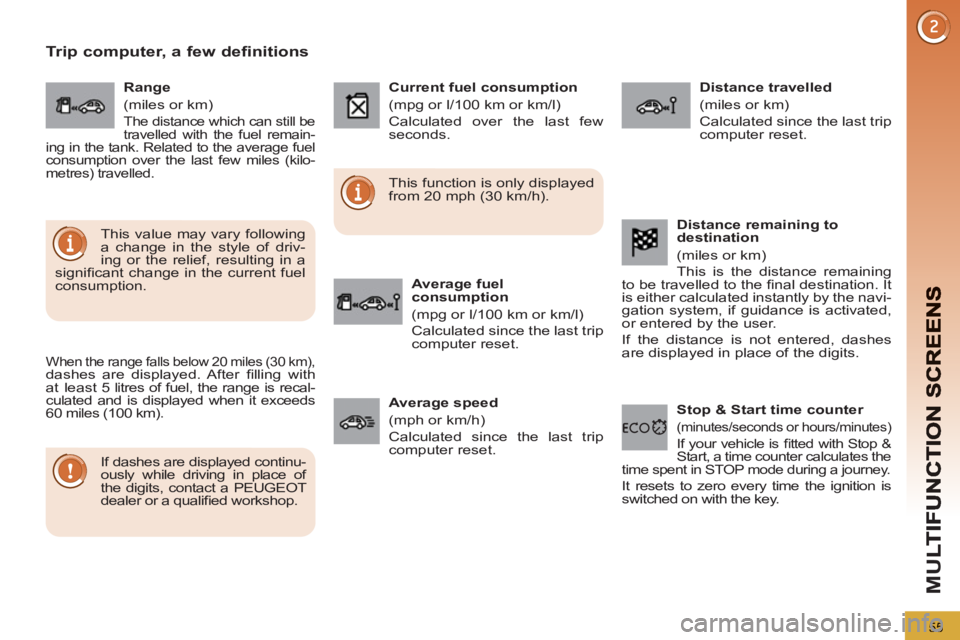
Trip computer, a few definitions
When the range falls below 20 miles (30 km), dashes are displayed. After fi lling with
at least 5 litres of fuel, the range is recal-
culated and is displayed when it exceeds
60 miles (100 km).
If dashes are displayed continu-
ously while driving in place of
the digits, contact a PEUGEOT
dealer or a qualifi ed workshop.
This function is only displayed
from 20 mph (30 km/h).
This value may vary following
a change in the style of driv-
ing or the relief, resulting in a
signifi cant change in the current fuel
consumption.
Range
(miles or km)
The distance which can still be
travelled with the fuel remain-
ing in the tank. Related to the average fuel
consumption over the last few miles (kilo-
metres) travelled.
Current fuel consumption
(mpg or l/100 km or km/l)
Calculated over the last few
seconds.
Average fuel
consumption
(mpg or l/100 km or km/l)
Calculated since the last trip
computer reset.
Distance travelled
(miles or km)
Calculated since the last trip
computer reset.
Average speed
(mph or km/h)
Calculated since the last trip
computer reset.
Stop & Start time counter
(minutes/seconds or hours/minutes)
If your vehicle is fi tted with Stop &
Start, a time counter calculates the
time spent in STOP mode during a journey.
It resets to zero every time the ignition is
switched on with the key.
Distance remaining to
destination
(miles or km)
This is the distance remaining
to be travelled to the fi nal destination. It
is either calculated instantly by the navi-
gation system, if guidance is activated,
or entered by the user.
If the distance is not entered, dashes
are displayed in place of the digits.
Page 323 of 364
321
11
2
3
3
1
4
2
2
1
4
4
2
2
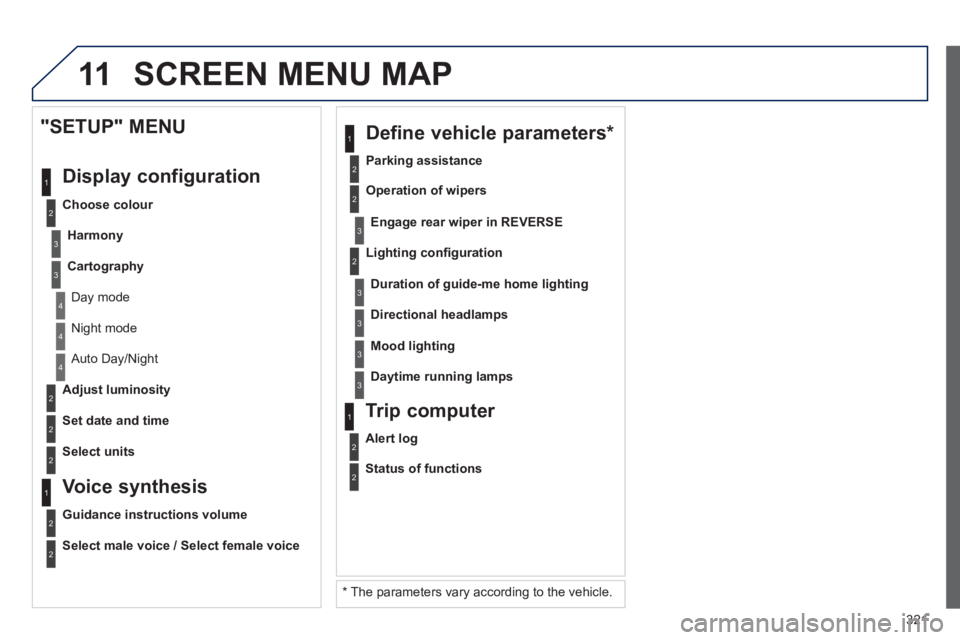
Night mode
Auto Day/Night
Ad
just luminosity
Set date and time
"SETUP" MENU
Displa
y configuration
Choose colour
Harmon
y
Cartography
Day mode
Voice synthesis
Guidance instructions volume
Select male voice / Select female voice
2
Select units
SCREEN MENU MAP
2
3
3
2
Lighting confi guration
Parkin
g assistance
En
gage rear wiper in REVERSE
Duration of guide-me home lighting
1
Define vehicle parameters *
2
Operation of wipers
3Directional headlamps
3Mood lighting
3Daytime running lamps
* The parameters var
y according to the vehicle.
2
Alert log
1
Trip computer
2
Status of functions
Page 332 of 364
330
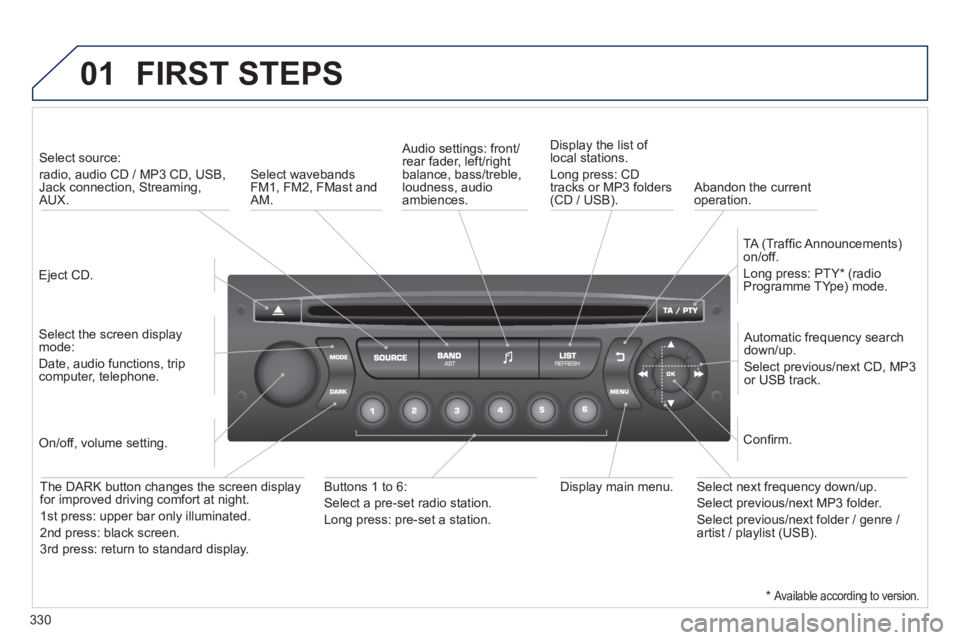
01 FIRST STEPS
Eject CD.
Select source:
radio, audio CD / MP3 CD, USB,Jack connection, Streaming,AUX.
Select the screen displaymode:
Date, audio functions, tripcomputer, telephone.
Automatic frequency search
down/up.
Select previous/next CD, MP3
or USB track.
Audio settings: front/rear fader, left/right
balance, bass/treble, loudness, audio ambiences. Displa
y the list of local stations.
Lon
g press: CD
tracks or MP3 folders(CD / USB).
TA
(Traffi c Announcements)
on/off.
Lon
g press: PTY * (radio
Programme TYpe) mode.
Display main menu. The DARK button changes the screen display
for improved driving comfort at night.
1stpress: upper bar only illuminated.
2ndpress: black screen.
3rdpress: return to standard display.
On/off, volume setting.
Buttons 1 to 6:
Select a pre-set radio station.
Lon
g press: pre-set a station.
Select next frequency down/up.
Select previous/next MP3 folder.
Select previous/next folder / genre /
artist / playlist (USB).
Confi rm.
Select wavebandsFM1, FM2, FMast and AM.
Abandon the current
operation.
*
Available according to version.
Page 334 of 364
332
03
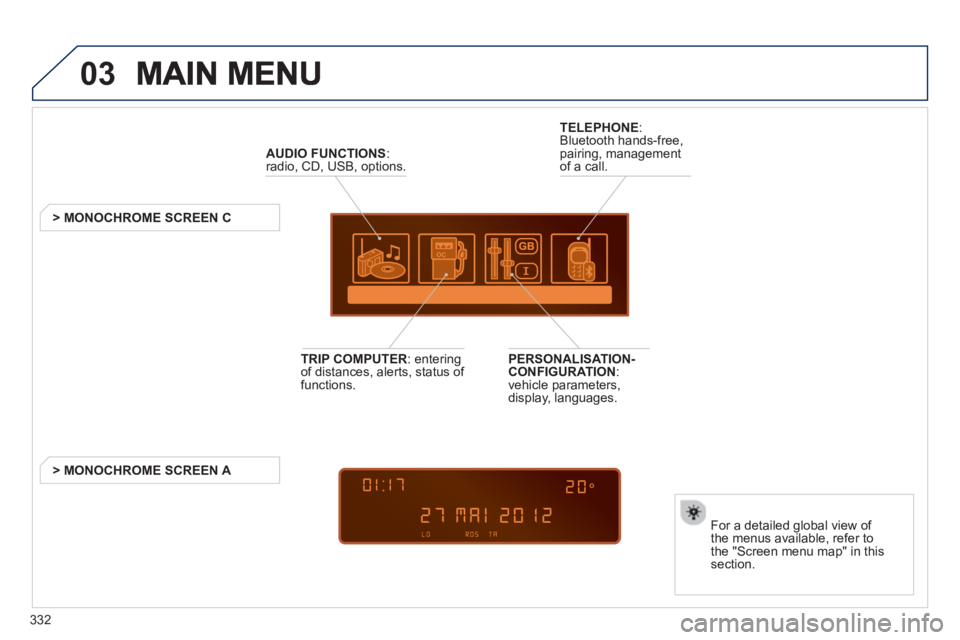
AUDIO FUNCTIONS :radio, CD, USB, options.
> MONOCHROME SCREEN C
For a detailed
global view of
the menus available, refer to
the "Screen menu map" in thissection.
TELEPHONE
:
Bluetooth hands-free,
pairing, managementof a call.
PERSONALISATION-
CONFIGURATION:
vehicle parameters,
display, languages.
TRIP COMPUTER
: enteringof distances, alerts, status of
functions.
> MONOCHROME
SCREEN A
Page 347 of 364
345
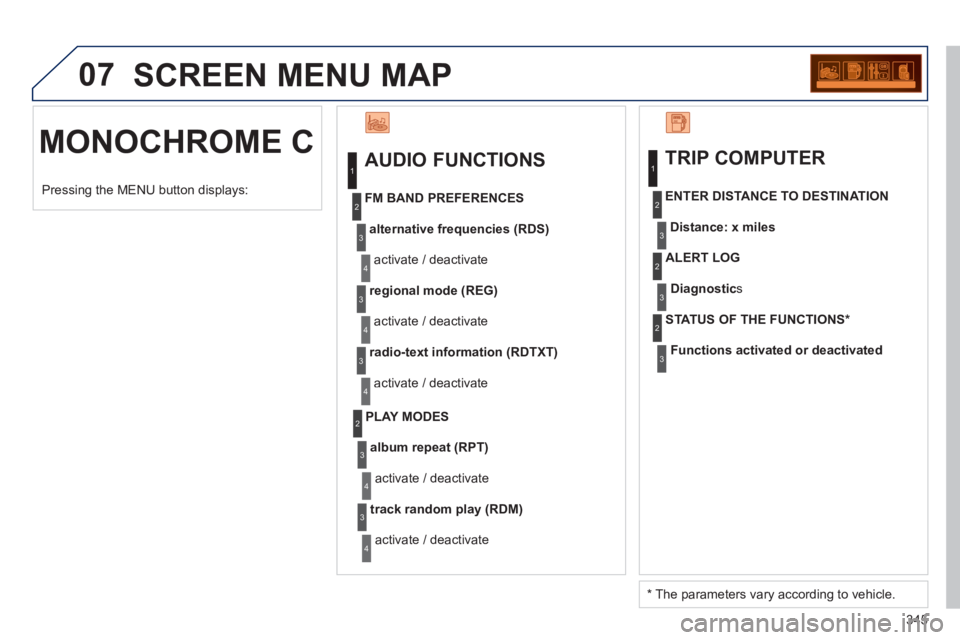
07 SCREEN MENU MAP
MONOCHROME C
AUDIO FUNCTIONS
alternative frequencies (RDS)
activate / deactivate
FM BAND PREFERENCES
regional mode (REG)
activate / deactivate
radio-text information (RDTXT)
activate / deactivate
1
2
3
4
3
4
3
4
PLAY MODES
album repeat (RPT)
activate / deactivate
track random pla
y (RDM)
activate / deactivate
2
3
4
3
4
TRIP COMPUTER
Distance: x miles ENTER DISTANCE TO DESTINATION
Diagnostic s
ALERT LOG
Functions activated or deactivated STATUS OF THE FUNCTIONS *
1
2
3
3
2
3
2
Pressing the MENU button displays:
*
The parameters vary according to vehicle.
Page 354 of 364
ALPHABETICAL INDEX
352
Xenon headlamps..................196
X
Vehicle identifi cation ..............225
Ventilation .......................... 56-58
Voice commands ...................234
V
Under-infl ation (detection) .....130
Under fl oor storage ................ 113
Unlocking .................................74
Unlocking from the inside ........84
Update risk areas ..........249, 286
Updating POIs .......................249
USB (Peugeot Connect) ...103, 336
Warning lamps .......30, 31, 33, 34
Wash-wipe, rear ......................96
Weights ..................218, 220, 223
Welcome lighting ...............91, 99
Window controls ......................81
Wiper, rear ...............................96
Wiper control stalk ............. 95-97
Wipers ...............................95, 97 Start .......................................209
Starting the vehicle ....76, 158, 162
Steering mounted controls,
audio ...........................236, 331
Stopping the vehicle ...76, 158, 162
Stop & Start ...55, 59, 62, 87, 165,
173, 179, 208
Storage ...101, 103, 105, 108, 109
Storage box ...........................102
Storage drawer ......................105
Storage wells .................108, 109
Stowing rings .................108, 109
Sun visor................ 101, 102, 114
Synchronising the remote
control ...................................77
Synthesiser, voice..................292
System, navigation ........242, 282 Reversing lamp......................199
Rigid panel...............................69
Risk areas (update) .......249, 286
Roof bars ...............................214
Routine checks ..............179, 180
Running out of fuel (Diesel) ...174
Safety for children....81, 121, 128
Screen, colour 16/9 .......237, 264
Screen, colour and
mapping ......................279, 318
Screen,
monochrome .......332, 342, 344
Screen, monochrome C...........53
Screen, multifunction (with audio
equipment) ..........44, 46, 49, 51
Screen, multifunction
(without audio equipment) ....42
Screen-wash reservoir...........178
Screen menu map ........264, 318,
342, 344
Screenwash, front....................96
Screenwash fl uid level .....96, 178
Seat adjustment...........63, 64, 67
Seat belts.......109, 133, 134, 136
Seat confi gurations ..................71
Seats, electric ..........................64
Seats, rear ...................67, 69, 70
Serial number, vehicle ...........225
Service indicator ......................38
Servicing ..................................25
Setting the clock ..........42, 44, 46
Short-cut menus ............238, 280
Sidelamps .......... 89, 91, 196-199
Side repeater .........................198
SIM card ........................102, 262
Spare wheel...................190, 192
Spectacles storage ................101
Speed limiter..........................153
Speedometer ...........................27
Spotlamps, side .......................99
T
S
Traffi c information (TA) ....252, 296,
309, 334
Traffi c information (TMC) ......251,
252, 295, 296
Trailer ....................................213
Trip computer ..............52, 53, 55
Trip distance recorder ..............41
Tyre pressures .......................225
Tyres ........................................25
Tyre under-infl ation detection ....130
U
Table of weights .....218, 220, 223
Tables, aircraft .......................105
Tables of engines...........217, 219
Tables of fuses.......................201
Tank, fuel .................................88
Technical data........ 217-220, 223
Telephone ............. 229, 259-261,
298, 302
Telephone, hands-free ... 259-261
Temperature, coolant ...............37
Temperature control for heated
seats .....................................65
Temporary tyre repair kit ........181
Third brake lamp....................200
TMC (Traffi c info) ...........251, 295
Tools ..............................190, 192
Torch .............. 100, 108, 109, 114
Total distance recorder ............41
Towbar ...................................213
Towed loads...........218, 220, 223
Towing another vehicle ..........212
Traction control (ASR) .......32, 35
W
Page 359 of 364
VISUAL SEARCH
357
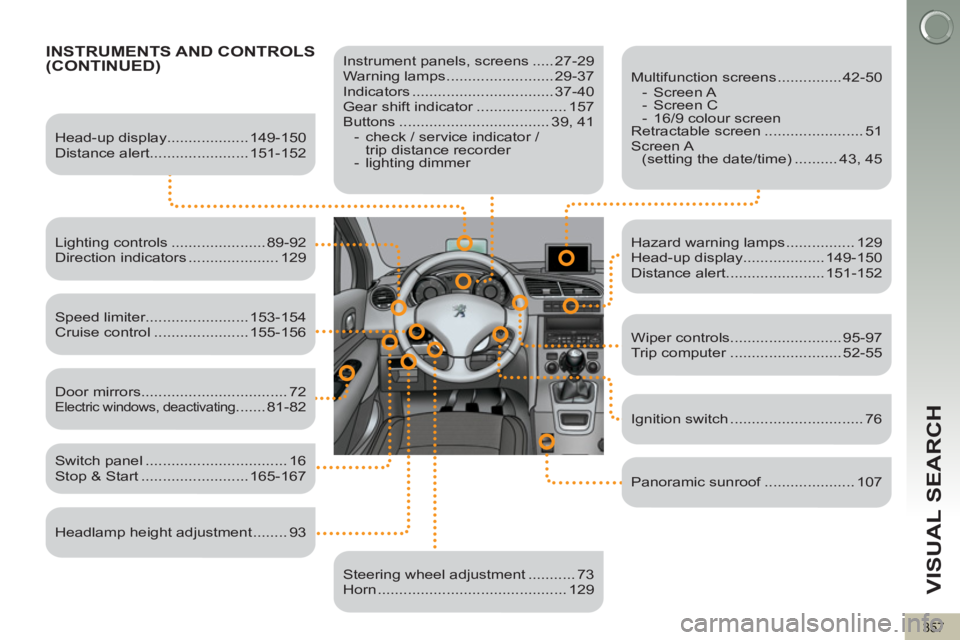
INSTRUMENTS AND CONTROLS(CONTINUED)
Instrument panels, screens ..... 27-29
Warning lamps ......................... 29-37
Indicators ................................. 37-40
Gear shift indicator ..................... 157
Buttons ................................... 39, 41
- check / service indicator /
trip distance recorder
- lighting dimmer
Head-up display................... 149-150
Distance alert....................... 151-152
Lighting controls ...................... 89-92
Direction indicators ..................... 129
Speed limiter........................ 153-154
Cruise control ...................... 155-156
Switch panel ................................. 16
Stop & Start ......................... 165-167
Door mirrors .................................. 72
Electric windows, deactivating ....... 81-82
Headlamp height adjustment ........ 93
Steering wheel adjustment ........... 73
Horn ............................................ 129
Multifunction screens ............... 42-50
- Screen A
- Screen C
- 16/9 colour screen
Retractable screen ....................... 51
Screen A
(setting the date/time) .......... 43, 45
Hazard warning lamps ................ 129
Head-up display................... 149-150
Distance alert....................... 151-152
Wiper controls.......................... 95-97
Trip computer .......................... 52-55
Ignition switch ............................... 76
Panoramic sunroof ..................... 107