audio PEUGEOT 5008 2015.5. User Guide
[x] Cancel search | Manufacturer: PEUGEOT, Model Year: 2015.5., Model line: 5008, Model: PEUGEOT 5008 2015.5.Pages: 364, PDF Size: 12.82 MB
Page 103 of 364
101
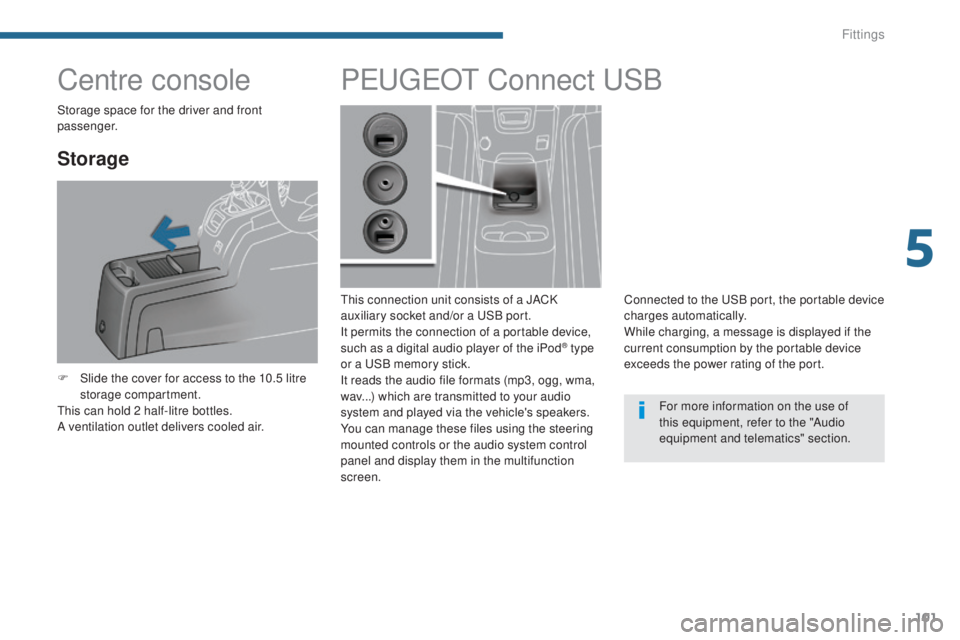
Centre console
Storage
F Slide the cover for access to the 10.5 litre storage compartment.
This can hold 2 half-litre bottles.
A ventilation outlet delivers cooled air.
PEUGEOT C onnect USB
This connection unit consists of a JACK
auxiliary socket and/or a USB port.
It permits the connection of a portable device,
such as a digital audio player of the iPod
® type
or a USB memory stick.
It reads the audio file formats (mp3, ogg, wma,
wav...) which are transmitted to your audio
system and played via the vehicle's speakers.
You can manage these files using the steering
mounted controls or the audio system control
panel and display them in the multifunction
screen. Connected to the USB port, the portable device
charges automatically.
While charging, a message is displayed if the
current consumption by the portable device
exceeds the power rating of the port.
For more information on the use of
this equipment, refer to the "Audio
equipment and telematics" section.
Storage space for the driver and front
passenger.
5
Fittings
Page 106 of 364
104
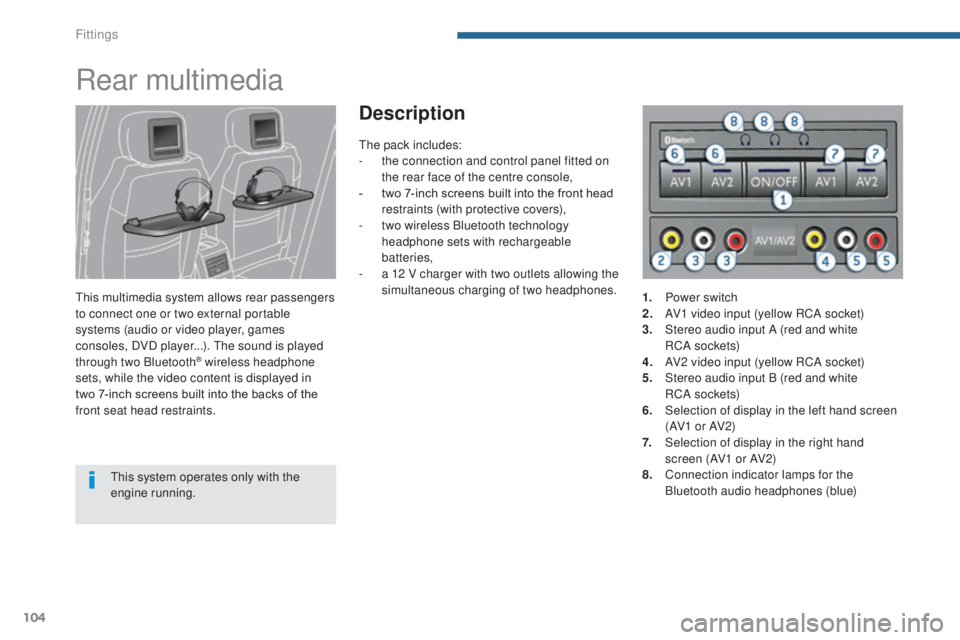
Rear multimedia
This multimedia system allows rear passengers
to connect one or two external portable
systems (audio or video player, games
consoles, DVD player...). The sound is played
through two Bluetooth
® wireless headphone
sets, while the video content is displayed in
two
7-inch screens built into the backs of the
front seat head restraints.
Description
This system operates only with the
engine running. The pack includes:
-
t
he connection and control panel fitted on
the rear face of the centre console,
-
t
wo 7-inch screens built into the front head
restraints (with protective covers),
-
t
wo wireless Bluetooth technology
headphone sets with rechargeable
batteries,
-
a 1
2 V charger with two outlets allowing the
simultaneous charging of two headphones. 1.
P
ower switch
2.
A
V1 video input (yellow RCA socket)
3.
S
tereo audio input A (red and white
RC A
s o c ket s)
4.
A
V2 video input (yellow RCA socket)
5.
S
tereo audio input B (red and white
RC A
s o c ket s)
6.
S
election of display in the left hand screen
(AV1 o r AV2)
7.
S
election of display in the right hand
screen (AV1 or AV2)
8. C onnection indicator lamps for the
Bluetooth audio headphones (blue)
Fittings
Page 107 of 364
105
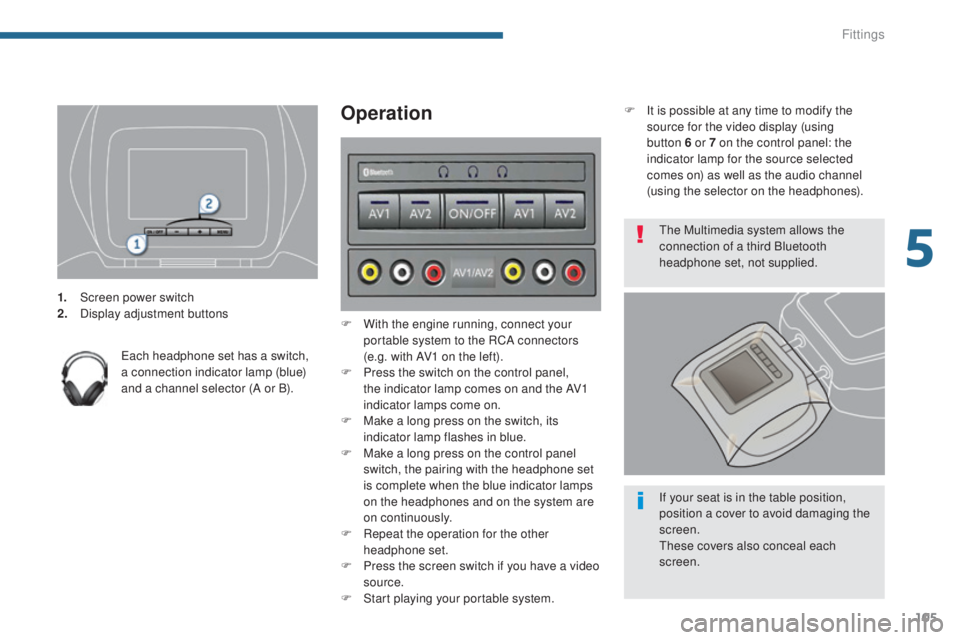
1. Screen power switch
2. Display adjustment buttons
Each headphone set has a switch,
a connection indicator lamp (blue)
and a channel selector (A or B).
Operation
F With the engine running, connect your portable system to the RCA connectors
(e.g. with AV1 on the left).
F
P
ress the switch on the control panel,
the indicator lamp comes on and the AV1
indicator lamps come on.
F
M
ake a long press on the switch, its
indicator lamp flashes in blue.
F
M
ake a long press on the control panel
switch, the pairing with the headphone set
is complete when the blue indicator lamps
on the headphones and on the system are
on continuously.
F
R
epeat the operation for the other
headphone set.
F
P
ress the screen switch if you have a video
source.
F
S
tart playing your portable system. F
I
t is possible at any time to modify the
source for the video display (using
button 6 or 7 on the control panel: the
indicator lamp for the source selected
comes on) as well as the audio channel
(using the selector on the headphones).
The Multimedia system allows the
connection of a third Bluetooth
headphone set, not supplied.
If your seat is in the table position,
position a cover to avoid damaging the
screen.
These covers also conceal each
screen.
5
Fittings
Page 110 of 364
108
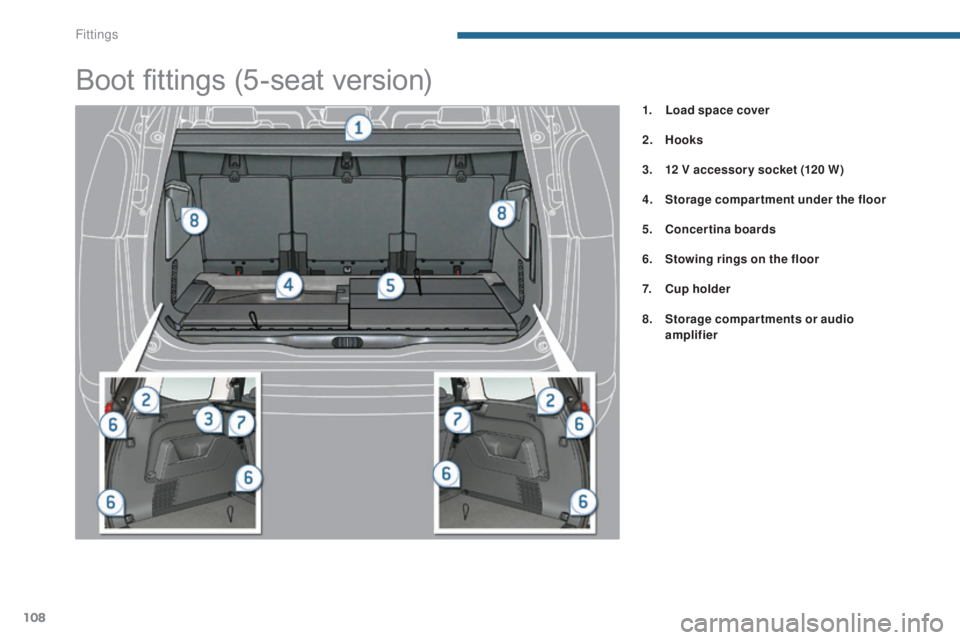
Boot fittings (5-seat version)
1. Load space cover
2.
Hoo
ks
3.
1
2 V accessor y socket (120 W)
4.
S
torage compartment under the floor
5.
C
oncertina boards
6.
S
towing rings on the floor
7.
C
up holder
8.
S
torage compartments or audio
amplifier
Fittings
Page 111 of 364
109
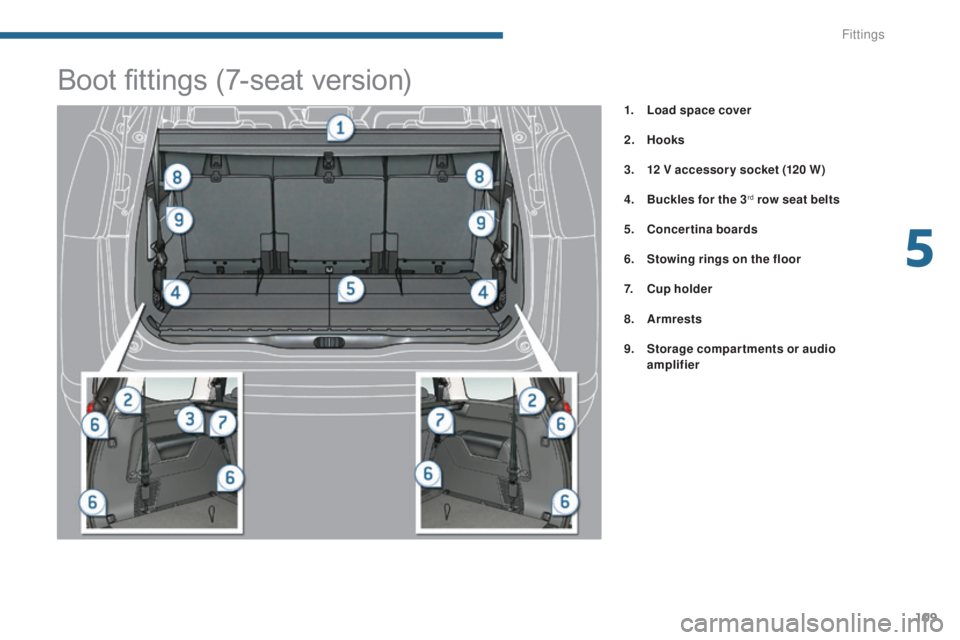
1. Load space cover
2.
Hoo
ks
3.
1
2 V accessor y socket (120 W)
4.
B
uckles for the 3
rd row seat belts
5.
C
oncertina boards
6.
S
towing rings on the floor
7.
C
up holder
8.
A
rmrests
9.
S
torage compartments or audio
amplifier
Boot fittings (7-seat version)
5
Fittings
Page 152 of 364
150
Key left in the "Ignition on"
position
If the key has been left in the ignition
switch at position 2 (Ignition on),
the ignition will be switched off
automatically after one hour.
To switch the ignition back on, turn the
key to position 1 (Stop) , then back to
position 2 (Ignition on) .
Avoid attaching heavy objects to the
key, which would weigh down on its
blade in the ignition switch and could
cause a malfunction. For more information, refer to the
"Practical information" section, under
"Energy economy mode".
Switching off the engine
Energy economy mode
After switching off the engine (position 1- Stop
),
for a maximum of 30 minutes you can still use
functions such as the audio and telematic
system, the wipers, dipped beam headlamps,
courtesy lamps,
...
To facilitate unlocking of the steering
column, it is recommended that the
wheels be returned to the straight ahead
position before switching off the engine.
F
C
heck that the parking brake is correctly
applied, particularly on sloping ground. Never switch off the ignition before the
vehicle is at a complete stop. With the
engine off, the braking and steering
assistance systems are also cut off: risk
of loss of control of the vehicle.
When you leave the vehicle, keep the
key with you and lock the vehicle.
F
S
top the vehicle.
F
W
ith the engine running at idle, turn the key
to position 1 .
F
R
emove the key from the ignition switch.
F
T
o lock the steering column, turn the
steering until it locks.
Driving
Page 160 of 364

158
System which projects various information onto
a transparent blade in the driver's field of vision
so that they do not have to take their eyes off
the road.
This system operates when the engine is
running and the settings are stored when the
ignition is switched off.
Head-up display
1. Head-up display on / off.
2. Brightness adjustment.
3.
D
isplay height adjustment. Once the system has been activated, the
following information is grouped together in the
head-up display:
A.
T
he speed of your vehicle.
B.
C
ruise control/speed limiter information.
ButtonsDisplays during operation
C. "Distance alert" information (depending on
ve r s i o n).
D.
N
avigation information (depending on
ve r s i o n).
F
or more information on the navigation
system, refer to the "Audio equipment and
telematics" section.
The blade is activated by pressing one
of the buttons.
Driving
Page 241 of 364
239
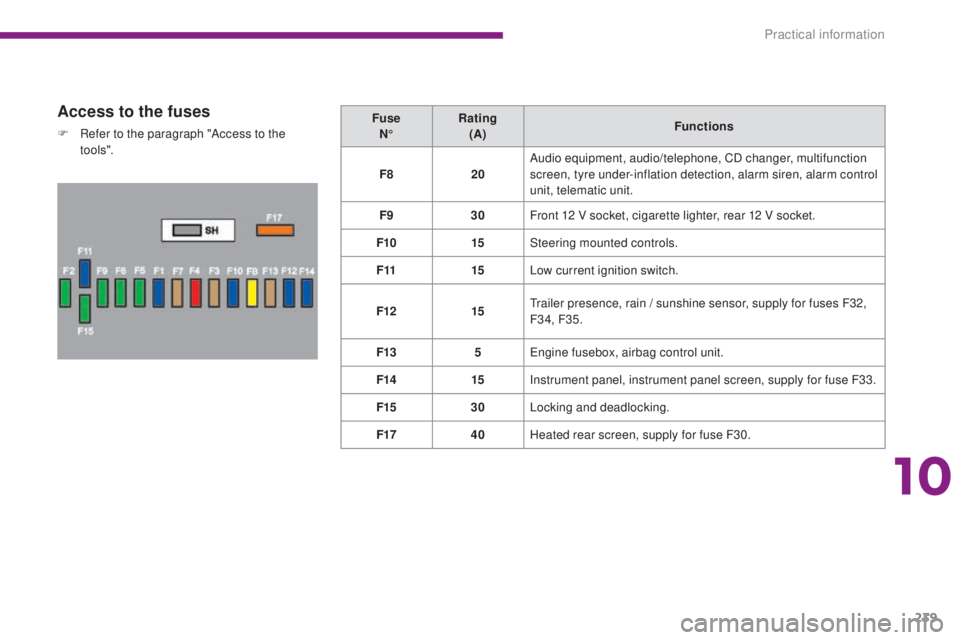
Access to the fuses
F Refer to the paragraph "Access to the to o ls". Fuse
N° Rating
(A) Functions
F8 20Audio equipment, audio/telephone, CD changer, multifunction
screen, tyre under-inflation detection, alarm siren, alarm control
unit, telematic unit.
F9 30Front 12 V socket, cigarette lighter, rear 12 V socket.
F10 15Steering mounted controls.
F11 15Low current ignition switch.
F12 15Trailer presence, rain / sunshine sensor, supply for fuses F32,
F34, F35.
F13 5Engine fusebox, airbag control unit.
F14 15Instrument panel, instrument panel screen, supply for fuse F33.
F15 30Locking and deadlocking.
F17 40Heated rear screen, supply for fuse F30.
10
Practical information
Page 249 of 364
247
Exiting economy mode
These functions are reactivated automatically
next time the vehicle is driven.
To restore the use of these functions
immediately, start the engine and let it run for at
least 5 minutes.
Load reduction modeEnergy economy mode
Switching to economy mode
Once this time has elapsed, a message
appears in the screen indicating that the
vehicle has switched to economy mode and the
active functions are put on standby.
System which manages the use of certain
functions according to the level of charge
remaining in the battery.
When the vehicle is being driven, the load
reduction function temporarily deactivates
certain functions, such as the air conditioning,
the heated rear screen...
The deactivated functions are reactivated
automatically as soon as conditions permit.
System which manages the duration of use of certain functions to conserve a sufficient level of
charge in the battery.
After the engine has stopped, you can still use functions such as the audio and telematics
system,
windscreen wipers, dipped beam headlamps, courtesy lamps, etc. for a maximum
combined duration of thirty minutes.
This period may be greatly reduced if the battery is not fully charged.
If the telephone is being used at this
time, the call will be maintained for
5 minutes with the hands-free kit of your
P
E
UGEOT
C
onnect Sound (RD5) or
P
E
UGEOT
C
onnect Navigation (RNEG). Let the engine run for the duration
specified to ensure that the battery
charge is sufficient.
Do not repeatedly and continuously
restart the engine in order to charge the
battery.
A flat battery prevents the engine
from starting (refer to the "Battery"
paragraph).
10
Practical information
Page 259 of 364
257
Installation of radio
communication
transmitters
Before installing any after-market radio
communication transmitter, you can
contact a PEUGEOT dealer for the
specification of transmitters which can
be fitted (frequency, maximum power,
aerial position, specific installation
requirements), in line with the Vehicle
Electromagnetic Compatibility
Directive (2004/104/EC).The fitting of electrical equipment
or accessories which are not
recommended by PEUGEOT may result
in a failure of your vehicle's electronic
system and excessive electrical
consumption.
Contact a PEUGEOT dealer
for information on the range of
recommended equipment and
accessories. Depending on the legislation in force in
the country, certain safety equipment
may be compulsory: high visibility
safety vests, warning triangles,
breathalyzers, spare bulbs, spare fuses,
fire extinguisher, first aid kit, mud flaps
at the rear of the vehicle.
You can also obtain cleaning and
maintenance products (exterior and
interior), products for topping up
(screenwash fluid...) and refills (sealant
cartridge for the temporary puncture
repair kit...) from PEUGEOT dealers.
"Multimedia"
Portable satellite navigation systems, mapping
updates, Bluetooth hands-free system, DVD
player, USB Box, additional Bluetooth wireless
headphones, Bluetooth audio headphones
mains charger, multimedia support...
10
Practical information