lock PEUGEOT 5008 2015 Owner's Manual
[x] Cancel search | Manufacturer: PEUGEOT, Model Year: 2015, Model line: 5008, Model: PEUGEOT 5008 2015Pages: 364, PDF Size: 12.82 MB
Page 55 of 364
53
Electric windows
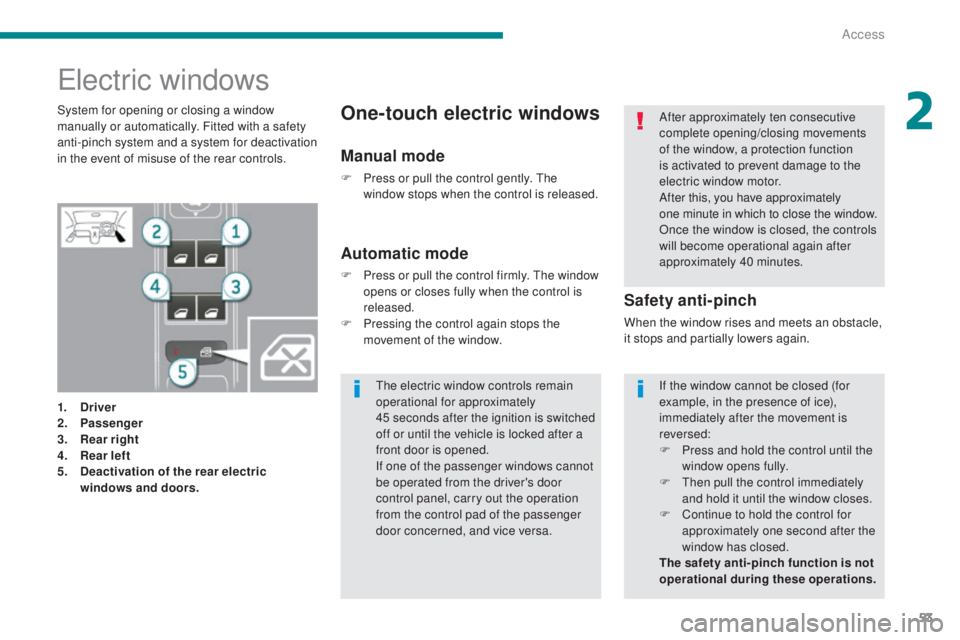
1. Driver
2. Passenger
3.
R
ear right
4.
R
ear left
5.
D
eactivation of the rear electric
windows and doors.
Safety anti-pinch
When the window rises and meets an obstacle,
it stops and partially lowers again.
Automatic mode
F Press or pull the control firmly. The window opens or closes fully when the control is
released.
F
P
ressing the control again stops the
movement of the window.
One-touch electric windowsSystem for opening or closing a window
manually or automatically. Fitted with a safety
anti-pinch system and a system for deactivation
in the event of misuse of the rear controls.
Manual mode
F Press or pull the control gently. The window stops when the control is released. After approximately ten consecutive
complete opening/closing movements
of the window, a protection function
is activated to prevent damage to the
electric window motor.
After this, you have approximately
one
minute in which to close the window.
Once the window is closed, the controls
will become operational again after
approximately 40 minutes.
If the window cannot be closed (for
example, in the presence of ice),
immediately after the movement is
reversed:
F
P
ress and hold the control until the
window opens fully.
F
T
hen pull the control immediately
and hold it until the window closes.
F
C
ontinue to hold the control for
approximately one second after the
window has closed.
The safety anti-pinch function is not
operational during these operations.
The electric window controls remain
operational for approximately
45
seconds after the ignition is switched
off or until the vehicle is locked after a
front door is opened.
If one of the passenger windows cannot
be operated from the driver's door
control panel, carry out the operation
from the control pad of the passenger
door concerned, and vice versa.
2
Access
Page 56 of 364
54
Reinitialisation
If a window does not rise automatically or
following disconnection of the battery, the anti-
pinch function must be reinitialised:
For each window:
F
P
ull the control until the window stops.
F
R
elease the control and pull it again, repeat
these operations until the window closes
fully.
F
C
ontinue to hold the control for
approximately one second after the window
has closed.
F
P
ress the control to lower the window
automatically to the low position.
F
O
nce the window has reached the low
position, press the control again for
approximately one second.
Deactivation of the rear
electric windows and doors
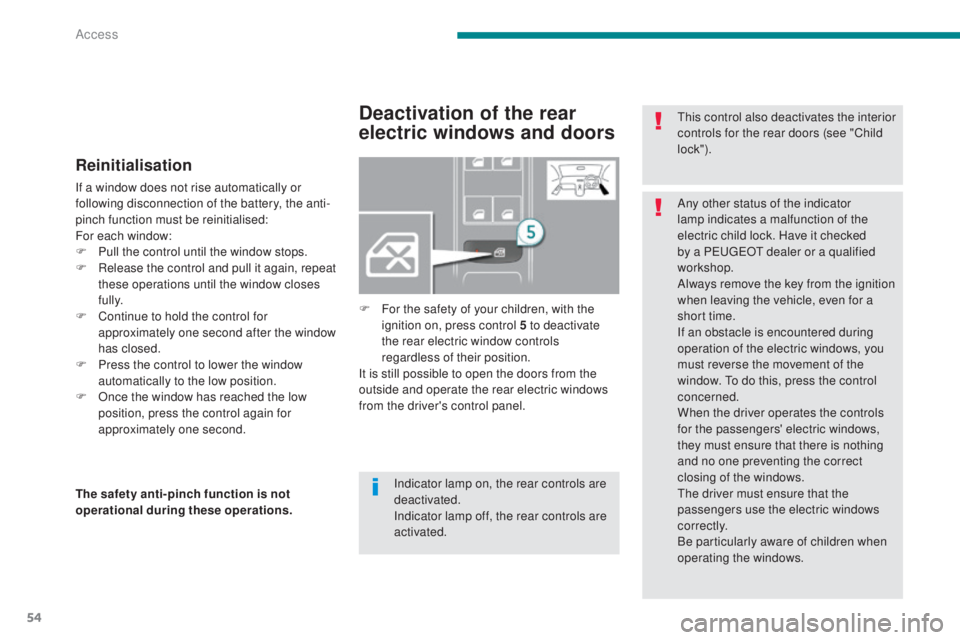
F For the safety of your children, with the ignition on, press control 5 to deactivate
the rear electric window controls
regardless of their position.
It is still possible to open the doors from the
outside and operate the rear electric windows
from the driver's control panel.
The safety anti-pinch function is not
operational during these operations. This control also deactivates the interior
controls for the rear doors (see "Child
lock").
Indicator lamp on, the rear controls are
deactivated.
Indicator lamp off, the rear controls are
activated. Any other status of the indicator
lamp indicates a malfunction of the
electric child lock. Have it checked
by a PEUGEOT dealer or a qualified
workshop.
Always remove the key from the ignition
when leaving the vehicle, even for a
short time.
If an obstacle is encountered during
operation of the electric windows, you
must reverse the movement of the
window. To do this, press the control
concerned.
When the driver operates the controls
for the passengers' electric windows,
they must ensure that there is nothing
and no one preventing the correct
closing of the windows.
The driver must ensure that the
passengers use the electric windows
c o r r e c t l y.
Be particularly aware of children when
operating the windows.
Access
Page 57 of 364
55
Doors
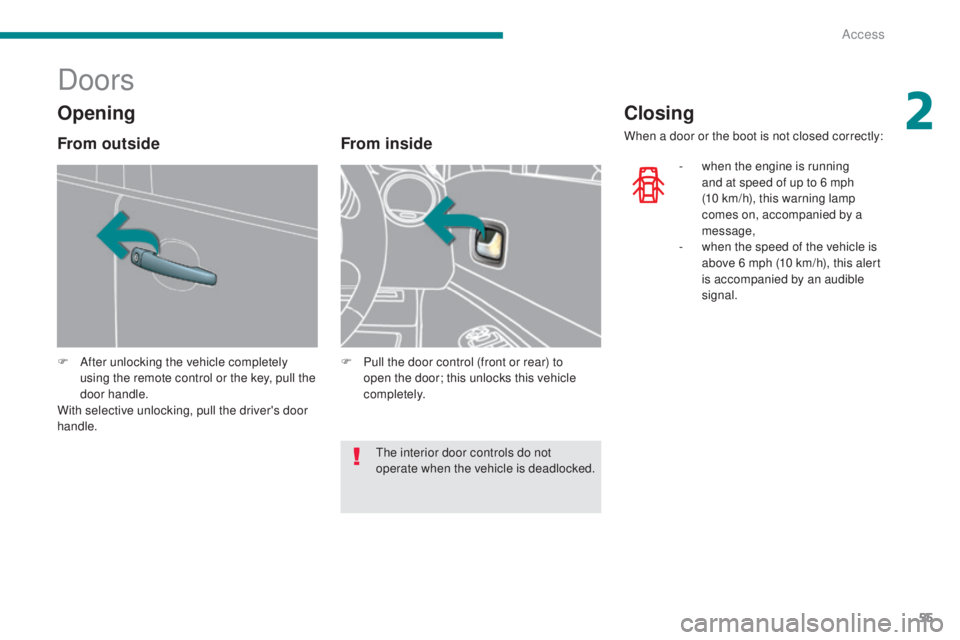
F After unlocking the vehicle completely using the remote control or the key, pull the
door handle.
With selective unlocking, pull the driver's door
handle.
From inside
F Pull the door control (front or rear) to open the door; this unlocks this vehicle
completely.
Closing
When a door or the boot is not closed correctly:
-
w
hen the engine is running
and at speed of up to 6 mph
(10
km/h), this warning lamp
comes on, accompanied by a
message,
-
w
hen the speed of the vehicle is
above 6 mph (10 km/h), this alert
is accompanied by an audible
signal.
Opening
From outside
The interior door controls do not
operate when the vehicle is deadlocked.
2
Access
Page 58 of 364
56
A confirmation message is displayed,
accompanied by an audible signal.
Central locking
System which provides full manual locking or
unlocking of the doors from the inside.
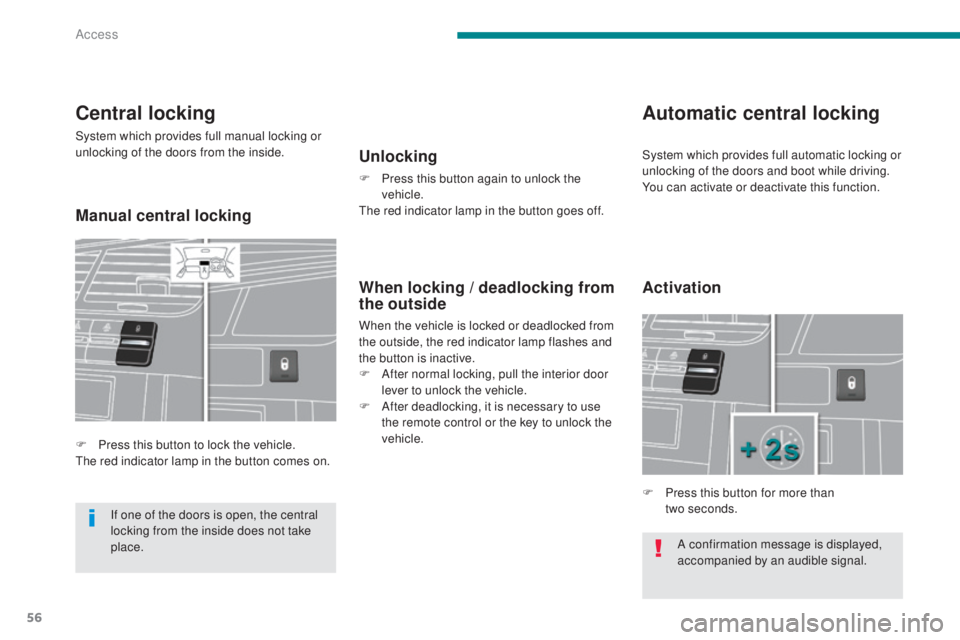
F
P
ress this button to lock the vehicle.
The red indicator lamp in the button comes on.
Automatic central locking
Unlocking
F Press this button again to unlock the vehicle.
The red indicator lamp in the button goes off.
When locking / deadlocking from
the outside
When the vehicle is locked or deadlocked from
the outside, the red indicator lamp flashes and
the button is inactive.
F
A
fter normal locking, pull the interior door
lever to unlock the vehicle.
F
A
fter deadlocking, it is necessary to use
the remote control or the key to unlock the
vehicle.
If one of the doors is open, the central
locking from the inside does not take
place. F
P
ress this button for more than
two
seconds.
Activation
System which provides full automatic locking or
unlocking of the doors and boot while driving.
You can activate or deactivate this function.
Manual central locking
Access
Page 59 of 364
57
Emergency control
System allowing the doors to be locked and
unlocked manually in the event of a malfunction
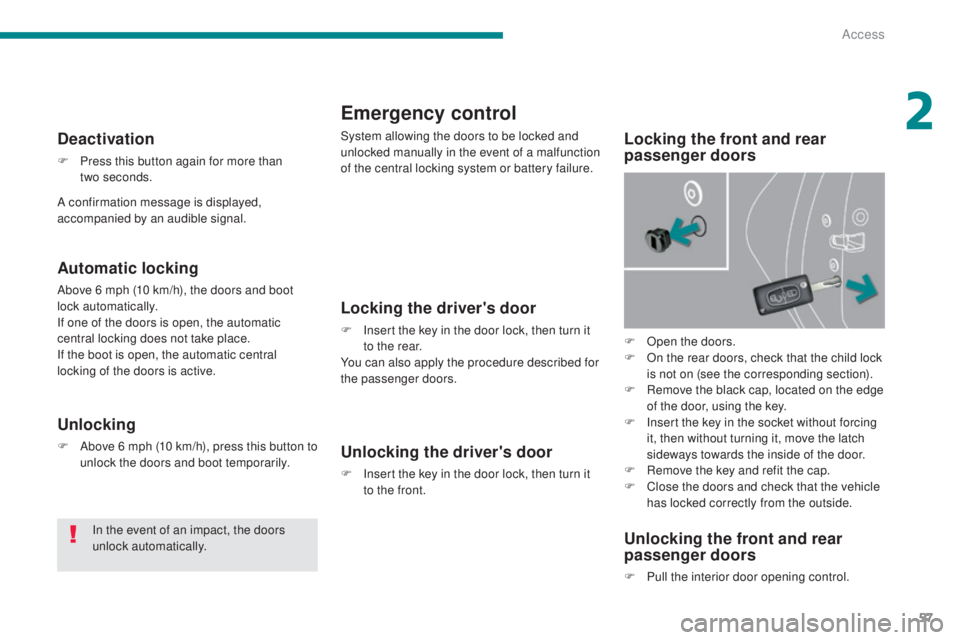
of the central locking system or battery failure.Locking the front and rear
passenger doors
Locking the driver's door
F Insert the key in the door lock, then turn it to the rear.
You can also apply the procedure described for
the passenger doors.
Unlocking the driver's door
F Insert the key in the door lock, then turn it to the front.
Unlocking the front and rear
passenger doors
F Pull the interior door opening control.
Automatic locking
Above 6 mph (10 km/h), the doors and boot
lock automatically.
If one of the doors is open, the automatic
central locking does not take place.
If the boot is open, the automatic central
locking of the doors is active.
Deactivation
F Press this button again for more than two seconds.
Unlocking
F Above 6 mph (10 km/h), press this button to unlock the doors and boot temporarily.
In the event of an impact, the doors
unlock automatically. F
O
pen the doors.
F
O
n the rear doors, check that the child lock
is not on (see the corresponding section).
F
R
emove the black cap, located on the edge
of the door, using the key.
F
I
nsert the key in the socket without forcing
it, then without turning it, move the latch
sideways towards the inside of the door.
F
R
emove the key and refit the cap.
F
C
lose the doors and check that the vehicle
has locked correctly from the outside.
A confirmation message is displayed,
accompanied by an audible signal.
2
Access
Page 60 of 364
58
Boot
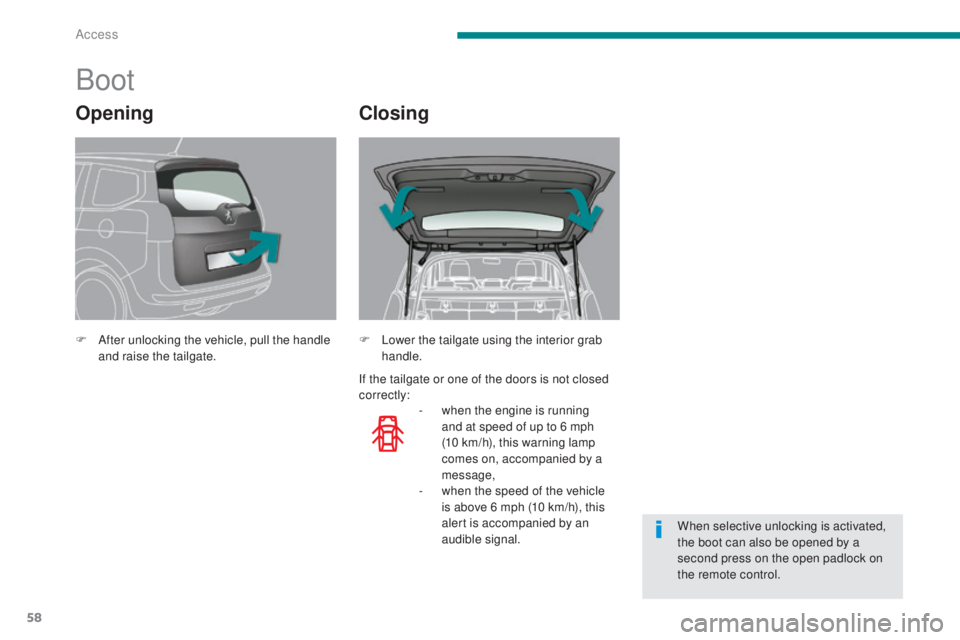
F After unlocking the vehicle, pull the handle and raise the tailgate.
-
w
hen the engine is running
and at speed of up to 6 mph
(10
km/h), this warning lamp
comes on, accompanied by a
message,
-
w
hen the speed of the vehicle
is above 6 mph (10 km/h), this
alert is accompanied by an
audible signal.
F
L ower the tailgate using the interior grab
handle.
When selective unlocking is activated,
the boot can also be opened by a
second press on the open padlock on
the remote control.
OpeningClosing
If the tailgate or one of the doors is not closed
correctly:
Access
Page 61 of 364
59
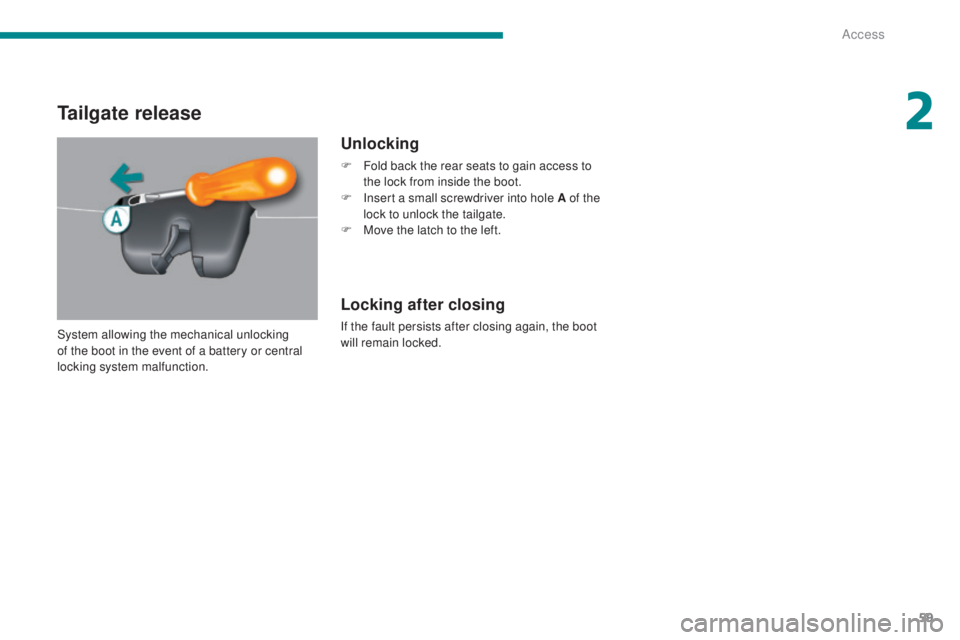
Tailgate release
Unlocking
F Fold back the rear seats to gain access to the lock from inside the boot.
F
I
nsert a small screwdriver into hole A of the
lock to unlock the tailgate.
F
M
ove the latch to the left.
Locking after closing
If the fault persists after closing again, the boot
will remain locked.
System allowing the mechanical unlocking
of the boot in the event of a battery or central
locking system malfunction.
2
Access
Page 74 of 364
72
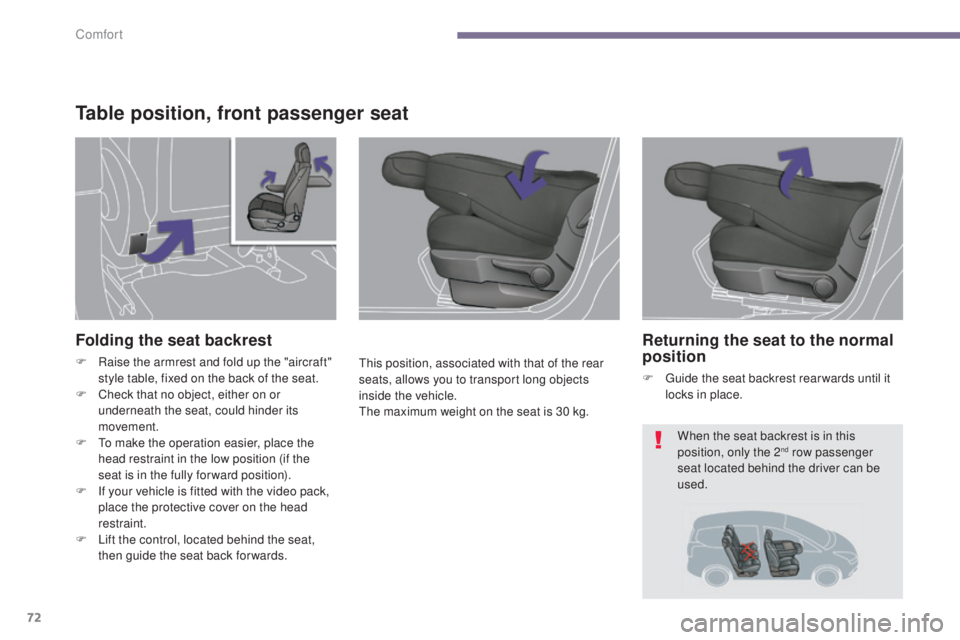
Table position, front passenger seat
This position, associated with that of the rear
seats, allows you to transport long objects
inside the vehicle.
The maximum weight on the seat is 30 kg.
Folding the seat backrest
F Raise the armrest and fold up the "aircraft" style table, fixed on the back of the seat.
F
C
heck that no object, either on or
underneath the seat, could hinder its
movement.
F
T
o make the operation easier, place the
head restraint in the low position (if the
seat is in the fully for ward position).
F
I
f your vehicle is fitted with the video pack,
place the protective cover on the head
restraint.
F
L
ift the control, located behind the seat,
then guide the seat back for wards.
Returning the seat to the normal
position
F Guide the seat backrest rear wards until it locks in place.
When the seat backrest is in this
position, only the 2
nd row passenger
seat located behind the driver can be
used.
Comfort
Page 76 of 364
74
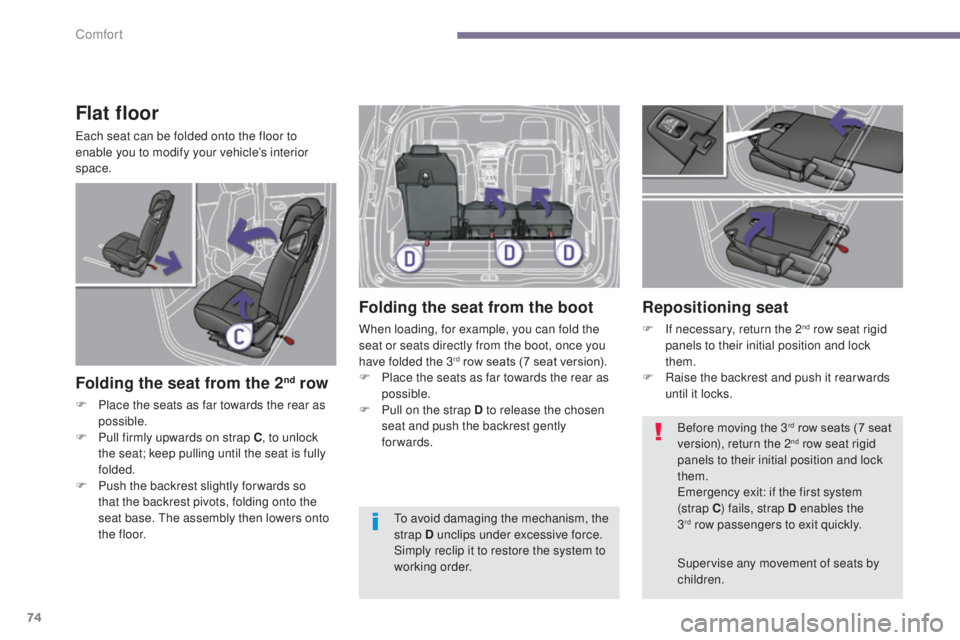
Flat floor
Each seat can be folded onto the floor to
enable you to modify your vehicle’s interior
space.
Folding the seat from the 2nd row
F Place the seats as far towards the rear as possible.
F
P
ull firmly upwards on strap C , to unlock
the seat; keep pulling until the seat is fully
folded.
F
P
ush the backrest slightly for wards so
that the backrest pivots, folding onto the
seat base. The assembly then lowers onto
t h e
f l o o r.
Folding the seat from the boot
When loading, for example, you can fold the
seat or seats directly from the boot, once you
have folded the 3
rd row seats (7 seat version).
F
P
lace the seats as far towards the rear as
possible.
F
P
ull on the strap D to release the chosen
seat and push the backrest gently
forwards.
Repositioning seat
F If necessary, return the 2nd row seat rigid
panels to their initial position and lock
them.
F
R
aise the backrest and push it rear wards
until it locks.
Supervise any movement of seats by
children. Before moving the 3
rd row seats (7 seat
version), return the 2nd row seat rigid
panels to their initial position and lock
them.
Emergency exit: if the first system
(strap C ) fails, strap D enables the
3
rd row passengers to exit quickly.
T
o avoid damaging the mechanism, the
strap D unclips under excessive force.
Simply reclip it to restore the system to
working order.
Comfort
Page 77 of 364
75
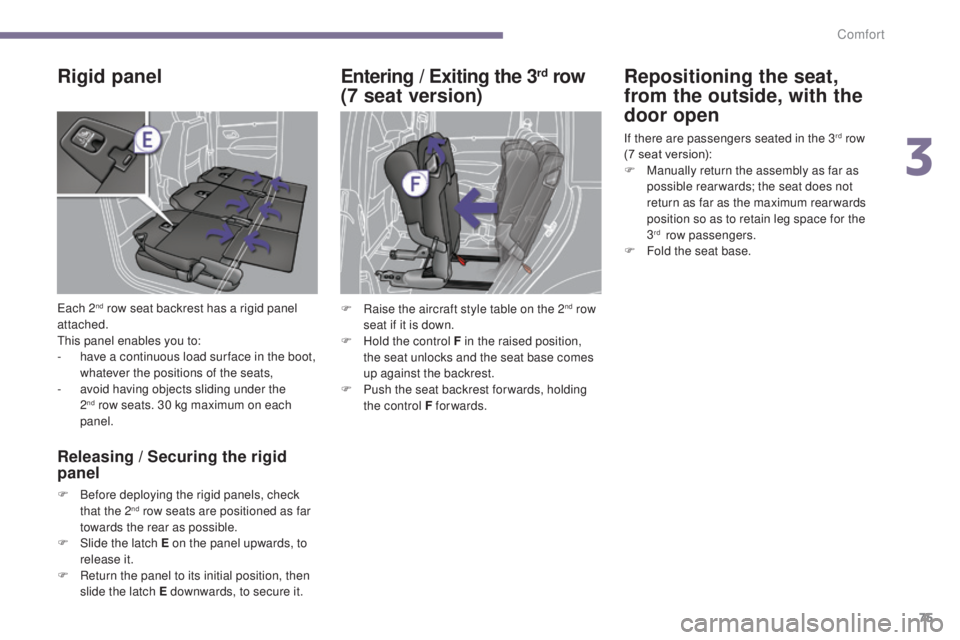
Rigid panel
Each 2nd row seat backrest has a rigid panel
attached.
This panel enables you to:
-
h
ave a continuous load sur face in the boot,
whatever the positions of the seats,
-
a
void having objects sliding under the
2
nd row seats. 30 kg maximum on each
panel.
Releasing / Securing the rigid
panel
F Before deploying the rigid panels, check that the 2nd row seats are positioned as far
towards the rear as possible.
F
S
lide the latch E on the panel upwards, to
release it.
F
R
eturn the panel to its initial position, then
slide the latch E downwards, to secure it.
Entering / Exiting the 3rd row
(7 seat version) Repositioning the seat,
from the outside, with the
door open
If there are passengers seated in the 3rd row
(7 seat version):
F
M
anually return the assembly as far as
possible rear wards; the seat does not
return as far as the maximum rear wards
position so as to retain leg space for the
3
rd row passengers.
F
F
old the seat base.
F
R
aise the aircraft style table on the 2
nd row
seat if it is down.
F
H
old the control F in the raised position,
the seat unlocks and the seat base comes
up against the backrest.
F
P
ush the seat backrest for wards, holding
the control F forwards.
3
Comfort