instrument panel PEUGEOT 5008 2017 Owner's Manual
[x] Cancel search | Manufacturer: PEUGEOT, Model Year: 2017, Model line: 5008, Model: PEUGEOT 5008 2017Pages: 404, PDF Size: 15.31 MB
Page 47 of 404
45
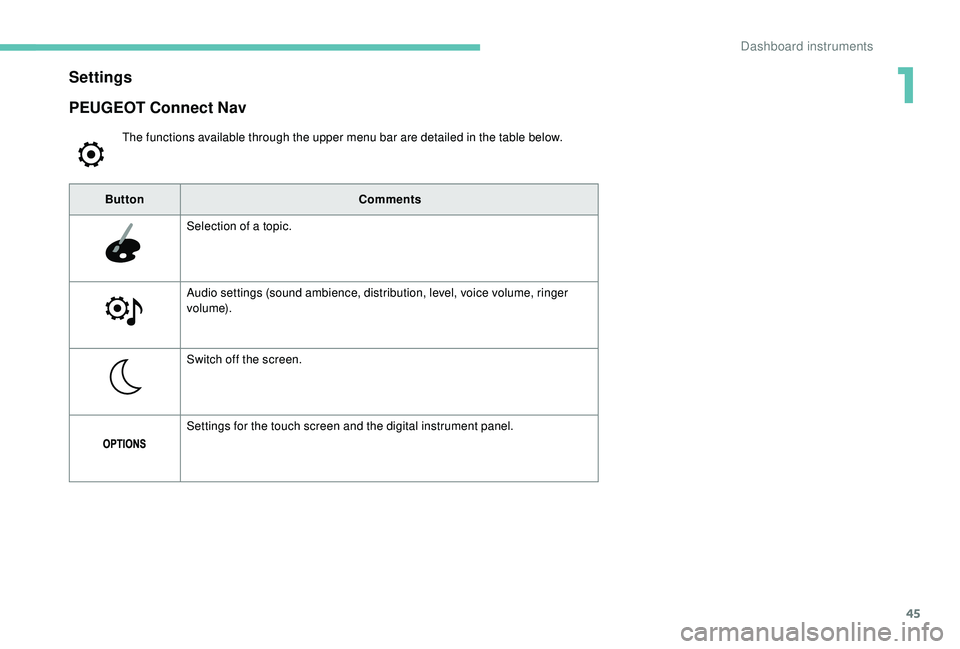
Settings
The functions available through the upper menu bar are detailed in the table below.
PEUGEOT Connect Nav
ButtonComments
Selection of a topic.
Audio settings (sound ambience, distribution, level, voice volume, ringer
vo l u m e).
Switch off the screen.
Settings for the touch screen and the digital instrument panel.
1
Dashboard instruments
Page 48 of 404
46
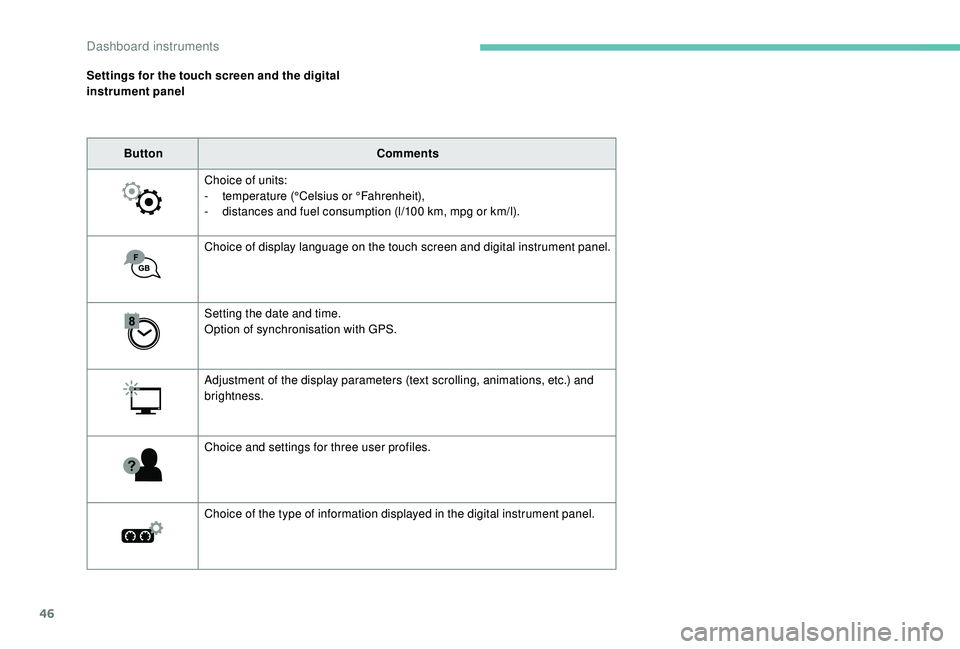
Settings for the touch screen and the digital
instrument panelButton Comments
Choice of units:
-
t
emperature (°Celsius or °Fahrenheit),
-
d
istances and fuel consumption (l/100 km, mpg or km/l).
Choice of display language on the touch screen and digital instrument panel.
Setting the date and time.
Option of synchronisation with GPS.
Adjustment of the display parameters (text scrolling, animations, etc.) and
brightness.
Choice and settings for three user profiles.
Choice of the type of information displayed in the digital instrument panel.
Dashboard instruments
Page 49 of 404
47
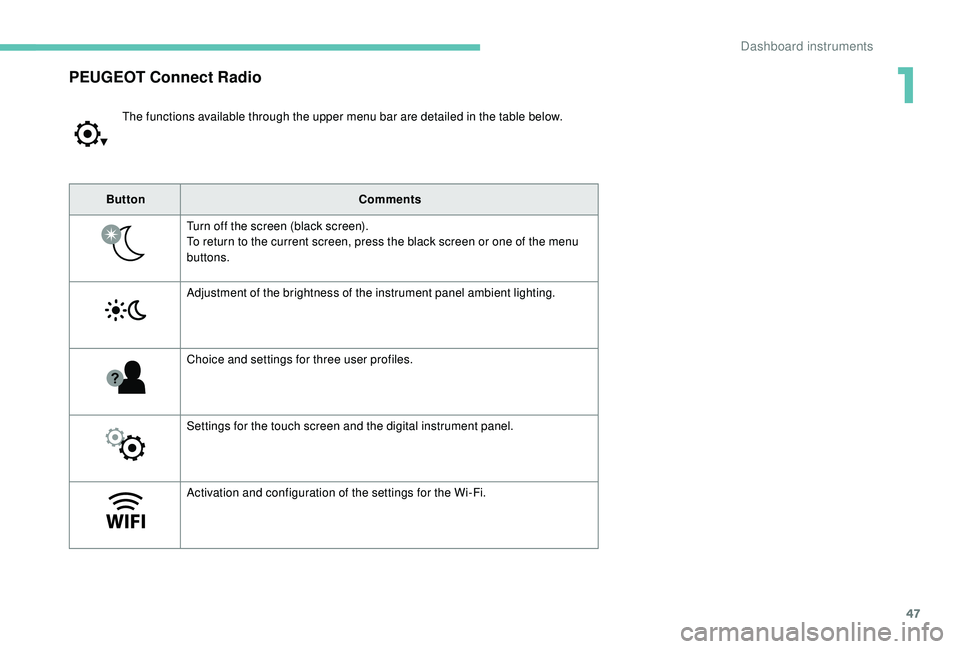
PEUGEOT Connect Radio
The functions available through the upper menu bar are detailed in the table below.
Button Comments
Turn off the screen (black screen).
To return to the current screen, press the black screen or one of the menu
buttons.
Adjustment of the brightness of the instrument panel ambient lighting.
Choice and settings for three user profiles.
Settings for the touch screen and the digital instrument panel.
Activation and configuration of the settings for the Wi-Fi.
1
Dashboard instruments
Page 50 of 404
48
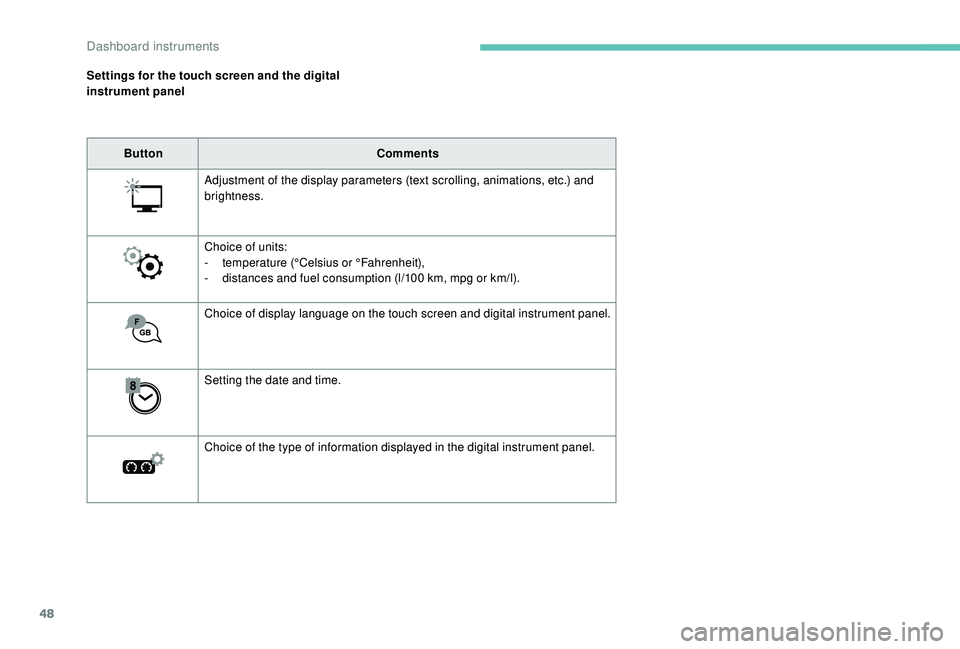
Settings for the touch screen and the digital
instrument panelButton Comments
Adjustment of the display parameters (text scrolling, animations, etc.) and
brightness.
Choice of units:
-
t
emperature (°Celsius or °Fahrenheit),
-
d
istances and fuel consumption (l/100 km, mpg or km/l).
Choice of display language on the touch screen and digital instrument panel.
Setting the date and time.
Choice of the type of information displayed in the digital instrument panel.
Dashboard instruments
Page 60 of 404
58
Reinitialising the remote
control
Following replacement of the battery or in
the event of a remote control fault, it may be
necessary to reinitialise the remote control.
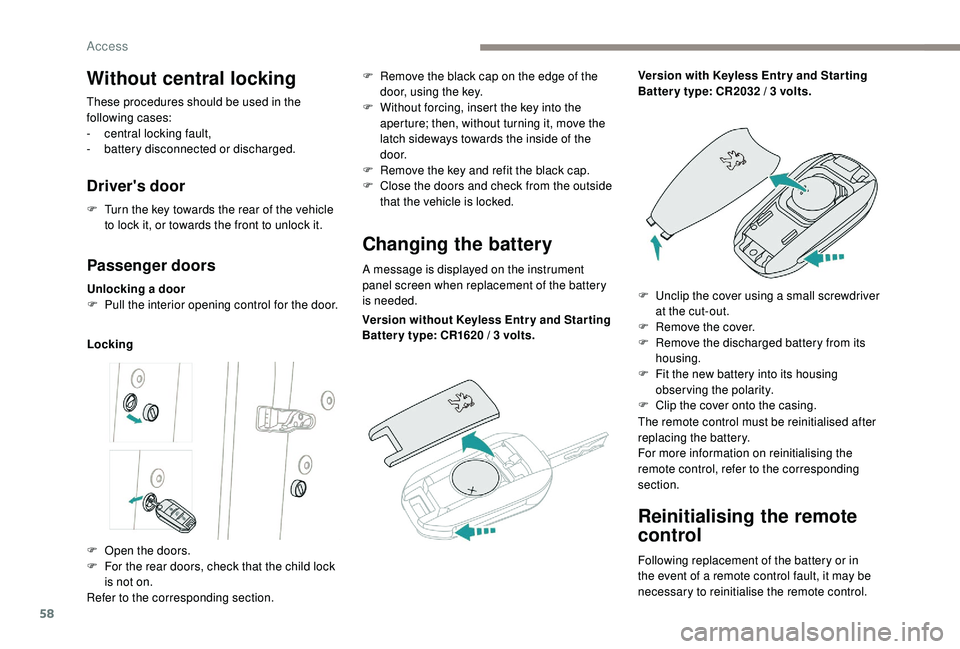
Without central locking
These procedures should be used in the
following cases:
-
c
entral locking fault,
-
b
attery disconnected or discharged.
Driver's door
F Turn the key towards the rear of the vehicle to lock it, or towards the front to unlock it.
Passenger doors
Unlocking a door
F P ull the interior opening control for the door.
Locking
Changing the battery
A message is displayed on the instrument
panel screen when replacement of the battery
is needed.
F
O
pen the doors.
F
F
or the rear doors, check that the child lock
is not on.
Refer to the corresponding section. F
R
emove the black cap on the edge of the
door, using the key.
F
W
ithout forcing, insert the key into the
aperture; then, without turning it, move the
latch sideways towards the inside of the
d o o r.
F
R
emove the key and refit the black cap.
F
C
lose the doors and check from the outside
that the vehicle is locked.
Version without
K
eyless Entr y and Star ting
Batter y type: CR1620
/ 3 volts.Version with
K
eyless Entr y and Star ting
Batter y type: CR2032 / 3 volts.
F
U
nclip the cover using a small screwdriver
at the cut-out.
F
R
emove the cover.
F
R
emove the discharged battery from its
housing.
F
F
it the new battery into its housing
observing the polarity.
F
C
lip the cover onto the casing.
The remote control must be reinitialised after
replacing the battery.
For more information on reinitialising the
remote control, refer to the corresponding
section.
Access
Page 62 of 404
60
Anti-intrusion security
Operation
If one of the doors or the boot is open, the
automatic central locking does not take place.This is signalled by the sound of
the locks rebounding, accompanied
by illumination of this symbol in the
instrument panel, an audible signal
and the display of an alert message.
Carrying long or voluminous objects
If you want to drive with the boot open, you
should press the central locking button
to lock the doors. Other wise, every time
the speed of the vehicle exceeds 6
mph
(10
km/h), the locks will rebound and the
alerts mentioned above will appear.
Pressing the central locking button
unlocks the vehicle.
Above 6
mph (10 km/h), this unlocking is
te m p o r a r y.
This system allows automatic simultaneous
locking of the doors and boot as soon as the
speed of the vehicle exceeds 6
mph (10 km/h).
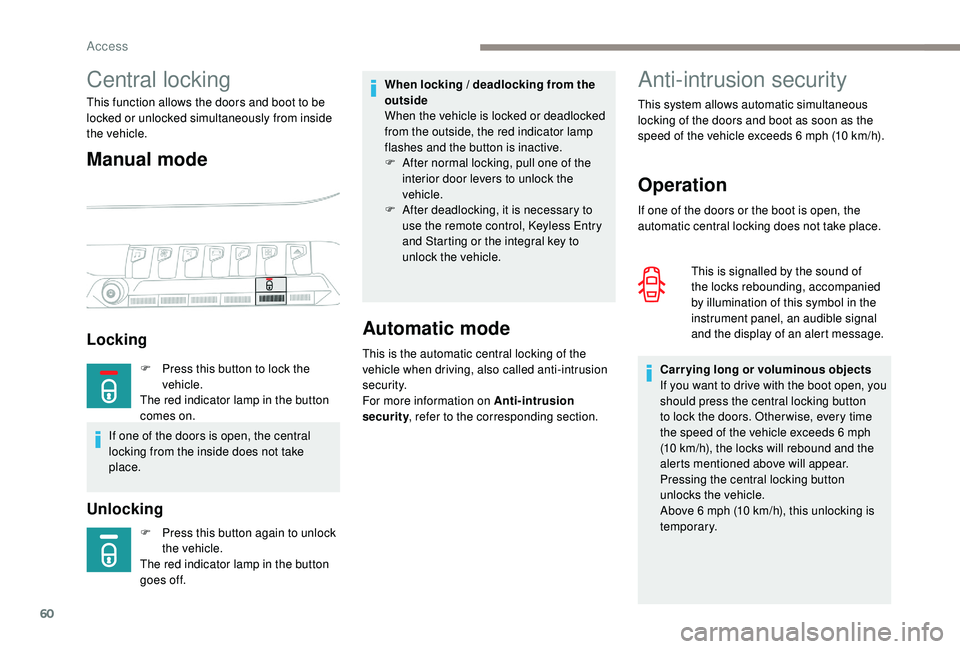
Unlocking
Central locking
This function allows the doors and boot to be
locked or unlocked simultaneously from inside
the vehicle.
Manual mode
Locking
F Press this button again to unlock
the vehicle.
The red indicator lamp in the button
goes off.
Automatic mode
This is the automatic central locking of the
vehicle when driving, also called anti-intrusion
s e c u r i t y.
For more information on Anti-intrusion
security , refer to the corresponding section.
When locking / deadlocking from the
outside
When the vehicle is locked or deadlocked
from the outside, the red indicator lamp
flashes and the button is inactive.
F
A
fter normal locking, pull one of the
interior door levers to unlock the
vehicle.
F
A
fter deadlocking, it is necessary to
use the remote control,
K
eyless Entry
and Starting or the integral key to
unlock the vehicle.
F
P
ress this button to lock the
vehicle.
The red indicator lamp in the button
comes on.
If one of the doors is open, the central
locking from the inside does not take
place.
Access
Page 67 of 404
65
Closing the tailgate
F Lower the tailgate using the interior grips.
F R elease the grips and press down on the
outside of the tailgate to close it.
If the tailgate is not properly closed: -
e
ngine running, this warning
lamp and a message appear in
the instrument panel for a few
seconds,
-
v
ehicle moving (speed above
6
mph (10 km/h)), this warning
lamp and a message appear in
the instrument panel for a few
seconds, accompanied by an
audible signal.
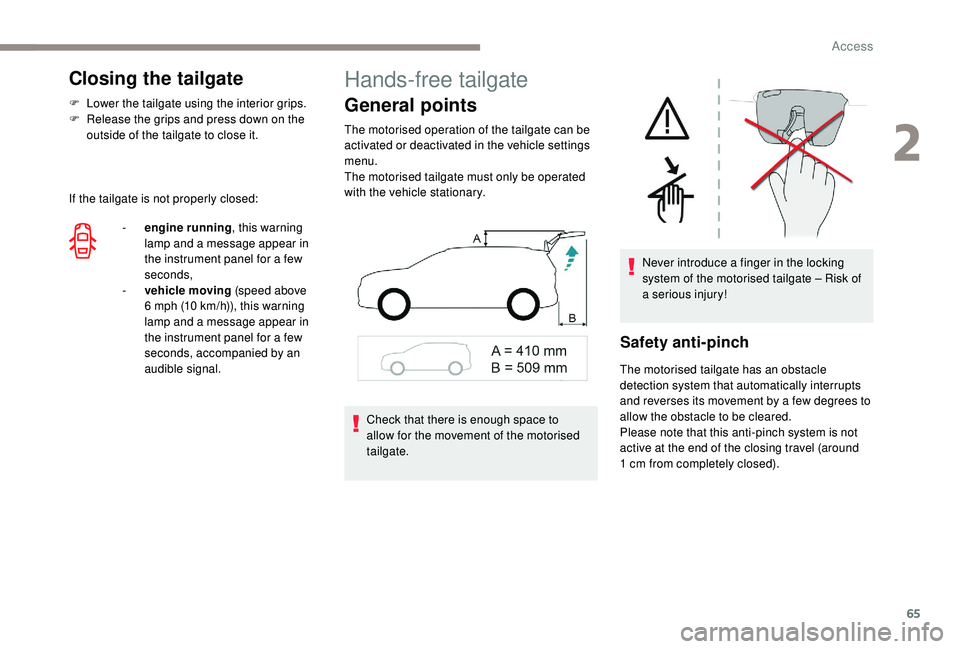
Hands-free tailgate
General points
The motorised operation of the tailgate can be
activated or deactivated in the vehicle settings
menu.
The motorised tailgate must only be operated
with the vehicle stationary.
Safety anti-pinch
The motorised tailgate has an obstacle
detection system that automatically interrupts
and reverses its movement by a few degrees to
allow the obstacle to be cleared.
Please note that this anti-pinch system is not
active at the end of the closing travel (around
1
cm from completely closed).
Check that there is enough space to
allow for the movement of the motorised
tailgate. Never introduce a finger in the locking
system of the motorised tailgate – Risk of
a serious injury!
2
Access
Page 76 of 404
74
Driving position
Adopting a good driving position helps improve
your comfort and protection.
It also optimises interior and exterior visibility
as well as access to controls.
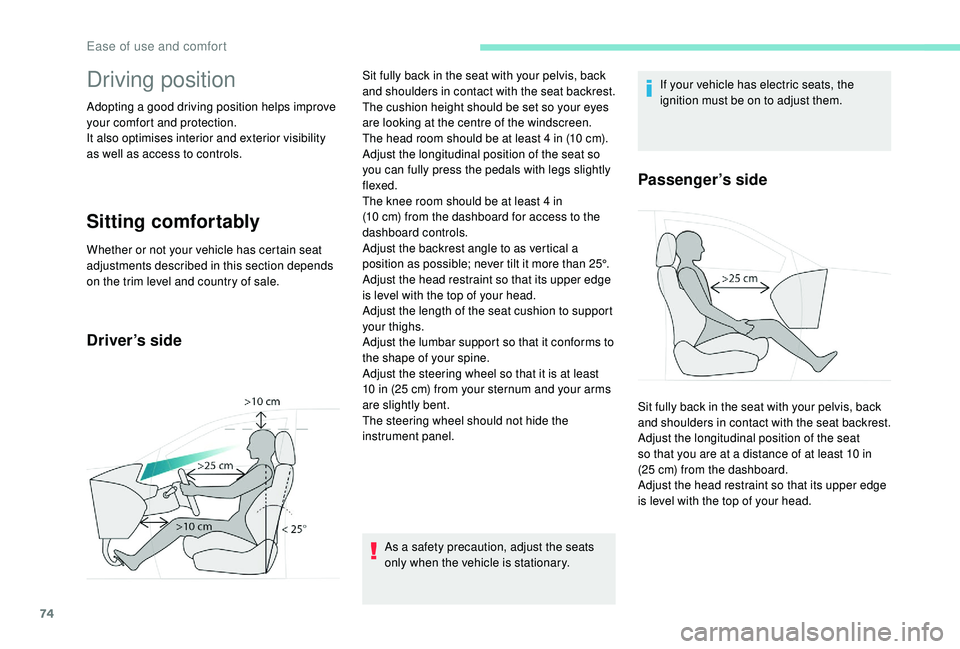
Sitting comfortably
Whether or not your vehicle has certain seat
adjustments described in this section depends
on the trim level and country of sale.
Driver’s side
As a safety precaution, adjust the seats
only when the vehicle is stationary.If your vehicle has electric seats, the
ignition must be on to adjust them.
Passenger’s side
Sit fully back in the seat with your pelvis, back
and shoulders in contact with the seat backrest.
The cushion height should be set so your eyes
are looking at the centre of the windscreen.
The head room should be at least 4
in (10 cm).
Adjust the longitudinal position of the seat so
you can fully press the pedals with legs slightly
flexed.
The knee room should be at least 4
in
(10
cm) from the dashboard for access to the
dashboard controls.
Adjust the backrest angle to as vertical a
position as possible; never tilt it more than 25°.
Adjust the head restraint so that its upper edge
is level with the top of your head.
Adjust the length of the seat cushion to support
your thighs.
Adjust the lumbar support so that it conforms to
the shape of your spine.
Adjust the steering wheel so that it is at least
10
in (25 cm) from your sternum and your arms
are slightly bent.
The steering wheel should not hide the
instrument panel. Sit fully back in the seat with your pelvis, back
and shoulders in contact with the seat backrest.
Adjust the longitudinal position of the seat
so that you are at a distance of at least 10
in
(25
cm) from the dashboard.
Adjust the head restraint so that its upper edge
is level with the top of your head.
Ease of use and comfort
Page 126 of 404
124
Exterior lighting control
stalk
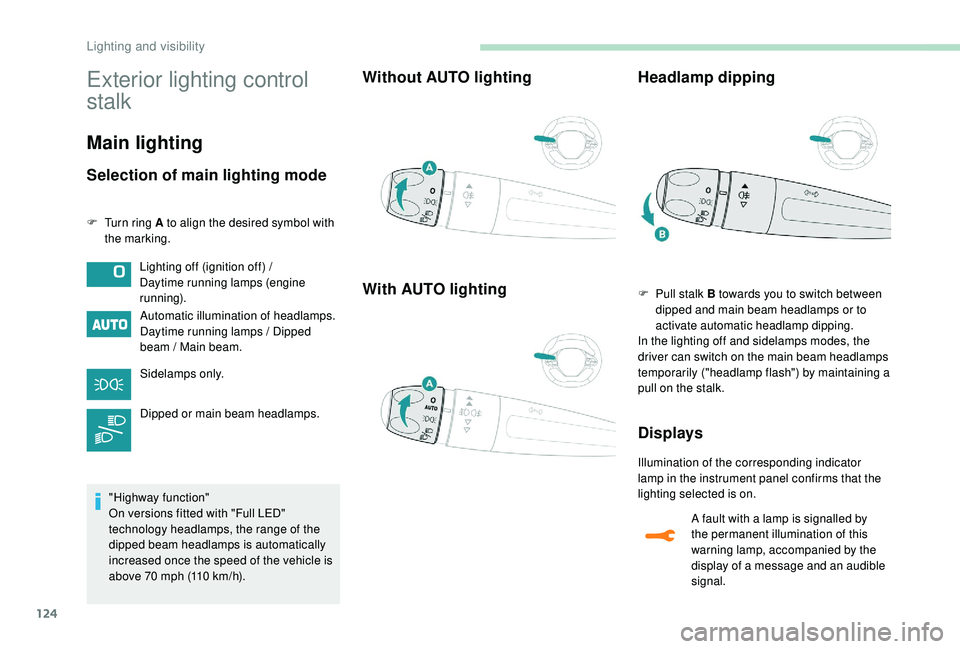
Main lighting
Selection of main lighting mode
F Turn ring A to align the desired symbol with the marking.
Automatic illumination of headlamps.
Daytime running lamps / Dipped
beam / Main beam.
Sidelamps only.
Dipped or main beam headlamps.
"Highway function"
On versions fitted with "Full LED"
technology headlamps, the range of the
dipped beam headlamps is automatically
increased once the speed of the vehicle is
above 70
mph (110 km/h).
Without AUTO lighting
With AUTO lighting Headlamp dipping
F Pull stalk B towards you to switch between
dipped and main beam headlamps or to
activate automatic headlamp dipping.
In the lighting off and sidelamps modes, the
driver can switch on the main beam headlamps
temporarily ("headlamp flash") by maintaining a
pull on the stalk.
Displays
Illumination of the corresponding indicator
lamp in the instrument panel confirms that the
lighting selected is on.
Lighting off (ignition off) /
Daytime running lamps (engine
running).
A fault with a lamp is signalled by
the permanent illumination of this
warning lamp, accompanied by the
display of a message and an audible
signal.
Lighting and visibility
Page 129 of 404
127
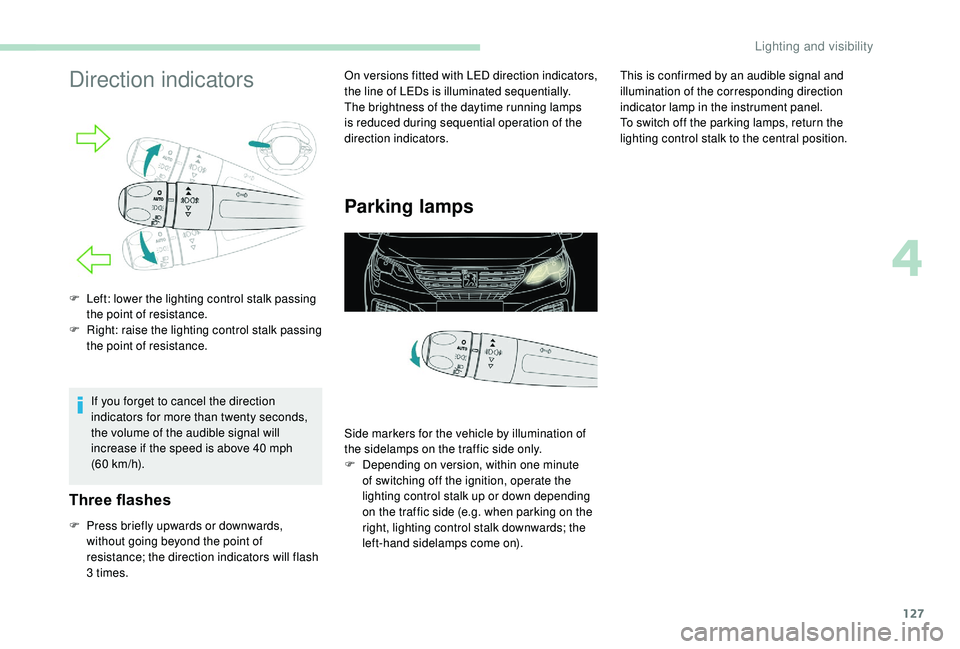
Direction indicators
If you forget to cancel the direction
indicators for more than twenty seconds,
the volume of the audible signal will
increase if the speed is above 40 mph
(60
km/h).
Three flashes
F Press briefly upwards or downwards, without going beyond the point of
resistance; the direction indicators will flash
3
times. On versions fitted with LED direction indicators,
the line of LEDs is illuminated sequentially.
The brightness of the daytime running lamps
is reduced during sequential operation of the
direction indicators.
Parking lamps
F Left: lower the lighting control stalk passing
the point of resistance.
F
R
ight: raise the lighting control stalk passing
the point of resistance.
Side markers for the vehicle by illumination of
the sidelamps on the traffic side only.
F
D
epending on version, within one minute
of switching off the ignition, operate the
lighting control stalk up or down depending
on the traffic side (e.g. when parking on the
right, lighting control stalk downwards; the
left-hand sidelamps come on). This is confirmed by an audible signal and
illumination of the corresponding direction
indicator lamp in the instrument panel.
To switch off the parking lamps, return the
lighting control stalk to the central position.
4
Lighting and visibility