steering wheel PEUGEOT 5008 2017 Owner's Manual
[x] Cancel search | Manufacturer: PEUGEOT, Model Year: 2017, Model line: 5008, Model: PEUGEOT 5008 2017Pages: 404, PDF Size: 15.31 MB
Page 191 of 404
189
From neutral N:
F P ress the brake pedal firmly.
F
S
tart the engine.
F
M
aintaining pressure on the brake pedal,
push rear ward to select the automatic
D mode, or for ward, while pressing the
Unlock button to engage reverse R .
Then, from P or N :
F
R
elease the brake pedal.
F
A
ccelerate progressively to automatically
release the electric parking brake.
F
W
ith the parking brake released, the vehicle
then moves off.
In severe wintry conditions (temperature
below -23°C), it is recommended that the
engine be allowed to run for a few minutes
before moving off, to ensure the correct
operation and durability of the engine and
gearbox.Stopping the vehicle
Whatever the state of the gearbox when the
ignition is switched off, P mode is engaged
automatically, with the exception of N , in which
case P mode will be engaged after a delay of
5
seconds (allowing the change to free-wheel).
Check that P mode has been engaged and
that the electric parking brake was applied
automatically; if not, apply it manually.
Operating faults
Malfunction of the gearbox
This is signalled by the illumination
of this warning lamp, accompanied
by the display of a message and an
audible signal, when the ignition is
switched on.
The gearbox switches to back-up mode: drive
mode D is locked in third gear, the steering-
mounted control paddles are inoperative,
Malfunction of the selector
The corresponding indicator lamps
for the selector panel and the
electric parking brake control lever
must be on, as well as the ones in
the instrument panel. mode M is no longer available. You may feel a
pronounced jolt when engaging reverse. This
does not present any risk for the gearbox.
Do not drive faster than 60
mph (100 km/h),
keeping to the speed limit.
Go to a PEUGEOT dealer or a qualified
workshop.
In the event of a minor fault
In the event of a serious fault
Stop as soon as it is safe to do so, away
from the traffic, and call a PEUGEOT
dealer or a qualified workshop.
When the ignition is switched off, the
gearbox goes into P mode automatically. You are alerted by the illumination of
this warning lamp. You are alerted by the warning lamp
lighting up, accompanied by the
display of a message and an audible
signal.
In certain cases, the selector lamps may not
come on, but the state of the gearbox is still
displayed in the instrument panel.
Drive cautiously and go to a PEUGEOT or a
qualified workshop.
6
Driving
Page 198 of 404
196
Under-inflation alert
This warning is indicated by
continuous illumination of the lamp,
an audible signal and, depending on
the equipment installed, a message
displayed on the screen.
F
R
educe speed immediately, avoid excessive
steering movements and sudden braking.
F
S
top the vehicle as soon as it is safe to do
so.
The loss of pressure detected does not
always cause visible bulging of the tyre.
Do not satisfy yourself with just a visual
check.
F
I
f you have a compressor, such as the one
in the temporary puncture repair kit, check
the pressures of the four tyres when cold.
F
I
f it is not possible to make this check
immediately, drive carefully at reduced
speed.
or
F
I
n case of a puncture, use the temporary
tyre repair kit or the spare wheel (if
equipped). The alert is kept active until the system is
reinitialised.
Reinitialisation
The system must be reinitialised after any
adjustment to the pressures of one or more
tyres, and after changing one or more wheels.
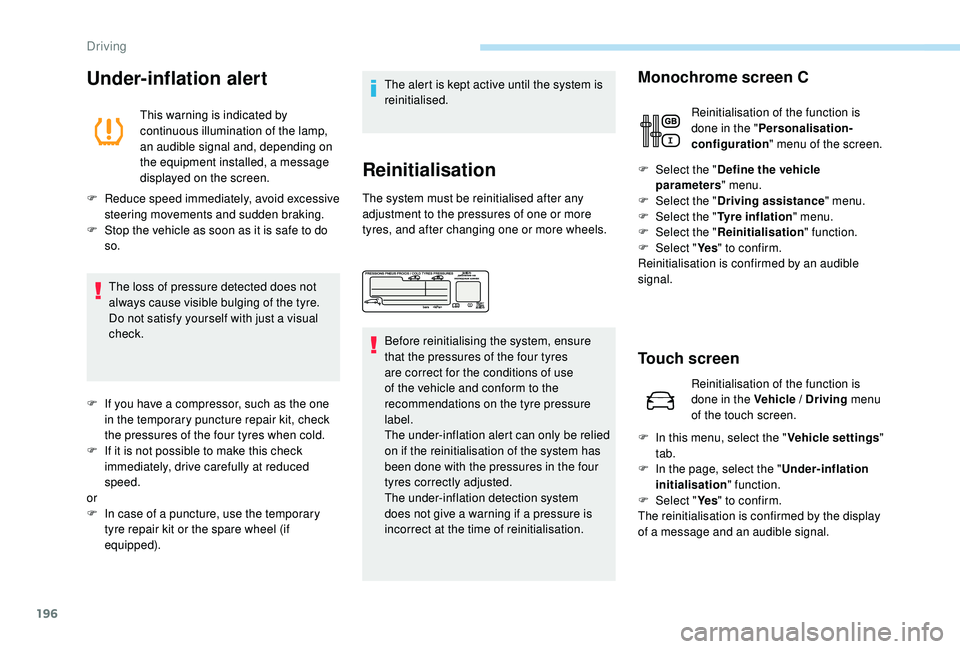
Before reinitialising the system, ensure
that the pressures of the four tyres
are correct for the conditions of use
of the vehicle and conform to the
recommendations on the tyre pressure
label.
The under-inflation alert can only be relied
on if the reinitialisation of the system has
been done with the pressures in the four
tyres correctly adjusted.
The under-inflation detection system
does not give a warning if a pressure is
incorrect at the time of reinitialisation. F
Sel
ect the "
Define the vehicle
parameters " menu.
F Sel ect the "Driving assistance " menu.
F
Sel
ect the "Tyre inflation " menu.
F
Sel
ect the "Reinitialisation " function.
F
Sel
ect "Ye s" to confirm.
Reinitialisation is confirmed by an audible
signal.
Touch screen
F In this menu, select the " Vehicle settings"
tab.
F
I
n the page, select the "
Under-inflation
initialisation " function.
F
Sel
ect "Ye s" to confirm.
The reinitialisation is confirmed by the display
of a message and an audible signal.
Monochrome screen C
Reinitialisation of the function is
done in the " Personalisation-
configuration " menu of the screen.
Reinitialisation of the function is
done in the Vehicle / Driving menu
of the touch screen.
Driving
Page 202 of 404
200
Operating limits
The legislation on speed limits is specific to
each country.
The system does not take account of reduced
speed limits in the following cases:
-
p
oor weather (rain, snow),
-
a
tmospheric pollution,
-
t
railer, caravan,
-
d
riving with a space-saver type spare wheel
or snow chains fitted,
-
p
uncture repair using the temporary repair
kit,
-
y
oung drivers, etc.
The following situations may inter fere with the
operation of the system or prevent it working:
-
p
oor visibility (inadequate street lighting,
falling snow, rain, fog),
-
w
indscreen area located in front of the
camera dirty, misted, frost-covered, snow-
covered, damaged or covered by a sticker,
-
f
ault with the camera,
-
o
bsolete or incorrect mapping,
-
h
idden road signs (other vehicles,
vegetation, snow),
-
s
peed limit signs that do not conform to the
standard, are damaged or distorted.
Memorising the speed
setting
This memorise function is in addition to the
display of Recognition of speed limit signs .
For more information on the Speed
limiter, Cruise control , or Dynamic
cruise control with Stop function , refer
to the corresponding sections.
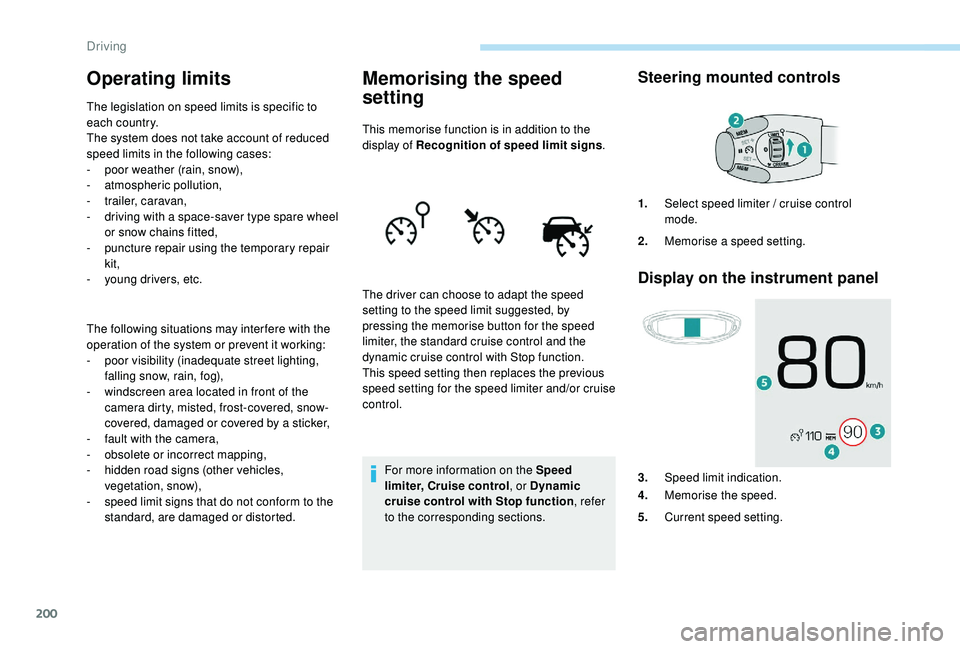
Steering mounted controls
Display on the instrument panel
The driver can choose to adapt the speed
setting to the speed limit suggested, by
pressing the memorise button for the speed
limiter, the standard cruise control and the
dynamic cruise control with Stop function.
This speed setting then replaces the previous
speed setting for the speed limiter and/or cruise
control. 1.
Select speed limiter / cruise control
mode.
2. Memorise a speed setting.
3. Speed limit indication.
4. Memorise the speed.
5. Current speed setting.
Driving
Page 204 of 404
202
Steering mounted control
For more information on Memorising speeds
or Recognition of speed limit signs and
recommendation, refer to the associated
sections.
Displays on the instrument panel
Switching on
F If the speed setting is suitable (last speed setting programmed in the system), press
button 4
to switch the speed limiter on.
F
P
ressing button 4 again temporarily
interrupts the function (pause).
Adjusting the limit speed
setting
You do not have to switch the speed limiter on
in order to set the speed.
To modify the limit speed setting from the
current speed of the vehicle:
F
i
n steps of +/- 1 mph (km/h), make
successive short presses on button 2
or 3,
F
c
ontinuously, in steps of +/- 5 mph (km/h),
press and hold button 2
or 3.
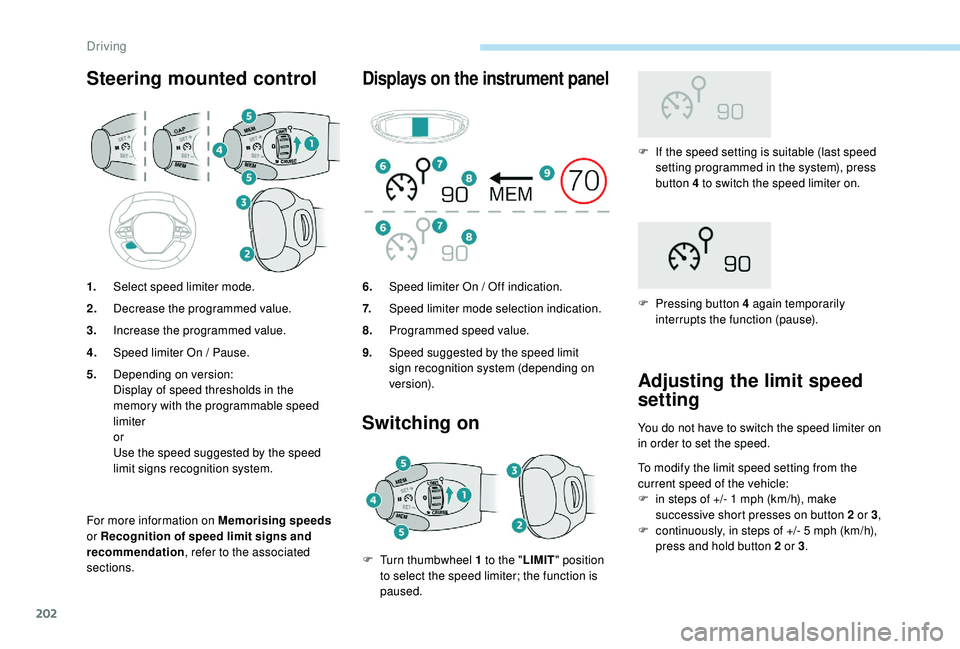
1.
Select speed limiter mode.
2. Decrease the programmed value.
3. Increase the programmed value.
4. Speed limiter On / Pause.
5. Depending on version:
Display of speed thresholds in the
memory with the programmable speed
limiter
or
Use the speed suggested by the speed
limit signs recognition system. 6.
Speed limiter On / Off indication.
7. Speed limiter mode selection indication.
8. Programmed speed value.
9. Speed suggested by the speed limit
sign recognition system (depending on
ve r s i o n).
F
T
urn thumbwheel 1
to the " LIMIT" position
to select the speed limiter; the function is
paused.
Driving
Page 220 of 404
218
Important: if operation of the
automatic emergency braking is
triggered, you should take back
control of your vehicle and brake
with the pedal to add to or finish the
automatic braking action.
The driver can take back control of the vehicle
at any time by sharply turning the steering
wheel and/or pressing the accelerator pedal.
The point at which braking is triggered
may be adjusted depending on the driving
actions of the driver, such as movement
of the steering wheel or actions at the
accelerator pedal.
Operation of the function may be felt by
slight vibration in the brake pedal.
If the vehicle comes to a complete stop,
the automatic braking is maintained for
1
to 2
seconds. With a manual gearbox, in the event of
automatic emergency braking until the
vehicle comes to a complete stop, the
engine may stall.
With an automatic gearbox, in the event
of automatic emergency braking until the
vehicle comes to a complete stop, keep
the brake pedal pressed down to prevent
the vehicle from starting off again.
Specific conditions for operation
The vehicle's speed must be between 3 mph
a nd 53 mph (5 km/h and 85 km/h) (versions
with camera alone) or 85
mph (140 km/h)
(versions with camera and radar) when a
moving vehicle is detected.
The vehicle's speed must not exceed 50
mph
(80 km/h) when a stopped vehicle is detected.
The vehicle's speed must not exceed 37
mph
(60
km/h) when a pedestrian is detected.
The ESC system must not be defective.
The DCS system must not be deactivated.
All passenger seat belts must be fastened.
Driving at a steady speed on roads with few
bends is required. After an impact, the function automatically
stops operating. Consult a PEUGEOT
dealer or a qualified workshop to have the
system checked.
Deactivation / Activation
By default, the system is automatically
activated at every engine start.
The system can be deactivated or activated via
the vehicle settings menu.
Deactivation of the system is
signalled by the illumination of this
indicator lamp, accompanied by the
display of a message.
Malfunction
In the event of a fault with the
system, you are alerted by the
illumination of this warning lamp,
accompanied by the display of a
message and an audible signal.
Check that the sensors (camera and radar) are
not covered by dirt, mud, frost, snow, etc.
If the fault persists, contact a PEUGEOT dealer
or a qualified workshop to have the system
checked.
Driving
Page 224 of 404
222
Operating fault
If a fault occurs, this warning lamp
comes on in the instrument panel,
accompanied by a message and an
audible signal.
Contact a PEUGEOT dealer or a qualified
workshop.
Active Lane Departure
Warning System
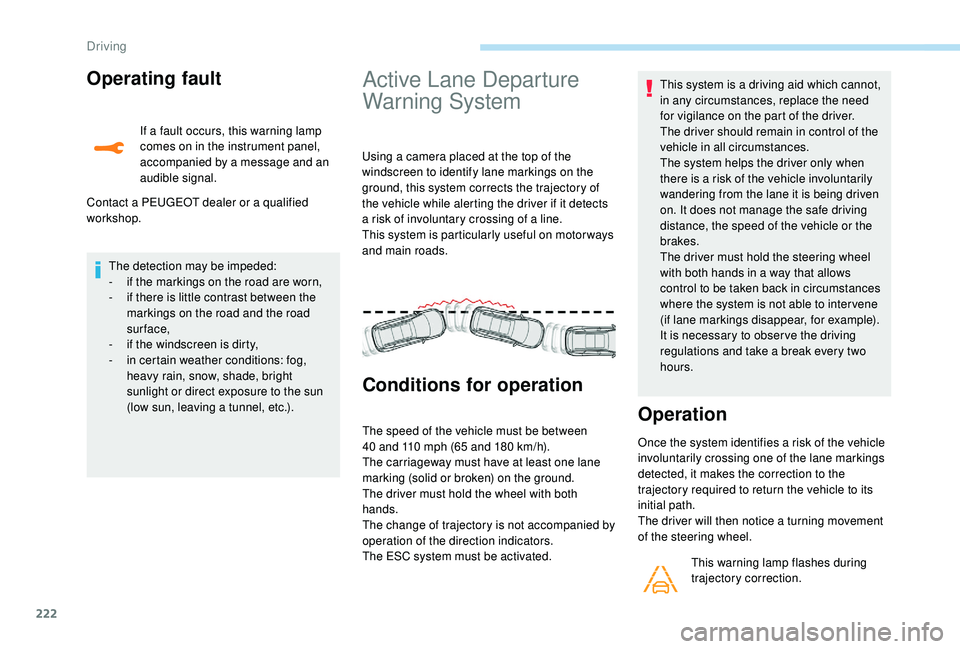
Using a camera placed at the top of the
windscreen to identify lane markings on the
ground, this system corrects the trajectory of
the vehicle while alerting the driver if it detects
a risk of involuntary crossing of a line.
This system is particularly useful on motor ways
and main roads.
Conditions for operation
The speed of the vehicle must be between
40 and 110 mph (65 and 180 km/h).
The carriageway must have at least one lane
marking (solid or broken) on the ground.
The driver must hold the wheel with both
hands.
The change of trajectory is not accompanied by
operation of the direction indicators.
The ESC system must be activated. This system is a driving aid which cannot,
in any circumstances, replace the need
for vigilance on the part of the driver.
The driver should remain in control of the
vehicle in all circumstances.
The system helps the driver only when
there is a risk of the vehicle involuntarily
wandering from the lane it is being driven
on. It does not manage the safe driving
distance, the speed of the vehicle or the
brakes.
The driver must hold the steering wheel
with both hands in a way that allows
control to be taken back in circumstances
where the system is not able to inter vene
(if lane markings disappear, for example).
It is necessary to obser ve the driving
regulations and take a break every two
hours.Operation
Once the system identifies a risk of the vehicle
involuntarily crossing one of the lane markings
detected, it makes the correction to the
trajectory required to return the vehicle to its
initial path.
The driver will then notice a turning movement
of the steering wheel.
This warning lamp flashes during
trajectory correction.
The detection may be impeded:
-
i
f the markings on the road are worn,
-
i
f there is little contrast between the
markings on the road and the road
sur face,
-
i
f the windscreen is dirty,
-
i
n certain weather conditions: fog,
heavy rain, snow, shade, bright
sunlight or direct exposure to the sun
(low sun, leaving a tunnel, etc.).
Driving
Page 236 of 404
234
Standard viewZoom view
Obstacles may appear further away than
they actually are in reality.
It is important to check the sides of the
vehicle during the manoeuvre, using the
mirrors.
The rear parking sensors also provide
information on the vehicle's surroundings.
180° view
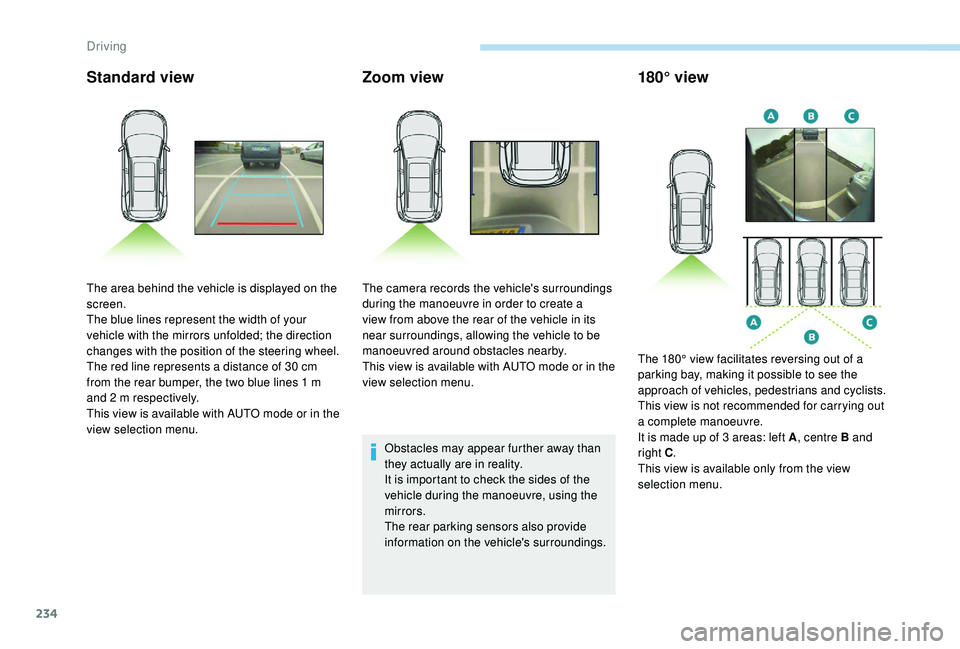
The area behind the vehicle is displayed on the
screen.
The blue lines represent the width of your
vehicle with the mirrors unfolded; the direction
changes with the position of the steering wheel.
The red line represents a distance of 30
cm
from the rear bumper, the two blue lines 1
m
and 2
m respectively.
This view is available with AUTO mode or in the
view selection menu. The camera records the vehicle's surroundings
during the manoeuvre in order to create a
view from above the rear of the vehicle in its
near surroundings, allowing the vehicle to be
manoeuvred around obstacles nearby.
This view is available with AUTO mode or in the
view selection menu.
The 180° view facilitates reversing out of a
parking bay, making it possible to see the
approach of vehicles, pedestrians and cyclists.
This view is not recommended for carrying out
a complete manoeuvre.
It is made up of 3
areas: left A, centre B and
right C .
This view is available only from the view
selection menu.
Driving
Page 238 of 404
236
AUTO modeStandard viewZoom view
Obstacles may appear further away than
they actually are in reality.
It is important to check the sides of the
vehicle during the manoeuvre, using the
mirrors.
The front and rear parking sensors also
provide information on the vehicle's
surroundings.
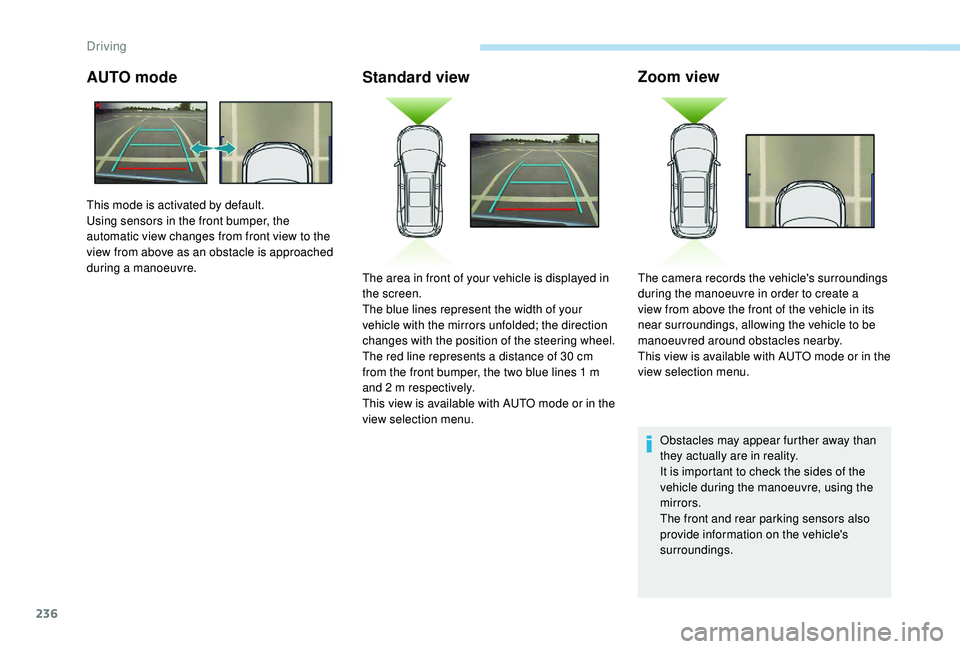
This mode is activated by default.
Using sensors in the front bumper, the
automatic view changes from front view to the
view from above as an obstacle is approached
during a manoeuvre.
The area in front of your vehicle is displayed in
the screen.
The blue lines represent the width of your
vehicle with the mirrors unfolded; the direction
changes with the position of the steering wheel.
The red line represents a distance of 30
cm
from the front bumper, the two blue lines 1
m
and 2
m respectively.
This view is available with AUTO mode or in the
view selection menu. The camera records the vehicle's surroundings
during the manoeuvre in order to create a
view from above the front of the vehicle in its
near surroundings, allowing the vehicle to be
manoeuvred around obstacles nearby.
This view is available with AUTO mode or in the
view selection menu.
Driving
Page 239 of 404
237
180° view
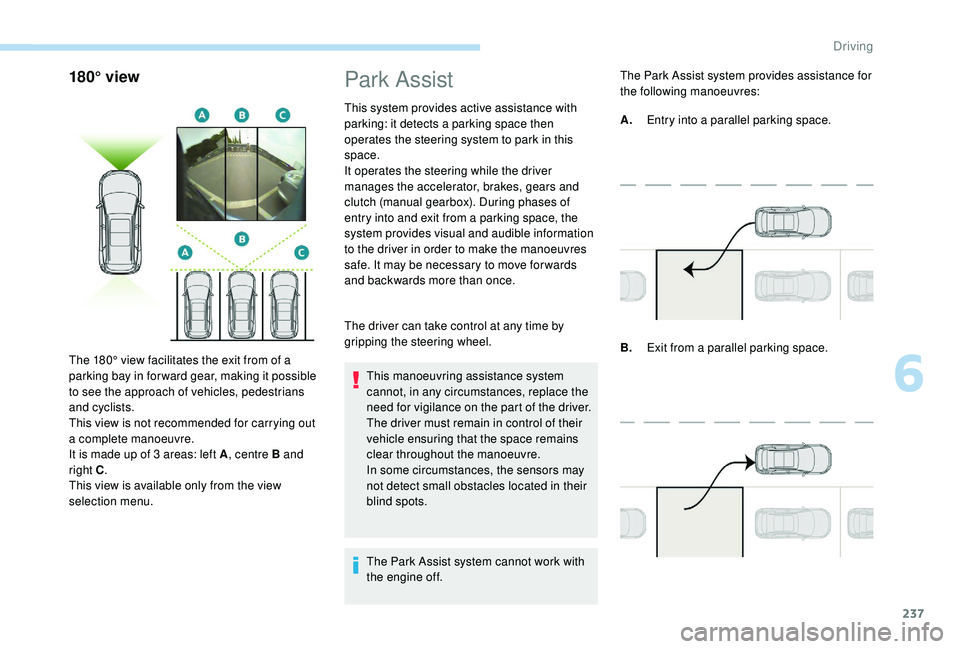
The 180° view facilitates the exit from of a
parking bay in forward gear, making it possible
to see the approach of vehicles, pedestrians
and cyclists.
This view is not recommended for carrying out
a complete manoeuvre.
It is made up of 3 areas: left A, centre B and
right C .
This view is available only from the view
selection menu.
Park Assist
This system provides active assistance with
parking: it detects a parking space then
operates the steering system to park in this
space.
It operates the steering while the driver
manages the accelerator, brakes, gears and
clutch (manual gearbox). During phases of
entry into and exit from a parking space, the
system provides visual and audible information
to the driver in order to make the manoeuvres
safe. It may be necessary to move for wards
and backwards more than once.
The driver can take control at any time by
gripping the steering wheel.
This manoeuvring assistance system
cannot, in any circumstances, replace the
need for vigilance on the part of the driver.
The driver must remain in control of their
vehicle ensuring that the space remains
clear throughout the manoeuvre.
In some circumstances, the sensors may
not detect small obstacles located in their
blind spots.
The Park Assist system cannot work with
the engine off. The Park Assist system provides assistance for
the following manoeuvres:
B.
Exit from a parallel parking space.
A.
Entry into a parallel parking space.
6
Driving
Page 240 of 404
238
When the Park Assist is active, it prevents
the Stop & Start going into STOP mode.
In STOP mode, activating Park Assist
restarts the engine.The Park Assist system takes control
of the assistance for a maximum of
4
manoeuvre cycles. The function is
deactivated after these 4 cycles. If you
think that your vehicle is not positioned
correctly, you should then take control of
the steering to carry out the manoeuvre.
The sequence of manoeuvres and the
driving instructions are displayed in the
instrument panel. You should always check the surroundings
of your vehicle before starting a
manoeuvre.
The parking sensors function is
not available during parking space
measurement. It intervenes later when
manoeuvring to warn you that your vehicle
is approaching an obstacle: the audible
signal becomes continuous when the
obstacle is less than thirty centimetres
away.
If you have deactivated the parking
sensors, they are automatically
reactivated during assisted parking
manoeuvres.
Activation of Park Assist deactivates the
Blind Spot Monitoring System.
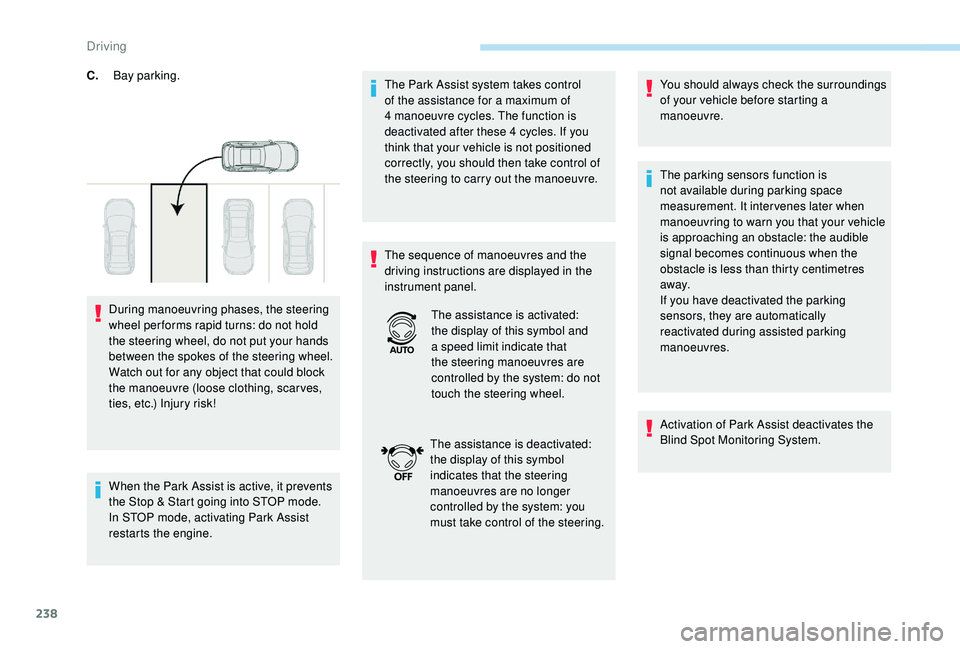
C.
Bay parking.
During manoeuvring phases, the steering
wheel per forms rapid turns: do not hold
the steering wheel, do not put your hands
between the spokes of the steering wheel.
Watch out for any object that could block
the manoeuvre (loose clothing, scar ves,
ties, etc.) Injury risk! The assistance is activated:
the display of this symbol and
a speed limit indicate that
the steering manoeuvres are
controlled by the system: do not
touch the steering wheel.
The assistance is deactivated:
the display of this symbol
indicates that the steering
manoeuvres are no longer
controlled by the system: you
must take control of the steering.
Driving