instrument panel PEUGEOT 5008 2017 Manual PDF
[x] Cancel search | Manufacturer: PEUGEOT, Model Year: 2017, Model line: 5008, Model: PEUGEOT 5008 2017Pages: 404, PDF Size: 15.31 MB
Page 225 of 404
223
If the driver wishes to maintain the
trajectory of the vehicle, they can prevent
the correction by keeping a firm grip on
the wheel (during an avoiding manoeuvre,
for example).
The correction is interrupted if the
direction indicators are operated.If the system detects that the driver is not
holding the wheel firmly enough during
an automatic correction of trajectory,
it interrupts the correction. An alert is
triggered to encourage the driver to take
back control of the vehicle.
Driving situations and
associated alerts
To benefit from all necessary information on
the instrument panel, you must previously
select the "DRIVING" display mode.
The table below describes the alerts and
messages displayed depending on the driving
situation.
The display of these alerts is not sequential.
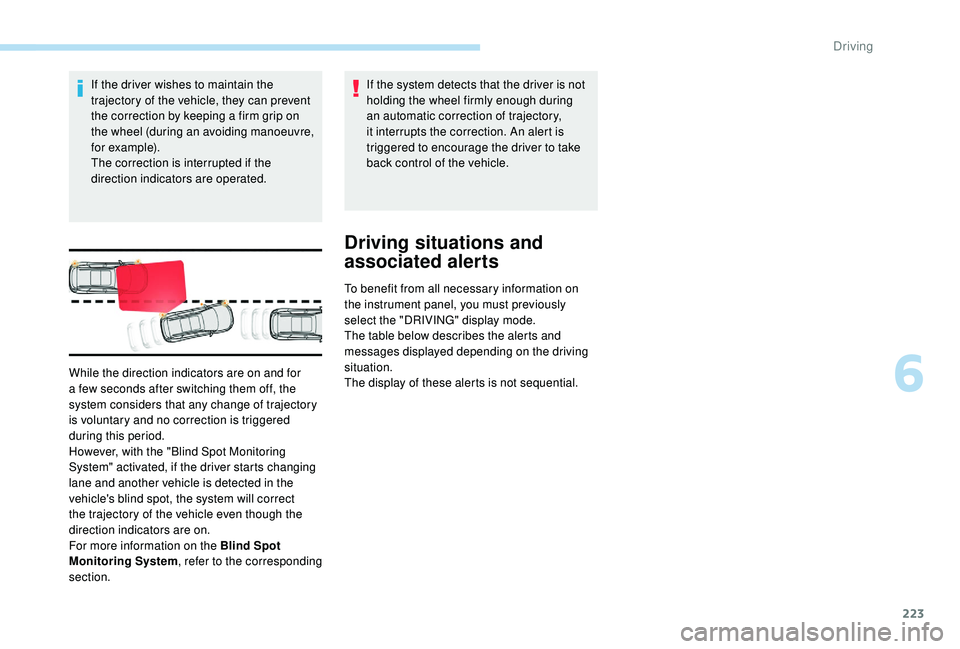
While the direction indicators are on and for
a few seconds after switching them off, the
system considers that any change of trajectory
is voluntary and no correction is triggered
during this period.
However, with the "Blind Spot Monitoring
System" activated, if the driver starts changing
lane and another vehicle is detected in the
vehicle's blind spot, the system will correct
the trajectory of the vehicle even though the
direction indicators are on.
For more information on the Blind Spot
Monitoring System
, refer to the corresponding
section.
6
Driving
Page 229 of 404
227
Operating fault
In the event of a fault with the system, you are
alerted by the illumination of these warning
lamps in the instrument panel, accompanied by
the display of a message and an audible signal.
Have the system checked by a PEUGEOT
dealer or a qualified workshop.
Blind Spot Monitoring
System
This driving aid system is designed to
improve safety when driving and is in no
circumstances a substitute for the use
of the interior rear view mirror and door
mirrors. It is the driver's responsibility to
constantly check the traffic, to assess the
distances and relative speeds of other
vehicles and to predict their movements
before deciding whether to change lane.
This system is a driving aid which cannot,
in any circumstances, replace the need for
vigilance on the part of the driver.
Activation / Deactivation
Activation and deactivation of the
system is done in the Vehicle /
Driving menu of the touch screen.
Select the " Driving functions " then the "Blind
spot sensors " tab.
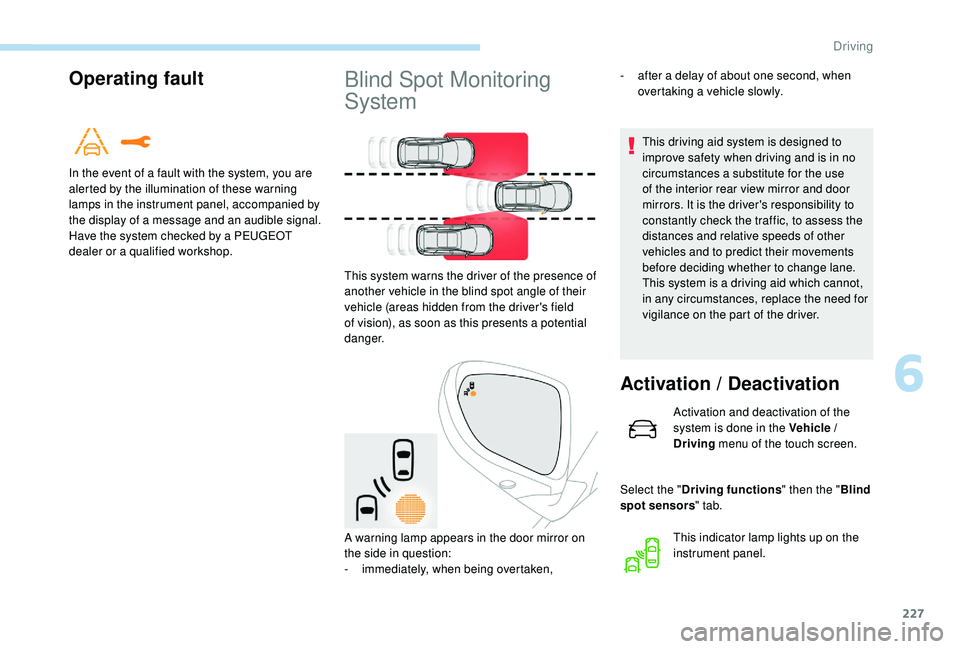
This system warns the driver of the presence of
another vehicle in the blind spot angle of their
vehicle (areas hidden from the driver's field
of vision), as soon as this presents a potential
danger.
A warning lamp appears in the door mirror on
the side in question:
-
i
mmediately, when being overtaken, This indicator lamp lights up on the
instrument panel.
-
a
fter a delay of about one second, when
overtaking a vehicle slowly.
6
Driving
Page 231 of 404
229
Operating faultActive Blind Spot
Monitoring System
In addition to the fixed warning lamp in the door
mirror on the side in question, a correction of
trajectory will be felt if you cross a lane marking
with the direction indicators on, to help you
avoid a collision.
Conditions for operation
The following systems must be activated:
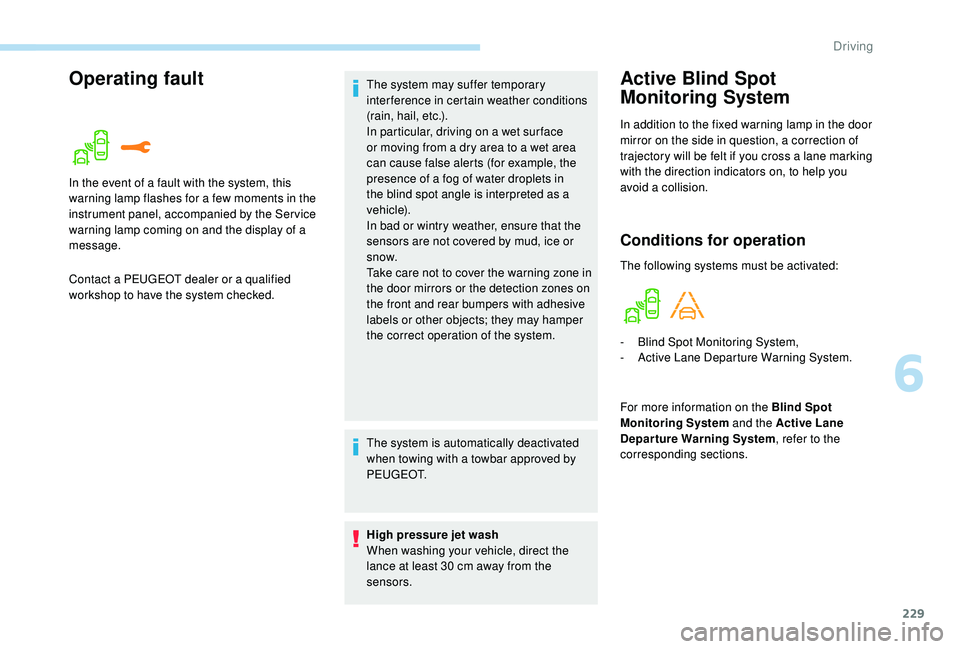
In the event of a fault with the system, this
warning lamp flashes for a few moments in the
instrument panel, accompanied by the Ser vice
warning lamp coming on and the display of a
message.
Contact a PEUGEOT dealer or a qualified
workshop to have the system checked. The system may suffer temporary
interference in certain weather conditions
(rain, hail, etc.).
In particular, driving on a wet sur face
or moving from a dry area to a wet area
can cause false alerts (for example, the
presence of a fog of water droplets in
the blind spot angle is interpreted as a
vehicle).
In bad or wintry weather, ensure that the
sensors are not covered by mud, ice or
snow.
Take care not to cover the warning zone in
the door mirrors or the detection zones on
the front and rear bumpers with adhesive
labels or other objects; they may hamper
the correct operation of the system.
The system is automatically deactivated
when towing with a towbar approved by
P E U G E O T.
High pressure jet wash
When washing your vehicle, direct the
lance at least 30
cm away from the
sensors. -
B
lind Spot Monitoring System,
-
A
ctive Lane Departure Warning System.
For more information on the Blind Spot
Monitoring System and the Active Lane
Departure Warning System , refer to the
corresponding sections.
6
Driving
Page 233 of 404
231
The sound emitted by the speaker (front or
rear) indicates whether the obstacle is in
front or behind.
Deactivation / Activation
The system is activated or deactivated via the
vehicle parameters menu in the screen.
The state of the system stays in the memory
when the ignition is switched off.The system will be deactivated
automatically if a trailer is being towed or a
bicycle carrier is fitted on a towbar (vehicle
fitted with a towbar installed in line with
the manufacturer's recommendations).
The parking sensors are deactivated while the
Park Assist system is measuring a space.
For more information on Park Assist , refer to
the corresponding section.
Operating fault
If a fault occurs when shifting
to reverse, this warning lamp
comes on in the instrument panel,
accompanied by a message and an
audible signal (short beep).
Contact a PEUGEOT dealer or a qualified
workshop to have the system checked.
High pressure jet wash
When washing your vehicle, direct the
lance at least 30
cm away from the
sensors. In bad or wintry weather, ensure that the
sensors are not covered with mud, ice or
snow. When reverse gear is engaged, an
audible signal (long beep) indicates that
the sensors may be dirty.
Certain sound sources (motorcycle,
lorry, pneumatic drill, etc.) may trigger
the audible signals of the parking sensor
system.
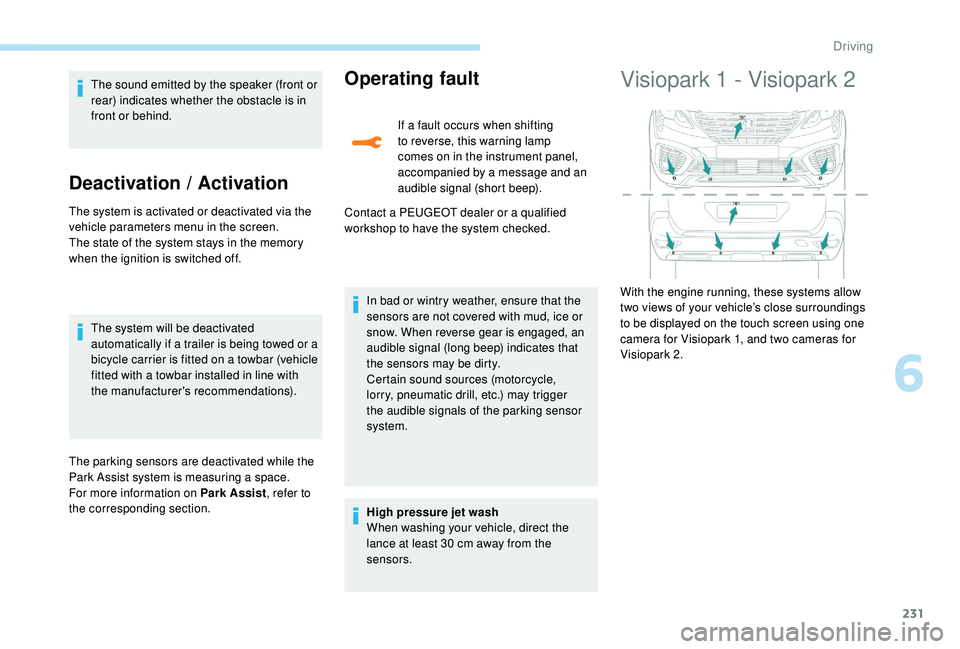
Visiopark 1 - Visiopark 2
With the engine running, these systems allow
two views of your vehicle’s close surroundings
to be displayed on the touch screen using one
camera for Visiopark 1, and two cameras for
Visiopark 2.
6
Driving
Page 240 of 404
238
When the Park Assist is active, it prevents
the Stop & Start going into STOP mode.
In STOP mode, activating Park Assist
restarts the engine.The Park Assist system takes control
of the assistance for a maximum of
4
manoeuvre cycles. The function is
deactivated after these 4 cycles. If you
think that your vehicle is not positioned
correctly, you should then take control of
the steering to carry out the manoeuvre.
The sequence of manoeuvres and the
driving instructions are displayed in the
instrument panel. You should always check the surroundings
of your vehicle before starting a
manoeuvre.
The parking sensors function is
not available during parking space
measurement. It intervenes later when
manoeuvring to warn you that your vehicle
is approaching an obstacle: the audible
signal becomes continuous when the
obstacle is less than thirty centimetres
away.
If you have deactivated the parking
sensors, they are automatically
reactivated during assisted parking
manoeuvres.
Activation of Park Assist deactivates the
Blind Spot Monitoring System.
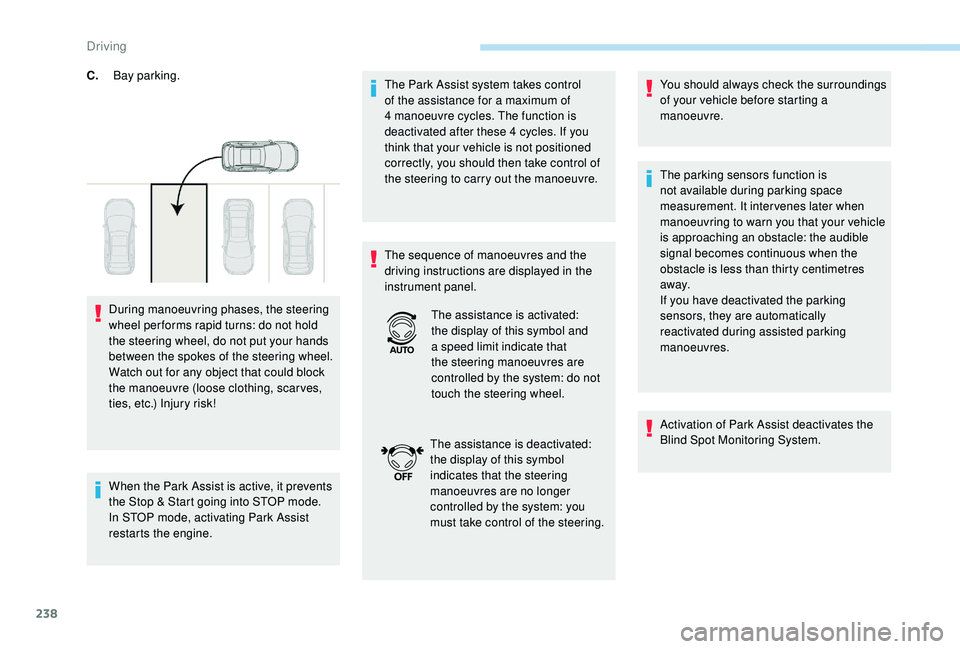
C.
Bay parking.
During manoeuvring phases, the steering
wheel per forms rapid turns: do not hold
the steering wheel, do not put your hands
between the spokes of the steering wheel.
Watch out for any object that could block
the manoeuvre (loose clothing, scar ves,
ties, etc.) Injury risk! The assistance is activated:
the display of this symbol and
a speed limit indicate that
the steering manoeuvres are
controlled by the system: do not
touch the steering wheel.
The assistance is deactivated:
the display of this symbol
indicates that the steering
manoeuvres are no longer
controlled by the system: you
must take control of the steering.
Driving
Page 241 of 404
239
Operation
Assistance with parallel parking
manoeuvres
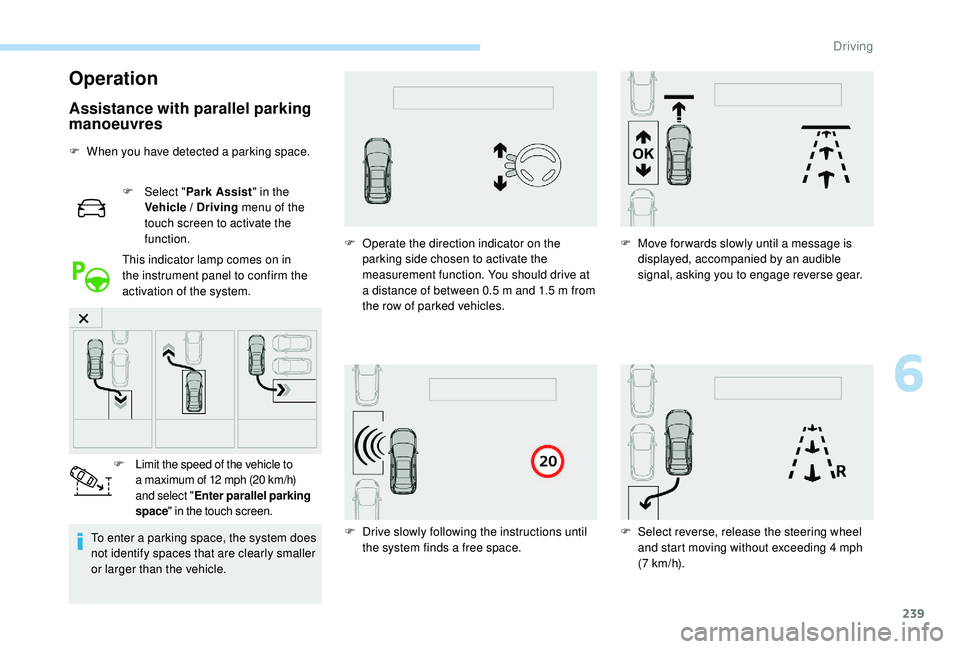
F When you have detected a parking space.F
Sel
ect "Park Assist " in the
Vehicle / Driving menu of the
touch screen to activate the
function.
This indicator lamp comes on in
the instrument panel to confirm the
activation of the system.
To enter a parking space, the system does
not identify spaces that are clearly smaller
or larger than the vehicle. F
L
imit the speed of the vehicle to
a maximum of 12
mph (20 km/h)
and select " Enter parallel parking
space " in the touch screen. F
O
perate the direction indicator on the
parking side chosen to activate the
measurement function. You should drive at
a distance of between 0.5
m and 1.5 m from
the row of parked vehicles. F
M
ove for wards slowly until a message is
displayed, accompanied by an audible
signal, asking you to engage reverse gear.
F
D
rive slowly following the instructions until
the system finds a free space. F
S
elect reverse, release the steering wheel
and start moving without exceeding 4
mph
(7
km/h).
6
Driving
Page 242 of 404
240
Assistance in exiting from a
parallel parking space
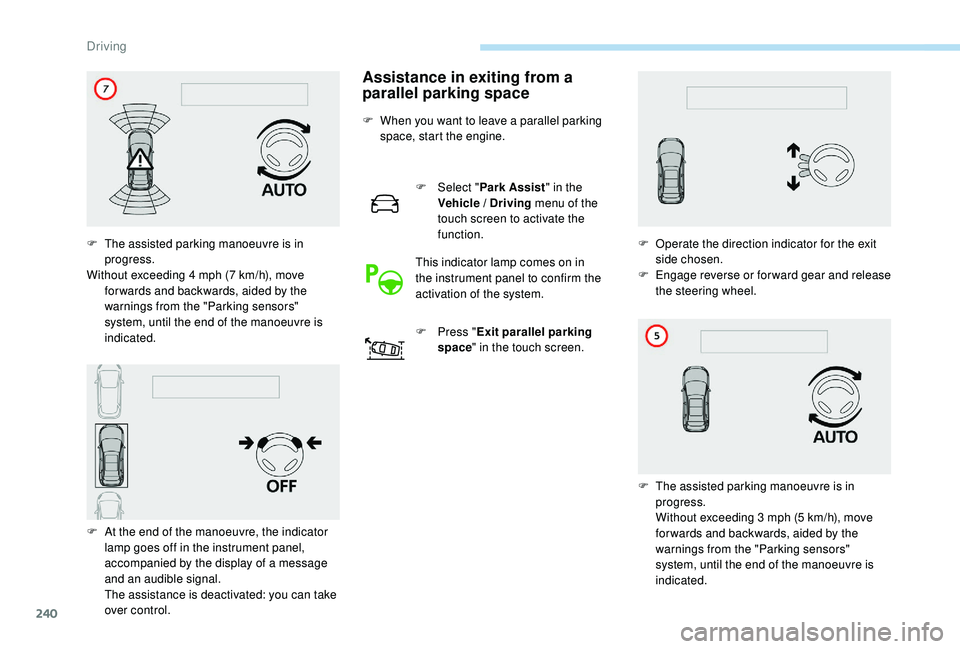
F When you want to leave a parallel parking space, start the engine.
F
Sel
ect "Park Assist " in the
Vehicle / Driving menu of the
touch screen to activate the
function.
This indicator lamp comes on in
the instrument panel to confirm the
activation of the system.
F
P
ress "Exit parallel parking
space " in the touch screen.
F
T
he assisted parking manoeuvre is in
progress.
Without exceeding 4
mph (7
km/h), move
for wards and backwards, aided by the
warnings from the "Parking sensors"
system, until the end of the manoeuvre is
indicated.
F
A
t the end of the manoeuvre, the indicator
lamp goes off in the instrument panel,
accompanied by the display of a message
and an audible signal.
T
he assistance is deactivated: you can take
over control. F
O
perate the direction indicator for the exit
side chosen.
F
E
ngage reverse or forward gear and release
the steering wheel.
F
T
he assisted parking manoeuvre is in
progress.
W
ithout exceeding 3 mph (5 km/h), move
for wards and backwards, aided by the
warnings from the "Parking sensors"
system, until the end of the manoeuvre is
indicated.
Driving
Page 243 of 404
241
Assistance with bay parking
manoeuvres
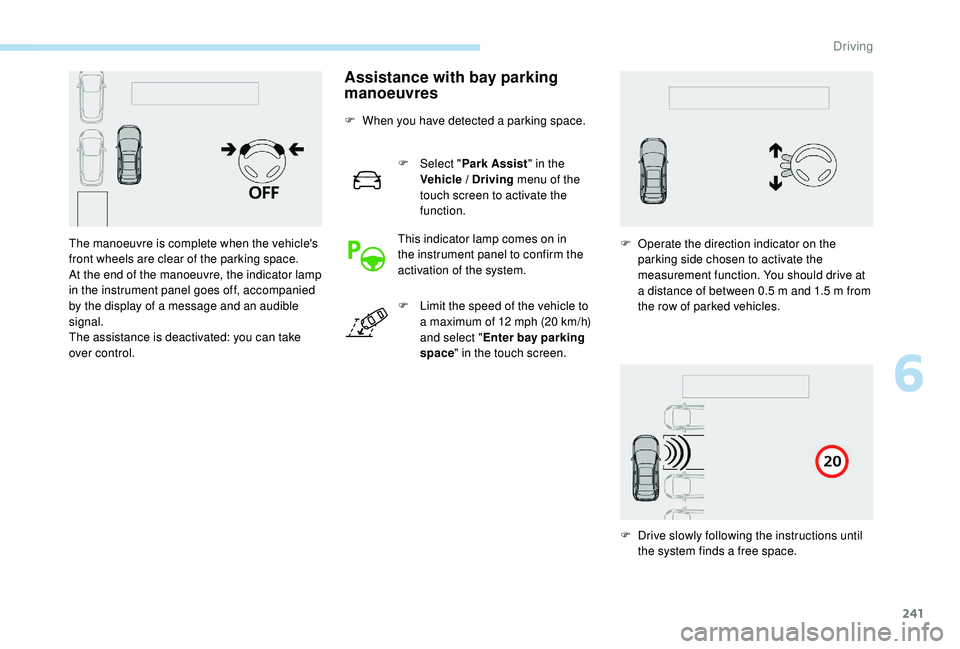
F When you have detected a parking space.F
Sel
ect "Park Assist " in the
Vehicle / Driving menu of the
touch screen to activate the
function.
This indicator lamp comes on in
the instrument panel to confirm the
activation of the system.
F
L
imit the speed of the vehicle to
a maximum of 12
mph (20 km/h)
and select " Enter bay parking
space " in the touch screen.
The manoeuvre is complete when the vehicle's
front wheels are clear of the parking space.
At the end of the manoeuvre, the indicator lamp
in the instrument panel goes off, accompanied
by the display of a message and an audible
signal.
The assistance is deactivated: you can take
over control.
F
O
perate the direction indicator on the
parking side chosen to activate the
measurement function. You should drive at
a distance of between 0.5
m and 1.5 m from
the row of parked vehicles.
F
D
rive slowly following the instructions until
the system finds a free space.
6
Driving
Page 244 of 404
242
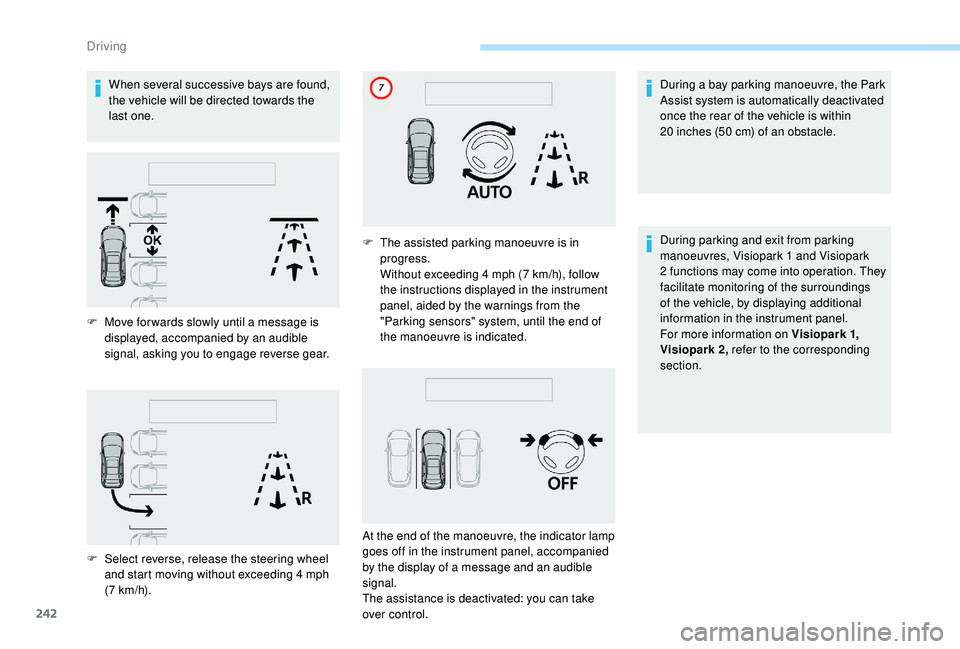
When several successive bays are found,
the vehicle will be directed towards the
last one.During a bay parking manoeuvre, the Park
Assist system is automatically deactivated
once the rear of the vehicle is within
20
inches (50 cm) of an obstacle.
During parking and exit from parking
manoeuvres, Visiopark 1
and Visiopark
2
functions may come into operation. They
facilitate monitoring of the surroundings
of the vehicle, by displaying additional
information in the instrument panel.
For more information on Visiopark 1 ,
Visiopark 2, refer to the corresponding
section.
F
M
ove for wards slowly until a message is
displayed, accompanied by an audible
signal, asking you to engage reverse gear.
F
S
elect reverse, release the steering wheel
and start moving without exceeding 4
mph
(7
km/h). F
T
he assisted parking manoeuvre is in
progress.
W
ithout exceeding 4 mph (7 km/h), follow
the instructions displayed in the instrument
panel, aided by the warnings from the
"Parking sensors" system, until the end of
the manoeuvre is indicated.
At the end of the manoeuvre, the indicator lamp
goes off in the instrument panel, accompanied
by the display of a message and an audible
signal.
The assistance is deactivated: you can take
over control.
Driving
Page 245 of 404
243
Deactivation
The system is deactivated by pressing the
control.
The system is deactivated automatically:
-
o
n switching off the ignition,
-
i
f the engine stalls,
-
i
f no manoeuvre is per formed within
5
minutes of selecting the type of
manoeuvre
-
a
fter a prolonged stop of the vehicle during
a manoeuvre,
-
i
f the road wheel anti-slip regulation (ASR)
is triggered,
-
i
f the speed of the vehicle exceeds the
stated limit,
-
w
hen the driver interrupts movement of the
steering wheel,
-
a
fter 4 manoeuvre cycles,
-
o
n opening the driver's door,
-
i
f one of the front wheels encounters an
obstacle.
The indicator lamp in the instrument panel goes
off and a message is displayed accompanied
by an audible signal.
The driver should then take back control of the
vehicle's steering.
If the system is deactivated during a
manoeuvre, the driver should reactivate it
to repeat the measurement.
Deactivation
The system is switched off automatically:
- w hen towing a trailer, connected electrically,
-
i
f the driver's door is opened,
-
i
f the speed of the vehicle is above 45 mph
(70
km/h).
To switch the system off for a prolonged period,
contact a PEUGEOT dealer or a qualified
workshop.
Operating faults
In the event of a fault, this warning
lamp flashes for a few seconds,
accompanied by an audible signal.
If the fault occurs during the use of the system,
the warning lamp goes off.
In the event of a fault with the
power steering, this warning lamp
flashes in the instrument panel,
accompanied by a message.
Contact a PEUGEOT dealer or a qualified
workshop. If the lateral distance between your vehicle
and the space is too great, the system may
not be able to measure the space.
Any object projecting beyond the
dimensions of the vehicle (e.g. a ladder on
the roof or a towball) will not be taken into
account by the Park Assist system during a
manoeuvre.
In bad weather or in winter, ensure that
the sensors are not covered by road dirt,
ice or snow.
In the event of a fault, have the system
checked by a PEUGEOT dealer or a
qualified workshop.
High pressure jet washing
When washing your vehicle, keep the lance at
least 12
inches (30 cm) away from the sensors.
6
Driving