ABS PEUGEOT 5008 2017 Owners Manual
[x] Cancel search | Manufacturer: PEUGEOT, Model Year: 2017, Model line: 5008, Model: PEUGEOT 5008 2017Pages: 404, PDF Size: 15.31 MB
Page 17 of 404
15
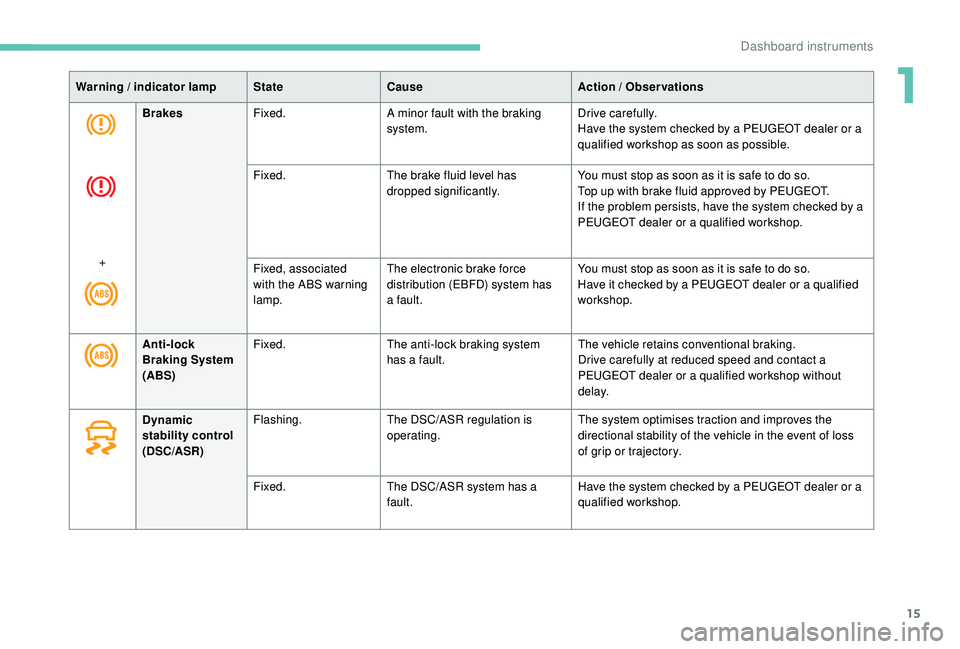
Warning / indicator lampStateCause Action / Observations
Brakes Fixed. A minor fault with the braking
system. Drive carefully.
Have the system checked by a PEUGEOT dealer or a
qualified workshop as soon as possible.
Fixed. The brake fluid level has
dropped significantly. You must stop as soon as it is safe to do so.
Top up with brake fluid approved by PEUGEOT.
If the problem persists, have the system checked by a
PEUGEOT dealer or a qualified workshop.
+ Fixed, associated
with the ABS warning
lamp.The electronic brake force
distribution (EBFD) system has
a fault. You must stop as soon as it is safe to do so.
Have it checked by a PEUGEOT dealer or a qualified
workshop.
Anti-lock
Braking System
(ABS) Fixed.
The anti-lock braking system
has a fault. The vehicle retains conventional braking.
Drive carefully at reduced speed and contact a
PEUGEOT dealer or a qualified workshop without
d e l ay.
Dynamic
stability control
(DSC/ASR) Flashing.
The DSC/ASR regulation is
operating. The system optimises traction and improves the
directional stability of the vehicle in the event of loss
of grip or trajectory.
Fixed. The DSC/ASR system has a
fault. Have the system checked by a PEUGEOT dealer or a
qualified workshop.
1
Dashboard instruments
Page 38 of 404
36
Trip computer
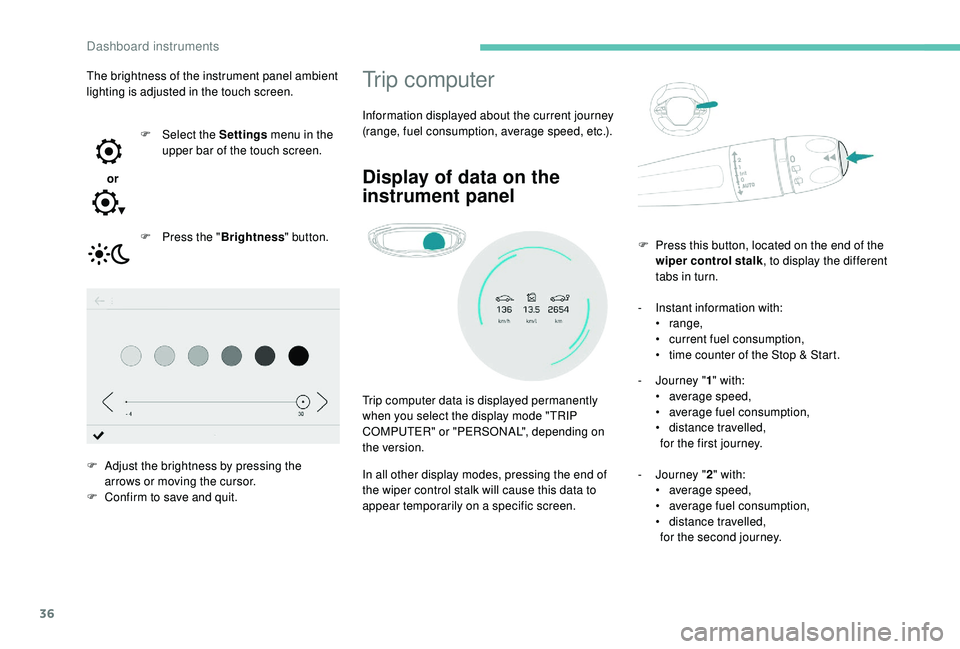
Information displayed about the current journey
(range, fuel consumption, average speed, etc.).
Display of data on the
instrument panel
Trip computer data is displayed permanently
when you select the display mode "TRIP
COMPUTER" or "PERSONAL", depending on
the version.
In all other display modes, pressing the end of
the wiper control stalk will cause this data to
appear temporarily on a specific screen.-
I
nstant information with:
•
range,
•
c
urrent fuel consumption,
•
t
ime counter of the Stop & Start.
-
J
ourney "
1" with:
• a verage speed,
• a verage fuel consumption,
•
d
istance travelled,
for the first journey.
-
J
ourney "2" with:
•
a
verage speed,
•
a
verage fuel consumption,
•
d
istance travelled,
for the second journey.
F
P
ress this button, located on the end of the
wiper control stalk , to display the different
tabs in turn.
The brightness of the instrument panel ambient
lighting is adjusted in the touch screen.
or F
Sel
ect the Settings
menu in the
upper bar of the touch screen.
F
P
ress the "
Brightness " button.
F
A
djust the brightness by pressing the
arrows or moving the cursor.
F
C
onfirm to save and quit.
Dashboard instruments
Page 43 of 404
41
Upper bar
Certain information is always displayed in the
upper bar of the touch screen:
-
T
ime and exterior temperature (a blue
warning lamp appears when there is a risk
of i c e).
-
R
epeat of the air conditioning information,
and direct access to the corresponding
menu.
-
S
ummary of information from the Radio
Media , Telephone menus and navigation
instructions*.
-
Notifications.
-
A
ccess to the Settings for the touch screen
and the digital instrument panel (date/time,
languages, units,etc.).
*
D
epending on equipment
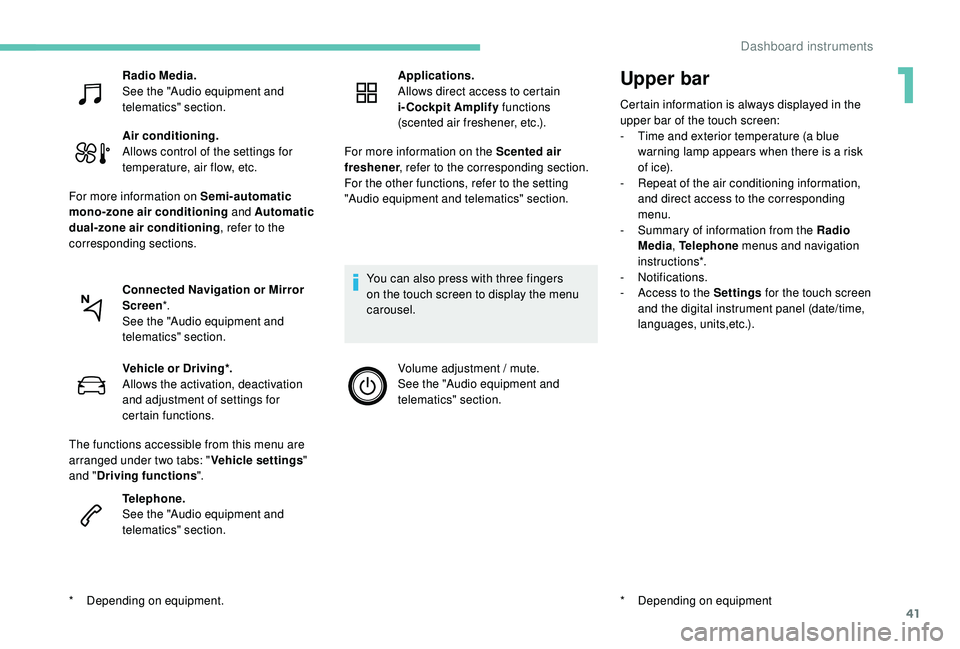
Radio Media.
See the "Audio equipment and
telematics" section.
Air conditioning.
Allows control of the settings for
temperature, air flow, etc.
For more information on Semi-automatic
mono-zone air conditioning and Automatic
dual-zone air conditioning , refer to the
corresponding sections.
Connected Navigation or Mirror
Screen *.
See the "Audio equipment and
telematics" section.
*
D
epending on equipment. Vehicle or Driving*.
Allows the activation, deactivation
and adjustment of settings for
certain functions.
The functions accessible from this menu are
arranged under two tabs: " Vehicle settings"
and " Driving functions ".
Telephone.
See the "Audio equipment and
telematics" section. Applications.
Allows direct access to certain
i-Cockpit Amplify
functions
(scented air freshener, etc.).
For more information on the Scented air
freshener , refer to the corresponding section.
For the other functions, refer to the setting
"Audio equipment and telematics" section.
You can also press with three fingers
on the touch screen to display the menu
carousel. Volume adjustment / mute.
See the "Audio equipment and
telematics" section.
1
Dashboard instruments
Page 65 of 404
63
Triggering of the alarm
This is indicated by sounding of the siren
and flashing of the direction indicators for
30
seconds.
The monitoring functions remain active until
the alarm has been triggered eleven times in
succession.
When the vehicle is unlocked using the remote
control or the "
K
eyless Entry and Starting"
system, rapid flashing of the indicator lamp
in the button informs you that the alarm was
triggered during your absence. When the
ignition is switched on, this flashing stops
immediately.
Failure of the remote
control
To deactivate the monitoring functions:
F u nlock the vehicle using the key (integral to
the remote control) in the driver's door lock,
F
o
pen the door; the alarm is triggered,
F
s
witch on the ignition; the alarm stops; the
indicator lamp in the button goes off.
Locking the vehicle without
activating the alarm
F Lock or deadlock the vehicle using the key (integral to the remote control) in the driver's
door lock.
Operating fault
When the ignition is switched on, fixed
illumination of the indicator lamp in the button
indicates a fault with the system.
Have it checked by a PEUGEOT dealer or a
qualified workshop.
Doors
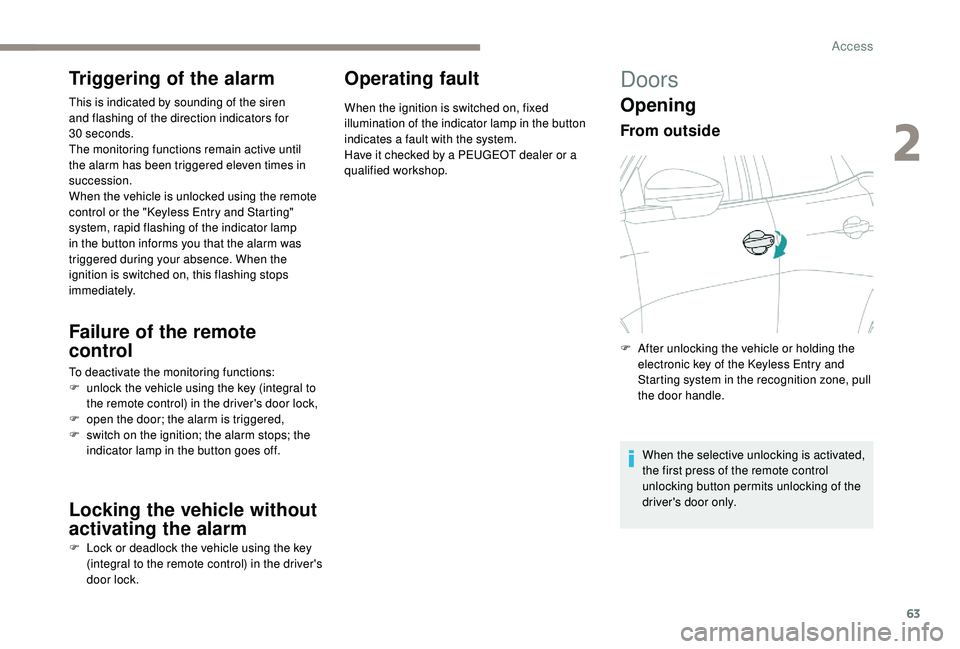
Opening
From outside
F After unlocking the vehicle or holding the electronic key of the K eyless Entry and
Starting system in the recognition zone, pull
the door handle.
When the selective unlocking is activated,
the first press of the remote control
unlocking button permits unlocking of the
driver's door only.
2
Access
Page 99 of 404
97
Semi-automatic mono-
zone air conditioning
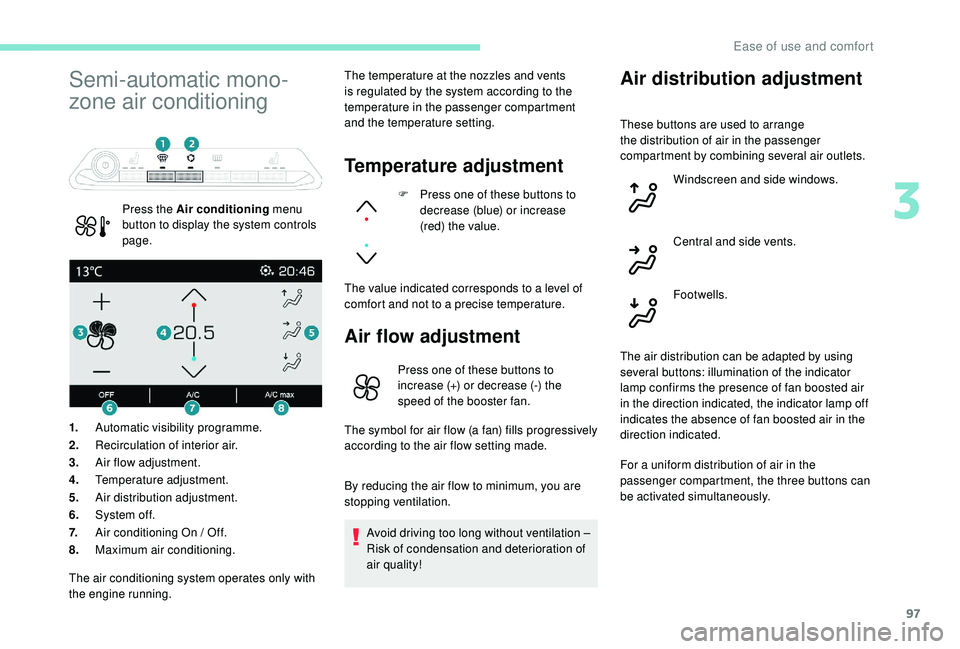
Press the Air conditioning menu
button to display the system controls
page. The temperature at the nozzles and vents
is regulated by the system according to the
temperature in the passenger compartment
and the temperature setting.
Temperature adjustment
F Press one of these buttons to
decrease (blue) or increase
(red) the value.
The value indicated corresponds to a level of
comfort and not to a precise temperature.
Air flow adjustment
1. Automatic visibility programme.
2. Recirculation of interior air.
3. Air flow adjustment.
4. Temperature adjustment.
5. Air distribution adjustment.
6. System of f.
7. Air conditioning On / Off.
8. Maximum air conditioning.
Air distribution adjustment
Press one of these buttons to
increase (+) or decrease (-) the
speed of the booster fan.
The symbol for air flow (a fan) fills progressively
according to the air flow setting made.
By reducing the air flow to minimum, you are
stopping ventilation.
Avoid driving too long without ventilation –
Risk of condensation and deterioration of
air quality!
The air conditioning system operates only with
the engine running. These buttons are used to arrange
the distribution of air in the passenger
compartment by combining several air outlets.
Windscreen and side windows.
Central and side vents.
Footwells.
The air distribution can be adapted by using
several buttons: illumination of the indicator
lamp confirms the presence of fan boosted air
in the direction indicated, the indicator lamp off
indicates the absence of fan boosted air in the
direction indicated.
For a uniform distribution of air in the
passenger compartment, the three buttons can
be activated simultaneously.
3
Ease of use and comfort
Page 144 of 404
142
Electronic stability control
(ESC)
A set of the following Electronic Stability
systems:
-
a
nti-lock braking system (ABS) and
electronic brake force distribution (EBFD),
-
em
ergency braking assistance (EBA),
-
w
heel anti-slip regulation (ASR) or traction
control,
-
d
ynamic stability control (DSC).
-
t
railer stability assist (TSA).
Definitions
Anti-lock braking system (ABS)
and electronic brake force
distribution (EBFD)
These systems improve the stability and
manoeuvrability of your vehicle when braking
and contribute towards improved control in
corners, in particular on poor or slippery road
surfaces.
The ABS prevents wheel lock in the event of
emergency braking.
The electronic brake force distribution system
manages the braking pressure wheel by wheel.
Emergency braking assistance
In an emergency, this system enables you to
reach the optimum braking pressure more
quickly and therefore reduce the stopping
distance.
It is triggered in relation to the speed at which
the brake pedal is pressed. This is felt by a
reduction in the resistance of the pedal and an
increase in braking efficiency.
Anti-slip regulation (ASR)
This system optimises traction in order to
avoid wheel slip by acting on the brakes of
the driving wheels and on the engine. It also
improves the directional stability of the vehicle
on acceleration.
Dynamic stability control (DSC)
If there is a difference between the path
followed by the vehicle and that required by the
driver, this system monitors each wheel and
automatically acts on the brake of one or more
wheels and on the engine to return the vehicle
to the required path, within the limits of the laws
of physics.
Trailer stability assist (TSA)
This system allows control of the vehicle to be
retained when towing a trailer, so as to avoid
the risk of snaking.
Anti-lock braking system
(ABS) and electronic brake
force distribution (EBFD)
The fixed illumination of this warning
lamp signals that there is a fault with
the ABS.
The vehicle retains conventional braking. Drive
carefully at moderate speed.
Contact a PEUGEOT dealer or a qualified
workshop as soon as possible.
Illumination of this warning lamp,
linked with the STOP and ABS
warning lamps, accompanied by
the display of a message and an
audible signal, signals that there is a
fault with the electronic brake force
distribution (EBFD).
You must stop as soon as it is safe to do so.
Call on a PEUGEOT dealer or a qualified
workshop.
Safety
Page 145 of 404
143
Normal operation of the ABS may make
itself felt by slight vibrations of the brake
pedal.
In emergency braking, press ver y
firmly and maintain this pressure.
When changing wheels (tyres and rims),
ensure that these are approved for your
vehicle.
After an impact, have these systems
checked by a PEUGEOT dealer or a
qualified workshop.
Intelligent traction control
system
Depending on version, your vehicle has a
system to help driving on snow: intelligent
traction control.
This system detects situations of difficult
sur face grip that could make it difficult to move
off or make progress on deep fresh snow or
compacted snow.
In these situations, the intelligent traction
control limits the amount of wheel spin to
provide the best traction and trajectory control
for your vehicle. The use of snow tyres is strongly
recommended on sur faces offering low
levels of grip.
Anti-slip regulation (ASR) /
Dynamic stability control
(DSC)
Operation
These systems are activated automatically
every time the vehicle is started.
They come into operation in the event of a
problem with grip or trajectory.
Deactivation
In exceptional conditions (starting a vehicle
which is bogged down, stuck in snow, on soft
ground, etc.), it may be advisable to deactivate
the ASR system, so that the wheels can turn
freely and regain grip.
Reactivate the system when grip conditions
allow. Deactivation of the function is done
in the Vehicle / Driving
menu of the
touch screen.
It is confirmed by the display of a message.
The ASR system no longer acts on the
operation of the engine.
Reactivation
The ASR system is reactivated automatically
every time the ignition is switched back on or
from 30
mph (50 km/h).
Below 30
mph (50 km/h), you can reactivate it
manually:
Reactivation of the function is done
in the Vehicle / Driving menu of the
touch screen.
It is confirmed by the display of a message.
This is indicated by flashing of this
warning lamp in the instrument
panel.
Operating fault
Illumination of this warning lamp,
accompanied by the display of a
message and an audible signal,
indicates a fault with the system.
Contact a PEUGEOT dealer or a qualified
workshop to have the systems checked.
5
Safety
Page 186 of 404
184
With an automatic gearbox, when N mode
is engaged, an audible signal will sound. It
will stop when you close the driver's door
again.
Deactivating automatic
operation
In some situations, for example when it is
extremely cold or during towing (caravan,
breakdown), it may be necessary to deactivate
automatic operation of the system.Deactivation of the automatic
functions is confirmed by
illumination of this indicator lamp in
the instrument panel.
F
R
elease the control lever and the brake
pedal.
From now on, the parking brake can only
be applied and released manually using the
control lever.
Repeat this procedure to reactivate automatic
operation.
Reactivation of automatic operation is
confirmed by the indicator lamp in the
instrument panel going off.
Emergency braking
The emergency braking should only be
used in an exceptional situation. In the event of a failure in braking using the
brake pedal or in an exceptional situation (e.g.
driver taken ill, driver under instruction, etc.), a
continuous pull on the control lever will brake
the vehicle. Braking takes place while the
control lever is being pulled. It is interrupted if
the control lever is released.
The ABS and DSC systems ensure stability of
the vehicle during emergency braking.
If the emergency braking malfunctions, the
message "Parking brake control faulty" will be
displayed in the instrument panel.
If the ABS and DSC systems malfunction,
signalled by the illumination of one or both
warning lamps in the instrument panel, then
stability of the vehicle is no longer guaranteed.
In this event, stability must be assured by the
driver by repeating alternate "pull-release"
actions on the control lever until the vehicle is
immobilised.
F
S
tart the engine.
F
A
pply the parking brake with the control
lever, if it is released.
F
T
ake your foot off the brake pedal. F
P
ush and hold the control lever in the
release direction for at least 10 seconds and
no more than 15 seconds.
F
R
elease the control lever.
F
P
ress and hold the brake pedal.
F
P
ull the control lever in the apply direction
for 2 seconds.
Driving
Page 210 of 404
208
The brake lamps illuminate as soon as
the braking system is activated with
deceleration of the vehicle.
The dynamic cruise control system
is a driving aid that cannot, in any
circumstances, replace the need to obser ve
speed limits and safety distances, nor the
need for vigilance on the part of the driver.
It is recommended that you always keep
your feet close to the pedals.
The driver must be ready to take back
control of their vehicle at any time, using the
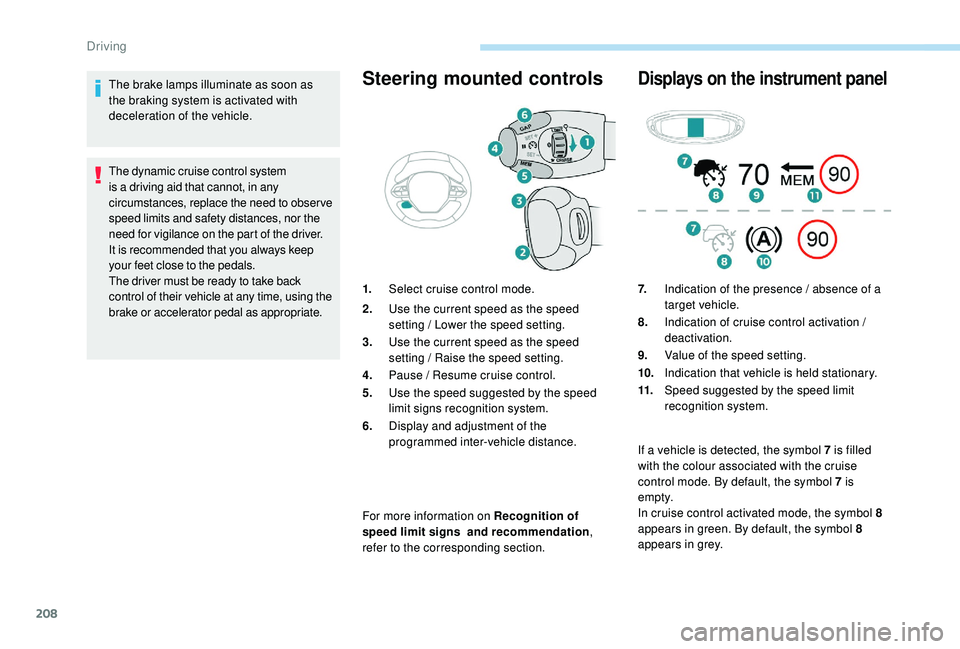
brake or accelerator pedal as appropriate.Steering mounted controls
For more information on Recognition of
speed limit signs and recommendation,
refer to the corresponding section.
Displays on the instrument panel
1. Select cruise control mode.
2. Use the current speed as the speed
setting / Lower the speed setting.
3. Use the current speed as the speed
setting / Raise the speed setting.
4. Pause / Resume cruise control.
5. Use the speed suggested by the speed
limit signs recognition system.
6. Display and adjustment of the
programmed inter-vehicle distance. 7.
Indication of the presence / absence of a
target vehicle.
8. Indication of cruise control activation /
deactivation.
9. Value of the speed setting.
10. Indication that vehicle is held stationary.
11. Speed suggested by the speed limit
recognition system.
If a vehicle is detected, the symbol 7
is filled
with the colour associated with the cruise
control mode. By default, the symbol 7
is
e m pt y.
In cruise control activated mode, the symbol 8
appears in green. By default, the symbol 8
appears in grey.
Driving
Page 223 of 404
221
The following situations may interfere with
the operation of the system or prevent it
working:
-
p
oor visibility (inadequate lighting of
the roadway, falling snow, heavy rain,
dense fog, etc.),
-
d
azzle (headlamps of an oncoming
vehicle, low sun, reflections on a damp
road, leaving a tunnel, alternating
shade and light, etc.),
-
w
indscreen area located in front of the
camera: dirty, misted up, frost-covered,
snow-covered, damaged or covered by
a s t i c ke r,
-
l
ane markings absent, worn, hidden
(snow, mud) or multiple (roadworks,
e t c .),
-
c
lose to the vehicle ahead (lane
markings not detected),
-
r
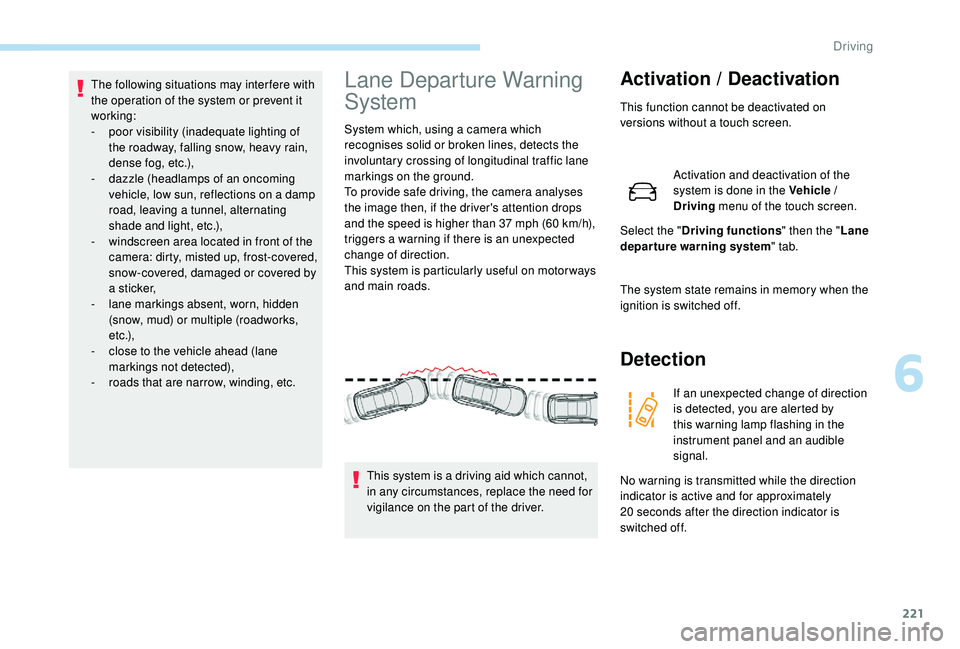
oads that are narrow, winding, etc.Lane Departure Warning
System
System which, using a camera which
recognises solid or broken lines, detects the
involuntary crossing of longitudinal traffic lane
markings on the ground.
To provide safe driving, the camera analyses
the image then, if the driver's attention drops
and the speed is higher than 37 mph (60 km/h),
triggers a warning if there is an unexpected
change of direction.
This system is particularly useful on motor ways
and main roads.
Activation / Deactivation
This function cannot be deactivated on
versions without a touch screen.
Activation and deactivation of the
system is done in the Vehicle /
Driving menu of the touch screen.
Select the " Driving functions " then the "Lane
departure warning system " tab.
The system state remains in memory when the
ignition is switched off.
Detection
If an unexpected change of direction
is detected, you are alerted by
this warning lamp flashing in the
instrument panel and an audible
signal.
No warning is transmitted while the direction
indicator is active and for approximately
20
seconds after the direction indicator is
switched off.
This system is a driving aid which cannot,
in any circumstances, replace the need for
vigilance on the part of the driver.
6
Driving