ABS PEUGEOT 5008 2018 User Guide
[x] Cancel search | Manufacturer: PEUGEOT, Model Year: 2018, Model line: 5008, Model: PEUGEOT 5008 2018Pages: 364, PDF Size: 13.03 MB
Page 199 of 364
197
- the ignition has been switched off for a few
minutes,
-
t
he driver's seat belt is unfastened and their
door is open.
As soon as the speed of the vehicle drops
below 40
mph (65 km/h), the system goes
into standby.
The driving time is counted again once the
speed is above 40
mph (65 km/h).
Driver inattention alert
Depending on version, the "Driving time
warning" may be combined with the "Driver
inattention alert".
After three first level alerts, the system triggers
a
new alert with the message "Take a
break!",
accompanied by a
more pronounced audible
signal. In certain driving conditions (poor road
sur face or strong winds), the system may
give alerts independent of the driver's
level of vigilance.
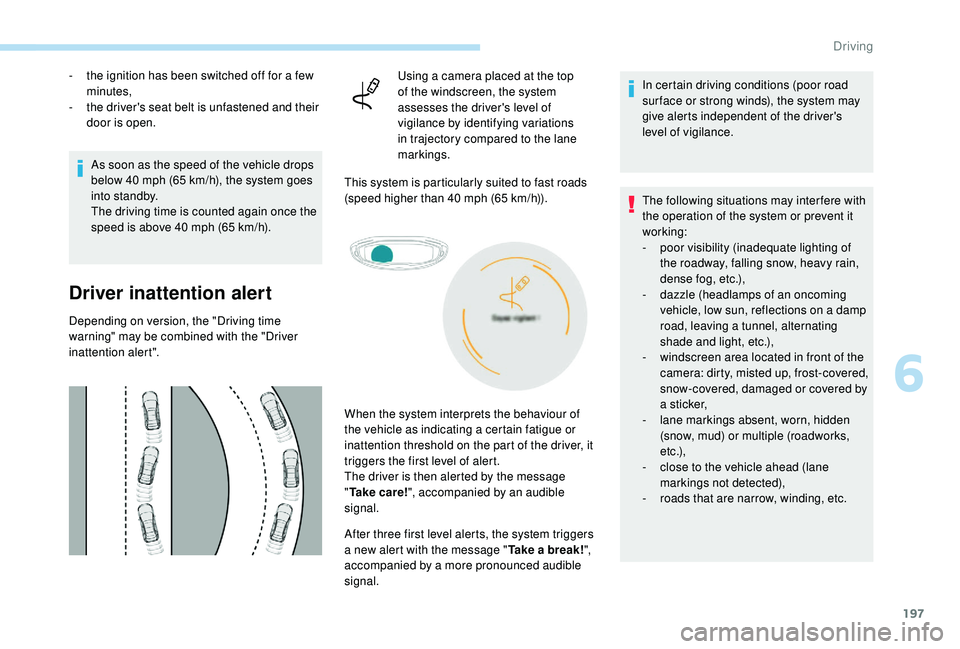
Using a camera placed at the top
of the windscreen, the system
assesses the driver's level of
vigilance by identifying variations
in trajectory compared to the lane
markings.
This system is particularly suited to fast roads
(speed higher than 40 mph (65 km/h)).
The following situations may interfere with
the operation of the system or prevent it
working:
-
p
oor visibility (inadequate lighting of
the roadway, falling snow, heavy rain,
dense fog, etc.),
-
d
azzle (headlamps of an oncoming
vehicle, low sun, reflections on a damp
road, leaving a tunnel, alternating
shade and light, etc.),
-
w
indscreen area located in front of the
camera: dirty, misted up, frost-covered,
snow-covered, damaged or covered by
a
s t i c ke r,
-
l
ane markings absent, worn, hidden
(snow, mud) or multiple (roadworks,
e t c .),
-
c
lose to the vehicle ahead (lane
markings not detected),
-
r
oads that are narrow, winding, etc.
When the system interprets the behaviour of
the vehicle as indicating a
certain fatigue or
inattention threshold on the part of the driver, it
triggers the first level of alert.
The driver is then alerted by the message
" Ta k e c a r e ! ", accompanied by an audible
signal.
6
Driving
Page 204 of 364
202
Operating limits
The system goes into standby automatically in
the following cases:
-
E
SC deactivated or operation triggered,
-
S
peed below 40 mph (65 km/h) or greater
than 112
mph (180 km/h),
-
c
onnected electrically to a
trailer,
-
u
se of the "space-saver" spare
wheel detected (as detection is not
immediate, deactivation of the system is
recommended),
-
d
ynamic driving style detected, pressure on
the brake or accelerator pedal,
-
d
riving where there are no lane markings,
-
a
ctivation of the direction indicators,
-
c
rossing the inside line on a bend,
-
d
riving in a tight corner,
-
i
nactivity by the driver detected during
correction. The following situations may interfere with
the operation of the system or prevent it
working:
-
c
onditions of poor visibility (inadequate
street lighting, snowfall, rain, fog),
-
d
azzle (headlamps of an oncoming
vehicle, low sun, reflections on a
damp
road, leaving a
tunnel, alternating
shade and light),
-
w
indscreen area located in front of the
camera: dirty, misted, frost-covered,
snow-covered, damaged or covered by
a
s t i c ke r,
-
l
ane markings absent, worn, hidden
(snow, mud) or multiple (roadworks),
-
r
unning close to the vehicle in front
(the lane markings may not be
detected),
-
r
oads that are narrow, winding, etc.
Risk of undesirable operation
Deactivation of the system is recommended in
the following situations:
-
d
riving on a road sur face in poor condition,
-
u
nfavourable climatic conditions,
-
d
riving on slippery sur faces (ice).
Activation/Deactivation
Activation and deactivation of the
system is done in the Vehicle/
Driving menu of the touch screen.
The system state remains in memory when the
ignition is switched off.
Operating fault
In the event of a fault with the system, you are
a lerted by the illumination of these warning
lamps in the instrument panel, accompanied by
the display of a
message and an audible signal.
Have the system checked by a
PEUGEOT
dealer or a
qualified workshop.
The system is not intended for driving in the
following situations:
-
d
riving on a speed circuit,
-
d
riving with a trailer,
-
d
riving on a rolling stand,
-
d
riving on unstable sur faces.
Select the " Driving functions " then the "Lane
assist " tab.
Driving
Page 209 of 364
207
- Certain materials (fabrics) absorb sound waves: pedestrians may not be detected.
-
A
ccumulated snow or dead leaves on the
road sur face can inter fere with the vehicle's
sensors.
-
A f
ront or rear impact to the vehicle can
distort the settings of the sensors, which is
not always detected by the system: distance
measurements may be incorrect.
-
T
he tilting of the vehicle if the boot is
very loaded can affect the distance
measurements.
-
T
he sensors may be affected by poor
weather conditions (heavy rain, thick fog,
snowfall, etc.).
Recommendations on care
In bad or wintry weather, ensure that the
sensors are not covered with mud, ice or
snow. When reverse gear is engaged, an
audible signal (long beep) indicates that
the sensors may be dirty. High pressure washing
When washing your vehicle, direct the
lance at least 30
cm away from the
sensors.
Operating fault
If a fault occurs when shifting
t o reverse, this warning lamp
comes on in the instrument panel,
accompanied by a
message and an
audible signal (short beep).
Contact a
PEUGEOT dealer or a qualified
workshop to have the system checked.
Visiopark 1 – Visiopark 2
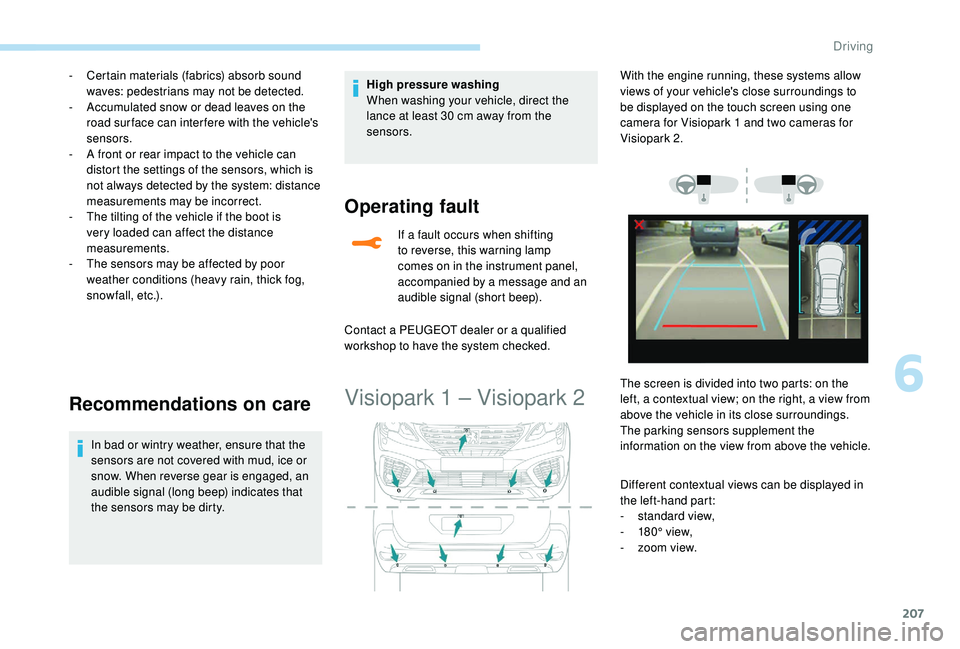
Different contextual views can be displayed in
the left-hand part:
-
s
tandard view,
-
1
80° view,
-
z
oom view.
With the engine running, these systems allow
views of your vehicle's close surroundings to
be displayed on the touch screen using one
camera for Visiopark 1
and two cameras for
Visiopark 2.
The screen is divided into two parts: on the
left, a contextual view; on the right, a view from
above the vehicle in its close surroundings.
The parking sensors supplement the
information on the view from above the vehicle.
6
Driving
Page 268 of 364
266
F Screw in the towing eye until it tightens fully.
F I nstall the towbar.
F
P
lace the gearbox in neutral.
Failure to follow this instruction could
result in damage to some components
(brakes, transmission, etc.) and the
absence of braking assistance when the
engine is restarted.
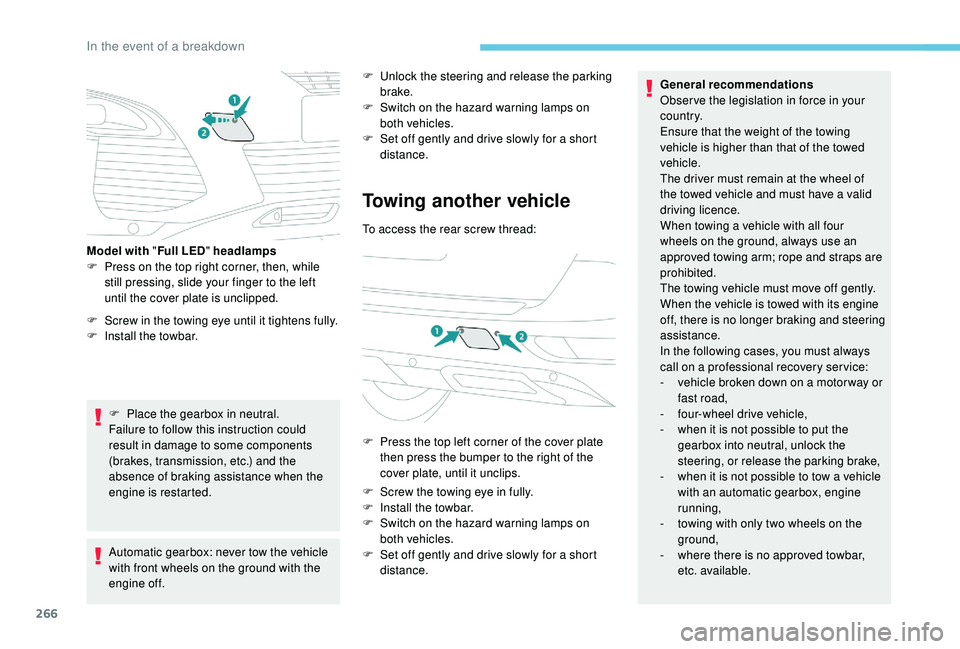
Model with "
Full LED" headlamps
F
P
ress on the top right corner, then, while
still pressing, slide your finger to the left
until the cover plate is unclipped.
Automatic gearbox: never tow the vehicle
with front wheels on the ground with the
engine off. F
U
nlock the steering and release the parking
brake.
F
S
witch on the hazard warning lamps on
both vehicles.
F
S
et off gently and drive slowly for a short
distance.
Towing another vehicle
To access the rear screw thread:
F
P
ress the top left corner of the cover plate
then press the bumper to the right of the
cover plate, until it unclips.
F
S
crew the towing eye in fully.
F
I
nstall the towbar.
F
S
witch on the hazard warning lamps on
both vehicles.
F
S
et off gently and drive slowly for a short
distance. General recommendations
Obser ve the legislation in force in your
c o u nt r y.
Ensure that the weight of the towing
vehicle is higher than that of the towed
vehicle.
The driver must remain at the wheel of
the towed vehicle and must have a
valid
driving licence.
When towing a vehicle with all four
wheels on the ground, always use an
approved towing arm; rope and straps are
prohibited.
The towing vehicle must move off gently.
When the vehicle is towed with its engine
off, there is no longer braking and steering
assistance.
In the following cases, you must always
call on a
professional recovery ser vice:
-
v
ehicle broken down on a motor way or
fast road,
-
f
our-wheel drive vehicle,
-
w
hen it is not possible to put the
gearbox into neutral, unlock the
steering, or release the parking brake,
-
w
hen it is not possible to tow a vehicle
with an automatic gearbox, engine
running,
-
t
owing with only two wheels on the
ground,
-
w
here there is no approved towbar,
etc. available.
In the event of a breakdown
Page 310 of 364
34
Radio
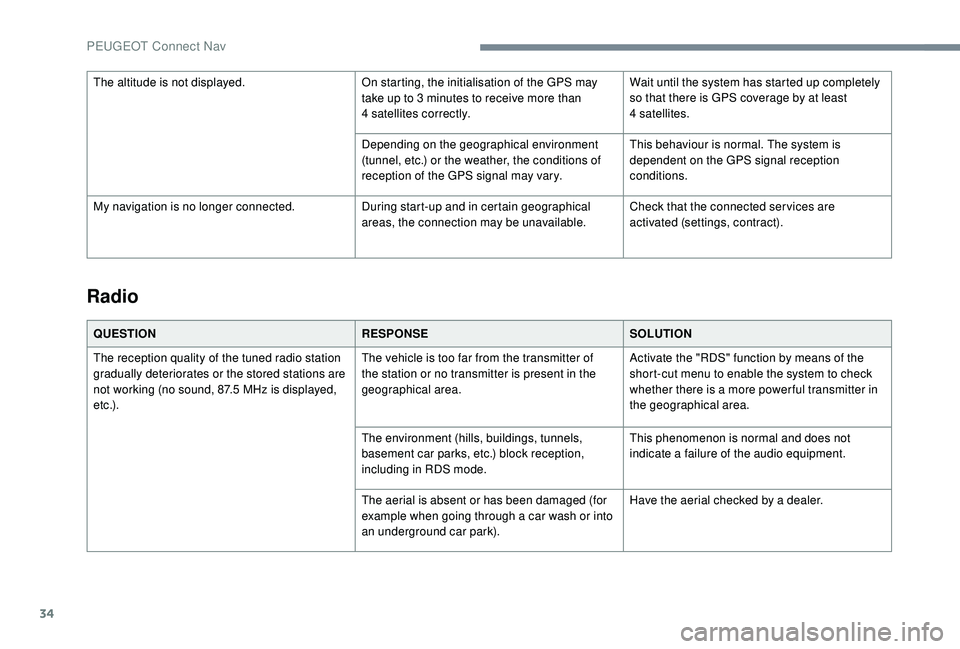
QUESTIONRESPONSESOLUTION
The reception quality of the tuned radio station
gradually deteriorates or the stored stations are
not working (no sound, 87.5
MHz is displayed,
e t c .) . The vehicle is too far from the transmitter of
the station or no transmitter is present in the
geographical area.
Activate the "RDS" function by means of the
short-cut menu to enable the system to check
whether there is a
more power ful transmitter in
the geographical area.
The environment (hills, buildings, tunnels,
basement car parks, etc.) block reception,
including in RDS mode. This phenomenon is normal and does not
indicate a
failure of the audio equipment.
The aerial is absent or has been damaged (for
example when going through a
car wash or into
an underground car park). Have the aerial checked by a
dealer.
The altitude is not displayed.
On starting, the initialisation of the GPS may
take up to 3 minutes to receive more than
4
satellites correctly.
Wait until the system has started up completely
so that there is GPS coverage by at least
4
satellites.
Depending on the geographical environment
(tunnel, etc.) or the weather, the conditions of
reception of the GPS signal may vary. This behaviour is normal. The system is
dependent on the GPS signal reception
conditions.
My navigation is no longer connected. During start-up and in certain geographical
areas, the connection may be unavailable.Check that the connected ser vices are
activated (settings, contract).
PEUGEOT Connect Nav
Page 333 of 364
19
Radio
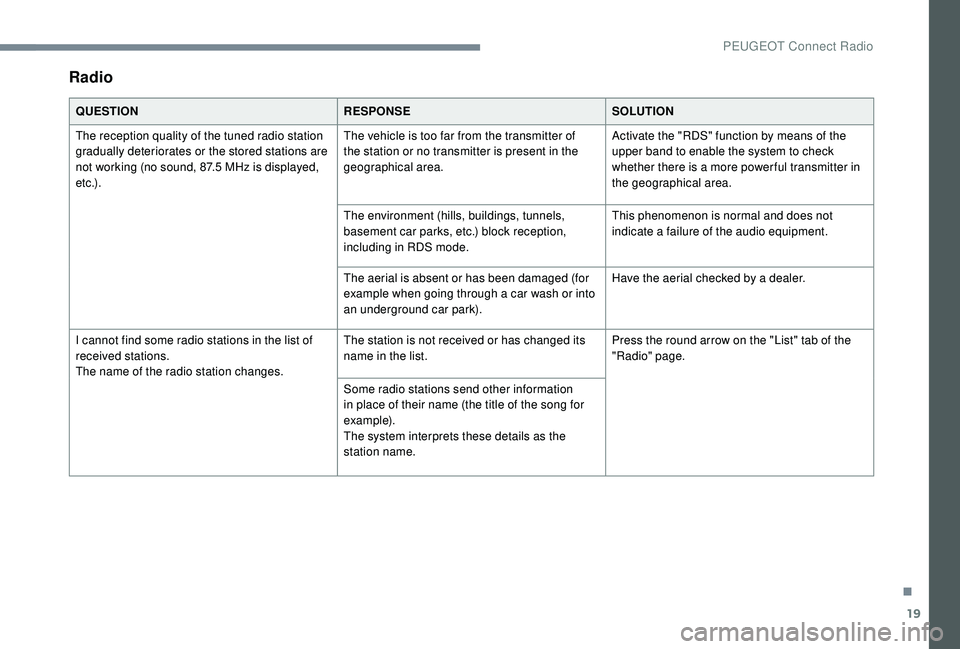
QUESTIONRESPONSESOLUTION
The reception quality of the tuned radio station
gradually deteriorates or the stored stations are
not working (no sound, 87.5
MHz is displayed,
e t c .) . The vehicle is too far from the transmitter of
the station or no transmitter is present in the
geographical area.
Activate the "RDS" function by means of the
upper band to enable the system to check
whether there is a
more power ful transmitter in
the geographical area.
The environment (hills, buildings, tunnels,
basement car parks, etc.) block reception,
including in RDS mode. This phenomenon is normal and does not
indicate a
failure of the audio equipment.
The aerial is absent or has been damaged (for
example when going through a
car wash or into
an underground car park). Have the aerial checked by a
dealer.
I cannot find some radio stations in the list of
received stations.
The name of the radio station changes. The station is not received or has changed its
name in the list.
Press the round arrow on the "List" tab of the
"Radio" page.
Some radio stations send other information
in place of their name (the title of the song for
example).
The system interprets these details as the
station name.
.
PEUGEOT Connect Radio
Page 352 of 364
16
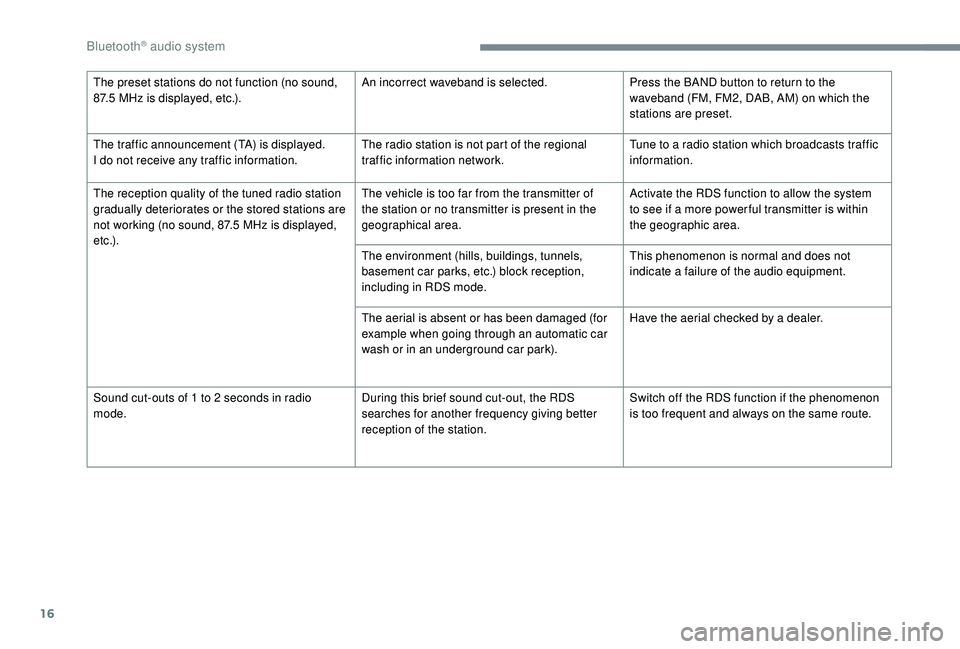
The preset stations do not function (no sound,
87.5 MHz is displayed, etc.). An incorrect waveband is selected.
Press the BAND button to return to the
waveband (FM, FM2, DAB, AM) on which the
stations are preset.
The traffic announcement (TA) is displayed.
I do not receive any traffic information. The radio station is not part of the regional
traffic information network.Tune to a
radio station which broadcasts traffic
information.
The reception quality of the tuned radio station
gradually deteriorates or the stored stations are
not working (no sound, 87.5
MHz is displayed,
e t c .) . The vehicle is too far from the transmitter of
the station or no transmitter is present in the
geographical area.
Activate the RDS function to allow the system
to see if a
more power ful transmitter is within
the geographic area.
The environment (hills, buildings, tunnels,
basement car parks, etc.) block reception,
including in RDS mode. This phenomenon is normal and does not
indicate a
failure of the audio equipment.
The aerial is absent or has been damaged (for
example when going through an automatic car
wash or in an underground car park). Have the aerial checked by a
dealer.
Sound cut-outs of 1
to 2 seconds in radio
mode. During this brief sound cut-out, the RDS
searches for another frequency giving better
reception of the station.Switch off the RDS function if the phenomenon
is too frequent and always on the same route.
Bluetooth® audio system
Page 355 of 364
275
Accessories .......................................... 12 2, 16 0
Active Safety Brake..................... 16 -17, 19 2-19 5
AdBlue
® ............................................. 2 0, 32, 237
Additive, Diesel ............................................. 235
Adjusting headlamps
.................................... 114
Adjusting head restraints
................................ 71
Adjusting seats
................................ 69 -71, 77-78
Adjusting the air distribution
.....................89-92
Adjusting the air flow
................................. 8
9-92
Adjusting the date
......................... 38 - 40, 31, 18
Adjusting the height and reach of the steering wheel
.................................... 74
Adjusting the lumbar support
.................... 6
9 -71
Adjusting the seat belt height
................ 13
0 -131
Adjusting the temperature
........................89-92
Adjusting the time
......................... 38 - 40, 31, 17
Advanced Grip Control
.......................... 128 -12 9
Advice on driving
................................... 15 5 -15 6
Airbags
...............................
.............18, 13 4, 13 9
Airbags, curtain
...................................... 13 5 -137
Airbags, front .................................. 13 4 -13 5, 137
Airbags, lateral
...................................... 13 5, 137
Air conditioning
......................................... 86-88
Air conditioning, automatic
.............................85
Air conditioning, dual-zone automatic
......89, 93
Air conditioning, manual
............... 8
5 - 86, 92-93
Air conditioning, mono-zone
...............87- 88, 93
Air intake
................................................... 89-92
Air vents
.......................................................... 84
Alarm
............................................................... 56
Amplifier, audio
...............................
..............101
Anti-lock braking system (ABS)
..............15, 125
Apple CarPlay connection
........................16, 12
Armrest, front
......................................... 102-103
Assistance call
...............................
........123 -124 Assistance, emergency braking
...........
125, 19 4
Audio streaming (Bluetooth)
...................
24, 9, 9
Cable, audio
................................................23, 9
Cable, Jack
.................................................23, 9
Capacity, fuel tank
........................................220
Cartridge, fragrance
............................. 10
3 -104
A
B
C
Backrest, folding ........................................7 0 -71
Battery ..................... 13, 227, 235, 262, 264-265
Battery charge (warning lamp)
.......................13
Battery, charging
................................... 263-264
Battery, remote control
.............................52, 54
Blind
..............................
..................................64
Blind spot monitoring system
..........24, 203-205
Blind spot monitoring system, active
......24, 205
Blind spot sensors
..........................24, 203-204
Blinds, side
.................................................... 107
BlueHDi
..................................... 32, 35, 237, 240
Bluetooth (hands-free)
........ 2
5 -2 6 , 13 -14, 10 -11
Bluetooth (telephone)
...................... 2
5 - 2 7, 1 3 -1 5
Bonnet
................................................... 230-231
Boot
............................................. 59 - 60, 62, 110
Boot (fittings)
................................................. 108
Brake discs
............................................ 236-237
Brake lamps
...............................
...................255
Brakes
........................................ 14-15, 236-237
Braking assistance system
...........................125
Braking, automatic emergency
...16 -17, 19 2-19 5
Braking, emergency
...................................... 16
4
Brightness
....................................................... 16
Bulbs
............................................................. 252
Bulbs (changing)
...........................252, 255-256
180° rear vision
.....................................
209 -210 CD
.....................................................
23 -24, 9, 9
CD, MP3
............................................
23 -24, 9, 9
Central locking
.......................................... 4
9, 55
Changing a
bulb
............................
25
2, 255-256
Changing a
fuse
............................
25
7-258, 261
Changing a
wheel
..................
24
1-243, 246 -248
Changing a wiper blade ........................
12 0, 257
Changing the remote control battery ..............
54
Charger, induction ..................................101-102
Charger, wireless
................................... 10
1-102
Checking the engine oil level
..........................31
Checking the levels
..............................232, 234
Checking tyre pressures (using the kit)
......................................243, 245
Checks
...................................231-232, 235-237
Child lock
................................................15 3 -15 4
Children
.................................14 4, 14 6 -148, 15 0
Children (safety)
.....................................15 3 -15 4
Child seats
............1
33, 138 -139, 142, 144, 152
Child seats, conventional
......................142, 14 4
Child seats, i-Size
.........................................15 0
Child seats, ISOFIX
.......................14 6 -148, 15 0
Cigarette lighter
............................................10 0
Closing the boot
..................................47, 50, 59
Closing the doors
..........................47, 49 -50, 59
Configurations, seats
......................................82
Configuration, vehicle
......................... 3
8 - 42, 44
Connection, Bluetooth
........ 1
9, 25 -27, 13 -15, 11
Connection, MirrorLink
.........................17, 11 -1 2
Connection, Wi-Fi network
.............................20
Connectivity
..................................................101
Container, AdBlue
® ....................................... 23 8
Control, emergency door ................................ 52
C
ontrol, heated seats
...................................... 73
Controls, steering mounted
.................. 165 -169
Control stalk, lighting
................. 2 5 - 2 6 , 111, 113
Control stalk, wipers
.............................. 11
9 -12 1
Courtesy lamps
..................................... 104 -105
Cruise control
... 175 -176, 178, 181-187, 191-192
Cruise control by speed limit recognition
.....178
.
Alphabetical index