headlamp PEUGEOT 5008 2018 Owners Manual
[x] Cancel search | Manufacturer: PEUGEOT, Model Year: 2018, Model line: 5008, Model: PEUGEOT 5008 2018Pages: 364, PDF Size: 13.03 MB
Page 4 of 364
2
.
.
Head-up digital screen 8
W arning and indicator lamps 1 1
Indicators
29
Manual test
3
5
Distance recorders
3
5
Lighting dimmer
3
6
Ambient lighting
3
6
Trip computer
3
7
Monochrome screen C
3
8
Touch screen
4
0
Remote control
4
6
K
eyless Entry and Starting
4
8
Back-up procedures
5
2
Central locking
5
5
Anti-intrusion security
5
6
Alarm
56
Doors
58
Boot
59
Hands-free tailgate
6
0
Electric windows
6
3
Panoramic opening sunroof
6
4Driving position
6
8
Front seats
6
9
Steering wheel adjustment
7
4
M i r r o r s
74
Second row seats
7
6
Third row seats
7
9
Seat modularity
8
2
i- Cockpit Amplify function 8 3
Heating and Ventilation 8 4
Manual air conditioning
8
6
Semi-automatic mono-zone
air conditioning
87
A
utomatic dual-zone air conditioning
8
9
Recirculation of the interior air
9
2
Front demist – defrost
9
3
Heated windscreen
9
3
Rear screen demist – defrost
9
4
Programmable heating
9
4
Front fittings
9
9
Courtesy lamps
1
04
Interior ambient lighting
1
05
Rear fittings
1
06
Boot fittings
1
08Exterior lighting control stalk
1
11
Direction indicators
1
13
Headlamp adjustment
1
14
Automatic illumination of headlamps
1
14
Automatic headlamp dipping
1
16
Cornering lighting
1
18
Wiper control stalk
1
19
Automatic windscreen wipers 1 21
General safety recommendations
1
22
Hazard warning lamps
1
23
H or n
123
Emergency or assistance call
1
23
Electronic stability control (ESC)
1
25
Advanced Grip Control
1
28
Hill Assist Descent Control
1
29
Seat belts
1
30
Airbags
1
34
Child seats
1
38
Deactivating the front passenger airbag
1
39
ISOFIX mountings and child seats
1
46
i-Size child seats
1
50
Child lock
1
53
Over view
Instruments Ease of use and comfort
Safety
Access Lighting and visibility
Eco-driving
Instruments and controls 4
Contents
Page 7 of 364
5
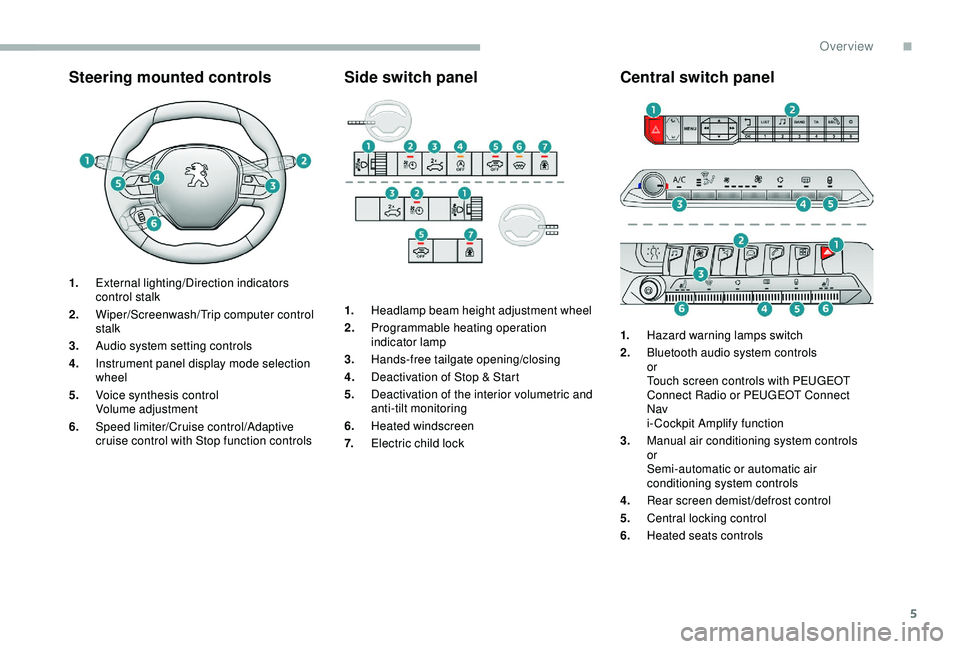
Steering mounted controls
1.External lighting/Direction indicators
control stalk
2. Wiper/Screenwash/ Trip computer control
stalk
3. Audio system setting controls
4. Instrument panel display mode selection
wheel
5. Voice synthesis control
Volume adjustment
6. Speed limiter/Cruise control/Adaptive
cruise control with Stop function controls
Side switch panel
1.Headlamp beam height adjustment wheel
2. Programmable heating operation
indicator lamp
3. Hands-free tailgate opening/closing
4. Deactivation of Stop & Start
5. Deactivation of the interior volumetric and
anti-tilt monitoring
6. Heated windscreen
7. Electric child lock
Central switch panel
1.Hazard warning lamps switch
2. Bluetooth audio system controls
or
Touch screen controls with PEUGEOT
Connect Radio or PEUGEOT Connect
Nav
i- Cockpit Amplify function
3. Manual air conditioning system controls
or
Semi-automatic or automatic air
conditioning system controls
4. Rear screen demist/defrost control
5. Central locking control
6. Heated seats controls
.
Over view
Page 8 of 364
6
As a passenger, if you avoid connecting your
m ultimedia devices (film, music, video game
etc.), you will contribute towards limiting the
consumption of electrical energy, and so of
fuel.
Disconnect your portable devices before
leaving the vehicle.
Eco- driving
Eco-driving is a range of everyday practices that allow the motorist to optimise their fuel consumption and CO2 emissions.
Optimise the use of your
gearbox
With a manual gearbox, move off gently
an d change up without waiting. During
acceleration change up early.
With an automatic gearbox, give preference
to automatic mode and avoid pressing the
accelerator pedal heavily or suddenly.
The gear shift indicator invites you to engage
the most suitable gear: as soon as the
indication is displayed in the instrument panel,
follow it straight away.
For vehicles fitted with an automatic gearbox,
this indicator appears only in manual mode.
Drive smoothly
Maintain a safe distance between vehicles,
u se engine braking rather than the
brake pedal, and press the accelerator
progressively. These practices contribute
towards a
reduction in fuel consumption and
CO
2 emissions and also help reduce the
background traffic noise.
If your vehicle has cruise control, make use of
the system at speeds above 25
mph (40 km/h)
when the traffic is flowing well.
Control the use of your electrical
equipment
Before moving off, if the passenger
compartment is too warm, ventilate it by
opening the windows and air vents before
using the air conditioning.
Above 31
mph (50 km/h), close the windows
and leave the air vents open.
Consider using equipment that can help
keep the temperature in the passenger
compartment down (sunroof blind and window
blinds, etc.). Switch off the headlamps and front foglamps
when the ambient light level does not require
their use.
Avoid running the engine before moving off,
particularly in winter; your vehicle will warm up
much faster while driving. Unless it has automatic regulation, switch off
the air conditioning as soon as the desired
temperature has been reached.
Switch off the demisting and defrosting
controls, if these are not automatically
managed.
Switch off the heated seat as soon as
possible.
Eco-driving
Page 27 of 364
25
Warning/indicator lampStateCause Action/Observations
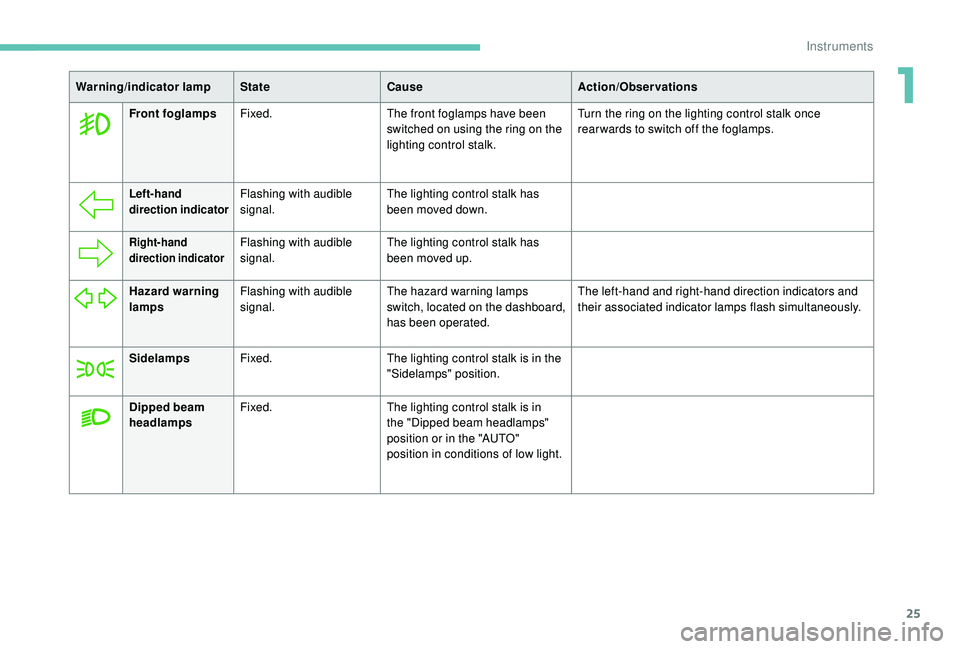
Front foglamps Fixed. The front foglamps have been
switched on using the ring on the
lighting control stalk. Turn the ring on the lighting control stalk once
rearwards to switch off the foglamps.
Left-hand
direction indicatorFlashing with audible
signal.
The lighting control stalk has
been moved down.
Right-hand
direction indicatorFlashing with audible
signal.The lighting control stalk has
been moved up.
Hazard warning
lamps Flashing with audible
signal. The hazard warning lamps
switch, located on the dashboard,
has been operated. The left-hand and right-hand direction indicators and
their associated indicator lamps flash simultaneously.
Sidelamps Fixed. The lighting control stalk is in the
"Sidelamps" position.
Dipped beam
headlamps Fixed.
The lighting control stalk is in
the "Dipped beam headlamps"
position or in the "AUTO"
position in conditions of low light.
1
Instruments
Page 28 of 364
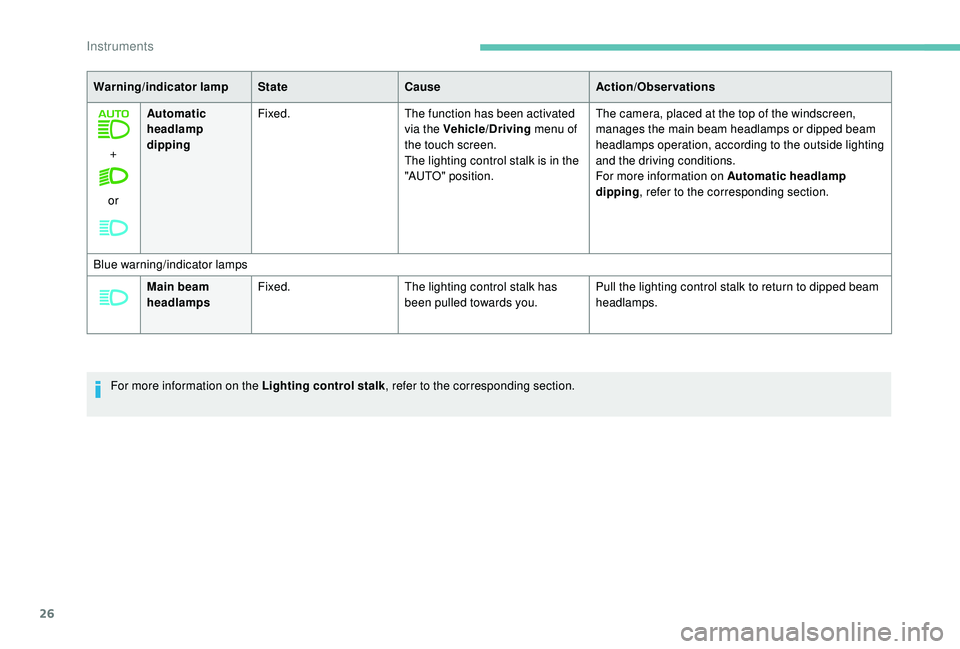
26
+
or Automatic
headlamp
dipping
Fixed.
The function has been activated
via the Vehicle/Driving menu of
the touch screen.
The lighting control stalk is in the
"AUTO" position. The camera, placed at the top of the windscreen,
manages the main beam headlamps or dipped beam
headlamps operation, according to the outside lighting
and the driving conditions.
For more information on Automatic headlamp
dipping
, refer to the corresponding section.
Warning/indicator lamp
StateCause Action/Observations
Blue warning/indicator lamps Main beam
headlamps Fixed.
The lighting control stalk has
been pulled towards you. Pull the lighting control stalk to return to dipped beam
headlamps.
For more information on the Lighting control stalk , refer to the corresponding section.
Instruments
Page 44 of 364
42
Upper bar
Certain information is always displayed in the
upper bar of the touch screen:
-
T
ime and exterior temperature (a blue
warning lamp appears when there is a
risk
of i c e).
-
R
epeat of the air conditioning information,
and direct access to the corresponding
menu.
-
S
ummary of information from the Radio
Media , Telephone menus and navigation
instructions*.
-
Notifications.
-
A
ccess to the Settings for the touch screen
and the digital instrument panel (date/time,
languages, units, etc.).
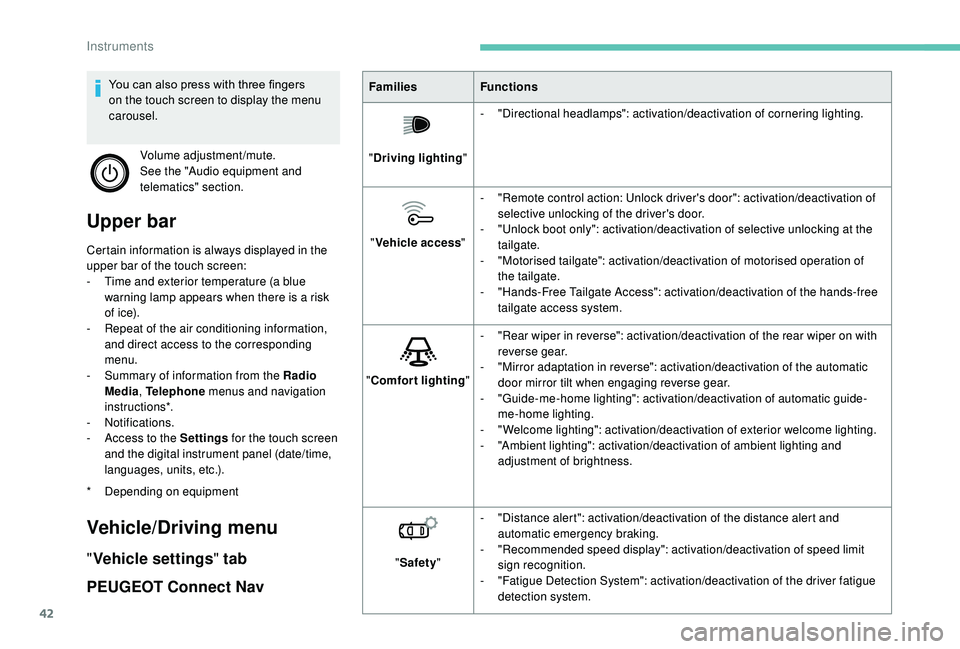
Vehicle/Driving menu
" Vehicle settings " tab
PEUGEOT Connect Nav
* Depending on equipment Families
Functions
" Driving lighting "-
"
Directional headlamps": activation/deactivation of cornering lighting.
" Vehicle access "-
"
Remote control action: Unlock driver's door": activation/deactivation of
selective unlocking of the driver's door.
-
"
Unlock boot only": activation/deactivation of selective unlocking at the
tailgate.
-
"
Motorised tailgate": activation/deactivation of motorised operation of
the tailgate.
-
"
Hands-Free Tailgate Access": activation/deactivation of the hands-free
tailgate access system.
" Comfort lighting "-
"
Rear wiper in reverse": activation/deactivation of the rear wiper on with
reverse gear.
-
"
Mirror adaptation in reverse": activation/deactivation of the automatic
door mirror tilt when engaging reverse gear.
-
"
Guide-me-home lighting": activation/deactivation of automatic guide-
me-home lighting.
-
"
Welcome lighting": activation/deactivation of exterior welcome lighting.
-
"
Ambient lighting": activation/deactivation of ambient lighting and
adjustment of brightness.
" Safety " -
"
Distance alert": activation/deactivation of the distance alert and
automatic emergency braking.
-
"
Recommended speed display": activation/deactivation of speed limit
sign recognition.
-
"
Fatigue Detection System": activation/deactivation of the driver fatigue
detection system.
You can also press with three fingers
on the touch screen to display the menu
carousel.
Volume adjustment/mute.
See the "Audio equipment and
telematics" section.
Instruments
Page 45 of 364
43
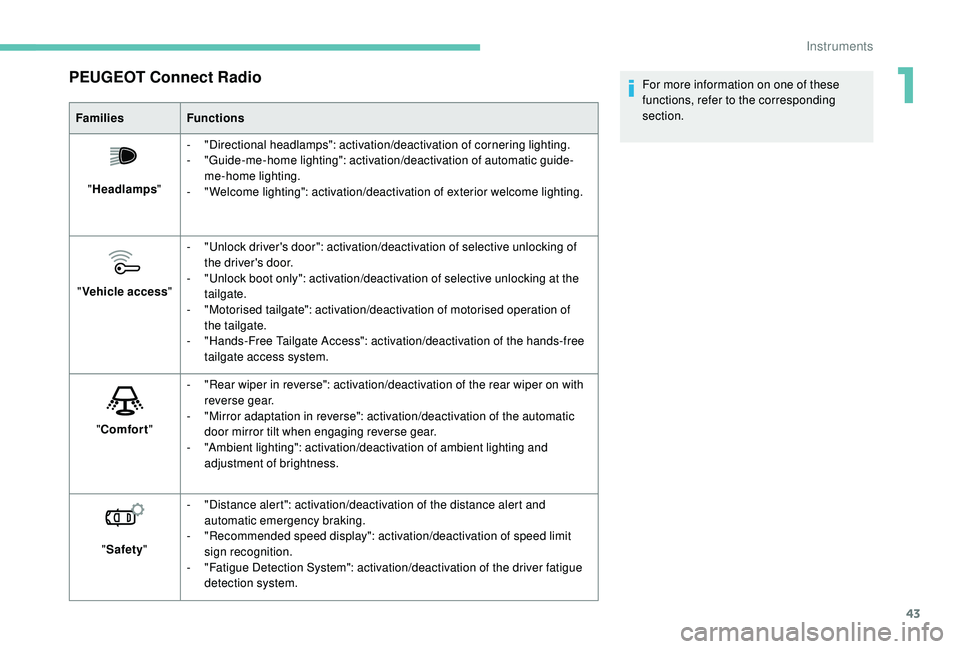
PEUGEOT Connect Radio
FamiliesFunctions
" Headlamps "-
"
Directional headlamps": activation/deactivation of cornering lighting.
-
"
Guide-me-home lighting": activation/deactivation of automatic guide-
me-home lighting.
-
"
Welcome lighting": activation/deactivation of exterior welcome lighting.
" Vehicle access "-
"
Unlock driver's door": activation/deactivation of selective unlocking of
the driver's door.
-
"
Unlock boot only": activation/deactivation of selective unlocking at the
tailgate.
-
"
Motorised tailgate": activation/deactivation of motorised operation of
the tailgate.
-
"
Hands-Free Tailgate Access": activation/deactivation of the hands-free
tailgate access system.
" Comfort "-
"
Rear wiper in reverse": activation/deactivation of the rear wiper on with
reverse gear.
-
"
Mirror adaptation in reverse": activation/deactivation of the automatic
door mirror tilt when engaging reverse gear.
-
"
Ambient lighting": activation/deactivation of ambient lighting and
adjustment of brightness.
" Safety " -
"
Distance alert": activation/deactivation of the distance alert and
automatic emergency braking.
-
"
Recommended speed display": activation/deactivation of speed limit
sign recognition.
-
"
Fatigue Detection System": activation/deactivation of the driver fatigue
detection system. For more information on one of these
functions, refer to the corresponding
section.
1
Instruments
Page 46 of 364
44
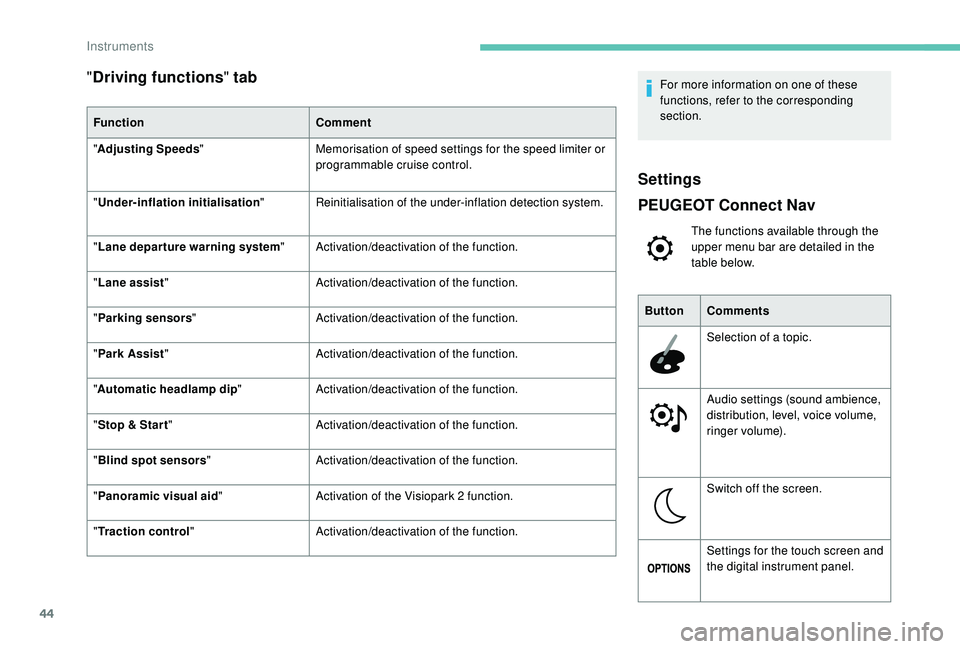
"Driving functions " tab
Function Comment
" Adjusting Speeds " Memorisation of speed settings for the speed limiter or
programmable cruise control.
"
Under-inflation initialisation "Reinitialisation of the under-inflation detection system.
" Lane departure warning system "Activation/deactivation of the function.
" Lane assist " Activation/deactivation of the function.
" Parking sensors " Activation/deactivation of the function.
" Park Assist " Activation/deactivation of the function.
" Automatic headlamp dip "Activation/deactivation of the function.
" Stop & Star t " Activation/deactivation of the function.
" Blind spot sensors " Activation/deactivation of the function.
" Panoramic visual aid "Activation of the Visiopark 2
function.
" Traction control" Activation/deactivation of the function. For more information on one of these
functions, refer to the corresponding
section.
Settings
PEUGEOT Connect Nav
The functions available through the
upper menu bar are detailed in the
table below.
Button Comments
Selection of a
topic.
Audio settings (sound ambience,
distribution, level, voice volume,
ringer volume).
Switch off the screen.
Settings for the touch screen and
the digital instrument panel.
Instruments
Page 50 of 364
48
Locating your vehicle
This function allows you to identify your vehicle
from a distance, particularly in poor light. Your
vehicle must be locked.
Welcome lighting
F Press this button.
This will switch on the courtesy lamps and door
mirror spot lamps and the direction indicators
will flash for around ten seconds.
Selective unlocking and
opening of the tailgate
The settings for the selective tailgate unlocking
and motorised operation are made in the
vehicle configuration menu.
By default, selective tailgate unlocking is
activated and the motorised function is
deactivated. F
M
ake a long press on the button
to unlock the boot and trigger the
motorised opening of the tailgate.
If selective unlocking of the tailgate is
deactivated, pressing the unlocking button
unlocks the whole vehicle.
If motorised operation of the tailgate is
deactivated, pressing the unlocking button
releases the tailgate.
To lock the vehicle, it is necessary to close
the tailgate again.
The doors and fuel filler flap remain locked.
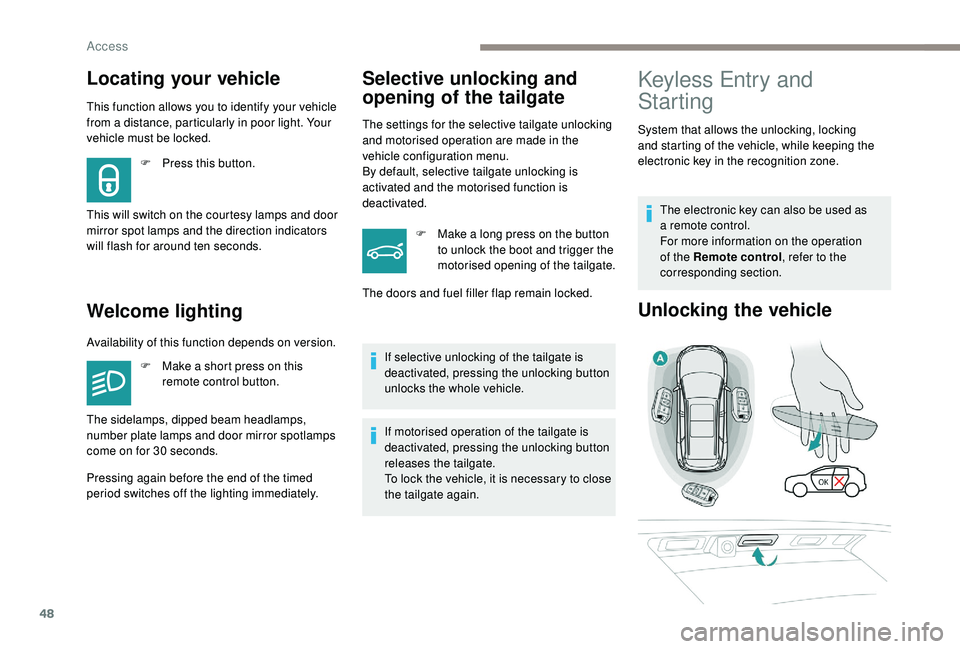
Keyless Entry and
Starting
System that allows the unlocking, locking
and starting of the vehicle, while keeping the
electronic key in the recognition zone.
The electronic key can also be used as
a
remote control.
For more information on the operation
of the Remote control , refer to the
corresponding section.
Unlocking the vehicle
Availability of this function depends on version.
F
M
ake a short press on this
remote control button.
Pressing again before the end of the timed
period switches off the lighting immediately. The sidelamps, dipped beam headlamps,
number plate lamps and door mirror spotlamps
come on for 30
seconds.
Access
Page 77 of 364
75
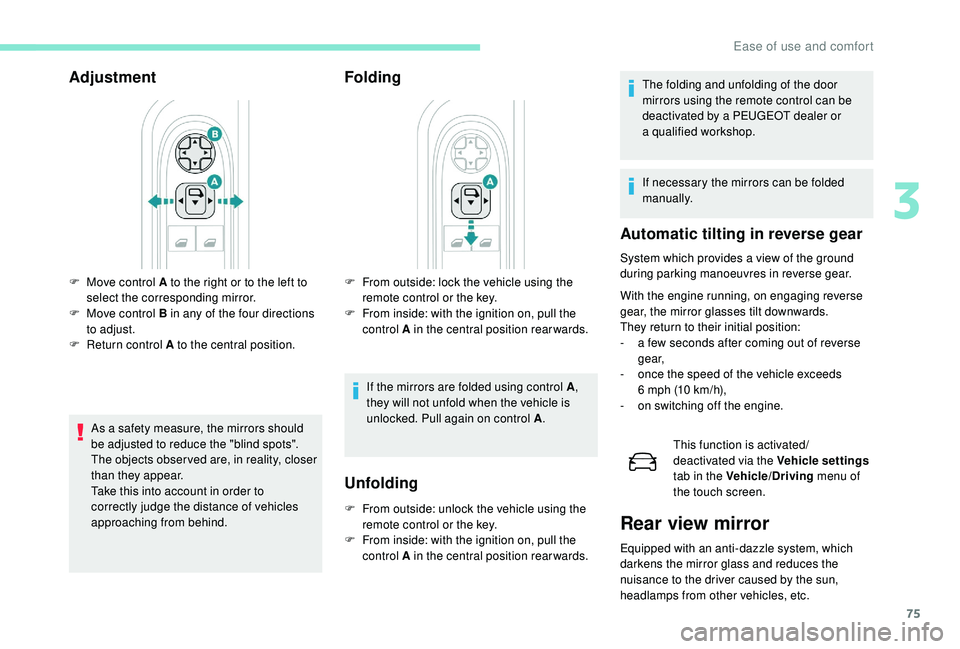
Adjustment
As a safety measure, the mirrors should
b e adjusted to reduce the "blind spots".
The objects obser ved are, in reality, closer
than they appear.
Take this into account in order to
correctly judge the distance of vehicles
approaching from behind.
Folding
F From outside: lock the vehicle using the remote control or the key.
F
F
rom inside: with the ignition on, pull the
control A in the central position rearwards.
If the mirrors are folded using control A ,
they will not unfold when the vehicle is
unlocked. Pull again on control A .
F
M
ove control A to the right or to the left to
select the corresponding mirror.
F
M
ove control B in any of the four directions
to adjust.
F
R
eturn control A to the central position.
Unfolding
F From outside: unlock the vehicle using the remote control or the key.
F
F
rom inside: with the ignition on, pull the
control A in the central position rearwards. The folding and unfolding of the door
mirrors using the remote control can be
deactivated by a
PEUGEOT dealer or
a
qualified workshop.
If necessary the mirrors can be folded
manually.
Automatic tilting in reverse gear
System which provides a view of the ground
d uring parking manoeuvres in reverse gear.
With the engine running, on engaging reverse
gear, the mirror glasses tilt downwards.
They return to their initial position:
-
a f
ew seconds after coming out of reverse
g e a r,
-
o
nce the speed of the vehicle exceeds
6
mph (10 km/h),
-
o
n switching off the engine. This function is activated/
deactivated via the Vehicle settings
tab in the Vehicle/Driving menu of
the touch screen.
Rear view mirror
Equipped with an anti-dazzle system, which
darkens the mirror glass and reduces the
nuisance to the driver caused by the sun,
headlamps from other vehicles, etc.
3
Ease of use and comfort