wipers PEUGEOT 5008 2018 Owners Manual
[x] Cancel search | Manufacturer: PEUGEOT, Model Year: 2018, Model line: 5008, Model: PEUGEOT 5008 2018Pages: 364, PDF Size: 13.03 MB
Page 4 of 364
2
.
.
Head-up digital screen 8
W arning and indicator lamps 1 1
Indicators
29
Manual test
3
5
Distance recorders
3
5
Lighting dimmer
3
6
Ambient lighting
3
6
Trip computer
3
7
Monochrome screen C
3
8
Touch screen
4
0
Remote control
4
6
K
eyless Entry and Starting
4
8
Back-up procedures
5
2
Central locking
5
5
Anti-intrusion security
5
6
Alarm
56
Doors
58
Boot
59
Hands-free tailgate
6
0
Electric windows
6
3
Panoramic opening sunroof
6
4Driving position
6
8
Front seats
6
9
Steering wheel adjustment
7
4
M i r r o r s
74
Second row seats
7
6
Third row seats
7
9
Seat modularity
8
2
i- Cockpit Amplify function 8 3
Heating and Ventilation 8 4
Manual air conditioning
8
6
Semi-automatic mono-zone
air conditioning
87
A
utomatic dual-zone air conditioning
8
9
Recirculation of the interior air
9
2
Front demist – defrost
9
3
Heated windscreen
9
3
Rear screen demist – defrost
9
4
Programmable heating
9
4
Front fittings
9
9
Courtesy lamps
1
04
Interior ambient lighting
1
05
Rear fittings
1
06
Boot fittings
1
08Exterior lighting control stalk
1
11
Direction indicators
1
13
Headlamp adjustment
1
14
Automatic illumination of headlamps
1
14
Automatic headlamp dipping
1
16
Cornering lighting
1
18
Wiper control stalk
1
19
Automatic windscreen wipers 1 21
General safety recommendations
1
22
Hazard warning lamps
1
23
H or n
123
Emergency or assistance call
1
23
Electronic stability control (ESC)
1
25
Advanced Grip Control
1
28
Hill Assist Descent Control
1
29
Seat belts
1
30
Airbags
1
34
Child seats
1
38
Deactivating the front passenger airbag
1
39
ISOFIX mountings and child seats
1
46
i-Size child seats
1
50
Child lock
1
53
Over view
Instruments Ease of use and comfort
Safety
Access Lighting and visibility
Eco-driving
Instruments and controls 4
Contents
Page 41 of 364
39
Controls
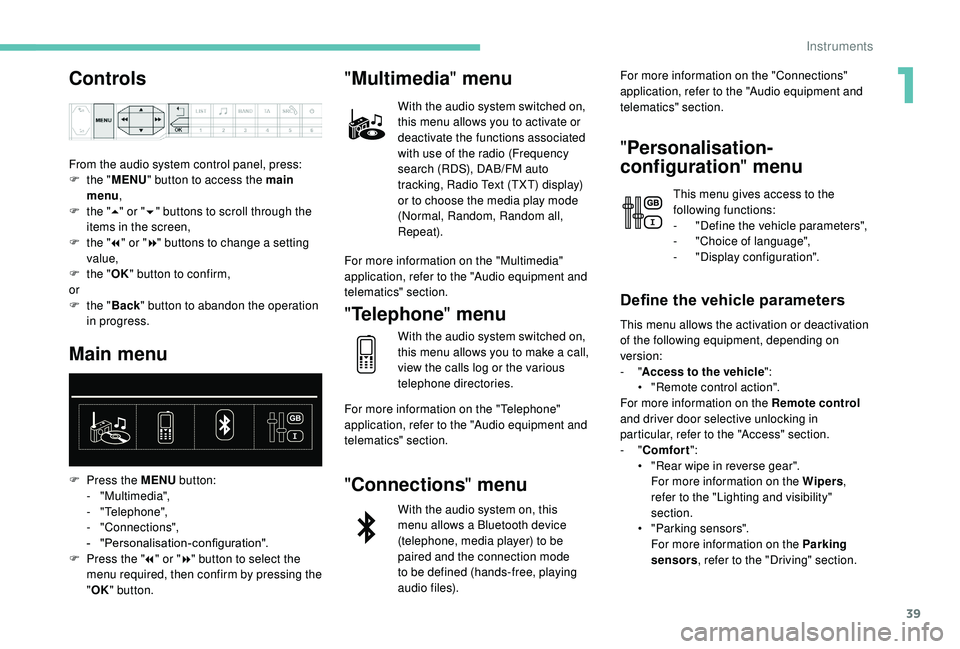
From the audio system control panel, press:
F t he "MENU " button to access the main
menu ,
F
t
he "5" or " 6" buttons to scroll through the
items in the screen,
F
t
he "7" or " 8" buttons to change a
setting
value,
F
t
he "OK" button to confirm,
or
F
t
he "Back " button to abandon the operation
in progress.
Main menu
F Press the MENU button:
- "Multimedia",
-
"Telephone",
-
"Connections",
-
"
Personalisation-configuration".
F
P
ress the " 7" or " 8" button to select the
menu required, then confirm by pressing the
" OK " button.
"Multimedia " menu
With the audio system switched on,
this menu allows you to activate or
deactivate the functions associated
with use of the radio (Frequency
search (RDS), DAB/FM auto
tracking, Radio Text (TXT) display)
or to choose the media play mode
(Normal, Random, Random all,
Repeat).
For more information on the "Multimedia"
application, refer to the "Audio equipment and
telematics" section.
" Telephone " menu
With the audio system switched on,
this menu allows you to make a
call,
view the calls log or the various
telephone directories.
For more information on the "Telephone"
application, refer to the "Audio equipment and
telematics" section.
" Connections " menu
With the audio system on, this
menu allows a
Bluetooth device
(telephone, media player) to be
paired and the connection mode
to be defined (hands-free, playing
audio files). For more information on the "Connections"
application, refer to the "Audio equipment and
telematics" section.
"
Personalisation-
configuration " menu
This menu gives access to the
following functions:
-
"
Define the vehicle parameters",
-
"
Choice of language",
-
"
Display configuration".
Define the vehicle parameters
This menu allows the activation or deactivation
of the following equipment, depending on
version:
- "Access to the vehicle ":
•
"
Remote control action".
For more information on the Remote control
and driver door selective unlocking in
particular, refer to the "Access" section.
-
"Comfort ":
•
"
Rear wipe in reverse gear".
For more information on the Wipers ,
refer to the "Lighting and visibility"
section.
•
"
Parking sensors".
For more information on the Parking
sensors , refer to the "Driving" section.
1
Instruments
Page 95 of 364
93
The system activates automatically when
reverse gear is engaged.
Front demist – defrost
With manual air
conditioning
F Adjust the temperature to maximum (red).
F A djust the air flow to maximum; all of the
orange indicator lamps come on.
F
A
djust the air distribution to the
" Windscreen" position; its associated
orange indicator lamp comes on.
F
C
heck that the recirculation of interior air is
deactivated; its indicator lamp must be off.
F
S
witch on the air conditioning by pressing
the " A/C" button; its orange indicator lamp
comes on.
With Stop & Start, when the demisting,
air conditioning and air flow functions are
activated, STOP mode is not available.
With semi-automatic and
automatic air conditioning
Automatic visibility programme
F Press this button to demist or defrost the windscreen and
side windows more quickly; its
orange indicator lamp comes on.
The system automatically manages the air
conditioning (depending on version), air
flow and air intake, and provides optimum
distribution towards the windscreen and side
windows.
F
T
o switch it off, press this button; its
indicator lamp goes off.
The system allows the manual modification of
air flow without causing automatic deactivation
of the automatic visibility programme.
With Stop & Start, when demisting –
defrosting has been activated, STOP
mode is not available. In wintry conditions, remove all snow or
ice on the camera on the windscreen
before moving off.
Other wise, this can affect the function
of the equipment associated with the
camera.Heated windscreen
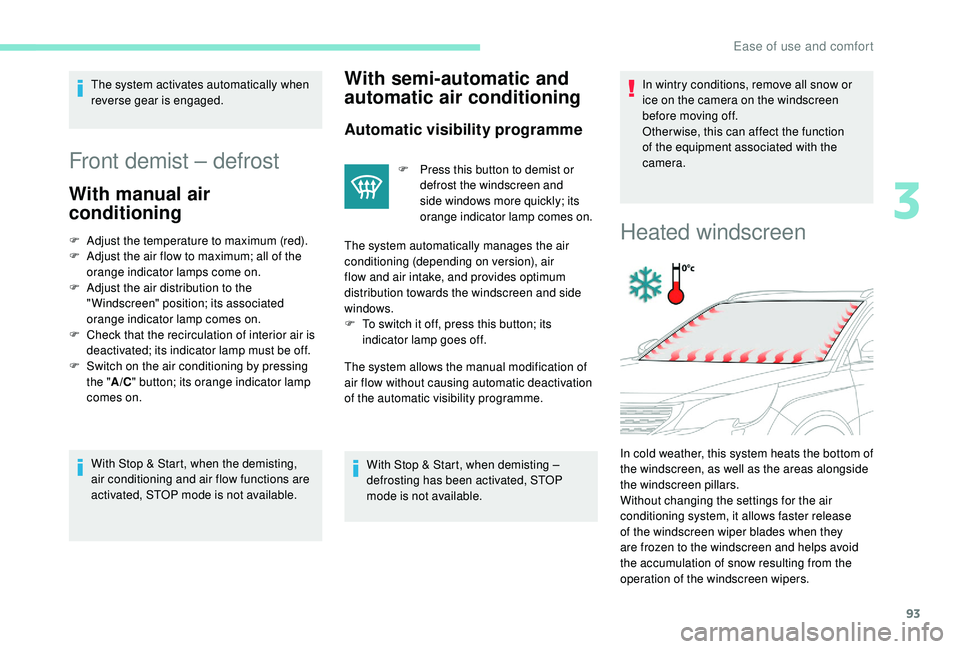
In cold weather, this system heats the bottom of
the windscreen, as well as the areas alongside
the windscreen pillars.
Without changing the settings for the air
conditioning system, it allows faster release
of the windscreen wiper blades when they
are frozen to the windscreen and helps avoid
the accumulation of snow resulting from the
operation of the windscreen wipers.
3
Ease of use and comfort
Page 116 of 364
114
Headlamp adjustment
Manual adjustment of
halogen headlamps
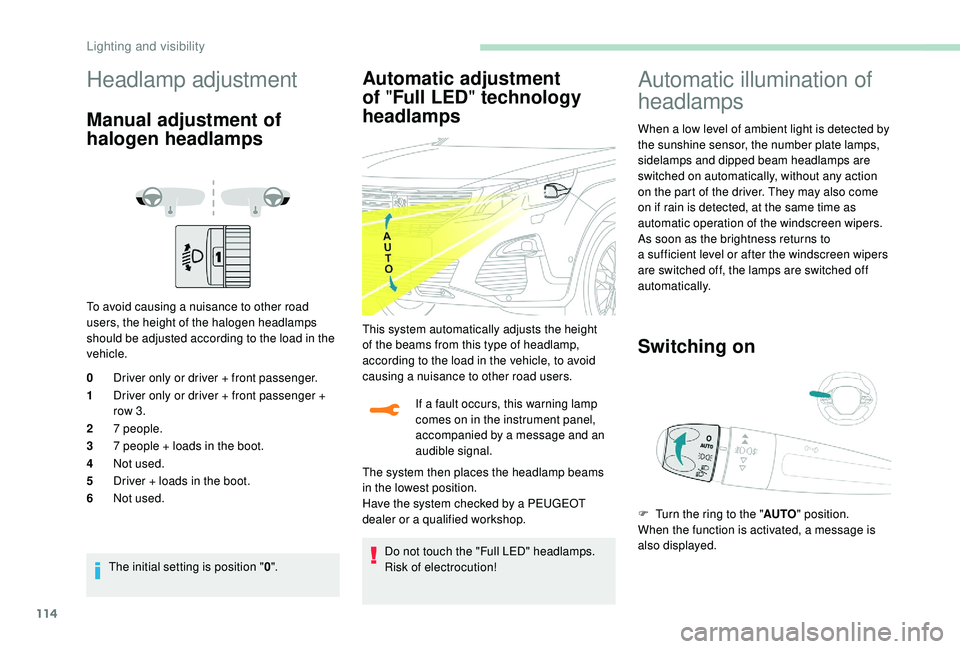
To avoid causing a nuisance to other road
u sers, the height of the halogen headlamps
should be adjusted according to the load in the
vehicle.
0 Driver only or driver + front passenger.
1 Driver only or driver + front passenger +
row 3.
2 7
people.
3 7
people + loads in the boot.
4 Not used.
5 Driver + loads in the boot.
6 Not used.
The initial setting is position " 0".
Automatic adjustment
of "Full LED " technology
headlamps
If a fault occurs, this warning lamp
c omes on in the instrument panel,
accompanied by a
message and an
audible signal.
Do not touch the "Full LED" headlamps.
Risk of electrocution!
Automatic illumination of
headlamps
When a low level of ambient light is detected by
t he sunshine sensor, the number plate lamps,
sidelamps and dipped beam headlamps are
switched on automatically, without any action
on the part of the driver. They may also come
on if rain is detected, at the same time as
automatic operation of the windscreen wipers.
As soon as the brightness returns to
a
sufficient level or after the windscreen wipers
are switched off, the lamps are switched off
automatically.
Switching on
This system automatically adjusts the height
of the beams from this type of headlamp,
according to the load in the vehicle, to avoid
causing a
nuisance to other road users.
The system then places the headlamp beams
in the lowest position.
Have the system checked by a
PEUGEOT
dealer or a
qualified workshop. F
T
urn the ring to the "AUTO" position.
When the function is activated, a message is
also displayed.
Lighting and visibility
Page 121 of 364
119
Wiper control stalk
Programming
Your vehicle may also include some functions
that can be configured:
-
a
utomatic rain sensitive windscreen wipers,
-
r
ear wiping on engaging reverse gear.
In wintry conditions, remove snow, ice or
frost present on the windscreen, around
the wiper arms and blades and the
windscreen seal, before operating the
wipers.
Do not operate the wipers on a
dry
windscreen. Under extremely hot or cold
conditions, ensure that the wiper blades
are not stuck to the windscreen before
operating the wipers.
Windscreen wipers
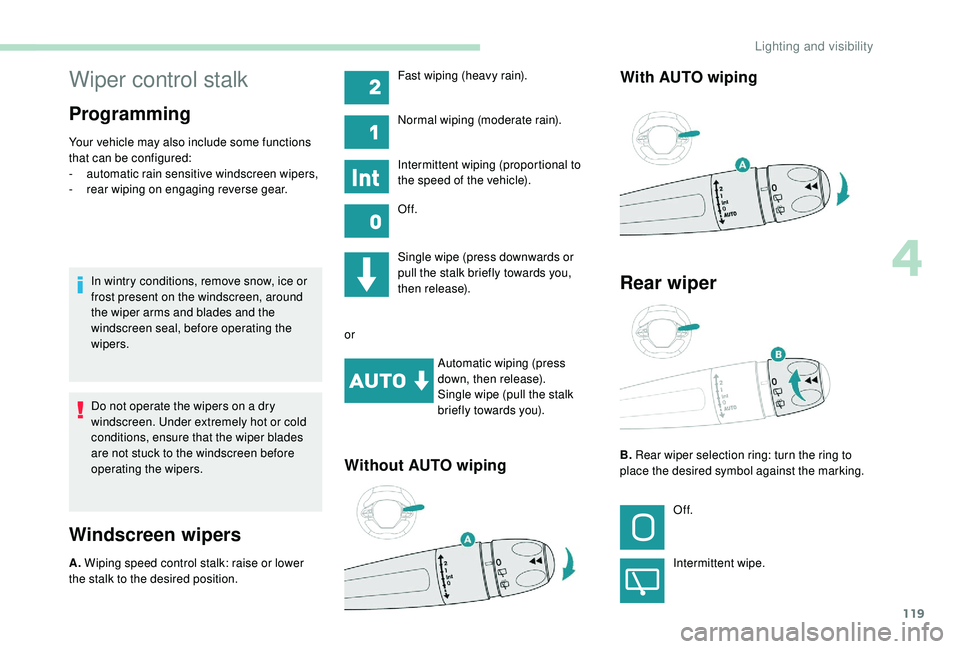
A. Wiping speed control stalk: raise or lower
the stalk to the desired position. Single wipe (press downwards or
pull the stalk briefly towards you,
then release).
or Automatic wiping (press
down, then release).
Single wipe (pull the stalk
briefly towards you).
Without AUTO wiping With AUTO wiping
Fast wiping (heavy rain).
Normal wiping (moderate rain).
Intermittent wiping (proportional to
the speed of the vehicle).
Of f.
Rear wiper
B.
Rear wiper selection ring: turn the ring to
place the desired symbol against the marking.
Of f.
Intermittent wipe.
4
Lighting and visibility
Page 122 of 364
120
Reverse gear
When reverse gear is engaged, the rear wiper
will come into operation automatically if the
front windscreen wipers are operating.
The system is activated or deactivated via the
vehicle parameters menu in the screen.
This function is activated by default.In the event of snow or hard frost or if
a
bicycle carrier is fitted to a towbar,
deactivate the automatic rear wiper via the
vehicle settings menu.
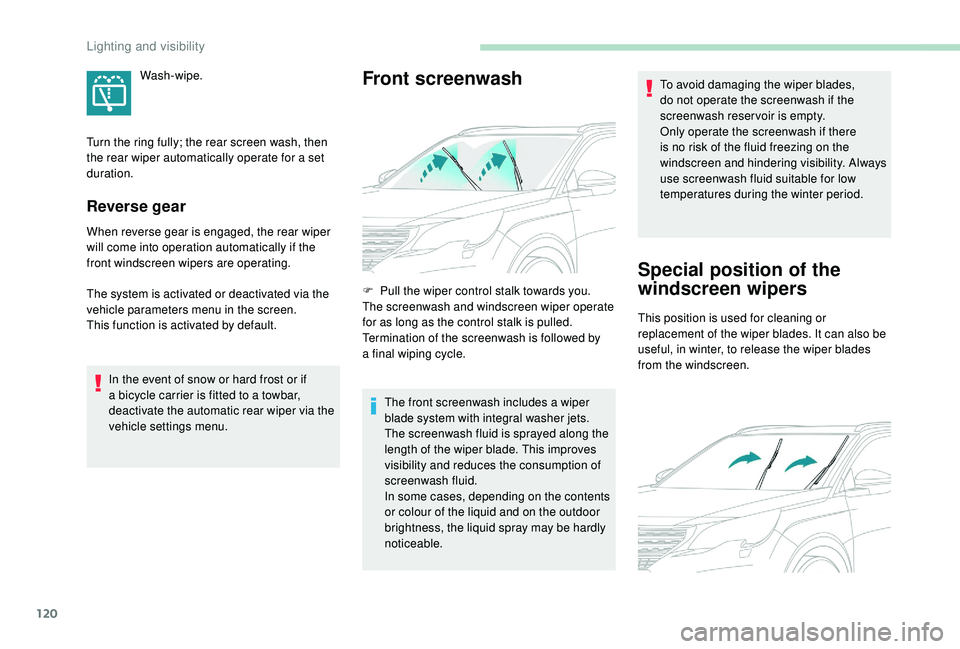
Front screenwashWash-wipe.
F
P
ull the wiper control stalk towards you.
The screenwash and windscreen wiper operate
for as long as the control stalk is pulled.
Termination of the screenwash is followed by
a
final wiping cycle.The front screenwash includes a
wiper
blade system with integral washer jets.
The screenwash fluid is sprayed along the
length of the wiper blade. This improves
visibility and reduces the consumption of
screenwash fluid.
In some cases, depending on the contents
or colour of the liquid and on the outdoor
brightness, the liquid spray may be hardly
noticeable. To avoid damaging the wiper blades,
do not operate the screenwash if the
screenwash reservoir is empty.
Only operate the screenwash if there
is no risk of the fluid freezing on the
windscreen and hindering visibility. Always
use screenwash fluid suitable for low
temperatures during the winter period.
Special position of the
windscreen wipers
Turn the ring fully; the rear screen wash, then
the rear wiper automatically operate for a
set
duration.
This position is used for cleaning or
replacement of the wiper blades. It can also be
useful, in winter, to release the wiper blades
from the windscreen.
Lighting and visibility
Page 123 of 364
121
To maintain the effectiveness of the wiper
blades, it is advisable to:
-
h
andle them with care,
-
c
lean them regularly using soapy
water,
-
a
void using them to retain cardboard
on the windscreen,
-
r
eplace them at the first signs of wear.
F
I
n the minute following ignition switch-off,
any operation of the wiper control stalk will
position the wiper blades vertically.
F
T
o park the wiper blades again, switch on
the ignition and operate the wiper stalk.
Automatic windscreen
wipers
The windscreen wipers operate automatically,
adapting their speed to the intensity of the
rainfall without any action on the part of the
driver.
Detection of rainfall is by means of a
sensor at
the top centre of the windscreen, behind the
rear view mirror.
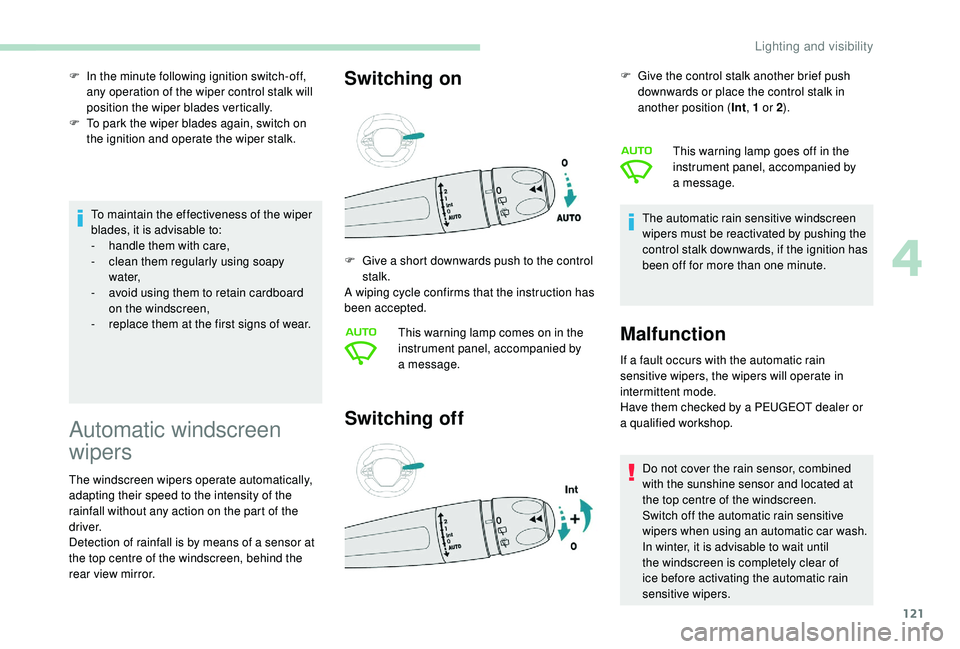
Switching on
Switching off
If a fault occurs with the automatic rain
s ensitive wipers, the wipers will operate in
intermittent mode.
Have them checked by a
PEUGEOT dealer or
a
qualified workshop. Do not cover the rain sensor, combined
with the sunshine sensor and located at
the top centre of the windscreen.
Switch off the automatic rain sensitive
wipers when using an automatic car wash.
In winter, it is advisable to wait until
the windscreen is completely clear of
ice before activating the automatic rain
sensitive wipers.
F
G
ive a
short downwards push to the control
stalk.
A wiping cycle confirms that the instruction has
been accepted.
This warning lamp comes on in the
instrument panel, accompanied by
a
message. F
G
ive the control stalk another brief push
downwards or place the control stalk in
another position ( Int, 1 or 2
).
The automatic rain sensitive windscreen
wipers must be reactivated by pushing the
control stalk downwards, if the ignition has
been off for more than one minute. This warning lamp goes off in the
instrument panel, accompanied by
a
message.
Malfunction
4
Lighting and visibility
Page 160 of 364
158
Switching off the engine
F Stop the vehicle.
F W ith the engine running in idle, turn the key
to position 1 .
F
R
emove the key from the ignition switch.
F
T
o lock the steering column, turn the
steering wheel until it locks.
To facilitate unlocking of the steering
column, it is recommended that the
wheels be returned to the straight ahead
position before switching off the engine. F
C
heck that the parking brake is correctly
applied, particularly on sloping ground.
Never switch off the ignition before the
vehicle is at a complete stop. With the
engine off, the braking and steering
assistance systems are also cut off: risk of
loss of control of the vehicle.
When you leave the vehicle, keep the key
with you and lock the vehicle.Energy economy mode
After switching off the engine (position 1
- Stop ), for a
maximum of 30 minutes you
can still use functions such as the audio and
telematic system, the wipers, dipped beam
headlamps, courtesy lamps, etc.
For more information on Energy
economy mode , refer to the
corresponding section. Key left in
If the key has been left in the ignition
switch at position 2 (Ignition on)
, the
ignition will be switched off automatically
after one hour.
To switch the ignition back on, turn the key
to position 1 (Stop) , then back to
position 2 (Ignition on) .
Starting/Switching off the
engine with
K
eyless Entry
and Starting
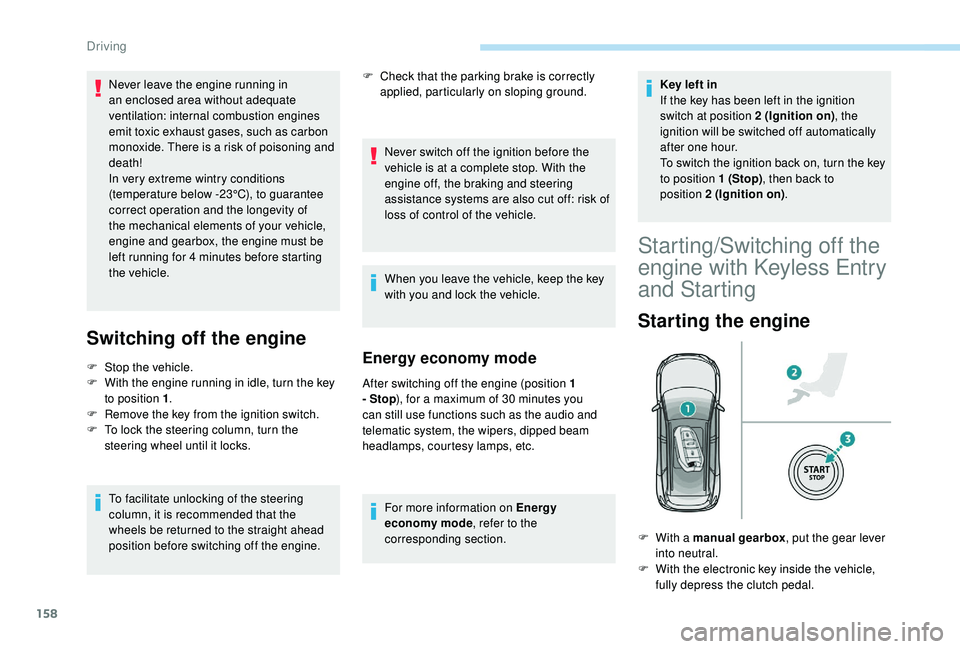
Starting the engine
F With a manual gearbox , put the gear lever
into neutral.
F
W
ith the electronic key inside the vehicle,
fully depress the clutch pedal.
Never leave the engine running in
an enclosed area without adequate
ventilation: internal combustion engines
emit toxic exhaust gases, such as carbon
monoxide. There is a
risk of poisoning and
death!
In very extreme wintry conditions
(temperature below -23°C), to guarantee
correct operation and the longevity of
the mechanical elements of your vehicle,
engine and gearbox, the engine must be
left running for 4
minutes before starting
the vehicle.
Driving
Page 229 of 364
227
Maintenance
Correct operation is only possible if the towball
and its carrier are kept clean.
Before cleaning the vehicle with a high-
pressure jet wash, the towball must be removed
and the protective plug fitted to the carrier.
Apply the label provided to a
clearly visible
area, close to the carrier or in the boot.
Go to a
PEUGEOT dealer or a qualified
workshop for any work on the towbar
system.
Load reduction mode
System which manages the use of certain
functions according to the level of charge
remaining in the battery.
When the vehicle is being driven, the load
reduction function temporarily deactivates
certain functions, such as air conditioning,
heated rear screen, etc.
The deactivated functions are reactivated
automatically as soon as conditions permit.
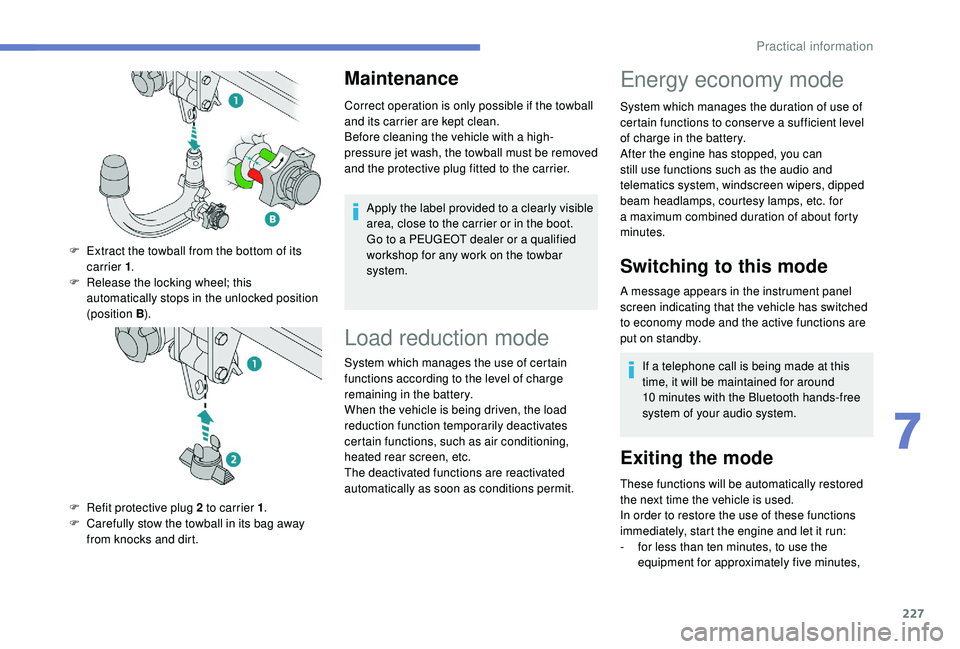
F
E
xtract the towball from the bottom of its
carrier 1 .
F
R
elease the locking wheel; this
automatically stops in the unlocked position
(position B ).
F
R
efit protective plug 2
to carrier 1 .
F
C
arefully stow the towball in its bag away
from knocks and dirt.
Energy economy mode
System which manages the duration of use of
certain functions to conser ve a sufficient level
of charge in the battery.
After the engine has stopped, you can
still use functions such as the audio and
telematics system, windscreen wipers, dipped
beam headlamps, courtesy lamps, etc. for
a
maximum combined duration of about forty
minutes.
Switching to this mode
A message appears in the instrument panel
screen indicating that the vehicle has switched
to economy mode and the active functions are
put on standby.
If a
telephone call is being made at this
time, it will be maintained for around
10
minutes with the Bluetooth hands-free
system of your audio system.
Exiting the mode
These functions will be automatically restored
the next time the vehicle is used.
In order to restore the use of these functions
immediately, start the engine and let it run:
-
f
or less than ten minutes, to use the
equipment for approximately five minutes,
7
Practical information
Page 264 of 364
262
12 V battery
Procedure for starting the engine using another
battery or charging a
discharged battery.
General points
Lead-acid starter batteries
Batteries contain harmful substances
such as sulphuric acid and lead.
They must be disposed of in accordance
with regulations and must not, in any
circumstances, be discarded with
household waste.
Take used remote control batteries and
vehicle batteries to a
special collection
point.
Protect your eyes and face before
handling the battery.
All operations on the battery must be
carried out in a
well ventilated area and
away from naked flames and sources of
sparks, so as to avoid the risk of explosion
or fire.
Wash your hands afterwards.
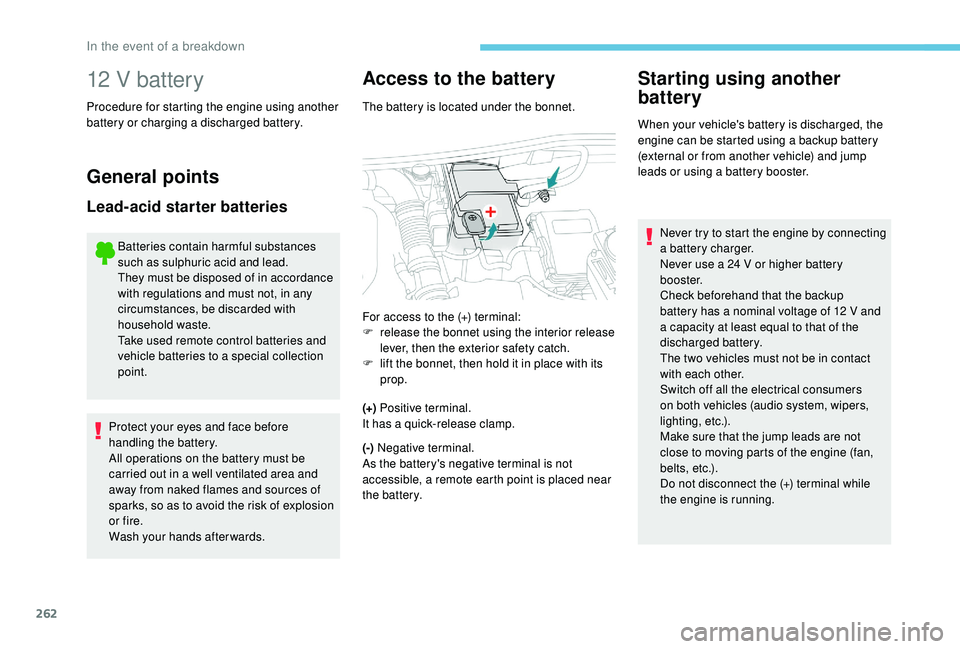
Access to the battery
The battery is located under the bonnet.
(+) Positive terminal.
It has a
quick-release clamp.
(-) Negative terminal.
As the battery's negative terminal is not
accessible, a remote earth point is placed near
the battery.
Starting using another
battery
When your vehicle's battery is discharged, the
engine can be started using a backup battery
(external or from another vehicle) and jump
leads or using a
battery booster.
For access to the (+) terminal:
F
r
elease the bonnet using the interior release
lever, then the exterior safety catch.
F
l
ift the bonnet, then hold it in place with its
prop. Never try to start the engine by connecting
a
battery charger.
Never use a
24 V or higher battery
b o o s t e r.
Check beforehand that the backup
battery has a
nominal voltage of 12 V and
a
capacity at least equal to that of the
discharged battery.
The two vehicles must not be in contact
with each other.
Switch off all the electrical consumers
on both vehicles (audio system, wipers,
lighting, etc.).
Make sure that the jump leads are not
close to moving parts of the engine (fan,
belts, etc.).
Do not disconnect the (+) terminal while
the engine is running.
In the event of a breakdown