ECO mode PEUGEOT 5008 2020 User Guide
[x] Cancel search | Manufacturer: PEUGEOT, Model Year: 2020, Model line: 5008, Model: PEUGEOT 5008 2020Pages: 308, PDF Size: 10.1 MB
Page 23 of 308
21
Instruments
1off. They are displayed when the driver's door
is opened, and when the vehicle is locked or
unlocked.
When travelling abroad, you may have to
change the distance units (km or miles):
the road speed must be displayed in the local
country’s official unit (km/h or mph).
The unit is changed via the screen
configuration menu, with the vehicle
stationary.
Total distance recorder
This recorder measures the total distance
travelled by the vehicle since its initial
registration.
Trip distance recorder
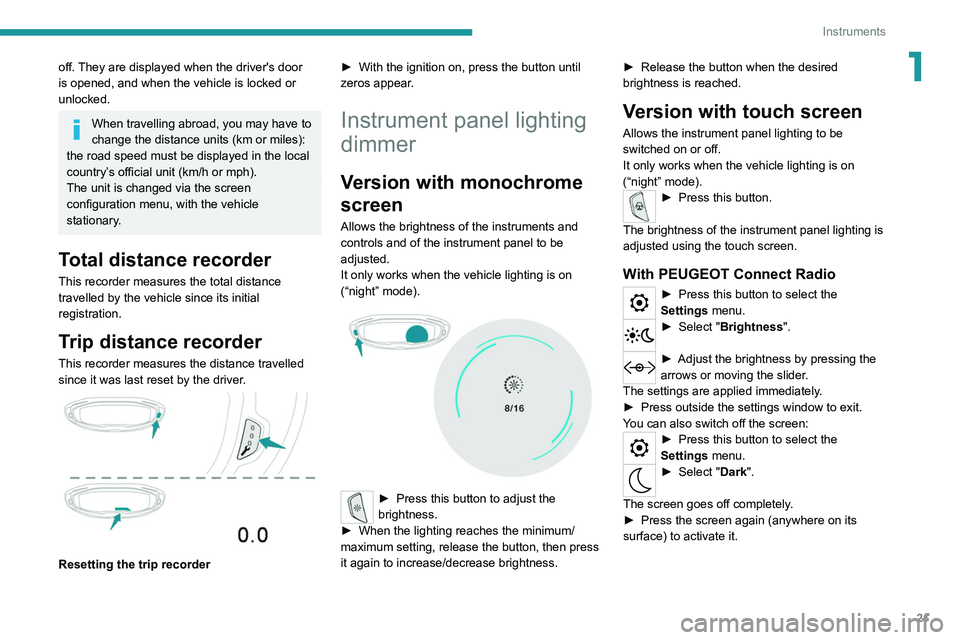
This recorder measures the distance travelled
since it was last reset by the driver.
Resetting the trip recorder ►
With the ignition on, press the button until
zeros appear
.
Instrument panel lighting
dimmer
Version with monochrome
screen
Allows the brightness of the instruments and
controls and of the instrument panel to be
adjusted.
It only works when the vehicle lighting is on
(“night” mode).
► Press this button to adjust the
brightness.
►
When the lighting reaches the minimum/
maximum setting, release the button, then press
it again to increase/decrease brightness. ►
Release the button when the desired
brightness is reached.
Version with touch screen
Allows the instrument panel lighting to be
switched on or off.
It only works when the vehicle lighting is on
(“night” mode).
► Press this button.
The brightness of the instrument panel lighting is
adjusted using the touch screen.
With PEUGEOT Connect Radio
► Press this button to select the
Settings menu.
► Select " Brightness".
► Adjust the brightness by pressing the
arrows or moving the slider .
The settings are applied immediately.
►
Press outside the settings window to exit.
Y
ou can also switch off the screen:
► Press this button to select the
Settings menu.
► Select " Dark".
The screen goes off completely.
►
Press the screen again (anywhere on its
surface) to activate it.
Page 24 of 308
22
Instruments
WithPEUGEOT Connect Nav
► Press this button to select the
Settings menu.
►
Select "
OPTIONS".
► Select " Screen configuration".
►
Select the "
Brightness" tab.
► Adjust the brightness by pressing the
arrows or moving the slider .
► Press this button to save and exit.
You can also switch off the screen:
► Press this button to select the
Settings menu.
► Select " Turn off screen".
The screen goes off completely.
►
Press the screen again (anywhere on its
surface) to activate it.
Trip computer
Displays information related to the current trip
(range, fuel consumption, average speed, etc.).
Display of data in the
instrument panel
Trip computer data is displayed permanently
when the "TRIP COMPUTER" or "PERSONAL"
display mode is selected, depending on version. In all other display modes, pressing the end of
the wiper control stalk causes this data to appear
temporarily in a specific window.
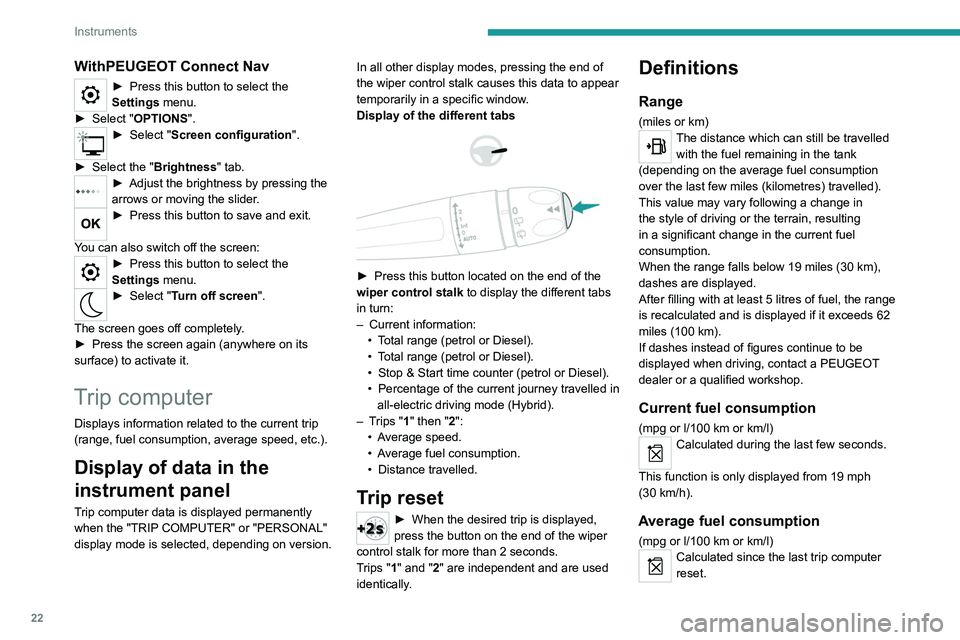
Display of the different tabs
► Press this button located on the end of the
wiper control stalk to display the different tabs
in turn:
–
Current information:
•
T
otal range (petrol or Diesel).
•
T
otal range (petrol or Diesel).
•
Stop & Start time counter (petrol or Diesel).
•
Percentage
of the current journey travelled in
all-electric driving mode (Hybrid).
–
T
rips "1" then "2":
•
A
verage speed.
•
A
verage fuel consumption.
•
Distance travelled.
Trip reset
► When the desired trip is displayed,
press the button on the end of the wiper
control stalk for more than 2
seconds.
Trips "1" and "2" are independent and are used
identically.
Definitions
Range
(miles or km)The distance which can still be travelled with the fuel remaining in the tank
(depending on the average fuel consumption
over the last few miles (kilometres) travelled).
This value may vary following a change in
the style of driving or the terrain, resulting
in a significant change in the current fuel
consumption.
When the range falls below 19 miles (30
km),
dashes are displayed.
After filling with at least 5 litres of fuel, the range
is recalculated and is displayed if it exceeds 62
miles (100
km).
If dashes instead of figures continue to be
displayed when driving, contact a PEUGEOT
dealer or a qualified workshop.
Current fuel consumption
(mpg or l/100 km or km/l)
Calculated during the last few seconds.
This function is only displayed from 19 mph
(30
km/h).
Average fuel consumption
(mpg or l/100 km or km/l)Calculated since the last trip computer
reset.
Page 25 of 308
23
Instruments
1Average speed
(mph or km/h)Calculated since the last trip computer
reset.
Distance travelled
(miles or km)Calculated since the last trip computer
reset.
Stop & Start time counter
(minutes/seconds or hours/minutes)
If your vehicle is equipped with Stop & Start, a
time counter calculates the time spent in STOP
mode during a journey.
It resets to zero every time the ignition is
switched on.
Monochrome screen C
Displays
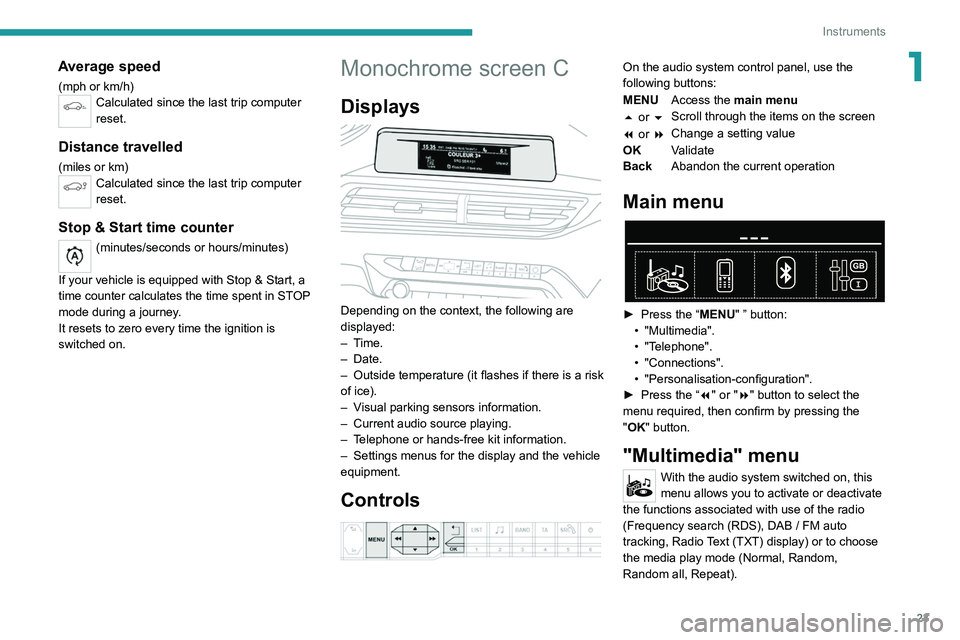
Depending on the context, the following are
displayed:
– Time.
–
Date.
– Outside
temperature (it flashes if there is a risk
of ice).
–
V
isual parking sensors information.
–
Current audio source playing.
–
T
elephone or hands-free kit information.
–
Settings menus for the display and the vehicle
equipment.
Controls
On the audio system control panel, use the
following buttons:
MENU Access the main menu
5 or 6 Scroll through the items on the screen
7 or 8 Change a setting value
OK Validate
Back Abandon the current operation
Main menu
► Press the “MENU" ” button:
• "Multimedia".
•
"Telephone".
•
"Connections".
• "Personalisation-configuration".
► Press
the “7" or "8" button to select the
menu
required, then confirm by pressing the
"
OK" button.
"Multimedia" menu
With the audio system switched on, this
menu allows you to activate or deactivate
the functions associated with use of the radio
(Frequency search (RDS), DAB
/ FM auto
tracking, Radio Text (TXT) display) or to choose
the media play mode (Normal, Random,
Random all, Repeat).
Page 26 of 308
24
Instruments
For more information on the "Multimedia"
application, refer to the "Audio equipment and
telematics" section.
"Telephone" menu
With the audio system switched on, this
menu allows you to make a call, view the
calls log or the various telephone directories.
For more information on the "Telephone"
application, refer to the "Audio equipment and
telematics" section.
"Connections" menu
With the audio system on, this menu
allows a Bluetooth device (telephone,
media player) to be paired and the connection
mode
to be defined (hands-free, playing audio
files).
For more information on the "Connections"
application, refer to the "Audio equipment and
telematics" section.
"Personalisation-
configuration" menu
This menu gives access to the following functions:
– "Define
the vehicle parameters",
–
"Choice of language",
–
"Display configuration".
Defining the vehicle parameters
This menu allows the activation or deactivation
of the following equipment, depending on
version:
–
"Access to the vehicle" :
•
"Plip action".
For more information on the Remote control
,
and in particular the selective unlocking of the
driver's door, refer to the "Access" section.
–
"Comfort"
:
• “Rear
wipe in reverse gear".
• “Parking
assistance".
•
"Fatigue Detection System".
For more information on the
W
iper control
stalk,
refer to the “Lighting and visibility” section.
For more information on the
Parking sensors
or the Fatigue detection system, refer to the
“Driving”
section.
–
"Driving assistance" :
•
"Auto. emergency braking" (Active Safety
Brake).
•
"Speed recommendation" (Road signs
recognition).
•
"Tyre inflation" (Tyre under-inflation
detection).
For more information on the
Active Safety
Brake ,
the Road signs recognition or the
Tyre
under-inflation detection ,
refer to the “Driving”
section.
Choice of language
This menu allows selection of the language used
by the screen and the instrument panel.
Display configuration
This menu gives access to the following settings:
– "Choice of units",
–
"Date and time adjustment",
–
"Display parameters",
–
"Brightness".
Adjusting the date and time
► Press
the "7" or "8" button to display the
"Display
configuration" menu, then press
OK
.
► Press
the "5" or "6" button to select the
"Date and time adjustment" button, then press
OK.
► Press
the "7" or "8" button to select the
setting
to modify. Confirm by pressing
OK
, then
modify
the setting and confirm again to save the
modification.
►
Adjust the settings one by one, confirming
with the
OK button.
► Press
the "5" or "6" button, then the OK
button to select the OK
box and confirm or the
Back button to cancel.
As a safety measure, the driver must only
carry out operations that require
sustained attention when stationary.
Touch screen
This system gives access to the following elements:
–
Permanent display of the time and the exterior
temperature (a blue warning lamp appears if
there is a risk of ice).
Page 28 of 308
26
Instruments
Activation, deactivation and settings for certain
functions.
The functions are organised in 2 tabs : "Driving
functions" and "Vehicle settings".
Telephone
See "Audio equipment and telematics"
section..
Applications
For the other functions, refer to the "Audio
equipment and telematics" section.
Hybrid
Access to the hybrid system features
(energy flow, consumption statistics, deferred
charge, eSave function).
For more information on Charging the battery
(Hybrid), refer to the corresponding section.
Volume adjustment/mute.
See "Audio equipment and telematics"
section.
Hybrid menu
Energy flow
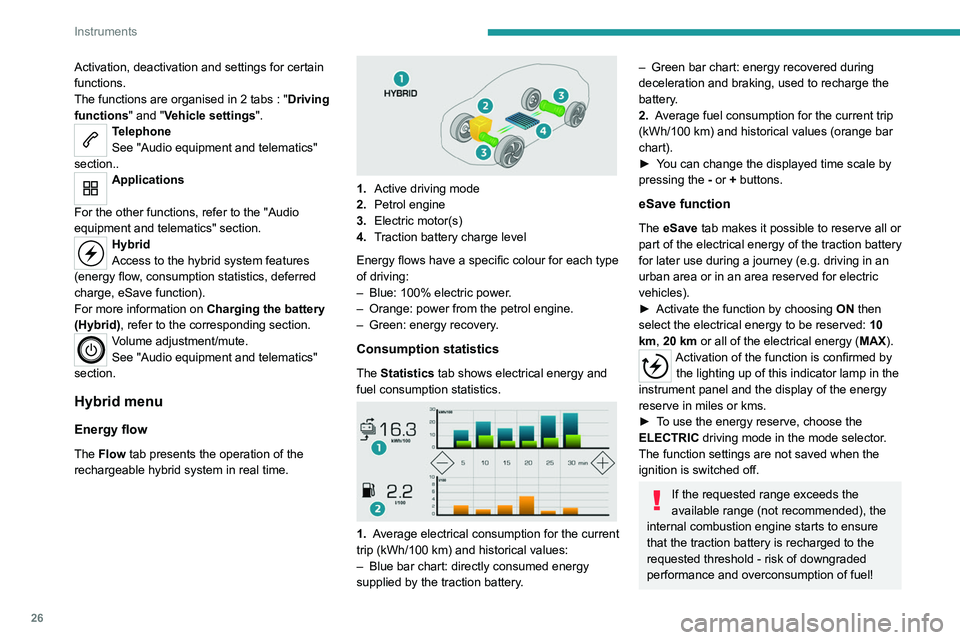
The Flow tab presents the operation of the
rechargeable hybrid system in real time.
1. Active driving mode
2. Petrol engine
3. Electric motor(s)
4. Traction battery charge level
Energy flows have a specific colour for each type
of driving:
–
Blue: 100% electric power
.
–
Orange: power from the petrol engine.
–
Green: energy recovery
.
Consumption statistics
The Statistics tab shows electrical energy and
fuel consumption statistics.
1. Average electrical consumption for the current
trip (kWh/100 km) and historical values:
–
Blue bar chart: directly consumed energy
supplied by the traction battery
.
– Green bar chart: energy recovered during
deceleration and braking, used to recharge the
battery
.
2. Average fuel consumption for the current trip
(kWh/100
km) and historical values (orange bar
chart).
►
Y
ou can change the displayed time scale by
pressing the
-
or + buttons.
eSave function
The eSave tab makes it possible to reserve all or
part of the electrical energy of the traction battery
for later use during a journey (e.g. driving in an
urban area or in an area reserved for electric
vehicles).
►
Activate the function by choosing ON
then
select the electrical energy to be reserved: 10
km, 20 km or all of the electrical energy ( MAX).
Activation of the function is confirmed by
the lighting up of this indicator lamp in the
instrument panel and the display of the energy
reserve in miles or kms.
►
T
o use the energy reserve, choose the
ELECTRIC driving mode in the mode selector.
The function settings are not saved when the
ignition is switched off.
If the requested range exceeds the
available range (not recommended), the
internal combustion engine starts to ensure
that the traction battery is recharged to the
requested threshold - risk of downgraded
performance and overconsumption of fuel!
Page 33 of 308
31
Access
2If selective unlocking of the tailgate is
deactivated, pressing this control also
unlocks the doors.
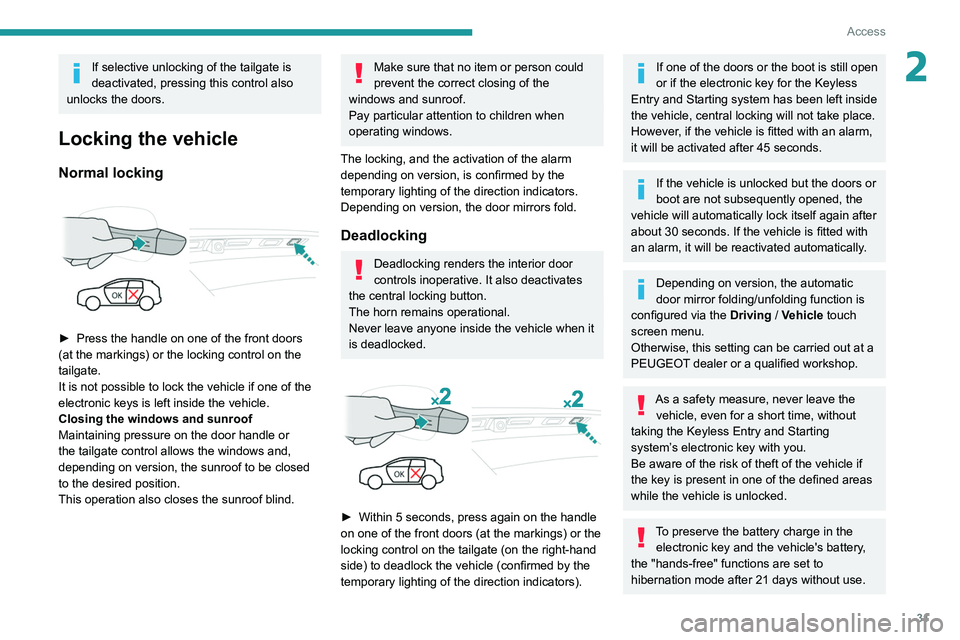
Locking the vehicle
Normal locking
► Press the handle on one of the front doors
(at the markings) or the locking control on the
tailgate.
It is not possible to lock the vehicle if one of the
electronic keys is left inside the vehicle.
Closing the windows and sunroof
Maintaining pressure on the door handle or
the tailgate control allows the windows and,
depending on version, the sunroof to be closed
to the desired position.
This operation also closes the sunroof blind.
Make sure that no item or person could
prevent the correct closing of the
windows and sunroof.
Pay particular attention to children when
operating windows.
The locking, and the activation of the alarm
depending on version, is confirmed by the
temporary lighting of the direction indicators.
Depending on version, the door mirrors fold.
Deadlocking
Deadlocking renders the interior door
controls inoperative. It also deactivates
the central locking button.
The horn remains operational.
Never leave anyone inside the vehicle when it
is deadlocked.
► Within 5 seconds, press again on the handle
on one of the front doors (at the markings) or the
locking control on the tailgate (on the right-hand
side) to deadlock the vehicle (confirmed by the
temporary lighting of the direction indicators).
If one of the doors or the boot is still open
or if the electronic key for the Keyless
Entry and Starting
system has been left inside
the vehicle, central locking will not take place.
However
, if the vehicle is fitted with an alarm,
it will be activated after 45
seconds.
If the vehicle is unlocked but the doors or
boot are not subsequently opened, the
vehicle will automatically lock itself again after
about 30
seconds. If the vehicle is fitted with
an alarm, it will be reactivated automatically.
Depending on version, the automatic
door mirror folding/unfolding function is
configured via the Driving
/ Vehicle touch
screen menu.
Otherwise, this setting can be carried out at a
PEUGEOT dealer or a qualified workshop.
As a safety measure, never leave the vehicle, even for a short time, without
taking the Keyless Entry and Starting
system’s electronic key with you.
Be aware of the risk of theft of the vehicle if
the key is present in one of the defined areas
while the vehicle is unlocked.
To preserve the battery charge in the electronic key and the vehicle's battery,
the "hands-free" functions are set to
hibernation mode after 21 days without use.
Page 36 of 308
34
Access
For more information on Reinitialising the
remote control, refer to the corresponding
section.
Do not throw remote control batteries
away, as they contain metals that are
harmful to the environment. Take them to an
approved disposal point.
Reinitialising the remote
control
Following replacement of the battery or in
the event of a fault, it may be necessary to
reinitialise the remote control.
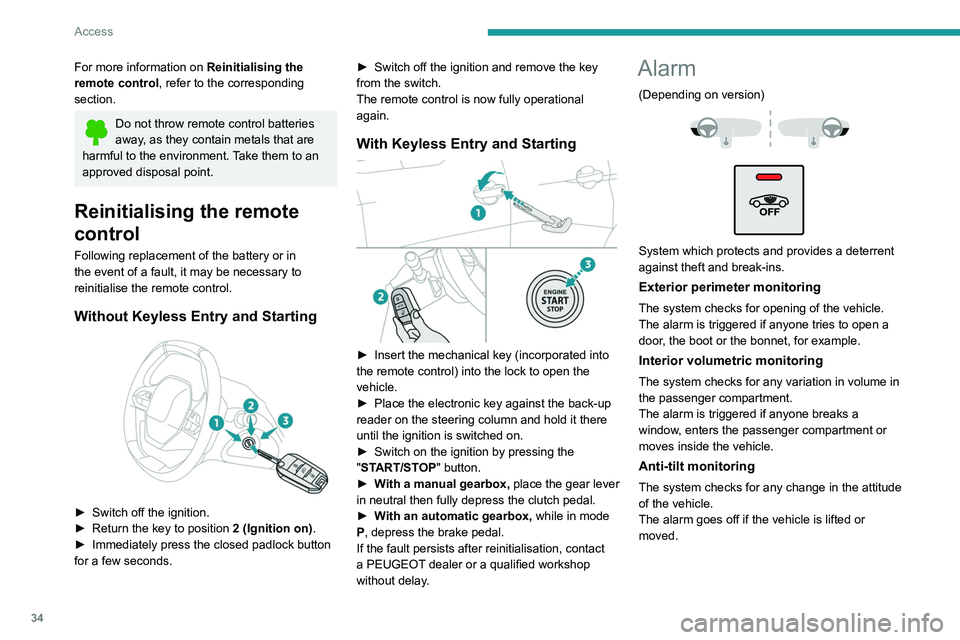
Without Keyless Entry and Starting
► Switch off the ignition.
► Return the key to position 2 (Ignition on).
►
Immediately press the closed padlock button
for a few seconds. ►
Switch off the ignition and remove the key
from the switch.
The remote control is now fully operational
again.
With Keyless Entry and Starting
► Insert the mechanical key (incorporated into
the remote control) into the lock to open the
vehicle.
►
Place the electronic key against the back-up
reader on the steering column and hold it there
until the ignition is switched on.
►
Switch on the ignition by pressing the
"
START/STOP" button.
►
W
ith a manual gearbox, place the gear lever
in neutral then fully depress the clutch pedal.
►
W
ith an automatic gearbox, while in mode
P, depress the brake pedal.
If the fault persists after reinitialisation, contact
a PEUGEOT dealer or a qualified workshop
without delay.
Alarm
(Depending on version)
System which protects and provides a deterrent
against theft and break-ins.
Exterior perimeter monitoring
The system checks for opening of the vehicle.
The alarm is triggered if anyone tries to open a
door, the boot or the bonnet, for example.
Interior volumetric monitoring
The system checks for any variation in volume in
the passenger compartment.
The alarm is triggered if anyone breaks a
window, enters the passenger compartment or
moves inside the vehicle.
Anti-tilt monitoring
The system checks for any change in the attitude
of the vehicle.
The alarm goes off if the vehicle is lifted or
moved.
When the vehicle is parked, the alarm
will not be triggered if the vehicle is
knocked.
Self-protection function
The system checks for the putting out of service
of its components.
The alarm is triggered if the battery, the central
control or the siren wiring is put out of service or
damaged.
For all work on the alarm system, contact
a PEUGEOT dealer or a qualified
workshop.
Locking the vehicle with full
alarm system
Activation
► Switch off the ignition and exit the vehicle.
► Lock or deadlock the vehicle using the
remote control or with the “Keyless Entry and
Starting” system.
When the monitoring system is active, the red
indicator lamp in the button flashes once per
second and the direction indicators come on for
about 2 seconds.
The exterior perimeter monitoring is activated
after 5 seconds and the interior volumetric and
anti-tilt monitoring after 45 seconds.
Page 44 of 308
42
Access
Be particularly aware of children when
operating the windows.
Be aware of passengers and/or other persons
present when closing the windows using
the electronic key or the "Keyless Entry and
Starting" system.
Panoramic sunroof
The panoramic sunroof consists of a movable
glass panel that slides over the roof and a blind
that can be opened independently. Opening the
sunroof automatically opens the blind.
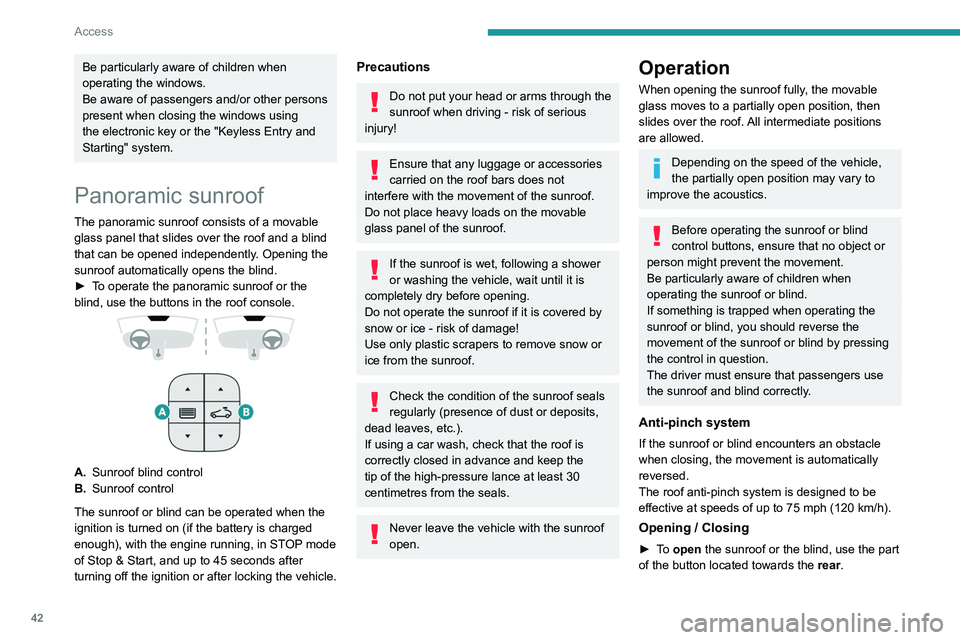
►
T
o operate the panoramic sunroof or the
blind, use the buttons in the roof console.
A. Sunroof blind control
B. Sunroof control
The sunroof or blind can be operated when the
ignition is turned on (if the battery is charged
enough), with the engine running, in STOP mode
of Stop & Start, and up to 45
seconds after
turning off the ignition or after locking the vehicle.
Precautions
Do not put your head or arms through the
sunroof when driving - risk of serious
injury!
Ensure that any luggage or accessories
carried on the roof bars does not
interfere with the movement of the sunroof.
Do not place heavy loads on the movable
glass panel of the sunroof.
If the sunroof is wet, following a shower
or washing the vehicle, wait until it is
completely dry before opening.
Do not operate the sunroof if it is covered by
snow or ice - risk of damage!
Use only plastic scrapers to remove snow or
ice from the sunroof.
Check the condition of the sunroof seals
regularly (presence of dust or deposits,
dead leaves, etc.).
If using a car wash, check that the roof is
correctly closed in advance and keep the
tip of the high-pressure lance at least 30
centimetres from the seals.
Never leave the vehicle with the sunroof
open.
Operation
When opening the sunroof fully, the movable
glass moves to a partially open position, then
slides over the roof. All intermediate positions
are allowed.
Depending on the speed of the vehicle,
the partially open position may vary to
improve the acoustics.
Before operating the sunroof or blind
control buttons, ensure that no object or
person might prevent the movement.
Be particularly aware of children when
operating the sunroof or blind.
If something is trapped when operating the
sunroof or blind, you should reverse the
movement of the sunroof or blind by pressing
the control in question.
The driver must ensure that passengers use
the sunroof and blind correctly.
Anti-pinch system
If the sunroof or blind encounters an obstacle
when closing, the movement is automatically
reversed.
The roof anti-pinch system is designed to be
effective at speeds of up to 75 mph (120
km/h).
Opening / Closing
► To open the sunroof or the blind, use the part
of the button located towards the rear.
Page 48 of 308
46
Ease of use and comfort
3.Lumbar support electric adjustment
The control allows independent adjustment of
the depth and vertical position of the lumbar
support.
►
Press and hold the front or rear of the
control to increase or reduce the lumbar
support.
►
Press and hold the top or bottom of the
control to raise or lower the lumbar support
area.
Placing the passenger seat
in the table position
The backrest of the passenger seat can be fully
folded forwards and secured in this position.
This function, when associated with folding
of the backrest of the rear seats, helps with
transporting long and bulky objects.
First steps:
►
Lower the head restraint.
►
Fold up the “aircraft” type table (depending
on version).
►
Move the seat backwards to allow space for
the head restraint.
►
Adjust the seat to the lowest position.
►
Check that there is nothing that might
interfere with folding of the backrest (seat belt,
child seat, items of clothing, bags, etc.).
Deactivation of the front passenger
airbag is recommended.
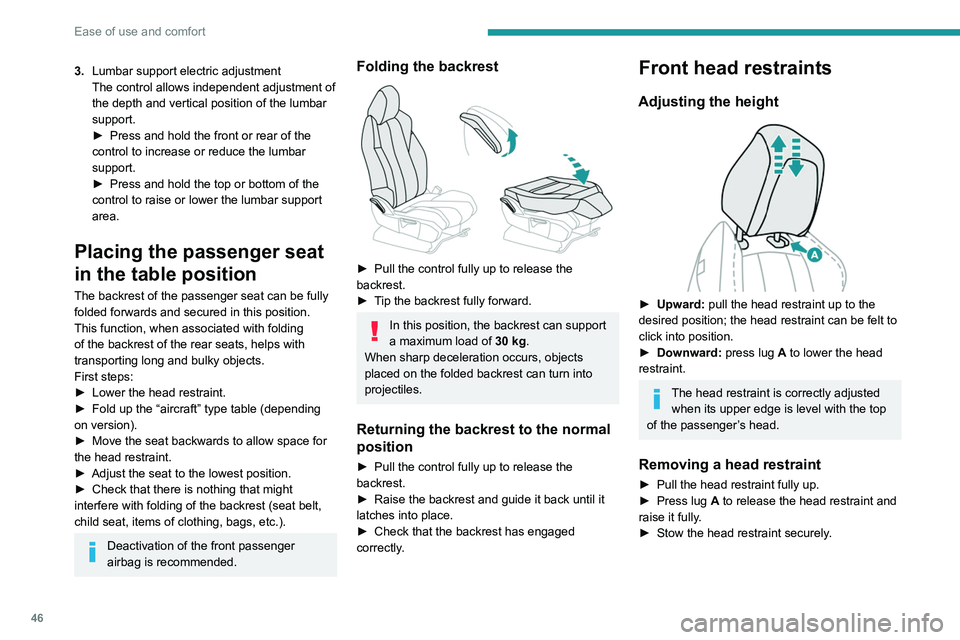
Folding the backrest
► Pull the control fully up to release the
backrest.
►
T
ip the backrest fully forward.
In this position, the backrest can support
a maximum load of 30 kg.
When sharp deceleration occurs, objects
placed on the folded backrest can turn into
projectiles.
Returning the backrest to the normal
position
► Pull the control fully up to release the
backrest.
►
Raise the backrest and guide it back until it
latches into place.
►
Check that the backrest has engaged
correctly
.
Front head restraints
Adjusting the height
► Upward: pull the head restraint up to the
desired position; the head restraint can be felt to
click into position.
►
Downward:
press lug A to lower the head
restraint.
The head restraint is correctly adjusted when its upper edge is level with the top
of the passenger’s head.
Removing a head restraint
► Pull the head restraint fully up.
► Press lug A to release the head restraint and
raise it fully.
►
Stow the head restraint securely
.
Refitting a head restraint
► Insert the head restraint rods into the guides
in the corresponding seat backrest.
► Push the head restraint down as far as it will
go.
► Press the lug A to release the head restraint
and push it down.
► Adjust the height of the head restraint.
Never drive with the head restraints
removed; they should be in place and
adjusted for the occupant of the seat.
Electrically-adjusted driver's
seat
To carry out these electric adjustments, switch on the ignition or start the engine
if the vehicle has gone into energy economy
mode.
These electric adjustments are accessible
about 1 minute after opening the driver's door.
They are deactivated about 1 minute after
switching the ignition off.
Page 49 of 308
47
Ease of use and comfort
3Refitting a head restraint
► Insert the head restraint rods into the guides
in the corresponding seat backrest.
►
Push the head restraint down as far as it will
go.
►
Press the lug
A to release the head restraint
and push it down.
►
Adjust the height of the head restraint.
Never drive with the head restraints
removed; they should be in place and
adjusted for the occupant of the seat.
Electrically-adjusted driver's
seat
To carry out these electric adjustments, switch on the ignition or start the engine
if the vehicle has gone into energy economy
mode.
These electric adjustments are accessible
about 1 minute after opening the driver's door.
They are deactivated about 1 minute after
switching the ignition off.
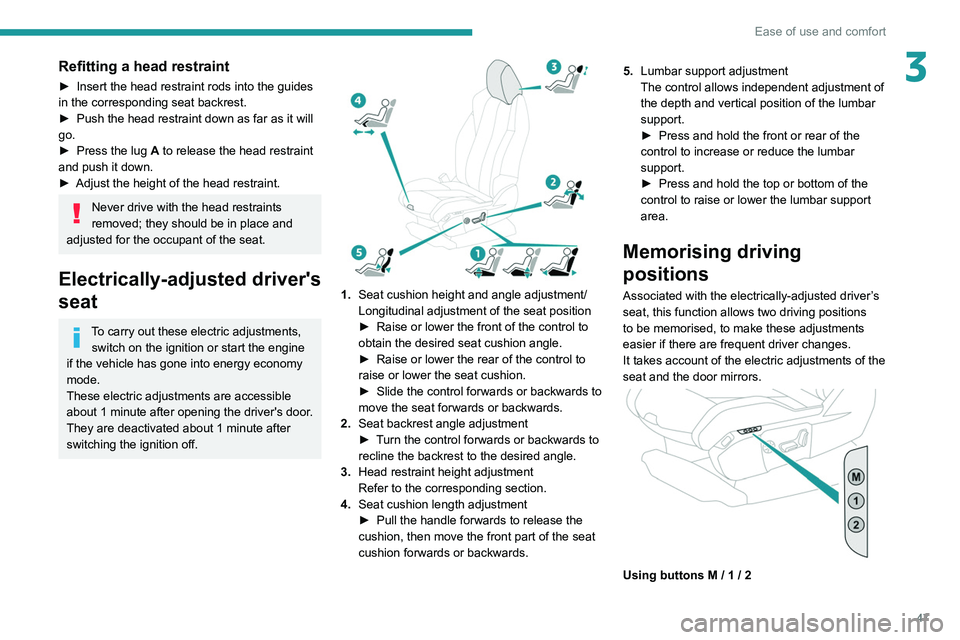
1. Seat cushion height and angle adjustment/
Longitudinal adjustment of the seat position
►
Raise or lower the front of the control to
obtain the desired seat cushion angle.
►
Raise or lower the rear of the control to
raise or lower the seat cushion.
►
Slide the control forwards or backwards to
move the seat forwards or backwards.
2. Seat backrest angle adjustment
►
T
urn the control forwards or backwards to
recline the backrest to the desired angle.
3. Head restraint height adjustment
Refer to the corresponding section.
4. Seat cushion length adjustment
►
Pull the handle forwards to release the
cushion, then move the front part of the seat
cushion forwards or backwards. 5.
Lumbar support adjustment
The control allows independent adjustment of
the depth and vertical position of the lumbar
support.
►
Press and hold the front or rear of the
control to increase or reduce the lumbar
support.
►
Press and hold the top or bottom of the
control to raise or lower the lumbar support
area.
Memorising driving
positions
Associated with the electrically-adjusted driver’s
seat, this function allows two driving positions
to be memorised, to make these adjustments
easier if there are frequent driver changes.
It takes account of the electric adjustments of the
seat and the door mirrors.
Using buttons M / 1 / 2