engine PEUGEOT 5008 2023 Owners Manual
[x] Cancel search | Manufacturer: PEUGEOT, Model Year: 2023, Model line: 5008, Model: PEUGEOT 5008 2023Pages: 292, PDF Size: 9.43 MB
Page 222 of 292
220
Technical data
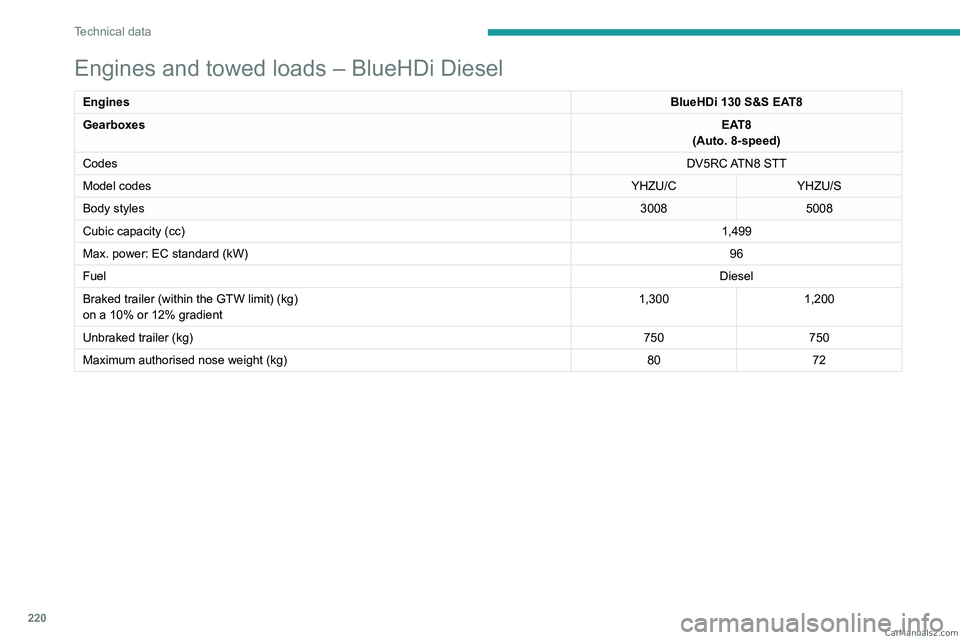
Engines and towed loads – BlueHDi Diesel
EnginesBlueHDi 130 S&S EAT8
Gearboxes EAT8
(Auto. 8-speed)
Codes DV5RC ATN8 STT
Model codes YHZU/CYHZU/S
Body styles 30085008
Cubic capacity (cc) 1,499
Max. power: EC standard (kW) 96
Fuel Diesel
Braked trailer (within the GTW limit) (kg)
on a 10% or 12% gradient 1,300
1,200
Unbraked trailer (kg) 750750
Maximum authorised nose weight (kg) 8072 CarM an uals 2 .c o m
Page 223 of 292
221
Technical data
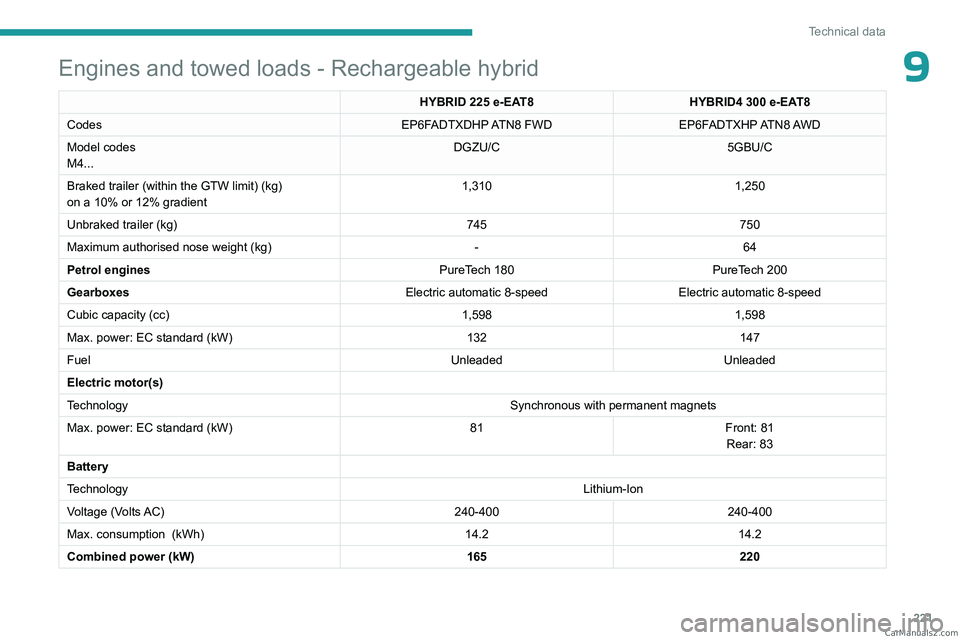
9Engines and towed loads - Rechargeable hybrid
HYBRID 225 e-EAT8HYBRID4 300 e-EAT8
Codes EP6FADTXDHP ATN8 FWDEP6FADTXHP ATN8 AWD
Model codes
M4... DGZU/C
5GBU/C
Braked trailer (within the GTW limit) (kg)
on a 10% or 12% gradient 1,310
1,250
Unbraked trailer (kg) 745750
Maximum authorised nose weight (kg) -64
Petrol engines PureTech 180PureTech 200
Gearboxes Electric automatic 8-speedElectric automatic 8-speed
Cubic capacity (cc) 1,5981,598
Max. power: EC standard (kW) 132147
Fuel UnleadedUnleaded
Electric motor(s)
Technology Synchronous with permanent magnets
Max. power: EC standard (kW) 81Front: 81
Rear: 83
Battery
Technology Lithium-Ion
Voltage (Volts AC) 240-400240-400
Max. consumption
(kWh) 14.214.2
Combined power (kW) 165220 CarM an uals 2 .c o m
Page 226 of 292
224
PEUGEOT Connect Radio
PEUGEOT Connect
Radio
Multimedia audio system -
Applications - Bluetooth
®
telephone
The functions and settings described
vary according to the vehicle version and
configuration, as well as the country of sale.
For safety reasons and because they
require sustained attention by the driver,
the following operations must be carried out
with the vehicle stationary and the ignition
on:
–
Pairing the smartphone with the system via
Bluetooth.
–
Using the smartphone.
–
Connecting to the CarPlay® or Android
Auto applications (certain applications stop
displaying when the vehicle is moving).
–
Changing the system settings and
configuration.
The system is protected so that it only operates in the vehicle.
The message Energy economy mode is
displayed when the system is about to go into
standby.
The system’s Open Source Software (OSS) source codes are available at the
following addresses:
https://www.groupe-psa.com/fr/oss/
https://www.groupe-psa.com/en/oss/
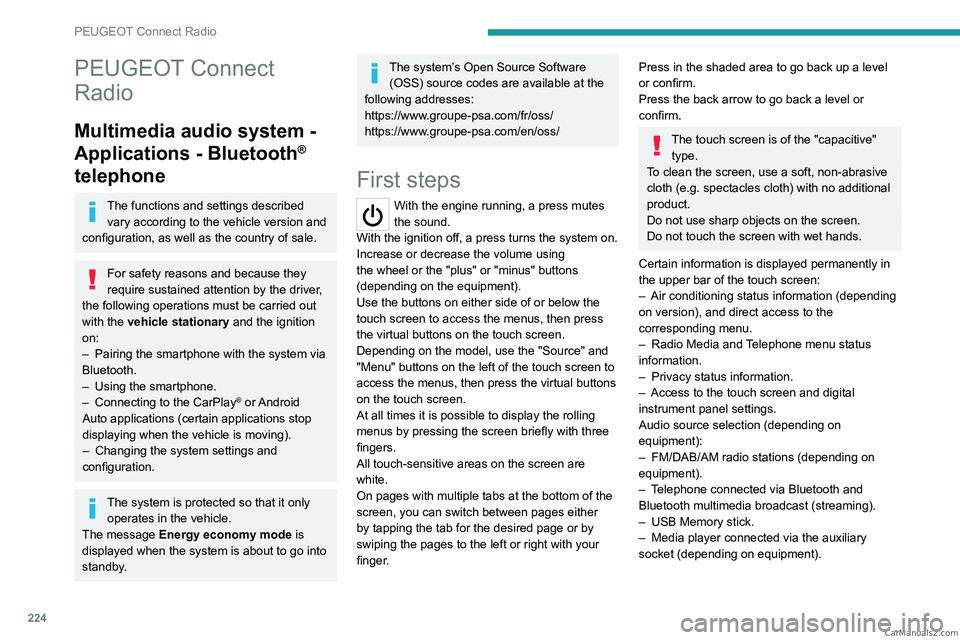
First steps
With the engine running, a press mutes
the sound.
With the ignition off, a press turns the system on.
Increase or decrease the volume using
the wheel or the "plus" or "minus" buttons
(depending on the equipment).
Use the buttons on either side of or below the
touch screen to access the menus, then press
the virtual buttons on the touch screen.
Depending on the model, use the "Source" and
"Menu" buttons on the left of the touch screen to
access the menus, then press the virtual buttons
on the touch screen.
At all times it is possible to display the rolling
menus by pressing the screen briefly with three
fingers.
All touch-sensitive areas on the screen are
white.
On pages with multiple tabs at the bottom of the
screen, you can switch between pages either
by tapping the tab for the desired page or by
swiping the pages to the left or right with your
finger.
Press in the shaded area to go back up a level
or confirm.
Press the back arrow to go back a level or
confirm.
The touch screen is of the "capacitive" type.
To clean the screen, use a soft, non-abrasive
cloth (e.g. spectacles cloth) with no additional
product.
Do not use sharp objects on the screen.
Do not touch the screen with wet hands.
Certain information is displayed permanently in
the upper bar of the touch screen:
–
Air conditioning status information (depending
on version), and direct access to the
corresponding menu.
–
Radio Media and
Telephone menu status
information.
–
Privacy status information.
–
Access to the touch screen and digital
instrument panel settings.
Audio source selection (depending on
equipment):
–
FM/DAB/AM radio stations (depending on
equipment).
–
T
elephone connected via Bluetooth and
Bluetooth multimedia broadcast (streaming).
–
USB Memory stick.
–
Media player connected via the auxiliary
socket (depending on equipment).
CarM an uals 2 .c o m
Page 238 of 292
236
PEUGEOT Connect Radio
► Delete the files supplied with the memory
stick and limit the number of sub-folders in the
file structure on the memory stick.
Some characters in information about the
currently playing media are not displayed
correctly
.
The audio system is unable to process certain
types of character.
►
Use standard characters to name tracks and
folders.
Playback of streaming files does not start.
The connected device does not automatically
launch playback.
►
Start playback from the device.
T
rack names and playing times are not
displayed on the audio streaming screen.
The Bluetooth profile does not allow the transfer
of this information.
Telephone
I cannot connect my Bluetooth telephone.
The telephone's Bluetooth function may be
switched off or the device may not be visible.
►
Check that the telephone has Bluetooth
switched on.
►
Check in the telephone settings that it is
"visible to all".
The Bluetooth telephone is not compatible with
the system.
►
Check the compatibility of the telephone on
the Brand's website (services).
Android
Auto and/or CarPlay do not work. Android Auto and CarPlay may not activate if the
USB cables are of poor quality.
►
Use genuine USB cables to ensure
compatibility
.
Android Auto and/or CarPlay do not work.
Android Auto and CarPlay are not available in all
countries.
►
Check the Google
Android Auto or Apple
website to see which countries are supported.
The volume of the telephone connected in
Bluetooth mode is inaudible.
The volume depends on both the system and the
telephone.
►
Increase the volume of the audio system, to
maximum if required, and increase the volume of
the telephone if necessary
.
Ambient noise affects the quality of the
telephone call.
►
Reduce ambient noise (close windows, turn
down ventilation, slow down, etc.).
The contacts are not listed in alphabetical
order
.
Some telephones offer display options.
Depending on the settings chosen, contacts can
be transferred in a specific order.
►
Modify the telephone directory display
settings.
Settings
When the treble and bass settings are
changed, the ambience is deselected.
When the ambience is changed, the treble
and bass settings are reset. Selecting an ambience imposes the treble and
bass settings, and vice versa.
►
Modify the treble and bass or ambience
settings to obtain the desired musical ambience.
When the balance settings are changed, the
distribution is deselected.
When the distribution setting is changed, the
balance settings are deselected.
Selecting a distribution setting imposes the
balance settings, and vice versa.
►
Modify the balance setting or the distribution
setting to obtain the desired sound quality
.
There is a difference in sound quality
between audio sources.
To allow for optimal listening quality, the sound
settings can be tailored to different audio
sources, which can generate audible differences
when changing source.
►
Check that the sound settings are appropriate
to the sources listened to.
Adjust the sound
functions to the middle position.
When the engine is off, the system switches
off after several minutes of use.
When the engine is switched off, the system's
operating time depends on the state of charge of
the battery.
The switch-off is normal: the system
automatically goes into energy economy mode
and switches off to maintain an adequate charge
in the battery.
► Start the vehicle’ s engine to increase the
charge of the battery. CarM an uals 2 .c o m
Page 239 of 292
237
PEUGEOT Connect Nav
11PEUGEOT Connect Nav
GPS navigation -
Applications - Multimedia
audio system - Bluetooth
®
telephone
The functions and settings described
vary according to the vehicle version and
configuration, as well as the country of sale.
For safety reasons and because they
require sustained attention by the driver,
the following operations must be carried out
with the vehicle stationary and the ignition
on:
–
Pairing the smartphone with the system via
Bluetooth.
–
Using the smartphone.
–
Connecting to the CarPlay® or Android
Auto applications (certain applications stop
displaying when the vehicle is moving).
–
W
atching a video (the video stops when the
vehicle starts to move again).
–
Changing the system settings and
configuration.
AM and DAB radio are not available on Hybrid vehicles.
The system is protected so that it only operates in the vehicle.
The message Energy economy mode is
displayed when the system is about to go into
standby.
System and map updates can be
downloaded from the Brand's website.
The update procedure is also available there.
The system’s Open Source Software (OSS) source codes are available at the
following addresses:
https://www.groupe-psa.com/fr/oss/
https://www.groupe-psa.com/en/oss/
First steps
With the engine running, a press mutes
the sound.
With the ignition off, a press turns the system on.
Increase or decrease the volume using
the wheel or the "plus" or "minus" buttons
(depending on the equipment).
Use the menu buttons on either side of or below
the touch screen for access to the menus, then
press the virtual buttons in the touch screen.
Depending on the model, use the "Source" or
"Menu" buttons to access the rolling menus, then
press the virtual buttons in the touch screen.
Display the rolling menus at any time by pressing
the screen briefly with three fingers.
All of the touch areas of the screen are white.
Press the back arrow to go back a level.
Press "OK" to confirm.
The touch screen is of the "capacitive" type.
To clean the screen, use a soft, non-abrasive
cloth (e.g. spectacles cloth) with no additional
product.
Do not use sharp objects on the screen.
Do not touch the screen with wet hands.
Certain information is displayed permanently
in the side bars or in the upper bar of the touch
screen (depending on equipment):
–
Air conditioning status information (depending
on version), and direct access to the
corresponding menu.
–
Go directly to the audio source selection
option, to view the list of radio stations (or list of
titles depending on the source).
–
Go to the "Notifications" of messages, emails,
map updates and, depending on the services,
the navigation notifications.
–
Go to the settings for the touch screen and the
digital instrument panel.
Audio source selection (depending on
equipment):
–
FM/DAB/AM radio stations (depending on
equipment).
–
T
elephone connected via Bluetooth and
Bluetooth multimedia broadcast (streaming).
–
USB memory stick. CarM an uals 2 .c o m
Page 263 of 292
261
PEUGEOT Connect Nav
11► Check that the sound settings are appropriate
to the sources listened to. W e recommend
setting the sound functions (Bass, Treble,
Balance) to the middle position, setting the
musical ambience to "None", setting loudness
correction to "Active" in USB mode and "Inactive"
in Radio mode.
►
In all cases, after applying sound settings,
adjust the volume level on the portable device (to
a high level) first.
Then adjust the volume level
on the audio system.
When the engine is off, the system switches
off after several minutes of use.
When the engine is switched off, the system's
operating time depends on the state of charge of
the battery.
The switch-off is normal: the system
automatically goes into energy economy mode
and switches off to maintain an adequate charge
in the battery.
►
Start the vehicle’
s engine to increase the
charge of the battery.
The date and time cannot be set.
Date and time settings are only available if
satellite synchronisation is deactivated.
►
Settings
menu/Options/Date-Time Setting.
Select the "Time" tab and deactivate "GPS
synchronisation" (UTC). CarM an uals 2 .c o m
Page 268 of 292
266
Alphabetical index
Charging flap (Rechargeable
hybrid)
168, 175–177
Charging the traction battery
(Rechargeable hybrid)
19, 167, 175–177
CHECK
20
Checking the engine oil level
17
Checking the levels
185–186
Checking tyre pressures
(using the kit)
198, 200
Checks
185–186, 187–189
Checks, routine
187–188
Child lock
109
Children
94, 101–102, 105–106, 108
Children (safety)
109
Child seats
94, 97–101, 107, 108
Child seats, conventional
100–101
Child seats, i-Size
108
Child seats, ISOFIX
102, 104–105
Cleaning (advice)
168, 192–194
Closing the boot
29, 33
Closing the doors
29, 32
Collision Risk Alert
150–151
Configurations, seats
55
Configuration, vehicle
23–24
Connected applications
249
Connection, Android Auto
249
Connection, Apple CarPlay
231, 248
Connection, Bluetooth
232–233,
249–250, 254–255
Connection, MirrorLink
231
Connection, Wi-Fi network
250
Connectivity
248
Consumptions
24Container, AdBlue® 190
Control, emergency boot release
33
Control, emergency door
30–31
Control, heated seats
46
Controls, steering mounted
118, 121–123
Control stalk, lighting
74–75
Control stalk, wipers
80–82
Control unit
169–171, 176
Courtesy lamps
66
Cruise control
131, 134, 137–139
Cruise control, adaptive
139
Cruise control, adaptive with Stop function
134
Cruise control by speed limit recognition
134
Cup holder
62
D
DAB (Digital Audio Broadcasting) -
Digital radio
229, 252
Date (setting)
235, 257
Daytime running lamps
75, 207
Deactivating the passenger airbag
96, 99–100
Deadlocking
27, 29
Deferred charging
24, 176
Deferred charging (Rechargeable
hybrid)
23–24, 168, 175
Defrosting
48, 60
Defrosting, front
60
Defrosting, rear screen
61
Demisting
48, 60
Demisting, front
60
Demisting, rear
61
Dials and gauges 9
Digital instrument panel
9–10
Dimensions
222
Dipstick
17, 185
Direction indicators (turn signals)
75, 207
Domestic charging
171
Domestic charging (Rechargeable
hybrid)
176–177
Door pockets
62
Doors
32
Drive Assist Plus
139
Driver’s attention warning
153
Driving
42–43, 111–112
Driving aids camera (warnings)
130
Driving aids (recommendations)
130
Driving economically
7
Driving modes
89–90, 125
Driving positions (storing)
45–46
Dynamic stability control (DSC)
88, 90
E
EBFD 87
Eco-driving (advice)
7
ECO mode
125
Electric windows
38
Electronic brake force distribution (EBFD)
87
Emergency braking assistance (EBA)
87
Emergency call
85–86
Emergency switching off
11 4
Emergency warning lamps
84, 195
Emissions control system, SCR
19, 189 CarM an uals 2 .c o m
Page 269 of 292
267
Alphabetical index
Energy economy (mode) 183
Energy economy mode
183
Energy flows
23
Energy recovery
19, 123
Engine
189
Engine compartment
183–185
Engine, Diesel
165, 185, 195, 220
Engine, petrol
126, 185, 218
Engines
217–218, 220
Environment
7, 31
e-Save function (energy reserve)
24
ESC (electronic stability control)
87
Expanded traffic sign recognition
135
Exterior lighting
77
F
Fatigue detection 153
Filling the AdBlue® tank
187, 190
Filling the fuel tank
165–166
Filter, air
187
Filter, oil
187
Filter, particle
186–187
Filter, passenger compartment
56, 187
Fitting a wheel
203, 205
Fitting roof bars
180–181
Fittings, boot
68
Fittings, front
62
Fittings, interior
62
Fittings, rear
66
Flap, charging
176
Flap, fuel filler
165–166
Flap, ski 67
Flashing indicators
75
Flat bed (towing)
214
Floor, boot, adjustable
72
Floor, concertina
53
Fluid, brake
186
Fluid, engine coolant
186
Foglamps, rear
74, 207
Folding the rear seats
49–52
Four-wheel drive (4WD)
126, 182
Frequency (radio)
251
Fuel
7, 165
Fuel consumption
7, 19
Fuel level, low
165
Fuel (tank)
165–166
Fuses
208
G
Gauge, fuel 165
Gearbox, automatic
117–118, 120–124, 188, 208
Gearbox, manual
117, 124, 188
Gear lever, manual gearbox
11 7
Gear shift indicator
126
Glove box
62
G.P.S.
245
Grab handles
62
H
Hands-free access 34–35
Hands-free tailgate
34–36
Hazard warning lamps
84, 195
Headlamps (adjustment)
76
Headlamps, automatic dipping
77–78
Headlamps, automatic operation
76
Headlamps, dipped beam
207
Headlamps, halogen
76
Headlamps, main beam
77, 207
Head restraints, front
44–45
Head restraints, rear
48–50
Heating
56
Heating, programmable
24, 61
Hi-Fi system
63
High voltage
167
Hill Assist Descent Control (HADC)
90
Hill start assist
124
Histogramme, fuel consumption
24
Horn
85
Hybrid
221
I
i-Cockpit® amplify function 46
Ignition
114, 255
Ignition on
11 4
Immobiliser, electronic
11 2
Indicator, AdBlue® range
18
Indicator, coolant temperature
18
Indicator, engine oil level
17, 20 CarM an uals 2 .c o m
Page 270 of 292
268
Alphabetical index
Indicators, direction 75
Indicator, service
16, 20
Inflating tyres
188, 223
Inflating tyres and accessories
(using the kit)
198, 200
Information, vehicle
9, 262
Infrared camera
79, 130
Instrument panel
9–10, 20–22, 131
Instrument panel (Rechargeable hybrid)
9
Intelligent Traction Control
88
Internet browser
246, 249
ISOFIX mountings
102
J
Jack 198, 201–203, 252
Jump starting
209
K
Key 26–27, 30–31
Key, electronic
28–29
Keyless Entry and Starting
26, 28–29, 113
Key not recognised
11 4
Key with remote control
26, 112
Kit, hands-free
232, 254
Kit, puncture repair
196–197
Kit, temporary puncture repair
195–200
Klaxon
85
L
Labels 6
Labels, identification
223
Lamps, parking
75
Lamps, rear
207
Lamps with Full LED technology
76, 78
Lane assist
139, 143–145
Lane keeping assist
147
Leather (care)
194
LEDs - Light-emitting diodes
75, 206–207
Level, AdBlue®
187
Level, brake fluid
186
Level, Diesel additive
186–187
Level, engine coolant
18, 186
Level, engine oil
17, 185
Levels and checks
185–187
Level, screenwash fluid
81, 186
Light-emitting diodes - LEDs
75, 206–207
Lighting, boot
73
Lighting, cornering
78–79
Lighting dimmer
21
Lighting, exterior
74, 77
Lighting, guide-me home
27, 77
Lighting, interior
66
Lighting, mood
21, 66
Lighting, welcome
77
Loading
70–71, 180–181
Load reduction mode
183
Load space cover
69
Locating your vehicle
27
Locking
27, 29
Locking from the inside
30
Locking the doors 30
Long objects, transporting
67
M
Mains socket (domestic network) 169–170
Maintenance (advice)
168, 192
Maintenance, routine
131, 187, 189
Manoeuvring aids (recommendations)
130
Map reading lamps
66
Markings, identification
223
Massage function
46
Massage, multi-point
46
Mat
65, 131
Memorising a speed
131
Menu
231
Menu, main
23
Menus (audio)
226–227, 238–239
Menu, shortcuts
23
Messages
256
Messages, quick
256
Mirror, rear view
48
Mirrors, door
47–48, 61, 154
Mirror, vanity
62
Misfuel prevention
166
Mobile application
24, 61, 175–176
Modularity, seats
55
Motor, electric
125–126, 167, 221
Motorised tailgate
33–34, 36
Mountings, ISOFIX
102 CarM an uals 2 .c o m
Page 271 of 292
269
Alphabetical index
N
Navigation 243–245
Navigation, connected
246–248
Net
69–70
Net, high load retaining
70–71
Night vision
79
Night Vision
79
O
Obstacle detection 155
Oil change
185
Oil consumption
185
Oil, engine
185
On-board tools
72, 195–198
Opening the bonnet
183–184
Opening the boot
28, 32
Opening the doors
28, 32
P
Pads, brake 188
Paint
193, 223
Paint colour code
223
Paint, matt
193
Paint, textured
193
Parcel shelf, rear
67, 69
Park Assist
161–162
Parking brake, electric
115–117, 188
Parking (sensors)
155
Parking sensors, audible and visual 155
Parking sensors, front
156
Parking sensors, rear
156
Passenger compartment temperature pre-
conditioning (Rechargeable hybrid)
24, 61
Pedestrian horn (Rechargeable hybrid)
85
Personalisation
10
Plates, identification
223
Player, Apple®
230, 253
Player, USB
229, 252
Port, USB
63, 67, 229, 231, 248, 252
Power
19
Power indicator (Rechargeable hybrid)
8, 19
Pressures, tyres
188, 199, 223
Pre-tensioning (seat belts)
94
Priming the fuel system
195
Profiles
234, 257
Protecting children
96–102, 105–106, 108
Puncture
198–199, 201
R
Radar (warnings) 130
Radio
227–228, 251
Radio, digital (Digital Audio Broadcasting -
DAB)
229, 252
Range, AdBlue®
18, 187
RDS
228, 251
Reading lamps
66
READY (warning lamp)
183
Rear air blower
59
Rear bench seat
48–49
Rear screen (demisting) 61
Rechargeable hybrid engine
8, 23, 182–183, 214, 221
Rechargeable hybrid system
5, 8, 23, 113, 126, 167
Recharging the battery
208–209, 212
Recharging the traction battery
171
Recharging the traction battery
(Rechargeable hybrid)
167, 175–177
Recirculation, air
58, 60
Recorder, total distance
20
Recorder, trip distance
21
Reduction of electrical load (mode)
183
Regeneration of the particle filter
187
Regenerative braking (deceleration
by engine braking)
123
Reinitialising the remote control
32
Reinitialising the under-inflation detection
system
129
Reminder, lighting on
74
Remote control
26–30
Remote functions
176
Remotely operable functions (Rechargeable
hybrid)
24, 61
Removing a wheel
203–205
Removing the mat
65
Replacing bulbs
206–207
Replacing fuses
208
Replacing the air filter
187
Replacing the oil filter
187
Replacing the passenger compartment
filter
187
Reservoir, screenwash
186 CarM an uals 2 .c o m