ESP Peugeot 508 2011 Owner's Guide
[x] Cancel search | Manufacturer: PEUGEOT, Model Year: 2011, Model line: 508, Model: Peugeot 508 2011Pages: 340, PDF Size: 25.72 MB
Page 109 of 340
4
107
i!
Driving
Displays in the instrument panel
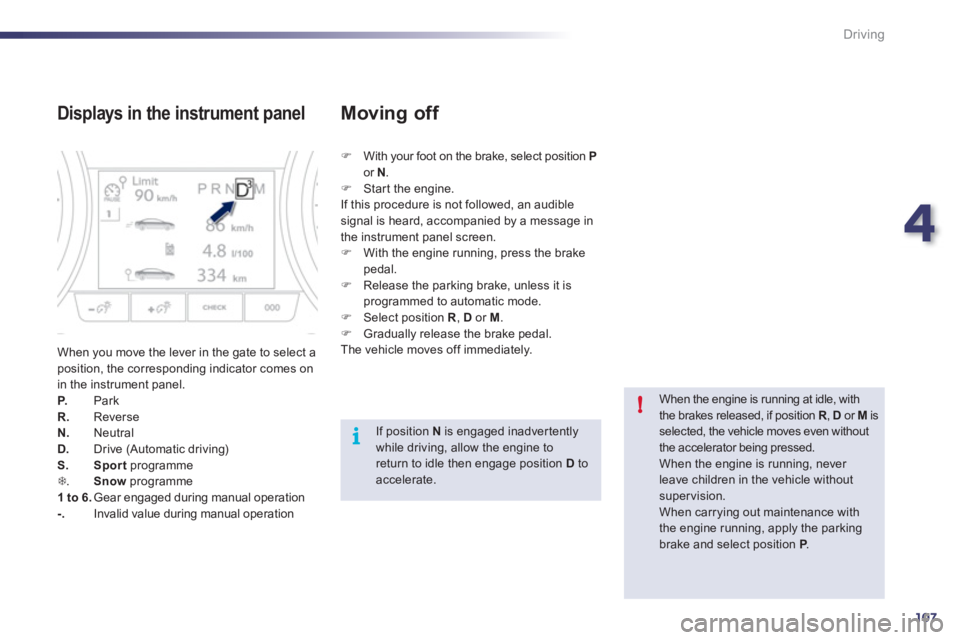
When you move the lever in the gate to select a
position, the corresponding indicator comes on
in the instrument panel.
P.
Park
R.
Reverse
N.
Neutral
D.
Drive (Automatic driving)
S.
Sport
programme
7
. Snow
programme
1 to 6.
Gear engaged during manual operation
-.
Invalid value during manual operation
)
With your foot on the brake, select position P
or N
.
)
Star t the engine.
If this procedure is not followed, an audible
signal is heard, accompanied by a message in
the instrument panel screen.
)
With the engine running, press the brake
pedal.
)
Release the parking brake, unless it is
programmed to automatic mode.
)
Select position R
, D
or M
.
)
Gradually release the brake pedal.
The vehicle moves off immediately.
Moving off
When the engine is running at idle, with
the brakes released, if position R
, D
or M
is
selected, the vehicle moves even without
the accelerator being pressed.
When the engine is running, never
leave children in the vehicle without
supervision.
When carrying out maintenance with
the engine running, apply the parking
brake and select position P
.
If position N
is engaged inadvertently
while driving, allow the engine to
return to idle then engage position D
to
accelerate.
Page 123 of 340
4
121
i
i
Driving
Speed limiter
System which prevents the vehicle from
exceeding the speed programmed by the driver.
When the programmed speed limit is reached,
pressing the accelerator pedal no longer
has any effect unless it is pressed firmly,
which allows you to temporarily exceed the
programmed speed.
To return to the programmed speed, simply
slow down to a speed below the programmed
speed by releasing the accelerator.
The speed limiter is switched on
manually: it
requires a programmed speed of at least
20 mph (30 km/h).
The speed limiter is switched off
by manual
operation of the control.
The programmed speed remains in the memory
when the ignition is switched off.
The speed limiter cannot, in any
circumstances, replace the need to
obser ve speed limits, nor can it replace
the need for vigilance and responsibility
on the par t of the driver.
This information also appears in the
head-up display.
For more information on the head-up
display, refer to the relevant page in this
"Driving" section.
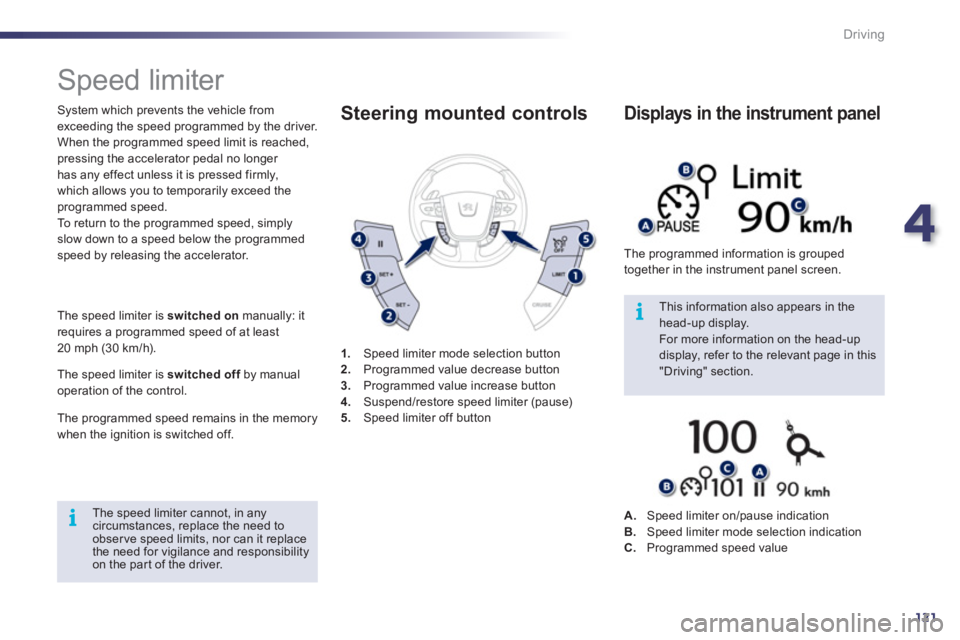
1.
Speed limiter mode selection button
2.
Programmed value decrease button
3.
Programmed value increase button
4.
Suspend/restore speed limiter (pause)
5.
Speed limiter off button
Steering mounted controls
The programmed information is grouped
together in the instrument panel screen.
Displays in the instrument panel
A.
Speed limiter on/pause indication
B.
Speed limiter mode selection indication
C.
Programmed speed value
Page 125 of 340
4
123
i
i
Driving
Cruise control
System which automatically maintains the
speed of the vehicle at the value programmed
by the driver, without any action on the
accelerator pedal.
The cruise control is switched on
manually: it
requires a minimum vehicle speed of 25 mph
(40 km/h) and the engaging:
- 4th gear or higher on a manual gearbox,
- 2nd gear or higher on an electronic gear
control gearbox or automatic gearbox,
- position A
on the electronic gear control
gearbox or D
on the automatic gearbox.
The cruise control is switched off
manually
or by pressing the brake or clutch pedal or
on triggering of the ESP system for safety
reasons.
It is possible to exceed the programmed speed
temporarily by pressing the accelerator pedal.
To return to the programmed speed, simply
release the accelerator pedal.
Switching off the ignition cancels any
programmed speed value.
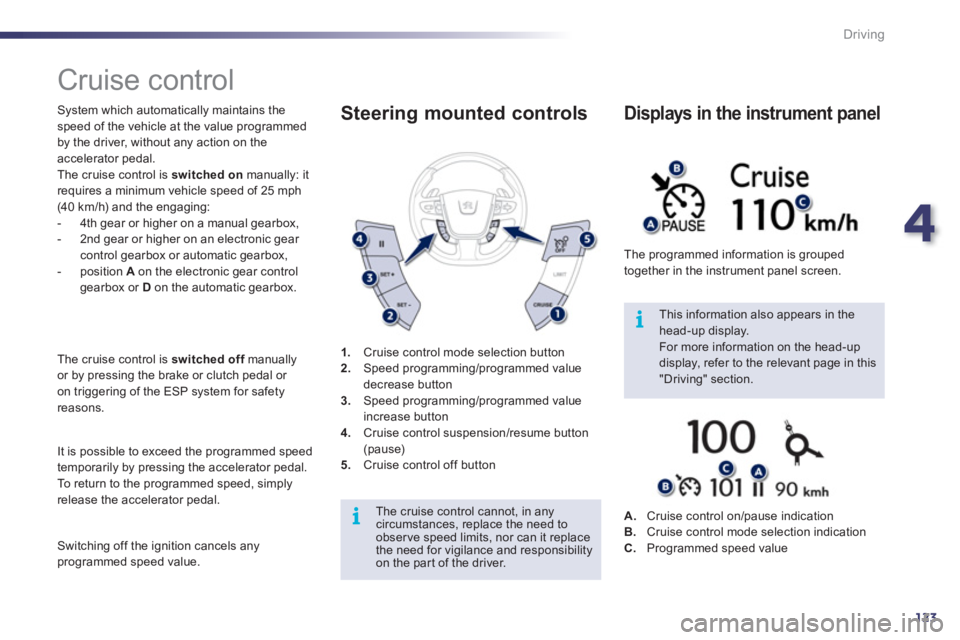
1.
Cruise control mode selection button
2.
Speed programming/programmed value
decrease button
3.
Speed programming/programmed value
increase button
4.
Cruise control suspension/resume button
(pause)
5.
Cruise control off button
Steering mounted controls
The cruise control cannot, in any
circumstances, replace the need to
obser ve speed limits, nor can it replace
the need for vigilance and responsibility
on the par t of the driver.
This information also appears in the
head-up display.
For more information on the head-up
display, refer to the relevant page in this
"Driving" section. The programmed information is grouped
together in the instrument panel screen.
Displays in the instrument panel
A.
Cruise control on/pause indication
B.
Cruise control mode selection indication
C.
Programmed speed value
Page 127 of 340
4
125
!
Driving
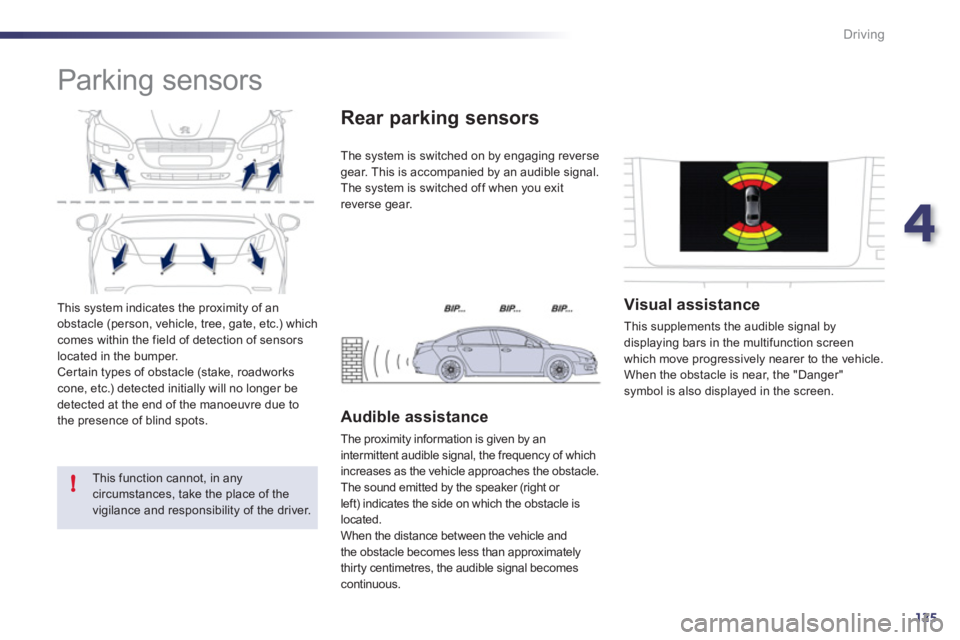
This system indicates the proximity of an
obstacle (person, vehicle, tree, gate, etc.) which
comes within the field of detection of sensors
located in the bumper.
Cer tain types of obstacle (stake, roadworks
cone, etc.) detected initially will no longer be
detected at the end of the manoeuvre due to
the presence of blind spots.
Parking sensors
This function cannot, in any
circumstances, take the place of the
vigilance and responsibility of the driver.
The system is switched on by engaging reverse
gear. This is accompanied by an audible signal.
The system is switched off when you exit
reverse gear.
Rear parking sensors
Audible assistance
The proximity information is given by an
intermittent audible signal, the frequency of which
increases as the vehicle approaches the obstacle.
The sound emitted by the speaker (right or
left) indicates the side on which the obstacle is
located.
When the distance between the vehicle and
the obstacle becomes less than approximately
thirty centimetres, the audible signal becomes
continuous.
Visual assistance
This supplements the audible signal by
displaying bars in the multifunction screen
which move progressively nearer to the vehicle.
When the obstacle is near, the "Danger"
symbol is also displayed in the screen.
Page 132 of 340
130
Visibility
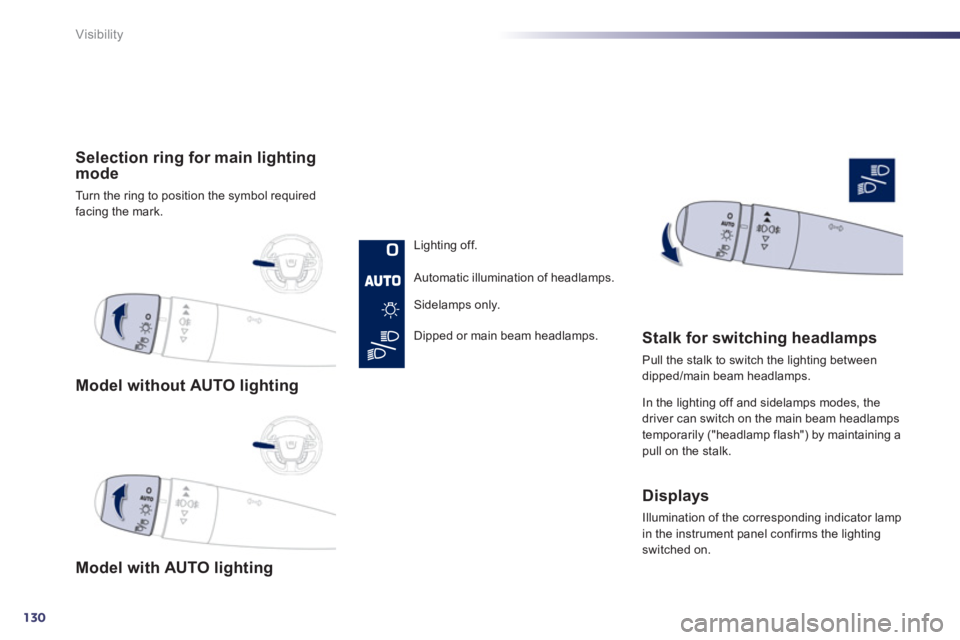
Model without AUTO lighting
Model with AUTO lighting
Selection ring for main lighting
mode
Turn the ring to position the symbol required
facing the mark.
Lighting off.
Automatic illumination of headlamps.
Sidelamps only.
Dipped or main beam headlamps.
Stalk for switching headlamps
Pull the stalk to switch the lighting between
dipped/main beam headlamps.
In the lighting off and sidelamps modes, the
driver can switch on the main beam headlamps
temporarily ("headlamp flash") by maintaining a
pull on the stalk.
Displays
Illumination of the corresponding indicator lamp
in the instrument panel confirms the lighting
switched on.
Page 133 of 340
5
131
!
Visibility
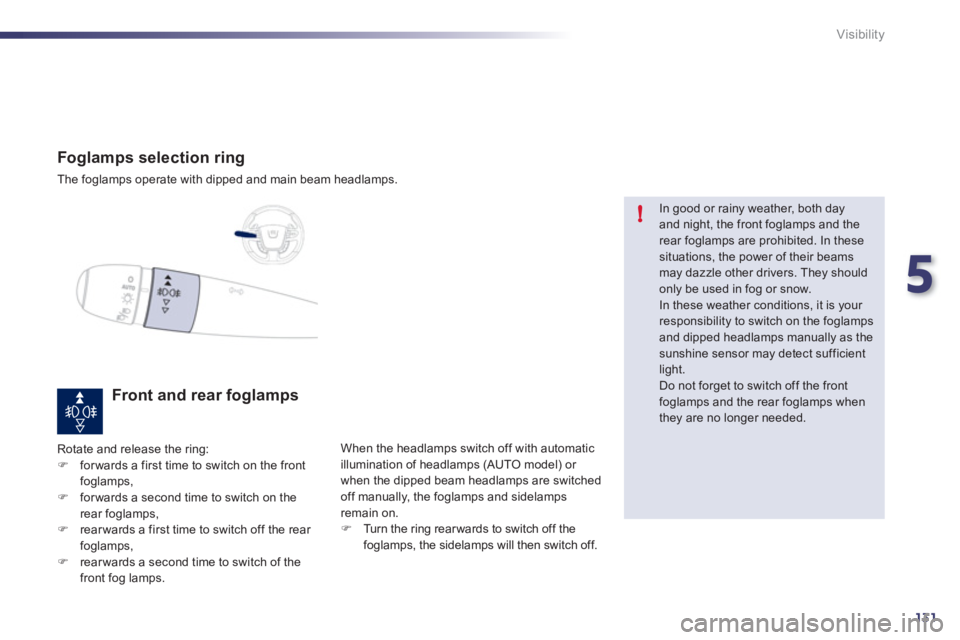
Foglamps selection ring
The foglamps operate with dipped and main beam headlamps.
Front and rear foglamps
Rotate and release the ring:
)
for wards a first time to switch on the front
foglamps,
)
for wards a second time to switch on the
rear foglamps,
)
rear wards a first time to switch off the rear
foglamps,
)
rear wards a second time to switch of the
front fog lamps. When the headlamps switch off with automatic
illumination of headlamps (AUTO model) or
when the dipped beam headlamps are switched
off manually, the foglamps and sidelamps
remain on.
)
Turn the ring rear wards to switch off the
foglamps, the sidelamps will then switch off.
In good or rainy weather, both day
and night, the front foglamps and the
rear foglamps are prohibited. In these
situations, the power of their beams
may dazzle other drivers. They should
only be used in fog or snow.
In these weather conditions, it is your
responsibility to switch on the foglamps
and dipped headlamps manually as the
sunshine sensor may detect sufficient
light.
Do not forget to switch off the front
foglamps and the rear foglamps when
they are no longer needed.
Page 135 of 340
5
133
Visibility
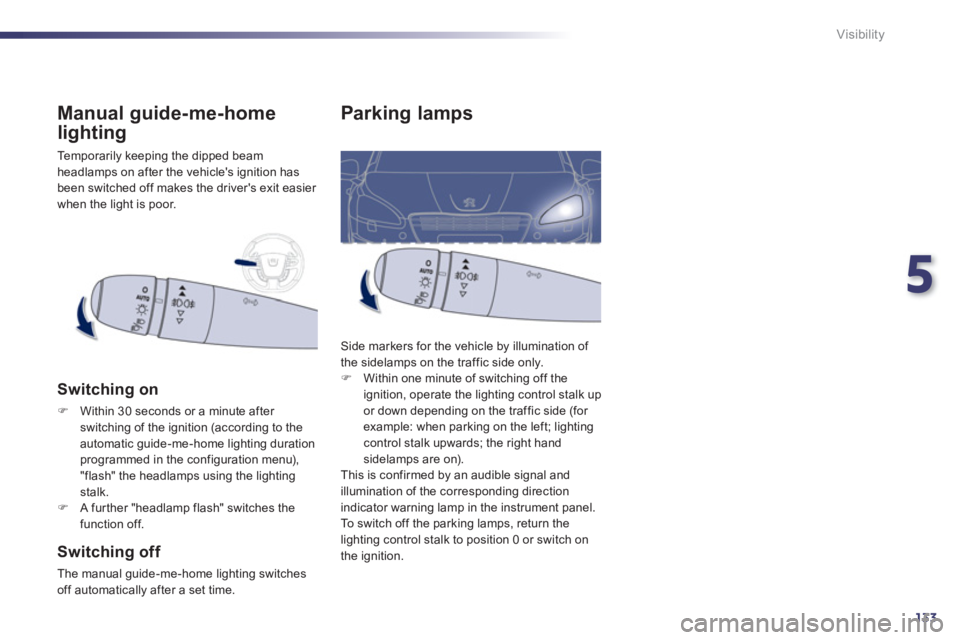
Parking lamps
Side markers for the vehicle by illumination of
the sidelamps on the traffic side only.
)
Within one minute of switching off the
ignition, operate the lighting control stalk up
or down depending on the traffic side (for
example: when parking on the left; lighting
control stalk upwards; the right hand
sidelamps are on).
This is confirmed by an audible signal and
illumination of the corresponding direction
indicator warning lamp in the instrument panel.
To switch off the parking lamps, return the
lighting control stalk to position 0 or switch on
the ignition. Temporarily keeping the dipped beam
headlamps on after the vehicle's ignition has
been switched off makes the driver's exit easier
when the light is poor.
Manual guide-me-home
lighting
Switching on
)
Within 30 seconds or a minute after
switching of the ignition (according to the
automatic guide-me-home lighting duration
programmed in the configuration menu),
"flash" the headlamps using the lighting
stalk.
)
A fur ther "headlamp flash" switches the
function off.
Switching off
The manual guide-me-home lighting switches
off automatically after a set time.
Page 137 of 340
5
135
i
i
Visibility
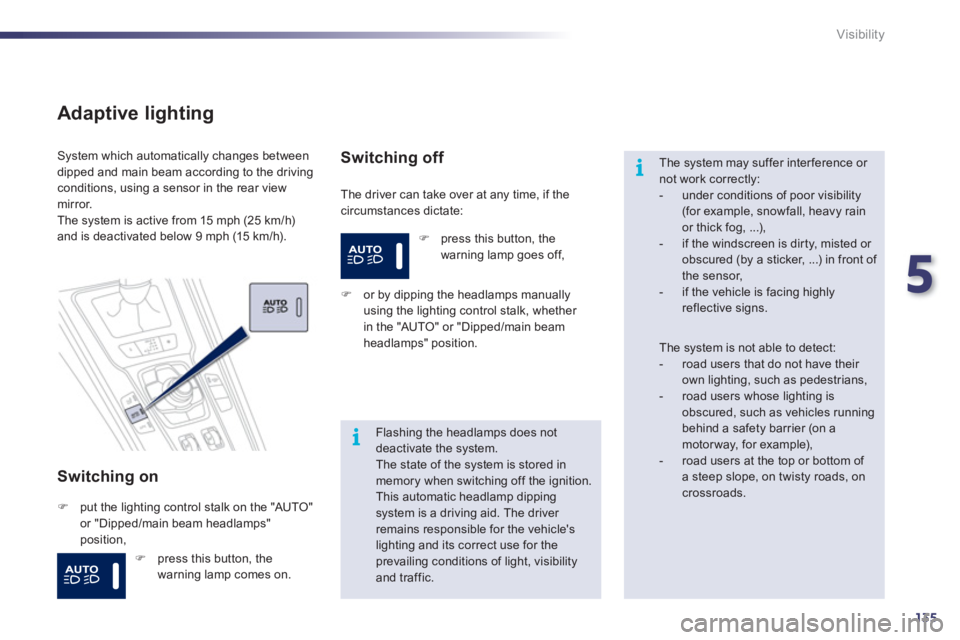
Adaptive lighting
Switching on
The driver can take over at any time, if the
circumstances dictate: System which automatically changes between
dipped and main beam according to the driving
conditions, using a sensor in the rear view
mirror.
The system is active from 15 mph (25 km/h)
and is deactivated below 9 mph (15 km/h).
)
put the lighting control stalk on the "AUTO"
or "Dipped/main beam headlamps"
position,
Switching off
)
or by dipping the headlamps manually
using the lighting control stalk, whether
in the "AUTO" or "Dipped/main beam
headlamps" position.
Flashing the headlamps does not
deactivate the system.
The state of the system is stored in
memory when switching off the ignition.
This automatic headlamp dipping
system is a driving aid. The driver
remains responsible for the vehicle's
lighting and its correct use for the
prevailing conditions of light, visibility
and traffic.
The system may suffer inter ference or
not work correctly:
- under conditions of poor visibility
(for example, snowfall, heavy rain
or thick fog, ...),
- if the windscreen is dir ty, misted or
obscured (by a sticker, ...) in front of
the sensor,
- if the vehicle is facing highly
reflective signs.
The system is not able to detect:
- road users that do not have their
own lighting, such as pedestrians,
- road users whose lighting is
obscured, such as vehicles running
behind a safety barrier (on a
motor way, for example),
- road users at the top or bottom of
a steep slope, on twisty roads, on
crossroads.
)
press this button, the
warning lamp goes off,
)
press this button, the
warning lamp comes on.
Page 146 of 340
144
i!
Visibility
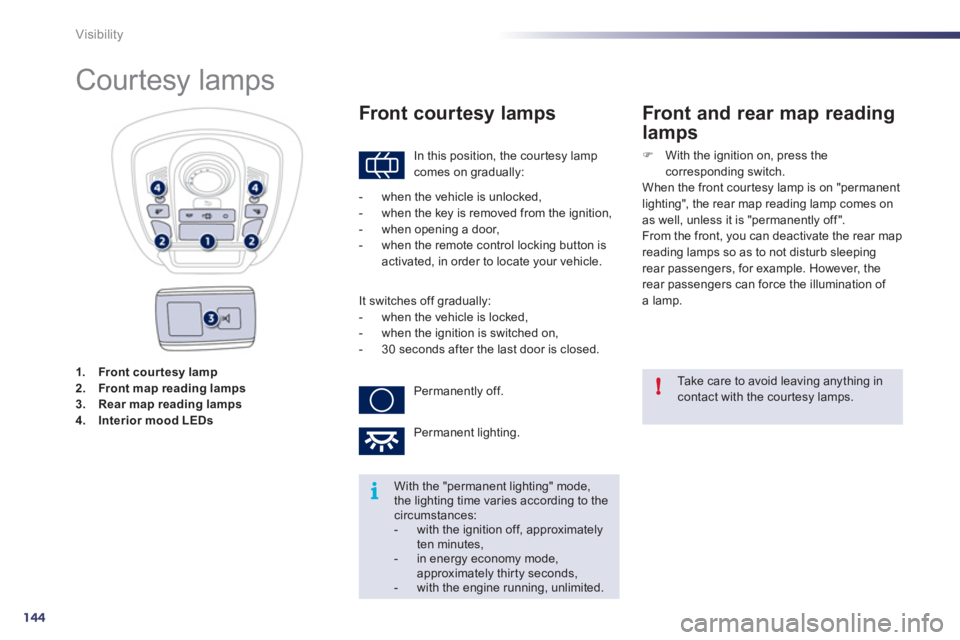
1.
Front cour tesy lamp
2.
Front map reading lamp s
3.
Rear map reading lamp s
4.
Interior mood LEDs
Courtesy lamps
In this position, the cour tesy lamp
comes on gradually:
Front courtesy lamps
Take care to avoid leaving anything in
contact with the courtesy lamps.
With the "permanent lighting" mode,
the lighting time varies according to the
circumstances:
- with the ignition off, approximately
ten minutes,
- in energy economy mode,
approximately thirty seconds,
- with the engine running, unlimited.
- when the vehicle is unlocked,
- when the key is removed from the ignition,
- when opening a door,
- when the remote control locking button is
activated, in order to locate your vehicle.
It switches off gradually:
- when the vehicle is locked,
- when the ignition is switched on,
- 30 seconds after the last door is closed.
Permanently off.
Permanent lighting.
Front and rear map reading
lamps
)
With the ignition on, press the
corresponding switch.
When the front courtesy lamp is on "permanent
lighting", the rear map reading lamp comes on
as well, unless it is "permanently off ".
From the front, you can deactivate the rear map
reading lamps so as to not disturb sleeping
rear passengers, for example. However, the
rear passengers can force the illumination of
a lamp.
Page 159 of 340
7
157
i
Safety
Direction indicators
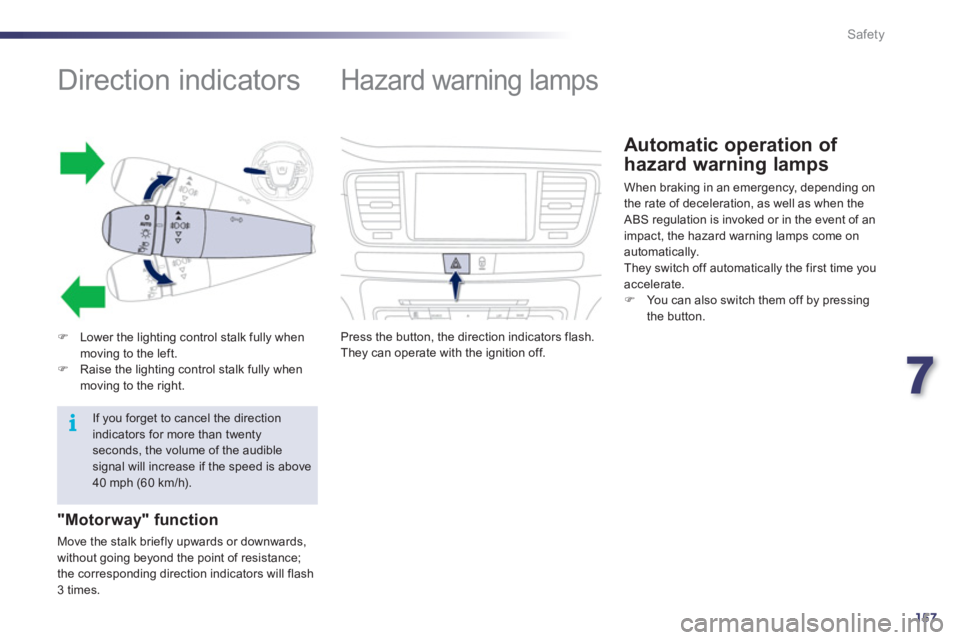
)
Lower the lighting control stalk fully when
moving to the left.
)
Raise the lighting control stalk fully when
moving to the right.
"Motorway" function
Move the stalk briefly upwards or downwards,
without going beyond the point of resistance;
the corresponding direction indicators will flash
3 times.
If you forget to cancel the direction
indicators for more than twenty
seconds, the volume of the audible
signal will increase if the speed is above
40 mph (60 km/h).
Hazard warning lamps
Press the button, the direction indicators flash.
They can operate with the ignition off.
Automatic operation of
hazard warning lamps
When braking in an emergency, depending on
the rate of deceleration, as well as when the
ABS regulation is invoked or in the event of an
impact, the hazard warning lamps come on
automatically.
They switch off automatically the first time you
accelerate.
)
You can also switch them off by pressing
the button.