radio Peugeot 508 2012 User Guide
[x] Cancel search | Manufacturer: PEUGEOT, Model Year: 2012, Model line: 508, Model: Peugeot 508 2012Pages: 340, PDF Size: 11.11 MB
Page 277 of 340
275
1
2
3
08
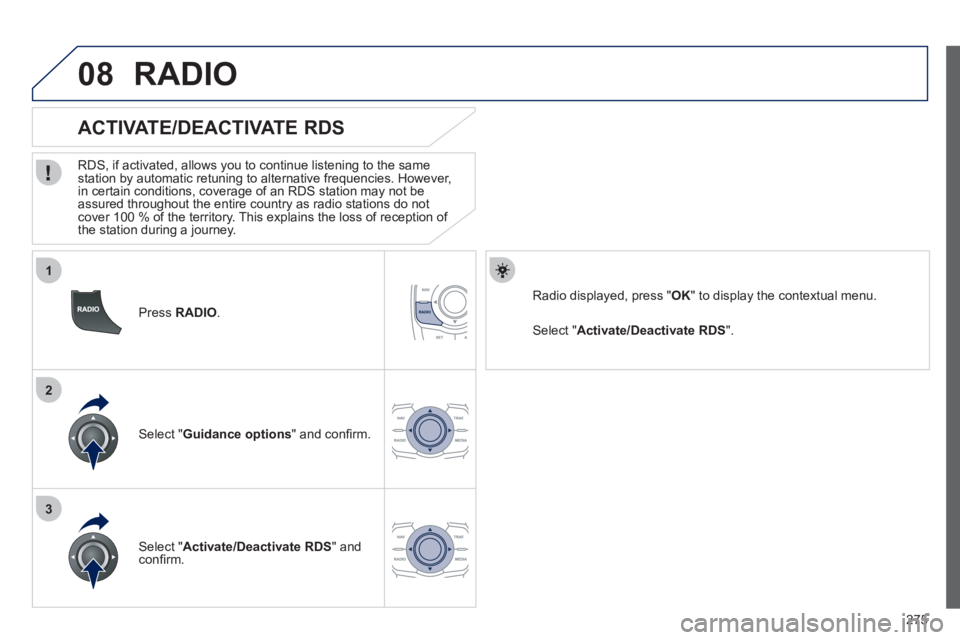
Press RADIO .
ACTIVATE/DEACTIVATE RDS
RDS, if activated, allows you to continue listening to the same station by automatic retuning to alternative frequencies. However,
in certain conditions, coverage of an RDS station may not be
assured throughout the entire country as radio stations do not cover 100 % of the territory. This explains the loss of reception of
the station during a journey.
Select "Guidance options" and confi rm.
Select "Activate/Deactivate RDS " and confi rm.
RADIO
Select " Activate/Deactivate RDS".
Radio displayed, press "OK " to display the contextual menu.
Page 280 of 340
278
09
1
2
MUSIC MEDIA PLAYERS
CD, MP3 CD, USB PLAYER
Insert the CD in the player, insert the USB memorystick in the USB player or connect the USBperipheral to the USB port using a suitable cable (not supplied)
The system builds playlists (in temporary memory),
an operation which can take from a few seconds to several minutes at the fi rst connection.
R
educe the number of non-music fi les and the number of folders to reduce the waiting time.
The playlists are updated every time the ignition isswitched off or connection of a USB memory stick. However, the system memorises these lists and
if they are not modifi ed, the loading time will be shorter.
Pla
y starts automatically after a period which
depends on the capacity of the USB memory stick.
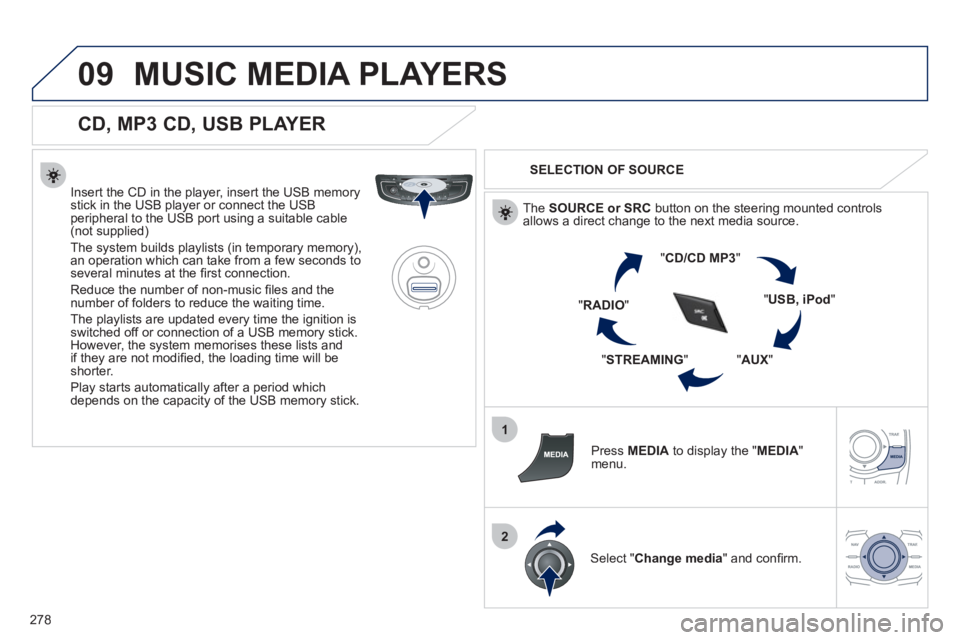
SELECTION OF SOURCE
The SOURCE or SRCbutton on the steering mounted controlsallows a direct change to the next media source.
"CD/CD MP
3"
"USB, iPod"
"AUX
" "STREAMING
" "RADIO
"
Pr
ess MEDIAto display the "MEDIA
"
menu.
Select "Change media" and confi rm.
Page 284 of 340
282
10
1
2
AUDIO SETTINGS
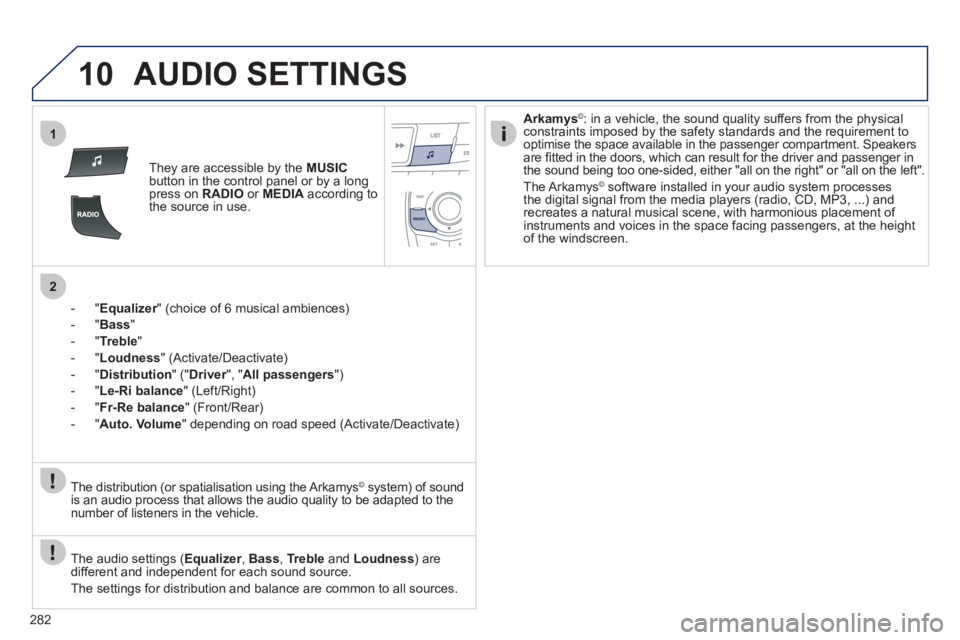
They are accessible by the MUSIC
button in the control panel or by a longpress on RADIO
or MEDIAaccording to
the source in use.
-"
Equalizer" (choice of 6 musical ambiences) r
-"Bass"
-
"Treble"
-"Loudness" (Activate/Deactivate)
- "
Distribution" (" Driver
", "rAll passengers
")
- " Le-Ri balanc
e
" (Left/Right)
- " Fr-Re balanc
e
" (Front/Rear)
-"Auto. Volume
" depending on road speed (Activate/Deactivate)
The audio settings ( Equalizer, rBass , Trebleand Loudness) are
different and independent for each sound source.
The settings
for distribution and balance are common to all sources. The distribution
(or spatialisation using the Arkamys© system) of sound©
is an audio process that allows the audio quality to be adapted to the
number of listeners in the vehicle.
Arkamys©: in a vehicle, the sound quality suffers from the physicalconstraints imposed by the safety standards and the requirement to
optimise the space available in the passenger compartment. Speakers
are fi tted in the doors, which can result for the driver and passenger in
the sound being too one-sided, either "all on the right" or "all on the left".
The Arkam
ys© software installed in your audio system processes©
the digital signal from the media players (radio, CD, MP3, ...) andrecreates a natural musical scene, with harmonious placement of
instruments and voices in the space facing passengers, at the heightof the windscreen.
Page 287 of 340
285
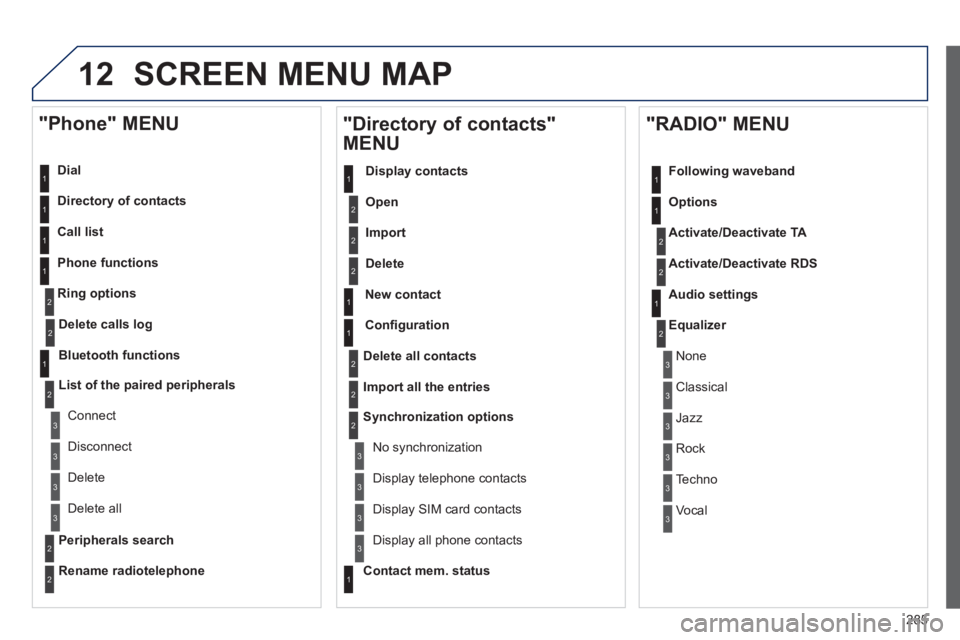
12 SCREEN MENU MAP
Dial
Director
y of contacts
Call list
Phone functions
Rin
g options
"Phone" MENU
1
1
2
1
1
2
3
3
2
1
3
3
2
2
1
2
2
2
1
1
2
2
2
1
3
3
3
3
1
2
2
1
1
3
3
3
3
3
3
2
Confi guration
Delete all contacts
Import all the entries
S
ynchronization options
No s
ynchronization
"Directory of contacts"
MENU
Display contacts
Open
Import
Delete
New contact
Equalizer
"RADIO" MENU
Following waveband
Options
Activate/Deactivate TA
Activate/Deactivate RD
S
Audio settings
Displa
y telephone contacts
Displa
y SIM card contacts
Contact mem. status
Displa
y all phone contacts
Delete calls log
Bluetooth functions
List of the paired peripherals
Connect
Di
sconnect
D
elete
Peripherals searchD
elete all
Rename radiotelephon
e
None
Classical
Jazz
Rock
Techno
Vocal
Page 288 of 340
286
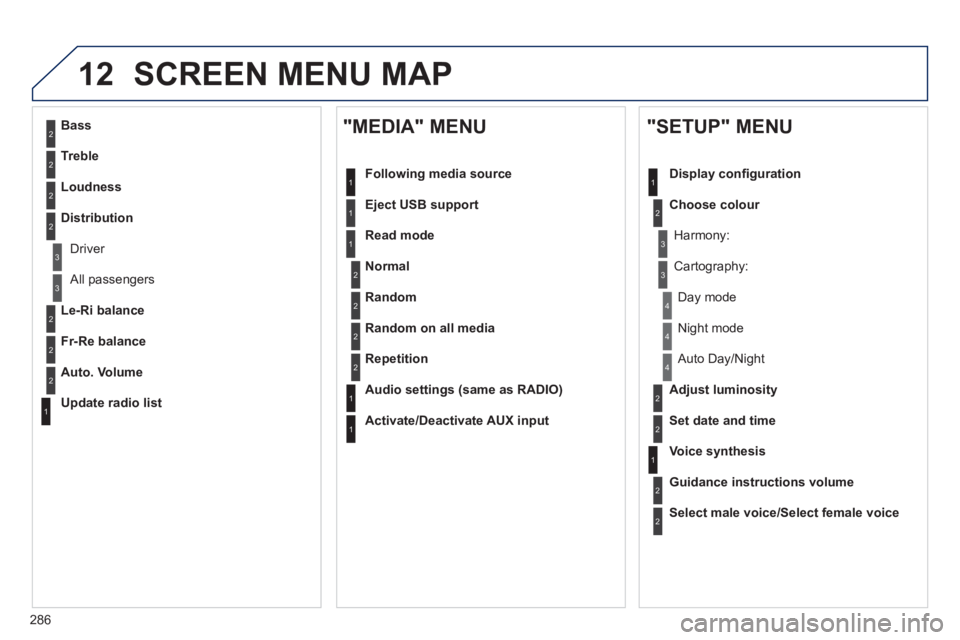
12 SCREEN MENU MAP
2
3
3
1
4
2
2
1
4
4
2
2
1
1
1
2
1
1
2
2
2
2
2
2
2
3
3
2
2
2
1
Random on all media
Repetition
Audio settin
gs (same as RADIO)
Activate/Deactivate AUX input
"MEDIA" MENU
Following media source
E
ject USB support
Read mode
Norma
l
Random
All passengers
Le-Ri balance
Fr-Re balance
Auto. Volume
Update radio list
Bass
Treble
Loudness
Distribution
Driv
er
Ni
ght mode
Auto Day/Night
Ad
just luminosity
Set date and time
"SETUP" MENU
Display confi guration
Choose colou
r
Harmony:
Carto
graphy:
Da
y mode
Voice synthesis
Guidance instructions volume
Select male voice/Select female voice
Page 292 of 340
290
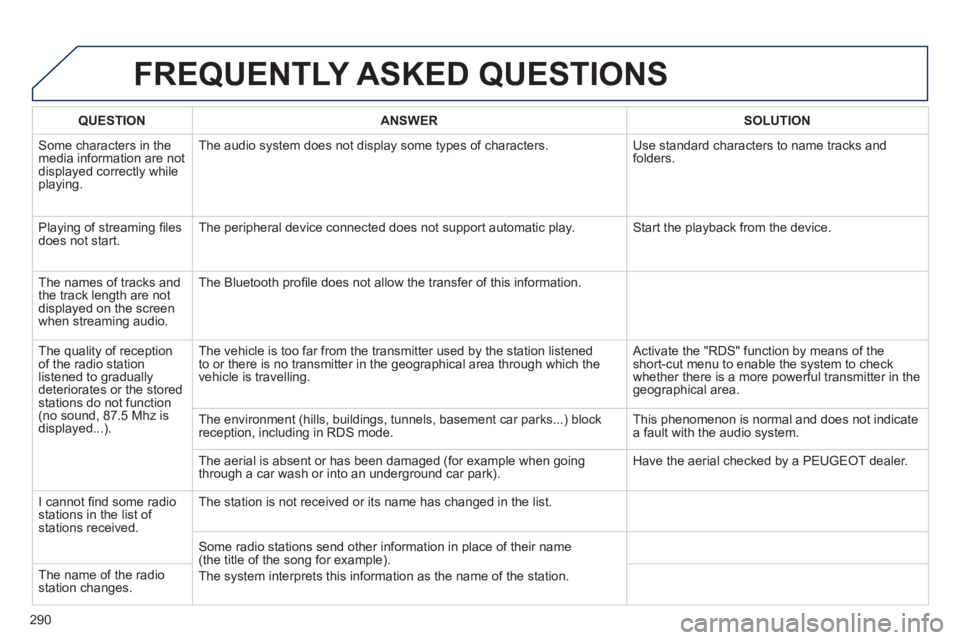
FREQUENTLY ASKED QUESTIONS
QUESTIONANSWER SOLUTION
Some characters in themedia information are not displayed correctly while playing. The audio s
ystem does not display some types of characters. Use standard characters to name tracks andfolders.
Pla
ying of streaming fi lesdoes not start. The peripheral device connected does not support automatic play. Start the playback from the device.
Th
e names of tracks and
the track length are not
displayed on the screen
when streamin
g audio. The Bluetooth pro
fi le does not allow the transfer of this information.
The qualit
y of receptionof the radio station
listened to graduallydeteriorates or the stored stations do not function(no sound, 87.5 Mhz is
displayed...). The vehicle is too far from the transmitter used b
y the station listened
to or there is no transmitter in the geographical area through which the
vehicle is travelling.
Activate the "RDS" function by means of theshort-cut menu to enable the system to check
whether there is a more powerful transmitter in the
geographical area.
The environment
(hills, buildings, tunnels, basement car parks...) block reception, including in RDS mode. This phenomenon is normal and does not indicate
a fault with the audio system.
The aerial is absent or has been dama
ged (for example when goingthrough a car wash or into an underground car park). Have the aerial checked by a PEUGEOT dealer.
I
cannot fi nd some radiostations in the list of stations received.
The station is not received or its name has changed in the list.
Some radio stations send other information in place of their name (the title of the song for example).
The s
ystem interprets this information as the name of the station. The name of the radio station changes.
Page 293 of 340
291
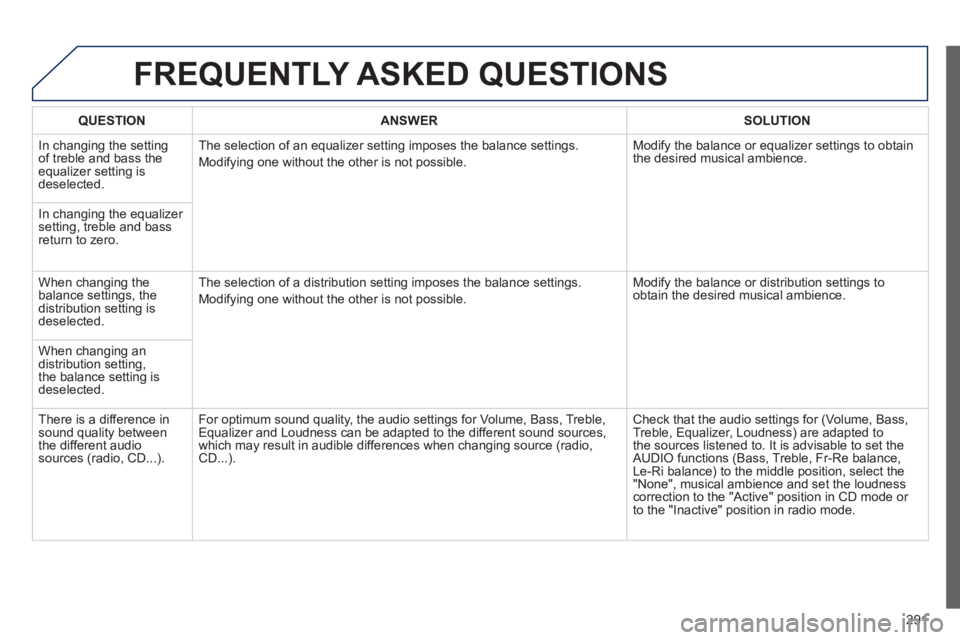
FREQUENTLY ASKED QUESTIONS
QUESTIONANSWER SOLUTION
In changing the settingof treble and bass theequalizer setting isdeselected. The selection of an equalizer settin
g imposes the balance settings.
Modi
fying one without the other is not possible. Modif
y the balance or equalizer settings to obtain
the desired musical ambience.
In chan
ging the equalizer setting, treble and bassreturn to zero.
When changing the balance settings, the
distribution setting is
deselected. The selection o
f a distribution setting imposes the balance settings.
Modi
fying one without the other is not possible. Modi
fy the balance or distribution settings to obtain the desired musical ambience.
When chan
ging an
distribution setting,
the balance setting isdeselected.
Th
ere is a difference in sound quality between
the different audiosources (radio, CD...). For optimum sound quality, the audio settings
for Volume, Bass, Treble,
Equalizer and Loudness can be adapted to the different sound sources,
which may result in audible differences when changing source (radio,
CD...).
Check that the audio settings for (Volume, Bass,
Treble, Equalizer, Loudness) are adapted to
the sources listened to. It is advisable to set theAUDIO functions (Bass, Treble, Fr-Re balance,
Le-Ri balance) to the middle position, select the "None", musical ambience and set the loudness correction to the "Active" position in CD mode or
to the "Inactive" position in radio mode.
Page 296 of 340
294
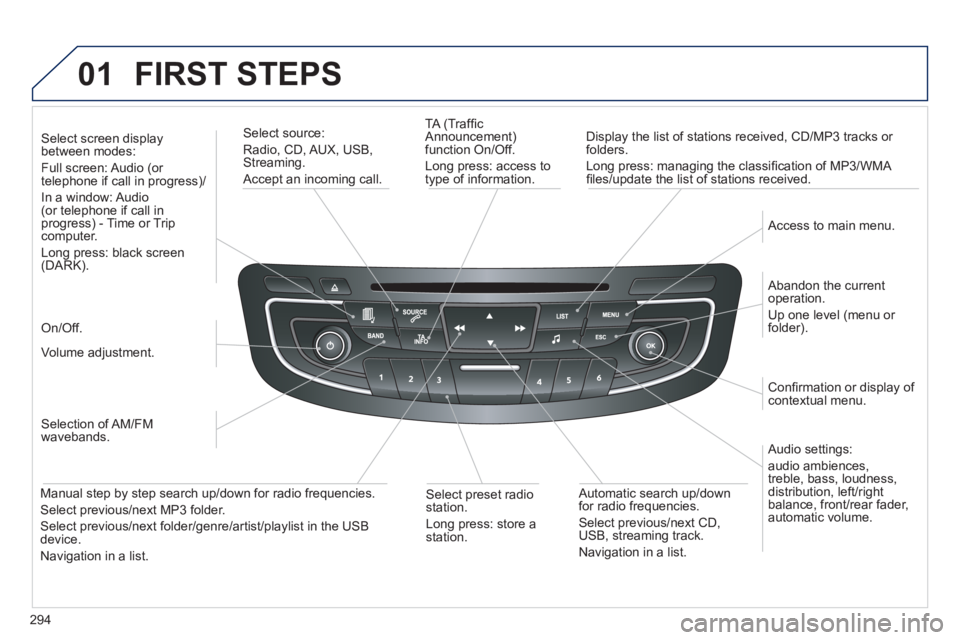
01 FIRST STEPS
TA (Traffi c
Announcement)
function On/Off.
Long press: access to
type of information.
Displa
y the list of stations received, CD/MP3 tracks or
folders.
Lon
g press: managing the classifi cation of MP3/WMA fi les/update the list of stations received.
Select source:
Radio, CD, AUX, USB, Streaming.
Accept an incoming call.
Audio settings:
audio ambiences,
treble, bass, loudness,
distribution, left/ri
ght
balance, front/rear fader, automatic volume.
Abandon the current
operation.
Up one level (menu or folder).
Access to main menu.
Selection of AM/FM
wavebands.
Select screen display between modes:
Full screen: Audio (or
telephone if call in progress)/
In
a window: Audio (or telephone if call in
progress) - Time or Tripcomputer.
Long press: black screen (DARK).
Volume adjustment.
Select preset radio
station.
Long press: store astation.
Automatic search up/down
for radio frequencies.
Select previous/next CD,USB, streaming track.
Navigation in a list.
Manual step b
y step search up/down for radio frequencies.
Select previous/next MP3 folder.
Select previous/next folder/genre/artist/playlist in the USB device.
Navigation in a list.
On/Off.
Confi rmation or displa
y of contextual menu.
Page 297 of 340
02
295
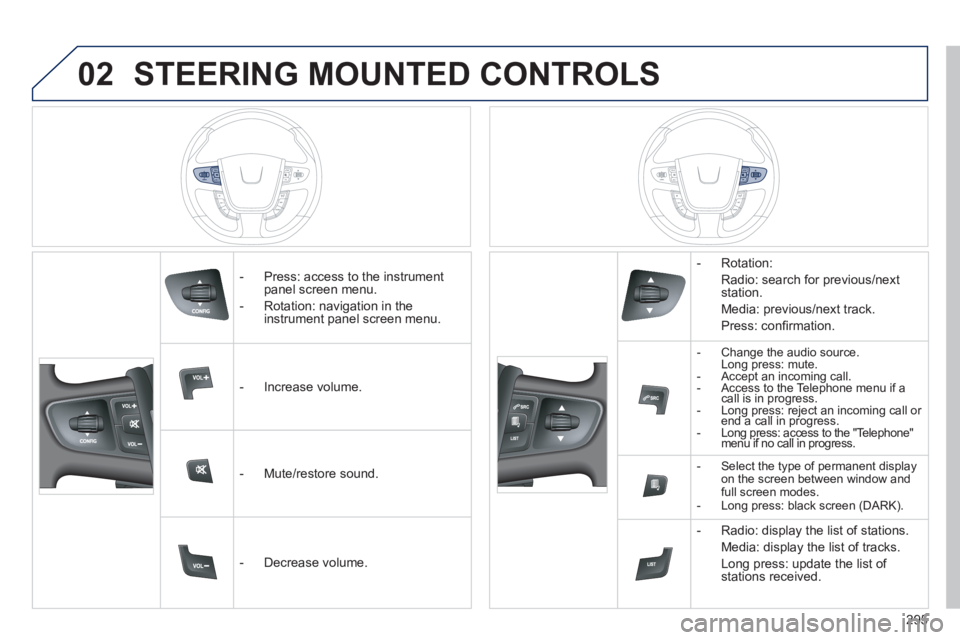
STEERING MOUNTED CONTROLS
- Press: access to the instrumentpanel screen menu.
- Rotation: navi
gation in the
instrument panel screen menu.
- In
crease volume.
- Mute
/restore sound.
- D
ecrease volume. - R
otation:
Radio: search for previous/next
station.
Media: previous
/next track.
Pr
ess: confi rmation.
-Change the audio source.
Long press: mute.
- Accept an incoming call.
- Access to the Telephone menu if acall is in progress.- Long press: reject an incoming call or end a call in progress. gp jgp
- Long press: access to the "Telephone" menu if no call in progress. gpp
- Select the type of permanent displayon the screen between window and full screen modes.
- Long press: black screen (DARK).
- Radio: display the list of stations.
Media: displa
y the list of tracks.
Lon
g press: update the list of stations received.
Page 298 of 340
296
03
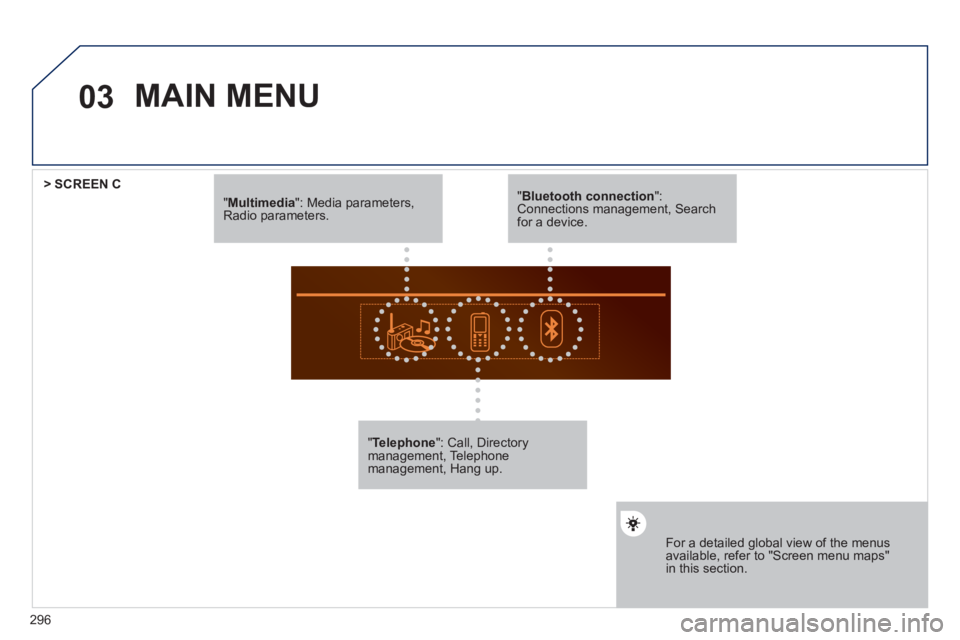
"Multimedia": Media parameters, Radio parameters.
"Telephone ": Call, Directory management, Telephonemanagement, Hang up.
For a detailed global view of the menus available, refer to "Screen menu maps"in this section.
> SCREEN C
"Bluetooth connection ": Connections management, Search for a device.
MAIN MENU