navigation Peugeot 508 2012 Owner's Guide
[x] Cancel search | Manufacturer: PEUGEOT, Model Year: 2012, Model line: 508, Model: Peugeot 508 2012Pages: 340, PDF Size: 11.11 MB
Page 257 of 340
255
04
35
1
2
4
NAVIGATION - GUIDANCE
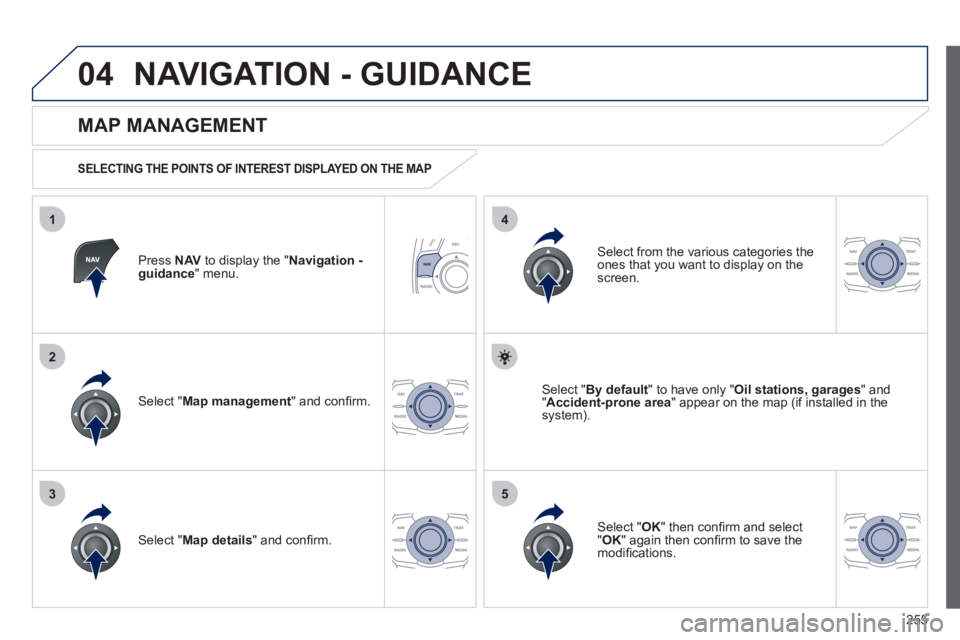
Press NAVto display the " Navigation - guidance" menu.
MAP MANAGEMENT
SELECTING THE POINTS OF INTEREST DISPLAYED ON THE MAP
Select " Map management
" and confi rm.
Select from the various categories the
ones that you want to display on thescreen.
Select " Map details
" and confi rm.
Select " By default" to have only "Oil stations, garages" and"Accident-prone area
" appear on the map (if installed in the
system).
Select " OK
" then confi rm and select "OK" again then confi rm to save the
modifi cations.
Page 258 of 340
256
04
3
1
2
4
NAVIGATION - GUIDANCE
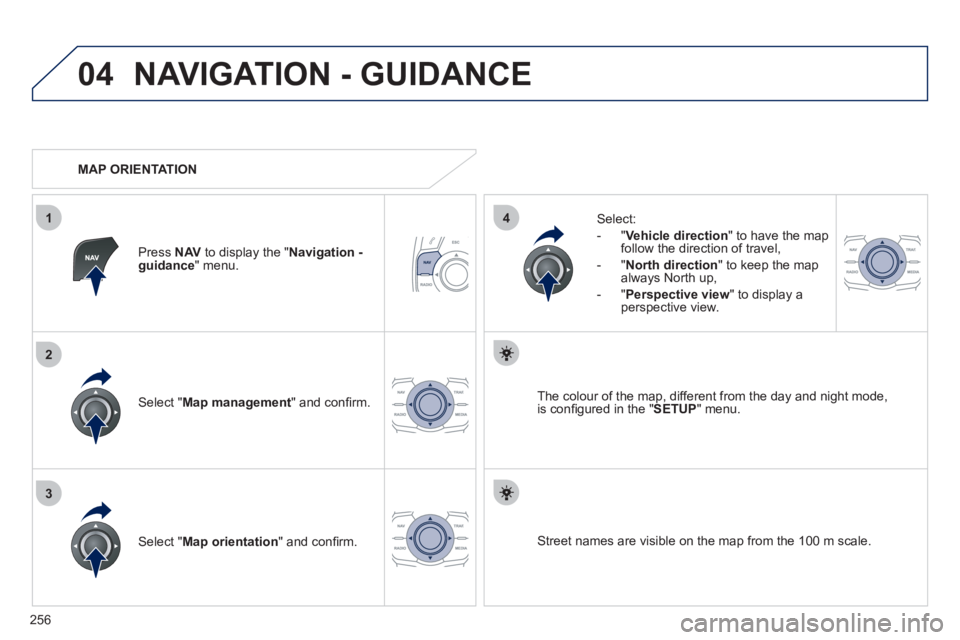
Select " Map management " and confi rm.
Select:
-
"Vehicle direction" to have the map follow the direction of travel,
- "North direction" to keep the map
alwa
ys North up,
-"Perspective view
" to displa
y aperspective view.
Select " Map orientation" and confi rm. The colour o
f the map, different from the day and night mode,
is confi gured in the " SETUP
" menu.
MAP ORIENTATION
Pr
ess NAVto display the " Navigation - guidance" menu.
Street names are visible on the map from the 100 m scale.
Page 259 of 340
257
04
1
2
36
4
5
NAVIGATION - GUIDANCE
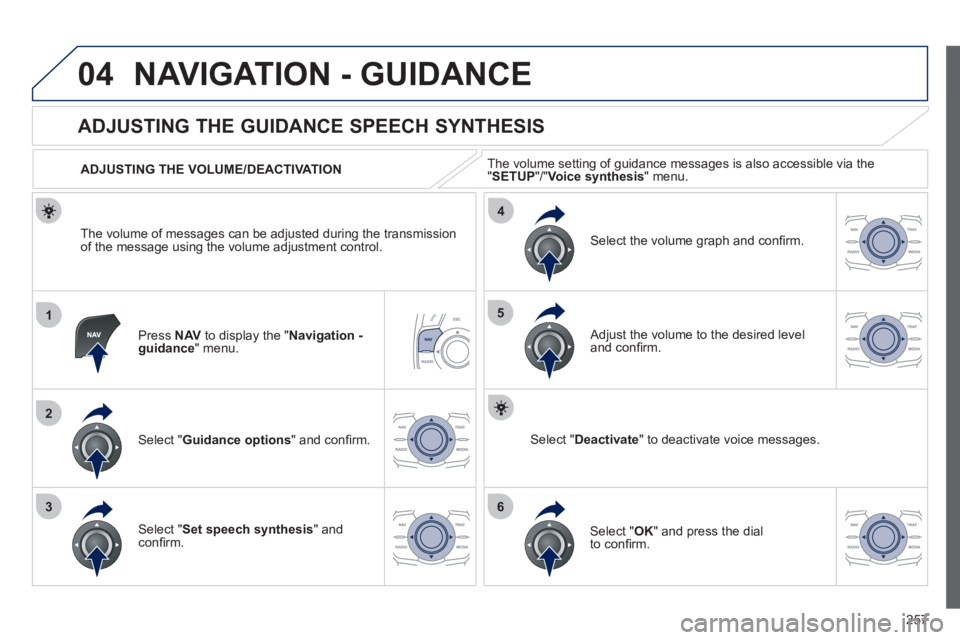
Press NAVto display the " Navigation - guidance" menu.
ADJUSTING THE GUIDANCE SPEECH SYNTHESIS
Select " Guidance options
" and confi rm.
ADJUSTING THE VOLUME/DEACTIVATION
Select " Set speech synthesis" andconfi rm.
Select the volume graph and confi rm.
Select "Deactivate
" to deactivate voice messages.
Select " OK " and press the dial
to confi rm.
Adjust the volume to the desired level and confi rm.
The volume o
f messages can be adjusted during the transmissionof the message using the volume adjustment control.The volume settin
g of guidance messages is also accessible via the "SETUP"/" Voice synthesis " menu.
Page 260 of 340
258
04
3
1
2
NAVIGATION - GUIDANCE
MALE VOICE/FEMALE VOICE
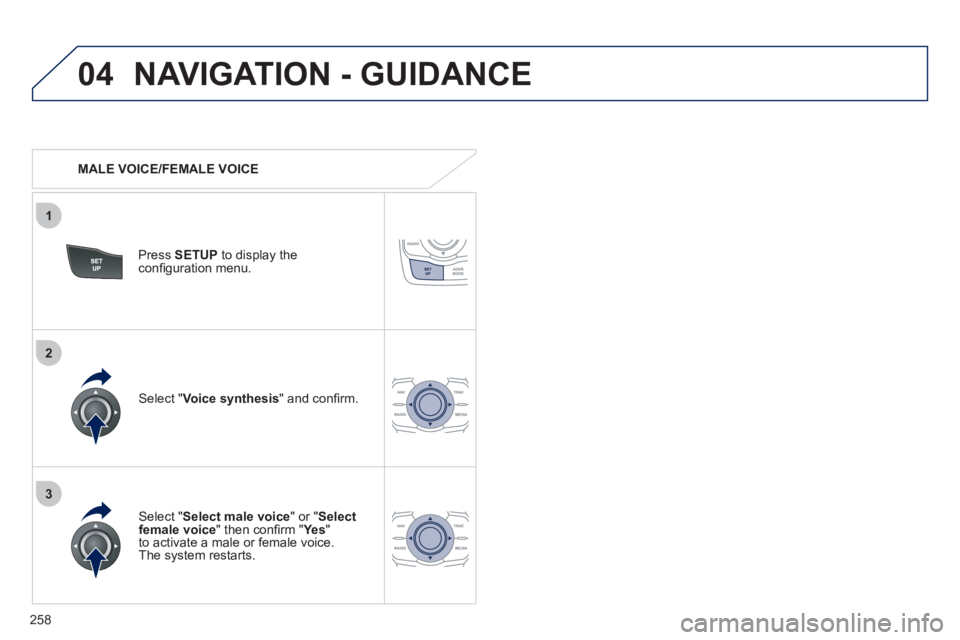
Press SETUP
to display theconfi guration menu.
Select "Select male voice
" or "Selectfemale voice" then confi rm " Ye s
"
to activate a male or female voice.
The system restarts.
Select "Voice synthesis
" and confi rm.
Page 262 of 340
260
05
1
2
3
4
TRAFFIC INFORMATION
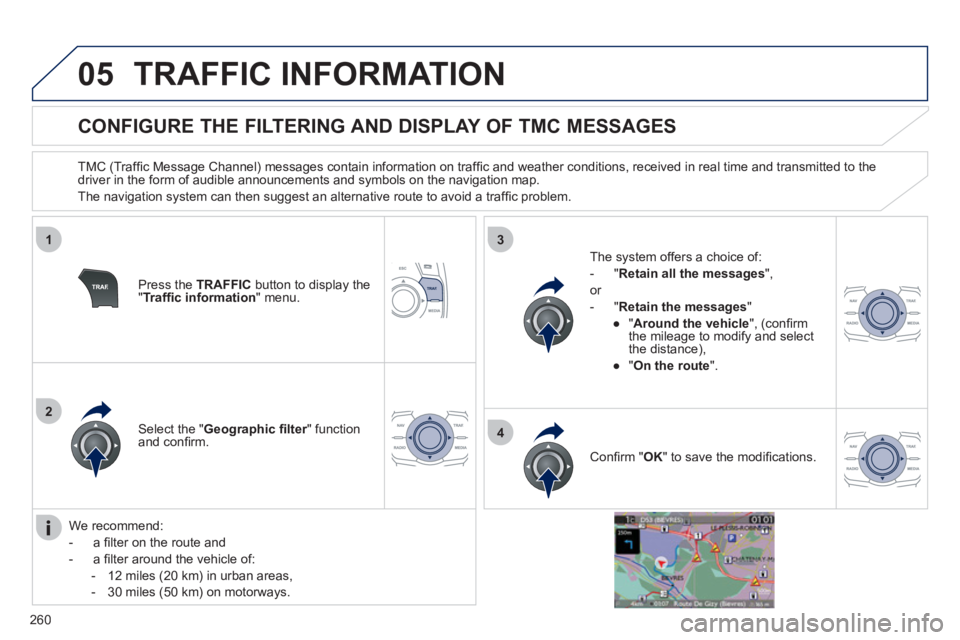
CONFIGURE THE FILTERING AND DISPLAY OF TMC MESSAGES
TMC (Traffi c Message Channel) messages contain information on traffi c and weather conditions, received in real time and transmitted to the
driver in the form of audible announcements and symbols on the navigation map.
The navi
gation system can then suggest an alternative route to avoid a traffi c problem.
Pr
ess the TRAFFICbutton to display the "Traffi c information
" menu.
Select the "Geographic fi lter" function rand confi rm. The s
ystem offers a choice of:
- " Retain all the messa
ges",
or
-"Retain the messa
ges"
●
"Around the vehicle ", (confi rm
the mileage to modify and select
the distance),
●
" On the rout
e".
Confi rm " OK
" to save the modifi cations.
We recommend:
-
a fi lter on the route and
-
a fi lter around the vehicle of:
- 12 miles
(20 km) in urban areas,
- 30 miles
(50 km) on motorways.
Page 286 of 340
284
12
"Navigation - guidance"
MENU
Enter an address
Select destination
Directory
GPS coordinates (Archive)
Journey leg and route
Add a sta
ge
Enter an address
Director
y Pr
evious destinations
Order/delete
journey legs
Divert route
Chosen destination
Guidance o
ptions
Defi ne calculation criteria
Set speech synthesis
Delete last destinations
Map management
Map orientation
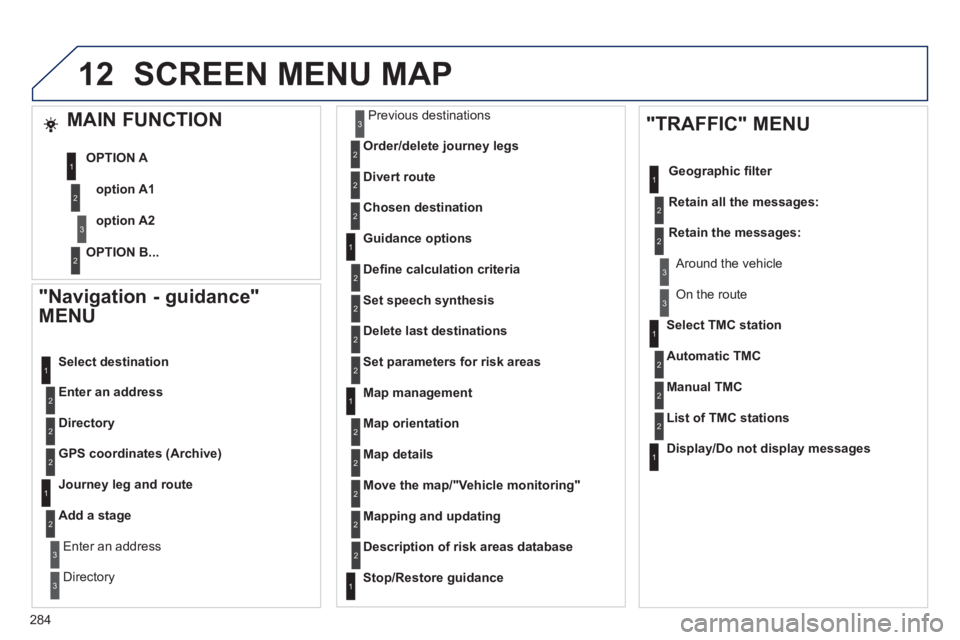
Select TMC station
Automatic TMC
Manual TMCList of TMC stations
Displa
y/Do not display messages
SCREEN MENU MAP
MAIN FUNCTION
option A1
option A2 OPTION A
OPTION B...
Map details
Move the map/"Vehicle monitoring"
Mapping and updating
Description of risk areas database
Stop/Restore guidance
"TRAFFIC" MENU
Geographic fi lter
Retain all the messa
ges:
Retain the messages:
Around the vehicle
On the route
Set
parameters for risk areas
1
2
3
2
1
2
2
2
1
2
2
3
3
1
1
3
3
2
2
2
2
1
3
1
1
2
2
2
2
2
2
2
2
2
2
2
1
2
Page 289 of 340
287
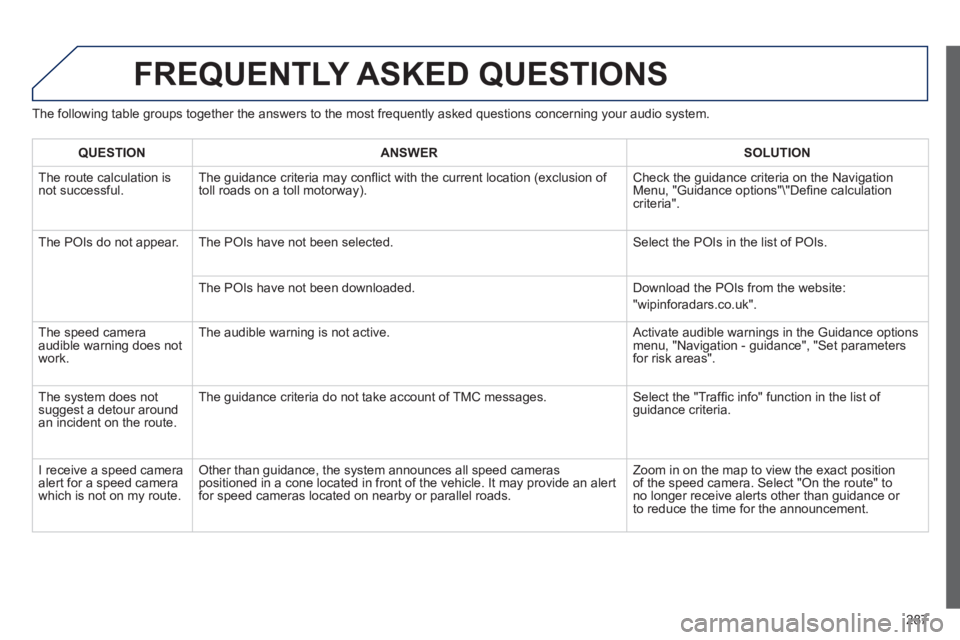
FREQUENTLY ASKED QUESTIONS
The following table groups together the answers to the most frequently asked questions concerning your audio system.
QUESTIONANSWER SOLUTION
The route calculation is not successful. The guidance criteria may confl ict with the current location (exclusion of
toll roads on a toll motorway). Check the guidance criteria on the Navigation Menu, "Guidance options"\"Defi ne calculation criteria".
The P
OIs do not appear. The POIs have not been selected. Select the POIs in the list of POIs.
Th
e POIs have not been downloaded. Download the POIs from the website:
"wipinforadars.co.uk".
The speed camera
audible warnin
g does not
work. The audible warnin
g is not active. Activate audible warnings in the Guidance options menu, "Navigation - guidance", "Set parameters
for risk areas".
The system does not
suggest a detour around an incident on the route. The guidance criteria do not take account o
f TMC messages. Select the "Traffi c info" function in the list of guidance criteria.
I receive a speed camera
alert for a speed camera
w
hich is not on my route.
Other than guidance, the system announces all speed cameras
positioned in a cone located in front of the vehicle. It may provide an alert for speed cameras located on nearby or parallel roads. Zoom in on the map to view the exact position
of the speed camera. Select "On the route" to no longer receive alerts other than guidance or
to reduce the time for the announcement.
Page 296 of 340
294
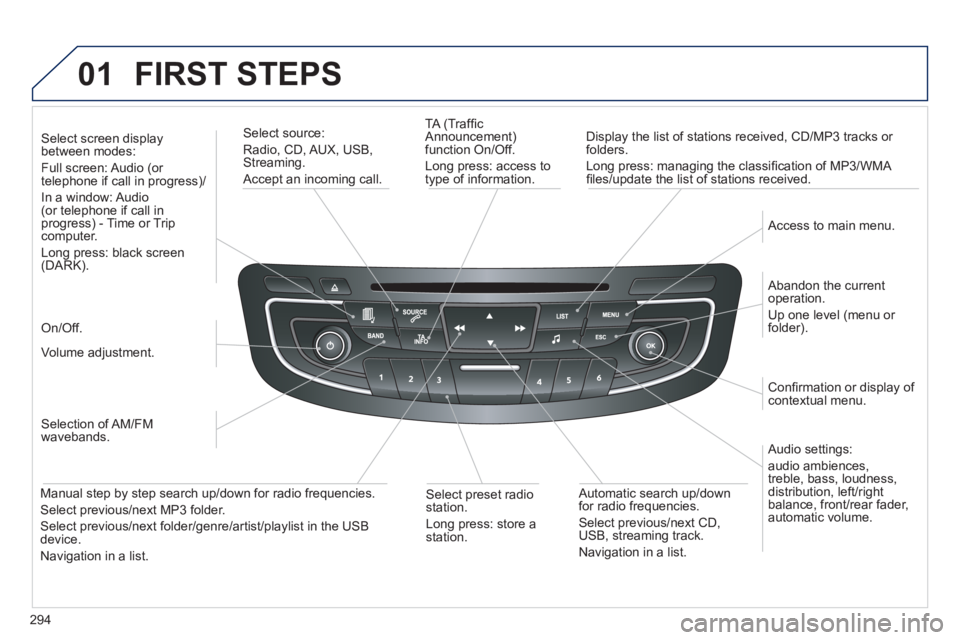
01 FIRST STEPS
TA (Traffi c
Announcement)
function On/Off.
Long press: access to
type of information.
Displa
y the list of stations received, CD/MP3 tracks or
folders.
Lon
g press: managing the classifi cation of MP3/WMA fi les/update the list of stations received.
Select source:
Radio, CD, AUX, USB, Streaming.
Accept an incoming call.
Audio settings:
audio ambiences,
treble, bass, loudness,
distribution, left/ri
ght
balance, front/rear fader, automatic volume.
Abandon the current
operation.
Up one level (menu or folder).
Access to main menu.
Selection of AM/FM
wavebands.
Select screen display between modes:
Full screen: Audio (or
telephone if call in progress)/
In
a window: Audio (or telephone if call in
progress) - Time or Tripcomputer.
Long press: black screen (DARK).
Volume adjustment.
Select preset radio
station.
Long press: store astation.
Automatic search up/down
for radio frequencies.
Select previous/next CD,USB, streaming track.
Navigation in a list.
Manual step b
y step search up/down for radio frequencies.
Select previous/next MP3 folder.
Select previous/next folder/genre/artist/playlist in the USB device.
Navigation in a list.
On/Off.
Confi rmation or displa
y of contextual menu.
Page 328 of 340
326
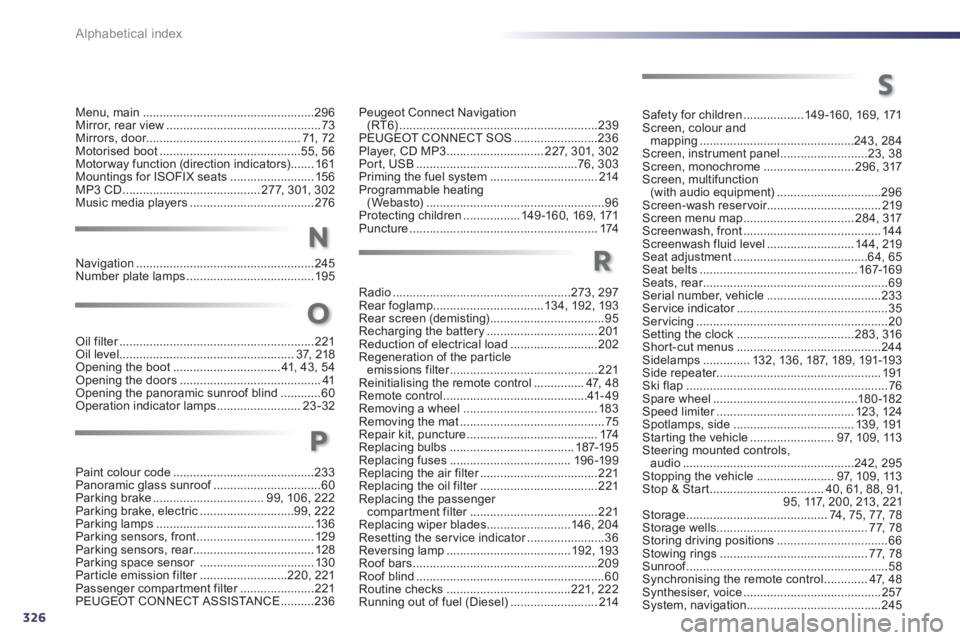
Alphabetical index
Menu, main...................................................296Mirror, rear view..............................................73Mirrors, door..............................................r71,72Motorised boot ..........................................55, 56Motorway function (direction indicators).......161Mountings for ISOFIX seats .........................156MP3 CD .........................................277, 301, 302Music media players.....................................276
Navigation.....................................................245Number plate lamps......................................195
Peugeot Connect Navigation (RT6)...........................................................239PEUGEOT CONNECT SOS.........................236Player, CD MP3 .............................227,301, 302Port, USB................................................76, 303Priming the fuel system ................................214Programmable heating(Webasto).....................................................96Protecting children.................149 -160, 169, 171Puncture........................................................174
Radio.....................................................273, 297Rear foglamp.................................13 4, 192, 193Rear screen (demisting)..................................95Recharging the battery .................................201Reduction of electrical load ..........................202Regeneration of the particleemissions filter............................................r221Reinitialising the remote control...............47, 48Remote control...........................................41-49Removing a wheel........................................183Removing the mat ...........................................75Repair kit, puncture.......................................174Replacing bulbs .....................................187-195Replacing fuses ....................................196-199Replacing the air filter...................................r221Replacing the oil filter...................................r221Replacing the passenger compartment filter......................................r221Replacing wiper blades.........................146, 204Resetting the service indicator.......................r36Reversing lamp .....................................192, 193Roof bars .......................................................209Roof blind ........................................................60Routine checks.....................................221,222Running out of fuel (Diesel)..........................214
Safety for children ..................149-160, 169, 171Screen, colour and
mapping ..............................................243, 284Screen, instrument panel..........................23,38Screen, monochrome...........................296,317Screen, multifunction(with audio equipment)...............................296Screen-wash reservoir..................................219Screen menu map .................................284,317Screenwash, front .........................................144Screenwash fluid level .......................... 144, 219Seat adjustment ........................................64,65Seat belts...............................................167-169Seats, rear.......................................................r69Serial number, vehicle..................................233Ser vice indicator.............................................r35Servicing .........................................................20Setting the clock ...................................283, 316Shor t-cut menus ...........................................244Sidelamps ..............132, 136, 187,189, 191-193Side repeater................................................. 191Ski flap............................................................76Spare wheel...........................................180-182Speed limiter.........................................r123,124Spotlamps, side....................................139, 191Starting the vehicle .........................97, 109,113Steering mounted controls,audio...................................................242, 295Stopping the vehicle.......................97, 109,113Stop & Start..................................40,61, 88, 91, 95,117,200,213, 221Storage..........................................74,75,77,78Storage wells.............................................77,78Storing driving positions.................................66Stowing rings ............................................77,78Sunroof............................................................f58Synchronising the remote control.............47,48Synthesiser, voice.........................................257System, navigation ........................................245
N
R
Oil filter..........................................................r221Oil level ....................................................37,218Opening the boot ................................ 41, 43,54Opening the doors .......................................... 41Opening the panoramic sunroof blind............60Operation indicator lamps.........................23-32
O
Paint colour code ..........................................233Panoramic glass sunroof................................f60Parking brake.................................99, 106, 222Parking brake, electric............................99, 222Parking lamps...............................................136Parking sensors, front...................................129Parking sensors, rear....................................r128Parking space sensor ..................................130Particle emission filter..........................r220, 221Passenger compartment filter......................r221PEUGEOT CONNECT ASSISTA NCE..........236
P
S
Page 333 of 340
.
331
Visual search
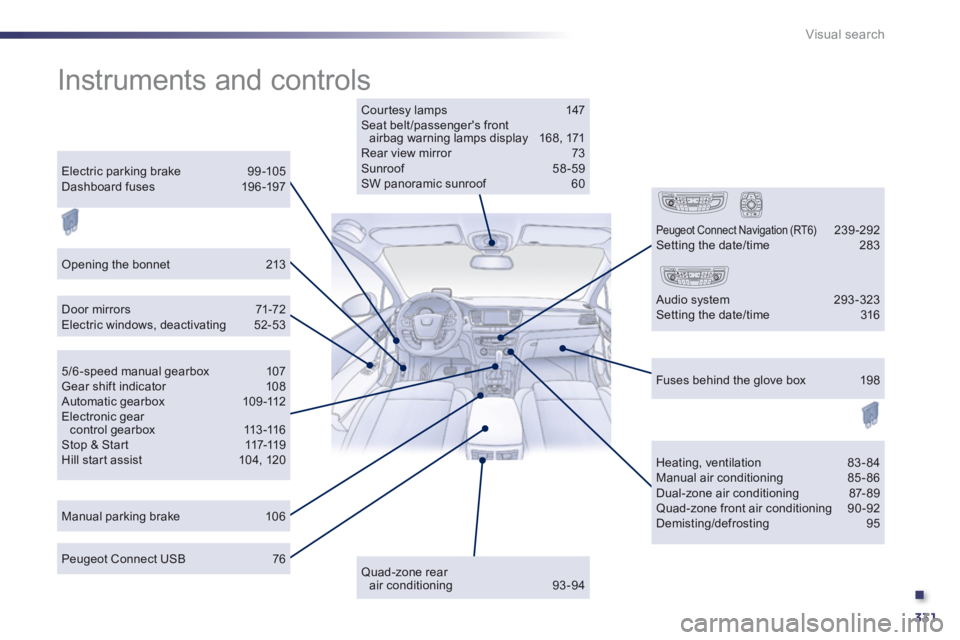
Instruments and controls
Courtesy lamps 147 Seat belt/passenger's frontairbag warning lamps display 168, 171 Rear view mirror 73Sunroof 58-59 SW panoramic sunroof 60
Door mirrors 71-72Electric windows, deactivating 52-53
Manual parking brake 106
Heating, ventilation 83-84 Manual air conditioning 85-86 Dual-zone air conditioning 87- 89 Quad-zone front air conditioning 90-92 Demisting/defrosting 95
Peugeot Connect USB 76
Electric parking brake 99 -105Dashboard fuses 196 -197
5/6 -speed manual gearbox 107 Gear shift indicator 108 Automatic gearbox 109-112Electronic gearcontrol gearbox 113-116Stop & Star t 117-119Hill start assist 104, 120
Fuses behind the glove box 198
Quad-zone rearair conditioning 93-94
Peugeot Connect Navigation (RT6) 239-292 Setting the date/time 283
Audio system 293-323 Setting the date/time 316
Opening the bonnet 213