instrument panel Peugeot 508 2013 - RHD (UK, Australia) Service Manual
[x] Cancel search | Manufacturer: PEUGEOT, Model Year: 2013, Model line: 508, Model: Peugeot 508 2013Pages: 340, PDF Size: 14.59 MB
Page 129 of 340
4
127
Driving
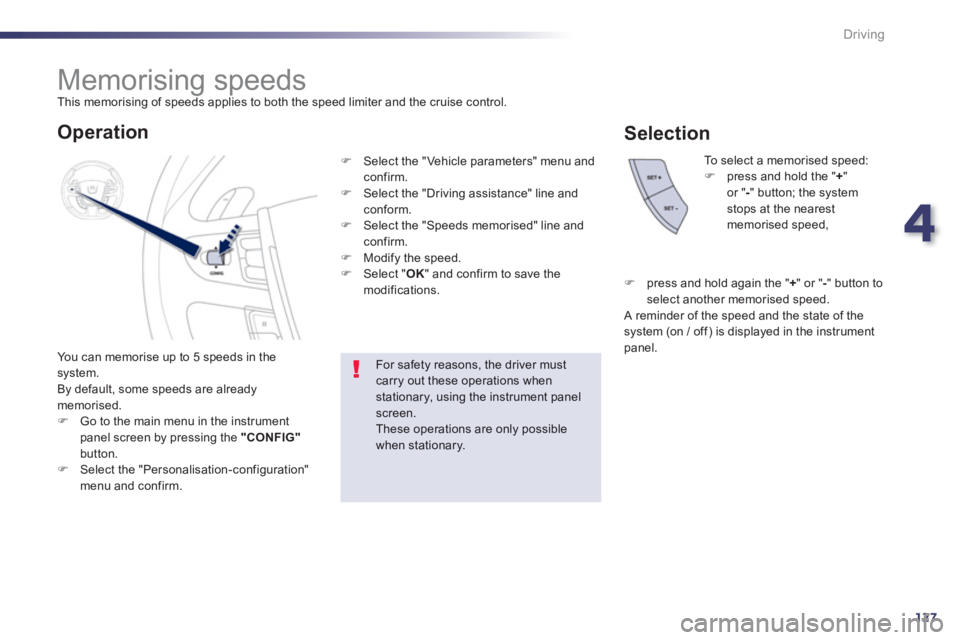
Memorising speeds
This memorising of speeds applies to both the speed limiter and the cruise control.
You can memorise u
p to 5 speeds in the system.
By default, some speeds are already memorised.FGo to the main menu in the instrument
panel screen by pressing the "CONFIG"button.FSelect the "Personalisation-configuration" menu and confirm.
To select a memorised speed:Fpress and hold the "+"or " -" button; the systemstops at the nearest memorised speed,
For safety reasons, the driver mustcarry out these operations when stationary, using the instrument panel screen.These operations are only possible when stationary.
Operation
FSelect the "Vehicle parameters" menu andconfirm.FSelect the "Driving assistance" line and conform.
FSelect the "Speeds memorised" line andconfirm.FModify the speed. FSelect " OK" and confirm to save the
modifications.
Selection
F
press and hold again the "+ " or " - " button toselect another memorised speed.
A reminder of the speed and the state of thesystem (on / off) is displayed in the instrument
panel.
Page 130 of 340
128
Driving
Speed limiter
System which prevents the vehicle fromexceeding the speed programmed by the driver.
When the programmed speed limit is reached,
pressing the accelerator pedal no longer has any effect unless it is pressed firmly,
which allows you to temporarily exceed theprogrammed speed.
To return to the programmed speed, simply
slow down to a speed below the programmed speed by releasing the accelerator.
The speed limiter is switched onmanuall
y:
it requires a programmed speed of at least
20 mph (30 km/h).
The speed limiter is
switched off by manual foperation of the control.
The pro
grammed speed remains in the memorywhen the ignition is switched off.
The speed limiter cannot, in anycircumstances, replace the need to obser ve speed limits, nor can it replacethe need for vigilance and responsibility on the par t of the driver.
This information also appears in the head-up display.
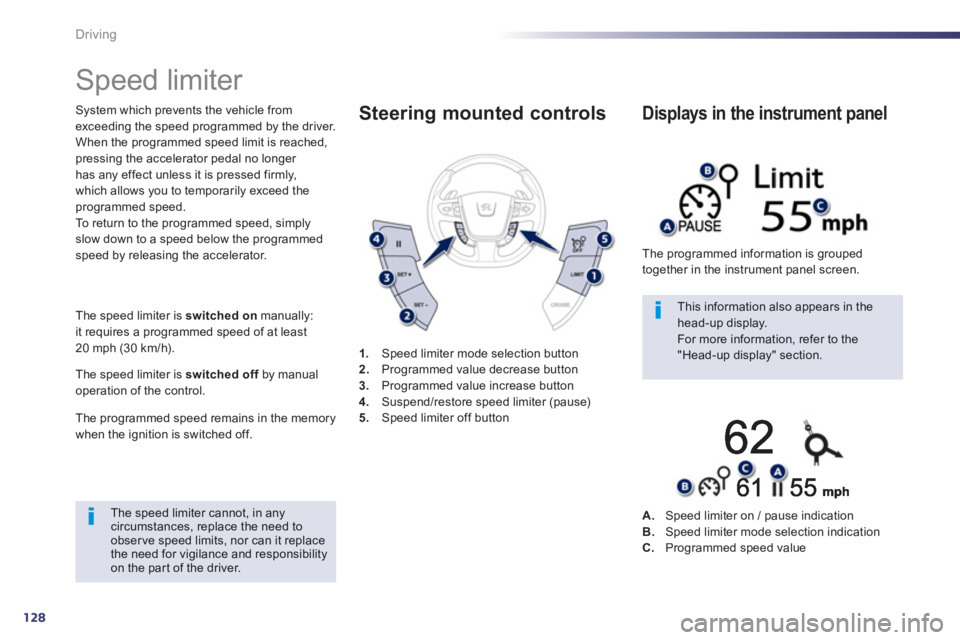
For more information, refer to the "Head-up display" section. 1.Speed limiter mode selection button
2. Programmed value decrease button3.
Programmed value increase button4.Suspend/restore speed limiter (pause)5.Speed limiter off button
Steering mounted controls
The programmed information is grouped
together in the instrument panel screen.
Displays in the instrument panel
A.Speed limiter on / pause indicationB.Speed limiter mode selection indicationC.Programmed speed value
Page 132 of 340
130
Driving
Cruise control
System which automatically maintains thespeed of the vehicle at the value programmed
by the driver, without any action on the
accelerator pedal. The cruise control is switched on
manually:
it requires a minimum vehicle speed of 25 mph(40 km/h) and the engaging:
- 4th gear or higher on a manual gearbox,
- 2nd
gear or higher on an electronic gear control gearbox or automatic gearbox,
- position A
on the electronic gear control gearbox or Don the automatic gearbox.
Th
e cruise control is switched offmanuallyfor by pressing the brake or clutch pedal or
on triggering of the ESC system for safety reasons.
It is possible to exceed the programmed speed
temporarily by pressing the accelerator pedal. To return to the programmed speed, simply release the accelerator pedal.
Switching off the ignition cancels any programmed speed value. 1
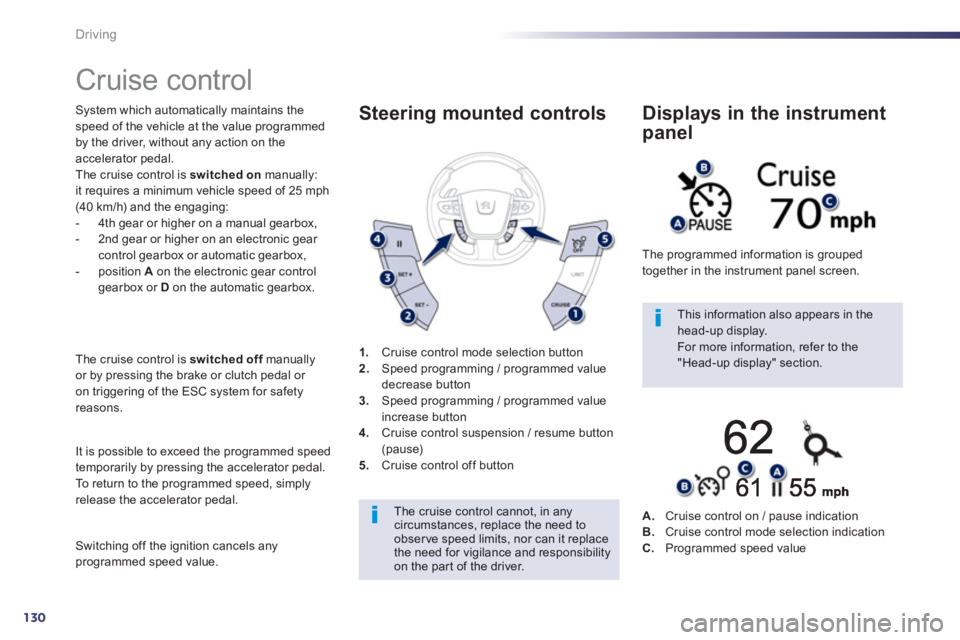
.Cruise control mode selection button
2. Speed programming / programmed value decrease button 3.
Speed programming / programmed value
increase button 4.Cruise control suspension / resume button (pause)5.Cruise control off button
Steering mounted controls
The cruise control cannot, in anycircumstances, replace the need to observe speed limits, nor can it replace the need for vigilance and responsibilityon the par t of the driver.
This information also appears in the head-up display.
For more information, refer to the "Head-up display" section. The pro
grammed information is grouped
together in the instrument panel screen.
Displays in the instrument
panel
A.Cruise control on / pause indicationB.Cruise control mode selection indication
C.Programmed speed value
Page 135 of 340
4
133
Driving
In bad weather or in winter, ensure that the sensors are not covered with mud, ice or snow. When reverse gear isengaged, an audible signal (long beep)indicates that the sensors may be dirty.
Cer tain sound sources (motorcycle, lorry, pneumatic drill, etc.) may trigger the audible signals of the parkingsensor system. In th
e event of a malfunction
of the system, when reversegear is engaged this warning
lamp is displayed in the instrument panel
and/or a message appears in the screen,
accompanied by an audible signal (short beep).
Contact a PEUGEOT dealer or a qualified
wor
kshop.
Operating fault
In addition to the rear parking sensors, the front
parking sensors are triggered when an obstacle
is detected in front and the speed of the vehicle
is still below 6 mph
(10 km/h).
The front parking sensors are interrupted if
the vehicle stops for more than three seconds
in
forward gear, if no fur ther obstacles are
detected or when the speed of the vehicle exceeds 6 mph (10 km/h).
Front par king sensors
The function will be deactivated automatically if a trailer is being towedor a bicycle carrier is fitted (vehicle fitted with a towbar or bicycle carrier recommended by PEUGEOT).
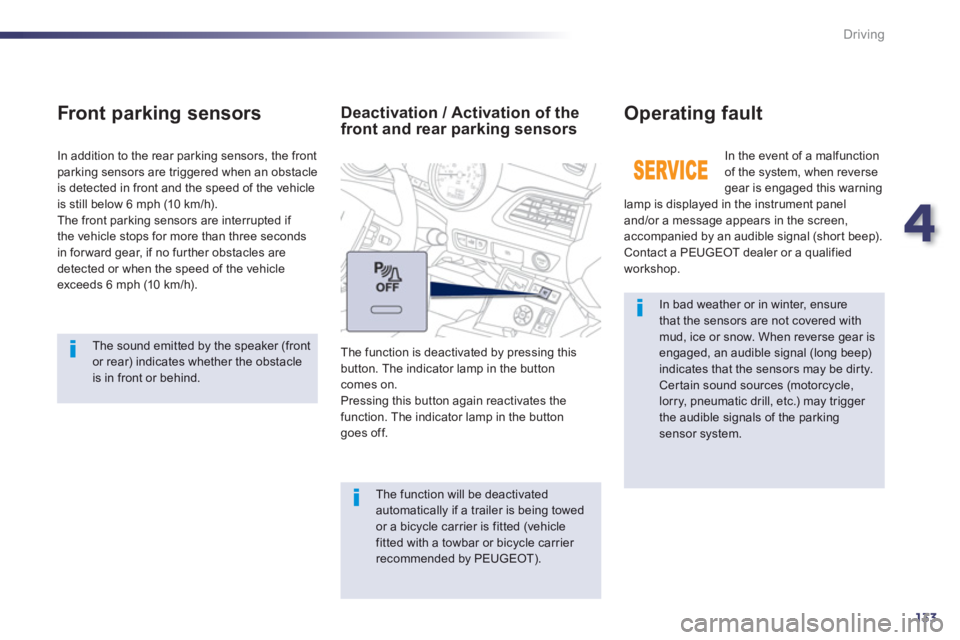
Deactivation / Activation of thefront and rear parking sensors
The function is deactivated by pressing this
button. The indicator lamp in the button
comes on.Pressing this button again reactivates thefunction. The indicator lamp in the button
goes off.
The sound emitted by the speaker (frontor rear) indicates whether the obstacle is in front or behind.
Page 139 of 340
5
137
Visibility
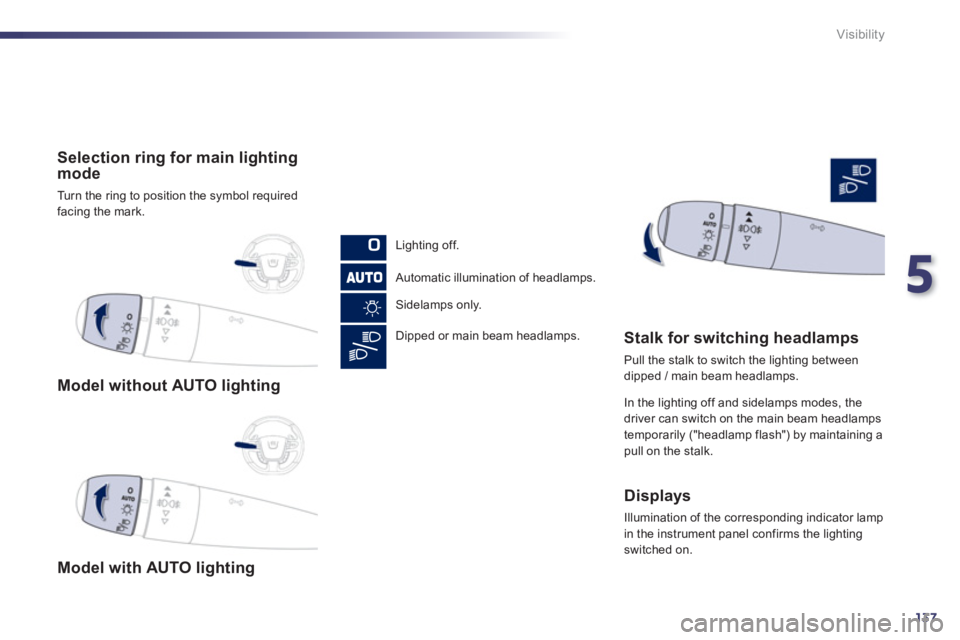
Model without AUTO lighting
Model with AUTO lighting
Selection ring for main lighting mode
Turn the ring to position the symbol required
facing the mark.
Li
ghting off.
Automatic illumination of headlamps.
Sidelamps onl
y.
Dipped or main beam headlamps.
Stalk for switching headlamps
Pull the stalk to switch the lighting between
dipped / main beam headlamps.
In the li
ghting off and sidelamps modes, the driver can switch on the main beam headlamps
temporaril
y ("headlamp flash") by maintaining apull on the stalk.
Displays
Illumination of the corresponding indicator lamp
in the instrument panel confirms the lighting switched on.
Page 142 of 340
140
Visibility
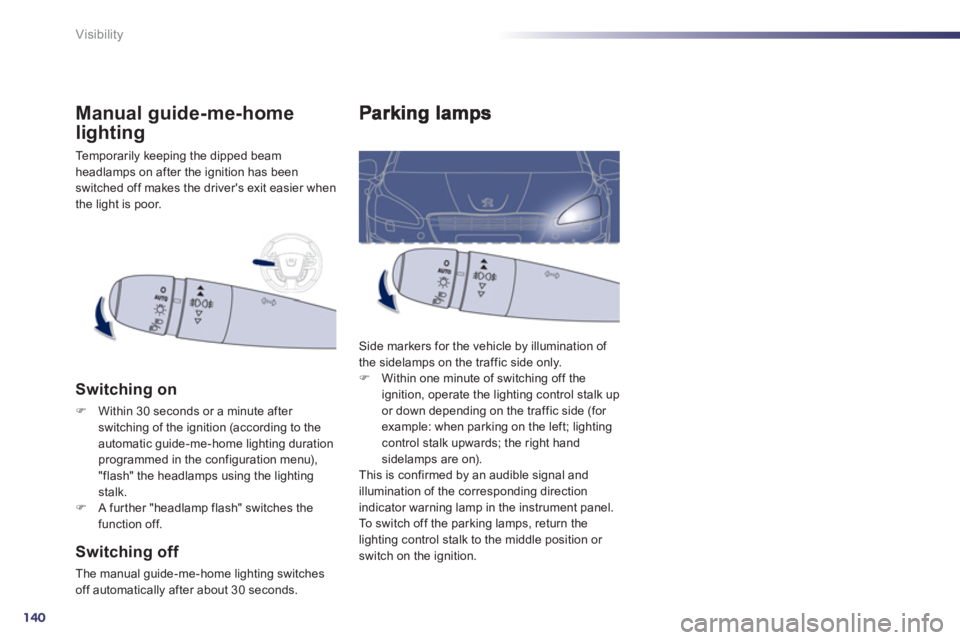
Side markers for the vehicle by illumination of
the sidelamps on the traffic side only. F Within one minute of switching off the
ignition, operate the lighting control stalk upor down depending on the traffic side (for example: when parking on the left; lightingcontrol stalk upwards; the right hand sidelamps are on).
This is confirmed by an audible signal and
illumination of the corresponding direction
indicator warning lamp in the instrument panel.
To switch off the parking lamps, return the
lighting control stalk to the middle position or
switch on the ignition.
Temporarily keeping the dipped beam
headlamps on after the ignition has beenswitched off makes the driver's exit easier when
the light is poor.
Manual guide-me-home
lighting
Switching on
FWithin 30 seconds or a minute after
switching of the ignition (according to theautomatic guide-me-home lighting durationprogrammed in the configuration menu), "flash" the headlamps using the lighting stalk.FA further "headlamp flash" switches the
function off.
Switching off
The manual guide-me-home lighting switches
off automatically after about 30 seconds.
Page 143 of 340
5
141
Visibility
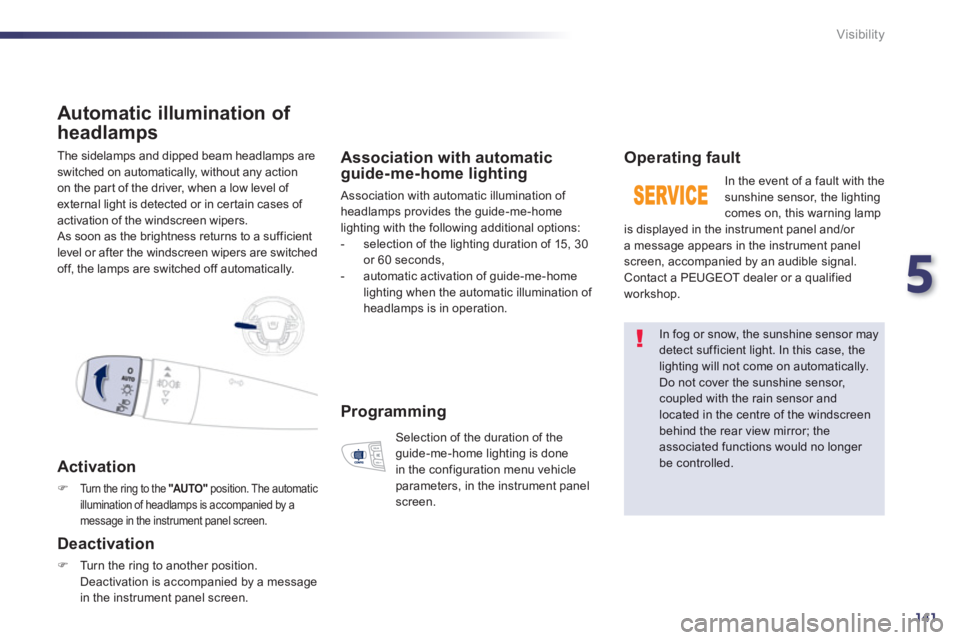
The sidelamps and dipped beam headlamps are
switched on automatically, without any action
on the part of the driver, when a low level of external light is detected or in certain cases of
activation of the windscreen wipers.
As soon as the brightness returns to a sufficient
level or after the windscreen wipers are switched
o
ff, the lamps are switched off automatically.
Automatic illumination of
headlam
ps
Activation
FTurn the ring to the "AUTO"position. The automatic
illumination of headlamps is accompanied by a message in the instrument panel screen.
Deactivation
FTurn the ring to another position.
Deactivation is accompanied by a message
in the instrument panel screen.
Association with automaticguide-me-home lighting
Association with automatic illumination of headlamps provides the guide-me-home lighting with the following additional options:
- selection of the lighting duration of 15, 30
or 60 seconds,
- automatic activation o
f guide-me-home lighting when the automatic illumination of
headlamps is in operation.
Operating fault
In the event of a fault with the sunshine sensor, the lighting comes on, this warning lamp
is displayed in the instrument panel and/or
a message appears in the instrument panel screen, accompanied by an audible signal.
Contact a PEUGEOT dealer or a qualified
workshop.
In fog or snow, the sunshine sensor maydetect sufficient light. In this case, the lighting will not come on automatically. Do not cover the sunshine sensor,coupled with the rain sensor and located in the centre of the windscreenbehind the rear view mirror; theassociated functions would no longer be controlled.
Programming
Selection of the duration of theguide-me-home lighting is done
in the configuration menu vehicle
parameters, in the instrument panel screen.
Page 145 of 340
5
143
Visibility
Exterior welcome
lighting
Remote switching on of the lighting makes your
approach to the vehicle easier in poor light. It is
activated according to the level of light detected
by the sunshine sensor.
Switching on
Switchin
g off
The exterior welcome lighting switches off
automatically after a set time, when the ignitionis switched on or on locking the vehicle.
Programming
The lighting duration is selected
via the instrument panel screen
configuration menu.
FPress the open padlock on the
remote control.
The dipped beam headlamps
and the sidelamps come on; your
vehicle is also unlocked.
Door mirror
spotlamps
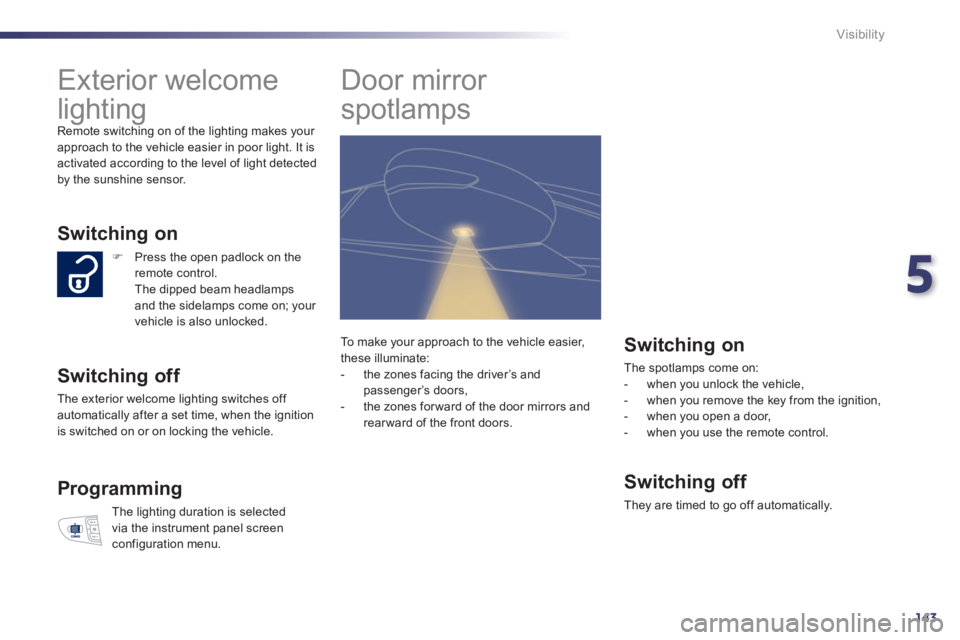
Switching on
The spotlamps come on:
- when you unlock the vehicle,
- when you remove the key from the ignition,
- when you open a door,
- when you use the remote control.
Switching off
They are timed to go off automatically. To m a k e
your approach to the vehicle easier,
these illuminate:
- the zones facing the driver’s and
passenger’s doors,
- the zones forward of the door mirrors andrearward of the front doors.
Page 146 of 340
144
Visibility
Manual adjustment
of halogen
headlamps
Automatic adjustment of xenon
headlamps
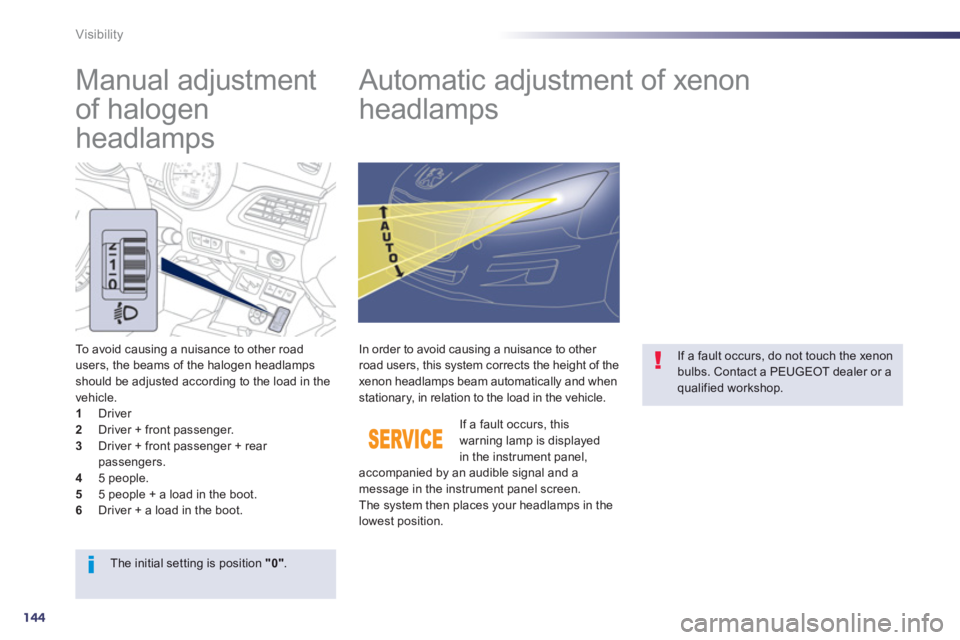
To avoid causing a nuisance to other road
users, the beams of the halogen headlamps should be adjusted according to the load in the
vehicle.1 Driver 2
Driver + front passenger.3
Driver + front passenger + rear passengers.4
5 people.5
5 people + a load in the boot. 6
Driver + a load in the boot. If a fault occurs
, this warning lamp is displayedin the instrument panel,
accompanied by an audible signal and a
message in the instrument panel screen.
The s
ystem then places your headlamps in the lowest position.
In order to avoid causing a nuisance to other road users, this system corrects the height of the
xenon headlamps beam automatically and when
stationary, in relation to the load in the vehicle.
If a fault occurs, do not touch the xenonbulbs. Contact a PEUGEOT dealer or a qualified workshop.
The initial setting is position "0".
Page 147 of 340
5
145
Visibility
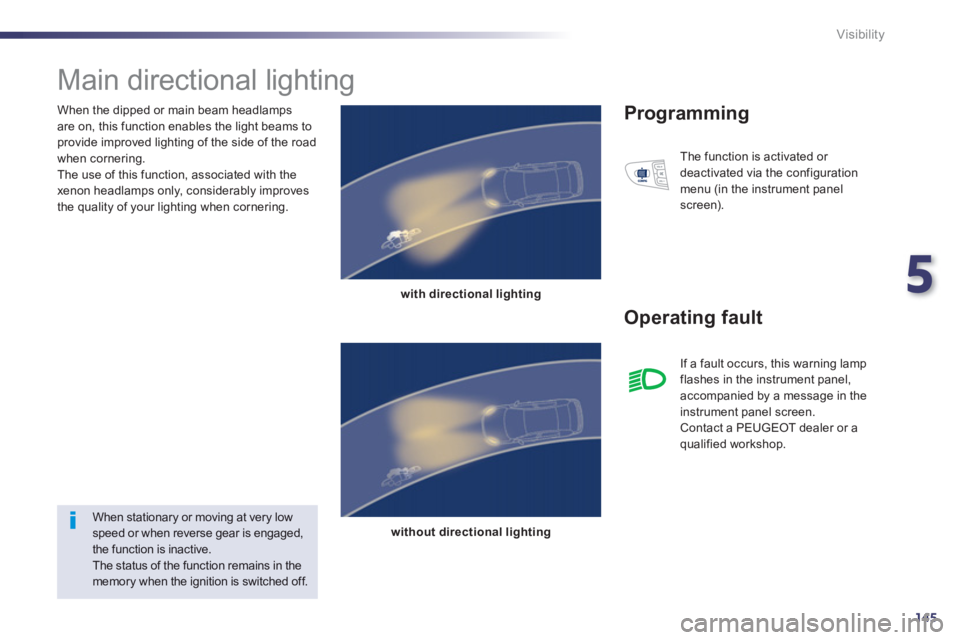
When the dipped or main beam headlamps
are on, this function enables the light beams toprovide improved lighting of the side of the road
when cornering.
The use of this function, associated with the
xenon headlamps only, considerably improves
the quality of your lighting when cornering.
Main directional lighting
with directional lighting
without directional lighting
Programming
Operating fault
The function is activated or
deactivated via the configuration
menu (in the instrument panel
screen).
When stationary or moving at very lowspeed or when reverse gear is engaged,the function is inactive.
The status of the function remains in the memory when the ignition is switched off. I
f a fault occurs, this warning lamp flashes in the instrument panel,
accompanied by a message in the
instrument panel screen.
Contact a PEUGEOT dealer or a qualified workshop.