steering Peugeot 508 2018 Owner's Guide
[x] Cancel search | Manufacturer: PEUGEOT, Model Year: 2018, Model line: 508, Model: Peugeot 508 2018Pages: 320, PDF Size: 10.09 MB
Page 137 of 320
135
Then, from D or R:
F R elease the brake pedal.
F
A
ccelerate progressively to automatically
release the electric parking brake.
F
W
ith the parking brake released, the vehicle
then moves off.
In severe wintry conditions (temperature
below -23°C), it is recommended that the
engine be allowed to run for a few minutes
before moving off, to ensure the correct
operation and durability of the engine and
gearbox.
Stopping the vehicle
Whatever the state of the gearbox when the
ignition is switched off, mode P is engaged
automatically and immediately.
However, in mode N , mode P will be engaged
after a duration of 5 seconds (allowing for the
process of putting the vehicle to free-wheeling).
Check that mode P has been engaged and that
the electric parking brake has been applied
automatically; if not, apply it manually.
Gearbox operating fault
The corresponding indicator lamps in
the selector and the electric parking
brake control lever must be on, as well
as those in the instrument panel.
Hill start assist
System which keeps your vehicle immobilised
temporarily (approximately 2 seconds) when
starting on a gradient, the time it takes to
move your foot from the brake pedal to the
accelerator pedal.
This system only operates when:
-
t
he vehicle has been brought to a complete
stop, with your foot on the brake pedal,
-
c
ertain slope conditions are met,
-
w
ith the driver’s door closed.
This is signalled by the illumination
of this warning lamp, accompanied
by the display of a message and an
audible signal, when the ignition is
switched on.
Go to a PEUGEOT dealer or a qualified
workshop.
Do not drive faster than 62 mph (100
km/h),
keeping to the speed limit.
The gearbox switches to back-up mode: mode
D is locked in third gear, the steering-mounted
control paddles are inoperative, mode M is no
longer available. You may feel a pronounced
jolt when engaging reverse. This does not
present any risk for the gearbox.
Selector operating fault
Minor malfunction
You are alerted by this warning lamp
lighting up, accompanied by the
display of a message and an audible
signal.
Drive cautiously and go to a PEUGEOT or a
qualified workshop.
Major malfunction
You are alerted by the illumination of
this warning lamp.
Stop as soon as it is safe to do so, away
from the traffic, and call a PEUGEOT
dealer or a qualified workshop.
When the ignition is switched off, the
gearbox goes into mode P automatically.
In certain cases, the selector lamps may not
come on, but the state of the gearbox is still
displayed in the instrument panel.
6
Driving
Page 139 of 320
137
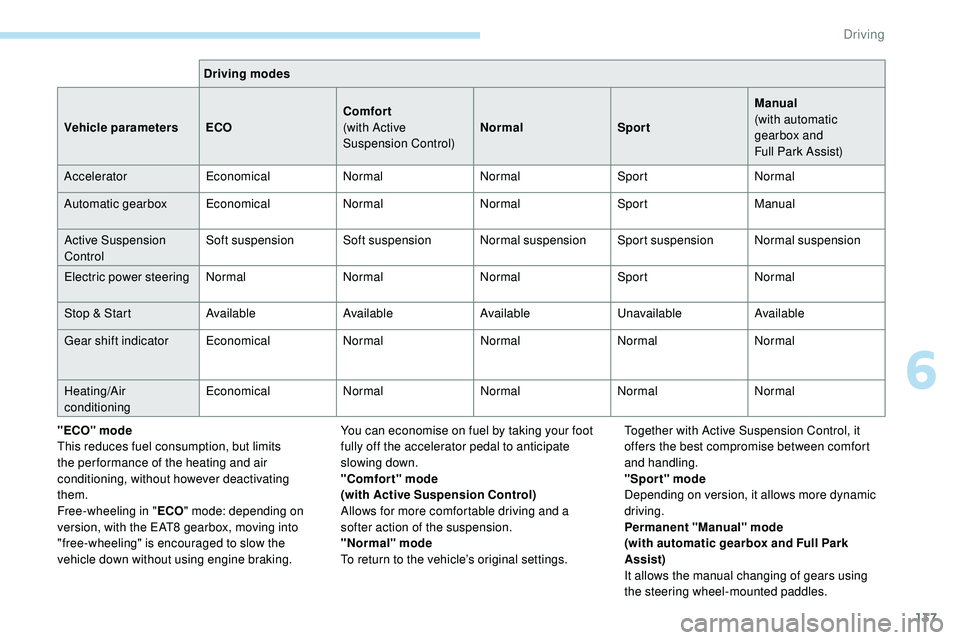
Driving modes
Vehicle parameters ECOComfort
(with Active
Suspension Control)Normal
SportManual
(with automatic
gearbox and
Full
Park Assist)
Accelerator EconomicalNormalNormalSportNormal
Automatic gearbox EconomicalNormalNormalSportManual
Active Suspension
Control Soft suspension Soft suspension Normal suspension
Sport suspensionNormal suspension
Electric power steering NormalNormalNormalSportNormal
Stop & Start AvailableAvailableAvailableUnavailableAvailable
Gear shift indicator EconomicalNormalNormalNormalNormal
Heating/Air
conditioning Economical
NormalNormalNormalNormal
"ECO" mode
This reduces fuel consumption, but limits
the performance of the heating and air
conditioning, without however deactivating
them.
Free-wheeling in " ECO" mode: depending on
version, with the EAT8 gearbox, moving into
"free-wheeling" is encouraged to slow the
vehicle down without using engine braking. You can economise on fuel by taking your foot
fully off the accelerator pedal to anticipate
slowing down.
"Comfort" mode
(with Active Suspension Control)
Allows for more comfortable driving and a
softer action of the suspension.
"Normal" mode
To return to the vehicle’s original settings.Together with Active Suspension Control, it
offers the best compromise between comfort
and handling.
"Sport" mode
Depending on version, it allows more dynamic
driving.
Permanent "Manual" mode
(with automatic gearbox and Full Park
Assist)
It allows the manual changing of gears using
the steering wheel-mounted paddles.
6
Driving
Page 141 of 320
139
A time counter calculates the time spent in
STOP mode during the journey. It is reset to
zero every time the ignition is switched on with
the "START/STOP " button.
For your comfort, during parking
manoeuvres, STOP mode is not available
for a few seconds after coming out of
reverse gear or turning the steering wheel.
The Stop & Start does not affect the
operation of vehicle systems, such as
braking, etc.
Special cases: STOP mode not
available
STOP mode is not activated when:
- t he vehicle is on a steep slope
(rising
or
falling),
-
t
he driver's door is open,
-
t
he driver's seat belt is not fastened,
-
t
he vehicle has not exceeded 6 mph
(10
km/h) since the last engine start,
-
t
his is necessary to maintain a comfortable
In this case, this indicator lamp flashes
for a few seconds, then goes off.
Going into engine START mode
This indicator lamp goes off and the
engine restarts automatically:
-
w
ith a manual gearbox , when you fully
depress the clutch pedal,
-
w
ith an automatic gearbox:
•
g
ear selector in mode D or M , when you
release the brake pedal,
•
o
r gear selector in mode N and brake
pedal released, when you place the gear
selector in mode D or M ,
•
o
r when you engage reverse.
Special cases: START mode
activated automatically
As a safety measure or to maintain comfort
levels in the vehicle, START mode is activated
automatically when:
-
y
ou open the driver's door,
-
y
ou unfasten the driver's seat belt,
-
w
ith a manual gearbox, the vehicle speed
exceeds 2.5 mph (4
km/h),
-
w
ith an automatic gearbox in mode N , the
vehicle speed exceeds 0.6 mph (1
km/h),
-
w
ith an automatic gearbox in mode D ,
release the brake pedal,
-
s
ome special conditions (battery charge,
engine temperature, braking assistance,
air conditioning setting, etc.) make this
necessary to ensure control of a system or
the vehicle.
In this case, this indicator lamp flashes
for a few seconds, then goes off.
Deactivation/Reactivation
In certain cases, such as the need to maintain
a comfortable temperature in the passenger
compartment, it may be useful to deactivate the
Stop & Start system.
This operation is perfectly normal.
This operation is perfectly normal.
•
a
t a speed below 12 mph (20
km/h)
for BlueHDi versions, or below 1 mph
(1
km/h) for the PureTech 180 and 225
versions, when you brake hard with the
gear selector in mode D ,
•
w
ith the vehicle stationary, when you
place the gear selector in position N .temperature in the passenger compartment,
-
d
emisting is active,
-
t
he exterior temperature is below 0°C or
above +35°C,
-
s
ome temporary conditions (battery charge,
engine temperature, braking assistance,
altitude, etc.) make this necessary to ensure
control of a system.
6
Driving
Page 143 of 320
141
The under-inflation detection system does
not replace the need for vigilance on the
part of the driver.
This system does not avoid the need to
check the tyre pressures (including the
spare wheel) every month as well as
before a long journey.
Driving with under-inflated tyres worsens
road-holding, lengthens braking distances,
causes premature wear of the tyres,
particularly in adverse conditions (heavy
loads, high speeds, long journeys).Driving with under-inflated tyres
increases fuel consumption.
The inflation pressures defined for your
vehicle can be found on the tyre pressure
label.
For more information on the
Identification markings , refer to the
corresponding section. Checking tyre pressures
This check should be done when the tyres
are "cold" (vehicle stopped for 1 hour or
after a journey of less than 6 miles (10 km)
at moderate speeds).
Other wise, add 0.3 bar to the pressures
shown on the label.
Snow chains
The system does not have to be
reinitialised after fitting or removing snow
chains.
Under-inflation alert
This is indicated by continuous
illumination of this warning lamp, an
audible signal and, depending on
equipment, the display of a message.
F
R
educe speed immediately, avoid excessive
steering movements and sudden braking.
F
S
top the vehicle as soon as it is safe to do so.
The loss of pressure detected does not
always cause visible bulging of the tyre.
Do not satisfy yourself with just a visual
check. F
I
f you have a compressor, such as the one
in the temporary puncture repair kit, check
the pressures of the four tyres when cold.
F
I
f it is not possible to make this check
immediately, drive carefully at reduced
speed.
or
F
I
n case of a puncture, use the temporary
puncture repair kit or the spare wheel
(depending on equipment).
The alert is kept active until the system is
reinitialised.
Reinitialisation
The system must be reinitialised after any
adjustment to the pressure of one or more
tyres, and after changing one or more wheels.
Before reinitialising the system, ensure
that the pressures of the four tyres
are correct for the conditions of use
of the vehicle and conform to the
recommendations on the tyre pressure
label.
The under-inflation alert can only be relied
on if the reinitialisation of the system has
been done with the pressures in the four
tyres correctly adjusted.
The under-inflation detection system
does not give a warning if a pressure is
incorrect at the time of reinitialisation.
6
Driving
Page 147 of 320
145
Recommendation
For more information on the Speed
limiter, Cruise control or Adaptive
cruise control , refer to the corresponding
sections.
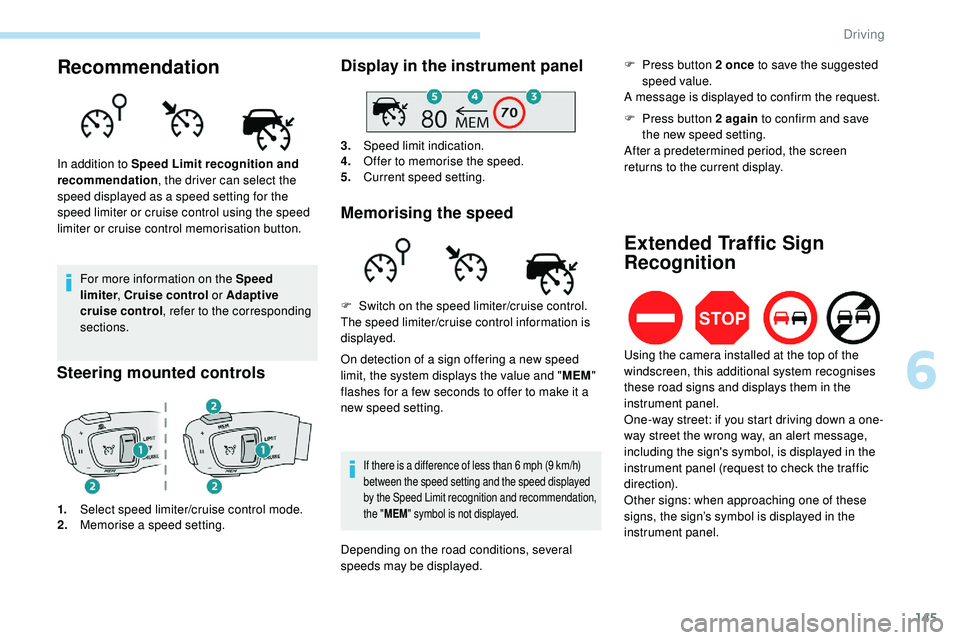
Steering mounted controls
1. Select speed limiter/cruise control mode.
2. Memorise a speed setting.
Display in the instrument panel
3.Speed limit indication.
4. Offer to memorise the speed.
5. Current speed setting.
Memorising the speed
In addition to Speed Limit recognition and
recommendation , the driver can select the
speed displayed as a speed setting for the
speed limiter or cruise control using the speed
limiter or cruise control memorisation button.
On detection of a sign offering a new speed
limit, the system displays the value and "MEM"
flashes for a few seconds to offer to make it a
new speed setting.
If there is a difference of less than 6 mph (9 km/h)
b etween the speed setting and the speed displayed
by the Speed Limit recognition and recommendation,
the " MEM " symbol is not displayed.
F Switch on the speed limiter/cruise control.
The speed limiter/cruise control information is
displayed.
Depending on the road conditions, several
speeds may be displayed. F
P
ress button 2 once
to save the suggested
speed value.
A message is displayed to confirm the request.
Extended Traffic Sign
Recognition
F Press button 2 again to confirm and save
the new speed setting.
After a predetermined period, the screen
returns to the current display.
Using the camera installed at the top of the
windscreen, this additional system recognises
these road signs and displays them in the
instrument panel.
One-way street: if you start driving down a one-
way street the wrong way, an alert message,
including the sign's symbol, is displayed in the
instrument panel (request to check the traffic
direction).
Other signs: when approaching one of these
signs, the sign’s symbol is displayed in the
instrument panel.
6
Driving
Page 148 of 320
146
This function is a driving aid that cannot,
in any circumstances, replace the driver’s
own vigilance nor compliance with the
highway code.
The actual signs always take priority over
the display by the system.
The signs must comply with the Vienna
Convention on road signs.
Speed limiter
This system prevents the vehicle
from exceeding the speed
programmed by the driver.
The speed limiter is switched on manually.
The minimum programmed speed is 19 mph
(30 km/h).
The programmed speed value remains in
the
system memory when the ignition is
switched off.
The speed limiter is a driving aid that
cannot, in any circumstances, replace the
need to obser ve speed limits or the need
for vigilance on the part of the driver.
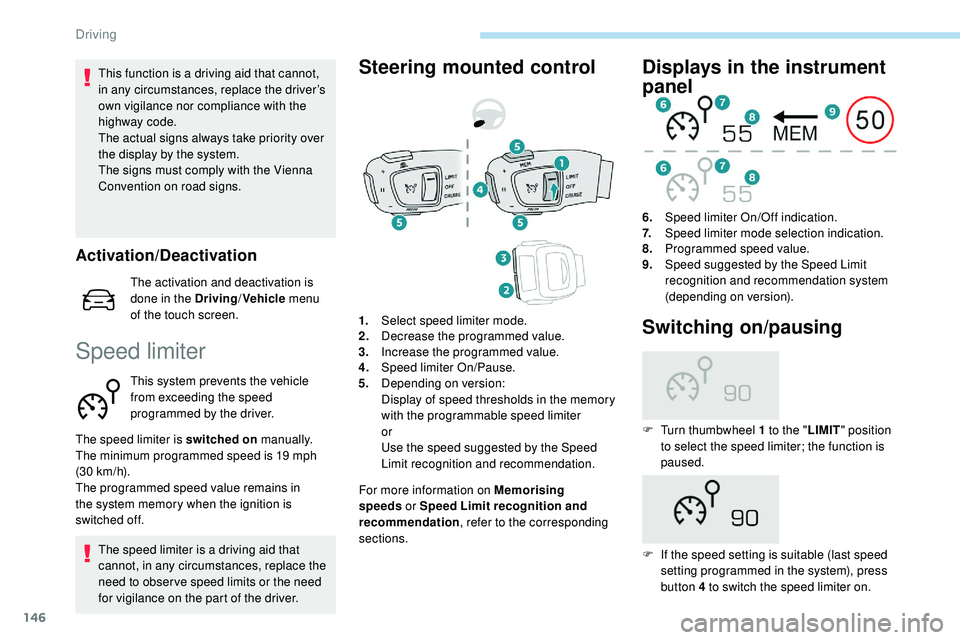
Steering mounted control
For more information on Memorising
speeds or Speed Limit recognition and
recommendation , refer to the corresponding
sections.
Displays in the instrument
panel
6. Speed limiter On/Off indication.
7. Speed limiter mode selection indication.
8. Programmed speed value.
9. Speed suggested by the Speed Limit
recognition and recommendation system
(depending on version).
1. Select speed limiter mode.
2. Decrease the programmed value.
3. Increase the programmed value.
4. Speed limiter On/Pause.
5. Depending on version:
Display of speed thresholds in the memory
with the programmable speed limiter
or
Use the speed suggested by the Speed
Limit recognition and recommendation.
Switching on/pausing
F Turn thumbwheel 1 to the " LIMIT" position
to select the speed limiter; the function is
paused.
F
I
f the speed setting is suitable (last speed
setting programmed in the system), press
button 4 to switch the speed limiter on.
Activation/Deactivation
The activation and deactivation is
done in the Driving /Vehicle menu
of the touch screen.
Driving
Page 150 of 320
148
The use of mats not approved by
PEUGEOT may inter fere with the
operation of the speed limiter.
To avoid any risk of jamming of the pedals:
-
e
nsure that the mat is positioned
c o r r e c t l y,
-
n
ever fit one mat on top of another.
Programmable cruise
control
System which automatically
maintains the cruising speed of the
vehicle at a setting programmed by
the driver, without any action on the
accelerator pedal. The cruise control remains active after
changing gear, regardless of the gearbox
type, on vehicles fitted with Stop & Start.
The operation of the cruise control can be
temporarily interrupted (pause):
-
b
y pressing control 4 or by pressing the
brake pedal,
-
a
utomatically, if operation of the dynamic
stability control system is triggered.
Switching off the ignition cancels any
programmed speed setting.
The cruise control system is a driving aid
that cannot, in any circumstances, replace
the need to obser ve speed limits, nor the
need for vigilance on the part of the driver.
As a safety measure, you are advised to
keep your feet near the pedals at all times.
With a manual gearbox, it requires the
engagement of third gear or higher.
With an automatic gearbox, it requires the
engagement of the selector in mode D or of
second gear or higher in mode M
.
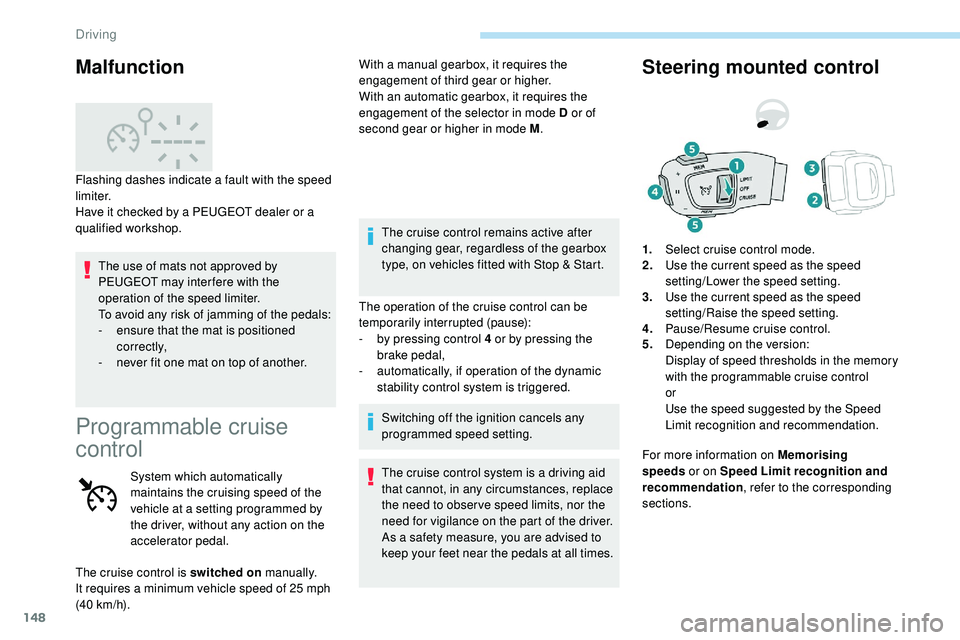
Steering mounted control
For more information on Memorising
speeds or on Speed Limit recognition and
recommendation , refer to the corresponding
sections. 1. Select cruise control mode.
2. Use the current speed as the speed
setting/Lower the speed setting.
3. Use the current speed as the speed
setting/Raise the speed setting.
4. Pause/Resume cruise control.
5. Depending on the version:
Display of speed thresholds in the memory
with the programmable cruise control
or
Use the speed suggested by the Speed
Limit recognition and recommendation.
Malfunction
Flashing dashes indicate a fault with the speed
limiter.
Have it checked by a PEUGEOT dealer or a
qualified workshop.
The cruise control is switched on manually.
It requires a minimum vehicle speed of 25 mph
(40
km/h).
Driving
Page 153 of 320
151
Memorising speeds
Linked to the speed limiter and programmable
cruise control, this function allows speed limits
to be registered which will then be suggested
as settings for these two systems.
You can memorise several speed settings for
each system.
By default, some speed settings are already
memorised.As a safety measure, the driver must
only modify the speed settings when
stationary.
Changing a speed setting
From the Driving/Vehicle menu of
the touch screen, select " Driving
functions ", then "Memorised speed
settings ".
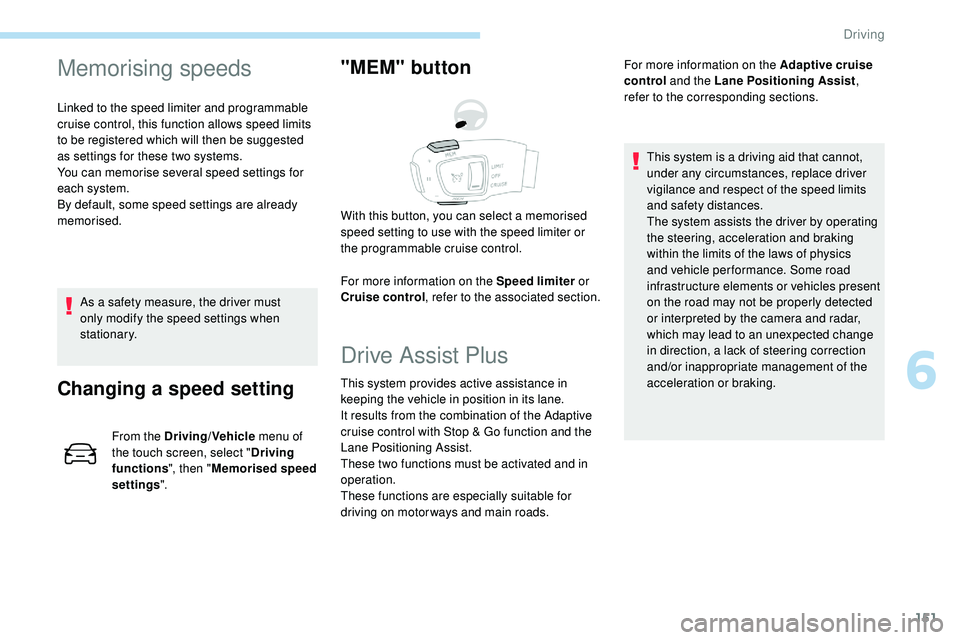
"MEM" button
For more information on the Speed limiter or
Cruise control , refer to the associated section.
With this button, you can select a memorised
speed setting to use with the speed limiter or
the programmable cruise control.
Drive Assist Plus
This system provides active assistance in
keeping the vehicle in position in its lane.
It results from the combination of the Adaptive
cruise control with Stop & Go function and the
Lane Positioning Assist.
These two functions must be activated and in
operation.
These functions are especially suitable for
driving on motor ways and main roads. For more information on the
Adaptive cruise
control and the Lane Positioning Assist ,
refer to the corresponding sections.
This system is a driving aid that cannot,
under any circumstances, replace driver
vigilance and respect of the speed limits
and safety distances.
The system assists the driver by operating
the steering, acceleration and braking
within the limits of the laws of physics
and vehicle per formance. Some road
infrastructure elements or vehicles present
on the road may not be properly detected
or interpreted by the camera and radar,
which may lead to an unexpected change
in direction, a lack of steering correction
and/or inappropriate management of the
acceleration or braking.
6
Driving
Page 154 of 320
152
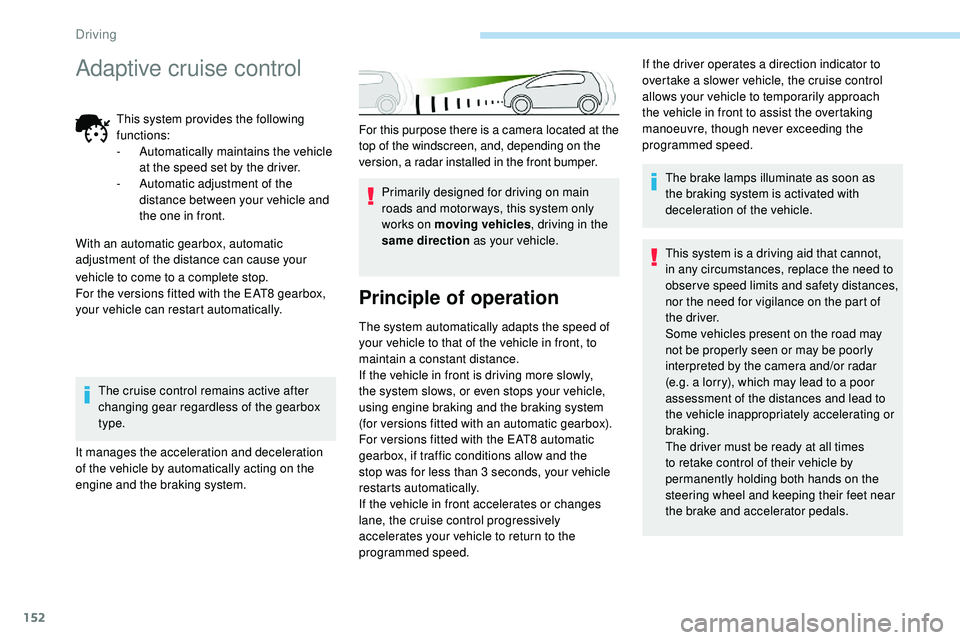
For this purpose there is a camera located at the
top of the windscreen, and, depending on the
version, a radar installed in the front bumper.Primarily designed for driving on main
roads and motor ways, this system only
works on moving vehicles , driving in the
same direction as your vehicle.
Principle of operation
The system automatically adapts the speed of
your vehicle to that of the vehicle in front, to
maintain a constant distance.
If the vehicle in front is driving more slowly,
the system slows, or even stops your vehicle,
using engine braking and the braking system
(for versions fitted with an automatic gearbox).
For versions fitted with the EAT8 automatic
gearbox, if traffic conditions allow and the
stop was for less than 3 seconds, your vehicle
restarts automatically.
If the vehicle in front accelerates or changes
lane, the cruise control progressively
accelerates your vehicle to return to the
programmed speed. The brake lamps illuminate as soon as
the braking system is activated with
deceleration of the vehicle.
This system is a driving aid that cannot,
in any circumstances, replace the need to
obser ve speed limits and safety distances,
nor the need for vigilance on the part of
the driver.
Some vehicles present on the road may
not be properly seen or may be poorly
interpreted by the camera and/or radar
(e.g. a lorry), which may lead to a poor
assessment of the distances and lead to
the vehicle inappropriately accelerating or
braking.
The driver must be ready at all times
to retake control of their vehicle by
permanently holding both hands on the
steering wheel and keeping their feet near
the brake and accelerator pedals.
If the driver operates a direction indicator to
overtake a slower vehicle, the cruise control
allows your vehicle to temporarily approach
the vehicle in front to assist the overtaking
manoeuvre, though never exceeding the
programmed speed.
vehicle to come to a complete stop.
For the versions fitted with the EAT8 gearbox,
your vehicle can restart automatically. The cruise control remains active after
changing gear regardless of the gearbox
type.
It manages the acceleration and deceleration
of the vehicle by automatically acting on the
engine and the braking system.
Adaptive cruise control
This system provides the following
functions:
-
A
utomatically maintains the vehicle
at the speed set by the driver.
-
A
utomatic adjustment of the
distance between your vehicle and
the one in front.
With an automatic gearbox, automatic
adjustment of the distance can cause your
Driving
Page 155 of 320
153
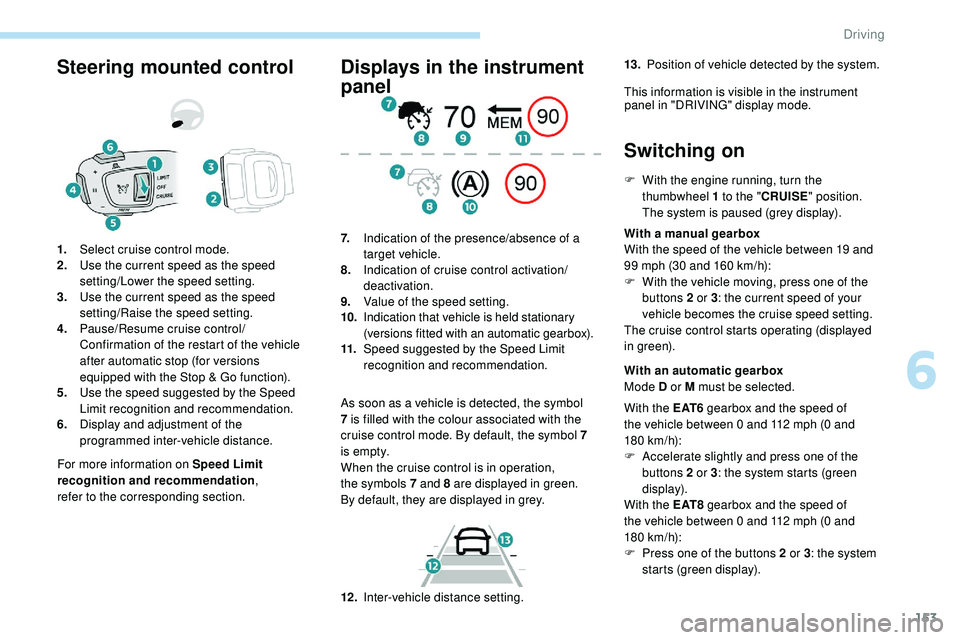
Steering mounted control
For more information on Speed Limit
recognition and recommendation,
refer
to
the corresponding section.
1.
Select cruise control mode.
2. Use the current speed as the speed
setting/Lower the speed setting.
3. Use the current speed as the speed
setting/Raise the speed setting.
4. Pause/Resume cruise control/
Confirmation of the restart of the vehicle
after automatic stop (for versions
equipped with the Stop & Go function).
5. Use the speed suggested by the Speed
Limit recognition and recommendation.
6. Display and adjustment of the
programmed inter-vehicle distance.
Displays in the instrument
panel
As soon as a vehicle is detected, the symbol
7
is filled with the colour associated with the
cruise control mode. By default, the symbol 7
i s e m pt y.
When the cruise control is in operation,
the
symbols 7 and 8 are displayed in green.
By
default, they are displayed in grey.
7.
Indication of the presence/absence of a
target vehicle.
8. Indication of cruise control activation/
deactivation.
9. Value of the speed setting.
10. Indication that vehicle is held stationary
(versions fitted with an automatic gearbox).
11. Speed suggested by the Speed Limit
recognition and recommendation.
Switching on
F With the engine running, turn the
thumbwheel 1 to the "CRUISE" position.
The system is paused (grey display).
With a manual gearbox
With the speed of the vehicle between 19 and
99 mph (30 and 160
km/h):
F
W
ith the vehicle moving, press one of the
buttons 2 or 3 : the current speed of your
vehicle becomes the cruise speed setting.
The cruise control starts operating (displayed
in green).
12 . Inter-vehicle distance setting. With an automatic gearbox
Mode D or M must be selected.
With the E AT 6 gearbox and the speed of
the vehicle between 0 and 112 mph (0
and
180
km/h):
F
A
ccelerate slightly and press one of the
buttons 2 or 3 : the system starts (green
display).
With the E AT 8 gearbox and the speed of
the vehicle between 0 and 112 mph (0
and
180
km/h):
F
P
ress one of the buttons 2 or 3 : the system
starts (green display).
13.
Position of vehicle detected by the system.
This information is visible in the instrument panel in "DRIVING" display mode.
6
Driving