engine Peugeot 508 2019 Owners Manual
[x] Cancel search | Manufacturer: PEUGEOT, Model Year: 2019, Model line: 508, Model: Peugeot 508 2019Pages: 320, PDF Size: 10.09 MB
Page 239 of 320
237
Automatic gearbox: never tow the vehicle
with the front wheels on the ground with
the engine off.
F
U
nlock the steering and release the parking
brake.
F
S
witch on the hazard warning lamps on
both vehicles.
F
M
ove off gently and drive slowly over a
short distance only.
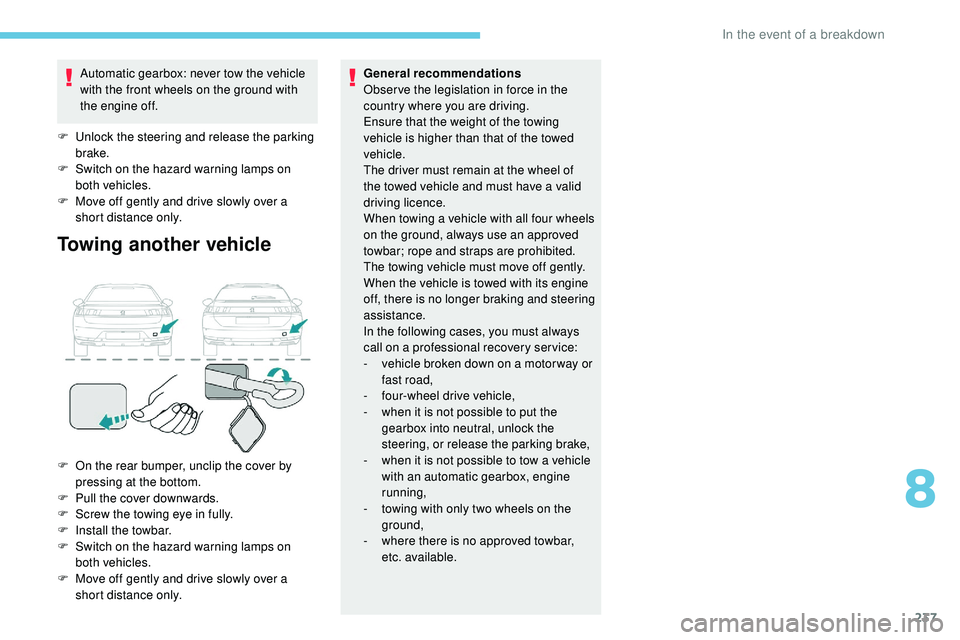
Towing another vehicle
F On the rear bumper, unclip the cover by pressing at the bottom.
F
P
ull the cover downwards.
F
S
crew the towing eye in fully.
F
I
nstall the towbar.
F
S
witch on the hazard warning lamps on
both vehicles.
F
M
ove off gently and drive slowly over a
short distance only. General recommendations
Obser ve the legislation in force in the
country where you are driving.
Ensure that the weight of the towing
vehicle is higher than that of the towed
vehicle.
The driver must remain at the wheel of
the towed vehicle and must have a valid
driving licence.
When towing a vehicle with all four wheels
on the ground, always use an approved
towbar; rope and straps are prohibited.
The towing vehicle must move off gently.
When the vehicle is towed with its engine
off, there is no longer braking and steering
assistance.
In the following cases, you must always
call on a professional recovery ser vice:
-
v
ehicle broken down on a motor way or
fast road,
-
f
our-wheel drive vehicle,
-
w
hen it is not possible to put the
gearbox into neutral, unlock the
steering, or release the parking brake,
- w hen it is not possible to tow a vehicle
with an automatic gearbox, engine
running,
-
t
owing with only two wheels on the
ground,
-
w
here there is no approved towbar,
etc. available.
8
In the event of a breakdown
Page 240 of 320
238
Engine technical data and
towed loads
Engines
The engine characteristics are given in the
vehicle's registration document, as well as in
sales brochures.The maximum power corresponds to the
value type-approved on a test bed, under
conditions defined in European legislation
(Directive 1999/99/EC).
For more information, contact a PEUGEOT
dealer or a qualified workshop.
Weights and towed loads
The weights and towed loads relating to your
vehicle are given in the registration document,
as well as in sales brochures.
These values are also given on the
manufacturer's plate or label.
For more information, contact a PEUGEOT
dealer or a qualified workshop. The GTW (Gross Train Weight) and towed load
values indicated are valid up to a maximum
altitude of 1,000 metres. The towed load value
must be reduced by 10% for each additional
1,000 metres of altitude.
The maximum authorised nose weight
corresponds to the weight permitted on the
towball.
High exterior temperatures may result
in a reduction in the per formance of the
vehicle to protect the engine. When the
exterior temperature is higher than 37°C,
limit the towed weight.
Towing by a lightly loaded vehicle can
adversely affect roadholding.
Braking distances are increased when
towing a trailer.
When using a vehicle to tow, never
exceed a speed of approximately 62 mph
(100 km/h) (obser ve the local legislation
in force).
If the exterior temperature is high, it is
recommended that the engine is allowed
to idle for 1 to 2 minutes after the vehicle
comes to a stop, to facilitate its cooling.
Technical data
Page 241 of 320
239
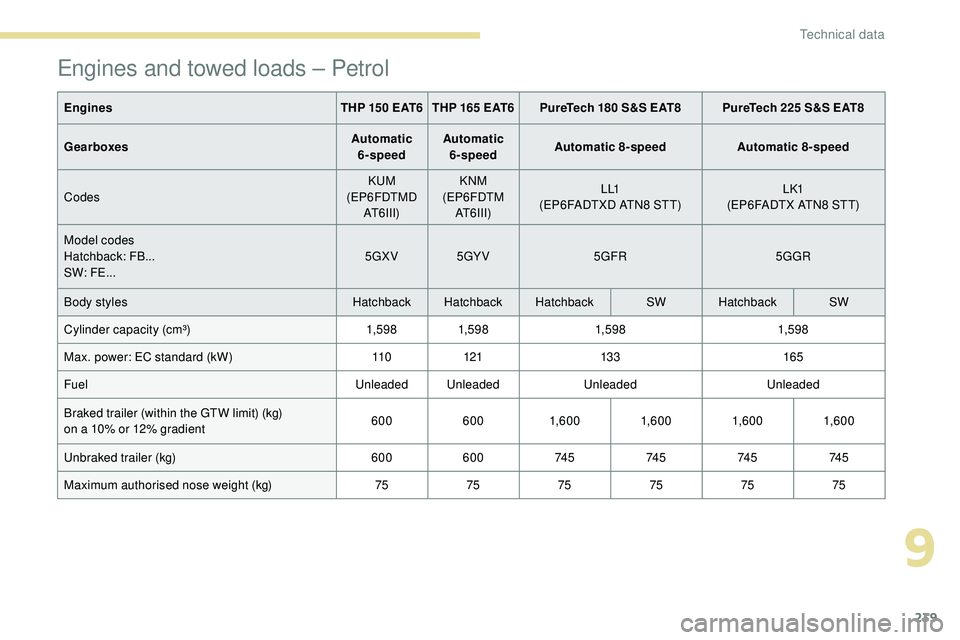
Engines and towed loads – Petrol
EnginesTHP 150 EAT6 THP 165 EAT6PureTech 180 S&S EAT8 PureTech 225 S&S EAT8
Gearboxes Automatic
6-speed Automatic
6-speed Automatic 8-speed
Automatic 8-speed
Codes KUM
(EP6FDTMD AT6III) KNM
(EP6FDTM AT6III) L L1
(EP6FADTXD ATN8 STT) L K1
(EP6FADTX ATN8 STT)
Model codes
Hatchback: FB...
SW: FE... 5GXV
5GY V 5GFR 5GGR
Body styles Hatchback Hatchback Hatchback SWHatchback SW
Cylinder capacity (cm³) 1,59 81,59 8 1,59 8 1,59 8
Max. power: EC standard (kW) 11 0121 13 3 165
Fuel Unleaded UnleadedUnleadedUnleaded
Braked trailer (within the GTW limit) (kg)
on a 10% or 12% gradient 600
6001,6 0 0 1,6 0 01,6 0 01,6 0 0
Unbraked trailer (kg) 600600 74 574 574 574 5
Maximum authorised nose weight (kg) 757575757575
9
Technical data
Page 242 of 320
240
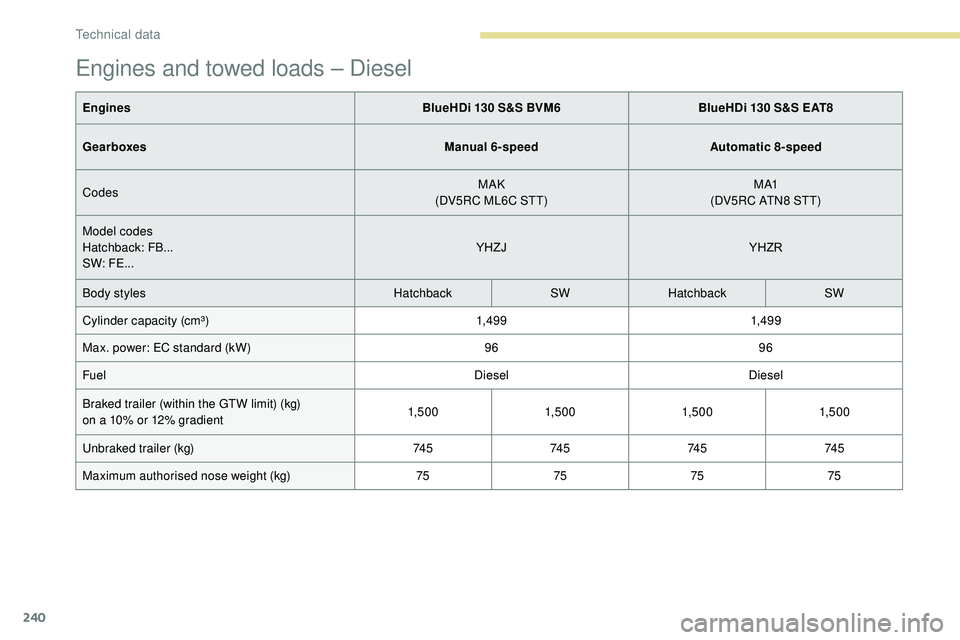
Engines and towed loads – Diesel
EnginesBlueHDi 130 S&S BVM6BlueHDi 130 S&S EAT8
Gearboxes Manual 6-speedAutomatic 8-speed
Codes MAK
(DV5RC ML6C STT) M A1
(DV5RC ATN8 STT)
Model codes
Hatchback: FB...
SW: FE... YHZJ
YHZR
Body styles HatchbackSWHatchback SW
Cylinder capacity (cm³) 1,49 91,49 9
Max. power: EC standard (kW) 9696
Fuel DieselDiesel
Braked trailer (within the GTW limit) (kg)
on a 10% or 12% gradient 1,5 0 0
1,5 0 01,5 0 01,5 0 0
Unbraked trailer (kg) 74 574 574 574 5
Maximum authorised nose weight (kg) 75757575
Technical data
Page 243 of 320
241
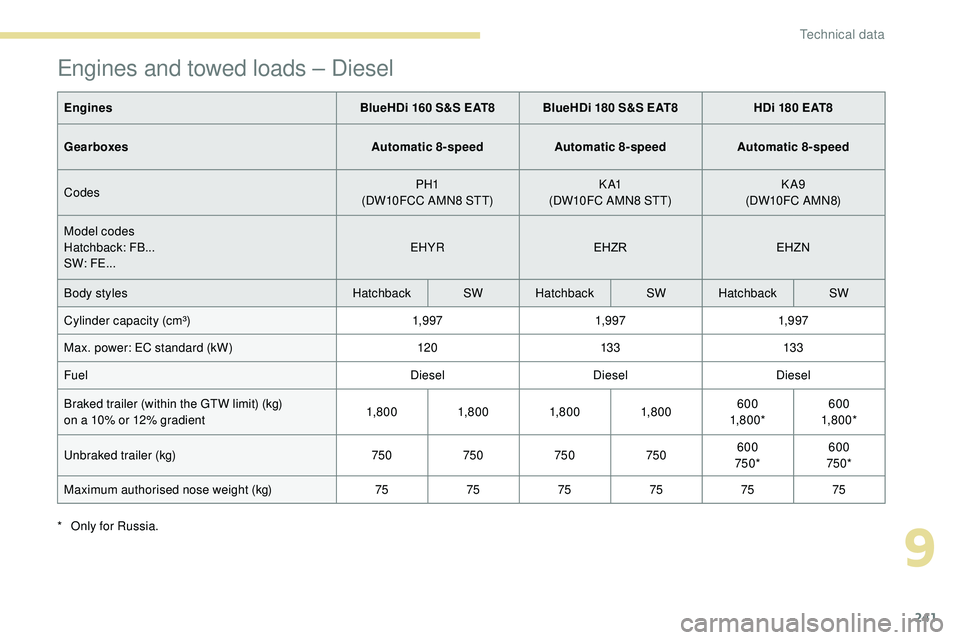
Engines and towed loads – Diesel
EnginesBlueHDi 160 S&S EAT8 BlueHDi 180 S&S EAT8 HDi 180 EAT8
Gearboxes Automatic 8-speedAutomatic 8-speedAutomatic 8-speed
Codes PH1
(DW10FCC AMN8 STT) K A1
(DW10FC AMN8 STT) KA9
(DW10FC A MN8)
Model codes
Hatchback: FB...
SW: FE... EHYR
EHZREHZN
Body styles HatchbackSWHatchback SWHatchback SW
Cylinder capacity (cm³) 1,9 971,9 971,9 97
Max. power: EC standard (kW) 12013 3 13 3
Fuel DieselDieselDiesel
Braked trailer (within the GTW limit) (kg)
on a 10% or 12% gradient 1,8 0 0
1,8 0 01,8 0 01,8 0 0 600
1,8 0 0 * 600
1,8 0 0 *
Unbraked trailer (kg) 750750750750600
750* 600
750*
Maximum authorised nose weight (kg) 757575757575
*
O
nly for Russia.
9
Technical data
Page 248 of 320
2
First steps
With the engine running, a press
mutes the sound.
With the ignition off, a press turns
the system on.Certain information is displayed permanently
in
the upper banner of the touch screen:
-
R
epeat of the air conditioning information
(depending on version), and direct access
to
the corresponding menu.
-
R
eminder of the Radio Media and
Telephone menu information.
-
R
eminder of the privacy information.
-
A
ccess to the Settings of the touch screen
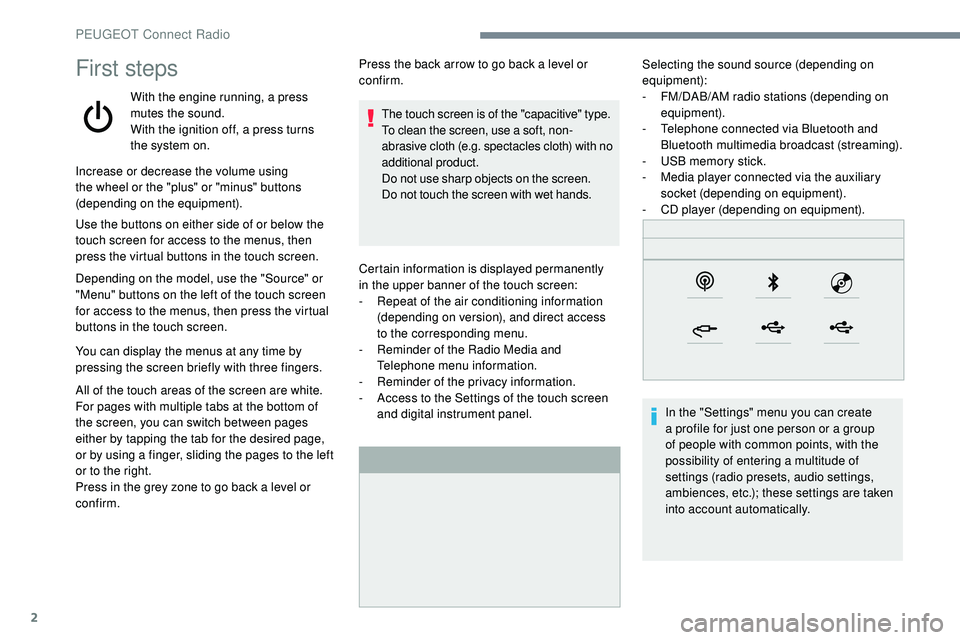
and digital instrument panel. Selecting the sound source (depending on
equipment):
-
F M/DAB/AM radio stations (depending on
equipment).
-
T
elephone connected via Bluetooth and
Bluetooth multimedia broadcast (streaming).
-
U
SB memory stick.
-
M
edia player connected via the auxiliary
socket (depending on equipment).
-
C
D player (depending on equipment).
In the "Settings" menu you can create
a profile for just one person or a group
of people with common points, with the
possibility of entering a multitude of
settings (radio presets, audio settings,
ambiences, etc.); these settings are taken
into account automatically.
Increase or decrease the volume using
the wheel or the "plus" or "minus" buttons
(depending on the equipment).
Use the buttons on either side of or below the
touch screen for access to the menus, then
press the virtual buttons in the touch screen.
Depending on the model, use the "Source" or
"Menu" buttons on the left of the touch screen
for access to the menus, then press the virtual
buttons in the touch screen.
You can display the menus at any time by
pressing the screen briefly with three fingers.
All of the touch areas of the screen are white.
For pages with multiple tabs at the bottom of
the screen, you can switch between pages
either by tapping the tab for the desired page,
or by using a finger, sliding the pages to the left
or to the right.
Press in the grey zone to go back a level or
confirm. Press the back arrow to go back a level or
confirm.
The touch screen is of the "capacitive" type.
To clean the screen, use a soft, non-
abrasive cloth (e.g. spectacles cloth) with no
additional product.
Do not use sharp objects on the screen.
Do not touch the screen with wet hands.
PEUGEOT Connect Radio
Page 268 of 320
22
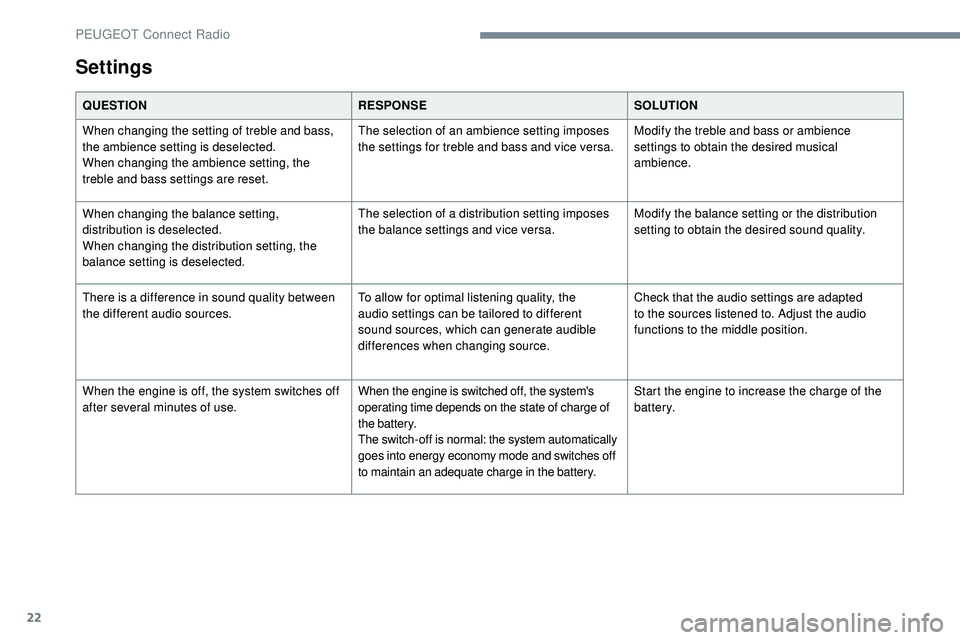
Settings
QUESTIONRESPONSESOLUTION
When changing the setting of treble and bass,
the ambience setting is deselected.
When changing the ambience setting, the
treble and bass settings are reset. The selection of an ambience setting imposes
the settings for treble and bass and vice versa.
Modify the treble and bass or ambience
settings to obtain the desired musical
ambience.
When changing the balance setting,
distribution is deselected.
When changing the distribution setting, the
balance setting is deselected. The selection of a distribution setting imposes
the balance settings and vice versa.
Modify the balance setting or the distribution
setting to obtain the desired sound quality.
There is a difference in sound quality between
the different audio sources. To allow for optimal listening quality, the
audio settings can be tailored to different
sound sources, which can generate audible
differences when changing source.Check that the audio settings are adapted
to the sources listened to. Adjust the audio
functions to the middle position.
When the engine is off, the system switches off
after several minutes of use.
When the engine is switched off, the system's
operating time depends on the state of charge of
the battery.
The switch-off is normal: the system automatically
goes into energy economy mode and switches off
to maintain an adequate charge in the battery.Start the engine to increase the charge of the
battery.
PEUGEOT Connect Radio
Page 270 of 320
2
First steps
With the engine running, a press
mutes the sound.
With the ignition off, a press turns
the system on.
Increase or decrease the volume using
the wheel or the "plus" or "minus" buttons
(depending on the equipment).
Use the menu buttons on either side of or
below the touch screen for access to the
menus, then press the virtual buttons in the
touch screen.
Depending on the model, use the "Source"
or "Menu" buttons to access the menus, then
press the virtual buttons in the touch screen.
You can display the menus at any time by
pressing the screen briefly with three fingers.
All of the touch areas of the screen are white.
Press the back arrow to go back a level.
Press "OK" to confirm. The touch screen is of the "capacitive"
type.
To clean the screen, use a soft, non-
abrasive cloth (e.g. spectacles cloth) with
no additional product.
Do not use sharp objects on the screen.
Do not touch the screen with wet hands.
Certain information is displayed permanently
in the side bars or in the upper bar of the touch
screen (depending on equipment):
-
R
epeat of the air conditioning information
(depending on version), and direct access to
the corresponding menu.
-
G
o directly to the selection of the audio
source, to the list of radio stations (or list of
titles depending on the source).
-
G
o to the "Notifications" of messages,
emails, map updates and, depending on the
services, the navigation notifications.
-
G
o to the settings for the touch screen and
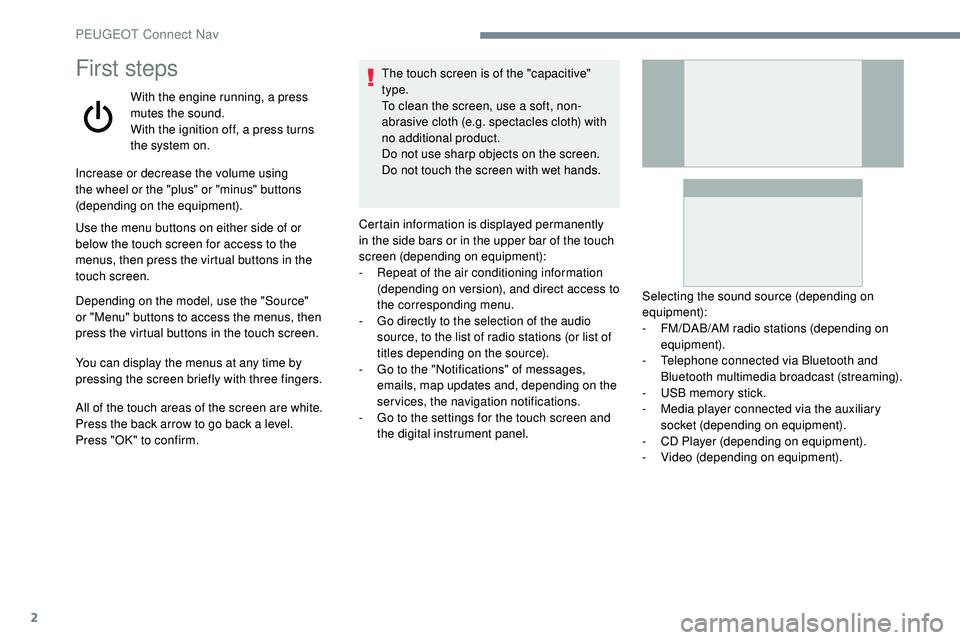
the digital instrument panel. Selecting the sound source (depending on
equipment):
-
F
M/DAB/AM radio stations (depending on
equipment).
-
T
elephone connected via Bluetooth and
Bluetooth multimedia broadcast (streaming).
-
U
SB memory stick.
-
M
edia player connected via the auxiliary
socket (depending on equipment).
-
C
D Player (depending on equipment).
-
V
ideo (depending on equipment).
PEUGEOT Connect Nav
Page 286 of 320
18
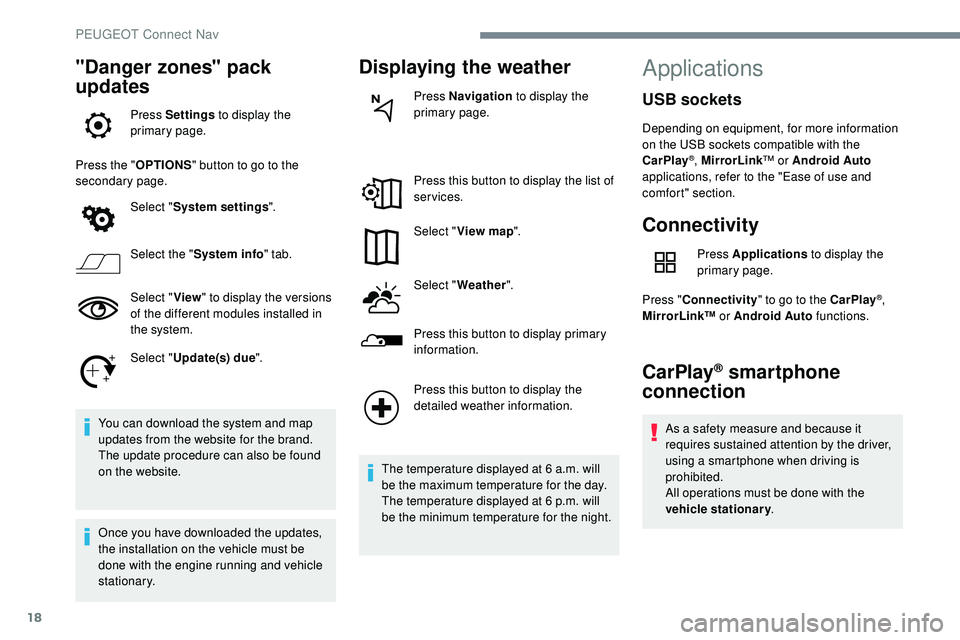
"Danger zones" pack
updates
Press Settings to display the
primary page.
Press the " OPTIONS" button to go to the
secondary page.
Select "System settings ".
Select the " System info " tab.
Select " View" to display the versions
of the different modules installed in
the system.
Select " Update(s) due ".
You can download the system and map
updates from the website for the brand.
The update procedure can also be found
on the website.
Once you have downloaded the updates,
the installation on the vehicle must be
done with the engine running and vehicle
stationary.
Displaying the weather
Press Navigation to display the
primary page.
Press this button to display the list of
services.
Select " View map ".
Select " Weather ".
Press this button to display primary
information.
Press this button to display the
detailed weather information.
The temperature displayed at 6 a.m. will
be the maximum temperature for the day.
The temperature displayed at 6 p.m. will
be the minimum temperature for the night.
Applications
Connectivity
Press Applications to display the
primary page.
Press " Connectivity " to go to the CarPlay
®,
MirrorLink™ or Android Auto functions.
CarPlay® smartphone
connection
As a safety measure and because it
requires sustained attention by the driver,
using a smartphone when driving is
prohibited.
All operations must be done with the
vehicle stationary .
USB sockets
Depending on equipment, for more information
on the USB sockets compatible with the
CarPlay
®, MirrorLink™ or Android Auto
applications, refer to the "Ease of use and
comfort" section.
PEUGEOT Connect Nav
Page 307 of 320
39
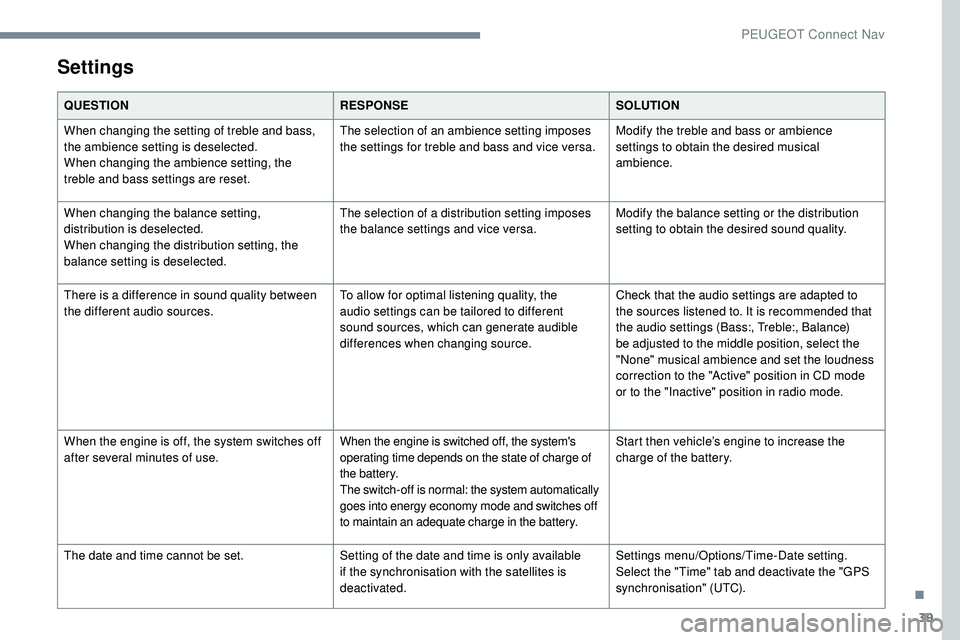
Settings
QUESTIONRESPONSESOLUTION
When changing the setting of treble and bass,
the ambience setting is deselected.
When changing the ambience setting, the
treble and bass settings are reset. The selection of an ambience setting imposes
the settings for treble and bass and vice versa.
Modify the treble and bass or ambience
settings to obtain the desired musical
ambience.
When changing the balance setting,
distribution is deselected.
When changing the distribution setting, the
balance setting is deselected. The selection of a distribution setting imposes
the balance settings and vice versa.
Modify the balance setting or the distribution
setting to obtain the desired sound quality.
There is a difference in sound quality between
the different audio sources. To allow for optimal listening quality, the
audio settings can be tailored to different
sound sources, which can generate audible
differences when changing source.Check that the audio settings are adapted to
the sources listened to. It is recommended that
the audio settings (Bass:, Treble:, Balance)
be adjusted to the middle position, select the
"None" musical ambience and set the loudness
correction to the "Active" position in CD mode
or to the "Inactive" position in radio mode.
When the engine is off, the system switches off
after several minutes of use.
When the engine is switched off, the system's
operating time depends on the state of charge of
the battery.
The switch-off is normal: the system automatically
goes into energy economy mode and switches off
to maintain an adequate charge in the battery.Start then vehicle’s engine to increase the
charge of the battery.
The date and time cannot be set. Setting of the date and time is only available
if the synchronisation with the satellites is
deactivated.Settings menu/Options/Time-Date setting.
Select the "Time" tab and deactivate the "GPS
synchronisation" (UTC).
.
PEUGEOT Connect Nav