blind Peugeot 508 2019 User Guide
[x] Cancel search | Manufacturer: PEUGEOT, Model Year: 2019, Model line: 508, Model: Peugeot 508 2019Pages: 320, PDF Size: 10.09 MB
Page 63 of 320
61
F next, proceed with the passenger's seat in the same way.
The changes are taken into account immediately.Once activated, the system starts a one hour
massage cycle, made up of sequences of 6 minutes
of massage followed by 3 minutes at rest.
The system stops automatically at the end of the
cycle; the indicator lamp in the button goes off.
Steering wheel adjustment
F When stationary , pull the control lever
to release the steering wheel adjustment
mechanism.
F
A
djust the height and reach to suit your
driving position.
F
P
ush the control lever to lock the steering
wheel adjustment mechanism.
As a safety measure, these adjustments
should only be carried out with the vehicle
stationary.
Mirrors
Door mirrors
Each fitted with an adjustable mirror glass
providing the lateral rear ward vision necessary
for overtaking or parking.
They can also be folded for parking in narrow
spaces.
On versions fitted with "electrochrome" mirrors,
a system connected to a brightness sensor
darkens the mirror to reduce the nuisance
to the driver caused by low sun or headlamp
beams from other vehicles.
Demisting/Defrosting
If fitted to your vehicle, the demisting/
defrosting of the door mirrors is
done by pressing the rear screen
defrosting control.
For more information on Rear screen demist/
Adjustment
As a safety measure, the mirrors should
be adjusted to reduce the blind spots.
The objects that you see in the mirrors are
in fact closer than they appear.
Take this into account in order to
correctly judge the distance of vehicles
approaching from behind.
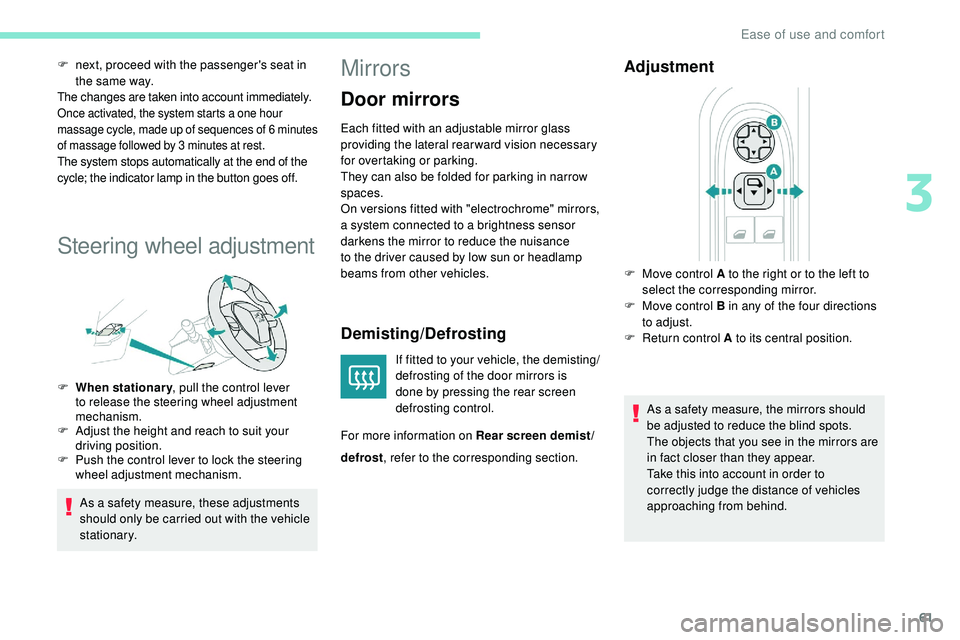
F
M
ove control A to the right or to the left to
select the corresponding mirror.
F
M
ove control B in any of the four directions
to adjust.
F
R
eturn control A to its central position.
defrost , refer to the corresponding section.
3
Ease of use and comfort
Page 113 of 320
111
Children at the rear
At rear seating positions, always leave
sufficient space between the front seat
and:
-
a "
rear ward facing" child seat,
-
t
he child's feet for a child seat fitted
"forward facing".
To do this, move the front seat for wards
and, if necessary, straighten its backrest.
For optimal installation of the "forward
facing" child seat, verify that its backrest is
as close as possible to the backrest of the
vehicle seat, if possible in contact with it.
Children at the front
The legislation on carrying children on the
front passenger seat is specific to each
country. Refer to the legislation in force in
the country in which you are driving.
Deactivate the front passenger airbag
when a "rear ward facing" child seat is
installed on the front passenger seats.
Other wise, there is a risk of serious or
fatal injury to the child if the airbag is
deployed. Installing a booster seat (height adjuster)
The chest part of the seat belt must be
positioned on the child's shoulder without
touching the neck.
Ensure that the lap part of the seat belt
passes correctly over the child's thighs.
We recommend using a booster seat with
a backrest, equipped with a belt guide at
shoulder level.
Additional protections
To prevent accidental opening of the doors
and rear windows, use the child lock.
Take care not to open the rear windows by
more than one third.
To protect young children from the rays
of the sun, fit side blinds on the rear
windows.
As a safety precaution, do not leave:
-
a c
hild or children alone and
unattended in a vehicle,
-
a c
hild or an animal in a vehicle
which is exposed to the sun, with the
windows closed,
-
t
he keys within reach of children inside
the vehicle.Child seat at the rear
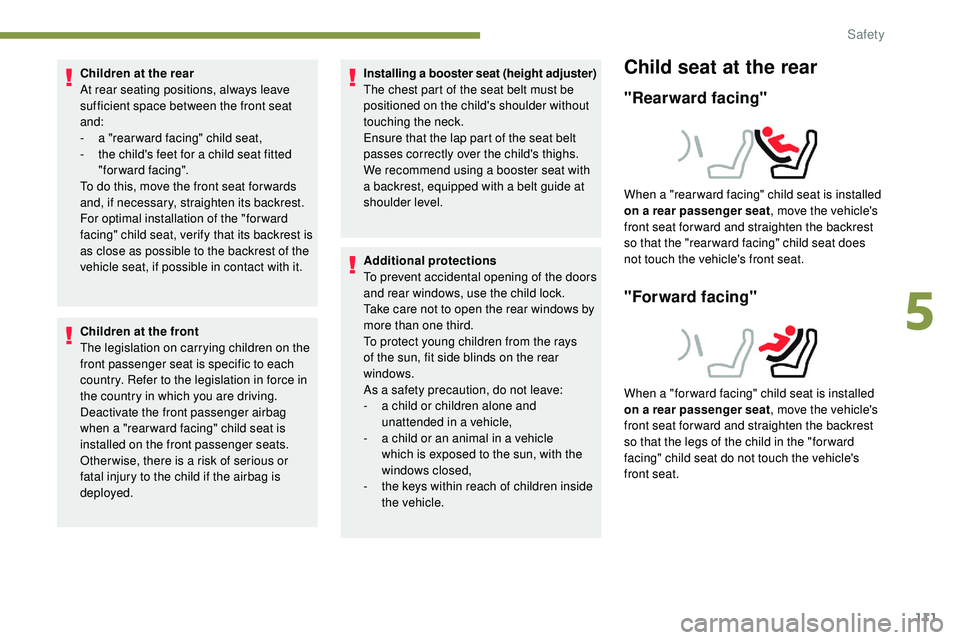
"Rearward facing"
When a "rear ward facing" child seat is installed
on a rear passenger seat , move the vehicle's
front seat for ward and straighten the backrest
so that the "rear ward facing" child seat does
not touch the vehicle's front seat.
"Forward facing"
When a "for ward facing" child seat is installed
on a rear passenger seat , move the vehicle's
front seat for ward and straighten the backrest
so that the legs of the child in the "for ward
facing" child seat do not touch the vehicle's
front seat.
5
Safety
Page 172 of 320
170
After three first level alerts, the system triggers
a new alert with the message "Take a break!",
accompanied by a more pronounced audible
signal. When the system interprets the behaviour of
the vehicle as indicating a certain fatigue or
inattention threshold on the part of the driver,
it triggers the first level of alert.
The driver is then alerted by the message
" Ta k e c a r e ! ", accompanied by an audible
signal.
Active Blind Spot
Monitoring System
In addition to the fixed warning lamp in the door
mirror on the side in question, a correction of
trajectory will be felt if you attempt to cross a
lane marking with the direction indicators on,
to
help you avoid a collision.
This system is the combination of the Active
Lane Keeping Assistance and Blind Spot
Detection.
These two functions must be activated and in
operation.
The speed of the vehicle must be between
40
and 87 mph (65 and 140 km/h) inclusive.
These functions are especially suitable for
driving on motor ways and main roads.
For more information on the Active Lane
Keeping Assistance and Blind Spot
Detection , refer to the corresponding sections.
This system is a driving aid which cannot,
in any circumstances, replace the need for
vigilance on the part of the driver.
In certain driving conditions (poor road
sur face or strong winds), the system may
give alerts independent of the driver's
level of vigilance. The following situations may interfere with
the operation of the system or prevent it
from working:
-
p
oor visibility (inadequate lighting of
the roadway, falling snow, heavy rain,
dense fog, etc.),
-
d
azzle (headlamps of an oncoming
vehicle, low sun, reflections on a damp
road, leaving a tunnel, alternating
shade and light, etc.),
-
w
indscreen area located in front of the
camera: dirty, misted up, frost-covered,
snow-covered, damaged or covered by
a s t i c ke r,
-
l
ane markings absent, worn, hidden
(snow, mud) or multiple (roadworks,
e t c .),
-
c
lose to the vehicle ahead (lane
markings not detected),
-
r
oads that are narrow, winding, etc.
Clean the windscreen regularly,
particularly the area in front of the camera.
The internal sur face of the windscreen can
also become misted around the camera.
In humid and cold weather, demist the
windscreen regularly.
Do not allow snow to accumulate on the
bonnet or roof of the vehicle as this could
conceal the detection camera.
Driving
Page 173 of 320
171
Active Lane Keeping
Assistance
Using a camera located at the top of the
windscreen to identify lane markings on the
ground and the edges of the road (depending
on version), the system corrects the trajectory
of the vehicle while alerting the driver if it
detects a risk of involuntarily crossing a line or
hard shoulder (depending on version).
This system is particularly useful on motor ways
and main roads.
Conditions for operation
The speed of the vehicle must be between
40 mph and 112 mph (65 km/h and 180 km/h).
The driver must hold the steering wheel with
both hands.
The change of trajectory must not be
accompanied by operation of the direction
indicators.
The ESC system must be activated and fault-
free. This system is a driving aid that cannot,
in any circumstances, replace the
driver’s own vigilance. The driver must
remain in control of the vehicle under all
circumstances.
The system helps the driver only when
there is a risk of the vehicle involuntarily
wandering from the lane it is being driven
in. It does not manage the safe driving
distance, the speed of the vehicle or the
brakes.
The driver must hold the steering wheel
with both hands in a way that allows
control to be maintained in circumstances
where the system is not able to inter vene
(if lane markings disappear, for example).
It is necessary to obser ve the driving
regulations and take a break every two
hours.
Operation
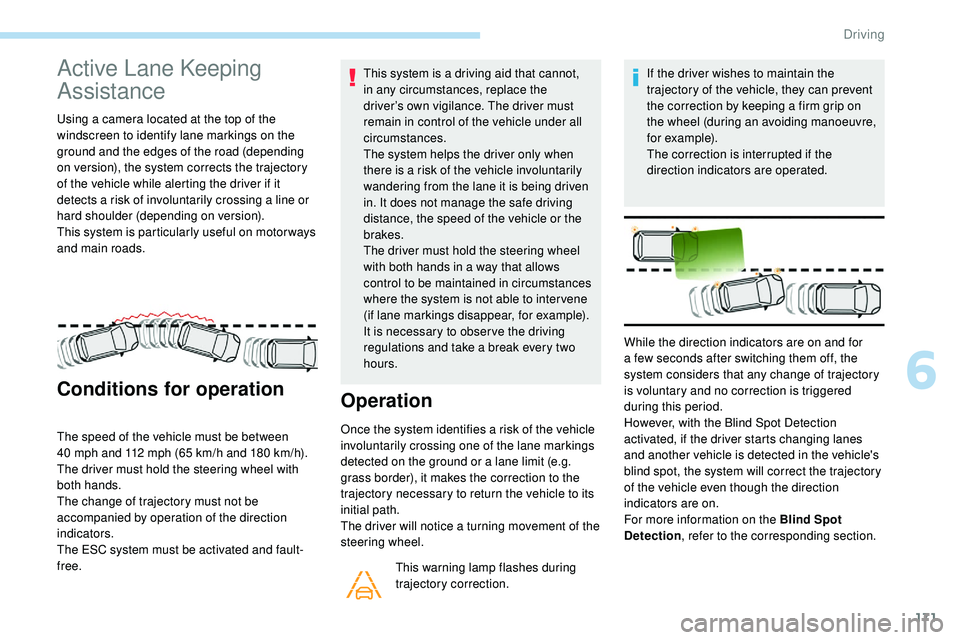
Once the system identifies a risk of the vehicle
involuntarily crossing one of the lane markings
detected on the ground or a lane limit (e.g.
grass border), it makes the correction to the
trajectory necessary to return the vehicle to its
initial path.
The driver will notice a turning movement of the
steering wheel.
This warning lamp flashes during
trajectory correction. If the driver wishes to maintain the
trajectory of the vehicle, they can prevent
the correction by keeping a firm grip on
the wheel (during an avoiding manoeuvre,
for example).
The correction is interrupted if the
direction indicators are operated.
While the direction indicators are on and for
a few seconds after switching them off, the
system considers that any change of trajectory
is voluntary and no correction is triggered
during this period.
However, with the Blind Spot Detection
activated, if the driver starts changing lanes
and another vehicle is detected in the vehicle's
blind spot, the system will correct the trajectory
of the vehicle even though the direction
indicators are on.
For more information on the Blind Spot
Detection , refer to the corresponding section.
6
Driving
Page 176 of 320
174
The following situations may interfere with
the operation of the system or prevent it
working:
-
c
onditions of poor visibility (inadequate
street lighting, snowfall, rain, fog),
-
d
azzle (headlamps of an oncoming
vehicle, low sun, reflections on a damp
road, leaving a tunnel, alternating
shade and light),
-
w
indscreen area located in front of the
camera: dirty, misted, frost-covered,
snow-covered, damaged or covered by
a s t i c ke r,
-
l
ane markings worn, hidden (snow,
mud) or multiple (roadworks, etc.),
-
r
unning close to the vehicle in front
(the lane markings may not be
detected),
-
r
oads that are narrow, winding, etc.
Risk of undesirable operation
- driving with a trailer,
- d riving on a rolling stand,
-
d
riving on unstable sur faces.
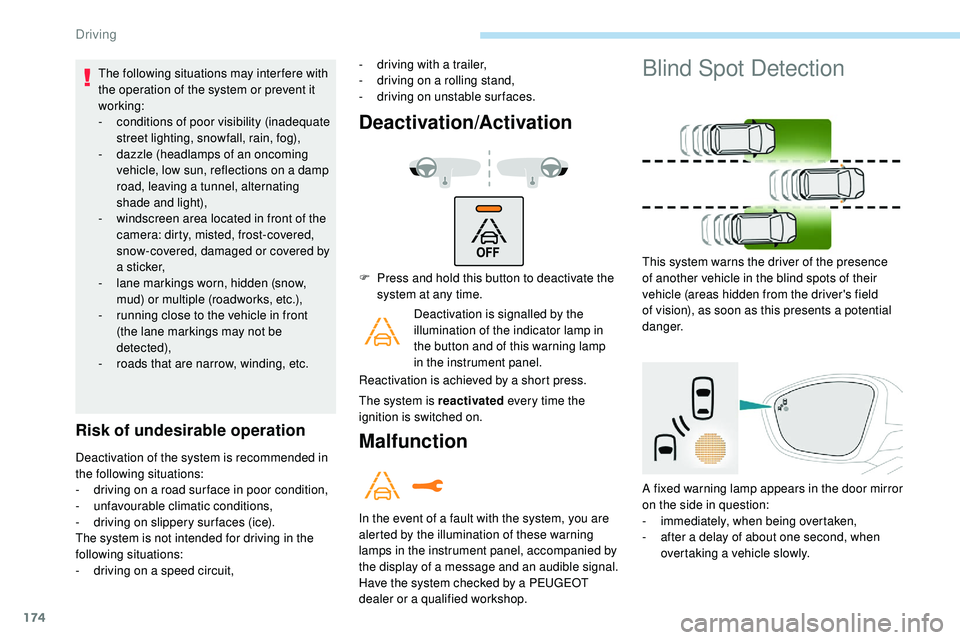
Deactivation/Activation
Deactivation of the system is recommended in
the following situations:
-
d
riving on a road sur face in poor condition,
-
u
nfavourable climatic conditions,
-
d
riving on slippery sur faces (ice).
The system is not intended for driving in the
following situations:
-
d
riving on a speed circuit, F
P
ress and hold this button to deactivate the
system at any time.
Deactivation is signalled by the
illumination of the indicator lamp in
the button and of this warning lamp
in the instrument panel.
Reactivation is achieved by a short press.
The system is reactivated every time the
ignition is switched on.Malfunction
In the event of a fault with the system, you are
alerted by the illumination of these warning
lamps in the instrument panel, accompanied by
the display of a message and an audible signal.
Have the system checked by a PEUGEOT
dealer or a qualified workshop.
Blind Spot Detection
This system warns the driver of the presence
of another vehicle in the blind spots of their
vehicle (areas hidden from the driver's field
of vision), as soon as this presents a potential
danger.
A fixed warning lamp appears in the door mirror
on the side in question:
-
i
mmediately, when being overtaken,
-
a
fter a delay of about one second, when
overtaking a vehicle slowly.
Driving
Page 177 of 320
175
This driving aid system is designed to
improve safety when driving and is in no
circumstances a substitute for the use
of the interior rear view mirror and door
mirrors. It is the driver's responsibility to
constantly check the traffic, to assess the
relative distances and speeds of other
vehicles and to anticipate their movements
before deciding whether to change lane.
This system is a driving aid which cannot,
in any circumstances, replace the need for
vigilance on the part of the driver.
Activation/Deactivation
The function is activated and
deactivated in the Driving/Vehicle
menu of the touch screen.
The state of the system is memorised when
switching off the ignition. The system is automatically deactivated
when towing with a towing device
approved by PEUGEOT.
Operation
Sensors fitted in the front and rear bumpers
monitor the blind spots.
The alert is given by an orange warning lamp
coming on in the relevant door mirror, as soon
as a vehicle – car, lorry, bicycle – is detected.
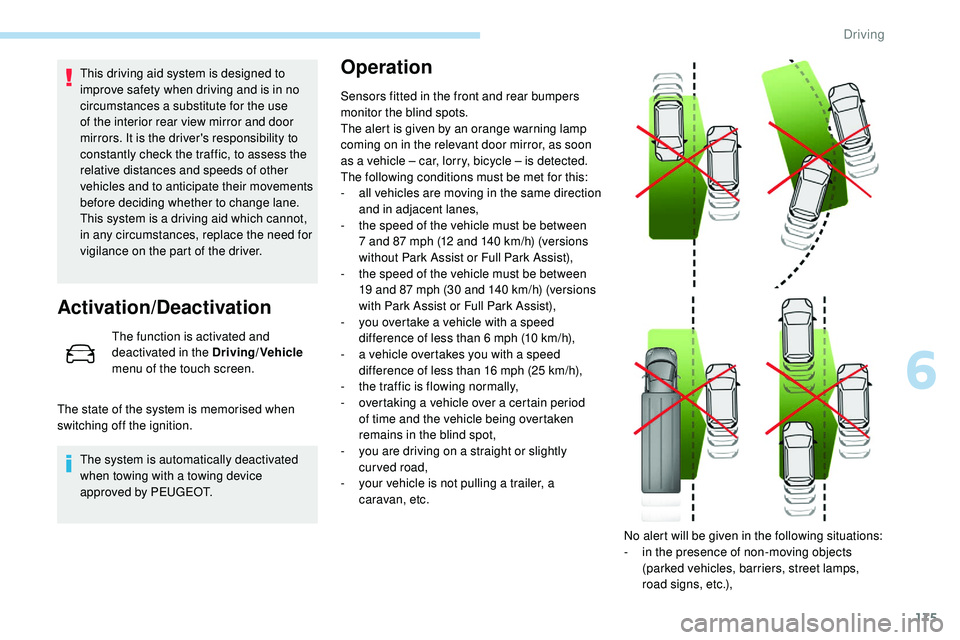
The following conditions must be met for this:
-
a
ll vehicles are moving in the same direction
and in adjacent lanes,
-
t
he speed of the vehicle must be between
7 and 87 mph (12 and 140
km/h) (versions
without Park Assist or Full Park Assist),
-
t
he speed of the vehicle must be between
19 and 87 mph (30 and 140
km/h) (versions
with Park Assist or Full Park Assist),
-
y
ou overtake a vehicle with a speed
difference of less than 6 mph (10
km/h),
-
a v
ehicle overtakes you with a speed
difference of less than 16 mph (25
km/h),
-
t
he traffic is flowing normally,
-
ov
ertaking a vehicle over a certain period
of time and the vehicle being overtaken
remains in the blind spot,
-
y
ou are driving on a straight or slightly
curved road,
-
y
our vehicle is not pulling a trailer, a
caravan, etc.
No alert will be given in the following situations:
-
i
n the presence of non-moving objects
(parked vehicles, barriers, street lamps,
road signs, etc.),
6
Driving
Page 178 of 320
176
Malfunction
- with vehicles moving in the opposite direction,
-
d
riving on a winding road or a sharp corner,
-
w
hen overtaking or being overtaken by a
very long vehicle (lorry, bus, etc.) which is
both in the rear blind spot and present in the
driver’s front field of vision,
-
w
hen overtaking quickly,
-
i
n very heavy traffic: vehicles detected in
front and behind are confused with a lorry or
a stationary object,
-
i
f the Park Assist or Full Park Assist function
is activated.
If a fault occurs, this warning lamp comes on
in the instrument panel, accompanied by a
message.
Contact a PEUGEOT dealer or a qualified
workshop to have the system checked. The system may suffer temporary
interference in certain weather conditions
(rain, hail, etc.).
In particular, driving on a wet sur face
or moving from a dry area to a wet area
can cause false alerts (for example, the
presence of a fog of water droplets in
the blind spot angle is interpreted as a
vehicle).
In bad or wintry weather, ensure that the
sensors are not covered by mud, ice or
snow.
Take care not to cover the warning zone in
the door mirrors or the detection zones on
the front and rear bumpers with adhesive
labels or other objects; they may hamper
the correct operation of the system.
The system is automatically deactivated
when towing with a towing device
approved by PEUGEOT.
High-pressure washing
When washing your vehicle, keep the lance
at least 12 inches (30 cm) away from the
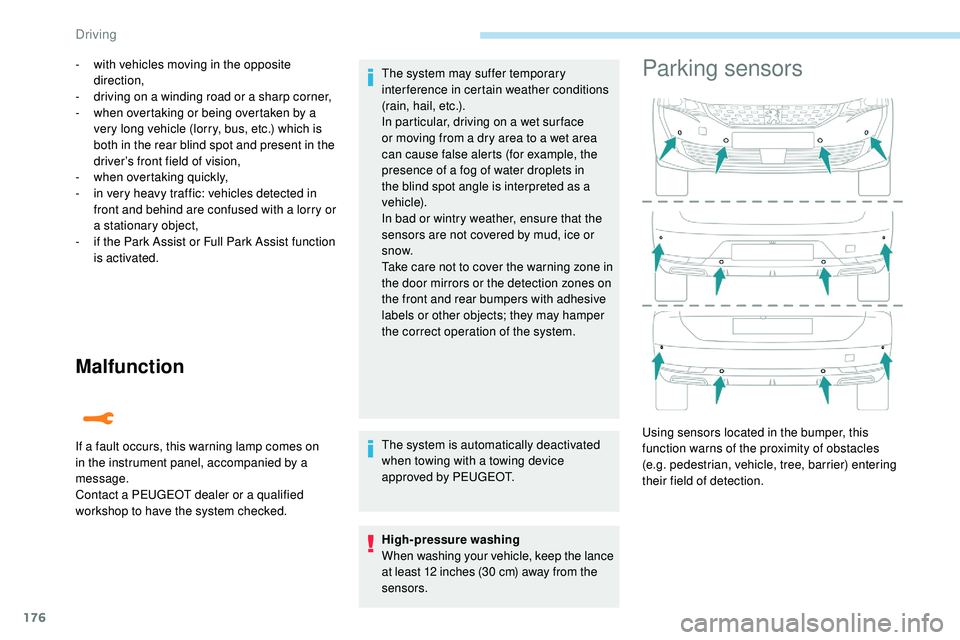
sensors.Parking sensors
Using sensors located in the bumper, this
function warns of the proximity of obstacles
(e.g. pedestrian, vehicle, tree, barrier) entering
their field of detection.
Driving
Page 180 of 320
178
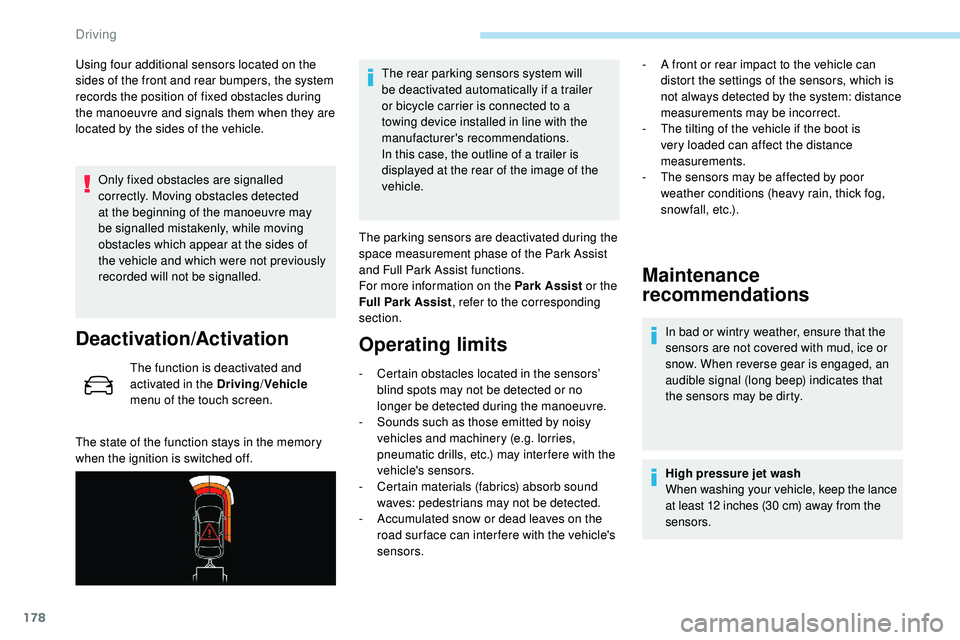
Using four additional sensors located on the
sides of the front and rear bumpers, the system
records the position of fixed obstacles during
the manoeuvre and signals them when they are
located by the sides of the vehicle.Only fixed obstacles are signalled
correctly. Moving obstacles detected
at the beginning of the manoeuvre may
be signalled mistakenly, while moving
obstacles which appear at the sides of
the vehicle and which were not previously
recorded will not be signalled.
Deactivation/Activation
The function is deactivated and
activated in the Driving /Vehicle
menu of the touch screen.
The state of the function stays in the memory
when the ignition is switched off. The rear parking sensors system will
be deactivated automatically if a trailer
or bicycle carrier is connected to a
towing device installed in line with the
manufacturer's recommendations.
In this case, the outline of a trailer is
displayed at the rear of the image of the
vehicle.
The parking sensors are deactivated during the
space measurement phase of the Park Assist
and Full Park Assist functions.
For more information on the Park Assist or the
Full Park Assist , refer to the corresponding
section.
Operating limits
- Certain obstacles located in the sensors’ blind spots may not be detected or no
longer be detected during the manoeuvre.
-
S
ounds such as those emitted by noisy
vehicles and machinery (e.g. lorries,
pneumatic drills, etc.) may inter fere with the
vehicle's sensors.
-
C
ertain materials (fabrics) absorb sound
waves: pedestrians may not be detected.
-
A
ccumulated snow or dead leaves on the
road sur face can inter fere with the vehicle's
sensors.
Maintenance
recommendations
In bad or wintry weather, ensure that the
sensors are not covered with mud, ice or
snow. When reverse gear is engaged, an
audible signal (long beep) indicates that
the sensors may be dirty.
High pressure jet wash
When washing your vehicle, keep the lance
at least 12 inches (30 cm) away from the
sensors.
-
A f
ront or rear impact to the vehicle can
distort the settings of the sensors, which is
not always detected by the system: distance
measurements may be incorrect.
-
T
he tilting of the vehicle if the boot is
very loaded can affect the distance
measurements.
-
T
he sensors may be affected by poor
weather conditions (heavy rain, thick fog,
snowfall, etc.).
Driving
Page 186 of 320
184
Park Assist
This system provides active parking
assistance: it detects a parking space and then
steers in the appropriate direction to park in
this space while the driver controls the driving
direction, engagement of gears, acceleration
and braking.
To assist the driver in monitoring the
correct manoeuvring operation, the system
automatically triggers the display of Visiopark 1
or Visiopark 2 and the activation of the parking
sensors.This system is a manoeuvring aid that
cannot under any circumstances replace
the vigilance of the driver.
The driver must remain in control of their
vehicle. He or she must always check
the surroundings of the vehicle before
undertaking a manoeuvre and ensure that
the space remains clear during the entire
manoeuvre.
The system per forms the measurements of
available parking spaces and calculations of
distances to obstacles using ultrasonic sensors
built in the front and rear bumpers of the
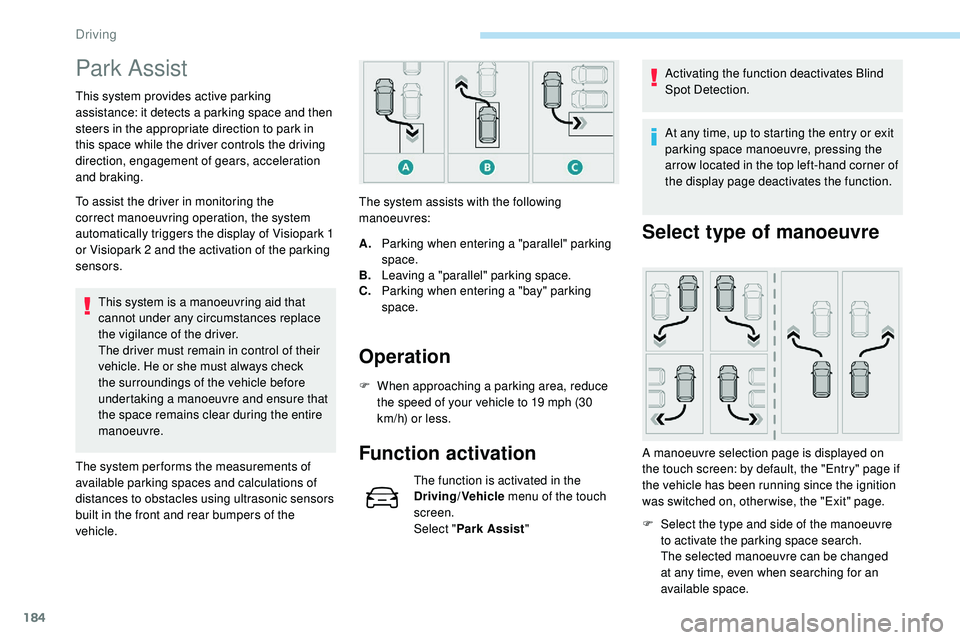
vehicle. The system assists with the following
manoeuvres:
Operation
A.
Parking when entering a "parallel" parking
space.
B. Leaving a "parallel" parking space.
C. Parking when entering a "bay" parking
space.
F
W
hen approaching a parking area, reduce
the speed of your vehicle to 19 mph (30
km/h) or less.
Function activation
The function is activated in the
Driving/Vehicle menu of the touch
screen.
Select " Park Assist " Activating the function deactivates Blind
Spot Detection.
At any time, up to starting the entry or exit
parking space manoeuvre, pressing the
arrow located in the top left-hand corner of
the display page deactivates the function.
Select type of manoeuvre
A manoeuvre selection page is displayed on
the touch screen: by default, the "Entry" page if
the vehicle has been running since the ignition
was switched on, other wise, the "Exit" page.F
S
elect the type and side of the manoeuvre
to activate the parking space search.
The selected manoeuvre can be changed
at any time, even when searching for an
available space.
Driving
Page 189 of 320
187
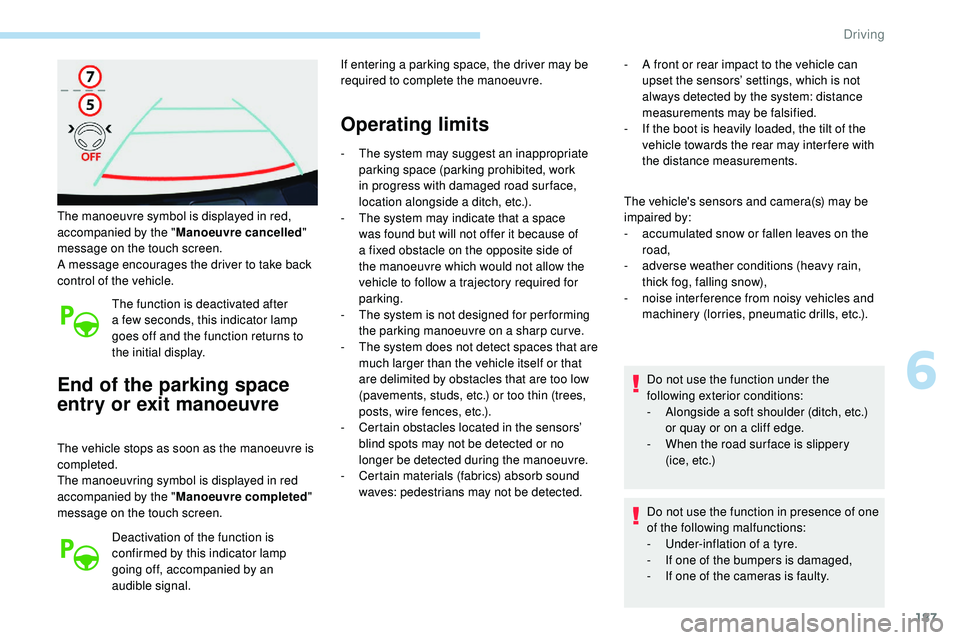
The manoeuvre symbol is displayed in red,
accompanied by the "Manoeuvre cancelled "
message on the touch screen.
A message encourages the driver to take back
control of the vehicle.
The function is deactivated after
a few seconds, this indicator lamp
goes off and the function returns to
the initial display.
End of the parking space
entry or exit manoeuvre
The vehicle stops as soon as the manoeuvre is
completed.
The manoeuvring symbol is displayed in red
accompanied by the " Manoeuvre completed "
message on the touch screen.
Deactivation of the function is
confirmed by this indicator lamp
going off, accompanied by an
audible signal. If entering a parking space, the driver may be
required to complete the manoeuvre.
Operating limits
- The system may suggest an inappropriate
parking space (parking prohibited, work
in progress with damaged road sur face,
location alongside a ditch, etc.).
-
T
he system may indicate that a space
was found but will not offer it because of
a fixed obstacle on the opposite side of
the manoeuvre which would not allow the
vehicle to follow a trajectory required for
parking.
-
T
he system is not designed for per forming
the parking manoeuvre on a sharp curve.
-
T
he system does not detect spaces that are
much larger than the vehicle itself or that
are delimited by obstacles that are too low
(pavements, studs, etc.) or too thin (trees,
posts, wire fences, etc.).
-
C
ertain obstacles located in the sensors’
blind spots may not be detected or no
longer be detected during the manoeuvre.
-
C
ertain materials (fabrics) absorb sound
waves: pedestrians may not be detected. -
A f
ront or rear impact to the vehicle can
upset the sensors’ settings, which is not
always detected by the system: distance
measurements may be falsified.
-
I
f the boot is heavily loaded, the tilt of the
vehicle towards the rear may inter fere with
the distance measurements.
The vehicle's sensors and camera(s) may be
impaired by:
-
a
ccumulated snow or fallen leaves on the
road,
-
a
dverse weather conditions (heavy rain,
thick fog, falling snow),
-
nois
e interference from noisy vehicles and
machinery (lorries, pneumatic drills, etc.).
Do not use the function under the
following exterior conditions:
-
A
longside a soft shoulder (ditch, etc.)
or quay or on a cliff edge.
-
W
hen the road sur face is slippery
( i c e ,
e t c .)
Do not use the function in presence of one
of the following malfunctions:
-
U
nder-inflation of a tyre.
-
I
f one of the bumpers is damaged,
-
I
f one of the cameras is faulty.
6
Driving