change time Peugeot 508 2019 User Guide
[x] Cancel search | Manufacturer: PEUGEOT, Model Year: 2019, Model line: 508, Model: Peugeot 508 2019Pages: 320, PDF Size: 10.09 MB
Page 142 of 320
140
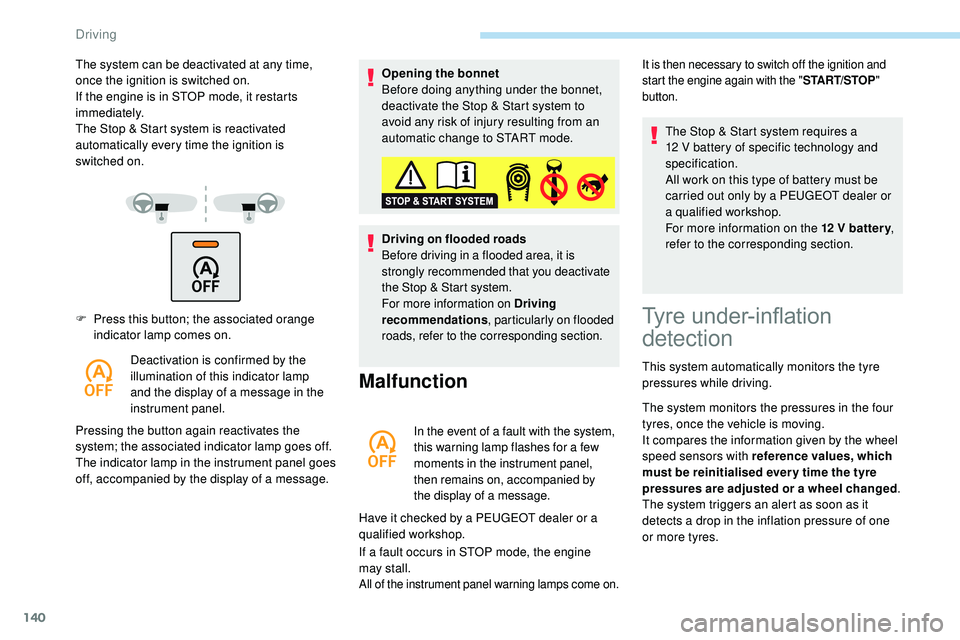
F Press this button; the associated orange indicator lamp comes on.
Deactivation is confirmed by the
illumination of this indicator lamp
and the display of a message in the
instrument panel.
Pressing the button again reactivates the
system; the associated indicator lamp goes off.
The indicator lamp in the instrument panel goes
off, accompanied by the display of a message. Opening the bonnet
Before doing anything under the bonnet,
deactivate the Stop & Start system to
avoid any risk of injury resulting from an
automatic change to START mode.
Driving on flooded roads
Before driving in a flooded area, it is
strongly recommended that you deactivate
the Stop & Start system.
For more information on Driving
recommendations
, particularly on flooded
roads, refer to the corresponding section.
Malfunction
In the event of a fault with the system,
this warning lamp flashes for a few
moments in the instrument panel,
then remains on, accompanied by
the display of a message.
Have it checked by a PEUGEOT dealer or a
qualified workshop.
If a fault occurs in STOP mode, the engine
may
stall.
All of the instrument panel warning lamps come on.
The system can be deactivated at any time,
once the ignition is switched on.
If the engine is in STOP mode, it restarts
immediately.
The Stop & Start system is reactivated
automatically every time the ignition is
switched
on.It is then necessary to switch off the ignition and
start the engine again with the " START/STOP"
button.
Tyre under-inflation
detection
This system automatically monitors the tyre
pressures while driving.
The system monitors the pressures in the four
tyres, once the vehicle is moving.
It compares the information given by the wheel
speed sensors with reference values, which
must be reinitialised ever y time the tyre
pressures are adjusted or a wheel changed .
The system triggers an alert as soon as it
detects a drop in the inflation pressure of one
or more tyres. The Stop & Start system requires a
12
V battery of specific technology and
specification.
All work on this type of battery must be
carried out only by a PEUGEOT dealer or
a qualified workshop.
For more information on the 12 V batter y
,
refer to the corresponding section.
Driving
Page 145 of 320
143
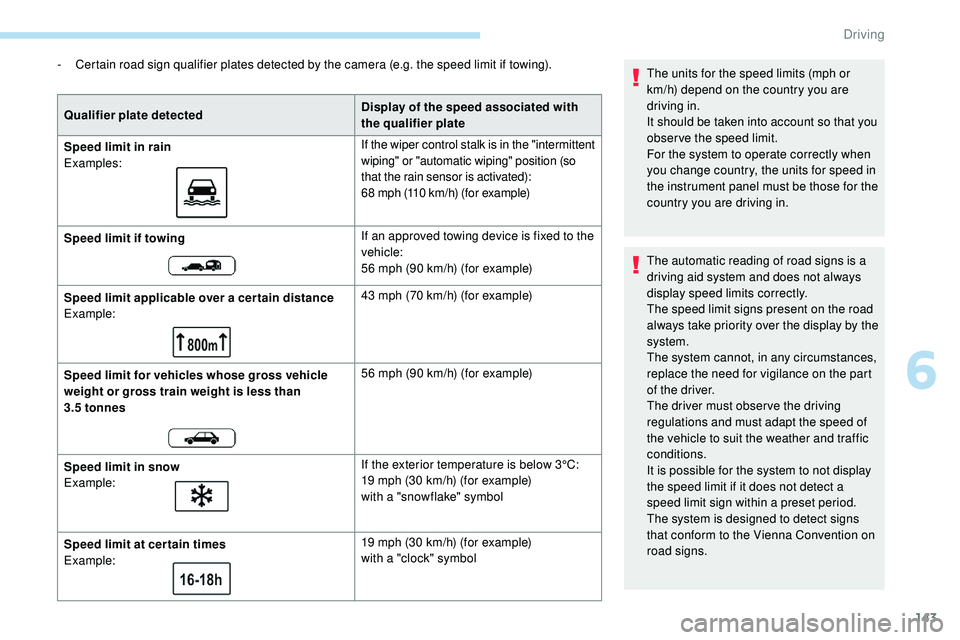
- Certain road sign qualifier plates detected by the camera (e.g. the speed limit if towing).Qualifier plate detected Display of the speed associated with
the qualifier plate
Speed limit in rain
Examples: If the wiper control stalk is in the "intermittent
wiping" or "automatic wiping" position (so
that the rain sensor is activated):
68 mph (110
km/h) (for example)
Speed limit if towing If an approved towing device is fixed to the
vehicle:
56 mph (90
km/h) (for example)
Speed limit applicable over a cer tain distance
Example: 43 mph (70
km/h) (for example)
Speed limit for vehicles whose gross vehicle
weight or gross train weight is less than
3.5
tonnes 56 mph (90
km/h) (for example)
Speed limit in snow
Example: If the exterior temperature is below 3°C:
19 mph (30
km/h) (for example)
with a "snowflake" symbol
Speed limit at cer tain times
Example: 19 mph (30
km/h) (for example)
with a "clock" symbol The units for the speed limits (mph or
km/h) depend on the country you are
driving in.
It should be taken into account so that you
obser ve the speed limit.
For the system to operate correctly when
you change country, the units for speed in
the instrument panel must be those for the
country you are driving in.
The automatic reading of road signs is a
driving aid system and does not always
display speed limits correctly.
The speed limit signs present on the road
always take priority over the display by the
system.
The system cannot, in any circumstances,
replace the need for vigilance on the part
of the driver.
The driver must observe the driving
regulations and must adapt the speed of
the vehicle to suit the weather and traffic
conditions.
It is possible for the system to not display
the speed limit if it does not detect a
speed limit sign within a preset period.
The system is designed to detect signs
that conform to the Vienna Convention on
road signs.
6
Driving
Page 154 of 320
152
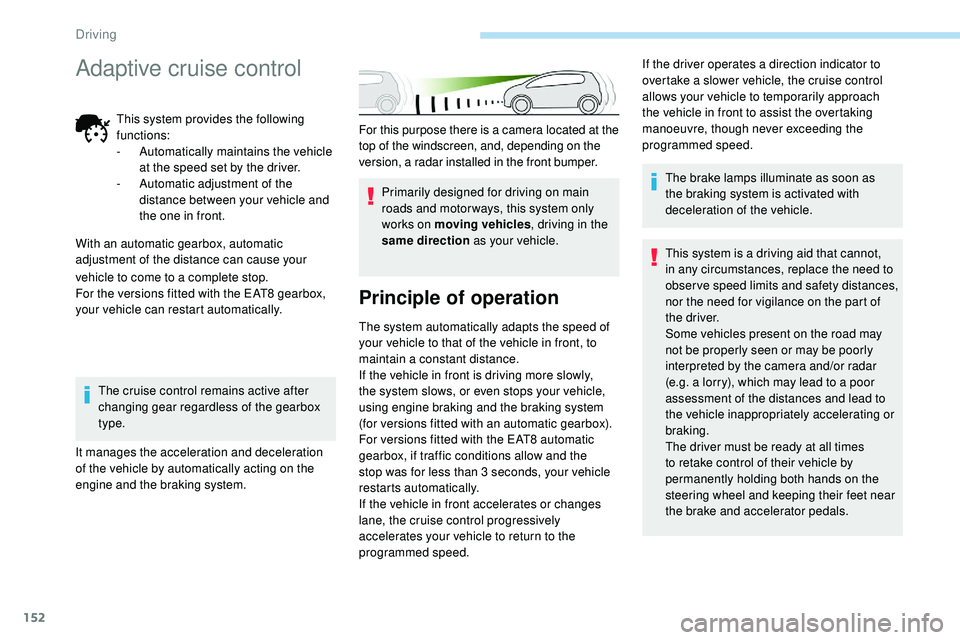
For this purpose there is a camera located at the
top of the windscreen, and, depending on the
version, a radar installed in the front bumper.Primarily designed for driving on main
roads and motor ways, this system only
works on moving vehicles , driving in the
same direction as your vehicle.
Principle of operation
The system automatically adapts the speed of
your vehicle to that of the vehicle in front, to
maintain a constant distance.
If the vehicle in front is driving more slowly,
the system slows, or even stops your vehicle,
using engine braking and the braking system
(for versions fitted with an automatic gearbox).
For versions fitted with the EAT8 automatic
gearbox, if traffic conditions allow and the
stop was for less than 3 seconds, your vehicle
restarts automatically.
If the vehicle in front accelerates or changes
lane, the cruise control progressively
accelerates your vehicle to return to the
programmed speed. The brake lamps illuminate as soon as
the braking system is activated with
deceleration of the vehicle.
This system is a driving aid that cannot,
in any circumstances, replace the need to
obser ve speed limits and safety distances,
nor the need for vigilance on the part of
the driver.
Some vehicles present on the road may
not be properly seen or may be poorly
interpreted by the camera and/or radar
(e.g. a lorry), which may lead to a poor
assessment of the distances and lead to
the vehicle inappropriately accelerating or
braking.
The driver must be ready at all times
to retake control of their vehicle by
permanently holding both hands on the
steering wheel and keeping their feet near
the brake and accelerator pedals.
If the driver operates a direction indicator to
overtake a slower vehicle, the cruise control
allows your vehicle to temporarily approach
the vehicle in front to assist the overtaking
manoeuvre, though never exceeding the
programmed speed.
vehicle to come to a complete stop.
For the versions fitted with the EAT8 gearbox,
your vehicle can restart automatically. The cruise control remains active after
changing gear regardless of the gearbox
type.
It manages the acceleration and deceleration
of the vehicle by automatically acting on the
engine and the braking system.
Adaptive cruise control
This system provides the following
functions:
-
A
utomatically maintains the vehicle
at the speed set by the driver.
-
A
utomatic adjustment of the
distance between your vehicle and
the one in front.
With an automatic gearbox, automatic
adjustment of the distance can cause your
Driving
Page 164 of 320
162
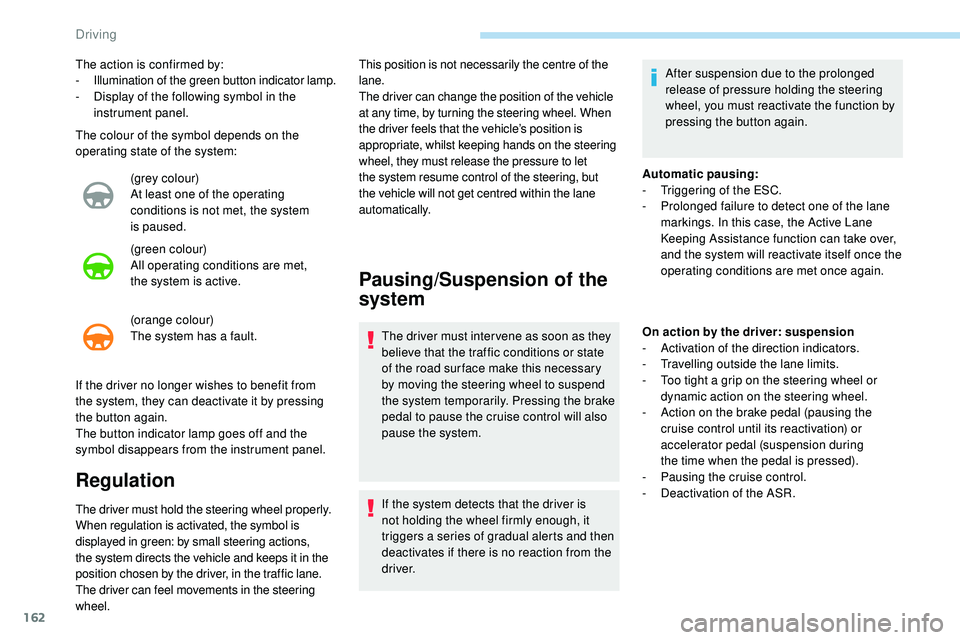
The colour of the symbol depends on the
operating state of the system:(grey colour)
At least one of the operating
conditions is not met, the system
is
paused.
(green colour)
All operating conditions are met,
the
system is active.
(orange colour)
The system has a fault.
The action is confirmed by:
-
I
llumination of the green button indicator lamp.
-
D
isplay of the following symbol in the
instrument panel.
If the driver no longer wishes to benefit from
the system, they can deactivate it by pressing
the
button again.
The button indicator lamp goes off and the
symbol disappears from the instrument panel.
Regulation
The driver must hold the steering wheel properly.
When regulation is activated, the symbol is
displayed in green: by small steering actions,
the system directs the vehicle and keeps it in the
position chosen by the driver, in the traffic lane.
The driver can feel movements in the steering
wheel. This position is not necessarily the centre of the
lane.
The driver can change the position of the vehicle
at any time, by turning the steering wheel. When
the driver feels that the vehicle’s position is
appropriate, whilst keeping hands on the steering
wheel, they must release the pressure to let
the system resume control of the steering, but
the vehicle will not get centred within the lane
automatically.
Pausing/Suspension of the
system
The driver must inter vene as soon as they
believe that the traffic conditions or state
of the road sur face make this necessary
by moving the steering wheel to suspend
the system temporarily. Pressing the brake
pedal to pause the cruise control will also
pause the system.
If the system detects that the driver is
not holding the wheel firmly enough, it
triggers a series of gradual alerts and then
deactivates if there is no reaction from the
driver.
Automatic pausing:
-
T
riggering of the ESC.
-
P
rolonged failure to detect one of the lane
markings. In this case, the Active Lane
Keeping Assistance function can take over,
and the system will reactivate itself once the
operating conditions are met once again.
On action by the driver: suspension
- A ctivation of the direction indicators.
-
T
ravelling outside the lane limits.
-
T
oo tight a grip on the steering wheel or
dynamic action on the steering wheel.
-
A
ction on the brake pedal (pausing the
cruise control until its reactivation) or
accelerator pedal (suspension during
the
time when the pedal is pressed).
-
P
ausing the cruise control.
-
D
eactivation of the ASR.
After suspension due to the prolonged
release of pressure holding the steering
wheel, you must reactivate the function by
pressing the button again.
Driving
Page 177 of 320
175
This driving aid system is designed to
improve safety when driving and is in no
circumstances a substitute for the use
of the interior rear view mirror and door
mirrors. It is the driver's responsibility to
constantly check the traffic, to assess the
relative distances and speeds of other
vehicles and to anticipate their movements
before deciding whether to change lane.
This system is a driving aid which cannot,
in any circumstances, replace the need for
vigilance on the part of the driver.
Activation/Deactivation
The function is activated and
deactivated in the Driving/Vehicle
menu of the touch screen.
The state of the system is memorised when
switching off the ignition. The system is automatically deactivated
when towing with a towing device
approved by PEUGEOT.
Operation
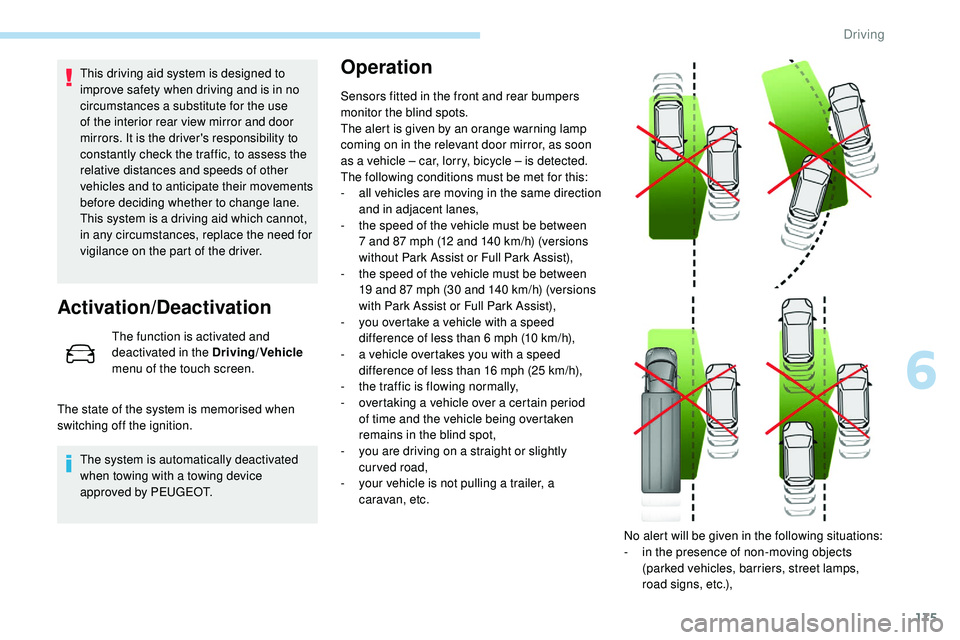
Sensors fitted in the front and rear bumpers
monitor the blind spots.
The alert is given by an orange warning lamp
coming on in the relevant door mirror, as soon
as a vehicle – car, lorry, bicycle – is detected.
The following conditions must be met for this:
-
a
ll vehicles are moving in the same direction
and in adjacent lanes,
-
t
he speed of the vehicle must be between
7 and 87 mph (12 and 140
km/h) (versions
without Park Assist or Full Park Assist),
-
t
he speed of the vehicle must be between
19 and 87 mph (30 and 140
km/h) (versions
with Park Assist or Full Park Assist),
-
y
ou overtake a vehicle with a speed
difference of less than 6 mph (10
km/h),
-
a v
ehicle overtakes you with a speed
difference of less than 16 mph (25
km/h),
-
t
he traffic is flowing normally,
-
ov
ertaking a vehicle over a certain period
of time and the vehicle being overtaken
remains in the blind spot,
-
y
ou are driving on a straight or slightly
curved road,
-
y
our vehicle is not pulling a trailer, a
caravan, etc.
No alert will be given in the following situations:
-
i
n the presence of non-moving objects
(parked vehicles, barriers, street lamps,
road signs, etc.),
6
Driving
Page 181 of 320
179
Operating fault
If a fault occurs when shifting
to reverse, this warning lamp
comes on in the instrument panel,
accompanied by a message and an
audible signal (short beep).
Contact a PEUGEOT dealer or a qualified
workshop to have the system checked.
Visiopark 1 – Visiopark 2
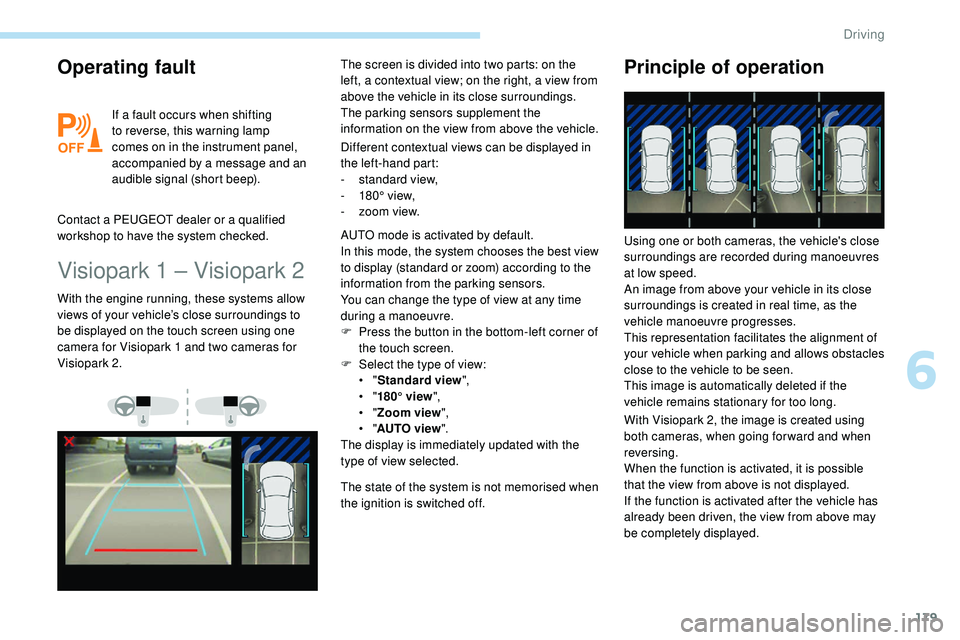
Different contextual views can be displayed in
the left-hand part:
-
s
tandard view,
-
1
80° view,
-
z
oom view.
With the engine running, these systems allow
views of your vehicle’s close surroundings to
be displayed on the touch screen using one
camera for Visiopark 1 and two cameras for
Visiopark 2. The screen is divided into two parts: on the
left, a contextual view; on the right, a view from
above the vehicle in its close surroundings.
The parking sensors supplement the
information on the view from above the vehicle.
AUTO mode is activated by default.
In this mode, the system chooses the best view
to display (standard or zoom) according to the
information from the parking sensors.
You can change the type of view at any time
during a manoeuvre.
F
P
ress the button in the bottom-left corner of
the touch screen.
F
Sel
ect the type of view:
•
"Standard view ",
•
"180° view ",
•
"Zoom view ",
•
"AUTO view ".
The display is immediately updated with the
type of view selected.
The state of the system is not memorised when
the ignition is switched off.
Principle of operation
With Visiopark 2, the image is created using
both cameras, when going for ward and when
reversing.
When the function is activated, it is possible
that the view from above is not displayed.
If
the function is activated after the vehicle has
already been driven, the view from above may
be completely displayed. Using one or both cameras, the vehicle's close
surroundings are recorded during manoeuvres
at low speed.
An image from above your vehicle in its close
surroundings is created in real time, as the
vehicle manoeuvre progresses.
This representation facilitates the alignment of
your vehicle when parking and allows obstacles
close to the vehicle to be seen.
This image is automatically deleted if the
vehicle remains stationary for too long.
6
Driving
Page 186 of 320
184
Park Assist
This system provides active parking
assistance: it detects a parking space and then
steers in the appropriate direction to park in
this space while the driver controls the driving
direction, engagement of gears, acceleration
and braking.
To assist the driver in monitoring the
correct manoeuvring operation, the system
automatically triggers the display of Visiopark 1
or Visiopark 2 and the activation of the parking
sensors.This system is a manoeuvring aid that
cannot under any circumstances replace
the vigilance of the driver.
The driver must remain in control of their
vehicle. He or she must always check
the surroundings of the vehicle before
undertaking a manoeuvre and ensure that
the space remains clear during the entire
manoeuvre.
The system per forms the measurements of
available parking spaces and calculations of
distances to obstacles using ultrasonic sensors
built in the front and rear bumpers of the
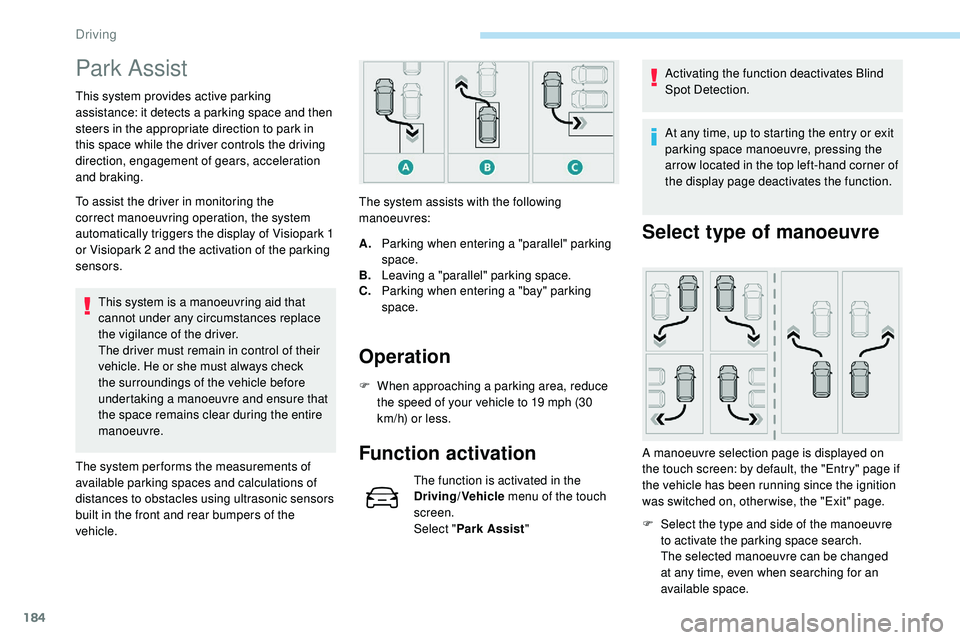
vehicle. The system assists with the following
manoeuvres:
Operation
A.
Parking when entering a "parallel" parking
space.
B. Leaving a "parallel" parking space.
C. Parking when entering a "bay" parking
space.
F
W
hen approaching a parking area, reduce
the speed of your vehicle to 19 mph (30
km/h) or less.
Function activation
The function is activated in the
Driving/Vehicle menu of the touch
screen.
Select " Park Assist " Activating the function deactivates Blind
Spot Detection.
At any time, up to starting the entry or exit
parking space manoeuvre, pressing the
arrow located in the top left-hand corner of
the display page deactivates the function.
Select type of manoeuvre
A manoeuvre selection page is displayed on
the touch screen: by default, the "Entry" page if
the vehicle has been running since the ignition
was switched on, other wise, the "Exit" page.F
S
elect the type and side of the manoeuvre
to activate the parking space search.
The selected manoeuvre can be changed
at any time, even when searching for an
available space.
Driving
Page 192 of 320
190
Operation
F When approaching a parking area, reduce the speed of your vehicle to a maximum of
19 mph (30
km/h).
Function activation
Activating the function can be done in two
ways:F
P
ress this button, located on the
gearbox selector.
or F
Sel
ect "Park Assist " in the
Driving/Vehicle menu of the
touch screen.
Activating the function deactivates Blind
Spot Detection.
At any time, up to starting the entry
manoeuvre or leaving the parking space,
pressing the red arrow located in the
top left-hand corner of the display page
deactivates the function.
Selecting the type of
manoeuvre
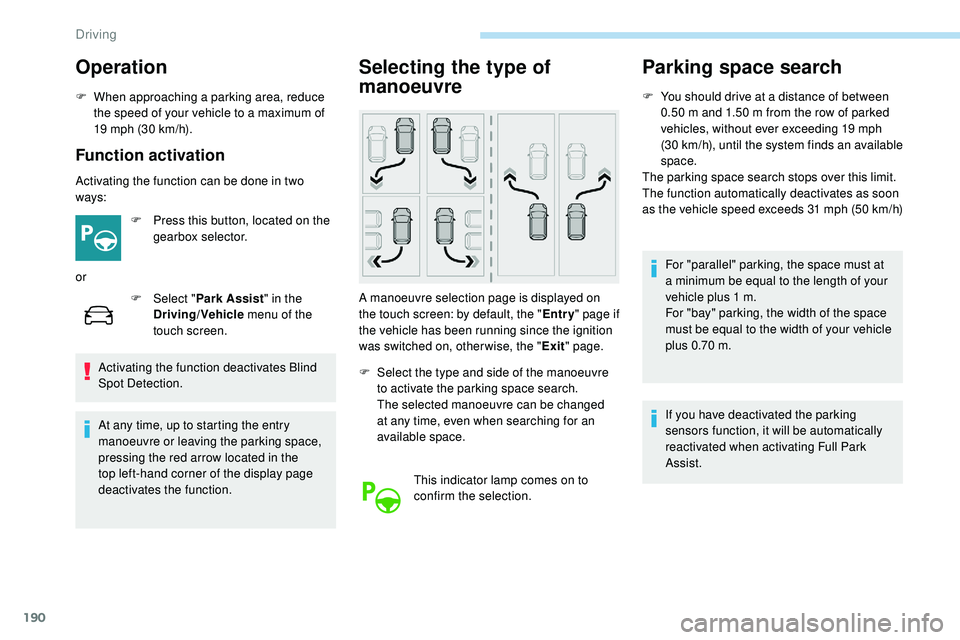
A manoeuvre selection page is displayed on
the touch screen: by default, the " Entry" page if
the vehicle has been running since the ignition
was switched on, other wise, the " Exit" page.
F
S
elect the type and side of the manoeuvre
to activate the parking space search.
The selected manoeuvre can be changed
at any time, even when searching for an
available space.
This indicator lamp comes on to
confirm the selection.
Parking space search
F You should drive at a distance of between 0.50 m and 1.50 m from the row of parked
vehicles, without ever exceeding 19 mph
(30
km/h), until the system finds an available
space.
The parking space search stops over this limit.
The function automatically deactivates as soon
as the vehicle speed exceeds 31 mph (50
km/h)
For "parallel" parking, the space must at
a minimum be equal to the length of your
vehicle plus 1
m.
For "bay" parking, the width of the space
must be equal to the width of your vehicle
plus 0.70
m.
If you have deactivated the parking
sensors function, it will be automatically
reactivated when activating Full Park
Assist.
Driving
Page 210 of 320
208
For more information on AdBlue (BlueHDi
engines), and in particular on topping up the
tank, refer to the corresponding section.
Checks
Unless otherwise indicated, check these
components in accordance with the
manufacturer's service schedule.
Other wise, have them checked by a
PEUGEOT
dealer or a qualified workshop.
12 V battery
The battery does not require any
maintenance.
However, check regularly that the
terminals are correctly tightened
(versions without quick release terminals)
and that the connections are clean.
For more information on the precautions
to take before starting work on the 12 V
battery , refer to the corresponding section.
Versions equipped with Stop & Start are
fitted with a 12 V lead-acid battery of
specific technology and specification.
Its replacement should be carried out
only by a PEUGEOT dealer or a qualified
workshop.
Passenger compartment filter
Depending on the environment
(e.g. dusty atmosphere) and
the use of the vehicle (e.g. city
driving), replace it twice as often,
if
necessary .
A clogged passenger compartment
filter may have an adverse effect on
the per formance of the air conditioning
system and generate undesirable odours.
Air filter
Depending on the environment
(e.g. dusty atmosphere) and
the use of the vehicle (e.g. city
driving), replace it twice as often,
if
necessary .
Oil filter
Change the oil filter each time the
engine oil is changed.
Particle filter (Diesel)
The start of saturation of the particle
filter is signalled by the temporary
illumination of this warning lamp
accompanied by a message warning
of the risk of the filter clogging up.
As soon as the traffic conditions permit,
regenerate the filter by driving at a speed
of at least 37 mph (60 km/h) until the
warning lamp goes off.
If the warning lamp stays on, this indicates
a low Diesel additive level.
For more information on Checking levels ,
refer to the corresponding section.
On a new vehicle, the first particle
filter regeneration operations may be
accompanied by a "burning" smell, which
is per fectly normal.
Following prolonged operation of the
vehicle at very low speed or at idle,
you may, in exceptional circumstances,
notice the emission of water vapour at the
exhaust on acceleration. This does not
affect the behaviour of the vehicle or the
environment.
Practical information
Page 211 of 320
209
Manual gearbox
The gearbox does not require any
maintenance (no oil change).
Automatic gearbox
The gearbox does not require any
maintenance (no oil change).
Brake pads
Brake wear depends on the style
of driving, particularly in the case
of vehicles used in town, over short
distances. It may be necessary to
have the condition of the brakes
checked, even between vehicle
services.
Unless there is a leak in the circuit, a drop in
the brake fluid level indicates that the brake
pads are worn.
Brake disc/drum wear
For any information on checking
brake disc wear, contact a
PEUGEOT dealer or a qualified
workshop.
Electric parking brake
This system does not require any
specific check. However, in the
event of a problem, have the system
checked by a PEUGEOT dealer or a
qualified workshop.
For more information on the Electric
parking brake , refer to the corresponding
section.
Wheels and tyres
The pressure must be checked on
all tyres, including the spare wheel,
when the tyres are "cold", at least
once a month and before a long
j o u r n ey. Driving with worn or damaged tyres reduces
braking efficiency and control of the vehicle's
steering. Regular inspections of the condition
of tyres (tread and sides) and rims are
recommended as well as making sure that
valves are fitted.
Using different size wheels and tyres from
those specified can affect the lifetime of tyres,
wheel rotation, ground clearance and the
speedometer reading and have an adverse
effect on road holding.
Fitting different tyres on the front and rear axles
can cause the ESC to mistime.
Only use products recommended by
PEUGEOT or products of equivalent
quality and specification.
In order to optimise the operation of
components as important as those in the
braking system, PEUGEOT selects and
offers very specific products.
After washing the vehicle, dampness, or
in wintry conditions, ice can form on the
brake discs and pads: braking efficiency
may be reduced. Make light brake
applications to dry and defrost the brakes.
The pressures given on the tyre pressure label
are valid for "cold" tyres. If you have driven for
more than 10 minutes or more than 6 miles (10
kilometres) at more than 31 mph (50 km/h),
0.3 bar (30 kPa) should be added to the values
given on the label.
Under-inflation increases fuel consumption.
Non-compliant tyre pressure causes premature
wear on tyres and has an adverse effect on the
vehicle's road holding – Risk of an accident!
7
Practical information