adaptive Peugeot 508 2019 Owner's Manual
[x] Cancel search | Manufacturer: PEUGEOT, Model Year: 2019, Model line: 508, Model: Peugeot 508 2019Pages: 320, PDF Size: 10.09 MB
Page 5 of 320
3
.
bit.ly/helpPSA
.
Driving recommendations 124
Anti-theft protection 1 25
Starting/Switching off the engine
1
25
Electric parking brake
1
28
Manual gearbox
1
31
Automatic gearbox
1
31
Hill start assist
1
35
Active Suspension Control
1
36
Driving modes
1
36
Gear shift indicator
1
38
Stop & Start
1
38
Tyre under-inflation detection
1
40
Speed Limit recognition and
recommendation
1
42
Speed limiter
1
46
Programmable cruise control
1
48
Memorising speeds
1
51
Drive Assist Plus
1
51
Adaptive cruise control
1
52
Lane Positioning Assist
1
61
Active Safety Brake with Distance Alert
and Intelligent emergency braking
assistance
165
Fatigue detection system
1
69
Active Blind Spot Monitoring System
1
70
Active Lane Keeping Assistance
1
71
Blind Spot Detection
1
74
Parking sensors
1
76
Visiopark 1 – Visiopark 2
1
79
Park Assist
1
84
Full Park Assist
1
88Compatibility of fuels
1 97
Refuelling 1 98
Misfuel prevention (Diesel)
1
99
Towing device
1
99
Towing device with retractable towball
2
00
Load reduction mode
2
01
Energy economy mode
202
S
now chains
2
02
Fitting roof bars
2
03
Bonnet
204
Engine compartment
2
05
Checking levels
20
5
Checks
20
8
Advice on care and maintenance
2
10
AdBlue
® (BlueHDi engines) 2 10
Warning triangle
2
13
Running out of fuel (Diesel)
2
13
Tool kit
2
14
Temporary puncture repair kit
2
16
Spare wheel
2
19
Changing a bulb
2
23
Changing a fuse
2
27
12 V battery
2
33
Towing the vehicle
2
36Engine technical data and towed loads
2
38
Engines and towed loads – Petrol
2
39
Engines and towed loads – Diesel
2
40
Dimensions
2
42
Identification markings
2
43
Driving
Practical information
In the event of a breakdown Technical data
Alphabetical index
Access to additional videos
Audio equipment and telematics
PEUGEOT Connect Radio
PEUGEOT Connect Nav
.
Contents
Page 7 of 320
5
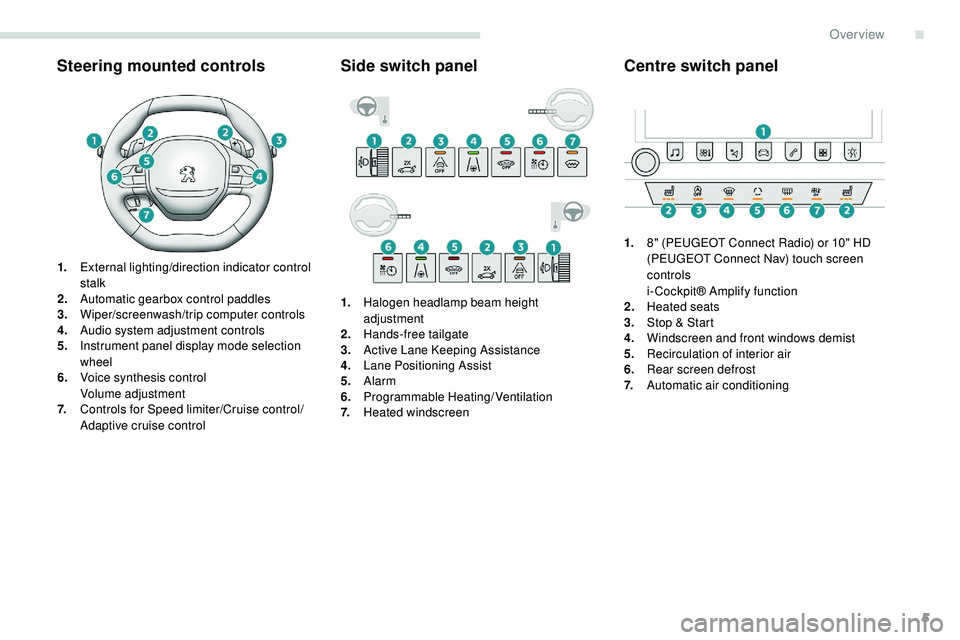
Steering mounted controls
1.External lighting/direction indicator control
stalk
2. Automatic gearbox control paddles
3. Wiper/screenwash/trip computer controls
4. Audio system adjustment controls
5. Instrument panel display mode selection
wheel
6. Voice synthesis control
Volume adjustment
7. Controls for Speed limiter/Cruise control/
Adaptive cruise control
Side switch panel
1.Halogen headlamp beam height
adjustment
2. Hands-free tailgate
3. Active Lane Keeping Assistance
4. Lane Positioning Assist
5. Alarm
6. Programmable Heating/Ventilation
7. Heated windscreen
Centre switch panel
1.8" (PEUGEOT Connect Radio) or 10" HD
(PEUGEOT Connect Nav) touch screen
controls
i- Cockpit® Amplify function
2. Heated seats
3. Stop & Start
4. Windscreen and front windows demist
5. Recirculation of interior air
6. Rear screen defrost
7. Automatic air conditioning
.
Over view
Page 34 of 320
32
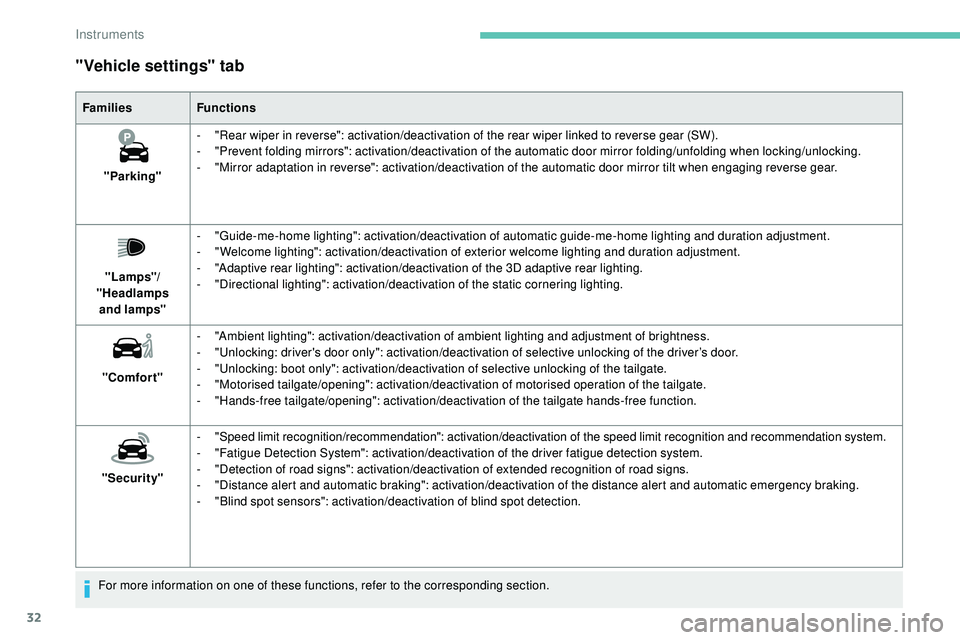
"Vehicle settings" tab
FamiliesFunctions
"Parking" -
"
Rear wiper in reverse": activation/deactivation of the rear wiper linked to reverse gear (SW).
-
"
Prevent folding mirrors": activation/deactivation of the automatic door mirror folding/unfolding when locking/unlocking.
-
"
Mirror adaptation in reverse": activation/deactivation of the automatic door mirror tilt when engaging reverse gear.
"Lamps"/
"Headlamps and
lamps" -
"
Guide-me-home lighting": activation/deactivation of automatic guide-me-home lighting and duration adjustment.
-
"
Welcome lighting": activation/deactivation of exterior welcome lighting and duration adjustment.
-
"
Adaptive rear lighting": activation/deactivation of the 3D adaptive rear lighting.
-
"
Directional lighting": activation/deactivation of the static cornering lighting.
"Comfort" -
"
Ambient lighting": activation/deactivation of ambient lighting and adjustment of brightness.
-
"
Unlocking: driver's door only": activation/deactivation of selective unlocking of the driver’s door.
-
"
Unlocking: boot only": activation/deactivation of selective unlocking of the tailgate.
-
"
Motorised tailgate/opening": activation/deactivation of motorised operation of the tailgate.
-
"
Hands-free tailgate/opening": activation/deactivation of the tailgate hands-free function.
"Security" -
"
Speed limit recognition/recommendation": activation/deactivation of the speed limit recognition and recommendation system.
-
"
Fatigue Detection System": activation/deactivation of the driver fatigue detection system.
-
"
Detection of road signs": activation/deactivation of extended recognition of road signs.
-
"
Distance alert and automatic braking": activation/deactivation of the distance alert and automatic emergency braking.
-
"
Blind spot sensors": activation/deactivation of blind spot detection.
For more information on one of these functions, refer to the corresponding section.
Instruments
Page 38 of 320
36
Locking the vehicle
Normal locking
F Press the button.
On the first press of the locking button,
illumination of the direction indicators for a few
seconds indicates:
-
t
he locking of the vehicle for versions
without alarm,
-
t
he activation of the alarm for other
versions.
The door mirrors fold.
An improperly closed door or tailgate
prevents locking of the vehicle. However, if
your vehicle has an alarm, this will be fully
activated after about 45 seconds.
If the vehicle is unlocked inadvertently
and there is then no action on the doors
or boot, the vehicle will automatically lock
itself again after about 30 seconds. If the
alarm was previously activated, it will be
reactivated automatically. The automatic folding and unfolding of the
door mirrors with the remote control can
be set in the Driving/Vehicle menu of the
touch screen.
Deadlocking
F Within five seconds, press the locking
button again to lock the vehicle.
For versions without an alarm, deadlocking
is confirmed by illumination of the direction
indicators for few seconds on the second press
of the locking button.
Deadlocking renders the interior door
controls inoperative.
It also deactivates the interior central
locking button on the dashboard.
Therefore, never leave anyone inside the
vehicle when it is deadlocked.
Closing the windows and sunroof Ensure that no person or object could
prevent the correct closing of the windows
and sunroof.
If, on versions with alarm, you want to
leave the windows and/or sunroof partly
open, you must first deactivate the interior
volumetric alarm protection.
For more information on the Alarm
, refer
to the corresponding section.
"Peugeot Adaptive LED technology"
On versions equipped with 3D LED rear
lamps, the lamps illuminate in a scrolling
pattern upon locking and unlocking the
vehicle, as well as when the lamps are lit
remotely.
Locating your vehicle
This function allows you to identify your vehicle
from a distance, particularly in poor light. Your
vehicle must be locked.
F
P
ress this button.
This will switch on the courtesy lamps and door
mirror spot lamps and the direction indicators
will flash for around ten seconds.
The windows stop when you release the button.
Maintaining pressure on the locking
button for more than three seconds
allows the windows and, depending
on version, the sunroof to be closed
to the desired position.This operation also closes the sunroof blind.
Access
Page 42 of 320
40
At the first press on one of the locking controls,
illumination of the direction indicators for a few
seconds signals:
-
t
he locking of the vehicle for versions
without alarm,
-
t
he activation of the alarm for other
versions.
The door mirrors fold. "Peugeot Adaptive LED technology"
On versions equipped with 3D LED rear
lamps, the lamps illuminate in a scrolling
pattern upon locking and unlocking the
vehicle, as well as when the lamps are lit
remotely.
Advice
Remote control
The high frequency remote control is a
sensitive system; do not operate it while
it is in your pocket as there is a possibility
that it may unlock the vehicle, without you
being aware of it.
Do not press the buttons of your remote
control out of range and out of sight of
your vehicle. It might stop working. It will
then be necessary to reinitialise it again.
Electrical interference
The Keyless Entry and Starting electronic
key may not operate if close to certain
electronic devices: telephone, laptop
computer, strong magnetic fields, etc.Anti-theft protection
Do not make any modifications to the
electronic engine immobiliser system;
this
could cause malfunctions.
Locking the vehicle
Driving with the doors locked could make
it difficult for the emergency ser vices to
enter the vehicle in an emergency.
As a safety precaution (with children on
board), take the electronic key with you when
you leave the vehicle, even for a short time.
Lost keys, remote control, electronic
key
Go to a PEUGEOT dealer with the
vehicle's registration document, your
personal identification documents and if
possible the key code label.
The PEUGEOT dealer will be able to
retrieve the key code and the transponder
code required to order a new key. Do not throw the remote control batteries
away, they contain metals which are
harmful to the environment.
Take them to an approved collection
point.
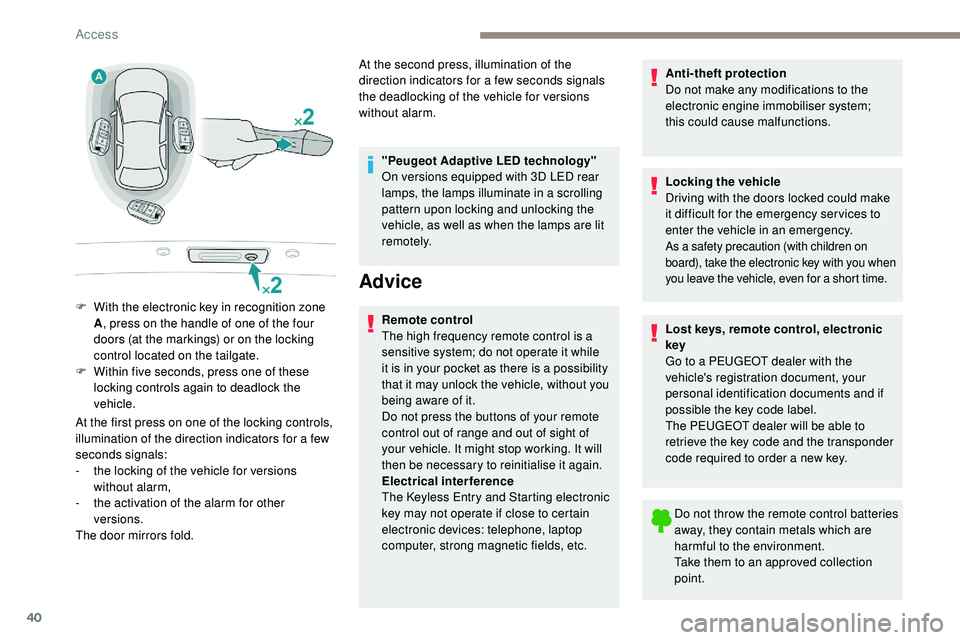
F
W
ith the electronic key in recognition zone
A , press on the handle of one of the four
doors (at the markings) or on the locking
control located on the tailgate.
F
W
ithin five seconds, press one of these
locking controls again to deadlock the
vehicle. At the second press, illumination of the
direction indicators for a few seconds signals
the deadlocking of the vehicle for versions
without alarm.
Access
Page 88 of 320
86
Exterior lighting control
stalk
Main lighting
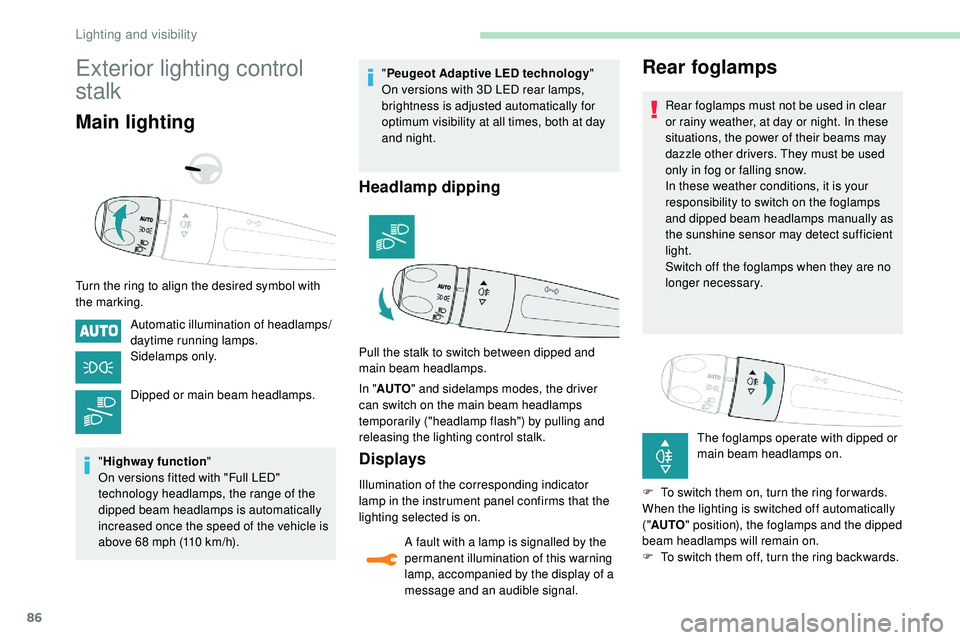
Turn the ring to align the desired symbol with
the marking.Automatic illumination of headlamps/
daytime running lamps.
Sidelamps only.
Dipped or main beam headlamps.
" Highway function "
On versions fitted with "Full LED"
technology headlamps, the range of the
dipped beam headlamps is automatically
increased once the speed of the vehicle is
above 68 mph (110 km/h). "
Peugeot Adaptive LED technology "
On versions with 3D LED rear lamps,
brightness is adjusted automatically for
optimum visibility at all times, both at day
and night.
Headlamp dipping
In " AUTO " and sidelamps modes, the driver
can switch on the main beam headlamps
temporarily ("headlamp flash") by pulling and
releasing the lighting control stalk.
Displays
Illumination of the corresponding indicator
lamp in the instrument panel confirms that the
lighting selected is on.
A fault with a lamp is signalled by the
permanent illumination of this warning
lamp, accompanied by the display of a
message and an audible signal.
Rear foglamps
Rear foglamps must not be used in clear
or rainy weather, at day or night. In these
situations, the power of their beams may
dazzle other drivers. They must be used
only in fog or falling snow.
In these weather conditions, it is your
responsibility to switch on the foglamps
and dipped beam headlamps manually as
the sunshine sensor may detect sufficient
light.
Switch off the foglamps when they are no
longer necessary.
The foglamps operate with dipped or
main beam headlamps on.
F
T
o switch them on, turn the ring for wards.
When the lighting is switched off automatically
(" AUTO " position), the foglamps and the dipped
beam headlamps will remain on.
F
T
o switch them off, turn the ring backwards.
Pull the stalk to switch between dipped and
main beam headlamps.
Lighting and visibility
Page 108 of 320
106
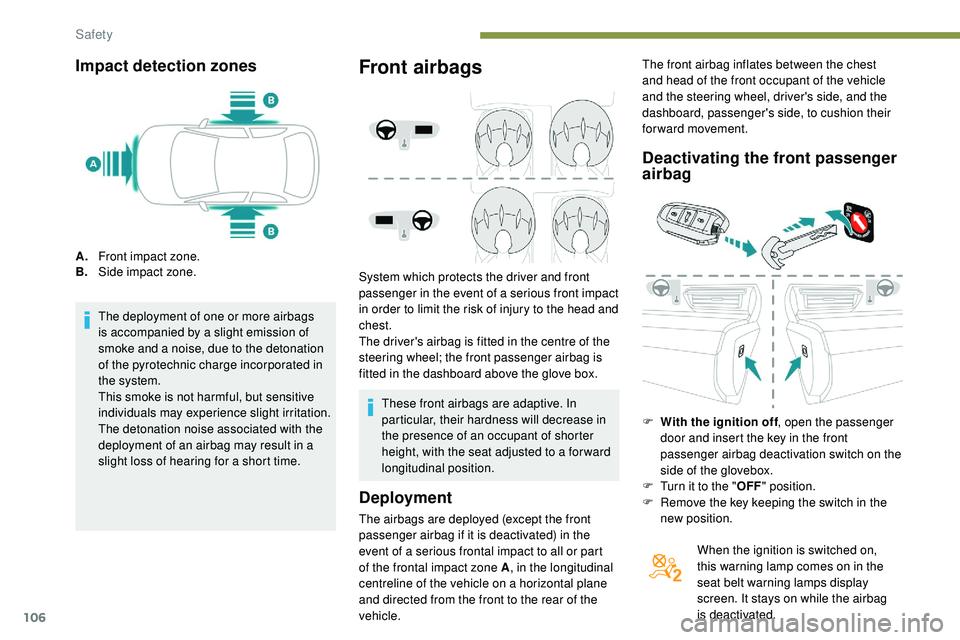
Impact detection zones
A.Front impact zone.
B. Side impact zone.
The deployment of one or more airbags
is accompanied by a slight emission of
smoke and a noise, due to the detonation
of the pyrotechnic charge incorporated in
the system.
This smoke is not harmful, but sensitive
individuals may experience slight irritation.
The detonation noise associated with the
deployment of an airbag may result in a
slight loss of hearing for a short time.
Front airbags
System which protects the driver and front
passenger in the event of a serious front impact
in order to limit the risk of injury to the head and
chest.
The driver's airbag is fitted in the centre of the
steering wheel; the front passenger airbag is
fitted in the dashboard above the glove box.
Deployment
The airbags are deployed (except the front
passenger airbag if it is deactivated) in the
event of a serious frontal impact to all or part
of the frontal impact zone A , in the longitudinal
centreline of the vehicle on a horizontal plane
and directed from the front to the rear of the
vehicle.
Deactivating the front passenger
airbag
F With the ignition off , open the passenger
door and insert the key in the front
passenger airbag deactivation switch on the
side of the glovebox.
F
T
urn it to the " OFF" position.
F
R
emove the key keeping the switch in the
new position.
When the ignition is switched on,
this warning lamp comes on in the
seat belt warning lamps display
screen. It stays on while the airbag
is deactivated.
These front airbags are adaptive. In
particular, their hardness will decrease in
the presence of an occupant of shorter
height, with the seat adjusted to a for ward
longitudinal position. The front airbag inflates between the chest
and head of the front occupant of the vehicle
and the steering wheel, driver's side, and the
dashboard, passenger's side, to cushion their
for ward movement.
Safety
Page 147 of 320
145
Recommendation
For more information on the Speed
limiter, Cruise control or Adaptive
cruise control , refer to the corresponding
sections.
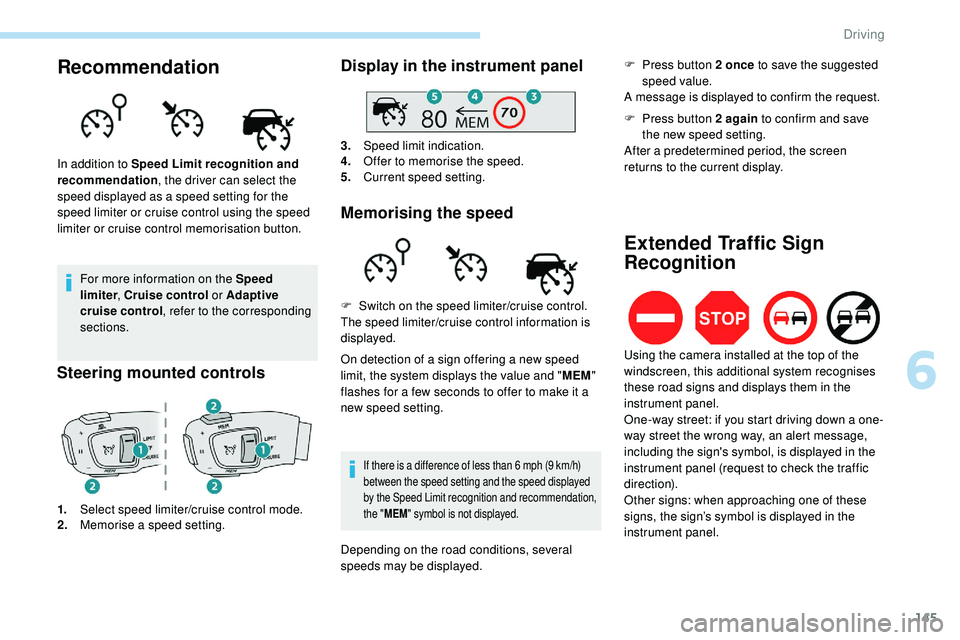
Steering mounted controls
1. Select speed limiter/cruise control mode.
2. Memorise a speed setting.
Display in the instrument panel
3.Speed limit indication.
4. Offer to memorise the speed.
5. Current speed setting.
Memorising the speed
In addition to Speed Limit recognition and
recommendation , the driver can select the
speed displayed as a speed setting for the
speed limiter or cruise control using the speed
limiter or cruise control memorisation button.
On detection of a sign offering a new speed
limit, the system displays the value and "MEM"
flashes for a few seconds to offer to make it a
new speed setting.
If there is a difference of less than 6 mph (9 km/h)
b etween the speed setting and the speed displayed
by the Speed Limit recognition and recommendation,
the " MEM " symbol is not displayed.
F Switch on the speed limiter/cruise control.
The speed limiter/cruise control information is
displayed.
Depending on the road conditions, several
speeds may be displayed. F
P
ress button 2 once
to save the suggested
speed value.
A message is displayed to confirm the request.
Extended Traffic Sign
Recognition
F Press button 2 again to confirm and save
the new speed setting.
After a predetermined period, the screen
returns to the current display.
Using the camera installed at the top of the
windscreen, this additional system recognises
these road signs and displays them in the
instrument panel.
One-way street: if you start driving down a one-
way street the wrong way, an alert message,
including the sign's symbol, is displayed in the
instrument panel (request to check the traffic
direction).
Other signs: when approaching one of these
signs, the sign’s symbol is displayed in the
instrument panel.
6
Driving
Page 153 of 320
151
Memorising speeds
Linked to the speed limiter and programmable
cruise control, this function allows speed limits
to be registered which will then be suggested
as settings for these two systems.
You can memorise several speed settings for
each system.
By default, some speed settings are already
memorised.As a safety measure, the driver must
only modify the speed settings when
stationary.
Changing a speed setting
From the Driving/Vehicle menu of
the touch screen, select " Driving
functions ", then "Memorised speed
settings ".
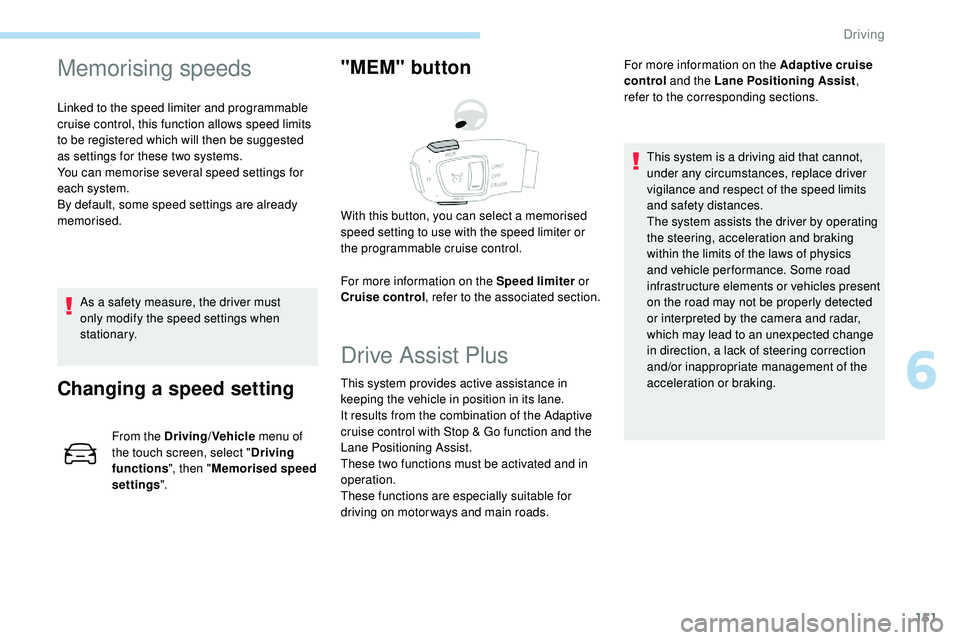
"MEM" button
For more information on the Speed limiter or
Cruise control , refer to the associated section.
With this button, you can select a memorised
speed setting to use with the speed limiter or
the programmable cruise control.
Drive Assist Plus
This system provides active assistance in
keeping the vehicle in position in its lane.
It results from the combination of the Adaptive
cruise control with Stop & Go function and the
Lane Positioning Assist.
These two functions must be activated and in
operation.
These functions are especially suitable for
driving on motor ways and main roads. For more information on the
Adaptive cruise
control and the Lane Positioning Assist ,
refer to the corresponding sections.
This system is a driving aid that cannot,
under any circumstances, replace driver
vigilance and respect of the speed limits
and safety distances.
The system assists the driver by operating
the steering, acceleration and braking
within the limits of the laws of physics
and vehicle per formance. Some road
infrastructure elements or vehicles present
on the road may not be properly detected
or interpreted by the camera and radar,
which may lead to an unexpected change
in direction, a lack of steering correction
and/or inappropriate management of the
acceleration or braking.
6
Driving
Page 154 of 320
152
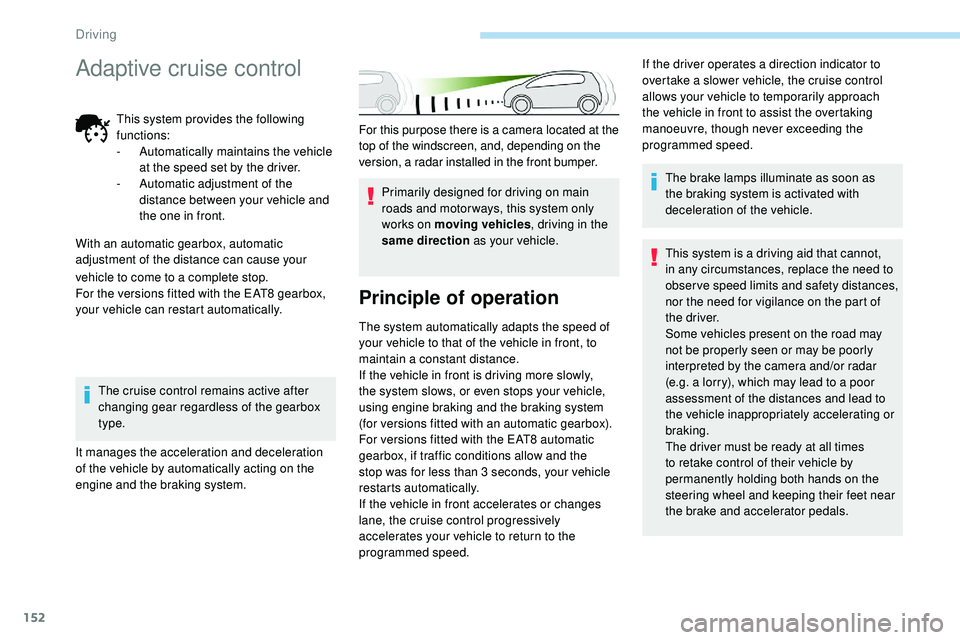
For this purpose there is a camera located at the
top of the windscreen, and, depending on the
version, a radar installed in the front bumper.Primarily designed for driving on main
roads and motor ways, this system only
works on moving vehicles , driving in the
same direction as your vehicle.
Principle of operation
The system automatically adapts the speed of
your vehicle to that of the vehicle in front, to
maintain a constant distance.
If the vehicle in front is driving more slowly,
the system slows, or even stops your vehicle,
using engine braking and the braking system
(for versions fitted with an automatic gearbox).
For versions fitted with the EAT8 automatic
gearbox, if traffic conditions allow and the
stop was for less than 3 seconds, your vehicle
restarts automatically.
If the vehicle in front accelerates or changes
lane, the cruise control progressively
accelerates your vehicle to return to the
programmed speed. The brake lamps illuminate as soon as
the braking system is activated with
deceleration of the vehicle.
This system is a driving aid that cannot,
in any circumstances, replace the need to
obser ve speed limits and safety distances,
nor the need for vigilance on the part of
the driver.
Some vehicles present on the road may
not be properly seen or may be poorly
interpreted by the camera and/or radar
(e.g. a lorry), which may lead to a poor
assessment of the distances and lead to
the vehicle inappropriately accelerating or
braking.
The driver must be ready at all times
to retake control of their vehicle by
permanently holding both hands on the
steering wheel and keeping their feet near
the brake and accelerator pedals.
If the driver operates a direction indicator to
overtake a slower vehicle, the cruise control
allows your vehicle to temporarily approach
the vehicle in front to assist the overtaking
manoeuvre, though never exceeding the
programmed speed.
vehicle to come to a complete stop.
For the versions fitted with the EAT8 gearbox,
your vehicle can restart automatically. The cruise control remains active after
changing gear regardless of the gearbox
type.
It manages the acceleration and deceleration
of the vehicle by automatically acting on the
engine and the braking system.
Adaptive cruise control
This system provides the following
functions:
-
A
utomatically maintains the vehicle
at the speed set by the driver.
-
A
utomatic adjustment of the
distance between your vehicle and
the one in front.
With an automatic gearbox, automatic
adjustment of the distance can cause your
Driving