Energy Peugeot 508 2020 User Guide
[x] Cancel search | Manufacturer: PEUGEOT, Model Year: 2020, Model line: 508, Model: Peugeot 508 2020Pages: 276, PDF Size: 8.43 MB
Page 68 of 276
66
Lighting and visibility
Headlamp beam height
adjustment
Manual adjustment of the
halogen headlamps
To avoid causing a nuisance to other road users,
the height of these headlamp beams should be
adjusted according to the load in the vehicle.
0 (Initial setting) Driver only or driver + front passenger
1 5 people
2 5 people + load in the boot
3 Driver only + load in the boot
4 5 6 Not used
Automatic adjustment of
the Full LED technology
headlamps
This system automatically adjusts the height of
the headlamp beams according to the load in the
vehicle.
If the driver's door is opened, a temporary
audible signal warns the driver that the lamps
are on.
They will go off automatically after a period of
time that depends on the state of charge of
the battery (entering energy economy mode).
In some weather conditions (e.g. low
temperature or humidity), misting on the
internal surface of the glass of the headlamps
and rear lamps is normal, and will disappear
after the lamps have been on for a few
minutes.
Never look too closely at the luminous
beam of Full LED headlamps: risk of
serious eye injury!
Travelling abroad
Vehicles equipped with halogen
headlamps:
If planning to use your vehicle in a country
that drives on the other side of the road, the
headlamp dipped beams must be adjusted to
avoid dazzling oncoming drivers. Contact a
PEUGEOT dealer or a qualified workshop.
Daytime running lamps /
Sidelamps
These LED lamps at the front and rear of the
vehicle light up automatically when the engine
starts.
They perform the following functions:
–
Daytime running lamps (lighting control stalk
at position
"AUTO" with adequate ambient light).
–
Sidelamps (lighting control stalk at position
"
AUTO" with low ambient light or "Sidelamps
only" or "Dipped/main beam headlamps").
Direction indicators
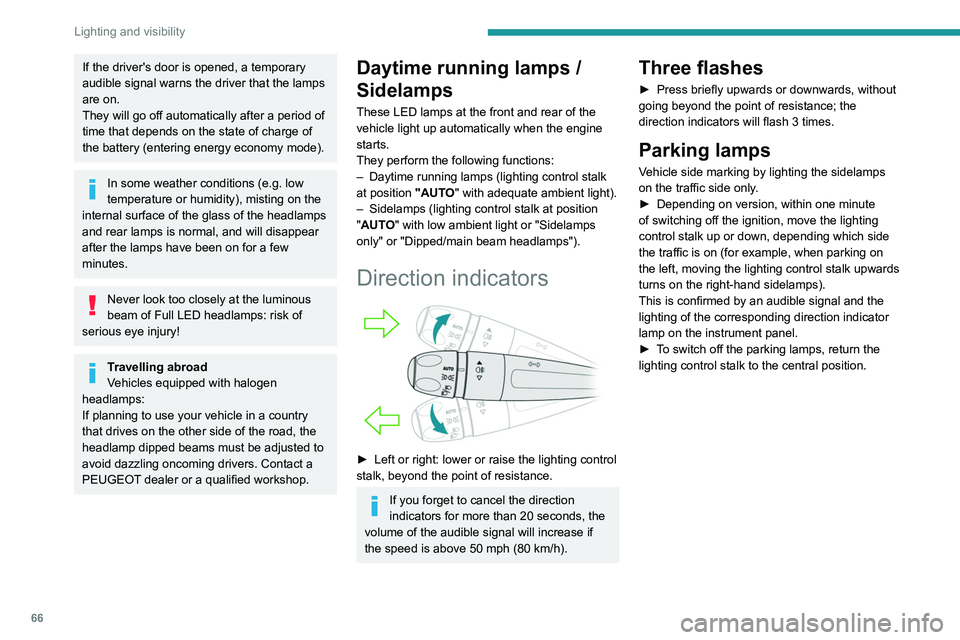
► Left or right: lower or raise the lighting control
stalk, beyond the point of resistance.
If you forget to cancel the direction
indicators for more than 20 seconds, the
volume of the audible signal will increase if
the speed is above 50 mph (80 km/h).
Three flashes
► Press briefly upwards or downwards, without
going beyond the point of resistance; the
direction indicators will flash 3 times.
Parking lamps
Vehicle side marking by lighting the sidelamps
on the traffic side only.
►
Depending on version, within one minute
of switching off the ignition, move the lighting
control stalk up or down, depending which side
the traffic is on (for example, when parking on
the left, moving the lighting control stalk upwards
turns on the right-hand sidelamps).
This is confirmed by an audible signal and the
lighting of the corresponding direction indicator
lamp on the instrument panel.
►
T
o switch off the parking lamps, return the
lighting control stalk to the central position.
Page 108 of 276
106
Driving
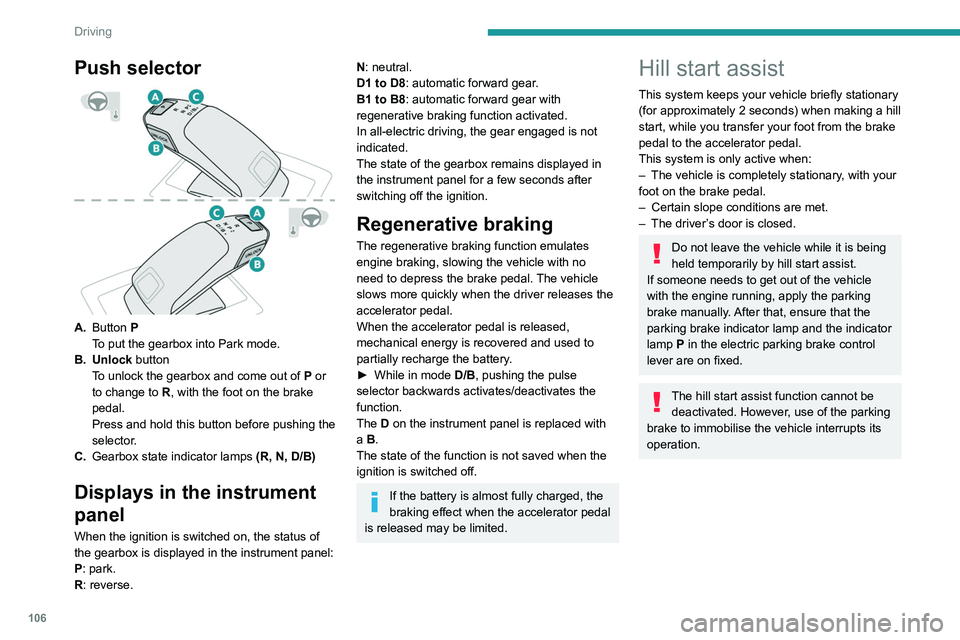
Push selector
A.Button P
To put the gearbox into Park mode.
B. Unlock button To unlock the gearbox and come out of
P
or
to change to
R, with the foot on the brake
pedal.
Press and hold this button before pushing the
selector.
C. Gearbox state indicator lamps (R, N, D/B)
Displays in the instrument
panel
When the ignition is switched on, the status of
the gearbox is displayed in the instrument panel:
P: park.
R: reverse.
N: neutral.
D1 to D8: automatic forward gear.
B1 to B8: automatic forward gear with
regenerative braking function activated.
In all-electric driving, the gear engaged is not
indicated.
The state of the gearbox remains displayed in
the instrument panel for a few seconds after
switching off the ignition.
Regenerative braking
The regenerative braking function emulates
engine braking, slowing the vehicle with no
need to depress the brake pedal. The vehicle
slows more quickly when the driver releases the
accelerator pedal.
When the accelerator pedal is released,
mechanical energy is recovered and used to
partially recharge the battery.
►
While in mode
D/B
, pushing the pulse
selector backwards activates/deactivates the
function.
The D on the instrument panel is replaced with
a B.
The state of the function is not saved when the
ignition is switched off.
If the battery is almost fully charged, the
braking effect when the accelerator pedal
is released may be limited.
Hill start assist
This system keeps your vehicle briefly stationary
(for approximately 2 seconds) when making a hill
start, while you transfer your foot from the brake
pedal to the accelerator pedal.
This system is only active when:
–
The vehicle is completely stationary
, with your
foot on the brake pedal.
–
Certain slope conditions are met.
–
The driver
’s door is closed.
Do not leave the vehicle while it is being
held temporarily by hill start assist.
If someone needs to get out of the vehicle
with the engine running, apply the parking
brake manually. After that, ensure that the
parking brake indicator lamp and the indicator
lamp
P in the electric parking brake control
lever are on fixed.
The hill start assist function cannot be deactivated. However, use of the parking
brake to immobilise the vehicle interrupts its
operation.
Operation
On an ascending slope, with the vehicle
stationary, the vehicle is held for a short time
when you release the brake pedal:
– provided you are in first gear or neutral with a
manual gearbox.
– provided you are in mode D or M with an
automatic gearbox.
On a descending slope, with the vehicle
stationary and reverse gear engaged, the
vehicle is held for a short time when you
release the brake pedal.
Page 110 of 276
108
Driving
COMFORT
(with Active Suspension Control)
Allows more comfortable driving and softer
suspension.
NORMAL
Restores the vehicle’s original settings.
Together with Active Suspension Control, this
mode offers the best compromise between
comfort and handling.
SPORT
Enables more dynamic driving, acting on the
power steering, accelerator and gear changes
with an automatic gearbox and the possibility of
displaying the vehicle’s dynamic settings on the
instrument panel.
MANUAL
Permanent "Manual" mode with an automatic
gearbox and Full Park Assist.
Enables manual gear changing using the
steering-mounted paddles.
With hybrid engine
Each time the ignition is switched on, ELECTRIC
mode is selected by default.
ELECTRIC
Allows 100% electric driving. The maximum
speed is approximately 84 mph (135 km/h).
When starting the vehicle, if the conditions do not
allow the activation or retention of
ELECTRIC
mode, the message
“Electric mode currently
unavailable” is displayed in the instrument panel.
The vehicle automatically changes to HYBRID
mode.
The lighting of a blue LED under the interior
rear view mirror, visible from outside the vehicle,
confirms driving in ELECTRIC mode.
The lighting of the LED can be
deactivated by inserting the tip of a paper
clip type accessory into the hole under the
mirror
.
Conditions of activation
–
Adequate battery charge level. Charging
the vehicle after each drive is therefore
recommended.
The ELECTRIC mode is
available as long as there is power left in the
battery.
–
Exterior temperature between 0°C and 45°C.
Manually exiting the mode
–
Fully depress the accelerator pedal.
–
Select another mode.
In case of non-use of the vehicle for a
long period (several months), a restart of
the petrol engine may occur even if the
battery is charged.
HYBRID
Optimises the fuel consumption of the vehicle
by managing the alternating or simultaneous
operation of the two types of engine ,
according to road conditions and driving style.
In HYBRID mode, it is possible to drive in
100% electric mode if the battery charge level
is sufficient and acceleration requirements are
moderate.
When navigation is activated, the use
of HYBRID mode is advisable to optimise
electrical consumption.
SPORT
Allows more dynamic driving to take advantage
of the vehicle's maximum performance.
Electric power is used to supplement the petrol
engine as long as there is energy left in the
battery.
COMFORT
Depending on equipment.
Combines the HYBRID mode and Active
Suspension Control (controlled shock absorption
option).
In COMFORT mode, the suspension favours soft
shock absorption to improve driving comfort on
uneven surfaces.
For more information on Active
Suspension Control , refer to the
corresponding section.
Gear efficiency indicator
This system helps reduce fuel consumption by
recommending the most appropriate gear.
Operation
Depending on the driving situation and the
vehicle's equipment, the system may advise
skipping one or more gears.
Gear engagement recommendations are only
optional. In fact, the configuration of the road,
the traffic density and safety remain determining
factors when choosing the best gear. Therefore,
the driver remains responsible for deciding
whether or not to follow the system’s advice.
This function cannot be deactivated.
With an automatic gearbox, the system is
only active in manual operation.
The information appears in the instrument panel in the form of an arrow and the
recommended gear.
The system adapts its gear shift recommendation according to the driving
conditions (slope, load, etc.) and the driver’s
requirements (power, acceleration, braking,
etc.).
The system never suggests:
– engaging first gear,
– engaging reverse.
Stop & Start
The Stop & Start function puts the engine
temporarily into standby - STOP mode - during
phases when the vehicle is stopped (red lights,
Page 155 of 276
153
Practical information
7serious burns or electrical shock that can lead
to death.
In the event of a problem, always contact a
PEUGEOT dealer or a qualified workshop.
This label is intended solely for use by firefighters responding to an incident
involving the vehicle and for maintenance
technicians.
In the event of an accident or impact
The electrical system or the battery
may be seriously damaged in the event of
an accident or impact involving the vehicle
underbody.
Stop as soon as it is safe to do so and switch
off the ignition.
Contact a PEUGEOT dealer or a qualified
workshop without delay.
In the event of exposure to a fire
Immediately exit and evacuate all
passengers from the vehicle. Never attempt
to fight the fire yourself - risk of electrocution!
You must immediately
contact the emergency
services, informing them that the incident
involves a hybrid vehicle.
When washing
Before washing the vehicle, always
check that the charging flap is closed
correctly.
Never wash the vehicle while the battery is
on charge.
High-pressure washing
To avoid damaging electrical
components, it is expressly prohibited to use
high-pressure washing to clean the front
compartment or the vehicle underbody.
Do not use a pressure greater than 80 bar
when washing the bodywork.
Never allow water or dust to enter the
connector or charging nozzle - risk of
electrocution or fire!
Never connect / disconnect the charging
nozzle or cable with wet hands - risk of
electrocution!
Traction battery
The Li-ion (Lithium-ion) traction battery stores
the electrical energy of the vehicle. It is located
under the rear seats.
The range of the battery varies depending
on the type of driving, the route, the use of
thermal comfort equipment and the ageing of its
components.
Battery ageing depends on several
parameters, such as climatic conditions,
mileage or charging frequency.
In case of damage of the battery
It is strictly forbidden to carry out repairs
on the vehicle yourself.
Do not touch liquids coming from the battery
and, in the event of skin contact with these
products, wash abundantly with water and
contact a doctor as soon as possible.
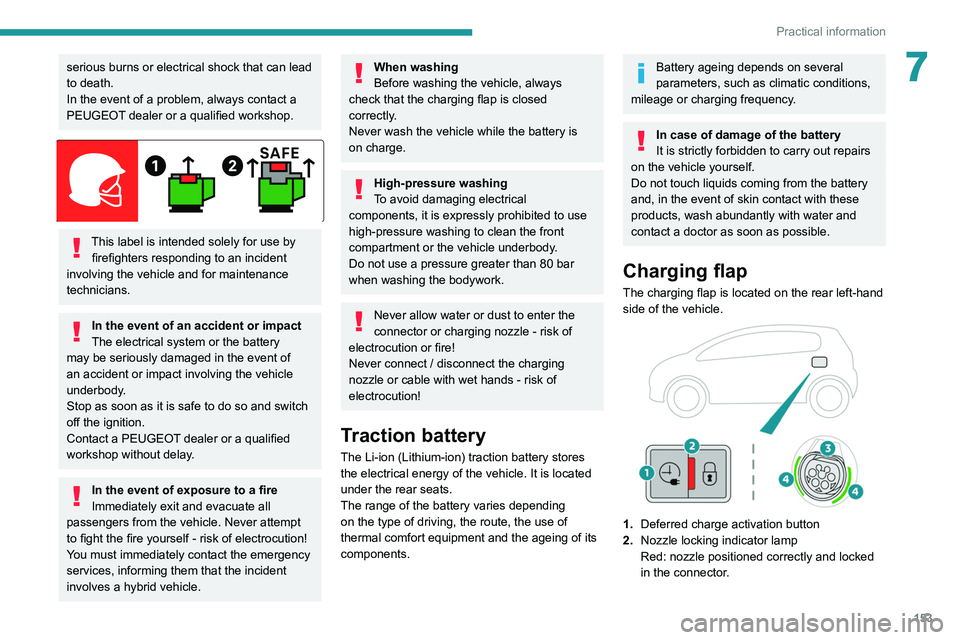
Charging flap
The charging flap is located on the rear left-hand
side of the vehicle.
1. Deferred charge activation button
2. Nozzle locking indicator lamp
Red: nozzle positioned correctly and locked
in the connector.
Page 164 of 276
162
Practical information
Original tyre size Maximum link size235/40 R19 Not suitable for
chains
(with standard chains)
For more information on snow chains, contact a
PEUGEOT dealer or a qualified workshop.
Installation tips
► To fit the chains during a journey, stop the
vehicle on a flat surface on the side of the road.
►
Apply the parking brake and position any
wheel chocks under the wheels to prevent
movement of the vehicle.
►
Fit the chains following the instructions
provided by the manufacturer
.
►
Move off gently and drive for a few moments,
without exceeding 31
mph (50 km/h).
►
Stop the vehicle and check that the snow
chains are correctly tightened.
It is strongly recommended that before
you leave, you practise fitting the snow
chains on a level and dry surface.
Avoid driving with snow chains on roads that have been cleared of snow to avoid
damaging the vehicle's tyres and the road
surface. If the vehicle is fitted with alloy
wheels, check that no part of the chain or its
fixings is in contact with the wheel rim.
Hybrid vehicles
The use of snow chains is only
authorised on the front wheels.
Energy economy mode
This system manages the duration of use of
certain functions, in order to conserve a sufficient
level of charge in the battery with the ignition off.
After switching off the engine, you can still
use functions such as the audio and telematic
system, the wipers and the dipped beam
headlamps or courtesy lamps, for a combined
duration of approximately 40 minutes.
Selecting the mode
A confirmation message is displayed when
energy economy mode is entered, and the active
functions are placed on standby.
If a telephone call is in progress at the
time, it will be maintained for around 10
minutes via the audio system’s hands-free
system.
Exiting the mode
These functions are automatically reactivated the
next time the vehicle is used.
To restore the use of these functions
immediately, start the engine and let it run:
–
For less than 10 minutes, to use the
equipment for approximately 5 minutes.
– For more than 10 minutes, to use the
equipment for approximately 30 minutes.
Let the engine run for the specified duration to
ensure that the battery charge is sufficient.
T
o recharge the battery, avoid repeatedly or
continuously restarting the engine.
A flat battery prevents the engine from starting.
For more information on the 12
V battery,
refer to the corresponding section.
Load reduction mode
This system manages the use of certain
functions according to the level of charge
remaining in the battery.
When the vehicle is being driven, the load
reduction function temporarily deactivates certain
functions, such as the air conditioning and the
heated rear screen.
The deactivated functions are reactivated
automatically as soon as conditions permit.
Bonnet
For more information about the Active bonnet,
refer to the corresponding section.
Stop & Start
Before doing anything under the bonnet,
you must switch off the ignition to avoid any
risk of injury resulting from an automatic
change to START mode.
Hybrid vehicles
Before any work is carried out under the
bonnet, it is essential to switch off the ignition
and check that the READY indicator lamp is
off in the instrument panel - risk of serious
injury!
The location of the interior bonnet release lever prevents the bonnet being
opened when the left-hand front door is
closed.
When the engine is hot, handle the
exterior safety catch with care (risk of
burns), using the protected area.
When the bonnet is open, take care not to
damage the safety catch.
Do not open the bonnet under very windy
conditions.
Cooling of the engine when stopped
The engine cooling fan may start after
the engine has been switched off.
Take care with objects or clothing that
could be caught in the blades of the fan!
Page 207 of 276
205
PEUGEOT Connect Radio
10PEUGEOT Connect
Radio
Multimedia audio system -
Applications - Bluetooth
®
telephone
The functions and settings described
vary according to the vehicle version and
configuration.
For safety reasons and because they
require sustained attention by the driver,
the following operations must be carried out
with the vehicle stationary and the ignition
on:
–
Pairing the smartphone with the system in
Bluetooth mode.
–
Using the smartphone.
–
Connection to the CarPlay®, MirrorLinkTM
or Android Auto applications (certain
applications interrupt their display while the
vehicle is moving).
–
Changing the system settings and
configuration.
The system is protected in such a way that it will only operate in the vehicle.
The Energy Economy Mode message is
displayed when the system is about to enter
the corresponding mode.
The system’s Open Source Software (OSS) source codes are available at the
following addresses:
https://www.groupe-psa.com/fr/oss/
https://www.groupe-psa.com/en/oss/
First steps
With the engine running, a press mutes
the sound.
With the ignition off, a press turns the system on.
Increase or decrease the volume using
the wheel or the "plus" or "minus" buttons
(depending on the equipment).
Use the buttons on either side of or below the
touch screen for access to the menus, then
press the virtual buttons in the touch screen.
Depending on the model, use the "Source" or
"Menu" buttons on the left of the touch screen
for access to the menus, then press the virtual
buttons in the touch screen.
At all times it is possible to display the rolling
menus by pressing the screen briefly with three
fingers.
All of the touch areas of the screen are white.
For pages with multiple tabs at the bottom of the
screen, it is possible to switch between pages
either by tapping the tab for the desired page, or
by using a finger, sliding the pages to the left or
to the right.
Press in the grey zone to go back up a level or
to confirm.
Press the back arrow to go back a level or
confirm.
The touch screen is of the "capacitive" type.
To clean the screen, use a soft, non-abrasive
cloth (e.g. spectacles cloth) with no additional
product.
Do not use sharp objects on the screen.
Do not touch the screen with wet hands.
Certain information is displayed permanently in
the upper bar of the touch screen:
–
Air conditioning status information (depending
on version), and direct access to the
corresponding menu.
–
Radio Media and
Telephone menu status
information.
–
Privacy status information.
–
Access to the touch screen and digital
instrument panel settings.
Audio source selection (depending on
equipment):
Page 220 of 276
218
PEUGEOT Connect Radio
Some telephones offer display options.
Depending on the settings chosen, contacts can
be transferred in a specific order.
►
Modify the telephone directory display
settings.
Settings
When the treble and bass settings are
changed, the ambience is deselected.
When the ambience is changed, the treble
and bass settings are reset.
Selecting an ambience imposes the treble and
bass settings, and vice versa.
►
Modify the treble and bass or ambience
settings to obtain the desired musical ambience.
When the balance settings are changed, the
distribution is deselected.
When the distribution setting is changed, the
balance settings are deselected.
Selecting a distribution setting imposes the
balance settings, and vice versa.
►
Modify the balance setting or the distribution
setting to obtain the desired sound quality
.
There is a difference in sound quality
between audio sources.
To allow for optimal listening quality, the sound
settings can be tailored to different audio
sources, which can generate audible differences
when changing source.
►
Check that the sound settings are appropriate
to the sources listened to.
Adjust the sound
functions to the middle position. When the engine is off, the system switches
off after several minutes of use.
When the engine is switched off, the system's
operating time depends on the state of charge of
the battery.
The switch-off is normal: the system
automatically goes into energy economy mode
and switches off to maintain an adequate charge
in the battery.
►
Start the vehicle’
s engine to increase the
charge of the battery.
Page 221 of 276
219
PEUGEOT Connect Nav
11PEUGEOT Connect Nav
GPS navigation -
Applications - Multimedia
audio system - Bluetooth
®
telephone
The functions and settings described
vary according to the vehicle version and
configuration.
For safety reasons and because they
require sustained attention by the driver,
the following operations must be carried out
with the vehicle stationary and the ignition
on:
–
Pairing the smartphone with the system in
Bluetooth mode.
–
Using the smartphone.
–
Connection to the CarPlay®, MirrorLinkTM
or Android Auto applications (certain
applications interrupt their display while the
vehicle is moving).
–
W
atching a video (the video stops when the
vehicle starts to move again).
–
Changing the system settings and
configuration.
The system is protected in such a way that it will only operate in the vehicle.
The Energy Economy Mode message is
displayed when the system is about to enter
the corresponding mode.
System and map updates can be
downloaded from the Brand’s website.
The update procedure is also available on the
website.
The system’s Open Source Software (OSS) source codes are available at the
following addresses:
https://www.groupe-psa.com/fr/oss/
https://www.groupe-psa.com/en/oss/
First steps
With the engine running, a press mutes
the sound.
With the ignition off, a press turns the system on.
Increase or decrease the volume using
the wheel or the "plus" or "minus" buttons
(depending on the equipment).
Use the menu buttons on either side of or below
the touch screen for access to the menus, then
press the virtual buttons in the touch screen.
Depending on the model, use the "Source" or
"Menu" buttons to access the rolling menus, then
press the virtual buttons in the touch screen.
Display the rolling menus at any time by pressing
the screen briefly with three fingers.
All of the touch areas of the screen are white.
Press the back arrow to go back a level.
Press "OK" to confirm.
The touch screen is of the "capacitive" type.
To clean the screen, use a soft, non-abrasive
cloth (e.g. spectacles cloth) with no additional
product.
Do not use sharp objects on the screen.
Do not touch the screen with wet hands.
Certain information is displayed permanently
in the side bars or in the upper bar of the touch
screen (depending on equipment):
–
Air conditioning status information (depending
on version), and direct access to the
corresponding menu.
–
Go directly to the audio source selection
option, to view the list of radio stations (or list of
titles depending on the source).
–
Go to the "Notifications" of messages, emails,
map updates and, depending on the services,
the navigation notifications.
–
Go to the settings for the touch screen and the
digital instrument panel.
Page 245 of 276
243
PEUGEOT Connect Nav
11Settings
When the treble and bass settings are
changed, the ambience is deselected.
When the ambience is changed, the treble
and bass settings are reset.
Selecting an ambience imposes the treble and
bass settings, and vice versa.
►
Modify the treble and bass or ambience
settings to obtain the desired musical ambience.
When the balance settings are changed, the
distribution is deselected.
When the distribution setting is changed, the
balance settings are deselected.
Selecting a distribution setting imposes the
balance settings, and vice versa.
►
Modify the balance setting or the distribution
setting to obtain the desired sound quality
.
There is a difference in sound quality
between audio sources.
To allow for optimal listening quality, the sound
settings can be tailored to different audio
sources, which can generate audible differences
when changing source.
►
Check that the sound settings are appropriate
to the sources listened to. W
e recommend
setting the sound functions (Bass:, Treble:,
Balance) to the middle position, setting the
musical ambience to "None", setting loudness
correction to "Active" in USB mode and "Inactive"
in Radio mode.
►
In all cases, after applying sound settings,
adjust the volume level on the portable device (to a high level) first.
Then adjust the volume level
on the audio system.
When the engine is off, the system switches
off after several minutes of use.
When the engine is switched off, the system's
operating time depends on the state of charge of
the battery.
The switch-off is normal: the system
automatically goes into energy economy mode
and switches off to maintain an adequate charge
in the battery.
►
Start the vehicle’
s engine to increase the
charge of the battery.
The date and time cannot be set.
Setting of the date and time is only available
if the synchronisation with the satellites is
deactivated.
►
Settings menu / Options /
Time-Date setting.
Select the "Time" tab and deactivate the "GPS
synchronisation" (UTC).
Page 248 of 276
246
Alphabetical index
Electric automatic gearbox (Hybrid) 105
Electric windows
38
Electronic brake force distribution (EBFD)
78
Emergency braking assistance (EBA)
78
Emergency call
76
Emergency switching off
99
Emergency warning lamps
75, 172
Emissions control system, SCR
19, 168
Energy economy mode
162
Energy flows
23
Energy recovery
19, 106
Engine
168
Engine compartment
164–165
Engine, Diesel
151, 164, 172, 199, 201
Engine, petrol
108, 164, 198
Engines
197–199, 201
Environment
7, 30, 54
e-Save function (energy reserve)
24
ESC (electronic stability control)
78
Expanded traffic sign recognition
11 6
F
Fatigue detection 130–131
Filling the AdBlue® tank
166, 169
Filling the fuel tank
151–152
Filter, air
166
Filter, oil
166
Filter, particle
166
Filter, passenger compartment
48, 166
Fitting a wheel
178–179
Fitting roof bars 160–161
Fittings, boot
60
Fittings, interior
55
Fittings, rear
59
Flap, charging
153, 156–158
Flap, fuel filler
151–152
Flashing indicators
66, 182
Flat bed (recovery)
195
Fluid, brake
165
Fluid, engine coolant
165
Foglamps, rear
65, 183
Folding the rear seats
47–48
Four-wheel drive (4WD)
162
Frequency (radio)
233–234
Fuel
7, 151
Fuel consumption
7, 19
Fuel tank
151–152
Full Park Assist
145
Fusebox, dashboard
184
Fusebox, engine compartment
184, 187–188
Fuses
183–184, 187–188
Fuses, dashboard
184
Fuses, engine compartment
189
G
Gauge, fuel 151
Gearbox, automatic
102–105, 107, 110, 167, 190
Gearbox, manual
102, 107, 110, 167
Gear lever, manual gearbox
102
Gear shift indicator ~ Gear efficiency
indicator
108–109
Glove box
55
G.P.S.
227
Grab handles
55
H
Hands-free access 36
Hands-free tailgate
34, 36–37
Hazard warning lamps
75, 172
headlamp adjustment
67
Headlamp adjustment
67
Headlamps, automatic dipping
68–69
Headlamps, automatic illumination
67
Headlamps, dipped beam
181–182
Headlamps, halogen
67, 181–182
Headlamps, main beam
181–182
Head restraints, front
42
Head restraints, rear
46–48
Heating
48, 53–54
Heating, additional
53–54
Heating, programmable
24, 53–54
Hi-Fi system
56
Hill start assist
106–107
Histogramme, fuel consumption
23–24
Horn
76
Horn for pedestrians
76
Hybrid
23, 98, 152, 202
Hybrid engine
202