keyless Peugeot 508 2020 User Guide
[x] Cancel search | Manufacturer: PEUGEOT, Model Year: 2020, Model line: 508, Model: Peugeot 508 2020Pages: 276, PDF Size: 8.43 MB
Page 41 of 276
39
Access
2The rear electric windows can still be controlled
using the driver's controls.
In the event of a serious impact, use of
the rear electric window controls is
re-enabled, if they had been deactivated.
Reinitialising the electric
windows
Following reconnection of the battery, or if
the windows move abnormally, the anti-pinch
function must be reinitialised.
The safety anti-pinch function is not active
during these operations.
For each of the windows:
►
Lower the window fully
, then raise it; it will
rise in steps of a few centimetres each time the
control is pressed. Repeat the operation until the
window is fully closed.
►
Continue to pull the switch for at least
one second after reaching the window closed
position.
If an electric window meets an obstacle
during operation, the movement of the
window must be reversed. To do this, press
the switch concerned.
When the driver operates the passengers’
electric window switches, it is important to
ensure that nothing can prevent the window
from closing properly.
It is important to ensure that the passengers
use the electric windows correctly.
Be particularly aware of children when
operating the windows.
Be aware of passengers and/or other persons
present when closing the windows using
the electronic key or the "Keyless Entry and
Starting" system.
Panoramic sunroof
The panoramic sunroof consists of a movable
glass panel that slides over the roof and a blind
that can be opened independently. Opening the
sunroof automatically opens the blind.
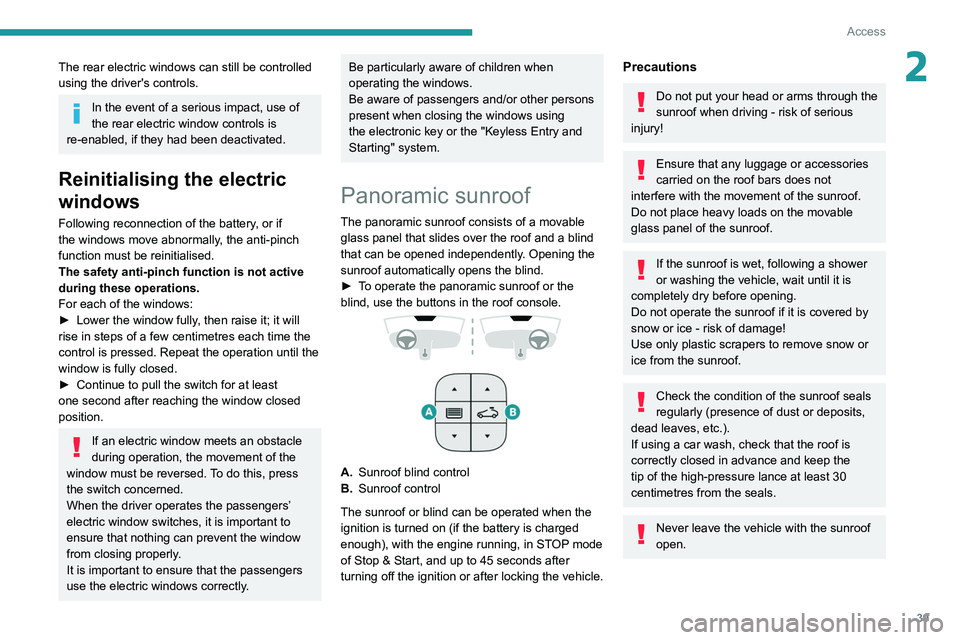
►
T
o operate the panoramic sunroof or the
blind, use the buttons in the roof console.
A. Sunroof blind control
B. Sunroof control
The sunroof or blind can be operated when the
ignition is turned on (if the battery is charged
enough), with the engine running, in STOP mode
of Stop & Start, and up to 45
seconds after
turning off the ignition or after locking the vehicle.
Precautions
Do not put your head or arms through the
sunroof when driving - risk of serious
injury!
Ensure that any luggage or accessories
carried on the roof bars does not
interfere with the movement of the sunroof.
Do not place heavy loads on the movable
glass panel of the sunroof.
If the sunroof is wet, following a shower
or washing the vehicle, wait until it is
completely dry before opening.
Do not operate the sunroof if it is covered by
snow or ice - risk of damage!
Use only plastic scrapers to remove snow or
ice from the sunroof.
Check the condition of the sunroof seals
regularly (presence of dust or deposits,
dead leaves, etc.).
If using a car wash, check that the roof is
correctly closed in advance and keep the
tip of the high-pressure lance at least 30
centimetres from the seals.
Never leave the vehicle with the sunroof
open.
Page 59 of 276
57
Ease of use and comfort
3– High fidelity woofer/mid-range speakers:
Polyglass technology delivering balance and
precise sound.
–
TNF tweeters: Inverted dome aluminium
technology giving optimum sound dispersion and
very detailed higher frequencies.
–
12-way active amplification - 515
Watts:
Hybrid Class AB/Class D technology providing
breadth and finesse in the high frequency
signals, as well as real power in the bass.
–
Subwoofer: 200
mm triple coil Power Flower
TM
technology for defined and dynamic reproduction
of lower frequencies.
Wireless smartphone
charger
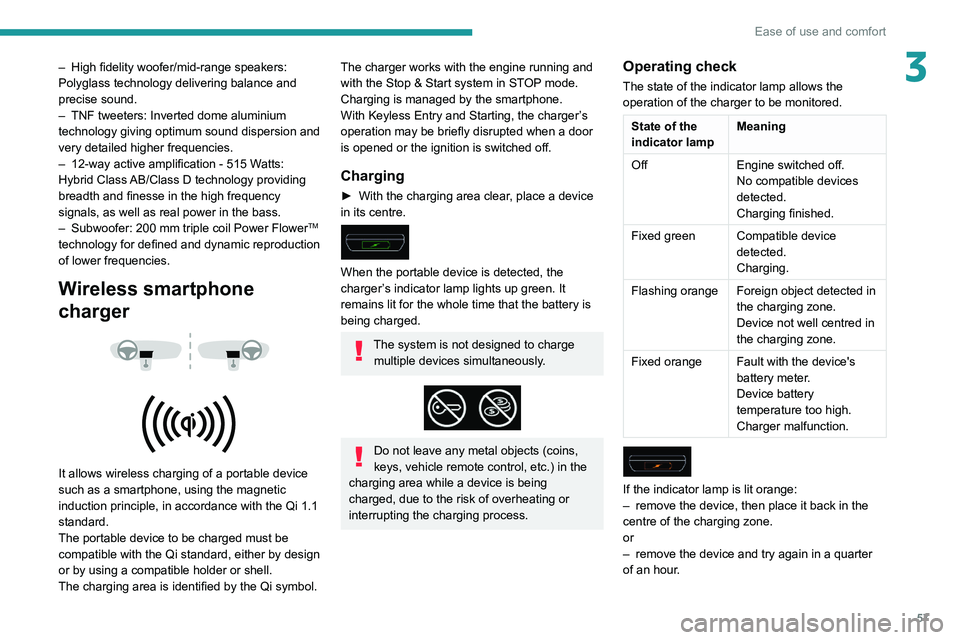
It allows wireless charging of a portable device
such as a smartphone, using the magnetic
induction principle, in accordance with the Qi 1.1
standard.
The portable device to be charged must be
compatible with the Qi standard, either by design
or by using a compatible holder or shell.
The charging area is identified by the Qi symbol.
The charger works with the engine running and
with the Stop & Start system in STOP mode.
Charging is managed by the smartphone.
With Keyless Entry and Starting, the charger’s
operation may be briefly disrupted when a door
is opened or the ignition is switched off.
Charging
► With the charging area clear , place a device
in its centre.
When the portable device is detected, the
charger’s indicator lamp lights up green. It
remains lit for the whole time that the battery is
being charged.
The system is not designed to charge multiple devices simultaneously.
Do not leave any metal objects (coins,
keys, vehicle remote control, etc.) in the
charging area while a device is being
charged, due to the risk of overheating or
interrupting the charging process.
Operating check
The state of the indicator lamp allows the
operation of the charger to be monitored.
State of the
indicator lamp Meaning
Off Engine switched off.
No compatible devices
detected.
Charging finished.
Fixed green Compatible device detected.
Charging.
Flashing orange Foreign object detected in the charging zone.
Device not well centred in
the charging zone.
Fixed orange Fault with the device's battery meter.
Device battery
temperature too high.
Charger malfunction.
If the indicator lamp is lit orange:
– remove the device, then place it back in the
centre of the charging zone.
or
–
remove the device and try again in a quarter
of an hour
.
Page 172 of 276
170
Practical information
If the AdBlue® tank is completely empty
– which is confirmed by the message
"Top up
AdBlue: Starting impossible" – it is
essential to add at least 5 litres.
Free-wheeling
In certain situations, you must allow the vehicle
to free-wheel (while being towed, on a rolling
road, in an automatic car wash, or being
transported by rail or sea freight, etc.).
The procedure varies according to the type of
gearbox and parking brake.
With a manual gearbox and
electric parking brake
/
Release procedure
► With the engine running and while depressing
the brake pedal, move the gear selector to the
neutral position.
►
While depressing the brake pedal, switch off
the ignition.
►
Release the brake pedal, then switch on the
ignition again.
►
While depressing the brake pedal, press the
control lever to release the parking brake.
►
Release the brake pedal, then switch off the
ignition.
Reverting to normal operation
► While depressing the brake pedal, start the
engine.
With an automatic gearbox
and electric parking brake
/
Release procedure
► With the vehicle stationary and the engine
running, select mode N and switch off the
ignition.
Within 5
seconds:
►
Switch on the ignition again.
►
While depressing the brake pedal, move the
push selector forwards or backwards to confirm
mode
N.
►
While depressing the brake pedal, press the
control lever to release the parking brake.
►
Release the brake pedal, switch off the
ignition.
If the 5-second time limit is exceeded, the
gearbox engages mode P
; it is then necessary to
restart the procedure.
Reverting to normal operation
► While depressing the brake pedal, restart the
engine.
Keyless Entry and Starting
You must not depress the brake pedal
while switching the ignition on or off. If you do,
the engine will start, requiring you to restart
the procedure.
Advice on care and maintenance
General recommendations
Observe the following recommendations to avoid
damaging your vehicle.
Exterior
Never use a high-pressure jet wash in
the engine compartment, due to the risk
of damaging electrical components.
Do not wash the vehicle in strong sunshine or
extremely cold conditions.
When washing the vehicle at an
automatic roller-brush car wash, be sure
to lock the doors and, depending on version,
remove the electronic key and deactivate the
“hands-free” function (“Hands-Free Tailgate
Access”).
When using a pressure washer, hold the
lance at least 30 cm from the vehicle
(particularly when cleaning areas containing
chipped paint, sensors or seals).
Promptly clean up any stains containing
chemicals liable to damage the vehicle's paint
Page 249 of 276
247
Alphabetical index
I
i-Cockpit® amplify function 44
Ignition
98, 238
Ignition on
98
Immobiliser, electronic
97
Indicator, AdBlue® range
18
Indicator, coolant temperature
18
Indicator, engine oil level
17
Indicators, direction
66, 182
Inflating tyres
167, 204
Inflating tyres and accessories
(using the kit)
174, 176
Infrared camera
69, 112
Instrument panel
9, 20–21, 113
Instrument panel (Hybrid)
9
Internet browser
228, 232
ISOFIX mountings
89
J
Jack 173–174, 177, 235
Jump starting
189
K
Key 25–26, 29
Key, electronic
27–28
Keyless Entry and Starting
27–29, 97–98
Key not recognised
99
Key with remote control 25, 97
Kit, hands-free
213–214, 236–237
Kit, puncture repair
173–174
Kit, temporary puncture repair
173–176
L
Labels, identification 204
Lamp, boot
64
Lamps, parking
66
Lamps, rear
182–183
Lams with “Full LED" technology
67, 69, 181
Lane assist
121, 125–126, 128
Lane departure warning active
131, 135
Leather (care)
171
LEDs - Light-emitting diodes
66, 181–183
Level, AdBlue®
166
Level, brake fluid
165
Level, Diesel additive
166
Level, engine coolant
18, 165
Level, engine oil
17, 164
Levels and checks
164–166
Level, screenwash fluid
72, 165
Light-emitting diodes - LEDs
66, 181–183
Lighting, cornering
69
Lighting dimmer
20
Lighting, exterior
65
Lighting, guide-me home
26, 67–68
Lighting, interior
58–59
Lighting, mood
59
Lighting, welcome
67–68
Loading 160–161
Load reduction mode
162
Locating your vehicle
26
Locking
26–27
Locking from the inside
30
Locking the doors
30–31
Long objects, transporting
60
Low fuel level
151
Lumbar
42–43
M
Mains socket (domestic network) 154, 158
Maintenance (advice)
153, 170
Maintenance, routine
113, 166
Manoeuvring aids (recommendations)
11 2
Map reading lamps
59–60
Markings, identification
204
Massage function
44
Massage, multi-point
44
Mat
58, 113
Memorising a speed
120–121
Menu
212
Menu, main
23
Menus (audio)
207–208, 220–221
Menu short cuts
23
Messages
238
Messages, quick
238
Mirror, rear view
46
Mirrors, door
45–46, 52, 135
Mirror, vanity
55