bluetooth Peugeot 508 2020 Owner's Guide
[x] Cancel search | Manufacturer: PEUGEOT, Model Year: 2020, Model line: 508, Model: Peugeot 508 2020Pages: 276, PDF Size: 8.43 MB
Page 239 of 276
237
PEUGEOT Connect Nav
11The ability of the system to connect just one profile depends on the telephone.
All three profiles may connect by default.
The profiles compatible with the system are: HFP, OPP, PBAP, A2DP, AVRCP,
MAP and PAN.
Visit the Brand's website for more information
(compatibility, additional help, etc.).
Automatic reconnection
On returning to the vehicle, if the last telephone
connected is present again, it is automatically
recognised and within about 30 seconds
after switching on the ignition, the pairing is
established automatically (Bluetooth activated).
To modify the connection profile:
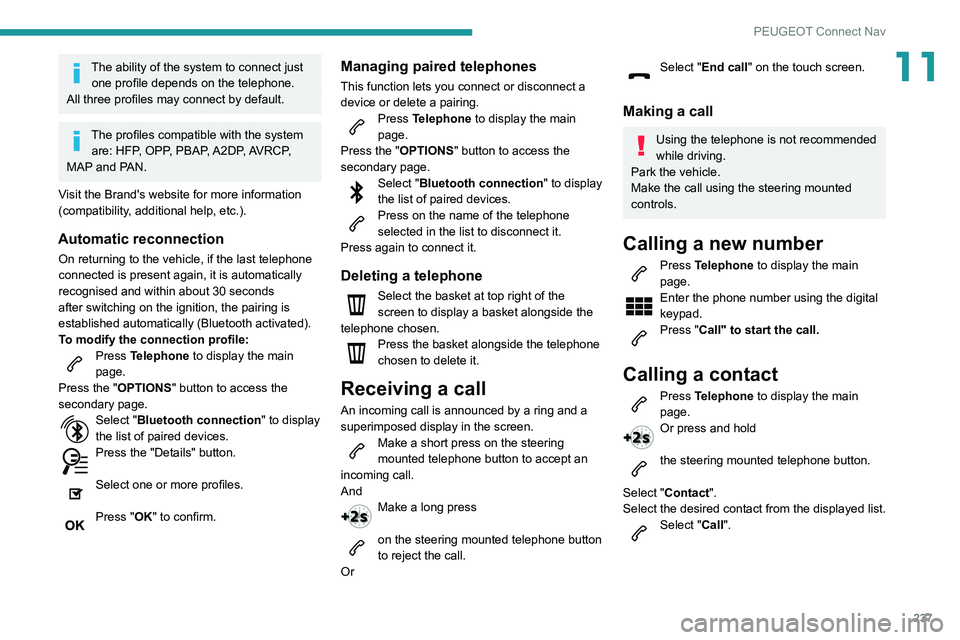
Press Telephone to display the main
page.
Press the "OPTIONS " button to access the
secondary page.
Select "Bluetooth connection " to display
the list of paired devices.
Press the "Details" button.
Select one or more profiles.
Press "OK" to confirm.
Managing paired telephones
This function lets you connect or disconnect a
device or delete a pairing.
Press Telephone to display the main
page.
Press the "OPTIONS " button to access the
secondary page.
Select "Bluetooth connection " to display
the list of paired devices.
Press on the name of the telephone
selected in the list to disconnect it.
Press again to connect it.
Deleting a telephone
Select the basket at top right of the
screen to display a basket alongside the
telephone chosen.
Press the basket alongside the telephone
chosen to delete it.
Receiving a call
An incoming call is announced by a ring and a
superimposed display in the screen.
Make a short press on the steering
mounted telephone button to accept an
incoming call.
And
Make a long press
on the steering mounted telephone button
to reject the call.
Or
Select "End call" on the touch screen.
Making a call
Using the telephone is not recommended
while driving.
Park the vehicle.
Make the call using the steering mounted
controls.
Calling a new number
Press Telephone to display the main
page.
Enter the phone number using the digital
keypad.
Press "Call" to start the call.
Calling a contact
Press Telephone to display the main
page.
Or press and hold
the steering mounted telephone button.
Select "Contact".
Select the desired contact from the displayed list.
Select "Call".
Page 244 of 276
242
PEUGEOT Connect Nav
Settings
When the treble and bass settings are
changed, the ambience is deselected.
When the ambience is changed, the treble
and bass settings are reset.
Selecting an ambience imposes the treble and
bass settings, and vice versa.
► Modify the treble and bass or ambience
settings to obtain the desired musical ambience.
When the balance settings are changed, the
distribution is deselected.
When the distribution setting is changed, the
balance settings are deselected.
Selecting a distribution setting imposes the
balance settings, and vice versa.
► Modify the balance setting or the distribution
setting to obtain the desired sound quality.
There is a difference in sound quality
between audio sources.
To allow for optimal listening quality, the sound
settings can be tailored to different audio
sources, which can generate audible differences
when changing source.
► Check that the sound settings are appropriate
to the sources listened to. We recommend
setting the sound functions (Bass:, Treble:,
Balance) to the middle position, setting the
musical ambience to "None", setting loudness
correction to "Active" in USB mode and "Inactive"
in Radio mode.
► In all cases, after applying sound settings,
adjust the volume level on the portable device (to
The aerial is missing or has been damaged
(for example while entering a car wash or
underground car park).
►
Have the aerial checked by a dealer
.
The environment (hills, buildings, tunnels,
basement car parks, etc.) is blocking reception,
including in RDS mode.
This is a perfectly normal phenomenon, and is
not indicative of an audio system malfunction.
I cannot find some radio stations in the list of
stations received.
The name of the radio station changes.
The station is no longer received or its name has
changed in the list.
Some radio stations send other information
in place of their name (the title of the song for
example).
The system interprets these details as the station
name.
►
Press the "Update list" button in the "Radio
stations” secondary menu.
Media
Playback of my USB memory stick starts only
after a very long wait (around 2 to 3 minutes).
Some files supplied with the memory stick may
greatly slow down access to reading the memory
stick (multiplication by 10 of the cataloguing
time).
►
Delete the files supplied with the memory
stick and limit the number of sub-folders in the
file structure on the memory stick. There may be an extended pause after
inserting a USB stick.
The system reads a variety of data (folder
, title,
artist, etc.). This can take from a few seconds to
a few minutes.
This is perfectly normal.
Some characters in information about the
currently playing media may not be displayed
correctly.
The audio system is unable to process certain
types of character.
►
Use standard characters to name tracks and
folders.
Playback of streaming files does not start.
The connected device does not automatically
launch playback.
►
Start playback from the device.
T
rack names and playing times are not
displayed on the audio streaming screen.
The Bluetooth profile does not allow the transfer
of this information.
Telephone
I cannot connect my Bluetooth telephone.
The telephone's Bluetooth function may be
switched off or the telephone may not be visible.
►
Check that the telephone has Bluetooth
switched on.
►
Check in the telephone settings that it is
"visible to all".
►
Deactivate then reactivate the telphone’
s
Bluetooth function. The Bluetooth telephone is not compatible with
the system.
►
Y
ou can check that your telephone is
compatible on the Brand's website (services).
The volume of the telephone connected in
Bluetooth mode is inaudible.
The volume depends on both the system and the
telephone.
►
Increase the volume of the audio system, to
maximum if required, and increase the volume of
the telephone if necessary
.
Ambient noise affects the quality of the
telephone call.
►
Reduce the ambient noise level (close
windows, reduce ventilation, slow down, etc.).
Some contacts are duplicated in the list.
The options for synchronising contacts are:
synchronise the contacts on the SIM card, the
contacts on the telephone, or both. When both
synchronisations are selected, some contacts
may be duplicated.
►
Select "Display SIM card contacts" or
"Display telephone contacts".
The contacts are not listed in alphabetical
order
.
Some telephones offer display options.
Depending on the settings chosen, contacts can
be transferred in a specific order.
►
Modify the telephone directory display
settings.
The system does not receive SMS.
SMS text messages cannot be sent to the
system in Bluetooth mode.
Page 246 of 276
244
Alphabetical index
180° rear vision 141
A
ABS 78
Accelerated charging unit (Wallbox)
154
Accessories
75, 161
Active Safety Brake
128–130
Active suspension
107
Active Suspension Control
107
Adaptive LED Technology
28, 65
Adaptive rear lighting
65
AdBlue®
18, 168
AdBlue® tank
169
Additive, Diesel
166
Adjusting headlamps
67
Adjusting head restraints
42
Adjusting seat
42–43
Adjusting the air distribution
50–51
Adjusting the air flow
50–51
Adjusting the date
216, 240
Adjusting the height and reach of the
steering wheel
45
Adjusting the lumbar support
42–43
Adjusting the seat angle
42
Adjusting the temperature
50
Adjusting the time
216, 240
Advice on care and maintenance
153, 170
Advice on driving
7, 96
Airbags
81–84, 86
Airbags, curtain
83–84
Airbags, front 82, 84, 87
Airbags, lateral
83–84
Air conditioning
48, 51
Air conditioning, automatic
52
Air conditioning, digital
49
Air conditioning, dual-zone automatic
49
Air intake
50–51
Air vents
48
Alarm
31–32
Amplifier, audio
56
Android Auto connection
231
Anti-lock braking system (ABS)
78
Antitheft / Immobiliser
26
Apple CarPlay connection
212, 230
Applications
231
Armrest, front
58
Armrest, rear
59
Assistance call
76
Assistance, emergency braking
78, 130
Audible warning
76
Audio streaming (Bluetooth)
211, 235
B
Battery 162
Battery, 12 V
166, 189–193
Battery, ancillaries
192
Battery, charging
152, 156, 190, 193
Battery (Hybrid)
153, 156
Battery, remote control
30, 54
Bicycle carrier
161
Blind 39–40
Blind spot monitoring system, active
135
Blind spot sensors
135
BlueHDi
18, 166, 172
Bluetooth (hands-free)
213–214, 236–237
Bluetooth (telephone)
213–214, 236–237
Bodywork
171
Bonnet
162–163
Bonnet, active
84
Boot
34, 37, 64
Brake discs
167
Brake lamps
182–183
Brakes
167
Braking
106
Braking assistance system
78
Braking, automatic emergency
128–130
Braking, dynamic emergency
100–101
Brightness
215
Bulbs
182
Bulbs (changing)
180–183
C
Cable, audio 235
Cable, Jack
235
Capacity, fuel tank
151
Care of the bodywork
171
CD
2 11
CD, MP3
2 11
Central locking
28, 30
Changing a bulb
180–183
Page 247 of 276
245
Alphabetical index
Changing a fuse 183–184, 187–188
Changing a wheel
173, 177
Changing a wiper blade
72–73
Changing the remote control battery
30
Charge level indicator
20
Charger, induction
57
Charger, wireless
57
Charging cable
154–155, 157
Charging connector
153, 156–157
CHECK
20
Checking the engine oil level
17
Checking the levels
164–165
Checking tyre pressures
(using the kit)
174, 176
Checks
164–165, 166–168
Checks, routine
166–167
Child lock
94
Children
81, 88–91, 93
Children (safety)
94
Child seats
81, 85–88
Child seats, conventional
87–88
Child seats, i-Size
93
Child seats, ISOFIX
89–91
Cigar lighter
55
Cleaning (advice)
153, 170–171
Closing the boot
27–28, 34
Closing the doors
27–28, 33
Collision Risk Alert
128–129
Comfort mode
108
Configuration, vehicle
22, 24
Connected applications
231–232
Connection, Bluetooth
213–214, 232, 236–237Connection, MirrorLink 212–213, 231
Connection, Wi-Fi network
232–233
Connectivity
230
Consumption figures
23
Container, AdBlue®
169
Control, emergency boot release
34
Control, emergency door
29
Control, heated seats
44
Controls, steering mounted
102–105
Control stalk, lighting
65–66
Control stalk, wipers
71–74
Control unit
154–155, 157
Courtesy lamp, front
59
Courtesy lamps
59–60
Cover, load space
61
Cruise control
115–116, 118–121
Cruise control, adaptive
121
Cruise control by speed limit
recognition
115–116
Cruise control, dynamic with Stop
function
115–116
Cup holder
55
D
DAB (Digital Audio Broadcasting) -
Digital radio
210, 234
Date (setting)
216, 240
Daytime running lamps
66, 181
Deactivating the passenger airbag
82, 86–87
Deadlocking
26, 28
Deferred charging 24, 153, 156, 158
Defrosting
52
Defrosting, front
52
Demisting
52
Demisting, front
52
Demisting, rear
52
Demisting, rear screen
52
Dials and gauges
9
Digital instrument panel
9–10
Dimensions
203
Dipstick
17, 164
Direction indicators
66, 181–183
Domestic charging
155, 158
Door pockets
55
Doors
33
Drive Assist Plus
121
Driver’s attention warning
131
Driving
41, 96
Driving aids camera (warnings)
11 2
Driving aids (recommendations)
11 2
Driving economically
7
Driving modes
107
Driving positions (storing)
44
Dynamic stability control (DSC)
78–79
E
EBFD 78
Eco-driving (advice)
7
ECO mode
107
Economy mode
162