charging Peugeot 508 2020 Owner's Guide
[x] Cancel search | Manufacturer: PEUGEOT, Model Year: 2020, Model line: 508, Model: Peugeot 508 2020Pages: 276, PDF Size: 8.43 MB
Page 192 of 276
190
In the event of a breakdown
Check beforehand that the backup battery
has a nominal voltage of 12 V and a capacity
at least equal to that of the discharged
battery.
The two vehicles must not be in contact with
each other.
Switch off all electricity-consuming equipment
on both vehicles (audio system, wipers,
lighting, etc.).
Make sure that the jump leads are well away
from the engine’s moving parts (fan, belt,
etc.).
Do not disconnect the (+) terminal while the
engine is running.
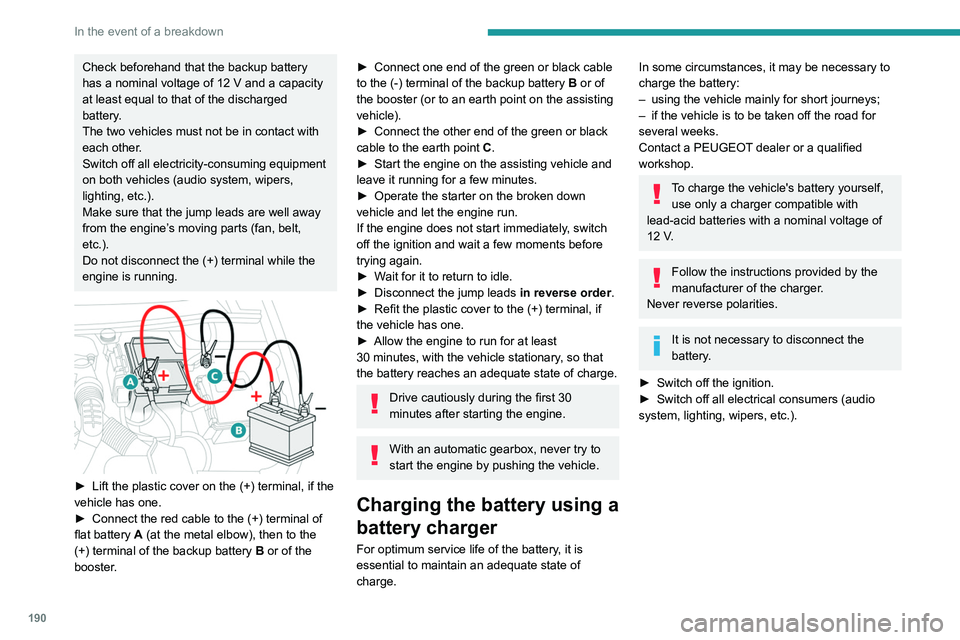
► Lift the plastic cover on the (+) terminal, if the
vehicle has one.
►
Connect the red cable to the (+) terminal of
flat battery
A (at the metal elbow), then to the
(+) terminal of the backup battery
B or of the
booster.
► Connect one end of the green or black cable
to the (-) terminal of the backup battery B or of
the booster (or to an earth point on the assisting
vehicle).
►
Connect the other end of the green or black
cable to the earth point
C
.
►
Start the engine on the assisting vehicle and
leave it running for a few minutes.
►
Operate the starter on the broken down
vehicle and let the engine run.
If the engine does not start immediately
, switch
off the ignition and wait a few moments before
trying again.
►
W
ait for it to return to idle.
►
Disconnect the jump leads in reverse order.
►
Refit the plastic cover to the (+) terminal, if
the vehicle has one.
►
Allow the engine to run for at least
30
minutes, with the vehicle stationary, so that
the battery reaches an adequate state of charge.
Drive cautiously during the first 30
minutes after starting the engine.
With an automatic gearbox, never try to
start the engine by pushing the vehicle.
Charging the battery using a
battery charger
For optimum service life of the battery, it is
essential to maintain an adequate state of
charge.
In some circumstances, it may be necessary to
charge the battery:
–
using the vehicle mainly for short journeys;
–
if the vehicle is to be taken off the road for
several weeks.
Contact a PEUGEOT
dealer or a qualified
workshop.
To charge the vehicle's battery yourself, use only a charger compatible with
lead-acid batteries with a nominal voltage of
12
V.
Follow the instructions provided by the
manufacturer of the charger.
Never reverse polarities.
It is not necessary to disconnect the
battery.
►
Switch off the ignition.
►
Switch off all electrical consumers (audio
system, lighting, wipers, etc.).
Page 193 of 276
191
In the event of a breakdown
8
► Switch off charger B before connecting
the cables to the battery, so as to avoid any
dangerous sparks.
►
Ensure that the charger cables are in good
condition.
►
Lift the plastic cover on the (+) terminal, if the
vehicle has one.
►
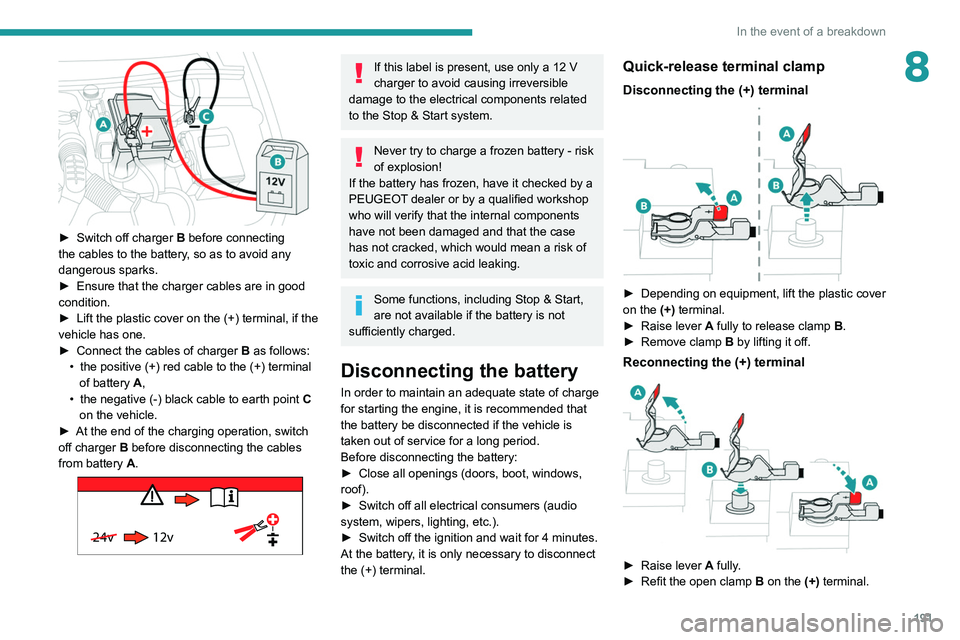
Connect the cables of charger B
as follows:
•
the positive (+) red cable to the (+) terminal
of battery
A,
•
the negative (-) black cable to earth point C
on the vehicle.
►
At the end of the charging operation, switch
off charger B
before disconnecting the cables
from battery A.
24v 12v
If this label is present, use only a 12 V
charger to avoid causing irreversible
damage to the electrical components related
to the Stop & Start system.
Never try to charge a frozen battery - risk
of explosion!
If the battery has frozen, have it checked by a
PEUGEOT dealer or by a qualified workshop
who will verify that the internal components
have not been damaged and that the case
has not cracked, which would mean a risk of
toxic and corrosive acid leaking.
Some functions, including Stop & Start,
are not available if the battery is not
sufficiently charged.
Disconnecting the battery
In order to maintain an adequate state of charge
for starting the engine, it is recommended that
the battery be disconnected if the vehicle is
taken out of service for a long period.
Before disconnecting the battery:
►
Close all openings (doors, boot, windows,
roof).
►
Switch off all electrical consumers (audio
system, wipers, lighting, etc.).
►
Switch off the ignition and wait for 4
minutes.
At the battery, it is only necessary to disconnect
the (+) terminal.
Quick-release terminal clamp
Disconnecting the (+) terminal
► Depending on equipment, lift the plastic cover
on the (+) terminal.
►
Raise lever
A
fully to release clamp
B
.
►
Remove clamp
B
by lifting it off.
Reconnecting the (+) terminal
► Raise lever A fully.
► Refit the open clamp B on the (+) terminal.
Page 195 of 276
193
In the event of a breakdown
8
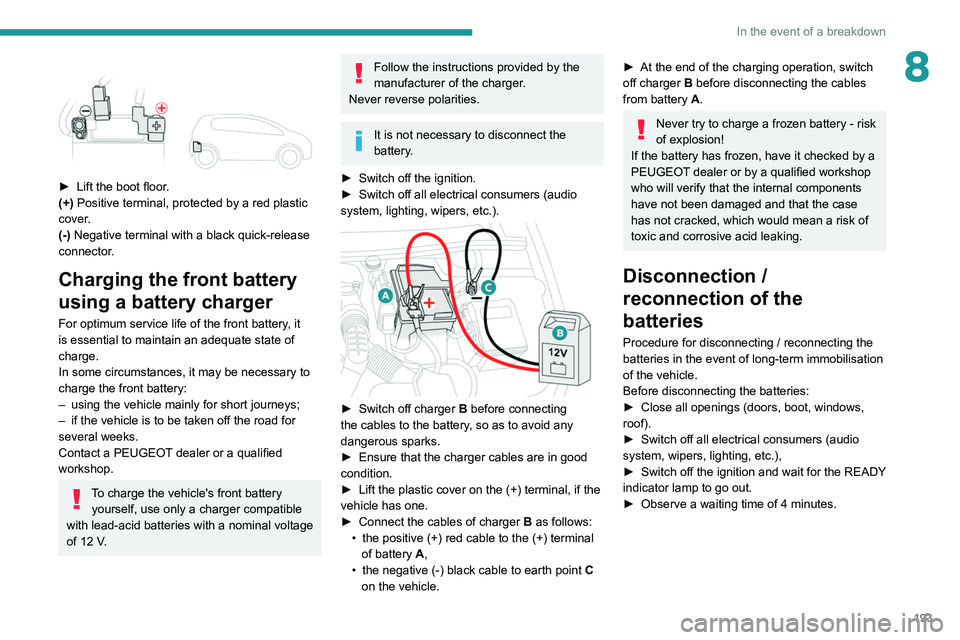
► Lift the boot floor.
(+) Positive terminal, protected by a red plastic
cover.
(-) Negative terminal with a black quick-release
connector.
Charging the front battery
using a battery charger
For optimum service life of the front battery, it
is essential to maintain an adequate state of
charge.
In some circumstances, it may be necessary to
charge the front battery:
–
using the vehicle mainly for short journeys;
–
if the vehicle is to be taken off the road for
several weeks.
Contact a PEUGEOT
dealer or a qualified
workshop.
To charge the vehicle's front battery yourself, use only a charger compatible
with lead-acid batteries with a nominal voltage
of 12
V.
Follow the instructions provided by the
manufacturer of the charger.
Never reverse polarities.
It is not necessary to disconnect the
battery.
►
Switch off the ignition.
►
Switch off all electrical consumers (audio
system, lighting, wipers, etc.).
► Switch off charger B before connecting
the cables to the battery, so as to avoid any
dangerous sparks.
►
Ensure that the charger cables are in good
condition.
►
Lift the plastic cover on the (+) terminal, if the
vehicle has one.
►
Connect the cables of charger B
as follows:
•
the positive (+) red cable to the (+) terminal
of battery
A,
•
the negative (-) black cable to earth point C
on the vehicle.
► At the end of the charging operation, switch
off charger B
before disconnecting the cables
from battery A.
Never try to charge a frozen battery - risk
of explosion!
If the battery has frozen, have it checked by a
PEUGEOT dealer or by a qualified workshop
who will verify that the internal components
have not been damaged and that the case
has not cracked, which would mean a risk of
toxic and corrosive acid leaking.
Disconnection /
reconnection of the
batteries
Procedure for disconnecting / reconnecting the
batteries in the event of long-term immobilisation
of the vehicle.
Before disconnecting the batteries:
►
Close all openings (doors, boot, windows,
roof).
►
Switch off all electrical consumers (audio
system, wipers, lighting, etc.),
►
Switch
off the ignition and wait for the READY
indicator lamp to go out.
►
Observe a waiting time of 4 minutes.
Page 232 of 276
230
PEUGEOT Connect Nav
Press "CarPlay" to display the CarPlay®
interface.
On connecting the USB cable, the
CarPlay® function deactivates the
system's Bluetooth® mode.
When the USB cable is disconnected
and the ignition is switched off then back
on, the system will not automatically switch to
Radio Media mode; the source must be
changed manually.
MirrorLinkTM smartphone
connection
The "MirrorLinkTM" function requires a
compatible smartphone and compatible
applications.
You can check that your telephone is
compatible on the Brand's website (services).
When connecting a smartphone to the
system, we recommend enabling
Bluetooth
® on the smartphone.Connect a USB cable. The smartphone
charges when connected by a USB cable.
From the system, press "Applications " to
display the main page.
Press "Connectivity" to access the
"MirrorLink
TM” function.Press "MirrorLinkTM" to start the
application in the system.
Select the "Settings” tab.
Select the desired fuel.
Press "OK" to save.
Displaying charging station
details
Press Navigation to display the main
page.
Press this button to display the list of
services.
Press "POI on map" to display the list
of points of interest.
Press one of the buttons to search for
"Stations".
Activate/deactivate "Stations".
Press this button to display a secondary
page.
Select the "Settings” tab.
Select the desired connector type.
Press "OK" to save.
Displaying weather
information
Press Navigation to display the main
page.
Press this button to display the list of
services.
Select "View map".
Select "Weather".
Press this button to display basic
information.
Press this button to display detailed
weather information.
The temperature displayed at 6 a.m. will be the maximum temperature for the day.
The temperature displayed at 6 p.m. will be
the minimum temperature for the night.
Applications
USB ports
Depending on equipment, for more information
on the USB ports compatible with CarPlay®,
MirrorLinkTM or Android Auto applications, refer
to the "Ease of use and comfort" section.
For the list of suitable smartphones, visit
the Brand's national website.
Synchronising a smartphone enables
users to display applications that support
the smartphone’s MirrorLinkCarPlay
®, TM or
Android Auto
technology on the vehicle’s
screen. For CarPlay
® technology, the
CarPlay® function must first be activated on
the smartphone.
In all cases, the smartphone must be
unlocked, to enable the communication
process between the smartphone and the
system to function.
As principles and standards are constantly
changing, we recommend keeping the
smartphone's operating system up-to-
date, together with the date and time on
the smartphone and the system.
Connectivity
Press Applications to display the main
page.
Press "Connectivity" to access the CarPlay
®,
MirrorLinkTM or Android Auto functions.
CarPlay® smartphone
connection
Connect a USB cable. The smartphone
charges when connected by a USB cable.
Press "Telephone" to display the
CarPlay® interface.
Or
Connect a USB cable. The smartphone
charges when connected by a USB cable.
From the system, press "Applications " to
display the main page.
Press "Connectivity" to access the "CarPlay
®”
function.
Page 246 of 276
244
Alphabetical index
180° rear vision 141
A
ABS 78
Accelerated charging unit (Wallbox)
154
Accessories
75, 161
Active Safety Brake
128–130
Active suspension
107
Active Suspension Control
107
Adaptive LED Technology
28, 65
Adaptive rear lighting
65
AdBlue®
18, 168
AdBlue® tank
169
Additive, Diesel
166
Adjusting headlamps
67
Adjusting head restraints
42
Adjusting seat
42–43
Adjusting the air distribution
50–51
Adjusting the air flow
50–51
Adjusting the date
216, 240
Adjusting the height and reach of the
steering wheel
45
Adjusting the lumbar support
42–43
Adjusting the seat angle
42
Adjusting the temperature
50
Adjusting the time
216, 240
Advice on care and maintenance
153, 170
Advice on driving
7, 96
Airbags
81–84, 86
Airbags, curtain
83–84
Airbags, front 82, 84, 87
Airbags, lateral
83–84
Air conditioning
48, 51
Air conditioning, automatic
52
Air conditioning, digital
49
Air conditioning, dual-zone automatic
49
Air intake
50–51
Air vents
48
Alarm
31–32
Amplifier, audio
56
Android Auto connection
231
Anti-lock braking system (ABS)
78
Antitheft / Immobiliser
26
Apple CarPlay connection
212, 230
Applications
231
Armrest, front
58
Armrest, rear
59
Assistance call
76
Assistance, emergency braking
78, 130
Audible warning
76
Audio streaming (Bluetooth)
211, 235
B
Battery 162
Battery, 12 V
166, 189–193
Battery, ancillaries
192
Battery, charging
152, 156, 190, 193
Battery (Hybrid)
153, 156
Battery, remote control
30, 54
Bicycle carrier
161
Blind 39–40
Blind spot monitoring system, active
135
Blind spot sensors
135
BlueHDi
18, 166, 172
Bluetooth (hands-free)
213–214, 236–237
Bluetooth (telephone)
213–214, 236–237
Bodywork
171
Bonnet
162–163
Bonnet, active
84
Boot
34, 37, 64
Brake discs
167
Brake lamps
182–183
Brakes
167
Braking
106
Braking assistance system
78
Braking, automatic emergency
128–130
Braking, dynamic emergency
100–101
Brightness
215
Bulbs
182
Bulbs (changing)
180–183
C
Cable, audio 235
Cable, Jack
235
Capacity, fuel tank
151
Care of the bodywork
171
CD
2 11
CD, MP3
2 11
Central locking
28, 30
Changing a bulb
180–183
Page 247 of 276
245
Alphabetical index
Changing a fuse 183–184, 187–188
Changing a wheel
173, 177
Changing a wiper blade
72–73
Changing the remote control battery
30
Charge level indicator
20
Charger, induction
57
Charger, wireless
57
Charging cable
154–155, 157
Charging connector
153, 156–157
CHECK
20
Checking the engine oil level
17
Checking the levels
164–165
Checking tyre pressures
(using the kit)
174, 176
Checks
164–165, 166–168
Checks, routine
166–167
Child lock
94
Children
81, 88–91, 93
Children (safety)
94
Child seats
81, 85–88
Child seats, conventional
87–88
Child seats, i-Size
93
Child seats, ISOFIX
89–91
Cigar lighter
55
Cleaning (advice)
153, 170–171
Closing the boot
27–28, 34
Closing the doors
27–28, 33
Collision Risk Alert
128–129
Comfort mode
108
Configuration, vehicle
22, 24
Connected applications
231–232
Connection, Bluetooth
213–214, 232, 236–237Connection, MirrorLink 212–213, 231
Connection, Wi-Fi network
232–233
Connectivity
230
Consumption figures
23
Container, AdBlue®
169
Control, emergency boot release
34
Control, emergency door
29
Control, heated seats
44
Controls, steering mounted
102–105
Control stalk, lighting
65–66
Control stalk, wipers
71–74
Control unit
154–155, 157
Courtesy lamp, front
59
Courtesy lamps
59–60
Cover, load space
61
Cruise control
115–116, 118–121
Cruise control, adaptive
121
Cruise control by speed limit
recognition
115–116
Cruise control, dynamic with Stop
function
115–116
Cup holder
55
D
DAB (Digital Audio Broadcasting) -
Digital radio
210, 234
Date (setting)
216, 240
Daytime running lamps
66, 181
Deactivating the passenger airbag
82, 86–87
Deadlocking
26, 28
Deferred charging 24, 153, 156, 158
Defrosting
52
Defrosting, front
52
Demisting
52
Demisting, front
52
Demisting, rear
52
Demisting, rear screen
52
Dials and gauges
9
Digital instrument panel
9–10
Dimensions
203
Dipstick
17, 164
Direction indicators
66, 181–183
Domestic charging
155, 158
Door pockets
55
Doors
33
Drive Assist Plus
121
Driver’s attention warning
131
Driving
41, 96
Driving aids camera (warnings)
11 2
Driving aids (recommendations)
11 2
Driving economically
7
Driving modes
107
Driving positions (storing)
44
Dynamic stability control (DSC)
78–79
E
EBFD 78
Eco-driving (advice)
7
ECO mode
107
Economy mode
162
Page 248 of 276
246
Alphabetical index
Electric automatic gearbox (Hybrid) 105
Electric windows
38
Electronic brake force distribution (EBFD)
78
Emergency braking assistance (EBA)
78
Emergency call
76
Emergency switching off
99
Emergency warning lamps
75, 172
Emissions control system, SCR
19, 168
Energy economy mode
162
Energy flows
23
Energy recovery
19, 106
Engine
168
Engine compartment
164–165
Engine, Diesel
151, 164, 172, 199, 201
Engine, petrol
108, 164, 198
Engines
197–199, 201
Environment
7, 30, 54
e-Save function (energy reserve)
24
ESC (electronic stability control)
78
Expanded traffic sign recognition
11 6
F
Fatigue detection 130–131
Filling the AdBlue® tank
166, 169
Filling the fuel tank
151–152
Filter, air
166
Filter, oil
166
Filter, particle
166
Filter, passenger compartment
48, 166
Fitting a wheel
178–179
Fitting roof bars 160–161
Fittings, boot
60
Fittings, interior
55
Fittings, rear
59
Flap, charging
153, 156–158
Flap, fuel filler
151–152
Flashing indicators
66, 182
Flat bed (recovery)
195
Fluid, brake
165
Fluid, engine coolant
165
Foglamps, rear
65, 183
Folding the rear seats
47–48
Four-wheel drive (4WD)
162
Frequency (radio)
233–234
Fuel
7, 151
Fuel consumption
7, 19
Fuel tank
151–152
Full Park Assist
145
Fusebox, dashboard
184
Fusebox, engine compartment
184, 187–188
Fuses
183–184, 187–188
Fuses, dashboard
184
Fuses, engine compartment
189
G
Gauge, fuel 151
Gearbox, automatic
102–105, 107, 110, 167, 190
Gearbox, manual
102, 107, 110, 167
Gear lever, manual gearbox
102
Gear shift indicator ~ Gear efficiency
indicator
108–109
Glove box
55
G.P.S.
227
Grab handles
55
H
Hands-free access 36
Hands-free tailgate
34, 36–37
Hazard warning lamps
75, 172
headlamp adjustment
67
Headlamp adjustment
67
Headlamps, automatic dipping
68–69
Headlamps, automatic illumination
67
Headlamps, dipped beam
181–182
Headlamps, halogen
67, 181–182
Headlamps, main beam
181–182
Head restraints, front
42
Head restraints, rear
46–48
Heating
48, 53–54
Heating, additional
53–54
Heating, programmable
24, 53–54
Hi-Fi system
56
Hill start assist
106–107
Histogramme, fuel consumption
23–24
Horn
76
Horn for pedestrians
76
Hybrid
23, 98, 152, 202
Hybrid engine
202
Page 250 of 276
248
Alphabetical index
Misfuel prevention 152
Motor, electric
108, 152, 202
Motorised tailgate
34–35, 37
Mountings, ISOFIX
89
N
Navigation 225–227
Navigation, connected
228–230
Net, high load retaining
62–63
Night vision
69
Night Vision
69
O
Obstacle detection 136
Oil change
164
Oil consumption
164
OIl, engine
164
On-board tools
64, 173–174
Opening the bonnet
162–163
Opening the boot
27, 34
Opening the doors
27, 33
Opening the windows
25
P
Pads, brake 167
Paint
171, 204
Paint colour code 204
Parcel shelf, rear
61
Park Assist
142
Parking brake, electric
99–101, 167
Parking sensors, audible and visual
136
Parking sensors, front
137
Parking sensors, rear
137
Personalisation
9–10
Plates, identification
204
Player, Apple®
211, 235
Player, USB
210, 235
Port, USB
56, 59, 210, 230, 235
Power
19
Power indicator
19
Pressures, tyres
167, 177, 204
Pre-tensioning seat belts
81
Priming pump
173
Priming the fuel system
172
Profiles
215, 239
Programmable cruise control
119
Protecting children
82, 85–91, 93
Puncture
174–175, 177
Q
Quiet vehicle warning sound 76
R
Radar (warnings) 11 2
Radio 208–209, 211, 233
Radio, digital (Digital Audio
Broadcasting - DAB)
210, 234
Range, AdBlue
18, 166
RDS
209, 233–234
READY lamp
163
Rear screen, demisting
52
Rechargeable hybrid
system
6, 23, 98, 108, 152
Recharging the battery
190, 193
Recirculation, air
50–51
Recovery
194, 196
Recovery of the vehicle
195
Reduction of electrical load
162
Regeneration of the particle filter
166
Regenerative braking (deceleration
by engine braking)
106
Reinitialisation of the under-inflation
detection system
111
Reinitialising the remote control
30
Reminder, lighting on
65
Remote control
25–29
Remote functions
24, 54, 157–158
Removing a wheel
178–179
Removing the mat
58
Replacing bulbs
180–183
Replacing fuses
183–184, 189
Replacing the air filter
166
Replacing the oil filter
166
Replacing the passenger compartment
filter
166
Reservoir, screenwash
165