belt PEUGEOT 508 2021 Owner's Manual
[x] Cancel search | Manufacturer: PEUGEOT, Model Year: 2021, Model line: 508, Model: PEUGEOT 508 2021Pages: 292, PDF Size: 8.61 MB
Page 138 of 292
136
Driving
The brake pedal may vibrate slightly while the function is operating.
If the vehicle comes to a complete stop,
automatic braking is maintained for 1 to 2
seconds.
Malfunction
In the event of a malfunction, this warning
lamp lights up on the instrument panel,
accompanied by the display of a message and
an audible signal.
Have it checked by a PEUGEOT dealer or a
qualified workshop.
If these warning lamps come on
after the engine has been switched
off and then restarted, contact a PEUGEOT
dealer or a qualified workshop to have the
system checked.
These warning lamps light up on the instrument panel to indicate
that the driver's and/or front passenger's seat
belt is not fastened (depending on version). The
automatic braking system is deactivated until the
seat belts are fastened.
Distraction detection
For more information, refer to the
General recommendations on the use
of driving and manoeuvring aids .
The function comprises the "Driver Attention
Warning" system combined with the "Driver
Attention Warning by Camera" system.
These systems are in no way designed
to keep the driver awake or to prevent
the driver from falling asleep at the wheel.
It is the driver’s responsibility to stop if feeling
tired.
Take a break if you are feeling tired or at least
every 2 hours.
Activation/Deactivation
This function is set via the touch screen Driving/Vehicle menu.
The state of the system is memorised when the
ignition is switched off.
Driver Attention Warning
The system triggers an alert when it detects that the driver has not taken a
break after two hours of driving at a speed above
43 mph (70
km/h).
This alert is issued via the display of a message
encouraging the driver to take a break,
accompanied by an audible signal.
If the driver does not follow this advice, the alert
is repeated hourly until the vehicle is stopped.
The system resets itself if one of the following
conditions is met:
–
With the engine running, the vehicle has been
stationary for more than 15 minutes.
– The ignition has been switched off for a few
minutes.
–
The driver's seat belt is unfastened and their
door is opened.
As soon as the speed of the vehicle drops below 43 mph (70 km/h), the
system goes into standby.
Driving time starts being counted again once
the speed reaches above 43
mph (70 km/h).
Driver Attention Warning by
Camera
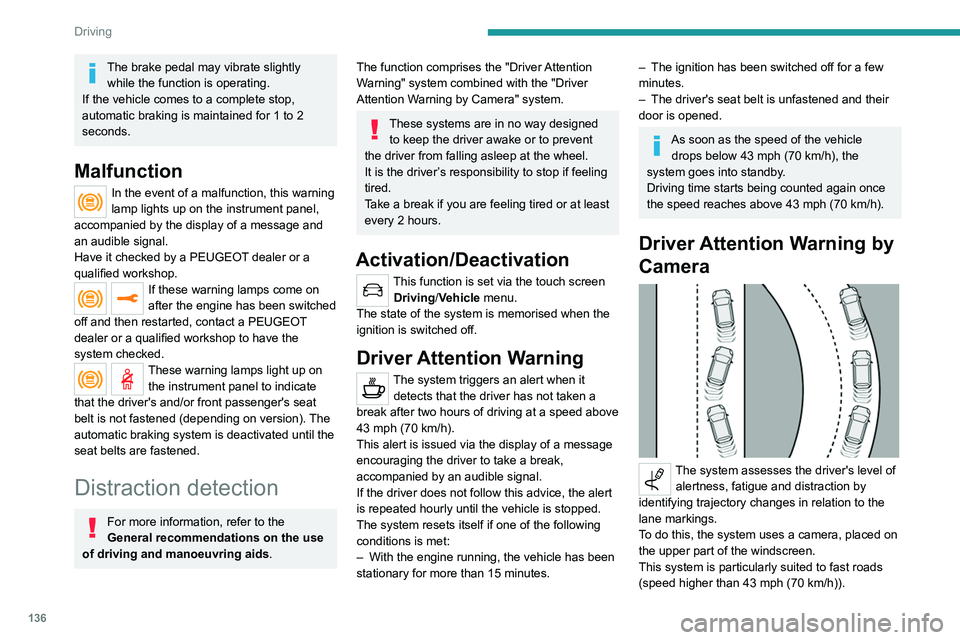
The system assesses the driver's level of alertness, fatigue and distraction by
identifying trajectory changes in relation to the
lane markings.
To do this, the system uses a camera, placed on
the upper part of the windscreen.
This system is particularly suited to fast roads
(speed higher than 43 mph (70
km/h)).
At a first alert level, the driver is warned by the
message "Be vigilant!", accompanied by an
audible signal.
After three first-level alerts, the system triggers
a further alert with the message " Dangerous
driving: take a break", accompanied by a more
pronounced audible signal.
In certain driving conditions (poor road
surface or strong winds), the system may
give alerts independent of the driver's level of
vigilance.
The following situations may interfere with the operation of the system or
prevent it from working:
– lane markings absent, worn, hidden (snow,
mud) or multiple (roadworks);
– close to the vehicle ahead (lane markings
not detected);
– roads that are narrow, winding, etc.
Active lane departure
warning system
For more information, refer to the
General recommendations on the use
of driving and manoeuvring aids .
The system corrects the vehicle's trajectory by
alerting the driver as soon as it detects a risk of
Page 152 of 292
150
Driving
The manoeuvring status is indicated by these
symbols:
Manoeuvre in progress (green).
Manoeuvre cancelled or finished (red)
(the arrows indicate that the driver must
resume control of the vehicle).
The maximum speeds during manoeuvres are
indicated by these symbols:
75 mph or 7 km/h, for parking space entry.
53 mph or 5 km/h, for parking space exit.
During manoeuvring phases, the steering
wheel performs rapid turns: do not hold
the steering wheel or put your hands between
the spokes of the steering wheel. Watch out
for any objects that could interfere with the
manoeuvre (loose clothing, scarf, tie, etc.).
Risk of injury!
It is the driver's responsibility to constantly
monitor the traffic, especially vehicles coming
towards you.
The driver should check that no objects or
people are obstructing the vehicle’s path.
The images from the camera(s) displayed on the touch screen may be
distorted by the terrain.
In shady areas, or in inadequate sunlight
or lighting conditions, the image may be
darkened and with lower contrast. The manoeuvre can be permanently interrupted
at any time, either by the driver or automatically
by the system.
Interruption by the driver:
–
taking over control of the steering.
–
activating the direction indicator lamps on the
opposite side to that of the manoeuvre.
–
unfastening the driver's seat belt.
–
switching off the ignition.
Interruption by the system:
–
vehicle exceeding the speed limit of
5
mph (7 km/h) during parking space entry
manoeuvres, or 3 mph (5 km/h) during parking
space exit manoeuvres.
–
activation of anti-slip regulation on a slippery
road.
–
opening of a door or the boot.
–
engine stall.
–
system malfunction.
–
after 10 manoeuvres to enter or exit a parallel
parking space and after 7 manoeuvres to enter a
parking bay
.
Interrupting the manoeuvre automatically
deactivates the function.
The manoeuvre symbol is displayed in red,
accompanied by the " Manoeuvre cancelled"
message on the touch screen.
A message prompts the driver to take back
control of the vehicle.
The function is deactivated after a few seconds; this indicator lamp goes off and
the function returns to the initial display.
End of the parking space
entry or exit manoeuvre
The vehicle stops as soon as the manoeuvre is
completed.
The manoeuvre symbol is displayed in red,
accompanied by the message " Manoeuvre
completed" on the touch screen.
When the function is deactivated, this
indicator lamp goes off, accompanied by
an audible signal.
When entering a parking space, the driver may
be required to complete the manoeuvre.
Operating limits
– The system may suggest an inappropriate
parking space (parking prohibited, work in
progress with damaged road surface, location
alongside a ditch, etc.).
–
The system may indicate that a space has
been found but will not offer it because of a fixed
obstacle on the opposite side of the manoeuvre,
which would not allow the vehicle to follow a
trajectory required for parking.
–
The system may indicate that a space has
been found but the manoeuvre will not be
triggered, because the width of the lane is
insufficient.
–
The system is not designed for performing the
parking manoeuvre on a sharp bend.
–
The system does not detect spaces that
are much larger than the vehicle itself or that
are delimited by obstacles that are too low
(pavements, studs, etc.) or too thin (trees, posts,
wire fences, etc.).
– If the boot is heavily loaded, the tilt of the
vehicle towards the rear may interfere with the
distance measurements.
Do not use the function under the
following exterior conditions:
– Alongside a soft shoulder (e.g. ditch) or
quay or on the edge of a drop.
– When the road surface is slippery (e.g. ice).
If any of the following malfunctions
occurs, do not use the system:
– If a tyre is under-inflated.
– If one of the bumpers is damaged.
– If one of the cameras is faulty.
If the vehicle has undergone any of the
following modifications, do not use the
function:
– When carrying an object extending beyond
the dimensions of the vehicle (ladder on the
roof bars, bicycle carrier on the tailgate, etc.).
– With a non-approved towball in place.
– With snow chains fitted.
– When driving on a small-diameter or
"space-saver" type spare wheel.
– When the wheels fitted are a different size
from the original ones.
– After modifying one or both bumpers
(added protection).
Page 154 of 292
152
Driving
Activation/Deactivation
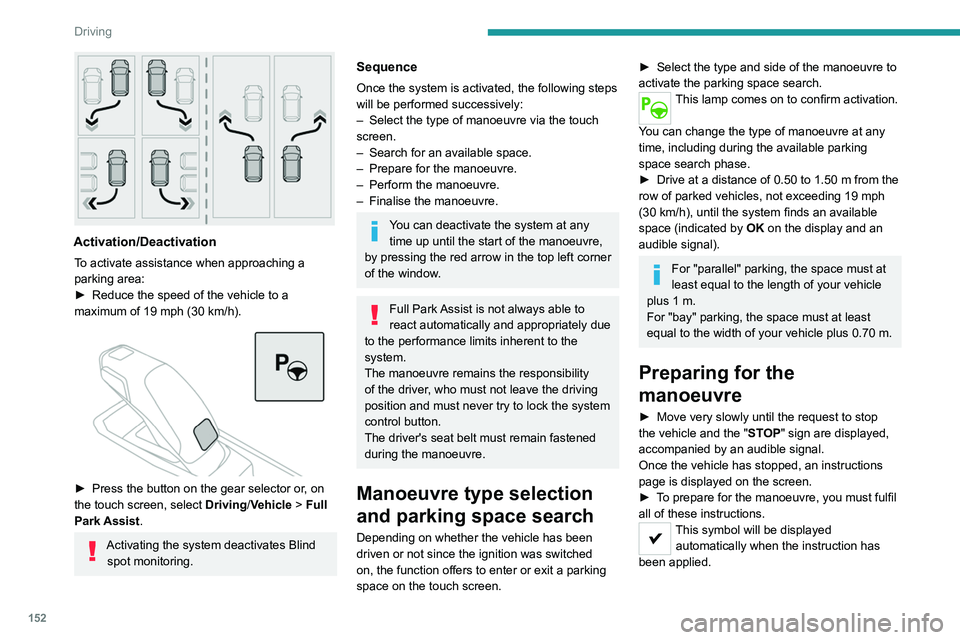
To activate assistance when approaching a
parking area:
►
Reduce the speed of the vehicle to a
maximum of 19
mph (30 km/h).
► Press the button on the gear selector or , on
the touch screen, select Driving/Vehicle > Full
Park Assist.
Activating the system deactivates Blind spot monitoring.
Sequence
Once the system is activated, the following steps
will be performed successively:
–
Select the type of manoeuvre via the touch
screen.
–
Search for an available space.
–
Prepare for the manoeuvre.
–
Perform the manoeuvre.
–
Finalise the manoeuvre.
You can deactivate the system at any time up until the start of the manoeuvre,
by pressing the red arrow in the top left corner
of the window.
Full Park Assist is not always able to
react automatically and appropriately due
to the performance limits inherent to the
system.
The manoeuvre remains the responsibility
of the driver, who must not leave the driving
position and must never try to lock the system
control button.
The driver's seat belt must remain fastened
during the manoeuvre.
Manoeuvre type selection
and parking space search
Depending on whether the vehicle has been
driven or not since the ignition was switched
on, the function offers to enter or exit a parking
space on the touch screen.
► Select the type and side of the manoeuvre to
activate the parking space search.
This lamp comes on to confirm activation.
You can change the type of manoeuvre at any
time, including during the available parking
space search phase.
►
Drive at a distance of 0.50 to 1.50
m from the
row of parked vehicles, not exceeding 19
mph
(30
km/h), until the system finds an available
space (indicated by OK on the display and an
audible signal).
For "parallel" parking, the space must at
least equal to the length of your vehicle
plus 1
m.
For "bay" parking, the space must at least
equal to the width of your vehicle plus 0.70
m.
Preparing for the
manoeuvre
► Move very slowly until the request to stop
the vehicle and the " ST
OP" sign are displayed,
accompanied by an audible signal.
Once the vehicle has stopped, an instructions
page is displayed on the screen.
►
T
o prepare for the manoeuvre, you must fulfil
all of these instructions.
This symbol will be displayed automatically when the instruction has
been applied.
When all of the instructions have been validated,
a new page is displayed, indicating that you can
undertake the manoeuvre.
► To undertake the manoeuvre, press
this button.
► While holding down the button, gradually
release the brake pedal.
The button must be held down
throughout the manoeuvre.
The start of the manoeuvre is indicated by
the display of a window with the message
"Manoeuvre in progress", accompanied by an
audible signal.
The Visiopark 1 or Visiopark 2 and
the parking sensors are automatically
activated to help monitor the vehicle's close
surroundings throughout the manoeuvre.
Performing the manoeuvre
As soon as the driver releases the brake
pedal, the system automatically takes control
of choosing the travel direction, forwards or
reverse, acceleration, braking and the steering
direction.
The manoeuvring status is indicated by these
symbols:
Manoeuvre in progress.
Manoeuvre interrupted.
Manoeuvre completed or aborted.
Page 155 of 292
153
Driving
6When all of the instructions have been validated,
a new page is displayed, indicating that you can
undertake the manoeuvre.
► To undertake the manoeuvre, press
this button.
►
While holding down the button, gradually
release the brake pedal.
The button must be held down
throughout the manoeuvre.
The start of the manoeuvre is indicated by
the display of a window with the message
"Manoeuvre in progress", accompanied by an
audible signal.
The Visiopark 1 or Visiopark 2 and
the parking sensors are automatically
activated to help monitor the vehicle's close
surroundings
throughout the manoeuvre.
Performing the manoeuvre
As soon as the driver releases the brake
pedal, the system automatically takes control
of choosing the travel direction, forwards or
reverse, acceleration, braking and the steering
direction.
The manoeuvring status is indicated by these
symbols:
Manoeuvre in progress.
Manoeuvre interrupted.
Manoeuvre completed or aborted.
The white arrows indicate that the driver must
take back control of the vehicle.
The direction of the manoeuvre is indicated by
these symbols:
Forward gear.
Reverse gear.
The central arrow is green whilst the vehicle
is moving, or white to indicate the next
manoeuvring direction.
Throughout the whole manoeuvre, indicated by the green " AUTO" symbol,
the driver must hold down the function control
button.
During manoeuvring phases, the steering
wheel performs rapid turns: do not hold
the steering wheel or put your hands between
the spokes of the steering wheel. Beware of
any object likely to block the manoeuvre
(e.g.
loose clothing, scarves, ties) - risk of
injury!
If the vehicle slows down significantly,
the brake lamps may come on.
Suspending/resuming the manoeuvre
The manoeuvre can be interrupted temporarily
at any time, either automatically by the system if
an obstacle is detected, or by driver action. If the driver notices a hazard, they may also interrupt
the manoeuvre permanently.
To suspend the manoeuvre, the driver can:
–
Release the function control button.
–
Depress the brake pedal.
–
Resume control of the steering.
–
Change the gearbox status (except changing
to
P).
The vehicle is immediately immobilised if the
manoeuvre is suspended.
This is confirmed by the display of this symbol, accompanied by the message
"Manoeuvre suspended".
Resuming the manoeuvre after resolving the
conditions for suspending it:
►
Release all controls (brake pedal, function
control button, steering wheel, gear selector).
►
Press the function control button again.
Permanent interruption after suspending the
manoeuvre:
►
Depress the brake pedal and engage a gear
.
Aborting the manoeuvre
The manoeuvre is aborted in the following
situations:
–
No action by the driver within 30 seconds of
the manoeuvre being suspended.
–
Intentional application of the parking brake.
–
Gearbox mode P
engaged by the driver.
–
Driver's seat belt unfastened.
–
Opening of a door or the boot.
–
Activation of the direction indicator lamps on
the opposite side to that of the manoeuvre.
Page 197 of 292
195
In the event of a breakdown
8Take used remote control batteries and
vehicle batteries to a special collection point.
Protect your eyes and face before
handling the battery.
All operations on the battery must be carried
out in a well ventilated area and away from
naked flames and sources of sparks, to avoid
any risk of explosion or fire.
Wash your hands afterwards.
Accessing the battery
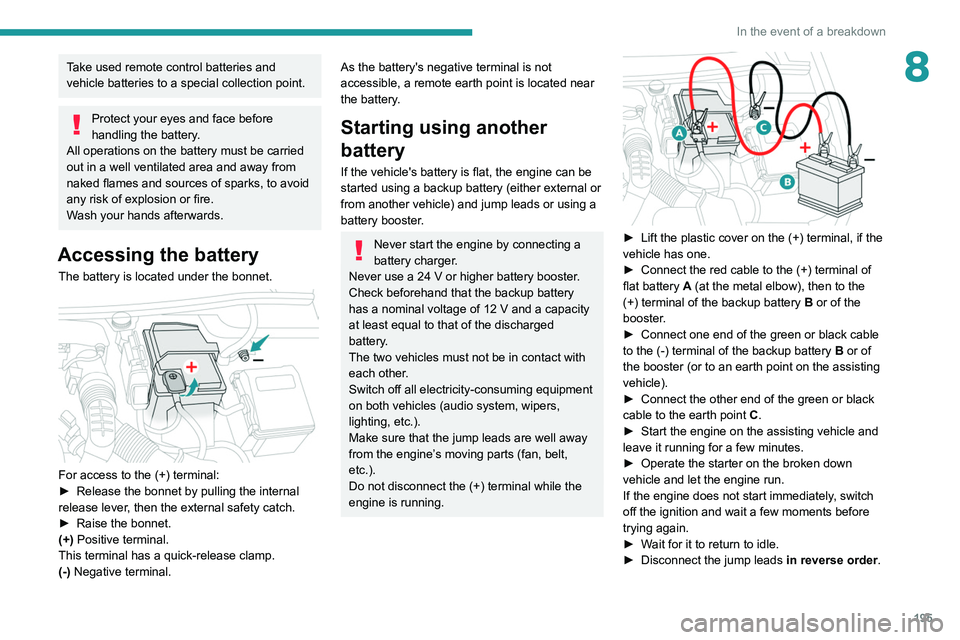
The battery is located under the bonnet.
For access to the (+) terminal:
► Release the bonnet by pulling the internal
release lever
, then the external safety catch.
►
Raise the bonnet.
(+)
Positive terminal.
This terminal has a quick-release clamp.
(-) Negative terminal.
As the battery's negative terminal is not
accessible, a remote earth point is located near
the battery.
Starting using another
battery
If the vehicle's battery is flat, the engine can be
started using a backup battery (either external or
from another vehicle) and jump leads or using a
battery booster.
Never start the engine by connecting a
battery charger.
Never use a 24
V or higher battery booster.
Check beforehand that the backup battery
has a nominal voltage of 12
V and a capacity
at least equal to that of the discharged
battery.
The two vehicles must not be in contact with
each other.
Switch off all electricity-consuming equipment
on both vehicles (audio system, wipers,
lighting, etc.).
Make sure that the jump leads are well away
from the engine’s moving parts (fan, belt,
etc.).
Do not disconnect the (+) terminal while the
engine is running.
► Lift the plastic cover on the (+) terminal, if the
vehicle has one.
►
Connect the red cable to the (+) terminal of
flat battery
A (at the metal elbow), then to the
(+) terminal of the backup battery
B or of the
booster.
►
Connect one end of the green or black cable
to the (-) terminal of the backup battery
B or of
the booster (or to an earth point on the assisting
vehicle).
►
Connect the other end of the green or black
cable to the earth point
C
.
►
Start the engine on the assisting vehicle and
leave it running for a few minutes.
►
Operate the starter on the broken down
vehicle and let the engine run.
If the engine does not start immediately
, switch
off the ignition and wait a few moments before
trying again.
►
W
ait for it to return to idle.
►
Disconnect the jump leads in reverse order.
Page 251 of 292
249
Event data recorders
12Event data recorders
Electronic control units are installed in your
vehicle. Control units process data which is
received by vehicle sensors, for example, or
which they generate themselves or exchange
amongst themselves. Some control units are
necessary for the safe functioning of your
vehicle, others assist you while you drive (driver
assistance systems), while others provide
comfort or infotainment functions.
The following contains general information about
data processing in the vehicle. You will find
additional information as to which specific data is
uploaded, stored and passed on to third parties
and for what purpose in your vehicle under
the key word Data Protection closely linked
to the references for the affected functional
characteristics in the relevant owner's manual
or in the general terms of sale. These are also
available online.
Operating data in the
vehicle
Control units process data for operation of the
vehicle.
This data includes, for example:
–
vehicle status information (e.g. speed,
movement delay
, lateral acceleration, wheel
rotation rate, "seat belts fastened" display)
–
ambient conditions (e.g. temperature, rain
sensor
, distance sensor) As a rule such data is transient and is not stored
for longer than an operational cycle, and only
processed on board the vehicle itself. Often
control units include data storage (including the
vehicle key). This is used to allow information
to be documented temporarily or permanently
on vehicle condition, component stress,
maintenance requirements and technical events
and errors.
Depending on technical equipment levels, the
data stored is as follows:
–
system component operating states (e.g. fill
level, tyre pressure, battery status)
–
faults and defects in important system
components (e.g. lights, brakes)
–
system reactions in special driving situations
(e.g. triggering of an airbag, actuation of the
stability control systems)
–
information on events damaging the vehicle
–
for electric vehicles the amount of charge in
the high-voltage battery
, estimated range
In special cases (e.g. if the vehicle has detected
a malfunction), it may be necessary to save data
that would otherwise just be volatile.
When you use services (e.g. repairs,
maintenance), the operating data saved can
be read together with the vehicle identification
number and used where necessary. Staff
working for the service network (e.g. garages,
manufacturers) or third parties (e.g. breakdown
services) can read the data from the vehicle.
The same applies to warranty work and quality
assurance measures. Data is generally read via the OBD (On-Board
Diagnostics) port prescribed by law in the
vehicle. The operating data read documents the
technical condition of the vehicle or individual
components and assists with fault diagnosis,
compliance with warranty obligations and quality
improvement. This data, in particular information
on component stress, technical events, operator
errors and other faults, is transmitted to the
manufacturer where appropriate, together
with the vehicle identification number. The
manufacturer is also subject to product liability.
The manufacturer potentially also uses operating
data from vehicles for product recalls. This data
can also be used to check customer warranty
and guarantee claims.
Fault memories in the vehicle can be reset by a
service company when carrying out servicing or
repairs or at your request.
Comfort and infotainment
functions
Comfort settings and custom settings can be
stored in the vehicle and changed or reset at any
time.
Depending on the equipment level in question,
these include
–
seat and steering wheel position settings
–
chassis and air conditioning settings
–
custom settings such as interior lighting
Y
ou can input your own data in the infotainment
functions for your vehicle as part of the selected
features.
Page 257 of 292
255
Alphabetical index
Menus (audio) 213–214, 225–226
Menu short cuts
24
Messages
243
Messages, quick
243
Mirror, rear view
49
Mirrors, door
48–49, 56, 140
Mirror, vanity
59
Misfuel prevention
158–159
Mobile application
25–26, 58, 166, 168
Motor, electric
111–112, 159, 208
Motorised tailgate
37–38
Mountings, ISOFIX
93
N
Navigation 230–232
Navigation, connected
233–235
Net, high load retaining
66–67
Night vision
74
Night Vision
74
O
Obstacle detection 142
Oil change
175
Oil consumption
175
OIl, engine
175
On-board tools
68, 184–185
Opening the bonnet
173–174
Opening the boot
29, 36
Opening the doors 29, 35
Opening the windows
27
P
Pads, brake 177–178
Paint
181, 210
Paint colour code
210
Parcel shelf, rear
65
Park Assist
148
Parking brake, electric
103–105, 177
Parking sensors, audible and visual
142
Parking sensors, front
143
Parking sensors, rear
142
Passenger compartment temperature pre-
conditioning (Rechargeable hybrid)
26, 58
Pedestrian horn (Rechargeable hybrid)
80
Personalisation
11
Plates, identification
210
Player, Apple®
217, 240
Player, USB
216, 239
Port, USB
59, 63, 216, 218, 235, 239
Power
21
Power indicator (Rechargeable
hybrid)
9, 10, 21
Pressures, tyres
178, 186, 188, 210
Pre-tensioning seat belts
85
Priming pump
184
Priming the fuel system
183
Profiles
221, 244
Programmable cruise control
123
Protecting children 86, 89–97
Puncture
185–186, 188
R
Radar (warnings) 11 7
Radio
214–215, 238
Radio, digital (Digital Audio
Broadcasting - DAB)
216, 239
Range, AdBlue®
20, 176
RDS
215, 238
READY lamp
173
Rear screen, demisting
56
Rechargeable hybrid engine
9, 25, 172–173, 200, 208
Rechargeable hybrid system
6, 9, 25,
102, 112, 159
Recharging the battery
196, 198–199
Recharging the traction battery
163
Recharging the traction battery (
Rechargeable hybrid)
159, 166–168
Recirculation, air
54–55
Recovery
200–202
Recovery of the vehicle
200–202
Reduction of electrical load
173
Regeneration of the particle filter
177
Regenerative braking (deceleration
by engine braking)
109
Reinitialisation of the under-inflation
detection system
11 6
Reinitialising the remote control
33
Page 258 of 292
256
Alphabetical index
Reminder, lighting on 69
Remote control
27–31
Remote functions
168
Remotely operable functions
(Rechargeable hybrid)
26, 58
Removing a wheel
189–190
Removing the mat
62
Replacing bulbs
191–194
Replacing fuses
194
Replacing the air filter
177
Replacing the oil filter
177
Replacing the passenger compartment
filter
177
Reservoir, screenwash
176
Reset trip
23
Rev counter
10
Reversing camera
117, 144–146
Reversing lamps
193–194
Roof bars
170–171
Running out of fuel (Diesel)
183
S
Safety, children 86, 89–97
Saturation of the particle filter (Diesel)
177
Screen, cold climate
172
Screen menu map
218
Screenwash
76
Screenwash, front
76
Screenwash, rear
76
SCR (Selective Catalytic Reduction)
20, 178
Seat angle
45
Seat belts 84–85, 91
Seat belts, rear
84
Seat, rear bench
50
Seats, electric
46–47
Seats, front
45–47
Seats, heated
47
Seats, rear
50–51, 89
Selector, gear
106–109
Sensors (warnings)
11 7
Serial number, vehicle
210
Service indicator
18, 22
Servicing
18, 176, 178
Settings, equipment
24
Settings, system
221, 244
Shield, snow
172
Sidelamps
70, 192–194
Side parking sensors
143
Silent vehicle warning sound (Rechargeable
hybrid)
80
Ski flap
64
Smartphone
26, 60
Snow chains
115, 172
Snow screen
172
Socket, 12 V accessory
59, 63, 67
Socket, auxiliary
217, 239
Socket, Jack
239
Speakers
61
Speed limiter
120–123, 125
Speed limit recognition
118–119
Speedometer
10, 118
Sport mode
111 – 11 2
Spotlamps, side
72
Stability control (ESC)
82–83Starting a Diesel engine 157
Starting/Stopping the vehicle
101
Starting the engine
101–102
Starting the vehicle
102, 106–109
Starting using another battery
103, 195
State of charge, battery
25
Station, radio
214–215, 238
Steering mounted controls, audio
212, 225
Steering wheel, adjustment
48
Stickers, customising ~ Stickers,
expressive
181
Stopping the vehicle
102, 106–109
Stop & Start
23, 52, 55, 113–115, 157, 173, 177, 197
Storage
59, 61–64
Storage box
68
Storage compartments
59
Storage wells
64, 68
Storing driving positions
47
Stowing rings
64, 67
Sunroof, panoramic
42–43
Sunshine sensor
52
Sun visor
59
Suspension
178
Suspension with variable vibration
reduction
111
Switching off the engine
101
Synchronising the remote control
33
T
Tables of engines 208
Page 259 of 292
257
Alphabetical index
Tailgate 36
Tank, fuel
157–158
Technical data
204, 206–208
Telephone
219–220, 241–243
Temperature, coolant
19
Ticket holder
59
Time (setting)
221, 245
TMC (Traffic info)
232
Tool box
68
Tools
184–185
Topping-up AdBlue®
179
Top Tether (fixing)
93
Total distance recorder
22
Touch screen
23, 25, 58
Touch-sensitive reading lamps
63–64
Towbar
83, 168
Towed loads
203–204, 206–208
Towing another vehicle
200, 202
Traction battery charge
163
Traction battery (Rechargeable
hybrid)
21, 159–160, 166
Traction control (ASR)
82–83
Traffic information (TMC)
232
Trailer
83, 168
Trailer stability assist (TSA)
83
Trajectory control systems
82
Triangle, warning
183
Trip computer
22–23
Trip distance recorder
22
Tyres
178, 210
Tyre under-inflation detection
115, 188U
Under-inflation (detection) 11 5
Unlocking
27, 29
Unlocking from the inside
33
Unlocking the boot
27, 29
Unlocking the doors
33
Unlocking the tailgate
27, 29
Updating the date
222, 244
Updating the time
221, 245
USB
216, 218, 235, 239
V
Vehicle data recording and privacy 249
Ventilation
51–52, 56–57
Video
240
Visibility
55
Vision, 180° forward
147
Visiopark 1
145
Visiopark 1 - Visiopark 2
144, 146
Voice commands
227–230
W
Wallbox (Rechargeable hybrid) 161–162, 167
Warning and indicator lamps
12
Warning lamp, driver''s seat belt
not fastened
85
Warning lamps
12, 22
Warning lamp, seat belts
85
Warnings and indicators
12
Washing 11 7
Washing (advice)
160, 181
Weights
203–204, 206–207
Welcome lighting
28, 72
Wheel, spare
178, 184–185, 188
Windscreen, heated
56
Windscreen wipers
75, 77
Wiper blades (changing)
77
Wiper, rear
76
Wipers
75, 78
Wipers, automatic rain sensitive
77–78