ECO mode PEUGEOT 508 2021 Workshop Manual
[x] Cancel search | Manufacturer: PEUGEOT, Model Year: 2021, Model line: 508, Model: PEUGEOT 508 2021Pages: 292, PDF Size: 8.61 MB
Page 140 of 292
138
Driving
However, with the Blind spot monitoring system
activated, if the driver is about to change lanes
while another vehicle is detected in the blind
spots of their vehicle, a trajectory correction is
initiated by the system despite the activation of
the direction indicators.For more information on the Blind spot
monitoring system, refer to the corresponding
section.
If the system detects that the driver is not
holding the wheel firmly enough during
an automatic correction of trajectory, it
interrupts the correction. An alert is triggered
to encourage the driver to take back control of
the vehicle.
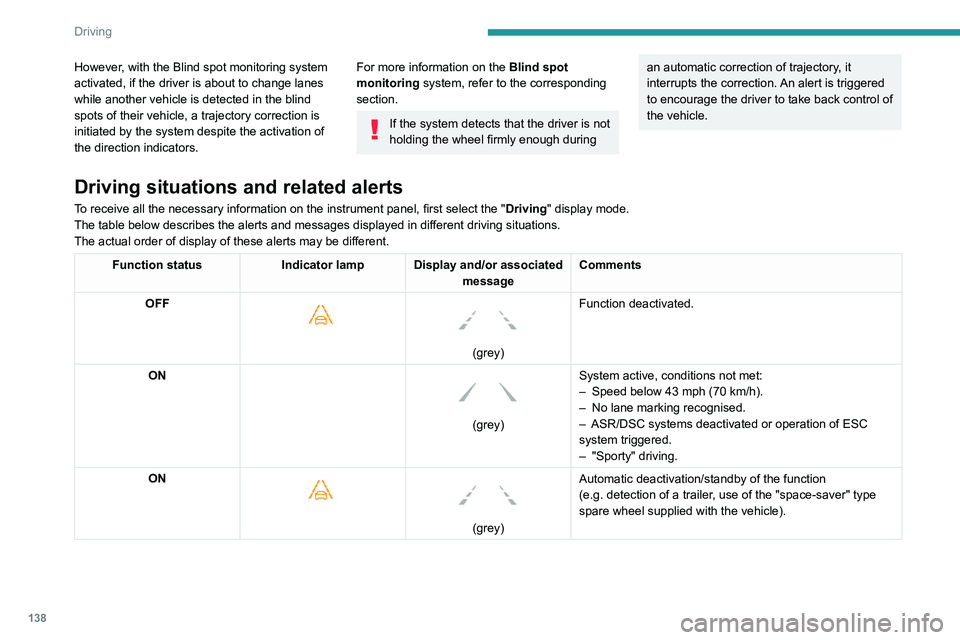
Driving situations and related alerts
To receive all the necessary information on the instrument panel, first select the " Driving" display mode.
The table below describes the alerts and messages displayed in different driving situations.
The actual order of display of these alerts may be different.
Function status Indicator lamp Display and/or associated
messageComments
OFF
(grey)
Function deactivated.
ON
(grey) System active, conditions not met:
–
Speed below 43 mph (70
km/h).
–
No lane marking recognised.
–
ASR/DSC systems deactivated or operation of ESC
system triggered.
–
"Sporty" driving.
ON
(grey)
Automatic deactivation/standby of the function
(e.g.
detection of a trailer, use of the "space-saver" type
spare wheel supplied with the vehicle).
Operating limits
The system goes into standby automatically in
the following cases:
– ESC deactivated or operation triggered.
– Speed below 43 mph (70 km/h) or greater
than 112 mph (180 km/h).
– Electrical connection to a trailer.
Page 146 of 292
144
Driving
Malfunction
In the event of a malfunction when
changing into reverse gear, this
warning lamp lights up on the instrument panel,
accompanied by the display of a message and
an audible signal (short beep).
Have it checked by a PEUGEOT dealer or a
qualified workshop.
Visiopark 1 - Visiopark 2
For more information, refer to the
General recommendations on the use
of driving and manoeuvring aids .
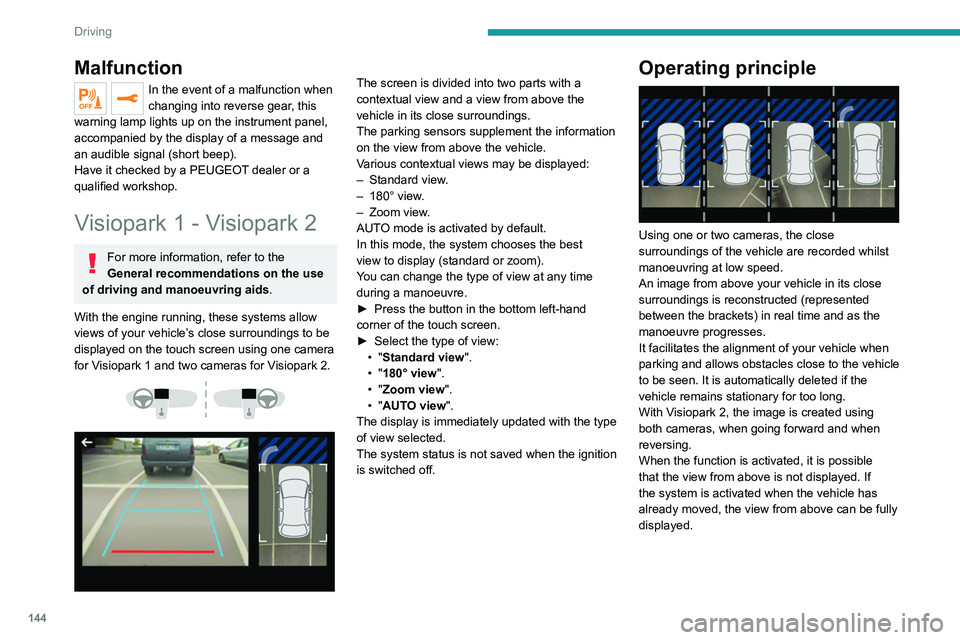
With the engine running, these systems allow
views of your vehicle’s close surroundings to be
displayed on the touch screen using one camera
for Visiopark 1 and two cameras for Visiopark 2.
The screen is divided into two parts with a
contextual view and a view from above the
vehicle in its close surroundings.
The parking sensors supplement the information
on the view from above the vehicle.
Various contextual views may be displayed:
–
Standard view
.
–
180° view
.
–
Zoom view
.
AUTO mode is activated by default.
In this mode, the system chooses the best
view
to display (standard or zoom).
You can change the type of view at any time
during a manoeuvre.
►
Press the button in the bottom left-hand
corner of the touch screen.
►
Select the type of view:
•
"Standard view".
•
"180° view".
•
"Zoom view".
•
"AUTO view".
The display is immediately updated with the type
of view selected.
The system status is not saved when the ignition
is switched off.Operating principle
Using one or two cameras, the close
surroundings of the vehicle are recorded whilst
manoeuvring at low speed.
An image from above your vehicle in its close
surroundings is reconstructed (represented
between the brackets) in real time and as the
manoeuvre progresses.
It facilitates the alignment of your vehicle when
parking and allows obstacles close to the vehicle
to be seen. It is automatically deleted if the
vehicle remains stationary for too long.
With Visiopark 2, the image is created using
both cameras, when going forward and when
reversing.
When the function is activated, it is possible
that the view from above is not displayed. If
the system is activated when the vehicle has
already moved, the view from above can be fully
displayed.
Visiopark 1
Rear view
To activate the camera located near the number
plate lamps, engage reverse gear and do not
exceed a speed of 6 mph (10 km/h).
The system is deactivated:
– Automatically, at speeds above approximately
6 mph (10 km/h),
– Automatically, if the tailgate is opened.
– Upon changing out of reverse gear (the image
remains displayed for 7 seconds).
– By pressing the white arrow in the upper-left
corner of the touch screen.
Page 147 of 292
145
Driving
6Visiopark 1
Rear view
To activate the camera located near the number
plate lamps, engage reverse gear and do not
exceed a speed of 6 mph (10 km/h).
The system is deactivated:
–
Automatically
, at speeds above approximately
6 mph (10
km/h),
–
Automatically
, if the tailgate is opened.
–
Upon changing out of reverse gear (the image
remains displayed for 7
seconds).
–
By pressing the white arrow in the upper-left
corner of the touch screen.
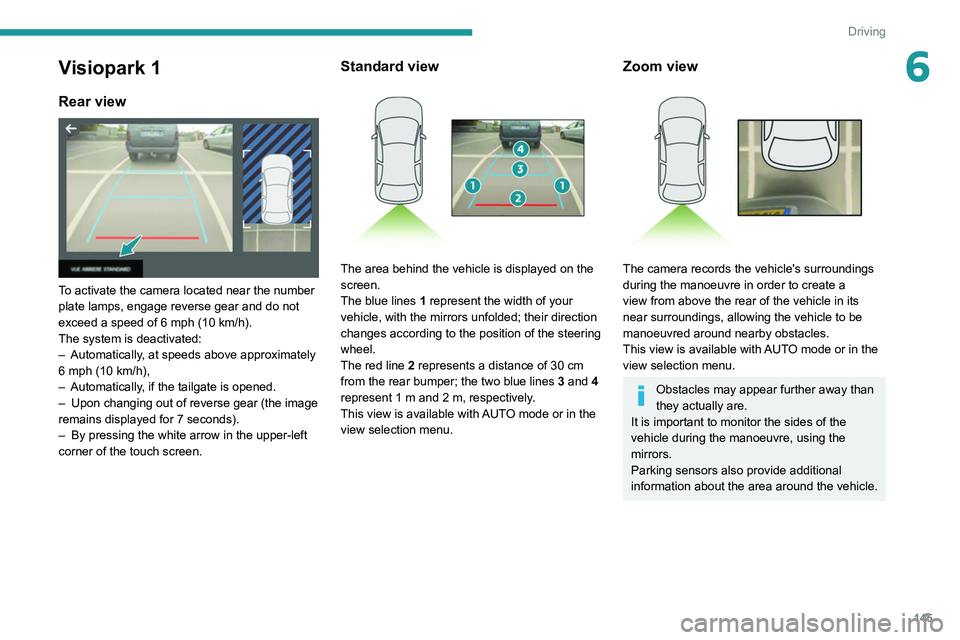
Standard view
The area behind the vehicle is displayed on the
screen.
The blue lines 1 represent the width of your
vehicle, with the mirrors unfolded; their direction
changes according to the position of the steering
wheel.
The red line 2 represents a distance of 30
cm
from the rear bumper; the two blue lines 3 and 4
represent 1
m and 2 m, respectively.
This view is available with AUTO mode or in the
view selection menu.
Zoom view
The camera records the vehicle's surroundings
during the manoeuvre in order to create a
view from above the rear of the vehicle in its
near surroundings, allowing the vehicle to be
manoeuvred around nearby obstacles.
This view is available with AUTO mode or in the
view selection menu.
Obstacles may appear further away than
they actually are.
It is important to monitor the sides of the
vehicle during the manoeuvre, using the
mirrors.
Parking sensors also provide additional
information about the area around the vehicle.
Page 148 of 292
146
Driving
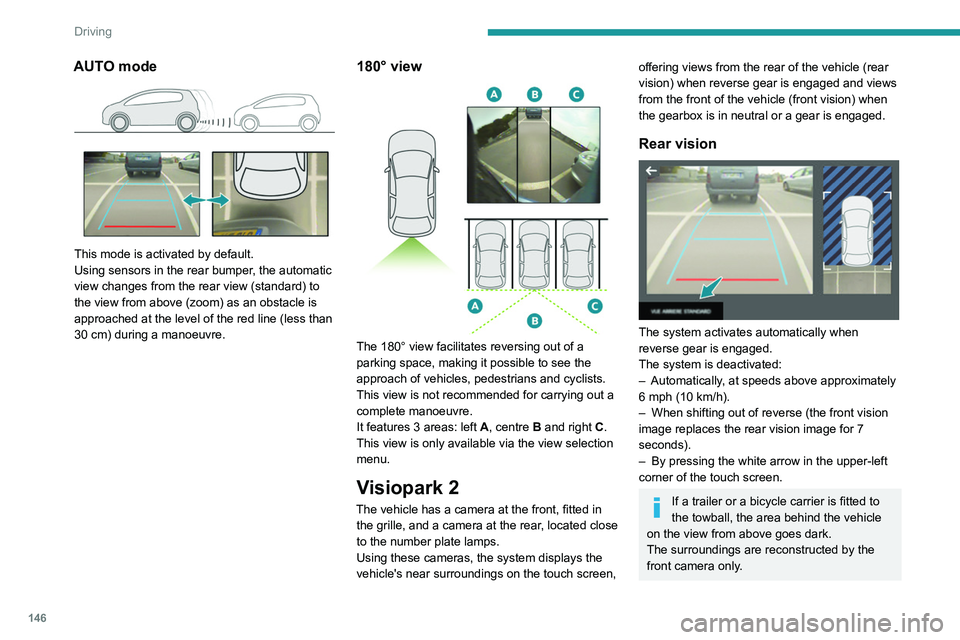
AUTO mode
This mode is activated by default.
Using sensors in the rear bumper, the automatic
view changes from the rear view (standard) to
the view from above (zoom) as an obstacle is
approached at the level of the red line (less than
30 cm) during a manoeuvre.
180° view
The 180° view facilitates reversing out of a
parking space, making it possible to see the
approach of vehicles, pedestrians and cyclists.
This view is not recommended for carrying out a
complete manoeuvre.
It features 3 areas: left A, centre B and right C.
This view is only available via the view selection
menu.
Visiopark 2
The vehicle has a camera at the front, fitted in the grille, and a camera at the rear, located close
to the number plate lamps.
Using these cameras, the system displays the
vehicle's near surroundings on the touch screen,
offering views from the rear of the vehicle (rear
vision) when reverse gear is engaged and views
from the front of the vehicle (front vision) when
the gearbox is in neutral or a gear is engaged.
Rear vision
The system activates automatically when
reverse gear is engaged.
The system is deactivated:
–
Automatically
, at speeds above approximately
6 mph (10
km/h).
–
When shifting out of reverse (the front vision
image replaces the rear vision image for 7
seconds).
–
By pressing the white arrow in the upper-left
corner of the touch screen.
If a trailer or a bicycle carrier is fitted to
the towball, the area behind the vehicle
on the view from above goes dark.
The surroundings are reconstructed by the
front camera only.
The rear vision views are similar to those for the
Visiopark 1 function.
For more information on the Visiopark
1 function, refer to the corresponding section.
Front and rear vision
With the engine running and the speed
below 12 mph (20 km/h), the system is
activated via the Driving/Vehicle touch screen
menu:
► Select "Visual parking assistance".
AUTO mode is displayed by default, with front
vision, if the gearbox is in neutral or with a
gear engaged, or with rear vision, if reverse is
engaged.
The system is deactivated:
– Automatically above about 19 mph (30 km/h)
(the image disappears temporarily from 12 mph
(20 km/h)).
– By pressing the white arrow in the upper-left
corner of the touch screen.
Page 149 of 292
147
Driving
6The rear vision views are similar to those for the
Visiopark 1 function.
For more information on the Visiopark
1
function, refer to the corresponding section.
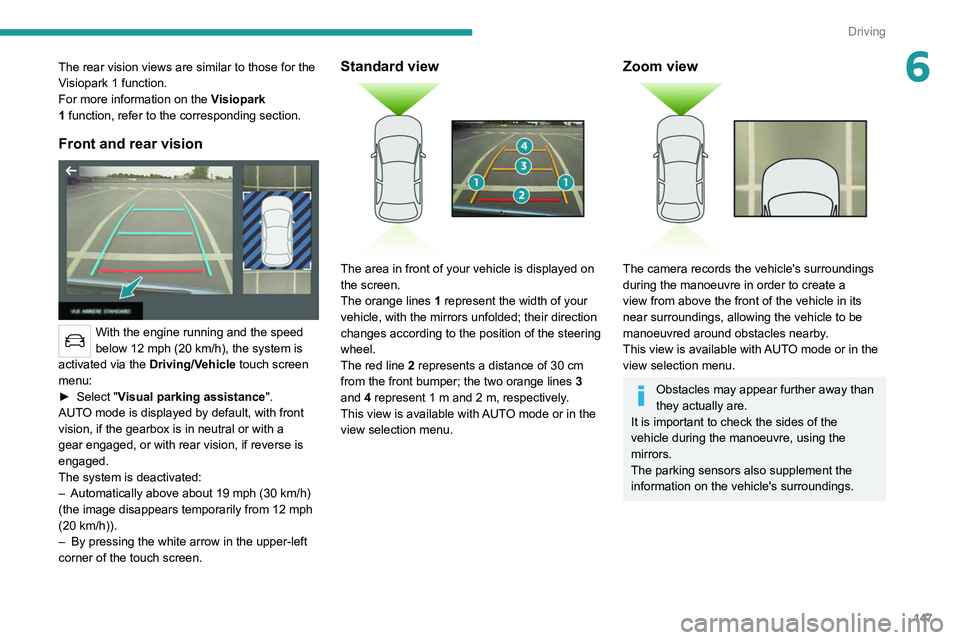
Front and rear vision
With the engine running and the speed
below 12 mph (20 km/h), the system is
activated via the Driving/Vehicle touch screen
menu:
►
Select "
Visual parking assistance".
AUTO mode is displayed by default, with front
vision, if the gearbox is in neutral or with a
gear engaged, or with rear vision, if reverse is
engaged.
The system is deactivated:
–
Automatically above about 19 mph (30
km/h)
(the image disappears temporarily from 12 mph
(20
km/h)).
–
By pressing the white arrow in the upper-left
corner of the touch screen.
Standard view
The area in front of your vehicle is displayed on
the screen.
The orange lines 1 represent the width of your
vehicle, with the mirrors unfolded; their direction
changes according to the position of the steering
wheel.
The red line 2 represents a distance of 30 cm
from the front bumper; the two orange lines 3
and 4 represent 1 m and 2 m, respectively.
This view is available with AUTO mode or in the
view selection menu.
Zoom view
The camera records the vehicle's surroundings
during the manoeuvre in order to create a
view from above the front of the vehicle in its
near surroundings, allowing the vehicle to be
manoeuvred around obstacles nearby.
This view is available with AUTO mode or in the
view selection menu.
Obstacles may appear further away than
they actually are.
It is important to check the sides of the
vehicle during the manoeuvre, using the
mirrors.
The parking sensors also supplement the
information on the vehicle's surroundings.
Page 150 of 292
148
Driving
AUTO mode
This mode is activated by default.
Using sensors in the front bumper, the automatic
view changes from the front view (standard) to
the view from above (zoom) as an obstacle is
approached during a manoeuvre.
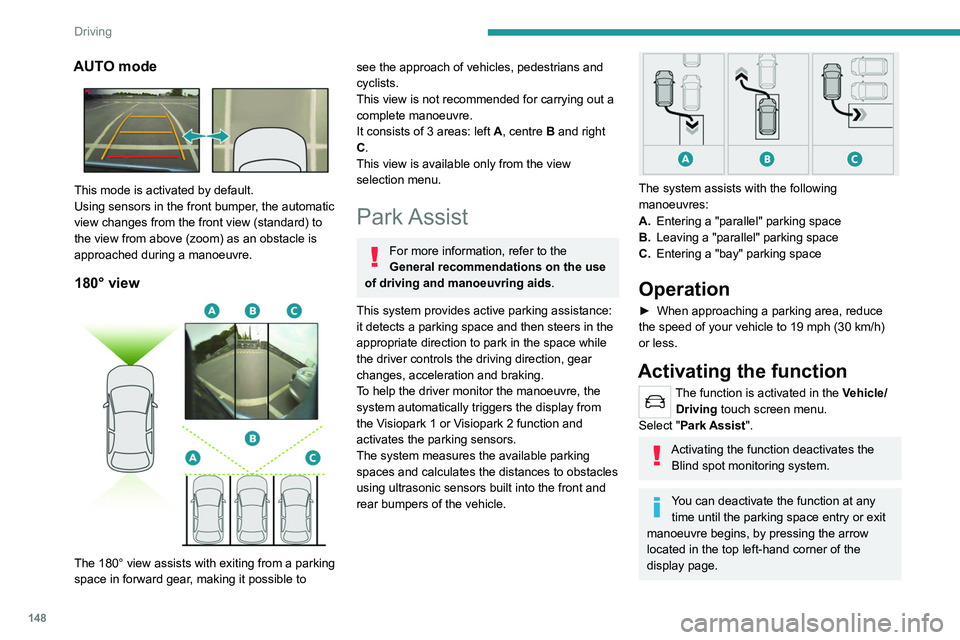
180° view
The 180° view assists with exiting from a parking
space in forward gear, making it possible to
see the approach of vehicles, pedestrians and
cyclists.
This view is not recommended for carrying out a
complete manoeuvre.
It consists of 3 areas: left A, centre B and right
C.
This view is available only from the view
selection menu.
Park Assist
For more information, refer to the
General recommendations on the use
of driving and manoeuvring aids .
This system provides active parking assistance:
it detects a parking space and then steers in the
appropriate direction to park in the space while
the driver controls the driving direction, gear
changes, acceleration and braking.
To help the driver monitor the manoeuvre, the
system automatically triggers the display from
the
Visiopark 1 or Visiopark 2 function and
activates the parking sensors.
The system measures the available parking
spaces and calculates the distances to obstacles
using ultrasonic sensors built into the front and
rear bumpers of the vehicle.
The system assists with the following
manoeuvres:
A. Entering a "parallel" parking space
B. Leaving a "parallel" parking space
C. Entering a "bay" parking space
Operation
► When approaching a parking area, reduce
the speed of your vehicle to 19 mph (30 km/h)
or less.
Activating the function
The function is activated in the Vehicle/
Driving touch screen menu.
Select "Park Assist".
Activating the function deactivates the Blind spot monitoring system.
You can deactivate the function at any time until the parking space entry or exit
manoeuvre begins, by pressing the arrow
located in the top left-hand corner of the
display page.
Selecting the type of
manoeuvre
A manoeuvre selection page is displayed on the
touch screen: by default, the "Entry" page if the
vehicle has been running since the ignition was
switched on, otherwise, the "Exit" page.
► Select the type and side of the manoeuvre to
activate the parking space search.
The selected manoeuvre can be changed at
any time, even while searching for an available
space.
This indicator lamp comes on to confirm the selection.
Parking space search
► You should drive at a distance of between
0.50 m and 1.50 m from the row of parked
vehicles, without ever exceeding 19 mph
(30 km/h), until the system finds an available
space.
Page 155 of 292
153
Driving
6When all of the instructions have been validated,
a new page is displayed, indicating that you can
undertake the manoeuvre.
► To undertake the manoeuvre, press
this button.
►
While holding down the button, gradually
release the brake pedal.
The button must be held down
throughout the manoeuvre.
The start of the manoeuvre is indicated by
the display of a window with the message
"Manoeuvre in progress", accompanied by an
audible signal.
The Visiopark 1 or Visiopark 2 and
the parking sensors are automatically
activated to help monitor the vehicle's close
surroundings
throughout the manoeuvre.
Performing the manoeuvre
As soon as the driver releases the brake
pedal, the system automatically takes control
of choosing the travel direction, forwards or
reverse, acceleration, braking and the steering
direction.
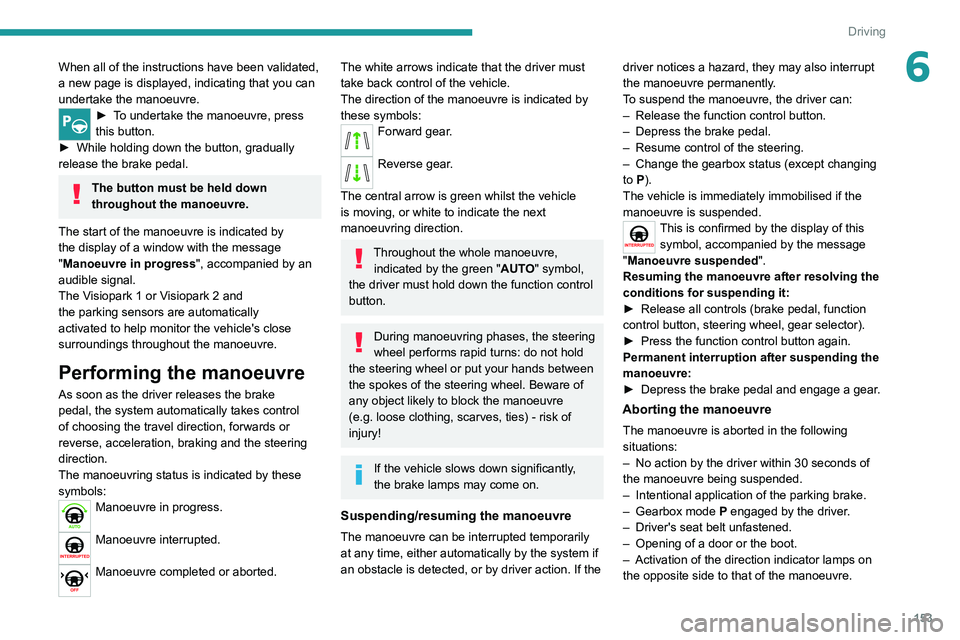
The manoeuvring status is indicated by these
symbols:
Manoeuvre in progress.
Manoeuvre interrupted.
Manoeuvre completed or aborted.
The white arrows indicate that the driver must
take back control of the vehicle.
The direction of the manoeuvre is indicated by
these symbols:
Forward gear.
Reverse gear.
The central arrow is green whilst the vehicle
is moving, or white to indicate the next
manoeuvring direction.
Throughout the whole manoeuvre, indicated by the green " AUTO" symbol,
the driver must hold down the function control
button.
During manoeuvring phases, the steering
wheel performs rapid turns: do not hold
the steering wheel or put your hands between
the spokes of the steering wheel. Beware of
any object likely to block the manoeuvre
(e.g.
loose clothing, scarves, ties) - risk of
injury!
If the vehicle slows down significantly,
the brake lamps may come on.
Suspending/resuming the manoeuvre
The manoeuvre can be interrupted temporarily
at any time, either automatically by the system if
an obstacle is detected, or by driver action. If the driver notices a hazard, they may also interrupt
the manoeuvre permanently.
To suspend the manoeuvre, the driver can:
–
Release the function control button.
–
Depress the brake pedal.
–
Resume control of the steering.
–
Change the gearbox status (except changing
to
P).
The vehicle is immediately immobilised if the
manoeuvre is suspended.
This is confirmed by the display of this symbol, accompanied by the message
"Manoeuvre suspended".
Resuming the manoeuvre after resolving the
conditions for suspending it:
►
Release all controls (brake pedal, function
control button, steering wheel, gear selector).
►
Press the function control button again.
Permanent interruption after suspending the
manoeuvre:
►
Depress the brake pedal and engage a gear
.
Aborting the manoeuvre
The manoeuvre is aborted in the following
situations:
–
No action by the driver within 30 seconds of
the manoeuvre being suspended.
–
Intentional application of the parking brake.
–
Gearbox mode P
engaged by the driver.
–
Driver's seat belt unfastened.
–
Opening of a door or the boot.
–
Activation of the direction indicator lamps on
the opposite side to that of the manoeuvre.
Page 156 of 292
154
Driving
– In certain cases, when a wheel of the vehicle
hits a pavement or a low obstacle.
–
T
riggering of anti-slip regulation on a slippery
road.
–
Sudden appearance in the field of the
manoeuvre of an obstacle not detected by the
system before the manoeuvre was started,
with the obstacle remaining for more than 30
seconds.
–
After 10 manoeuvres to enter or exit a
"parallel" parking space and after 7 manoeuvres
to enter a "bay" parking space,
–
System malfunction during the manoeuvre.
Abandoning the manoeuvre immediately
triggers the vehicle’
s brakes and automatically
deactivates the function.
This symbol is displayed accompanied by the message "Manoeuvre aborted".
A message prompts the driver to take back
control of the vehicle.
The function is deactivated after a few seconds; this indicator lamp goes off and
the initial display is resumed.
The system automatically engages gearbox
mode P after 4 seconds.
End of manoeuvre
The vehicle stops as soon as the manoeuvre is
completed.
This symbol is displayed accompanied by the message "Manoeuvre completed".
When the function is deactivated, this
indicator lamp goes off and the original
display is restored.
–
If entering a parking space, the driver may
be required to complete the manoeuvre.
The gearbox changes to
P
4 seconds after
completion of the manoeuvre.
–
When exiting a parking space, the gearbox
changes to
N when the manoeuvre is complete.
A message and symbols prompt the driver to
take back control of the vehicle.
The gearbox automatically changes to mode
P if no action is taken by the driver within 30
seconds.
Operating limits
– The system may suggest an inappropriate
parking space (parking prohibited, work in
progress with damaged road surface, location
alongside a ditch, etc.).
–
The system may indicate that a space has
been found but will not offer it because of a fixed
obstacle on the opposite side of the manoeuvre,
which does not allow the vehicle to follow the
trajectory required for parking.
–
The system may indicate that a space has
been found but the manoeuvre will not be
triggered because the width of the lane is
insufficient.
–
The system is not designed to perform parking
manoeuvres on a steep slope or on a sharp
curve.
– The system does not detect spaces that
are much larger than the vehicle itself or that
are delimited by obstacles that are too low
(pavements, studs, etc.) or too thin (trees, posts,
wire fences, etc.).
–
The system may be impaired by incorrect
inflation of the vehicle’
s tyres.
–
The tilting of the vehicle if the boot is heavily
loaded can affect the distance measurements.
Do not use the function under the
following exterior conditions:
–
Alongside a soft shoulder (ditch) or quay or
on the edge of a drop.
–
When the road surface is slippery (ice).
Do not use the function in the presence
of one of the following malfunctions:
–
If a tyre is under-inflated.
–
If one of the bumpers is damaged.
–
If one of the cameras is faulty
.
–
If the brake lamps are not working.
Do not use the function if the vehicle has
been subject to one of the following
modifications:
–
When carrying an object extending beyond
the dimensions of the vehicle (ladder on the
roof bars, bicycle carrier on the tailgate, etc.).
–
With a non-approved towball in place.
–
With snow chains fitted.
–
When driving on a small-diameter or
"space-saver" type spare wheel.
– When the wheels fitted are a different size
from the original ones.
– After modifying one or both bumpers
(added protection).
– If the sensors have been repainted outside
the PEUGEOT dealer network.
– With sensors not approved for the vehicle.
Malfunctions
When the function is not activated, the
temporary flashing of this indicator lamp
and an audible signal indicate a Full Park Assist
malfunction.
If the malfunction occurs while in use, the
indicator lamp goes off.
If the parking sensor malfunction occurs
during Full Park Assist use, indicated by
this warning lamp coming on, the function is
deactivated.
Consult a PEUGEOT dealer or a qualified
workshop.
In the event of a power steering
malfunction, this warning lamp lights up
on the instrument panel, accompanied by a
message.
You must stop the vehicle.
Stop as soon as it is safe to do so and
switch off the ignition.
Contact a PEUGEOT dealer or a qualified
workshop.
Page 164 of 292
162
Practical information
Types of charging
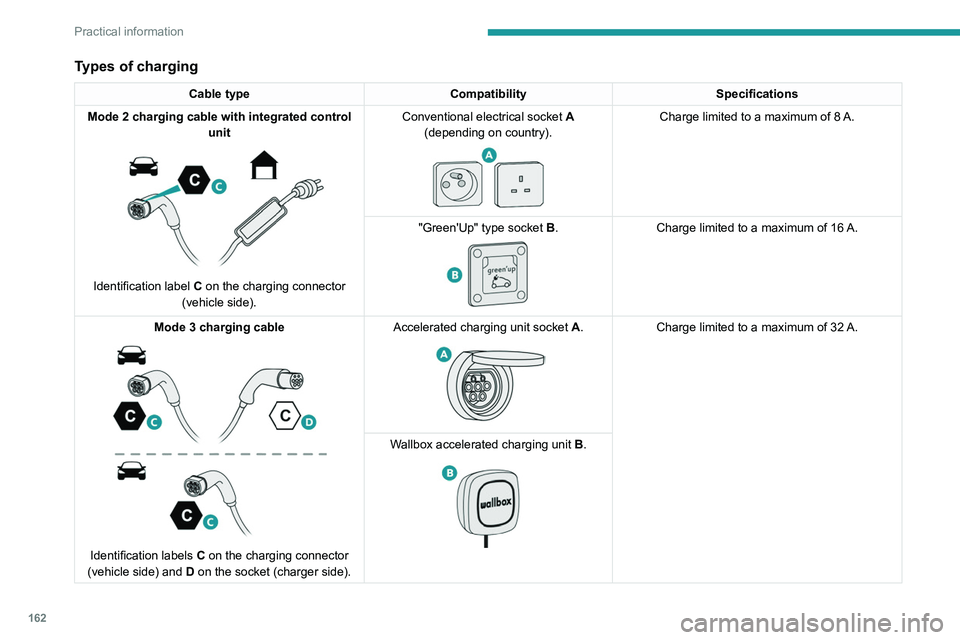
Cable typeCompatibility Specifications
Mode 2 charging cable with integrated control unit
Identification label C on the charging connector
(vehicle side). Conventional electrical socket
A
(depending on country).
Charge limited to a maximum of 8 A.
"Green'Up" type socket B.
Charge limited to a maximum of 16 A.
Mode
3 charging cable
Identification labels C on the charging connector
(vehicle side) and D on the socket (charger side). Accelerated charging unit socket
A.
Charge limited to a maximum of 32 A.
W
allbox accelerated charging unit B.
Page 165 of 292
163
Practical information
7The estimated charging time is indicated on the instrument panel when the vehicle
is connected. It may vary depending on
various factors such as the outside
temperature or the quality of the electricity
supply.
If the outside temperature is below -10°C, it
is recommended to connect the vehicle as
soon as possible as the charging time may
increase significantly. The traction battery
may not charge fully.
Domestic charging cable (mode 2)
It is essential to avoid damaging the
cable and to keep it intact.
In the event of damage, do not use it and
contact a PEUGEOT
dealer or a qualified
workshop to replace it.
Accelerated charging unit (mode 3)
Do not dismantle or modify the
accelerated charging unit - risk of
electrocution and/or fire!
To find out how it is used, please refer to the
accelerated charging unit's user instructions.
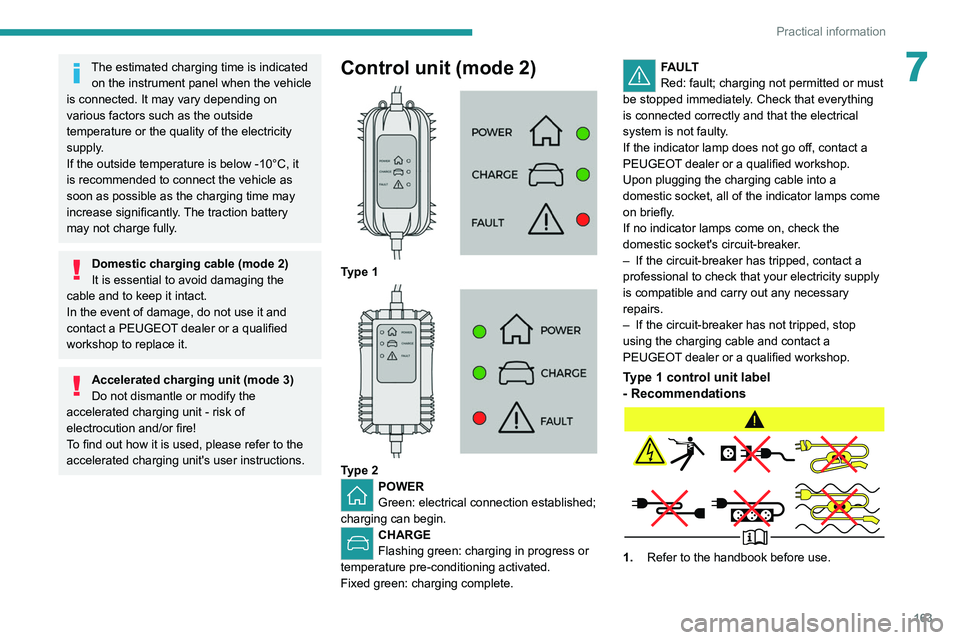
Control unit (mode 2)
Type 1
Type 2POWER
Green: electrical connection established;
charging can begin.
CHARGE
Flashing green: charging in progress or
temperature pre-conditioning activated.
Fixed green: charging complete.
FAULT
Red: fault; charging not permitted or must
be stopped immediately. Check that everything
is connected correctly and that the electrical
system is not faulty.
If the indicator lamp does not go off, contact a
PEUGEOT dealer or a qualified workshop.
Upon plugging the charging cable into a
domestic socket, all of the indicator lamps come
on briefly.
If no indicator lamps come on, check the
domestic socket's circuit-breaker.
–
If the circuit-breaker has tripped, contact a
professional to check that your electricity supply
is compatible and carry out any necessary
repairs.
–
If the circuit-breaker has not tripped, stop
using the charging cable and contact a
PEUGEOT
dealer or a qualified workshop.
Type 1 control unit label
- Recommendations
1. Refer to the handbook before use.