Touch screen Peugeot 508 RXH 2016 Owner's Manual
[x] Cancel search | Manufacturer: PEUGEOT, Model Year: 2016, Model line: 508 RXH, Model: Peugeot 508 RXH 2016Pages: 364, PDF Size: 10.31 MB
Page 5 of 364
.
508_en_Chap00a_sommaire_ed01-2016
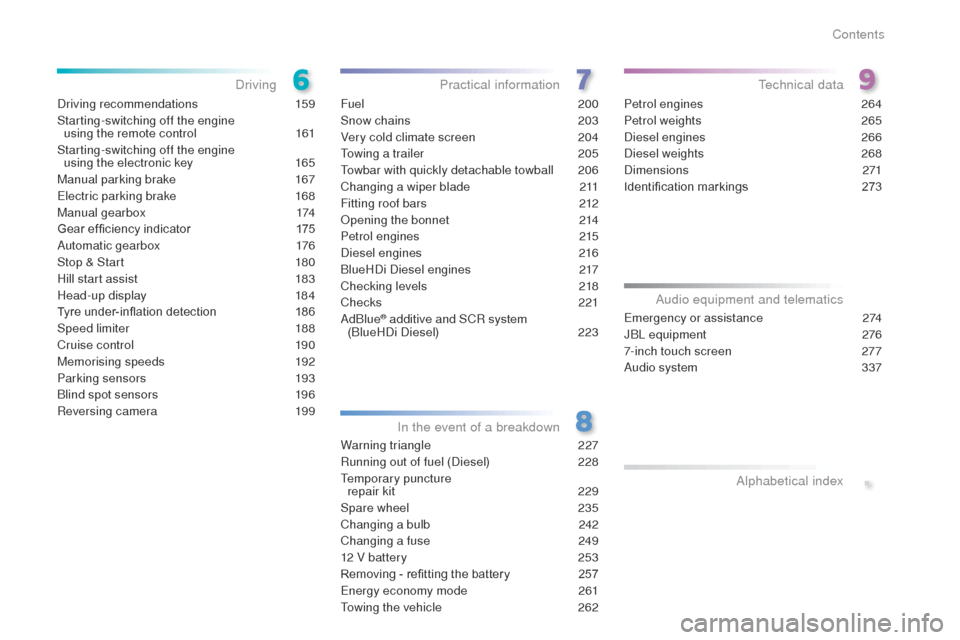
Driving recommendations 159
Starting-switching off the engine using the remote control
1
61
Starting-switching off the engine using the electronic key
1
65
Manual parking brake
1
67
el
ectric parking brake
1
68
Manual gearbox
1
74
Gear ef ficiency indicator
1
75
Automatic gearbox
1
76
Stop & Start
1
80
Hill start assist
1
83
Head-up display
1
84
Tyre under-inflation detection
1
86
Speed limiter
1
88
Cruise control
1
90
Memorising speeds
1
92
Parking sensors
1
93
Blind spot sensors
1
96
Reversing camera
1
99Fuel
200
Snow chains
2
03
Very cold climate screen
2
04
to
wing a trailer
2
05
to
wbar with quickly detachable towball
2
06
Changing a wiper blade
2
11
Fitting roof bars
2
12
Opening the bonnet
2
14
Petrol engines
2
15
Diesel engines
2
16
BlueHDi Diesel engines
2
17
Checking levels
2
18
Checks
221
AdBlue
® additive and SCR system
(BlueHDi Diesel) 2 23
Warning triangle
2
27
Running out of fuel (Diesel)
2
28
te
mporary puncture
repair kit
2
29
Spare wheel
23
5
Changing a bulb
2
42
Changing a fuse
2
49
12 V battery
2
53
Removing - refitting the battery
2
57
en
ergy economy mode
26
1
to
wing the vehicle
2
62Petrol engines
2
64
Petrol weights
2
65
Diesel engines
2
66
Diesel weights
26
8
Dimensions
271
Identification markings
2
73em
ergency or assistance 2 74
JBL equipment 2 76
7-inch touch screen
2
77
Audio system
3
37
DrivingPractical information
In the event of a breakdownte chnical data
Audio equipment and telematics Alphabetical index
Contents
Page 43 of 364
41
508 _en_Chap01_instrument-bord_ed01-2016
tr i p c o m p u t e r
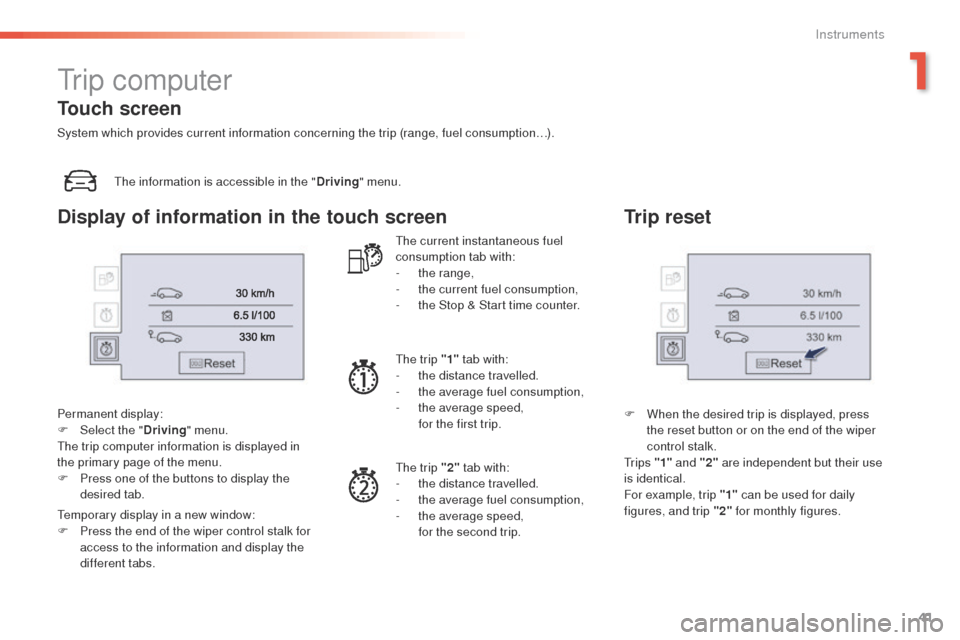
the information is accessible in the "Driving" menu.
Permanent display:
F
Sel
ect the " Driving" menu.
th
e trip computer information is displayed in
the primary page of the menu.
F
P
ress one of the buttons to display the
desired tab.
te
mporary display in a new window:
F
P
ress the end of the wiper control stalk for
access to the information and display the
different tabs.
th
e current instantaneous fuel
consumption tab with:
-
t
he range,
-
t
he current fuel consumption,
-
t
he Stop & Start time counter.
th
e trip "1" tab with:
-
t
he distance travelled.
-
t
he average fuel consumption,
-
t
he average speed,
f
or the first trip.
th
e trip "2" tab with:
-
t
he distance travelled.
-
t
he average fuel consumption,
-
t
he average speed,
f
or the second trip.
Trip reset
F When the desired trip is displayed, press the reset button or on the end of the wiper
control stalk.
t
r i p s "1" and "2" are independent but their use
is identical.
For example, trip "1" can be used for daily
figures, and trip "2" for monthly figures.
Touch screen
System which provides current information concerning the trip (range, fuel consumption…).
Display of information in the touch screen
1
Instruments
Page 45 of 364
43
508 _en_Chap01_instrument-bord_ed01-2016
touch screen
It gives access to:
- m enus for adjusting settings for vehicle
functions and systems,
-
a
udio and display configuration menus,
-
a
udio system and telephone controls and
the display of associated information.
And, depending on equipment, it allows:
-
t
he display of alert messages and the
visual parking sensors information,
-
a
ccess to the controls for the navigation
system and Internet services, and the
display of associated information.
For reasons of safety, the driver
should only carr y out operations
that require close attention, with the
vehicle stationary.
Some functions are not accessible
when driving.General operation
Recommendations
It is necessary to press firmly, particularly for
"flick" gestures (scrolling through lists, moving
the map...).
A light wipe is not enough.
th
e screen does not recognise pressing with
more than one finger.
th
is technology allows use at all temperatures
and when wearing gloves.
Do not use pointed objects on the touch
screen.
Do not touch the touch screen with wet hands.
us
es a soft clean cloth to clean the touch
screen.
State of indicator lamps
Some buttons contain an indicator lamp that
gives the state of the corresponding function.
gr
een indicator: you have switched on the
corresponding function.
Orange indicator: you have switched off the
corresponding function.
1
Instruments
Page 46 of 364
44
508 _en_Chap01_instrument-bord_ed01-2016
use this button to go to the
secondary page.
us
e this button to return to the
primary page.
us
e this button for access to
additional information and to the
settings for certain functions.
us
e this button to confirm.
us
e this button to quit.
Principles
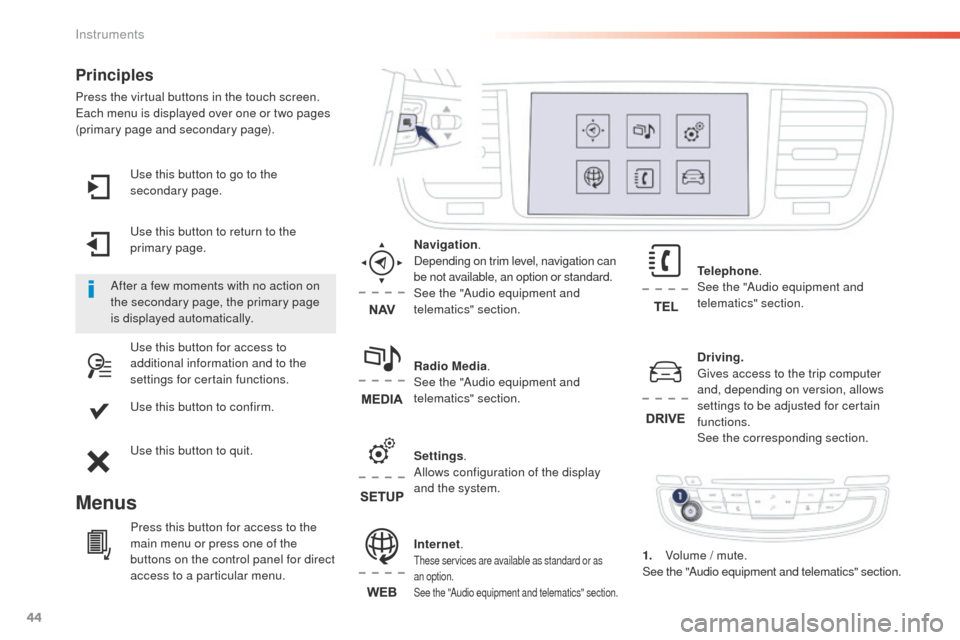
Press the virtual buttons in the touch screen.each menu is displayed over one or two pages
(primary page and secondary page).
Menus
Driving . gi
ves access to the trip computer
and, depending on version, allows
settings to be adjusted for certain
functions.
See the corresponding section.
Internet.
these services are available as standard or as
an option.
See the "Audio equipment and telematics" section.
Telephone .
See the "Audio equipment and
telematics" section.
Radio Media .
See the "Audio equipment and
telematics" section. Navigation .
Depending on trim level, navigation can
be not available, an option or standard.
See the "Audio equipment and
telematics" section.
Settings .
Allows configuration of the display
and the system.
After a few moments with no action on
the secondary page, the primary page
is displayed automatically.
Press this button for access to the
main menu or press one of the
buttons on the control panel for direct
access to a particular menu. 1.
V
olume / mute.
See the "Audio equipment and telematics" section.
Instruments
Page 47 of 364
45
508 _en_Chap01_instrument-bord_ed01-2016
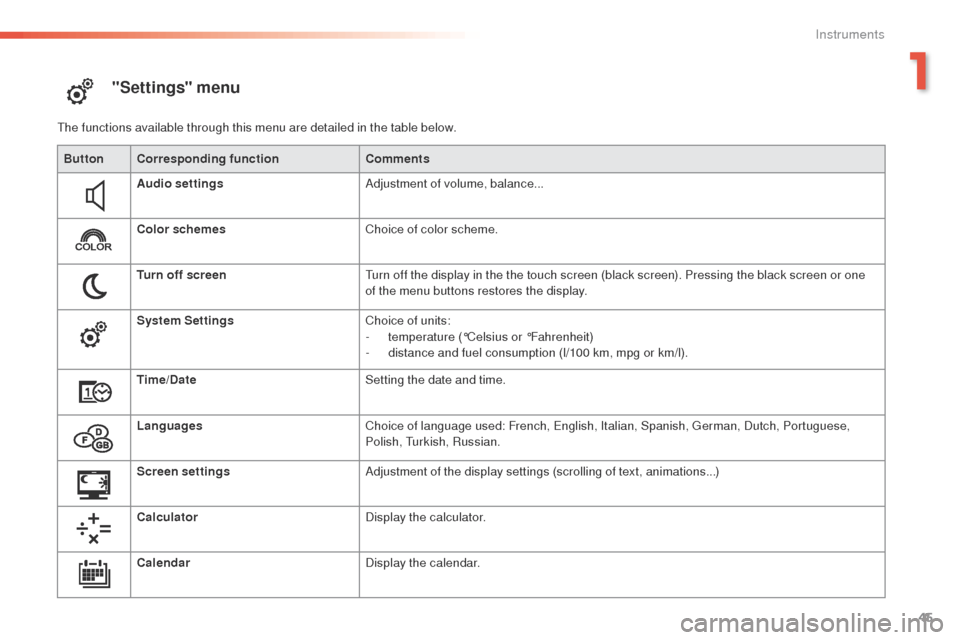
"Settings" menu
the functions available through this menu are detailed in the table below.Button Corresponding function Comments
Audio settings Adjustment of volume, balance...
Color schemes Choice of color scheme.
Turn off screen
tu
rn off the display in the the touch screen (black screen). Pressing the black screen or one
of the menu buttons restores the display.
System Settings Choice of units:
-
t
emperature (°Celsius or °Fahrenheit)
-
d
istance and fuel consumption (l/100 km, mpg or km/l).
Time/Date Setting the date and time.
Languages Choice of language used: French,
e
n
glish, Italian, Spanish, g
e
rman, Dutch, Portuguese,
Polish,
t
u
rkish, Russian.
Screen settings Adjustment of the display settings (scrolling of text, animations...)
Calculator Display the calculator.
Calendar Display the calendar.
1
Instruments
Page 49 of 364
47
508 _en_Chap01_instrument-bord_ed01-2016
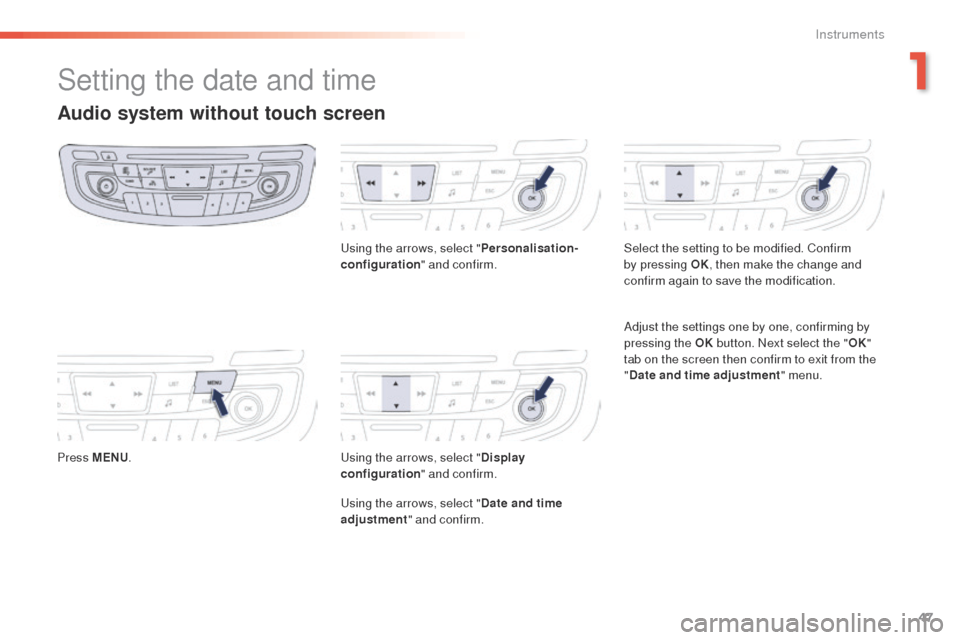
Setting the date and time
Audio system without touch screen
Press MENU.
us
ing the arrows, select "
Personalisation-
configuration " and confirm.us ing the arrows, select "Display
configuration " and confirm.
us
ing the arrows, select "Date and time
adjustment " and confirm. Select the setting to be modified. Confirm
by pressing OK
, then make the change and
confirm again to save the modification.
Adjust the settings one by one, confirming by
pressing the OK button. Next select the " OK"
tab on the screen then confirm to exit from the
" Date and time adjustment " menu.
1
Instruments
Page 50 of 364
48
508 _en_Chap01_instrument-bord_ed01-2016
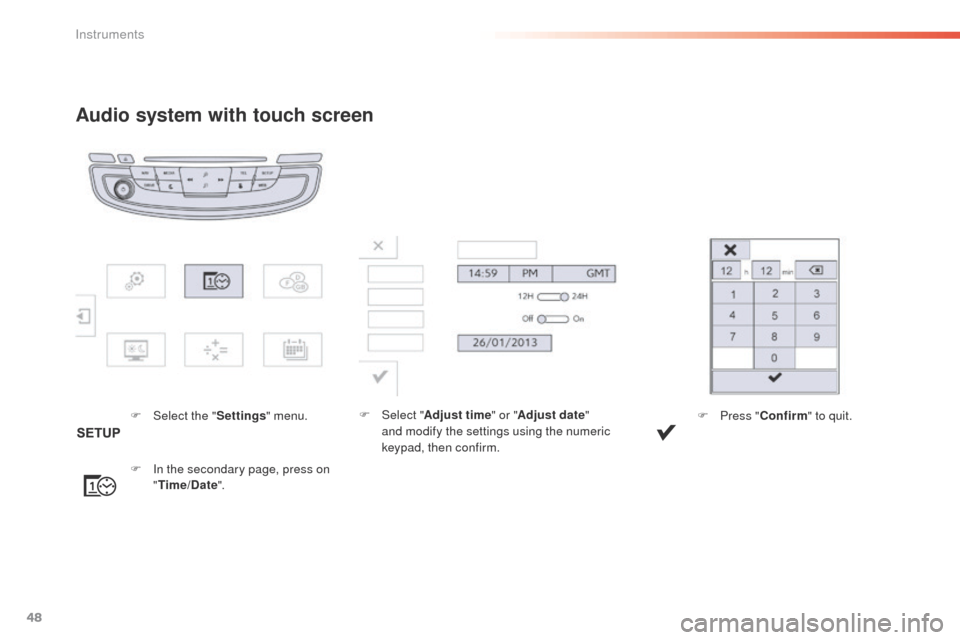
Audio system with touch screen
F Select the "Settings" menu.
F
I
n the secondary page, press on
" Time/Date ". F
Sel ect "
Adjust time " or "Adjust date"
and modify the settings using the numeric
keypad, then confirm. F
P ress "Confirm " to quit.
Instruments
Page 128 of 364
126
508_en_Chap04_eclairage-et-visibilite_ed01-2016
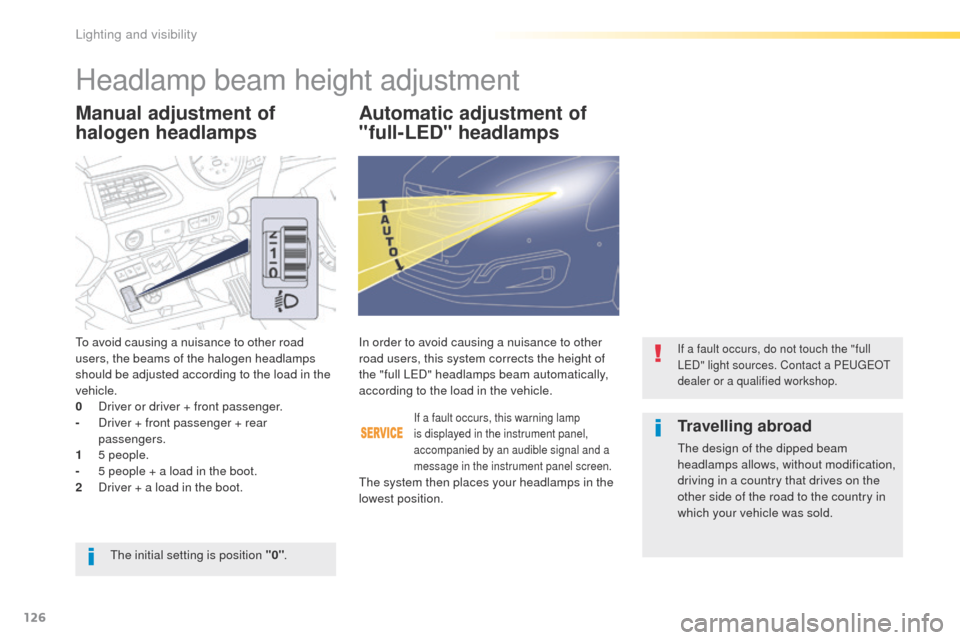
Manual adjustment of
halogen headlampsAutomatic adjustment of
"full-LED" headlamps
to avoid causing a nuisance to other road
users, the beams of the halogen headlamps
should be adjusted according to the load in the
vehicle.
0
D
river or driver + front passenger.
-
D
river + front passenger + rear
passengers.
1
5
people.
-
5 p
eople + a load in the boot.
2
D
river + a load in the boot.
If a fault occurs, this warning lamp
is displayed in the instrument panel,
accompanied by an audible signal and a
message in the instrument panel screen.
In order to avoid causing a nuisance to other
road users, this system corrects the height of
the "full L e
D
" headlamps beam automatically,
according to the load in the vehicle.If a fault occurs, do not touch the "full
LeD " light sources. Contact a Pe ugeOt
dealer or a qualified workshop.
the initial setting is position "0" .
Travelling abroad
the design of the dipped beam
headlamps allows, without modification,
driving in a country that drives on the
other side of the road to the country in
which your vehicle was sold.
th
e system then places your headlamps in the
lowest position.
Headlamp beam height adjustment
Lighting and visibility
Page 196 of 364
194
508_en_Chap06_conduite_ed01-2016
In addition to the rear parking sensors, the
front parking sensors are triggered when an
obstacle is detected in front and the speed of
the vehicle is still below 6 mph (10 km/h).
th
e front parking sensors are interrupted if
the vehicle stops for more than three seconds
in for ward gear, if no further obstacles are
detected or when the speed of the vehicle
exceeds 6 mph (10 km/h).
Front parking sensors
the function will be deactivated
automatically if a trailer is being towed
or a bicycle carrier is fitted (vehicle
fitted with a towbar or bicycle carrier
recommended by P
e
uge
Ot)
.
Deactivation / Activation of the
front and rear parking sensors
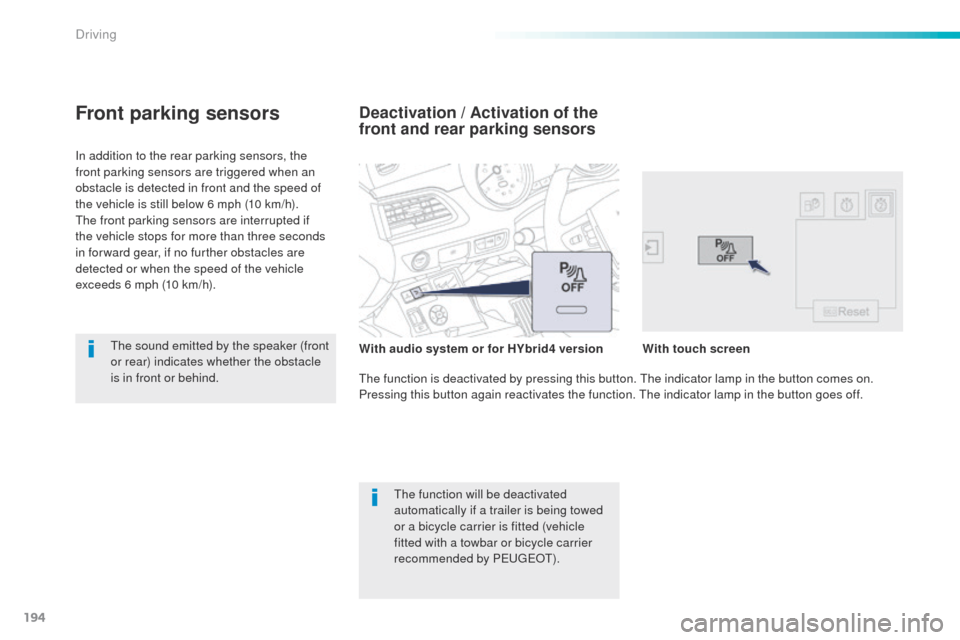
the function is deactivated by pressing this button. th e indicator lamp in the button comes on.
Pressing this button again reactivates the function. th e indicator lamp in the button goes off.
th
e sound emitted by the speaker (front
or rear) indicates whether the obstacle
is in front or behind. With
audio system or for HYbrid4 version With
touch screen
Driving
Page 199 of 364
197
508_en_Chap06_conduite_ed01-2016
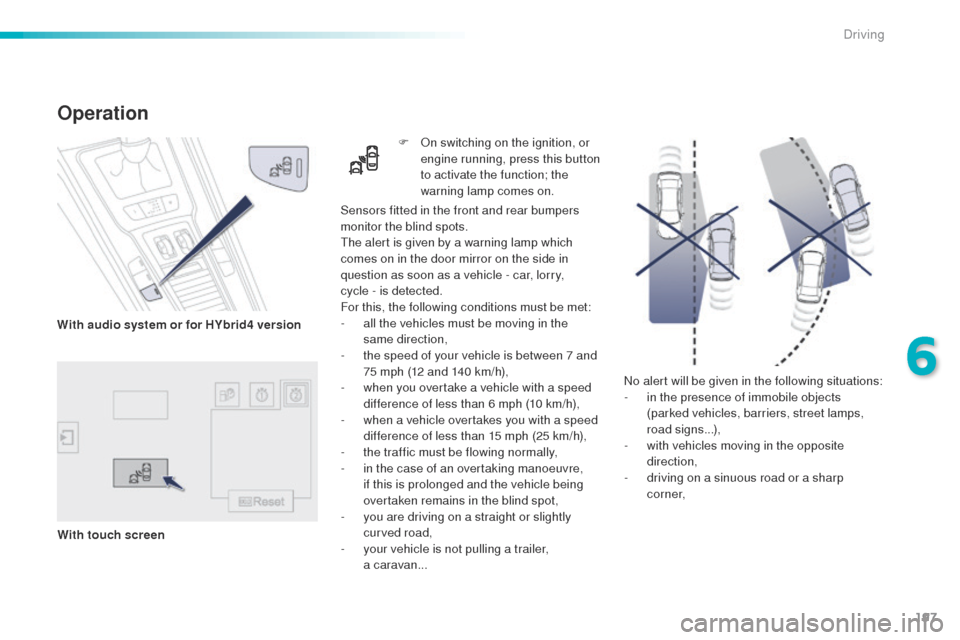
No alert will be given in the following situations:
- i n the presence of immobile objects
(parked vehicles, barriers, street lamps,
road signs...),
-
w
ith vehicles moving in the opposite
direction,
-
d
riving on a sinuous road or a sharp
c o r n e r,
Sensors fitted in the front and rear bumpers
monitor the blind spots.
th
e alert is given by a warning lamp which
comes on in the door mirror on the side in
question as soon as a vehicle - car, lorry,
cycle
- is detected.
For this, the following conditions must be met:
-
a
ll the vehicles must be moving in the
same direction,
-
t
he speed of your vehicle is between 7 and
75 mph (12 and 140 km/h),
-
w
hen you overtake a vehicle with a speed
difference of less than 6 mph (10 km/h),
-
w
hen a vehicle overtakes you with a speed
difference of less than 15 mph (25 km/h),
-
t
he traffic must be flowing normally,
-
i
n the case of an overtaking manoeuvre,
if this is prolonged and the vehicle being
overtaken remains in the blind spot,
-
y
ou are driving on a straight or slightly
curved road,
-
y
our vehicle is not pulling a trailer,
a
caravan...
Operation
F On switching on the ignition, or engine running, press this button
to activate the function; the
warning lamp comes on.
With audio system or for HYbrid4 version
With touch screen
6
Driving