display PEUGEOT 607 2007 User Guide
[x] Cancel search | Manufacturer: PEUGEOT, Model Year: 2007, Model line: 607, Model: PEUGEOT 607 2007Pages: 187, PDF Size: 9.2 MB
Page 145 of 187
02
125
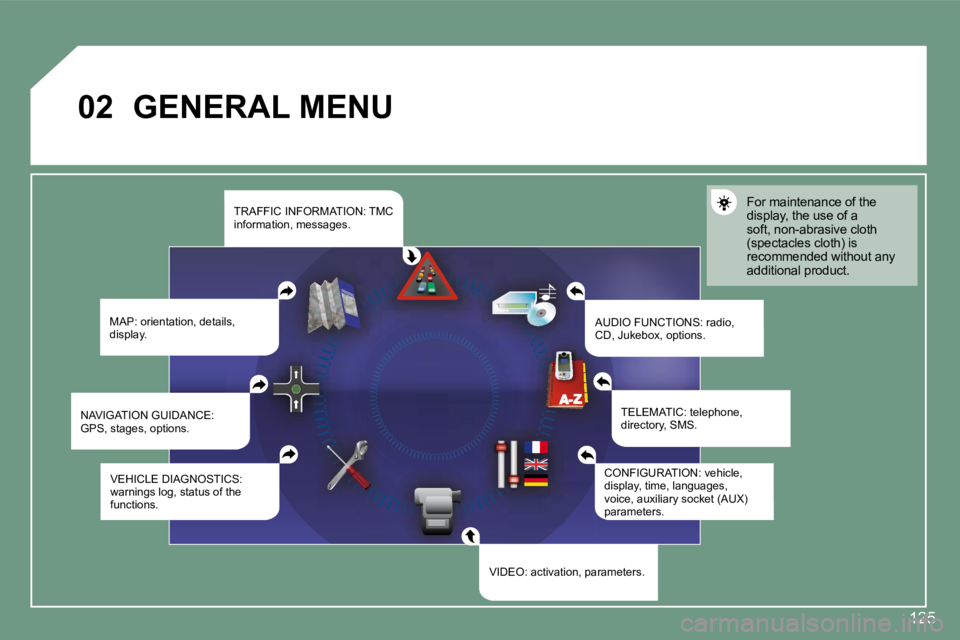
GENERAL MENU
MAP: orientation, details,
display. AUDIO FUNCTIONS: radio,
CD, Jukebox, options.For maintenance of the
display, the use of a
soft, non-abrasive cloth
(spectacles cloth) is
recommended without any
additional product.
TELEMATIC: telephone,
directory, SMS.
CONFIGURATION: vehicle,
display, time, languages,
voice, auxiliary socket (AUX)
parameters.
VIDEO: activation, parameters.
VEHICLE DIAGNOSTICS:
warnings log, status of the
functions.
NAVIGATION GUIDANCE:
GPS, stages, options. TRAFFIC INFORMATION: TMC
information, messages.
Page 152 of 187
2
3
4
15
6
7
03
132
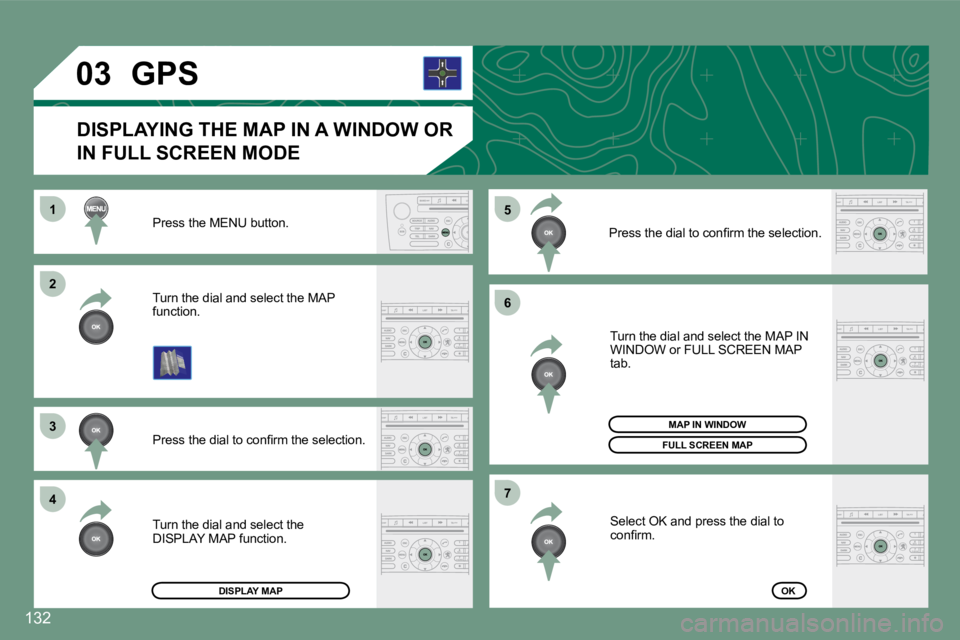
Press the MENU button.
Press the dial to conirm the selection.
Turn the dial and select the MAP
function.
Turn the dial and select the MAP IN
WINDOW or FULL SCREEN MAP
tab.
Select OK and press the dial to
conirm.
Press the dial to conirm the selection.
Turn the dial and select the
DISPLAY MAP function.
DISPLAYING THE MAP IN A WINDOW OR
IN FULL SCREEN MODE
GPS
DISPLAY MAP
FULL SCREEN MAP
OK
MAP IN WINDOW
Page 156 of 187
1
2
3
46
5
7
04
136
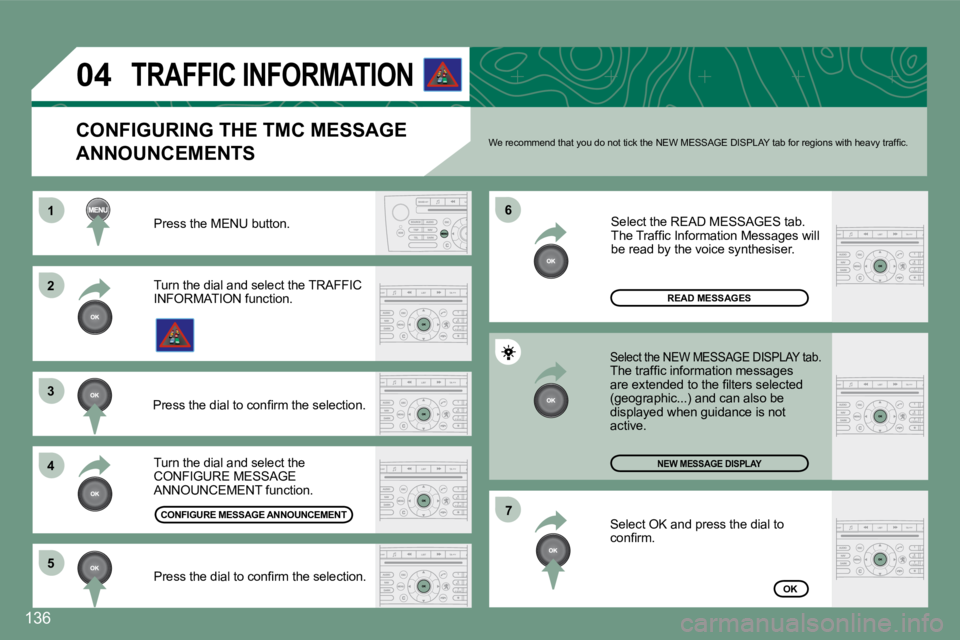
Turn the dial and select the
CONFIGURE MESSAGE
ANNOUNCEMENT function. Select the READ MESSAGES tab.
The Trafic Information Messages will
be read by the voice synthesiser.
Select the NEW MESSAGE DISPLAY tab.The trafic information messages
are extended to the ilters selected
(geographic...) and can also be
displayed when guidance is not
active.
Press the MENU button.
NEW MESSAGE DISPLAY
OK
CONFIGURING THE TMC MESSAGE
ANNOUNCEMENTS
We recommend that you do not tick the NEW MESSAGE D
ISPLAY tab for regions with heavy trafic.
Turn the dial and select the TRAFFIC
INFORMATION function.
Press the dial to conirm the selection.
Press the dial to conirm the selection.
TRAFFIC INFORMATION
Select OK and press the dial to
conirm.
READ MESSAGES
CONFIGURE MESSAGE ANNOUNCEMENT
Page 157 of 187
1
2
3
41
2
3
4
05
137
AUDIO/VIDEO
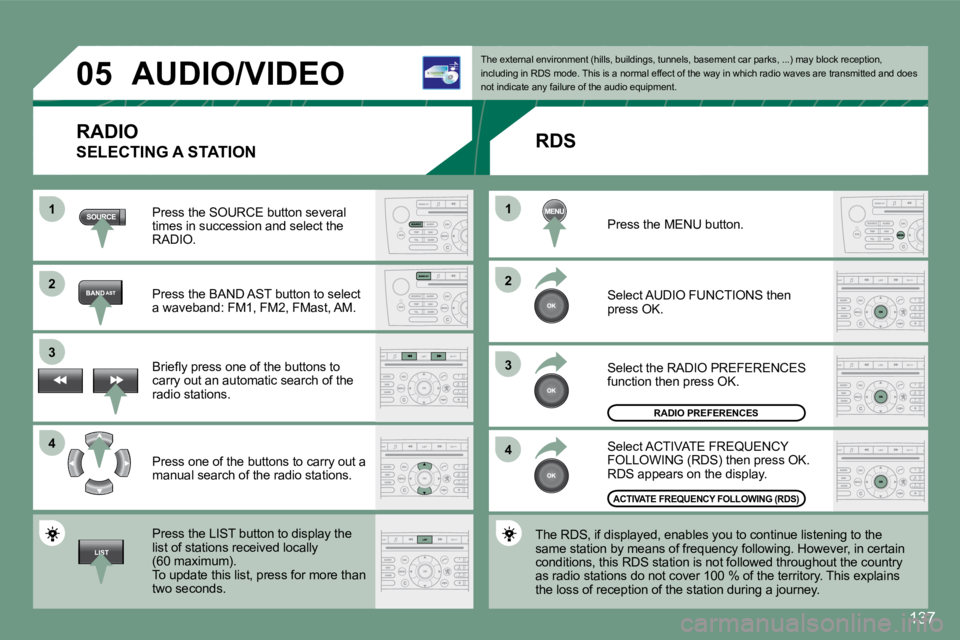
RADIO
SELECTING A STATION
Press the SOURCE button several
times in succession and select the
RADIO.
Press the BAND AST button to select
a waveband: FM1, FM2, FMast, AM.
Briely press one of the buttons to
carry out an automatic search of the
radio stations.
Press one of the buttons to carry out a
manual search of the radio stations.
Press the LIST button to display the
list of stations received locally
(60 maximum).
To update this list, press for more than
two seconds. The external environment (hills, buildings, tunnels
, basement car parks, ...) may block reception,
including in RDS mode. This is a normal effect of t he way in which radio waves are transmitted and doe s
not indicate any failure of the audio equipment.
RDS
Select ACTIVATE FREQUENCY
FOLLOWING (RDS) then press OK.
RDS appears on the display.
Select the RADIO PREFERENCES
function then press OK.
Select AUDIO FUNCTIONS then
press OK.
Press the MENU button.
The RDS, if displayed, enables you to continue list ening to the
same station by means of frequency following. Howev er, in certain
conditions, this RDS station is not followed throug hout the country
as radio stations do not cover 100 % of the territo ry. This explains
the loss of reception of the station during a journ ey.
RADIO PREFERENCES
ACTIVATE FREQUENCY FOLLOWING (RDS)
Page 158 of 187
1
2
05
138
AUDIO/VIDEO
The MP3 format, an abbreviation of MPEG 1.2 & 2.5 A udio Layer
3, is an audio compression standard which permits t he recording of
several tens of music iles on a single disc.
In order to be able to play a recorded CDR or CDRW, when recording
it is preferable to select standards ISO 9660 level 1.2 or Joliet.
If the disc is recorded in another format, it may n ot be played
correctly.
It is recommended that the same recording standard is always used
for an individual disc, with as low a speed as poss ible (4x maximum)
for optimum sound quality.
In the particular case of a multi-session CD, the J oliet standard is
recommended.
The audio equipment will only play audio iles with the extension
".mp3" with a sampling rate of 22.05 KHz or 44.1 KH z. No other type
of ile (.wma, .mp4, m3u...) can be played.
It is advisable to restrict ile names to 20 charact ers without using
special characters (e.g.: " " ? ; ù) to avoid any p laying or displaying
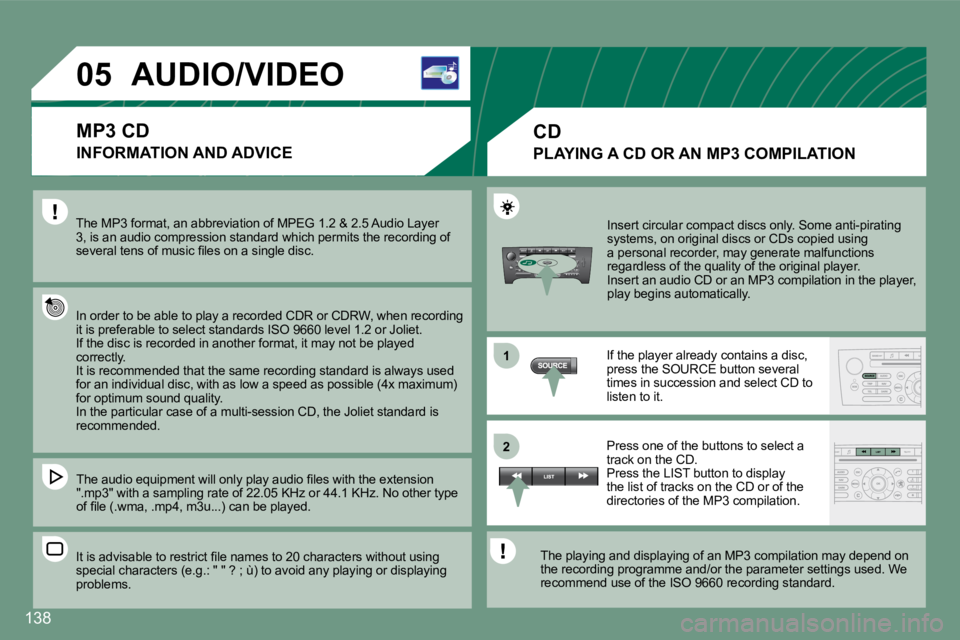
problems. Insert circular compact discs only. Some anti-pirat
ing
systems, on original discs or CDs copied using
a personal recorder, may generate malfunctions
regardless of the quality of the original player.
Insert an audio CD or an MP3 compilation in the pla yer,
play begins automatically.
If the player already contains a disc,
press the SOURCE button several
times in succession and select CD to
listen to it.
Press one of the buttons to select a
track on the CD.
Press the LIST button to display
the list of tracks on the CD or of the
directories of the MP3 compilation.
The playing and displaying of an MP3 compilation ma y depend on
the recording programme and/or the parameter settin gs used. We
recommend use of the ISO 9660 recording standard.
MP3 CD
INFORMATION AND ADVICE
CD
PLAYING A CD OR AN MP3 COMPILATION
Page 162 of 187
1
23
2
1
142
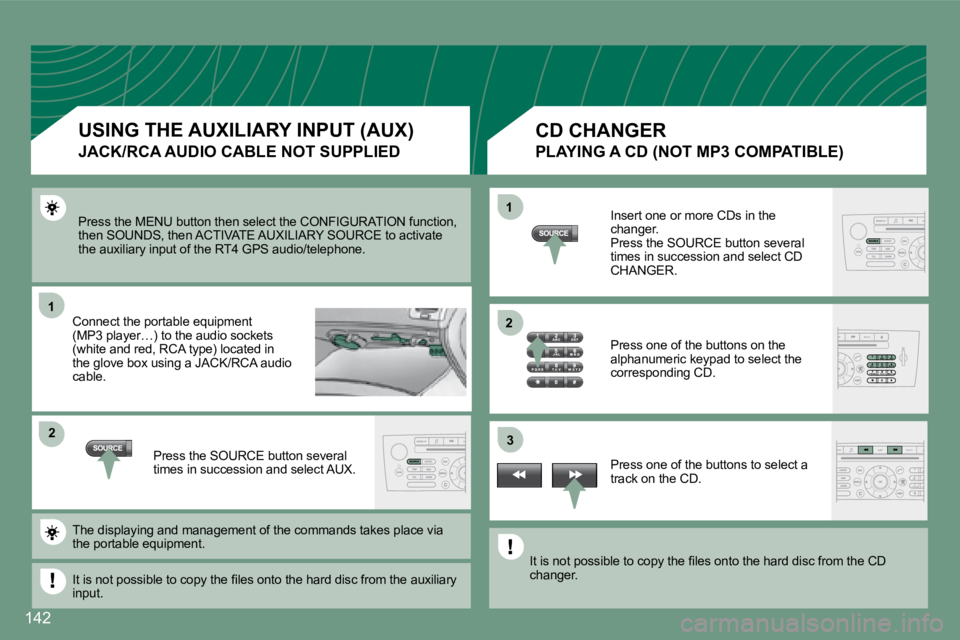
Press the MENU button then select the CONFIGURATION
function,
then SOUNDS, then ACTIVATE AUXILIARY SOURCE to acti vate
the auxiliary input of the RT4 GPS audio/telephone.
Connect the portable equipment
(MP3 player…) to the audio sockets
(white and red, RCA type) located in
the glove box using a JACK/RCA audio
cable.
Press the SOURCE button several
times in succession and select AUX. Insert one or more CDs in the
changer.
Press the SOURCE button several
times in succession and select CD
CHANGER.
Press one of the buttons on the
alphanumeric keypad to select the
corresponding CD.
Press one of the buttons to select a
track on the CD.
The displaying and management of the commands takes place via
the portable equipment.
It is not possible to copy the iles onto the hard d isc from the auxiliary
input. It is not possible to copy the iles onto the hard d
isc from the CD
changer.
USING THE AUXILIARY INPUT (AUX)
JACK/RCA AUDIO CABLE NOT SUPPLIED
CD CHANGER
PLAYING A CD (NOT MP3 COMPATIBLE)
Page 163 of 187
2
3
4
5
16
7
143
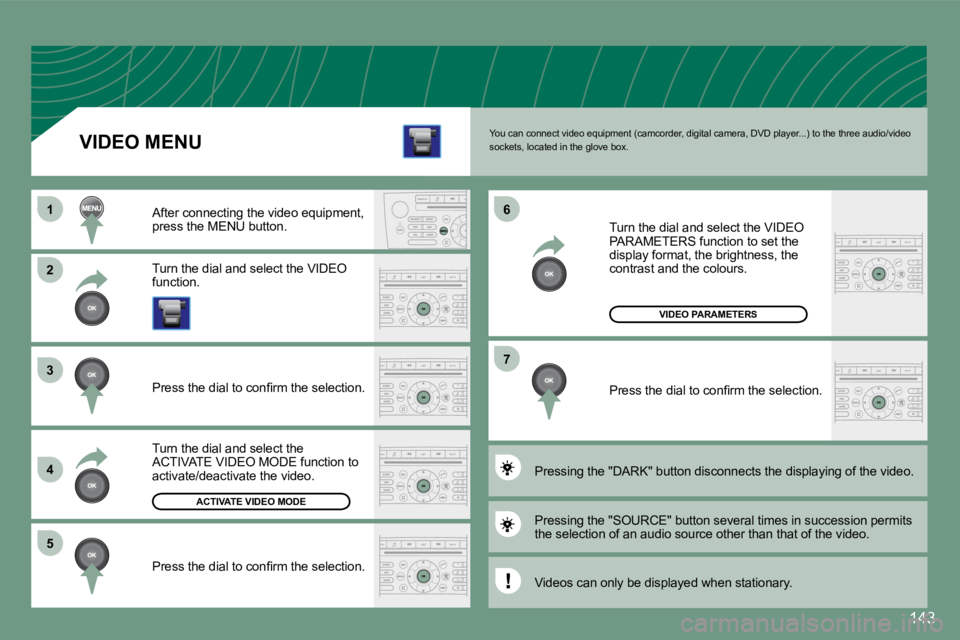
You can connect video equipment (camcorder, digital camera, DVD player...) to the three audio/video
sockets, located in the glove box.
Turn the dial and select the VIDEO
function.
After connecting the video equipment,
press the MENU button.
Turn the dial and select the
ACTIVATE VIDEO MODE function to
activate/deactivate the video.
Press the dial to conirm the selection.
Press the dial to conirm the selection.
Pressing the "SOURCE" button several times in succe
ssion permits
the selection of an audio source other than that of the video.
Pressing the "DARK" button disconnects the displayi
ng of the video.
Turn the dial and select the VIDEO
PARAMETERS function to set the
display format, the brightness, the
contrast and the colours.
Press the dial to conirm the selection.
VIDEO MENU
Videos can only be displayed when stationary.
ACTIVATE VIDEO MODE
VIDEO PARAMETERS
Page 165 of 187
1
2
3
4 5
6
06
145
TELEPHONE
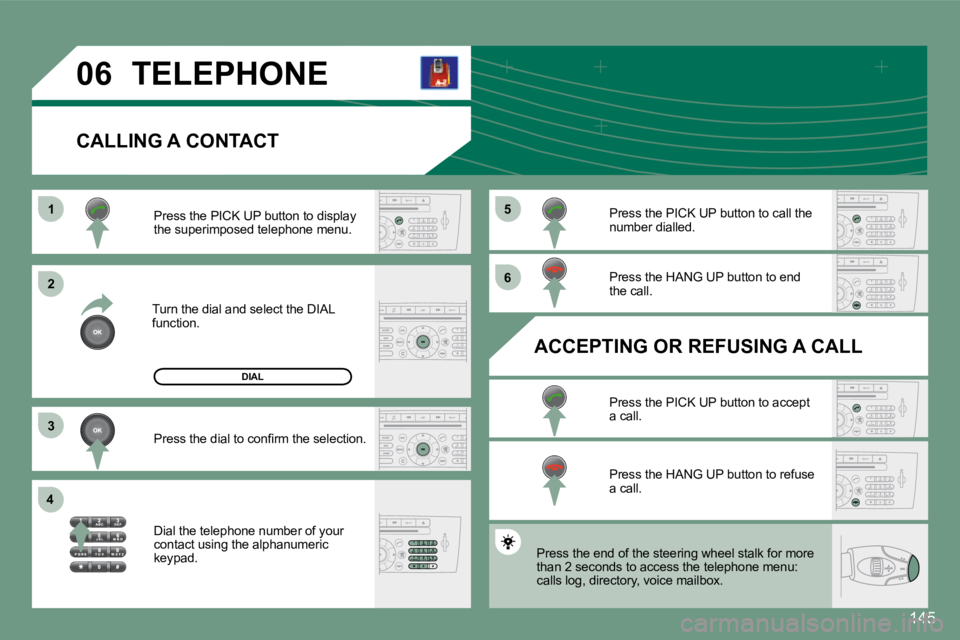
CALLING A CONTACT
Turn the dial and select the DIAL
function.Press the PICK UP button to display
the superimposed telephone menu.
Press the dial to conirm the selection.
Dial the telephone number of your
contact using the alphanumeric
keypad. Press the PICK UP button to call the
number dialled.
Press the HANG UP button to end
the call.
ACCEPTING OR REFUSING A CALL Press the PICK UP button to accept
a call.
Press the HANG UP button to refuse
a call.
DIAL
Press the end of the steering wheel stalk for more
than 2 seconds to access the telephone menu:
calls log, directory, voice mailbox.
Page 166 of 187
146
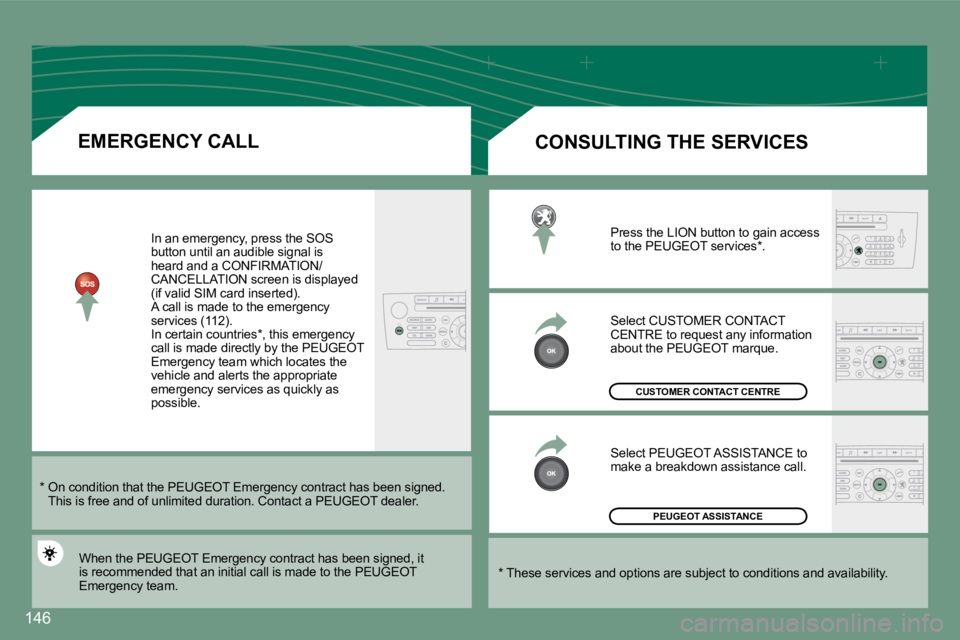
EMERGENCY CALLIn an emergency, press the SOS
button until an audible signal is
heard and a CONFIRMATION/
CANCELLATION screen is displayed
(if valid SIM card inserted).
A call is made to the emergency
services (112).
In certain countries*, this emergency
call is made directly by the PEUGEOT
Emergency team which locates the
vehicle and alerts the appropriate
emergency services as quickly as
possible.
PEUGEOT ASSISTANCE
CUSTOMER CONTACT CENTRE
When the PEUGEOT Emergency contract has been signed , it
is recommended that an initial call is made to the PEUGEOT
Emergency team. CONSULTING THE SERVICES
Press the LION button to gain access
to the PEUGEOT services*.
Select CUSTOMER CONTACT
CENTRE to request any information
about the PEUGEOT marque.
Select PEUGEOT ASSISTANCE to
make a breakdown assistance call.
* These services and options are subject to conditi ons and availability.
* On condition that the PEUGEOT Emergency contract
has been signed.
This is free and of unlimited duration. Contact a P EUGEOT dealer.
Page 168 of 187
2
1
148
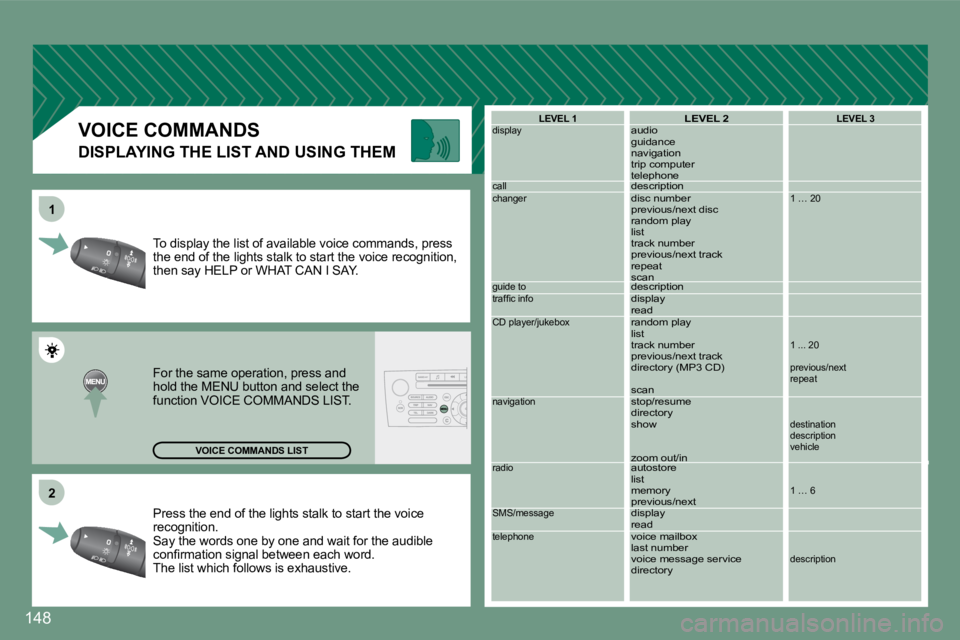
Press the end of the lights stalk to start the voic
e
recognition.
Say the words one by one and wait for the audible
conirmation signal between each word.
The list which follows is exhaustive.
To display the list of available voice commands, pr
ess
the end of the lights stalk to start the voice reco gnition,
then say HELP or WHAT CAN I SAY.
For the same operation, press and
hold the MENU button and select the
function VOICE COMMANDS LIST.
VOICE COMMANDS LIST LEVEL 1
display
call
changer
guide to
trafic info
CD player/jukebox
navigation
radio
SMS/message
telephone
LEVEL 2
audio
guidance
navigation
trip computer
telephone
description
disc number
previous/next disc
random play
list
track number
previous/next track
repeat
scan
description
display
read
random play
list
track number
previous/next track
directory (MP3 CD)
scan
stop/resume
directory
show
zoom out/in
autostore
list
memory
previous/next
display
read
voice mailbox
last number
voice message service
directoryLEVEL 3
1 … 20
1 ... 20
previous/next
repeat
destination
description
vehicle
1 … 6
description
DISPLAYING THE LIST AND USING THEM
VOICE COMMANDS