audio Peugeot Boxer 2008 User Guide
[x] Cancel search | Manufacturer: PEUGEOT, Model Year: 2008, Model line: Boxer, Model: Peugeot Boxer 2008Pages: 154, PDF Size: 3.27 MB
Page 78 of 154
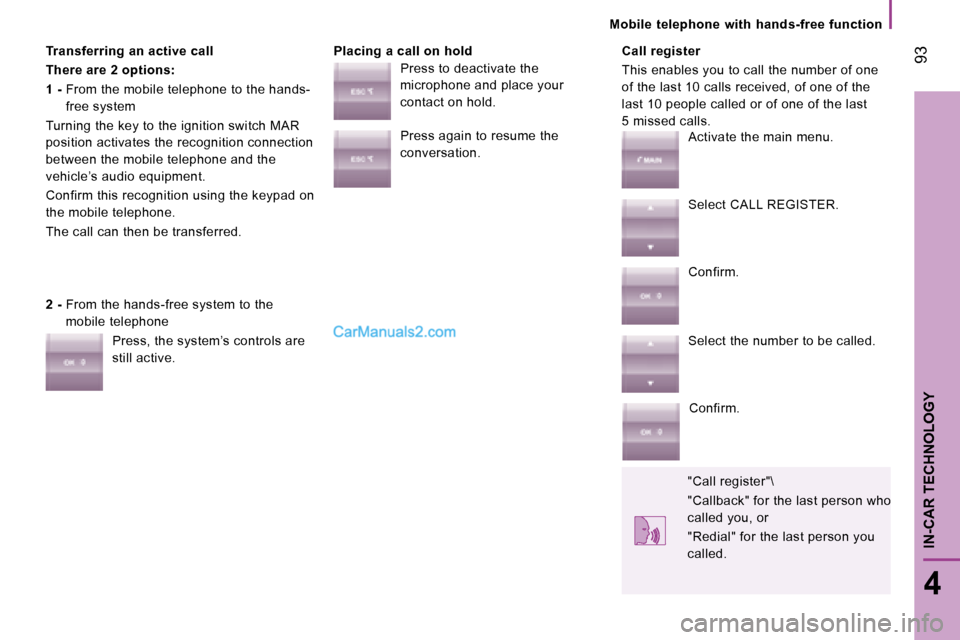
Transferring an active call
There are 2 options:
1 - From the mobile telephone to the hands-
free system
Turning the key to the ignition switch MAR
position activates the recognition connection
between the mobile telephone and the
vehicle’s audio equipment.
Confirm this recognition using the keypad on
the mobile telephone.
The call can then be transferred. Placing a call on hold Call register
This enables you to call the number of one
of the last 10 calls received, of one of the
last 10 people called or of one of the last
5 missed calls.
2 - From the hands-free system to the
mobile telephone
Press, the system’s controls are
still active. Press to deactivate the
microphone and place your
contact on hold.
Press again to resume the
conversation.
Activate the main menu.
Select CALL REGISTER.
Confirm.
Select the number to be called.
Confirm.
"Call register"\
"Callback" for the last person who
called you, or
"Redial" for the last person you
called. 93
4
IN-CAR TECHNOLOGY
Mobile telephone with hands-free function
Page 79 of 154
94
Portable equipment audio player
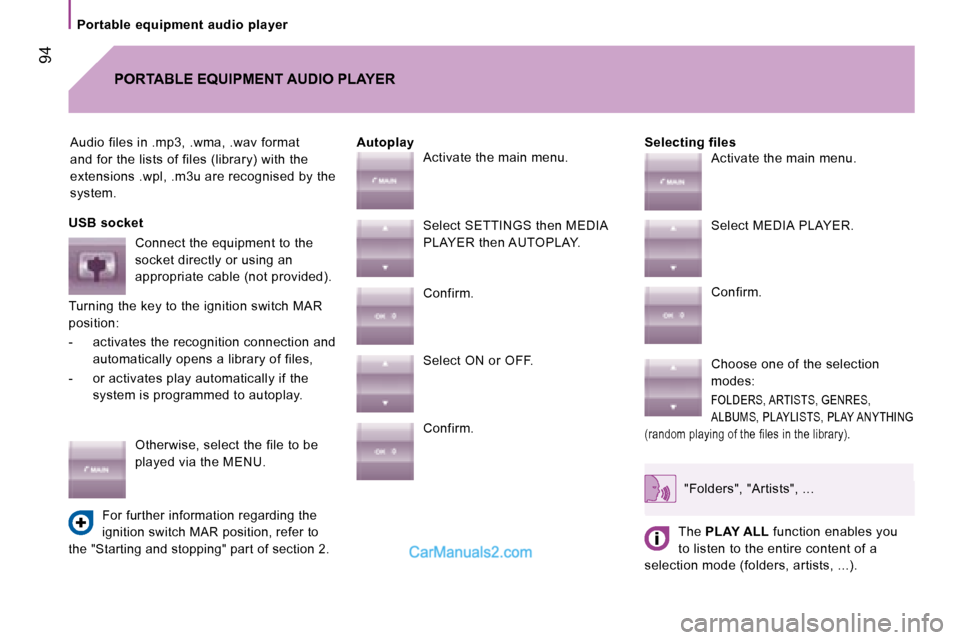
Audio files in .mp3, .wma, .wav format
and for the lists of files (library) with the
extensions .wpl, .m3u are recognised by the
system.Selecting files
PORTABLE EQUIPMENT AUDIO PLAYER
Autoplay
USB socket Connect the equipment to the
socket directly or using an
appropriate cable (not provided).
Turning the key to the ignition switch MAR
position:
- activates the recognition connection and automatically opens a library of files,
- or activates play automatically if the system is programmed to autoplay.
Otherwise, select the file to be
played via the MENU.
For further information regarding the
ignition switch MAR position, refer to
the "Starting and stopping" part of section 2.
Activate the main menu.
Select SETTINGS then MEDIA
PLAYER then AUTOPLAY.
Confirm.
Select ON or OFF.
Confirm. Activate the main menu.
Select MEDIA PLAYER.
Confirm.
Choose one of the selection
modes:
FOLDERS, ARTISTS, GENRES,
ALBUMS, PLAYLISTS, PLAY ANYTHING
(random playing of the files in the library).
"Folders", "Artists", ...
The PLAY ALL function enables you
to listen to the entire content of a
selection mode (folders, artists, ...).
Page 80 of 154
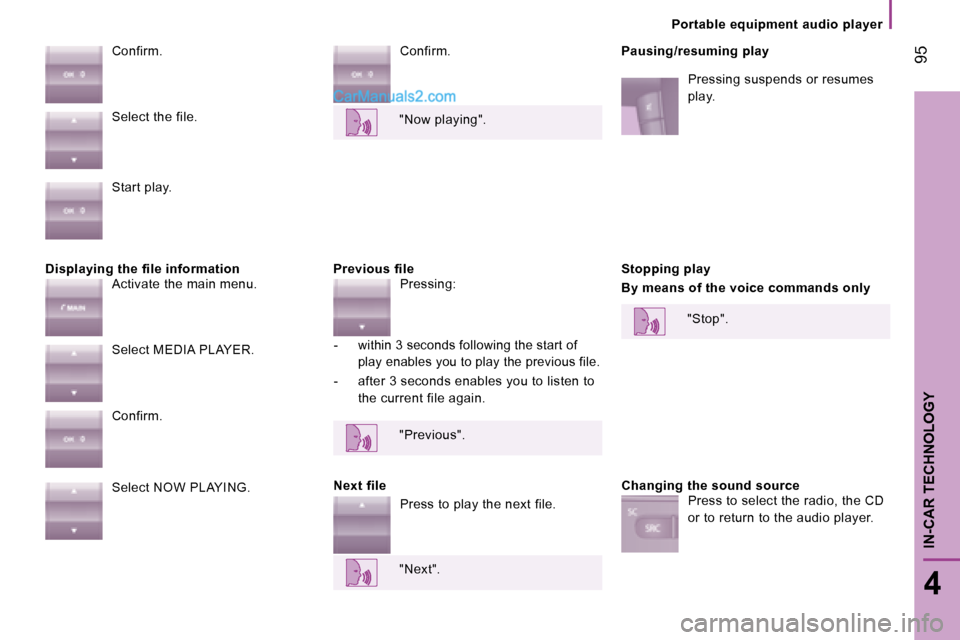
Displaying the file information Previous fileConfirm.
Pausing/resuming play
Pressing suspends or resumes
play.
Confirm.
Next file Stopping play
By means of the voice commands only
Changing the sound source
Select the file.
Start play.
Activate the main menu.
Select MEDIA PLAYER.
Confirm.
Select NOW PLAYING.
"Now playing".
Pressing:
- within 3 seconds following the start of play enables you to play the previous file.
- after 3 seconds enables you to listen to the current file again.
"Previous".
Press to play the next file.
"Next". "Stop".
Press to select the radio, the CD
or to return to the audio player.
95
4
IN-CAR TECHNOLOGY
Portable equipment audio player
Page 82 of 154
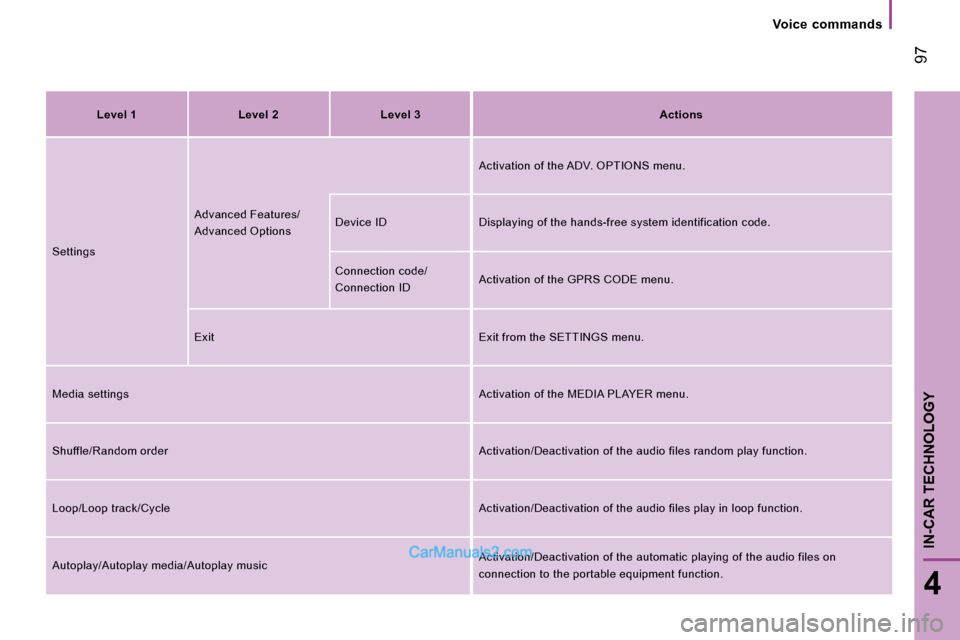
Level 1 Level 2 Level 3Actions
Settings Advanced Features/
Advanced Options Activation of the ADV. OPTIONS menu.
Device ID Displaying of the hands-free system identi fication code.
Connection code/
Connection ID Activation of the GPRS CODE menu.
Exit Exit from the SETTINGS menu.
Media settings Activation of the MEDIA PLAYER menu.
Shuffle/Random order Activation/Deactivation of the audio files random play function.
Loop/Loop track/Cycle Activation/Deactivation of the audio files play in loop function.
Autoplay/Autoplay media/Autoplay music Activation/Deactivation of the automatic playing of
the audio files on
connection to the portable equipment function.
97
4
IN-CAR TECHNOLOGY
Voice commands
Page 84 of 154
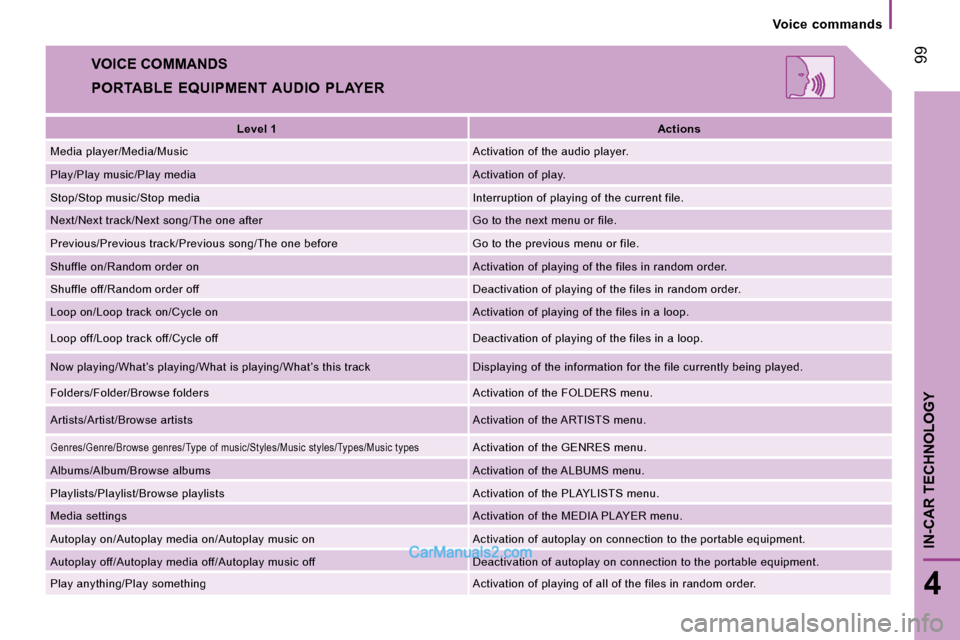
VOICE COMMANDS
PORTABLE EQUIPMENT AUDIO PLAYERLevel 1 Actions
Media player/Media/Music Activation of the audio player.
Play/Play music/Play media Activation of play.
Stop/Stop music/Stop media Interruption of playing of the current file.
Next/Next track/Next song/The one after Go to the next menu or file.
Previous/Previous track/Previous song/The one befor e Go to the previous menu or file.
Shuffle on/Random order on Activation of playing of the files in random order.
Shuffle off/Random order off Deactivation of playing of the files in random order.
Loop on/Loop track on/Cycle on Activation of playing of the files in a loop.
Loop off/Loop track off/Cycle off Deactivation of playing of the files in a loop.
Now playing/What’s playing/What is playing/What’s t his track Displaying of the information for the file currently being played.
Folders/Folder/Browse folders Activation of the FOLDERS menu.
Artists/Artist/Browse artists Activation of the ARTISTS menu.
Genres/Genre/Browse genres/Type of music/Styles/Music styles/Types/Music typesActivation of the GENRES menu.
Albums/Album/Browse albums Activation of the ALBUMS menu.
Playlists/Playlist/Browse playlists Activation of the PLAYLISTS menu.
Media settings Activation of the MEDIA PLAYER menu.
Autoplay on/Autoplay media on/Autoplay music on Acti vation of autoplay on connection to the portable equipment.
Autoplay off/Autoplay media off/Autoplay music off D eactivation of autoplay on connection to the portable equipment.
Play anything/Play something Activation of playing of all of the files in random order.
99
4
IN-CAR TECHNOLOGY
Voice commands
Page 109 of 154
119
6
ACCESSORIES
Equipment
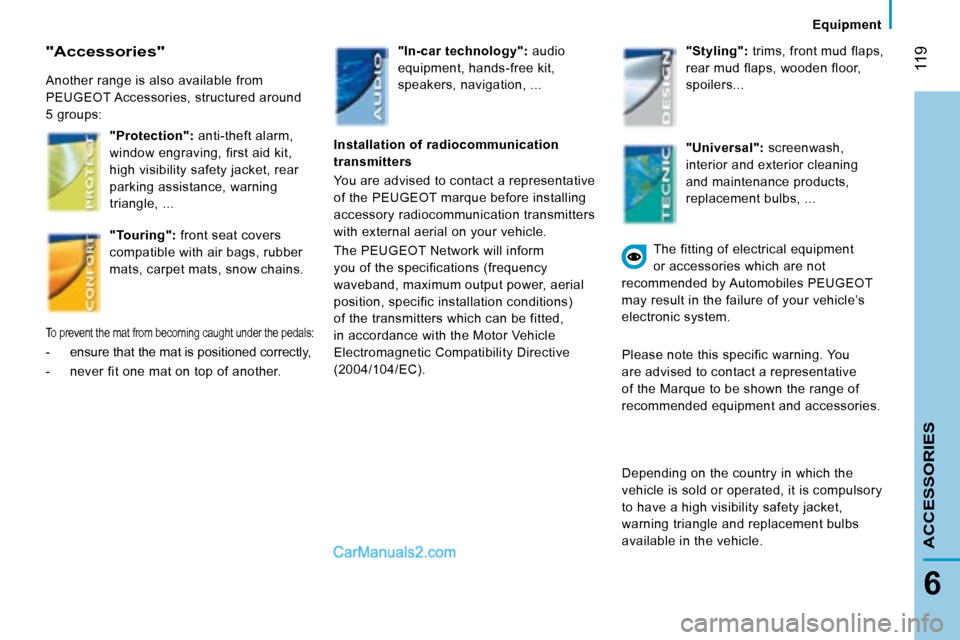
"Accessories"
Another range is also available from
PEUGEOT Accessories, structured around
5 groups:"Protection": anti-theft alarm,
window engraving, first aid kit,
high visibility safety jacket, rear
parking assistance, warning
triangle, ...
"Touring": front seat covers
compatible with air bags, rubber
mats, carpet mats, snow chains.
To prevent the mat from becoming caught under the p edals:
- ensure that the mat is positioned correctly,
- never fit one mat on top of another. "In-car technology":
audio
equipment, hands-free kit,
speakers, navigation, ... "Styling":
trims, front mud flaps,
rear mud flaps, wooden floor,
spoilers...
Installation of radiocommunication
transmitters
You are advised to contact a representative
of the PEUGEOT marque before installing
accessory radiocommunication transmitters
with external aerial on your vehicle.
The PEUGEOT Network will inform
you of the specifications (frequency
waveband, maximum output power, aerial
position, specific installation conditions)
of the transmitters which can be fitted,
in accordance with the Motor Vehicle
Electromagnetic Compatibility Directive
(2004/104/EC). "Universal":
screenwash,
interior and exterior cleaning
and maintenance products,
replacement bulbs, ...
The fitting of electrical equipment
or accessories which are not
recommended by Automobiles PEUGEOT
may result in the failure of your vehicle’s
electronic system.
Please note this specific warning. You
are advised to contact a representative
of the Marque to be shown the range of
recommended equipment and accessories.
Depending on the country in which the
vehicle is sold or operated, it is compulsory
to have a high visibility safety jacket,
warning triangle and replacement bulbs
available in the vehicle.
Page 128 of 154
139
TROUBLESHOOTING
8
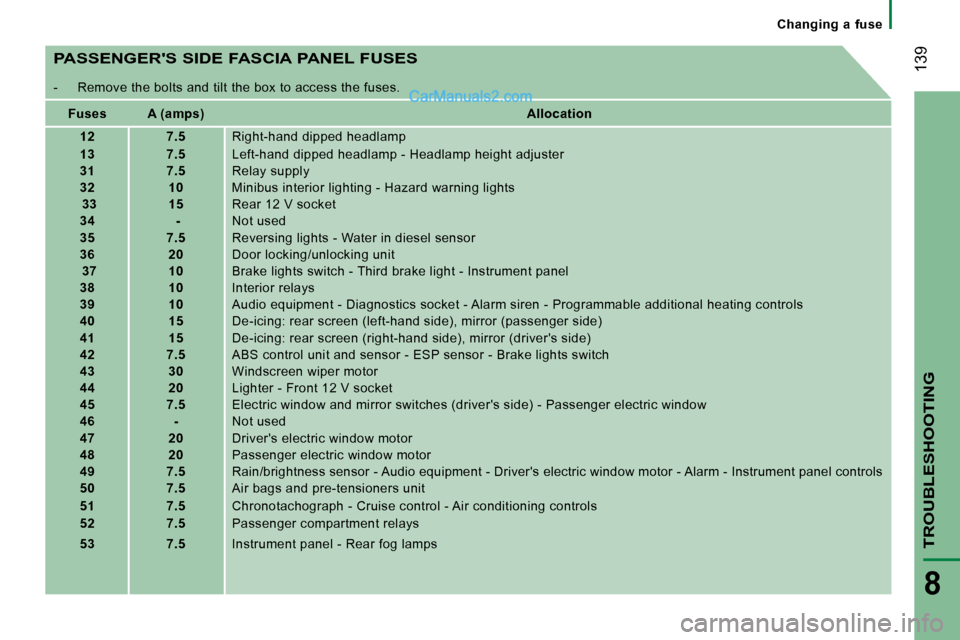
PASSENGER'S SIDE FASCIA PANEL FUSES
- Remove the bolts and tilt the box to access the fuses.
Fuses A (amps) Allocation
12 7.5 Right-hand dipped headlamp
13 7.5 Left-hand dipped headlamp - Headlamp height adjuste r
31 7.5 Relay supply
32 10 Minibus interior lighting - Hazard warning lights
33 15 Rear 12 V socket
34 - Not used
35 7.5 Reversing lights - Water in diesel sensor
36 20 Door locking/unlocking unit
37 10 Brake lights switch - Third brake light - Instrumen t panel
38 10 Interior relays
39 10 Audio equipment - Diagnostics socket - Alarm siren - Programmable additional heating controls
40 15 De-icing: rear screen (left-hand side), mirror (pas senger side)
41 15 De-icing: rear screen (right-hand side), mirror (dr iver's side)
42 7.5 ABS control unit and sensor - ESP sensor - Brake li ghts switch
43 30 Windscreen wiper motor
44 20 Lighter - Front 12 V socket
45 7.5 Electric window and mirror switches (driver's side) - Passenger electric window
46 - Not used
47 20 Driver's electric window motor
48 20 Passenger electric window motor
49 7.5 Rain/brightness sensor - Audio equipment - Driver's electric window motor - Alarm - Instrument panel controls
50 7.5 Air bags and pre-tensioners unit
51 7.5 Chronotachograph - Cruise control - Air conditionin g controls
52 7.5 Passenger compartment relays
53 7.5 Instrument panel - Rear fog lamps Changing a fuse