key Peugeot Boxer 2008 User Guide
[x] Cancel search | Manufacturer: PEUGEOT, Model Year: 2008, Model line: Boxer, Model: Peugeot Boxer 2008Pages: 154, PDF Size: 3.27 MB
Page 54 of 154
A
B
70
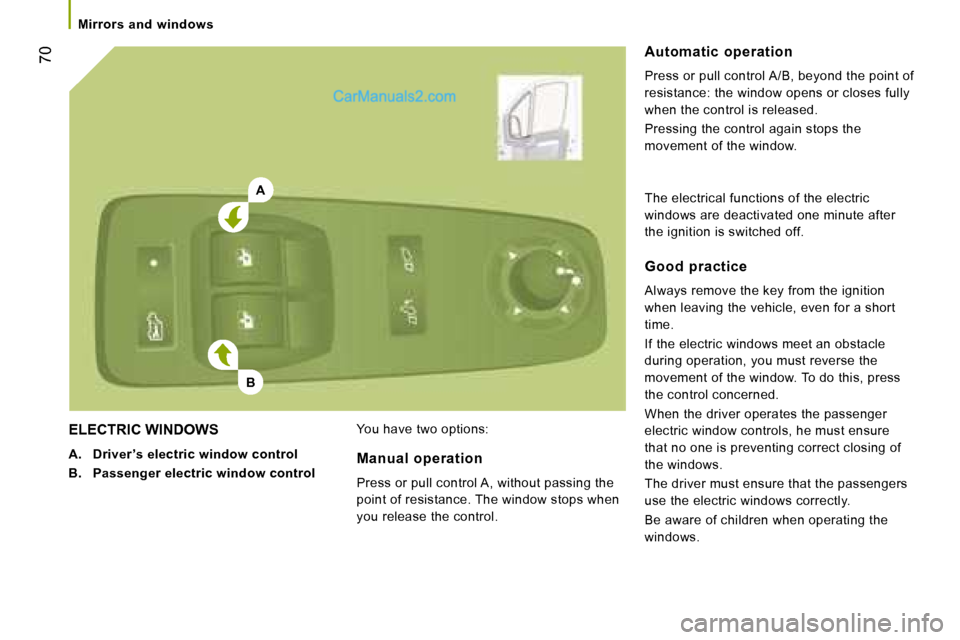
ELECTRIC WINDOWS
A. Driver ’s electric window control
B. Passenger electric window control You have two options: Automatic operation
Press or pull control A/B, beyond the point of
resistance: the window opens or closes fully
when the control is released.
Pressing the control again stops the
movement of the window.
Manual operation
Press or pull control A, without passing the
point of resistance. The window stops when
you release the control. Good practice
Always remove the key from the ignition
when leaving the vehicle, even for a short
time.
If the electric windows meet an obstacle
during operation, you must reverse the
movement of the window. To do this, press
the control concerned.
When the driver operates the passenger
electric window controls, he must ensure
that no one is preventing correct closing of
the windows.
The driver must ensure that the passengers
use the electric windows correctly.
Be aware of children when operating the
windows.
The electrical functions of the electric
windows are deactivated one minute after
the ignition is switched off.
Mirrors and windows
Page 60 of 154
76
Reversing camera
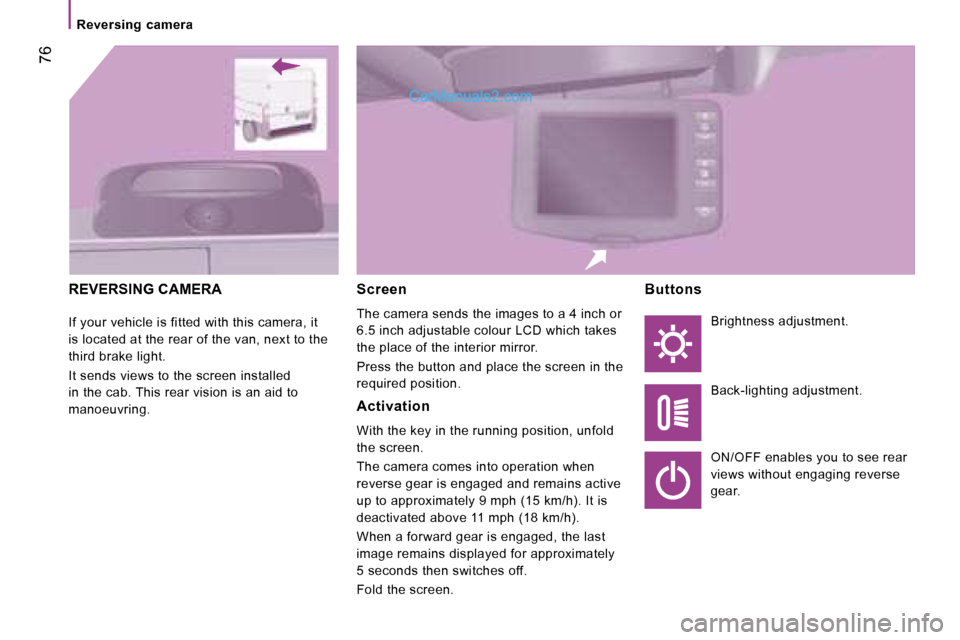
REVERSING CAMERA
If your vehicle is fitted with this camera, it
is located at the rear of the van, next to the
third brake light.
It sends views to the screen installed
in the cab. This rear vision is an aid to
manoeuvring. Screen
The camera sends the images to a 4 inch or
6.5 inch adjustable colour LCD which takes
the place of the interior mirror.
Press the button and place the screen in the
required position.
Activation
With the key in the running position, unfold
the screen.
The camera comes into operation when
reverse gear is engaged and remains active
up to approximately 9 mph (15 km/h). It is
deactivated above 11 mph (18 km/h).
When a forward gear is engaged, the last
image remains displayed for approximately
5 seconds then switches off.
Fold the screen.Buttons
Brightness adjustment.
Back-lighting adjustment.
ON/OFF enables you to see rear
views without engaging reverse
gear.
Page 68 of 154
Scroll the
display
Select
Display
Select
Display
Select
Display
Select
DisplayEnables you to…
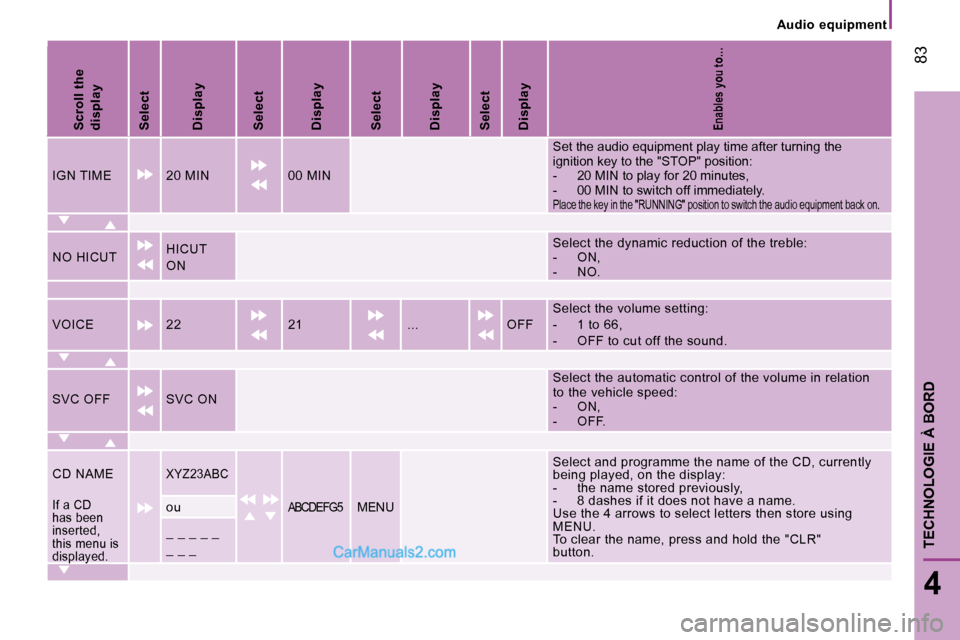
IGN TIME 20 MIN 00 MINSet the audio equipment play time after turning the
ignition key to the "STOP" position:
- 20 MIN to play for 20 minutes,
- 00 MIN to switch off immediately.
Place the key in the "RUNNING" position to switch t
he audio equipment back on.
NO HICUTHICUT
ON Select the dynamic reduction of the treble:
- ON,
- NO.
VOICE 22 21 ... OFF Select the volume setting:
- 1 to 66,
- OFF to cut off the sound.
SVC OFF SVC ON Select the automatic control of the volume in relat
ion
to the vehicle speed:
- ON,
- OFF.
CD NAME
XYZ23ABCSelect and programme the name of the CD, currently
being played, on the display:
- the name stored previously,
- 8 dashes if it does not have a name.
Use the 4 arrows to select letters then store using
MENU.
To clear the name, press and hold the "CLR"
button.
If a CD
has been
inserted,
this menu is
displayed.ouABCDEFG5MENU
_ _ _ _ _
_ _ _
83
4
TECHNOLOGIE À BORD
Audio equipment
Page 72 of 154
KEY
Indicates that a maintained press is required to start the action described.
Voice mode Press the control to start the voice recognition, a n audible signal confirms that the function has bee n activated, do not speak until
you hear this signal.
For further information regarding the voice command s, say "Help" or refer to the tables at the end of this document.
INTRODUCTION
This equipment chiefly enables you to:
- connect your Bluetooth® mobile telephone to your vehicle leaving your hands free,
- play audio sources (mp3, wma, wav) from a portabl e player,
- use the voice commands.
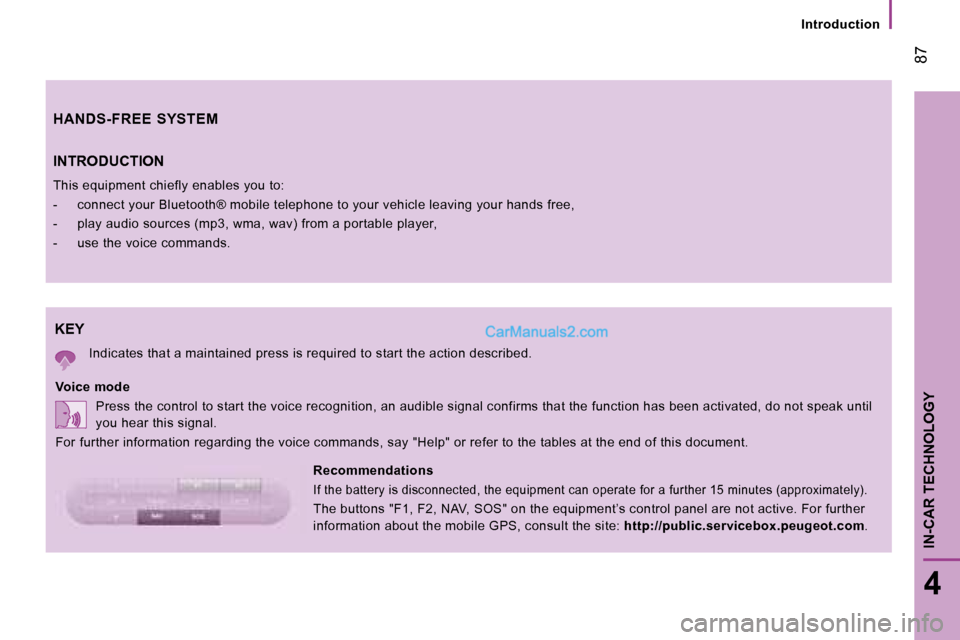
Recommendations
If the battery is disconnected, the equipment can o perate for a further 15 minutes (approximately).
The buttons "F1, F2, NAV, SOS" on the equipment’s c ontrol panel are not active. For further
information about the mobile GPS, consult the site: http://public.servicebox.peugeot.com .
HANDS-FREE SYSTEM
87
4
IN-CAR TECHNOLOGY
Introduction
Page 75 of 154
90
Mobile telephone with hands-free function
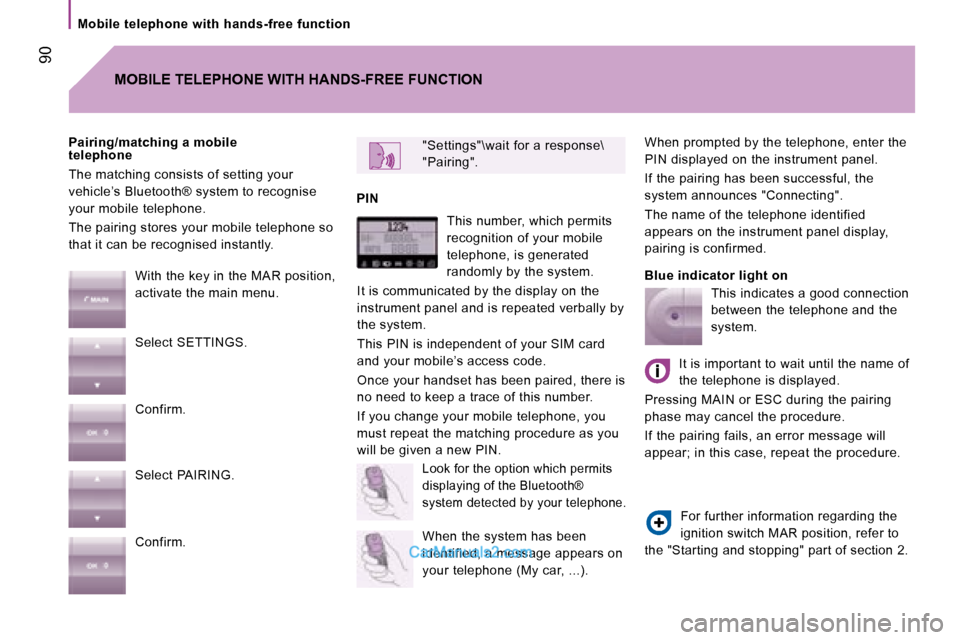
When prompted by the telephone, enter the
PIN displayed on the instrument panel.
If the pairing has been successful, the
system announces "Connecting".
The name of the telephone identified
appears on the instrument panel display,
pairing is confirmed.
Blue indicator light on
"Settings"\wait for a response\
"Pairing".
PIN
Pairing/matching a mobile
telephone
The matching consists of setting your
vehicle’s Bluetooth® system to recognise
your mobile telephone.
The pairing stores your mobile telephone so
that it can be recognised instantly.
MOBILE TELEPHONE WITH HANDS-FREE FUNCTION
With the key in the MAR position,
activate the main menu.
Select SETTINGS.
Confirm.
Select PAIRING.
Confirm. This number, which permits
recognition of your mobile
telephone, is generated
randomly by the system.
It is communicated by the display on the
instrument panel and is repeated verbally by
the system.
This PIN is independent of your SIM card
and your mobile’s access code.
Once your handset has been paired, there is
no need to keep a trace of this number.
If you change your mobile telephone, you
must repeat the matching procedure as you
will be given a new PIN.
Look for the option which permits
displaying of the Bluetooth®
system detected by your telephone.
When the system has been
identified, a message appears on
your telephone (My car, ...). This indicates a good connection
between the telephone and the
system.
It is important to wait until the name of
the telephone is displayed.
Pressing MAIN or ESC during the pairing
phase may cancel the procedure.
If the pairing fails, an error message will
appear; in this case, repeat the procedure.
For further information regarding the
ignition switch MAR position, refer to
the "Starting and stopping" part of section 2.
Page 78 of 154
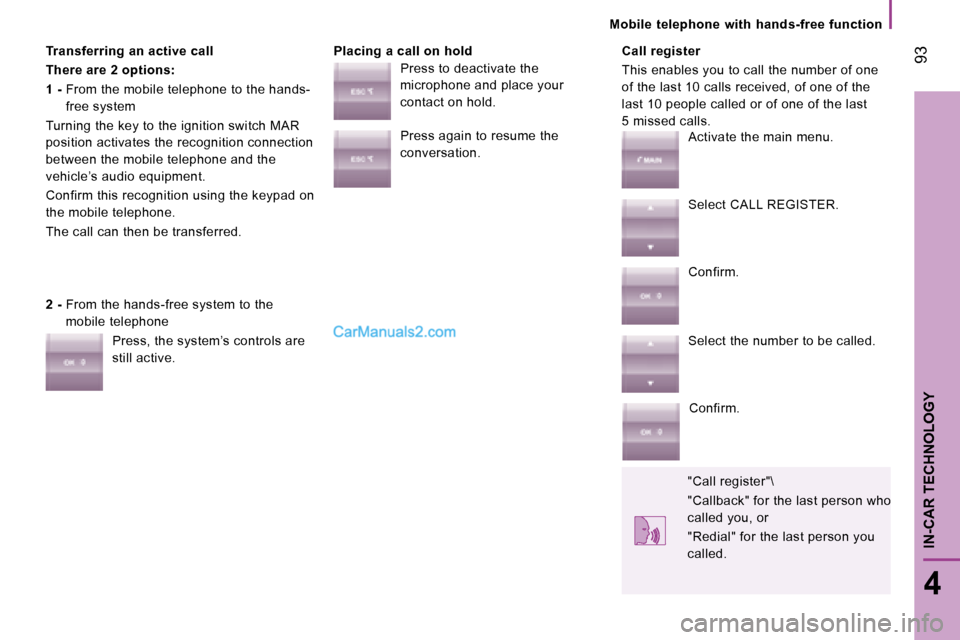
Transferring an active call
There are 2 options:
1 - From the mobile telephone to the hands-
free system
Turning the key to the ignition switch MAR
position activates the recognition connection
between the mobile telephone and the
vehicle’s audio equipment.
Confirm this recognition using the keypad on
the mobile telephone.
The call can then be transferred. Placing a call on hold Call register
This enables you to call the number of one
of the last 10 calls received, of one of the
last 10 people called or of one of the last
5 missed calls.
2 - From the hands-free system to the
mobile telephone
Press, the system’s controls are
still active. Press to deactivate the
microphone and place your
contact on hold.
Press again to resume the
conversation.
Activate the main menu.
Select CALL REGISTER.
Confirm.
Select the number to be called.
Confirm.
"Call register"\
"Callback" for the last person who
called you, or
"Redial" for the last person you
called. 93
4
IN-CAR TECHNOLOGY
Mobile telephone with hands-free function
Page 79 of 154
94
Portable equipment audio player
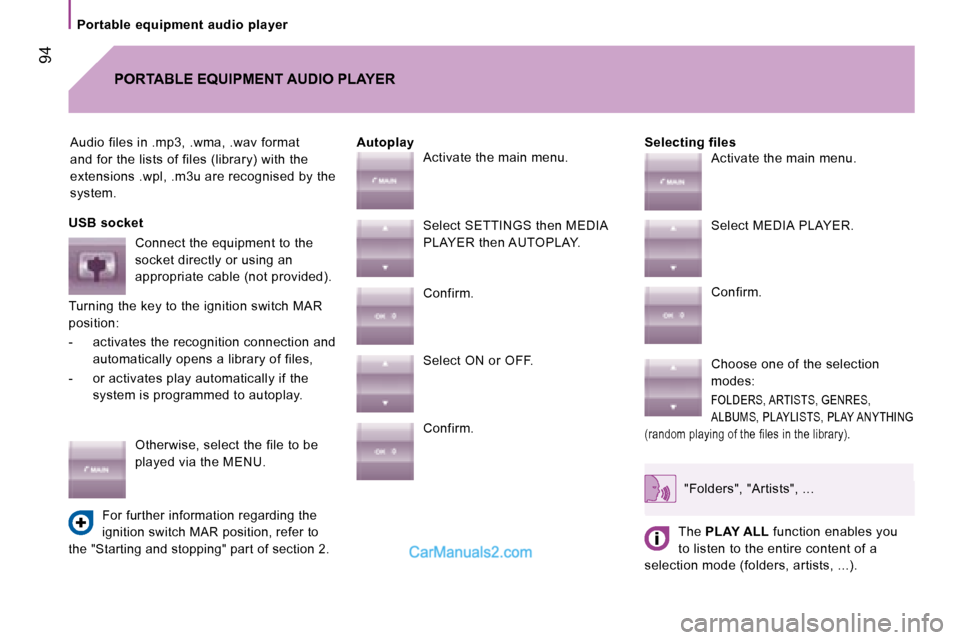
Audio files in .mp3, .wma, .wav format
and for the lists of files (library) with the
extensions .wpl, .m3u are recognised by the
system.Selecting files
PORTABLE EQUIPMENT AUDIO PLAYER
Autoplay
USB socket Connect the equipment to the
socket directly or using an
appropriate cable (not provided).
Turning the key to the ignition switch MAR
position:
- activates the recognition connection and automatically opens a library of files,
- or activates play automatically if the system is programmed to autoplay.
Otherwise, select the file to be
played via the MENU.
For further information regarding the
ignition switch MAR position, refer to
the "Starting and stopping" part of section 2.
Activate the main menu.
Select SETTINGS then MEDIA
PLAYER then AUTOPLAY.
Confirm.
Select ON or OFF.
Confirm. Activate the main menu.
Select MEDIA PLAYER.
Confirm.
Choose one of the selection
modes:
FOLDERS, ARTISTS, GENRES,
ALBUMS, PLAYLISTS, PLAY ANYTHING
(random playing of the files in the library).
"Folders", "Artists", ...
The PLAY ALL function enables you
to listen to the entire content of a
selection mode (folders, artists, ...).
Page 81 of 154
96
Voice commands
VOICE COMMANDS
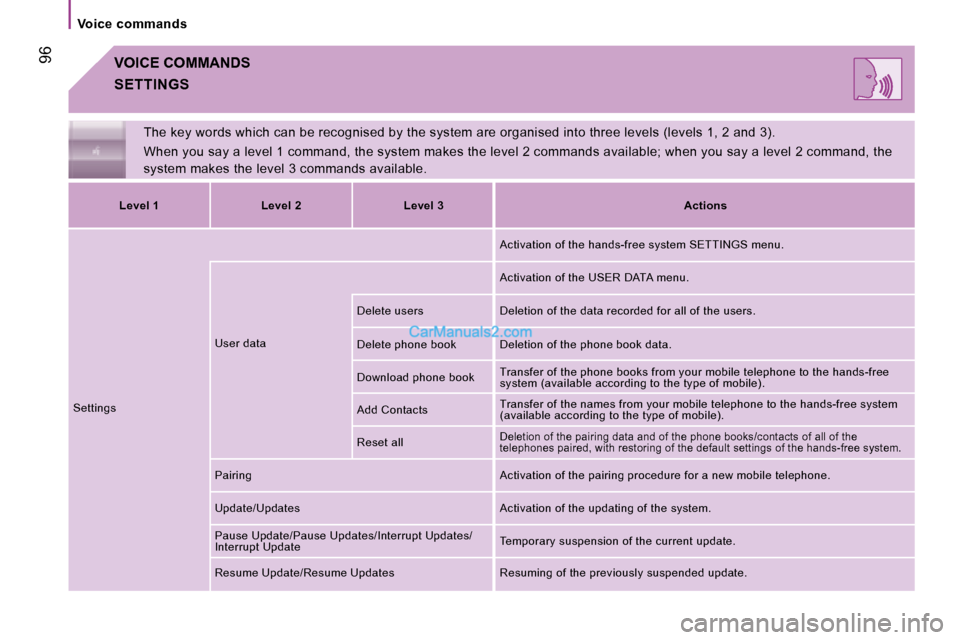
The key words which can be recognised by the system are organised into three levels (levels 1, 2 and 3).
When you say a level 1 command, the system makes th e level 2 commands available; when you say a level 2 command, the
system makes the level 3 commands available.
SETTINGS
Level 1 Level 2 Level 3 Actions
Settings User data Activation of the hands-free system SETTINGS menu.
Activation of the USER DATA menu.
Delete users Deletion of the data recorded for all o f the users.
Delete phone book Deletion of the phone book data.
Download phone book Transfer of the phone books from your mobile teleph
one to the hands-free
system (available according to the type of mobile).
Add Contacts Transfer of the names from your mobile telephone to
the hands-free system
(available according to the type of mobile).
Reset all
Deletion of the pairing data and of the phone books /contacts of all of the
telephones paired, with restoring of the default se ttings of the hands-free system.
Pairing Activation of the pairing procedure for a new mobile telephone.
Update/Updates Activation of the updating of the system.
Pause Update/Pause Updates/Interrupt Updates/
Interrupt Update Temporary suspension of the current update.
Resume Update/Resume Updates Resuming of the previou sly suspended update.
Page 83 of 154
98
Voice commands
The key words which can be recognised by the system are organised into three levels (levels 1, 2 and 3).
When you say a level 1 command, the system makes th e level 2 commands available; when you say a level 2 command, the
system makes the level 3 commands available.
VOICE COMMANDS
MOBILE TELEPHONE WITH HANDS-FREE FUNCTION
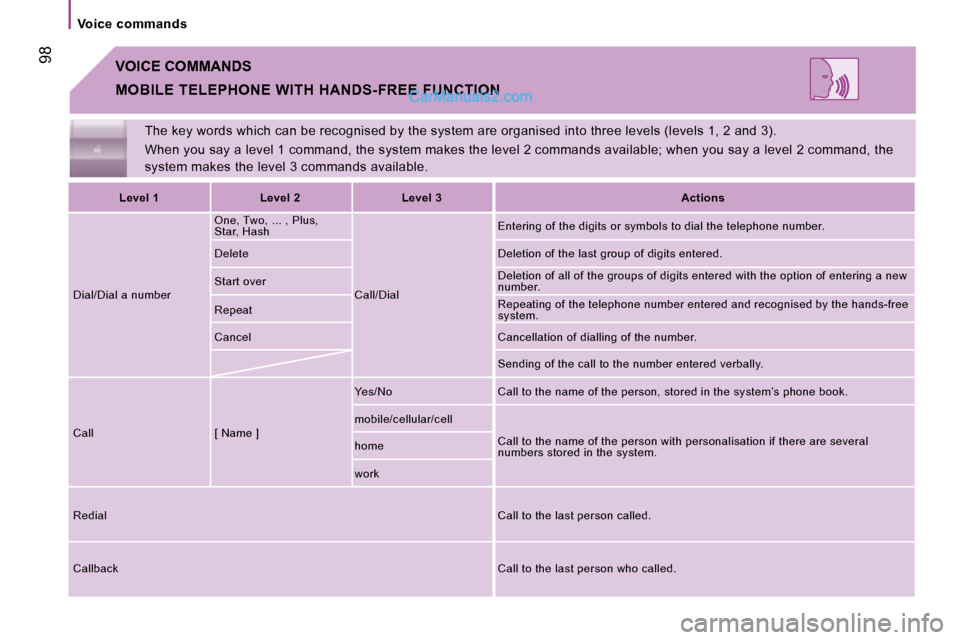
Level 1 Level 2 Level 3 Actions
Dial/Dial a number One, Two, ... , Plus,
Star, Hash
Call/Dial Entering of the digits or symbols to dial the telep
hone number.
Delete Deletion of the last group of digits entered.
Start over Deletion of all of the groups of digits entered wit
h the option of entering a new
number.
Repeat Repeating of the telephone number entered and recog
nised by the hands-free
system.
Cancel Cancellation of dialling of the number.
Sending of the call to the number entered verbally.
Call [ Name ] Yes/No Call to the name of the person, stored in the
system’s phone book.
mobile/cellular/cell Call to the name of the person with personalisation if there are several
numbers stored in the system.
home
work
Redial Call to the last person called.
Callback Call to the last person who called.
Page 104 of 154
ADVICE ON CHILD SEATS
The incorrect installation of a child seat in a
vehicle compromises the child’s protection in
the event of an accident.
Remember to fasten the seat belts or the
child seat harnesses keeping the slack in
relation to the child’s body to a minimum,
even for short journeys.
For optimum installation of the "forward
facing" child seat, ensure that the back of
the child seat is in contact with the back of
the vehicle’s seat and that the head restraint
does not cause any discomfort.
If the head restraint has to be removed,
ensure that it is stored or attached securely
to prevent it from being thrown around the
vehicle in the event of sharp braking.
Children under the age of 10 must not travel
in the "forward facing" position on the front
passenger seat, unless the rear seats are
already occupied by other children, cannot
be used or are absent. Disarm the passenger air bag when a "rear
facing" child seat is installed on the front
seat.
Otherwise, the child would risk being
seriously injured or killed if the air bag were
to inflate.
Installing a booster seat
The chest part of the seat belt must be
positioned on the child’s shoulder without
touching the neck.
Ensure that the lap part of the seat belt
passes correctly over the child’s thighs.
PEUGEOT recommends the use of a
booster seat which has a back, fitted with a
seat belt guide at shoulder level.
As a safety precaution, do not leave:
- one or more children alone and
unsupervised in a vehicle,
- a child or an animal in a vehicle which is exposed to the sun, with the windows
closed,
- the keys within reach of children inside the vehicle.
To prevent accidental opening of the doors,
use the "Child Lock". Take care not to open the rear windows by
more than one third.
To protect young children from the rays of
the sun, fit side blinds to the rear windows. 115
5
SAFETY
Child safety