Command Peugeot Boxer 2010 Owner's Manual
[x] Cancel search | Manufacturer: PEUGEOT, Model Year: 2010, Model line: Boxer, Model: Peugeot Boxer 2010Pages: 167, PDF Size: 4.33 MB
Page 87 of 167
89
4
TECHNOLOGY ON BOARD
Introduction
KEY
Indicates that a maintained press is required to start the action described.
Voice mode Press the control to start the voice recognition, an audible signal confirms that the function has be en activated, do not speak until
you hear this signal.
For further information regarding the voice comman ds, say "Help" or refer to the tables at the end of this document.
INTRODUCTION
This equipment chiefly enables you to:
- connect your Bluetooth®
mobile telephone to your vehicle leaving your hand s free,
- play audio sources (mp3, wma, wav) from a port able player,
- use the voice commands.
Recommendations
If the battery is disconnected, the equipment can operate for a further 15 minutes
(approximately).
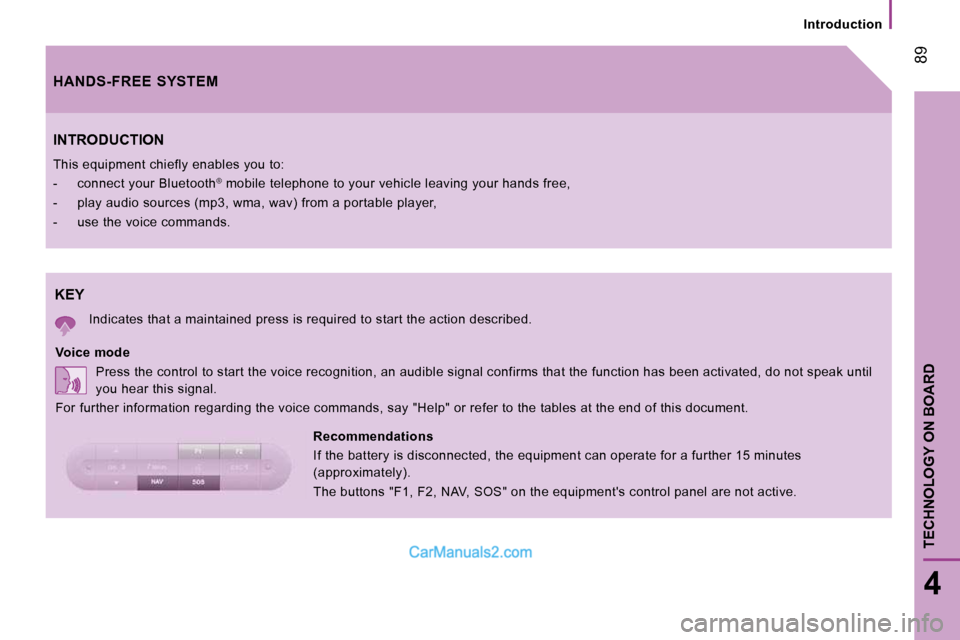
The buttons "F1, F2, NAV, SOS" on the equipment's control panel are not active.
HANDS-FREE SYSTEM
Page 89 of 167
1 F2
OSOSESC
NAMAOK
NAVF1
SOSSOSMAINOK
NAMOK
NAV F1 F2
SOSSOSMAINESC
91
4
TECHNOLOGY ON BOARD
Presentation
PRESENTATION
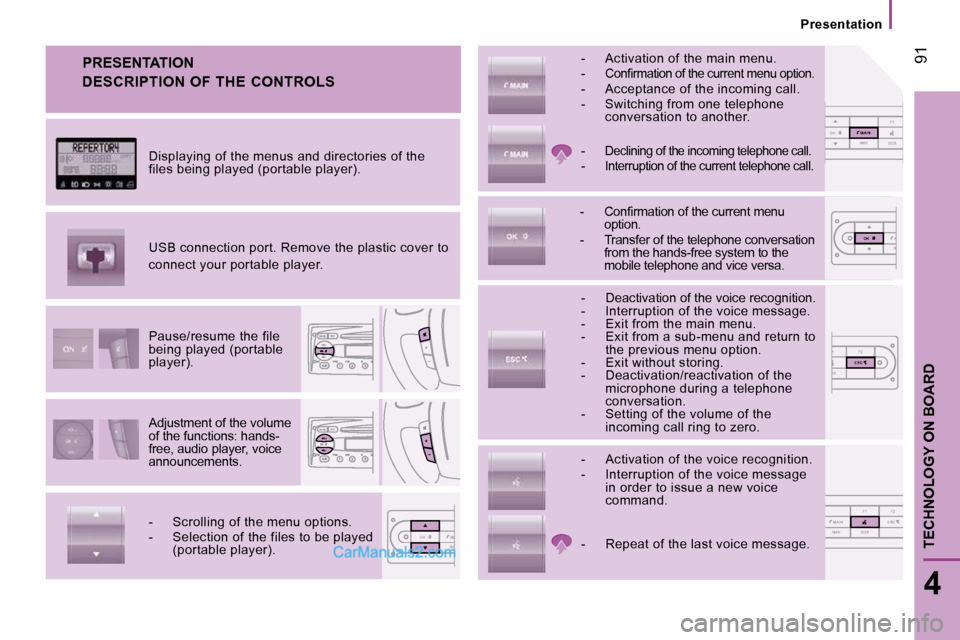
Adjustment of the volume
of the functions: hands-
free, audio player, voice
announcements.
Pause/resume the file
being played (portable
player).
USB connection port. Remove the plastic cover to
connect your portable player.
Displaying of the menus and directories of the
files being played (portable player).
- Scrolling of the menu options.
- Selection of the files to be played
(portable player). - Activation of the voice recognition.
- Interruption of the voice message
in order to issue a new voice
command.
- Deactivation of the voice recognition.
- Interruption of the voice message.
- Exit from the main menu.
- Exit from a sub-menu and return to
the previous menu option.
- Exit without storing.
- Deactivation/reactivation of the microphone during a telephone
conversation.
- Setting of the volume of the incoming call ring to zero.
- Confi rmation of the current menu option.
- Transfer of the telephone conversation from the hands-free system to the
mobile telephone and vice versa.
-
Declining of the incoming telephone call.
- Interruption of the current telephone call.
- Activation of the main menu.
- Confi rmation of the current menu option. - Acceptance of the incoming call.
- Switching from one telephone conversation to another.
- Repeat of the last voice message. DESCRIPTION OF THE CONTROLS
Page 92 of 167
Mobile telephone with hands-free function
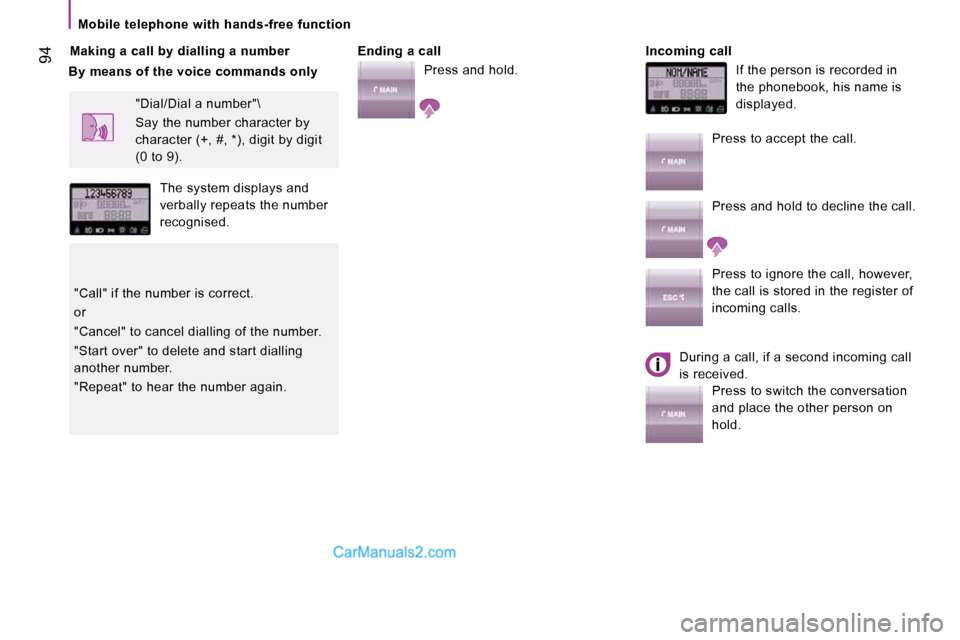
94 Making a call by dialling a number Ending a call
Press and hold. Incoming call
If the person is recorded in
the phonebook, his name is
displayed.
"Dial/Dial a number"\
Say the number character by
character (+, #, *), digit by digit
(0 to 9).
The system displays and
verbally repeats the number
recognised.
"Call" if the number is correct.
or
"Cancel" to cancel dialling of the number.
"Start over" to delete and start dialling
another number.
"Repeat" to hear the number again. Press to accept the call.
Press and hold to decline the call.
Press to ignore the call, however,
the call is stored in the register of
incoming calls.
During a call, if a second incoming call
is received. Press to switch the conversation
and place the other person on
hold.
By means of the voice commands only
Page 95 of 167
CD
97
4
TECHNOLOGY ON BOARD
Portable equipment audio player
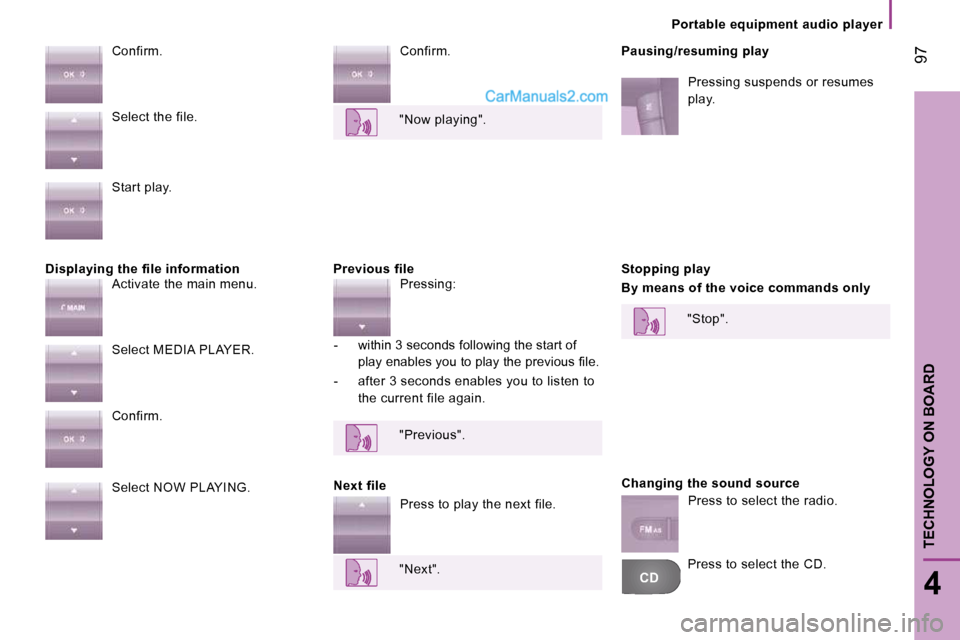
Displaying the file information Previous file Confirm.
Pausing/resuming play
Confirm.
Next file Stopping play
By means of the voice commands only
Changing the sound source
Select the file.
Start play.
Activate the main menu.
Select MEDIA PLAYER.
Confirm.
Select NOW PLAYING. "Now playing".
Pressing:
- within 3 seconds following the start of play enables you to play the previous fi le.
- after 3 seconds enables you to listen to the current file again.
"Previous".
Press to play the next file.
"Next". "Stop".
Press to select the radio.
Pressing suspends or resumes
play.
Press to select the CD.
Page 96 of 167
Voice commands
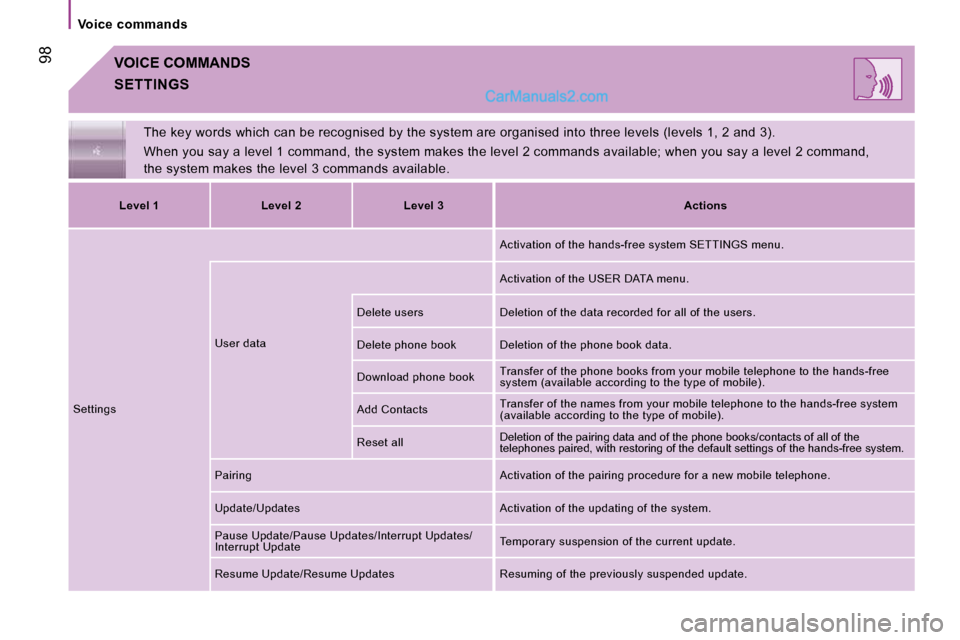
98 VOICE COMMANDS
The key words which can be recognised by the system are organised into three levels (levels 1, 2 and 3).
When you say a level 1 command, the system makes t he level 2 commands available; when you say a level 2 command,
the system makes the level 3 commands available.
SETTINGS
Level 1 Level 2 Level 3
Actions
Settings User data Activation of the hands-free system SETTINGS menu.
Activation of the USER DATA menu.
Delete users Deletion of the data recorded for all of the users.
Delete phone book Deletion of the phone book data.
Download phone book Transfer of the phone books from your mobile telep
hone to the hands-free
system (available according to the type of mobile).
Add Contacts Transfer of the names from your mobile telephone t
o the hands-free system
(available according to the type of mobile).
Reset all Deletion of the pairing data and of the phone books/co
ntacts of all of the
telephones paired, with restoring of the default settings of the hands-free system.
Pairing Activation of the pairing procedure for a new mobile telephone.
Update/Updates Activation of the updating of the system.
Pause Update/Pause Updates/Interrupt Updates/
Interrupt Update Temporary suspension of the current update.
Resume Update/Resume Updates Resuming of the previ ously suspended update.
Page 97 of 167
99
4
TECHNOLOGY ON BOARD
Voice commands
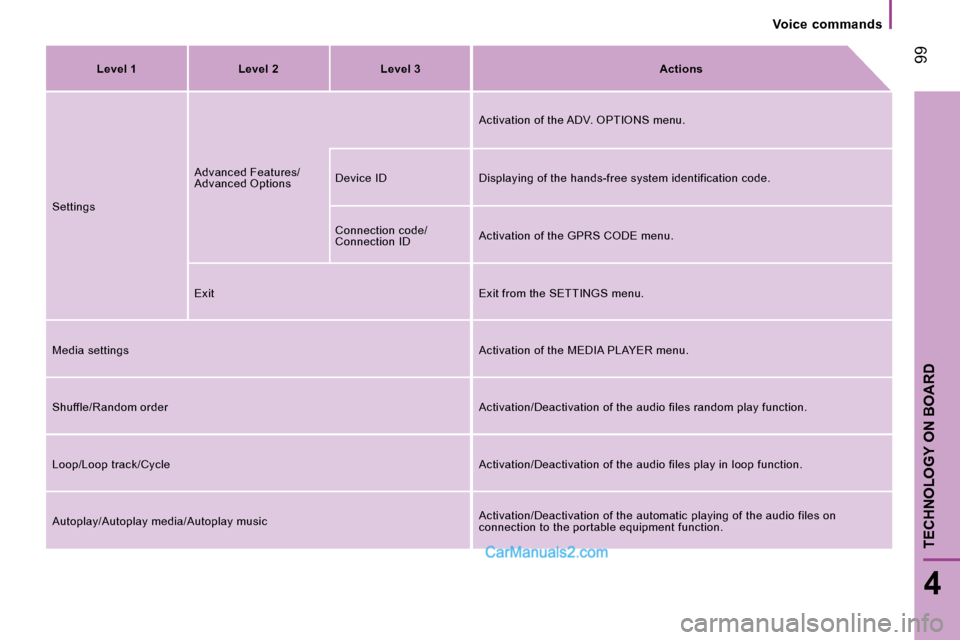
Level 1 Level 2 Level 3
Actions
Settings Advanced Features/
Advanced Options Activation of the ADV. OPTIONS menu.
Device ID Displaying of the hands-free system ide ntification code.
Connection code/
Connection ID Activation of the GPRS CODE menu.
Exit Exit from the SETTINGS menu.
Media settings Activation of the MEDIA PLAYER menu.
Shuffle/Random order Activation/Deactivation of the audio files random play function.
Loop/Loop track/Cycle Activation/Deactivation of the audio files play in loop function.
Autoplay/Autoplay media/Autoplay music Activation/Deactivation of the automatic playing o
f the audio files on
connection to the portable equipment function.
Page 98 of 167
Voice commands
100
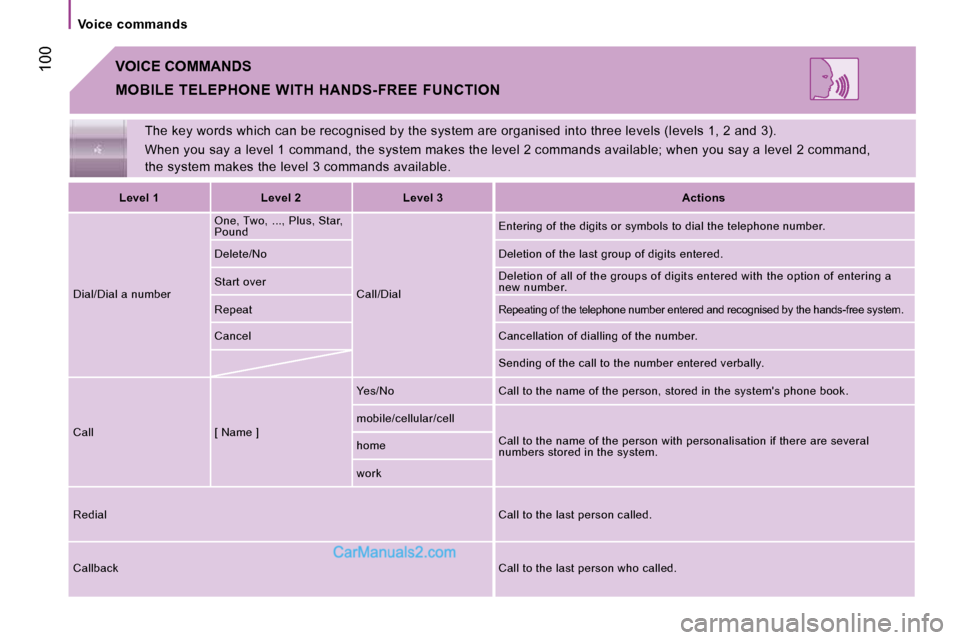
The key words which can be recognised by the system are organised into three levels (levels 1, 2 and 3).
When you say a level 1 command, the system makes t he level 2 commands available; when you say a level 2 command,
the system makes the level 3 commands available.
VOICE COMMANDS
MOBILE TELEPHONE WITH HANDS-FREE FUNCTION
Level 1 Level 2 Level 3
Actions
Dial/Dial a number One, Two, ..., Plus, Star,
Pound
Call/Dial Entering of the digits or symbols to dial the tele
phone number.
Delete/No Deletion of the last group of digits entered.
Start over Deletion of all of the groups of digits entered wi
th the option of entering a
new number.
Repeat
Repeating of the telephone number entered and reco gnised by the hands-free system.
Cancel Cancellation of dialling of the number.
Sending of the call to the number entered verbally.
Call [ Name ] Yes/No Call to the name of the person, stored in
the system's phone book.
mobile/cellular/cell Call to the name of the person with personalisatio n if there are several
numbers stored in the system.
home
work
Redial Call to the last person called.
Callback Call to the last person who called.
Page 99 of 167
101
4
TECHNOLOGY ON BOARD
Voice commands
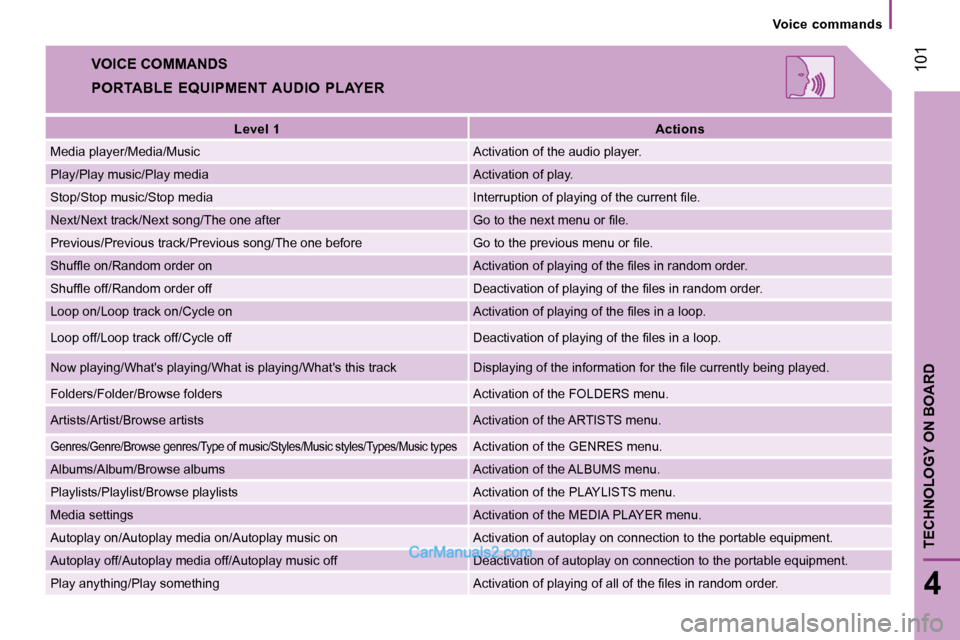
VOICE COMMANDS
PORTABLE EQUIPMENT AUDIO PLAYER
Level 1
Actions
Media player/Media/Music Activation of the audio player.
Play/Play music/Play media Activation of play.
Stop/Stop music/Stop media Interruption of playing of the current fi le.
Next/Next track/Next song/The one after Go to the next menu or fi le.
Previous/Previous track/Previous song/The one before Go to the previous menu or fi le.
Shuffl e on/Random order on Activation of playing of the fi les in random order.
Shuffl e off/Random order off Deactivation of playing of the fi les in random order.
Loop on/Loop track on/Cycle on Activation of playing of the fi les in a loop.
Loop off/Loop track off/Cycle off Deactivation of playing of the fi les in a loop.
Now playing/What's playing/What is playing/What's this tra ck Displaying of the information for the fi le currently being played.
Folders/Folder/Browse folders Activation of the FOLDERS menu.
Artists/Artist/Browse artists Activation of the ARTISTS menu.
Genres/Genre/Browse genres/Type of music/Styles/Mus ic styles/Types/Music types Activation of the GENRES menu.
Albums/Album/Browse albums Activation of the ALBUMS menu.
Playlists/Playlist/Browse playlists Activation of the PLAYLISTS menu.
Media settings Activation of the MEDIA PLAYER menu.
Autoplay on/Autoplay media on/Autoplay music on Activation of autoplay on connection to the portable equipment.
Autoplay off/Autoplay media off/Autoplay music off Deactivati on of autoplay on connection to the portable equipment.
Play anything/Play something Activation of playing of all of the fi les in random order.