service Peugeot Boxer 2014 User Guide
[x] Cancel search | Manufacturer: PEUGEOT, Model Year: 2014, Model line: Boxer, Model: Peugeot Boxer 2014Pages: 240, PDF Size: 8.98 MB
Page 32 of 240
Instruments and controls
30
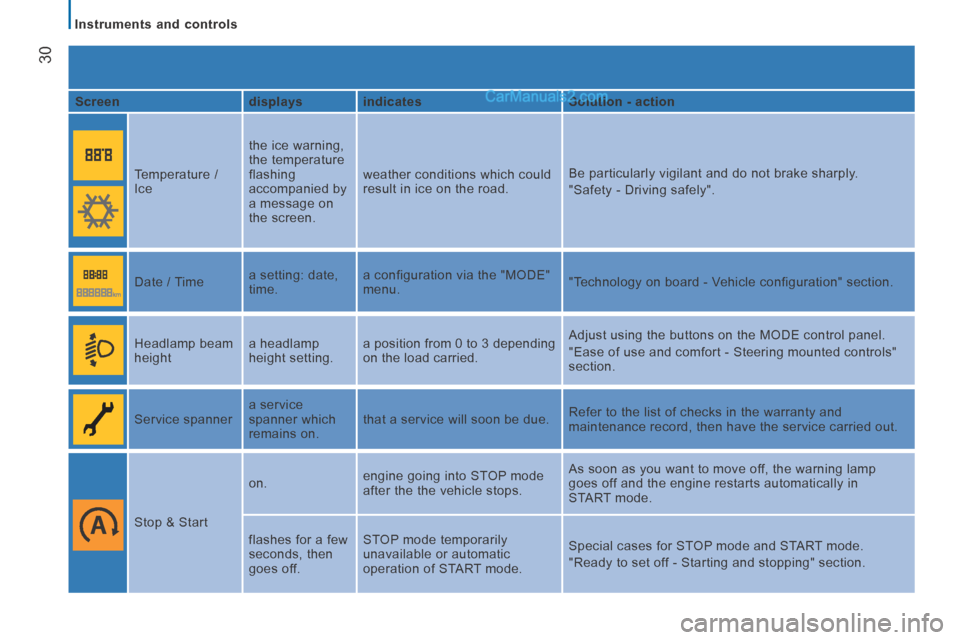
Screen displays indicates Solution - action
Temperature /
Ice the ice warning,
the temperature
flashing
accompanied by
a message on
the screen. weather conditions which could
result in ice on the road.
Be particularly vigilant and do not brake sharply.
"Safety - Driving safely".
Date / Time a setting: date,
time. a configuration via the "MODE"
menu.
"Technology on board - Vehicle configuration" section.
Headlamp beam
height a headlamp
height setting. a position from 0 to 3 depending
on the load carried . Adjust using the buttons on the MODE control panel.
"Ease of use and comfort - Steering mounted controls"
section.
Service spanner a service
spanner which
remains on. that a service will soon be due.
Refer to the list of checks in the warranty and
maintenance record, then have the service carried out.
Stop & Start on.
engine going into STOP mode
after the the vehicle stops. As soon as you want to move off, the warning lamp
goes off and the engine restarts automatically in
START mode.
flashes for a few
seconds, then
goes off. STOP mode temporarily
unavailable or automatic
operation of START mode.
Special cases for STOP mode and START mode.
"Ready to set off - Starting and stopping" section.
Page 36 of 240
Instruments and controls
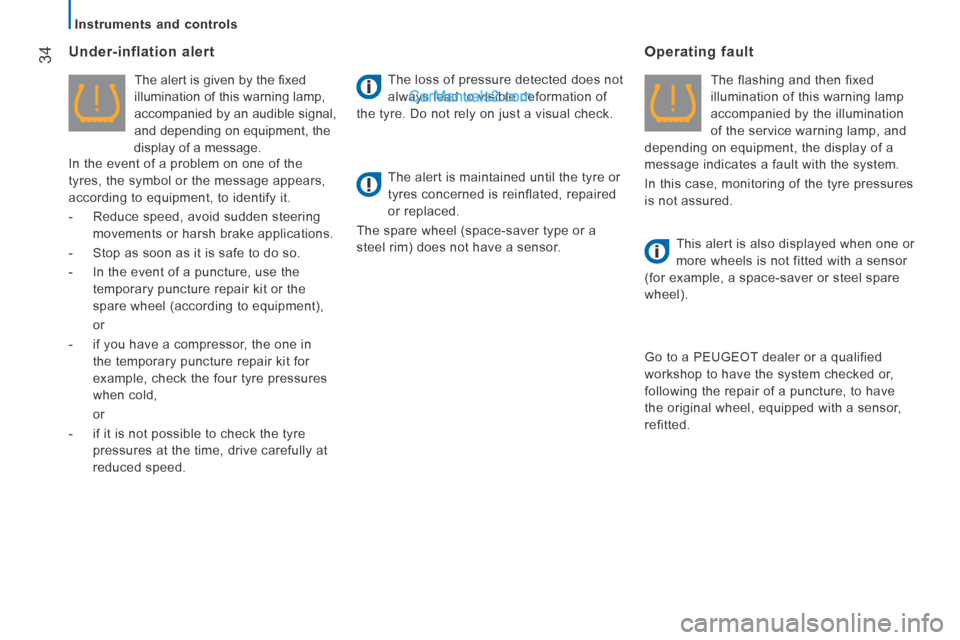
34 Under-inflation alert
The alert is given by the fi xed
illumination of this warning lamp,
accompanied by an audible signal,
and depending on equipment, the
display of a message.
In the event of a problem on one of the
tyres, the symbol or the message appears,
according to equipment, to identify it.
- Reduce speed, avoid sudden steering
movements or harsh brake applications.
- Stop as soon as it is safe to do so.
- In the event of a puncture, use the temporary puncture repair kit or the
spare wheel (according to equipment),
or
- if you have a compressor, the one in the temporary puncture repair kit for
example, check the four tyre pressures
when cold,
or
- if it is not possible to check the tyre pressures at the time, drive carefully at
reduced speed. The loss of pressure detected does not
always lead to visible deformation of
the tyre. Do not rely on just a visual check.
The alert is maintained until the tyre or
tyres concerned is reinflated, repaired
or replaced.
The spare wheel (space-saver type or a
steel rim) does not have a sensor.
Operating fault
The flashing and then fixed
illumination of this warning lamp
accompanied by the illumination
of the service warning lamp, and
depending on equipment, the display of a
message indicates a fault with the system.
In this case, monitoring of the tyre pressures
is not assured.
This alert is also displayed when one or
more wheels is not fitted with a sensor
(for example, a space-saver or steel spare
wheel).
Go to a PEUGEOT dealer or a qualified
workshop to have the system checked or,
following the repair of a puncture, to have
the original wheel, equipped with a sensor,
refitted.
Page 37 of 240
Instruments and controls
35
2
READY TO SET OFF
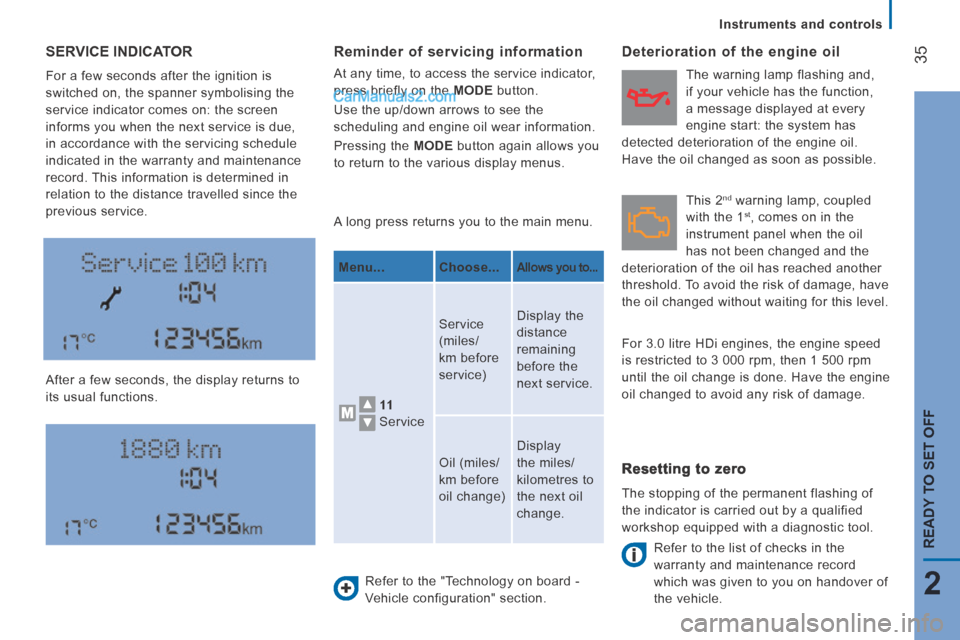
SERVICE INDICATOR
For a few seconds after the ignition is
switched on, the spanner symbolising the
service indicator comes on: the screen
informs you when the next service is due,
in accordance with the servicing schedule
indicated in the warranty and maintenance
record. This information is determined in
relation to the distance travelled since the
previous service.
After a few seconds, the display returns to
its usual functions. A long press returns you to the main menu.
Refer to the "Technology on board -
Vehicle configuration" section.
Deterioration of the engine oil
Refer to the list of checks in the
warranty and maintenance record
which was given to you on handover of
the vehicle.
Reminder of servicing information
At any time, to access the service indicator,
press briefly on the MODE button.
Use the up/down arrows to see the
scheduling and engine oil wear information.
Pressing the MODE button again allows you
to return to the various display menus.
Menu... Choose...
Allows you to...
11
Service Service
(miles/
km before
service)
Display the
distance
remaining
before the
next service.
Oil (miles/
km before
oil change) Display
the miles/
kilometres to
the next oil
change.
Resetting to zero
The stopping of the permanent flashing of
the indicator is carried out by a qualified
workshop equipped with a diagnostic tool. This 2
nd warning lamp, coupled
with the 1 st , comes on in the
instrument panel when the oil
has not been changed and the
deterioration of the oil has reached another
threshold. To avoid the risk of damage, have
the oil changed without waiting for this level. The warning lamp flashing and,
if your vehicle has the function,
a message displayed at every
engine start: the system has
detected deterioration of the engine oil.
Have the oil changed as soon as possible.
For 3.0 litre HDi engines, the engine speed
is restricted to 3 000 rpm, then 1 500 rpm
until the oil change is done. Have the engine
oil changed to avoid any risk of damage.
Page 88 of 240
Vehicle configuration
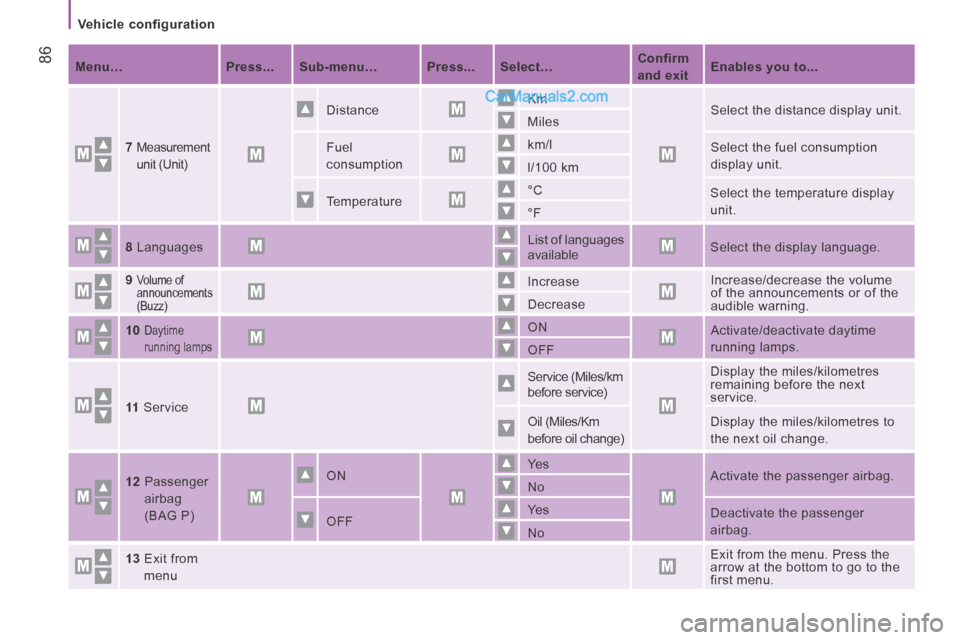
86 Menu… Press... Sub-menu… Press... Select… Confirm
and exit
Enables you to...
7
Measurement
unit (Unit)
Distance Km
Select the distance display unit.
Miles
Fuel
consumption km/l
Select the fuel consumption
display unit.
l/100 km
Temperature °C
Select the temperature display
unit.
°F
8 Languages List of languages
available
Select the display language.
9
Volume of
announcements
(Buzz) Increase
Increase/decrease the volume
of the announcements or of the
audible warning.
Decrease
10
Daytime
running lamps ON
Activate/deactivate daytime
running lamps.
OFF
11 Service Service (Miles/km
before service)
Display the miles/kilometres
remaining before the next
service.
Oil (Miles/Km
before oil change) Display the miles/kilometres to
the next oil change .
12 Passenger airbag
(BAG P)
ON Ye s
Activate the passenger airbag.
No
OFF Ye s
Deactivate the passenger
airbag.
No
13 Exit from menu
Exit from the menu. Press the
arrow at the bottom to go to the
first menu.
Page 123 of 240
Maintenance with TOTAL
121
7
CHECKS
PEUGEOT & TOTAL
Partners in performance and protection of the environment
Innovation at the service of performance
The TOTAL Research and Development teams
develop lubricants for PEUGEOT which satisfy the
requirements of the latest technical innovations
incorporated in PEUGEOT vehicles.
This ensures that you obtain the best performance
and the maximum engine life.
Reduced exhaust emissions
TOTAL lubricants are formulated to optimise the
efficiency of engines and the protection of the
emissions post-treatment systems. It is crucial to
observe the servicing recommendations made by
PEUGEOT to ensure correct operation.
RECOMMENDS
Page 129 of 240
Levels and checks
127
7
CHECKS
Manual gearbox
Have the level checked in accordance with
the manufacturer's servicing schedule.
Good practice
To check the main levels and certain
components, in accordance with the
manufacturer's servicing schedule, refer to
the pages of the warranty and maintenance
record which correspond to your vehicle's
engine.
Only use products recommended by
PEUGEOT or products of equivalent quality
and specification.
In order to optimise the operation of units as
important as the braking system, PEUGEOT
selects and offers specific products.
Oil filter
Change the filter regularly, in accordance
with the manufacturer's servicing schedule.
Brake pads
Brake pad wear depends on the style of
driving, in particular for vehicles which are
used in town, over short distances. It may
be necessary to check the thickness of the
pads, even between services.
Brake disc/drum wear status
For any information relating to checking
the brake disc/drum wear status, contact a
PEUGEOT dealer or a qualified workshop.
Parking brake
Where the parking brake travel is too great
or there is a reduction in the performance
of the system, the parking brake should be
adjusted, even between services.
Have the system checked by a PEUGEOT
dealer or a qualified workshop.
If this warning lamp comes on,
have the brake pad wear checked
by a PEUGEOT dealer or a
qualified workshop. In order to avoid damaging the
electrical units, high pressure washing
to clean the engine compartment is strictly
prohibited.
After washing the vehicle dampness, or in
winter, ice may form on the brake discs and
pads: braking efficiency may be reduced.
Make some light brake applications to dry
and de-ice the brakes.
Page 152 of 240
Being towed or towing
150
TOWING
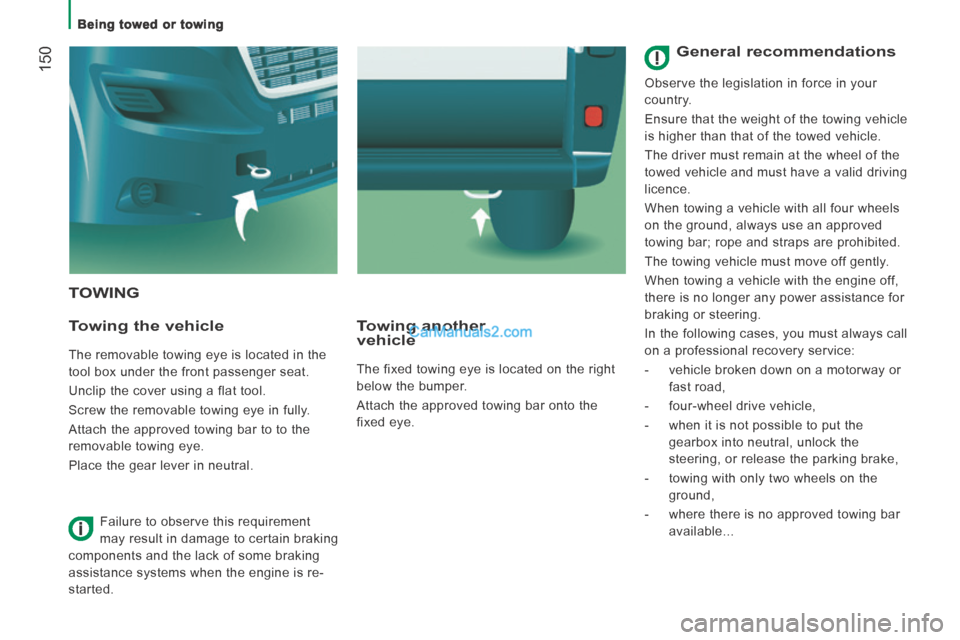
Towing the vehicle
The removable towing eye is located in the
tool box under the front passenger seat.
Unclip the cover using a flat tool.
Screw the removable towing eye in fully.
Attach the approved towing bar to to the
removable towing eye.
Place the gear lever in neutral.
Towing another vehicle
The fixed towing eye is located on the right
below the bumper.
Attach the approved towing bar onto the
fixed eye.
Failure to observe this requirement
may result in damage to certain braking
components and the lack of some braking
assistance systems when the engine is re-
started.
General recommendations
Observe the legislation in force in your
country.
Ensure that the weight of the towing vehicle
is higher than that of the towed vehicle.
The driver must remain at the wheel of the
towed vehicle and must have a valid driving
licence.
When towing a vehicle with all four wheels
on the ground, always use an approved
towing bar; rope and straps are prohibited.
The towing vehicle must move off gently.
When towing a vehicle with the engine off,
there is no longer any power assistance for
braking or steering.
In the following cases, you must always call
on a professional recovery service:
- vehicle broken down on a motorway or fast road,
- four-wheel drive vehicle,
- when it is not possible to put the gearbox into neutral, unlock the
steering, or release the parking brake,
- towing with only two wheels on the ground,
- where there is no approved towing bar available...
Page 176 of 240
04
10.10
RADIO
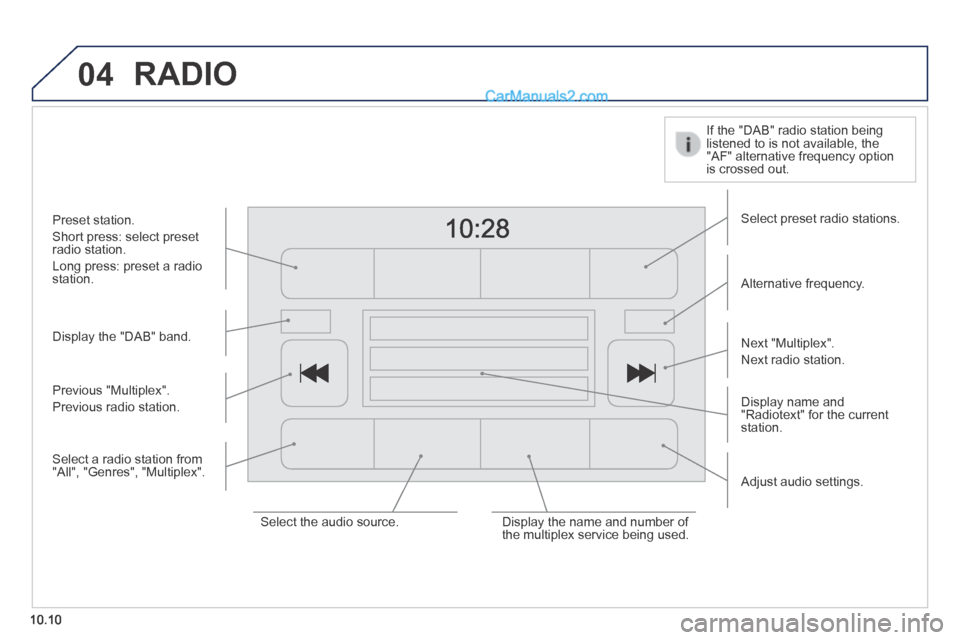
Display the "DAB" band.
Display name and "Radiotext" for the current station.
Select preset radio stations.
Alternative frequency.
If the "DAB" radio station being listened to is not available, the "AF" alternative frequency option is crossed out.
Preset station.
Short press: select preset radio station.
Long press: preset a radio station.
Next "Multiplex".
Next radio station.
Adjust audio settings.
Select the audio source. Display the name and number of the multiplex service being used.
Previous "Multiplex".
Previous radio station.
Select a radio station from "All", "Genres", "Multiplex".
Page 189 of 240
06
10.23
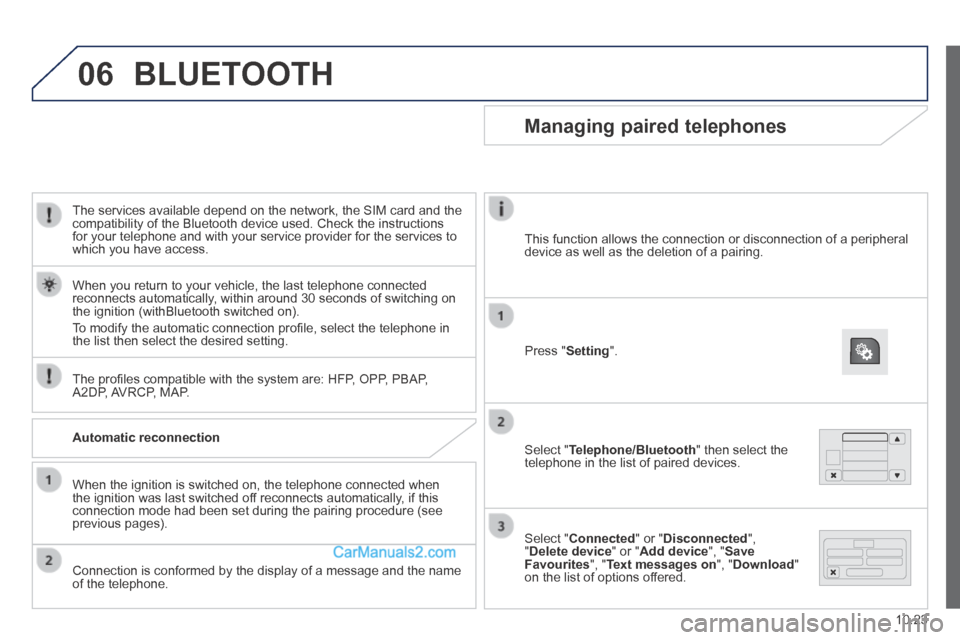
The services available depend on the network, the SIM card and the compatibility of the Bluetooth device used. Check the instructions for your telephone and with your service provider for the services to which you have access.
The profi les compatible with the system are: HFP, OPP, PBAP, A2DP, AVRCP, MAP.
When you return to your vehicle, the last telephone connected reconnects automatically, within around 30 seconds of switching on the ignition (withBluetooth switched on).
To modify the automatic connection profi le, select the telephone in the list then select the desired setting.
BLUETOOTH
Automatic reconnection
When the ignition is switched on, the telephone connected when the ignition was last switched off reconnects automatically, if this connection mode had been set during the pairing procedure (see previous pages).
Connection is conformed by the display of a message and the name of the telephone.
Managing paired telephones
Press " Setting ".
Select " Telephone/Bluetooth " then select the telephone in the list of paired devices.
Select " Connected " or " Disconnected ", " Delete device " or " Add device ", " Save Favourites ", " Text messages on ", " Download " on the list of options offered.
This function allows the connection or disconnection of a peripheral device as well as the deletion of a pairing.
Page 193 of 240
10.27
Level 1Level 2Level 3Comment
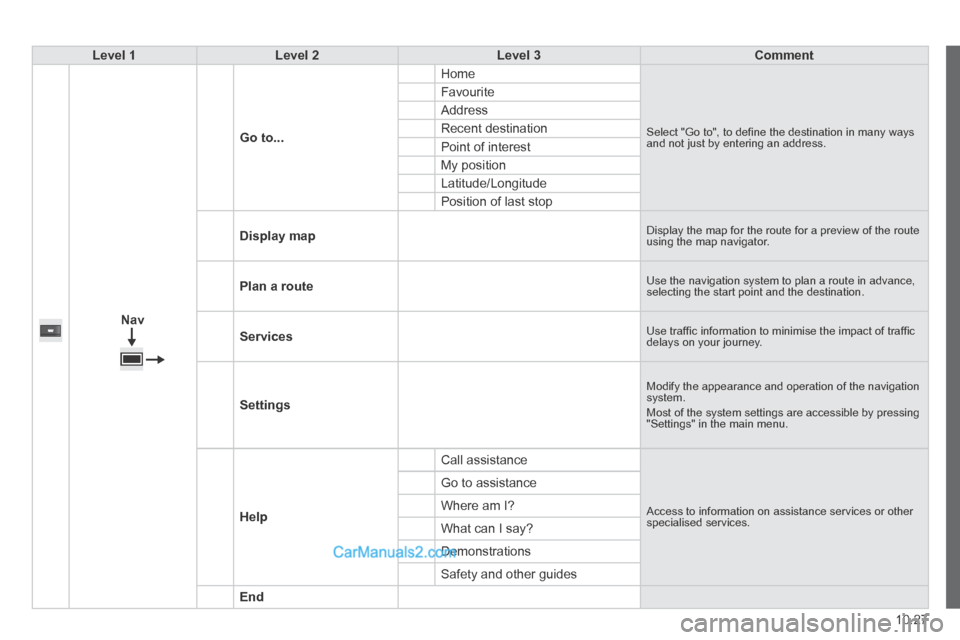
Nav
Go to...
Home
Select "Go to", to defi ne the destination in many ways and not just by entering an address.
Favourite
Address
Recent destination
Point of interest
My position
Latitude/Longitude
Position of last stop
Display map Display the map for the route for a preview of the route using the map navigator.
Plan a route Use the navigation system to plan a route in advance, selecting the start point and the destination.
Services Use traffi c information to minimise the impact of traffi c delays on your journey.
Settings
Modify the appearance and operation of the navigation system. Most of the system settings are accessible by pressing "Settings" in the main menu.
Help
Call assistance
Access to information on assistance services or other specialised services.
Go to assistance
Where am I?
What can I say?
Demonstrations
Safety and other guides
End