display PEUGEOT BOXER 2015 Owner's Guide
[x] Cancel search | Manufacturer: PEUGEOT, Model Year: 2015, Model line: BOXER, Model: PEUGEOT BOXER 2015Pages: 276, PDF Size: 8.99 MB
Page 201 of 276
199
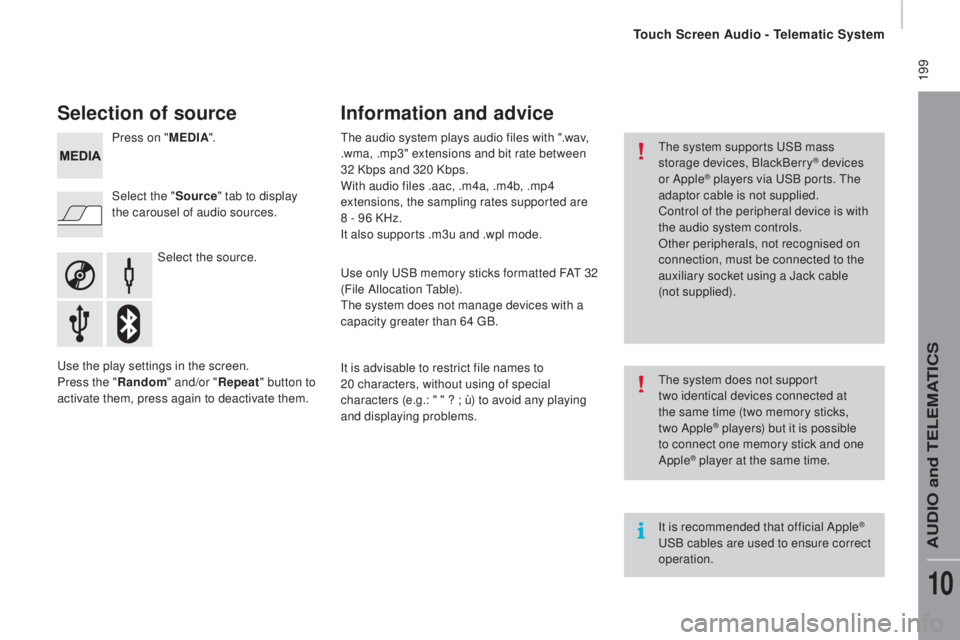
Selection of source
Select the source.
Select the "
Source" tab to display
the carousel of audio sources. Press on " ME
dIA".
use t
he play settings in the screen.
Press the "
rand
om " and/or "
repe
at" button to
activate them, press again to deactivate them.
the a
udio system plays audio files with ".wav,
.wma, .mp3" extensions and bit rate between
32 Kbps and 320 Kbps.
With audio files .aac, .m4a, .m4b, .mp4
extensions, the sampling rates supported are
8 - 96 KHz.
It also supports .m3u and .wpl mode.use o nly uSB m emory sticks formatted FAt 3 2
(File Allocation
table
).
the s
ystem does not manage devices with a
capacity greater than 64
gB.
It i
s advisable to restrict file names to
20
c
haracters, without using of special
characters (e.g.:
" " ? ; ù
) to avoid any playing
and displaying problems.
Information and advice
the system supports uSB m ass
storage devices, BlackBerry® devices
or Apple® players via uSB p orts. the
a
daptor cable is not supplied.
Control of the peripheral device is with
the audio system controls.
Other peripherals, not recognised on
connection, must be connected to the
auxiliary socket using a Jack cable
(not supplied).
It is recommended that official Apple
® uSB c
ables are used to ensure correct
operation.
the s
ystem does not support
two
i
dentical devices connected at
the same time (two memory sticks,
two Apple
® players) but it is possible
to c
onnect one memory stick and one
Apple
® player at the same time.
touch Screen Audio - telematic System
AuDIO and teLeMAtICS
10
Page 202 of 276
200
Bluetooth® audio streaming
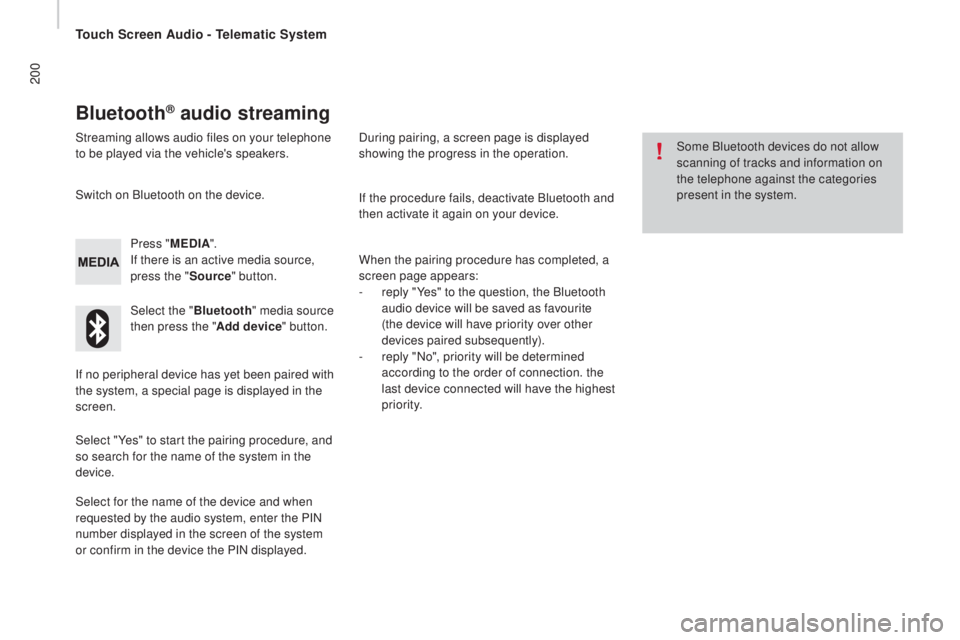
Streaming allows audio files on your telephone
to be played via the vehicle's speakers.Press "ME
dIA".
I
f there is an active media source,
press the " Source" button.
Select the " Bluetooth" media source
then press the " Add device" button.
Switch on Bluetooth on the device.
Some Bluetooth devices do not allow
scanning of tracks and information on
the telephone against the categories
present in the system.
If the procedure fails, deactivate Bluetooth and
then activate it again on your device.
Select for the name of the device and when
requested by the audio system, enter the PIN
number displayed in the screen of the system
or confirm in the device the PIN displayed. When the pairing procedure has completed, a
screen page appears:
-
re
ply "Yes" to the question, the Bluetooth
audio device will be saved as favourite
(the device will have priority over other
devices paired subsequently).
-
re
ply "No", priority will be determined
according to the order of connection. the
last device connected will have the highest
priority.
During pairing, a screen page is displayed
showing the progress in the operation.
If no peripheral device has yet been paired with
the system, a special page is displayed in the
screen.
Select "Yes" to start the pairing procedure, and
so search for the name of the system in the
device.
touch Screen Audio - telematic System
Page 205 of 276
203Level 1Level 2 Level 3com ment
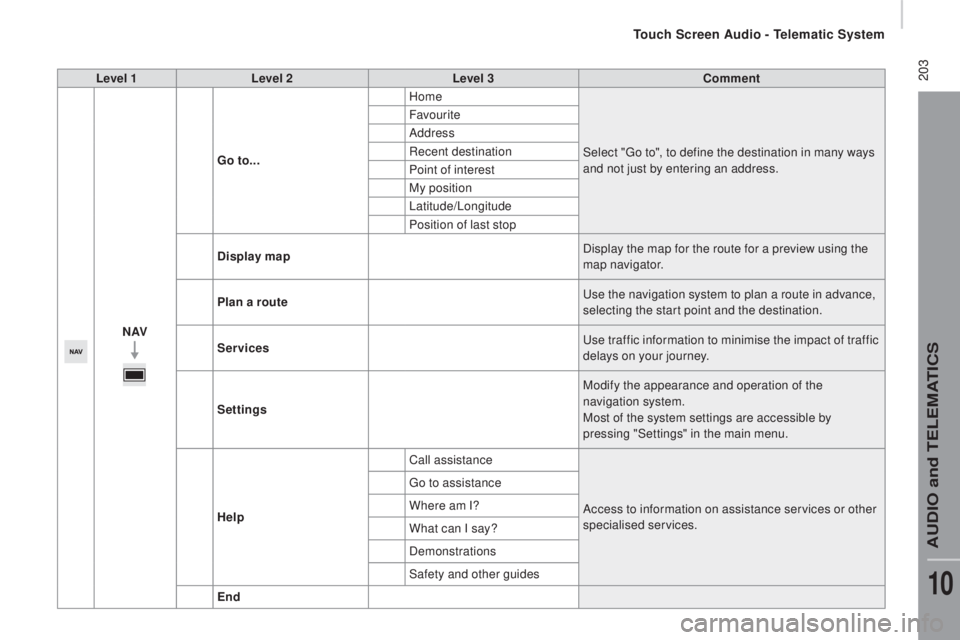
nAVGo
to... Home
Select "
go to"
, to define the destination in many ways
and not just by entering an address.
Favourite
Address
Recent destination
Point of interest
My position
Latitude/Longitude
Position of last stop
di
splay map Display the map for the route for a preview using the
map navigator.
Plan a route
use t
he navigation system to plan a route in advance,
selecting the start point and the destination.
Services
use t
raffic information to minimise the impact of traffic
delays on your journey.
Settings Modify the appearance and operation of the
navigation system.
Most of the system settings are accessible by
pressing "Settings" in the main menu.
Help Call assistance
Access to information on assistance services or other
specialised services.
go to a
ssistance
Where am I?
What can I say?
Demonstrations
Safety and other guides
End
touch Screen Audio - telematic System
AuDIO and teLeMAtICS
10
Page 207 of 276
205Level 1Level 2 Level 3com ment
nAVSpeed limit (if known).to se
e the difference between the desired time of arrival
and estimated time of arrival.
tou
ch this par t of the status bar to switch between 3D and
2D map.
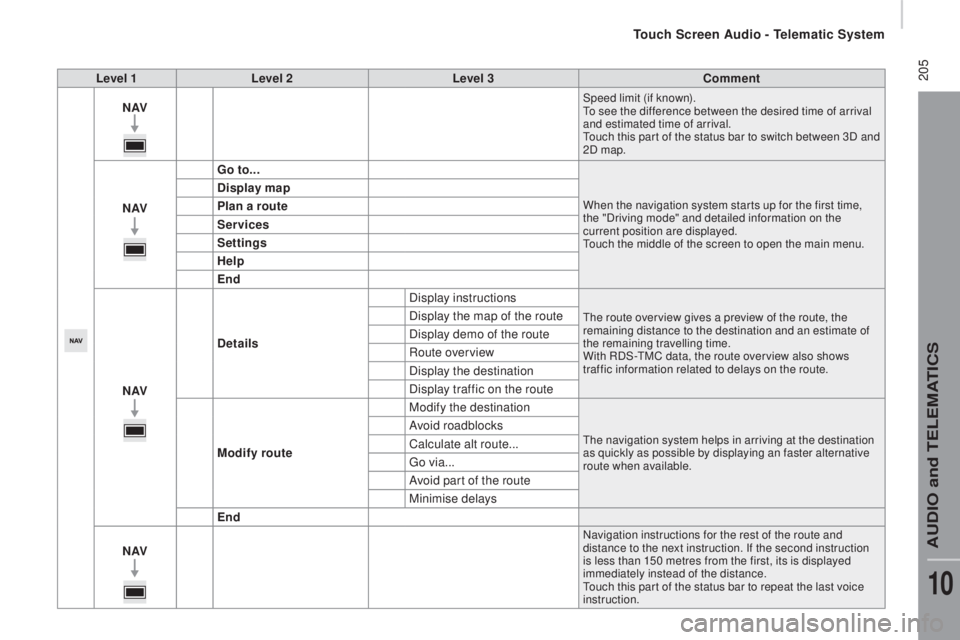
nAV Go to...When the navigation system star ts up for the first time,
the "Driving mode" and detailed information on the
current position are displayed.
tou
ch the middle of the screen to open the main menu.
display map
Pl an a route
Services
Settings
Help
End
nAV
det
ails Display instructions
the route over view gives a preview of the route, the
r emaining distance to the destination and an estimate of
the remaining travelling time.
With RDS-
tMC d
ata, the route over view also shows
traffic information related to delays on the route.Display the map of the route
Display demo of the route
Route overview
Display the destination
Display traffic on the route
Modify route Modify the destination
the navigation system helps in arriving at the destination
a s quickly as possible by displaying an faster alternative
route when available.Avoid roadblocks
Calculate alt route...
go v
ia...
Avoid part of the route
Minimise delays
End
nAV
Navigation instructions for the rest of the route and
distance to the next instruction. If the second instruction
is less than 150 metres from the first, its is displayed
immediately instead of the distance.
tou
ch this par t of the status bar to repeat the last voice
instruction.
touch Screen Audio - telematic System
AuDIO and teLeMAtICS
10
Page 209 of 276
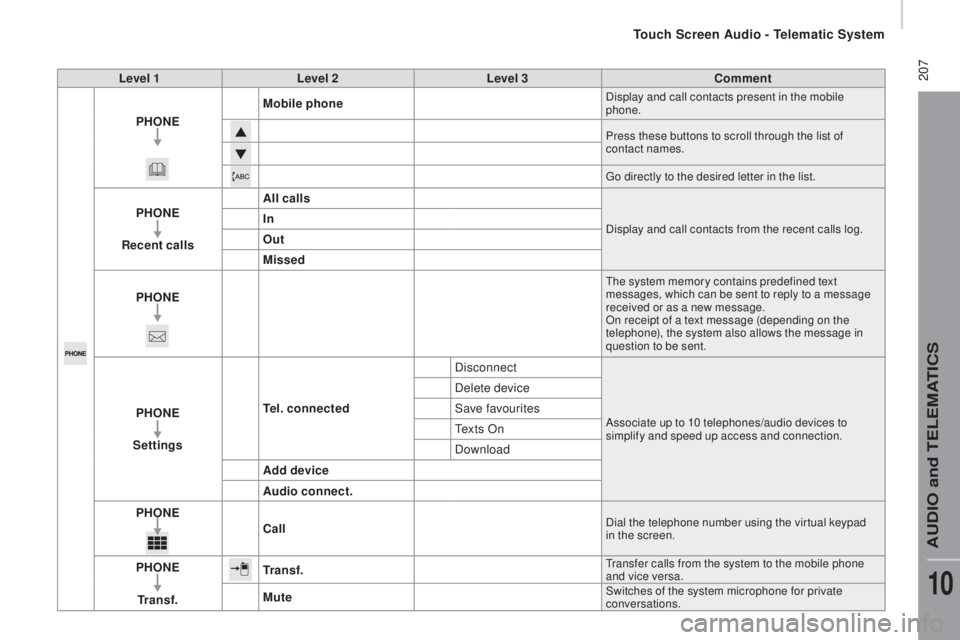
207Level 1Level 2 Level 3com ment
PH
o
n
E Mob
ile phone
Display and call contacts present in the mobile
phone.
Press these buttons to scroll through the list of
contact names.
go di
rectly to the desired letter in the list.
PHonE
rec
ent calls All callsDisplay and call contacts from the recent calls log.In
out
M
issed
PH
o
n
E
the system memory contains predefined text
m essages, which can be sent to reply to a message
received or as a new message.
On receipt of a text message (depending on the
telephone), the system also allows the message in
question to be sent.
PHonE
Se ttingstel. connected DisconnectAssociate up to 10 telephones/audio devices to
simplify and speed up access and connection.
Delete device
Save favourites
te
x t s O n
Download
Add device
Audio connect.
PH
o
n
Eca
ll
Dial the telephone number using the vir tual keypad
in the screen.
PHonE
tr a
n s f .tr a n s f .transfer calls from the system to the mobile phone
a nd vice versa.
MuteSwitches of the system microphone for private
conversations.
touch Screen Audio - telematic System
AuDIO and teLeMAtICS
10
Page 210 of 276
208
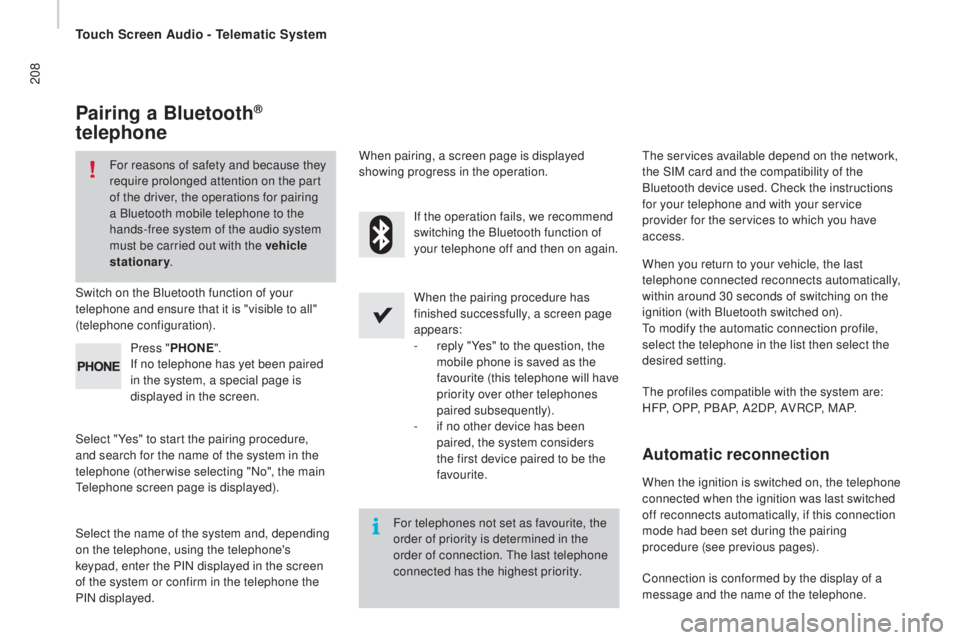
Pairing a Bluetooth®
telephone
For reasons of safety and because they
require prolonged attention on the part
of the driver, the operations for pairing
a Bluetooth mobile telephone to the
hands-free system of the audio system
must be carried out with the vehicle
stationary .
Switch on the Bluetooth function of your
telephone and ensure that it is "visible to all"
(telephone configuration).
Select "Yes" to start the pairing procedure,
and search for the name of the system in the
telephone (otherwise selecting "No", the main
tel
ephone screen page is displayed). When the pairing procedure has
finished successfully, a screen page
appears:
-
re
ply "Yes" to the question, the
mobile phone is saved as the
favourite (this telephone will have
priority over other telephones
paired subsequently).
-
if n
o other device has been
paired, the system considers
the first device paired to be the
favourite.
When pairing, a screen page is displayed
showing progress in the operation.the s
ervices available depend on the network,
the SIM card and the compatibility of the
Bluetooth device used. Check the instructions
for your telephone and with your service
provider for the services to which you have
access.
Select the name of the system and, depending
on the telephone, using the telephone's
keypad, enter the PIN displayed in the screen
of the system or confirm in the telephone the
PIN displayed. Press "
PH
o
n
E".
If n
o telephone has yet been paired
in the system, a special page is
displayed in the screen. If the operation fails, we recommend
switching the Bluetooth function of
your telephone off and then on again.
For telephones not set as favourite, the
order of priority is determined in the
order of connection.
the l
ast telephone
connected has the highest priority.
the p
rofiles compatible with the system are:
H F P, O P P, P B A P, A 2 D P, A V R C P, M A P. When you return to your vehicle, the last
telephone connected reconnects automatically,
within around 30 seconds of switching on the
ignition (with Bluetooth switched on).
to mo
dify the automatic connection profile,
select the telephone in the list then select the
desired setting.
Automatic reconnection
When the ignition is switched on, the telephone
connected when the ignition was last switched
off reconnects automatically, if this connection
mode had been set during the pairing
procedure (see previous pages).
Connection is conformed by the display of a
message and the name of the telephone.
touch Screen Audio - telematic System
Page 211 of 276
209
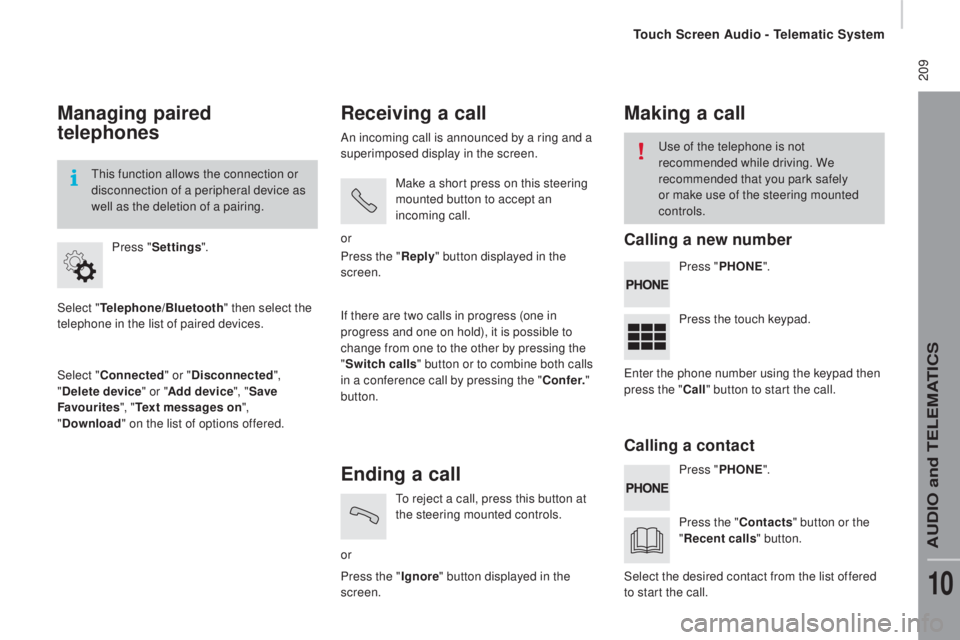
Managing paired
telephones
Select "telephone/Bluetooth" t hen select the
telephone in the list of paired devices.
Select "
con
nected" or "
dis
connected",
"
dele
te device " or "Add device", " Save
Favourites ", "
tex
t messages on",
"
do
wnload " on the list of options offered.
Press "
Settings ".
thi
s function allows the connection or
disconnection of a peripheral device as
well as the deletion of a pairing.
receiving a call
An incoming call is announced by a ring and a
superimposed display in the screen.
Make a short press on this steering
mounted button to accept an
incoming call.
or
If there are two calls in progress (one in
progress and one on hold), it is possible to
change from one to the other by pressing the
" Switch calls " button or to combine both calls
in a conference call by pressing the "
co n
f e r."
button. Press the "
reply " b
utton displayed in the
screen.
Ending a call
or
to re
ject a call, press this button at
the steering mounted controls.
Press the " Ignore" button displayed in the
screen.
Making a call
Press " PHo nE".
Pr ess " PH
o
n
E".
Pr
ess the touch keypad.
Press the "
co
ntacts" button or the
"
rec
ent calls " button.
use o
f the telephone is not
recommended while driving. We
recommended that you park safely
or make use of the steering mounted
controls.
ent
er the phone number using the keypad then
press the "
ca
ll" button to start the call.
Select the desired contact from the list offered
to start the call.
calling a new number
cal
ling a contact
touch Screen Audio - telematic System
AuDIO and teLeMAtICS
10
Page 213 of 276
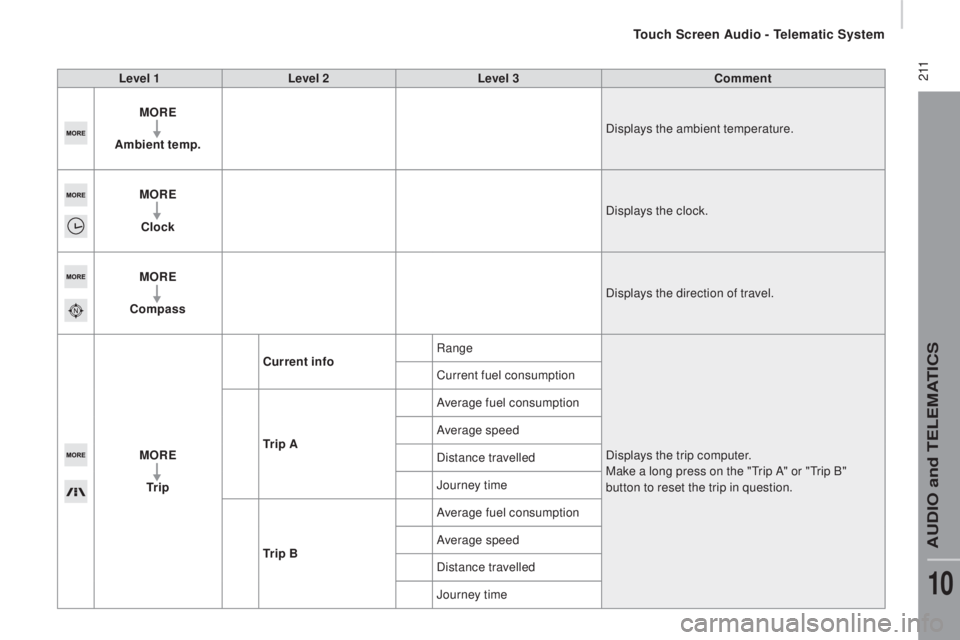
2 11Level 1Level 2 Level 3com ment
M
orE
Am
bient temp. Displays the ambient temperature.
M
orE
cl
ock Displays the clock.
M
orE
com
pass Displays the direction of travel.
M
orE
tr i
p
curr
ent infoRange
Displays the trip computer.
Make a long press on the "
tri
p A" or "
tri
p B"
button to reset the trip in question.
Current fuel consumption
tr i
p AAverage fuel consumption
Average speed
Distance travelled
Journey time
tr i
p BAverage fuel consumption
Average speed
Distance travelled
Journey time
touch Screen Audio - telematic System
AuDIO and teLeMAtICS
10
Page 215 of 276
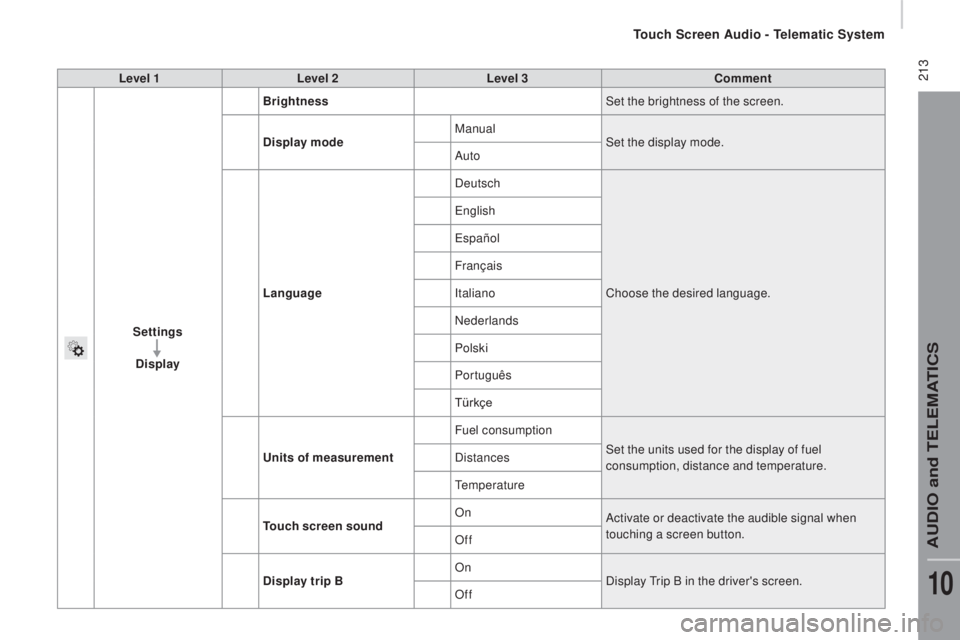
213Level 1Level 2 Level 3com ment
Settings
di
splay Brightness
Set the brightness of the screen.
di
splay mode Manual
Set the display mode.
Auto
Language Deutsch
Choose the desired language.
engl
ish
españo
l
Français
Italiano
Nederlands
Polski
Português
Türkçe
uni
ts of measurement Fuel consumption
Set the units used for the display of fuel
consumption, distance and temperature.
Distances
temp
erature
touch
screen soundOn
Activate or deactivate the audible signal when
touching a screen button.
Off
dis
play trip B On
Display
tri
p B in the driver's screen.
Off
touch Screen Audio - telematic System
AuDIO and teLeMAtICS
10
Page 217 of 276
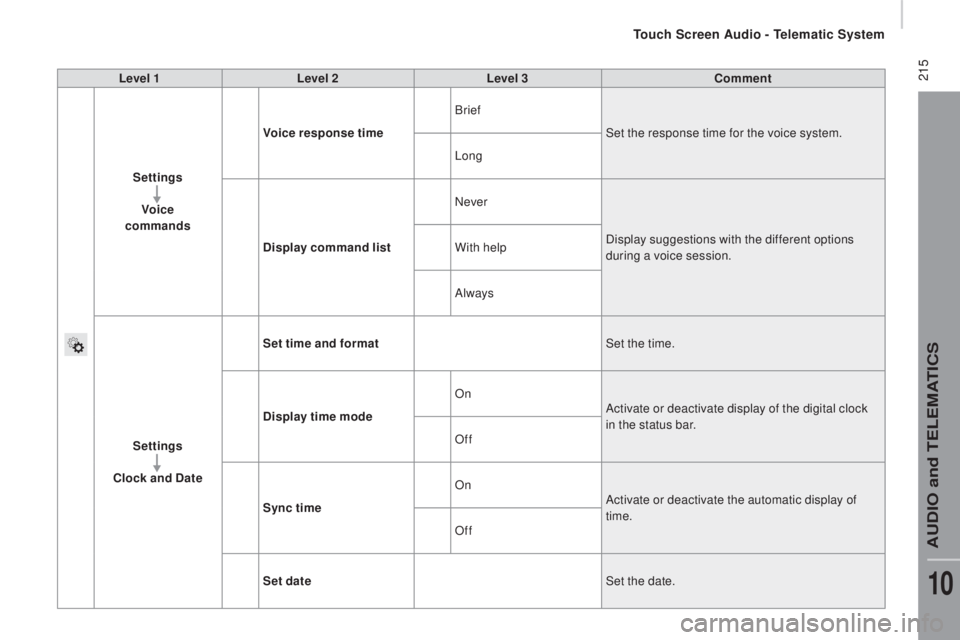
215Level 1Level 2 Level 3com ment
Settings Voice
commands Voice response time
Brief
Set the response time for the voice system.
Long
di
splay command list Never
Display suggestions with the different options
during a voice session.
With help
Always
Settings
cloc
k and
date S
et time and format Set the time.
di
splay time mode On
Activate or deactivate display of the digital clock
in the status bar.
Off
Sync time On
Activate or deactivate the automatic display of
time.
Off
Set date Set the date.
touch Screen Audio - telematic System
AuDIO and teLeMAtICS
10