display PEUGEOT BOXER 2015 Owner's Manual
[x] Cancel search | Manufacturer: PEUGEOT, Model Year: 2015, Model line: BOXER, Model: PEUGEOT BOXER 2015Pages: 276, PDF Size: 8.99 MB
Page 113 of 276
111
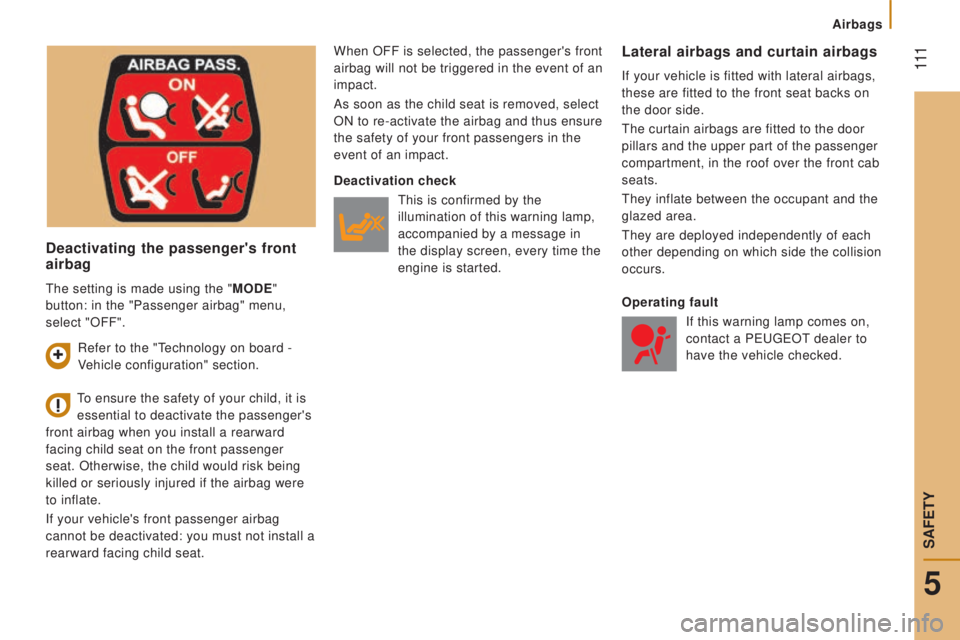
deactivating the passenger's front
airbag
When OFF is selected, the passenger's front
airbag will not be triggered in the event of an
impact.
As soon as the child seat is removed, select
ON to re-activate the airbag and thus ensure
the safety of your front passengers in the
event of an impact.Lateral airbags and curtain airbags
If your vehicle is fitted with lateral airbags,
these are fitted to the front seat backs on
the door side.
the curtain airbags are fitted to the door
pillars and the upper part of the passenger
compartment, in the roof over the front cab
seats.
they inflate between the occupant and the
glazed area.
they are deployed independently of each
other depending on which side the collision
occurs.
to ensure the safety of your child, it is
essential to deactivate the passenger's
front airbag when you install a rearward
facing child seat on the front passenger
seat. Otherwise, the child would risk being
killed or seriously injured if the airbag were
to inflate.
If your vehicle's front passenger airbag
cannot be deactivated: you must not install a
rearward facing child seat.
deactivation check
this is confirmed by the
illumination of this warning lamp,
accompanied by a message in
the display screen, every time the
engine is started.
operating fault
If this warning lamp comes on,
contact a P
eugeOt dealer to
have the vehicle checked.
Refer to the "technology on board -
V
ehicle configuration" section.
the setting is made using the "
M
odE
"
button: in the "Passenger airbag" menu,
select "OFF".
5
SAFetY
Airbags
Page 139 of 276
137
Good practice
While the quantity of AdBlue® in the additive
tank is
sufficient, no information is displayed.
On the other hand, once the additive level
drops to the quantity needed for a range
of 1 500 miles (2 400 km) driving, you
are warned by different temporary signals
(warning lamp, message, audible signal).
As more miles are covered, these signals
intensify and the message becomes
permanent.
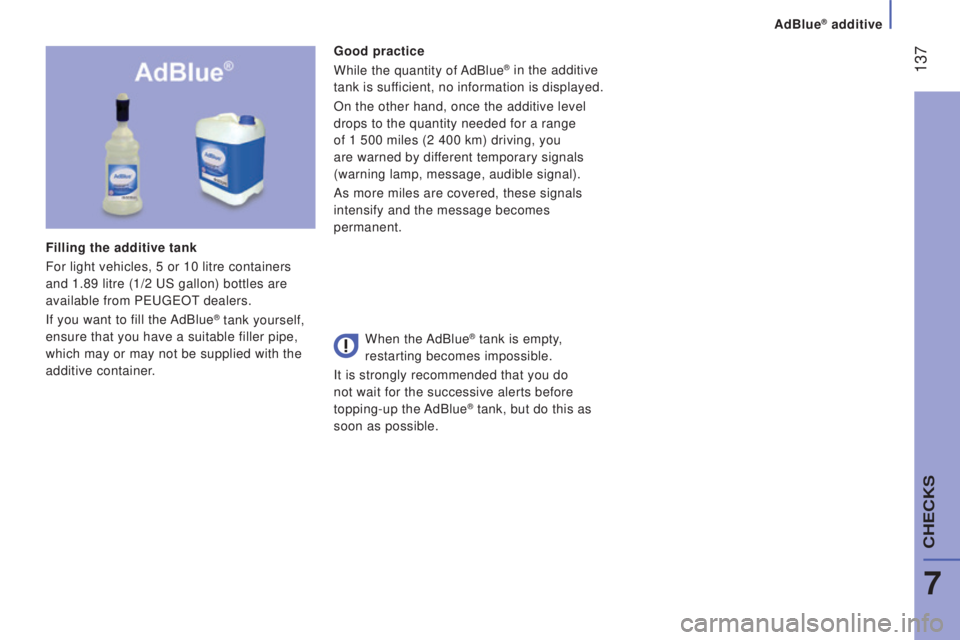
Filling the additive tank
For light vehicles, 5 or 10 litre containers
and 1.89 litre (1/2
uS gallon) bottles are
available from P
eugeOt dealers.
If you want to fill the AdBlue® tank yourself,
ensure that you have a suitable filler pipe,
which may or may not be supplied with the
additive container. When the AdBlue® tank is empty,
restarting becomes impossible.
It is strongly recommended that you do
not wait for the successive alerts before
topping-up the AdBlue
® tank, but do this as
soon as possible.
AdBlue® additive
7
CHeCKS
Page 140 of 276
138
range indicators
Different levels of alert are triggered
according to the remaining driving range
threshold.
You will be informed as each mileage
threshold is reached and the alerts will
change from temporary to permanent.
-
t
he 1st alert is triggered at a remaining
driving range of 1 500 miles (2 400 km).
-
t
he 2nd alert is triggered at a remaining
driving range of 375 miles (600 km).
up to 0 miles, at which point it will be
impossible to restart the engine after a stop.
range greater than 1 500 miles (2 400 km)
No information displayed.
Once the 1 500 miles (2 400 km)
threshold is reached, this warning
lamp comes on temporarily and the
remaining range message is displayed.
every time the ignition is switched on, the
alert is given, together with an audible
signal.
remaining range less than 1 500 miles
(2 400 km) and greater than 375 miles
(600 km)
Once the 350 miles (600 km) threshold
is reached, this warning lamp flashes,
accompanied by a message on the
remaining driving range.
the alert is repeated with an update of the
remaining driving range in steps of 30 miles
(50 km) travelled.
every time the ignition is switched on, the
alert is given together with an audible signal.
At 0 miles the system installed in the
vehicle to meet the emissions standard
will prevent engine starting.
the 0 level of
AdBlue
® additive has been
reached.
Your vehicle's exhaust emissions no longer
meet the "
euro 6" standard and the engine
will not start.
to be able to restart
the vehicle, you must
add at least 3.8 litres of AdBlue
®.
-
Pour the additive into the tank (by the
filler with the blue cap).
-
Switch on the ignition without starting.
-
Wait 10 seconds before starting the
engine.
remaining range less than 350 miles
(600 km) and more than 0 miles Starting prevented, breakdown related to a
lack of AdBlue
®
additive in the special tank
Avoid waiting until the remaining
range is 0 miles!
the alert is repeated when driving until the
AdBlue additive tank has been topped-up
with sufficient additive.
unless the additive in the special additive
tank is topped-up, you risk immobilisation of
the vehicle. Following this, make a further fill to the
special additive tank, the capacity of
which is 15 litres. Or go to a P
eugeOt dealer or a
qualified workshop.
AdBlue® additive
Page 141 of 276
139
Fault with the Scr system
the diagnostic warning lamp
comes on.
every time the ignition is
switched on, the emissions fault
is confirmed by an audible signal and a
message.
If it is a temporary fault, the alert disappears
as soon as the exhaust emissions return to
the levels required by the standard. Fault confirmed
In addition to the previous signals, the
remaining range allowed will be displayed in
miles (kilometres) in the instrument panel.
the alert will be repeated every 30 seconds
with an update of the driving range.
go to a PeugeOt dealer or a qualified
workshop as soon as possible.
Y
ou risk not being able to start the engine. Starting prevented, having covered the
250 miles (400 km)
detection
At each attempt at starting,
the alert is activated and the
message on starting prevention is
displayed.
On the other hand, if the warning lamp
is still on after 30 miles (50 km) of
driving, the fault is confirmed.
An engine start prevention system
will be activated automatically after
250
miles (400 km) travelled following this
confirmation.
go to a PeugeOt dealer or a qualified
workshop.
AdBlue® additive
7
CHeCKS
Page 146 of 276
144
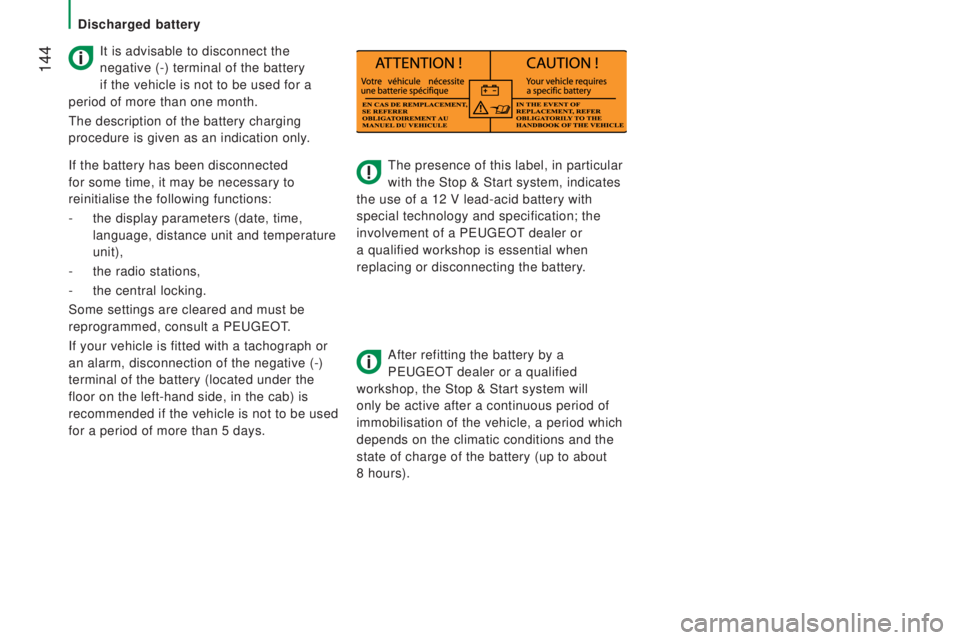
the presence of this label, in particular
with the Stop & Start system, indicates
the use of a 12 V lead-acid battery with
special technology and specification; the
involvement of a P
eugeOt dealer or
a qualified workshop is essential when
replacing or disconnecting the battery.
After refitting the battery by a
P
eugeOt dealer or a qualified
workshop, the Stop & Start system will
only be active after a continuous period of
immobilisation of the vehicle, a period which
depends on the climatic conditions and the
state of charge of the battery (up to about
8 hours).
It is advisable to disconnect the
negative (-) terminal of the battery
if the vehicle is not to be used for a
period of more than one month.
the description of the battery charging
procedure is given as an indication only.
If the battery has been disconnected
for some time, it may be necessary to
reinitialise the following functions:
-
the display parameters (date, time,
language, distance unit and temperature
unit),
-
the radio stations,
-
the central locking.
Some settings are cleared and must be
reprogrammed, consult a P
eugeOt.
If your vehicle is fitted with a tachograph or
an alarm, disconnection of the negative (-)
terminal of the battery (located under the
floor on the left-hand side, in the cab) is
recommended if the vehicle is not to be used
for a period of more than 5 days.
Discharged battery
Page 187 of 276
185
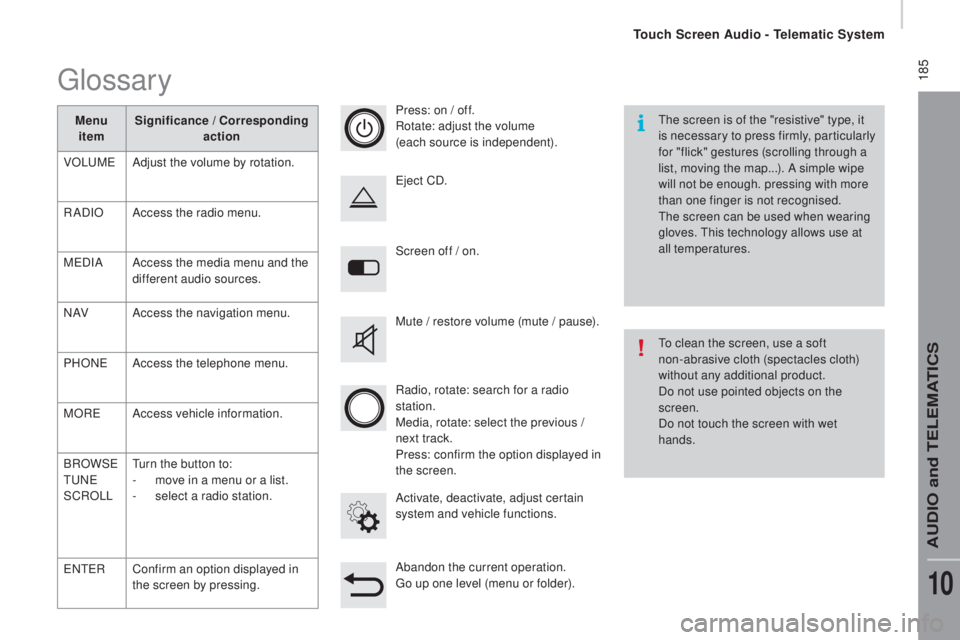
Screen off / on.
Activate, deactivate, adjust certain
system and vehicle functions.
eje
ct CD.
Mute / restore volume (mute / pause).
Abandon the current operation.
go up o
ne level (menu or folder).
Press: on / off.
Rotate: adjust the volume
(each source is independent).
Radio, rotate: search for a radio
station.
Media, rotate: select the previous /
next track.
Press: confirm the option displayed in
the screen.
the s
creen is of the "resistive" type, it
is necessary to press firmly, particularly
for "flick" gestures (scrolling through a
list, moving the map...). A simple wipe
will not be enough. pressing with more
than one finger is not recognised.
the s
creen can be used when wearing
gloves.
thi
s technology allows use at
all temperatures.
to cl
ean the screen, use a soft
non-abrasive cloth (spectacles cloth)
without any additional product.
Do not use pointed objects on the
screen.
Do not touch the screen with wet
hands.
glossary
Menu item Significance / cor
responding
action
VOL
uMeAd
just the volume by rotation.
RADIO Access the radio menu.
M
eD
IA Access the media menu and the
different audio sources.
N AV Access the navigation menu.
PHON
eAc
cess the telephone menu.
MOR
eAc
cess vehicle information.
BROWS
e
tuNeSC
ROLL
tur
n the button to:
-
mov
e in a menu or a list.
-
se
lect a radio station.
eNteRC
onfirm an option displayed in
the screen by pressing.
touch Screen Audio - telematic System
AuDIO and teLeMAtICS
10
Page 191 of 276
189Level 1Level 2 Level 3com ment
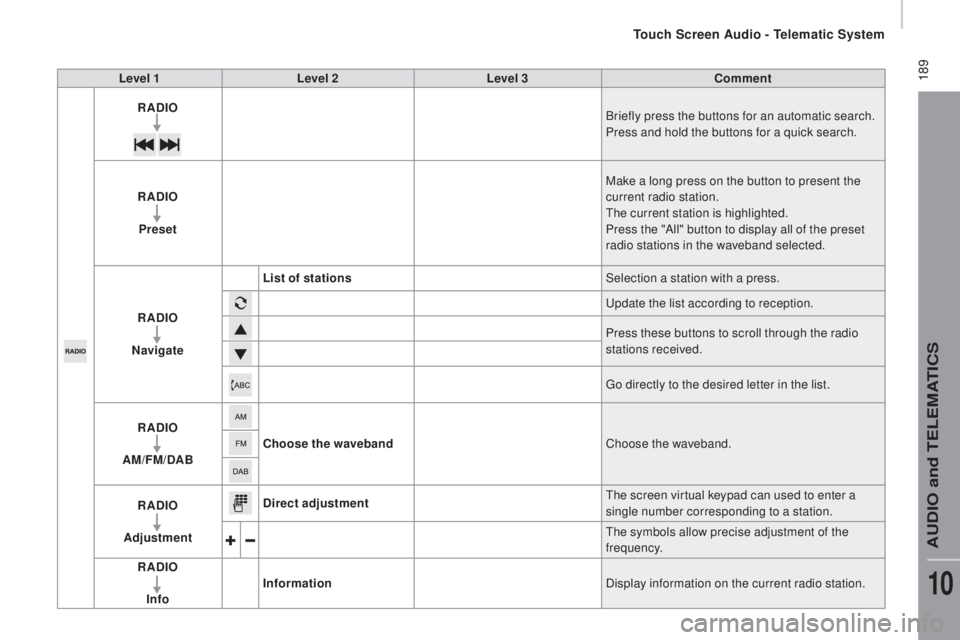
rAdIoBr
iefly press the buttons for an automatic search.
Press and hold the buttons for a quick search.
rAdIo
Pre
set Make a long press on the button to present the
current radio station.
the c
urrent station is highlighted.
Press the "All" button to display all of the preset
radio stations in the waveband selected.
rAdIo
n
a
vigate List of stations
Selection a station with a press.
upd
ate the list according to reception.
Press these buttons to scroll through the radio
stations received.
go di
rectly to the desired letter in the list.
rAdIo
AM/F
M/
dA
B
choo
se the waveband Choose the waveband.
rAdIo
Ad
justment
dire
ct adjustment
the s
creen virtual keypad can used to enter a
single number corresponding to a station.
the s
ymbols allow precise adjustment of the
frequency.
rAdIo
In
fo Information
Display information on the current radio station.
touch Screen Audio - telematic System
AuDIO and teLeMAtICS
10
Page 194 of 276
192
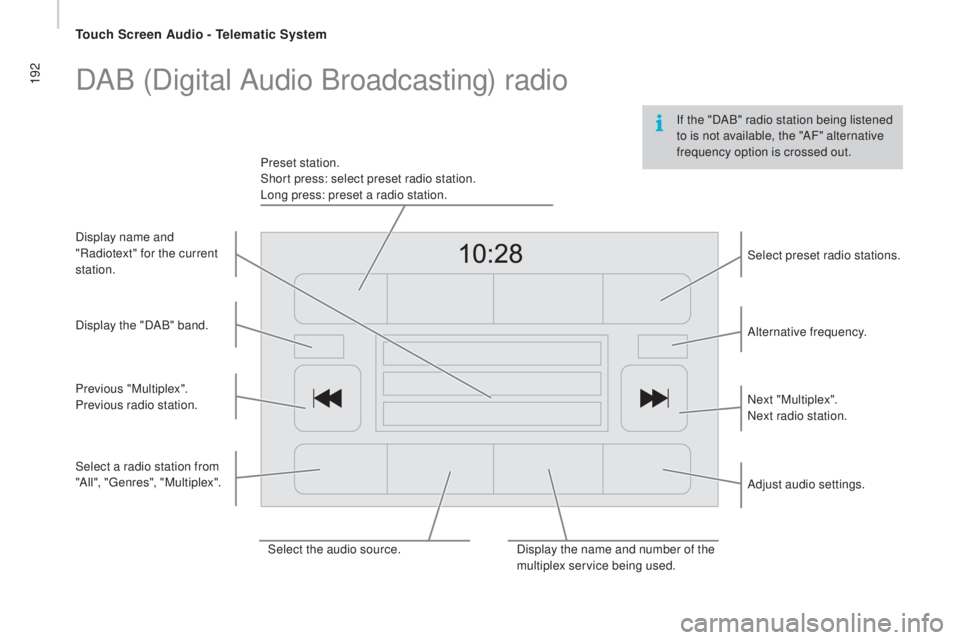
If the "DAB" radio station being listened
to is not available, the "AF" alternative
frequency option is crossed out.
DAB (Digital Audio Broadcasting) radio
Select the audio source.Display the name and number of the
multiplex service being used.Alternative frequency.
Adjust audio settings. Select preset radio stations.
Next "Multiplex".
Next radio station.
Display the "DAB" band.
Select a radio station from
"All", "
genr
es", "Multiplex".
Previous "Multiplex".
Previous radio station. Display name and
"Radiotext" for the current
station. Preset station.
Short press: select preset radio station.
Long press: preset a radio station.
touch Screen Audio - telematic System
Page 195 of 276
193
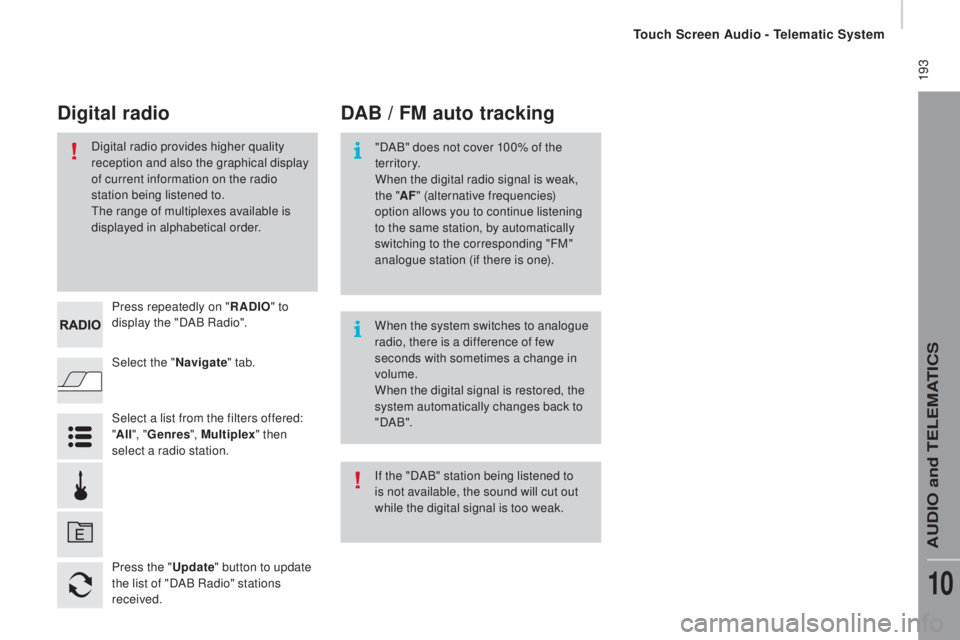
Select the "navigate" tab.
Press repeatedly on "
rAdIo" to
d
isplay the "DAB Radio".
Select a list from the filters offered:
" All ", "Genres ", Multiplex " then
select a radio station.
Press the "
upda
te" button to update
the list of "DAB Radio" stations
received.
dAB / FM auto trackingdig
ital radio
"DAB" does not cover 100% of the
te r r i to r y.
When the digital radio signal is weak,
the " AF" (alternative frequencies)
option allows you to continue listening
to the same station, by automatically
switching to the corresponding "FM"
analogue station (if there is one).
When the system switches to analogue
radio, there is a difference of few
seconds with sometimes a change in
volume.
When the digital signal is restored, the
system automatically changes back to
" DA B ".
Digital radio provides higher quality
reception and also the graphical display
of current information on the radio
station being listened to.
the r
ange of multiplexes available is
displayed in alphabetical order.
If the "DAB" station being listened to
is not available, the sound will cut out
while the digital signal is too weak.
touch Screen Audio - telematic System
AuDIO and teLeMAtICS
10
Page 197 of 276
195Level 1Level 2 Level 3com ment
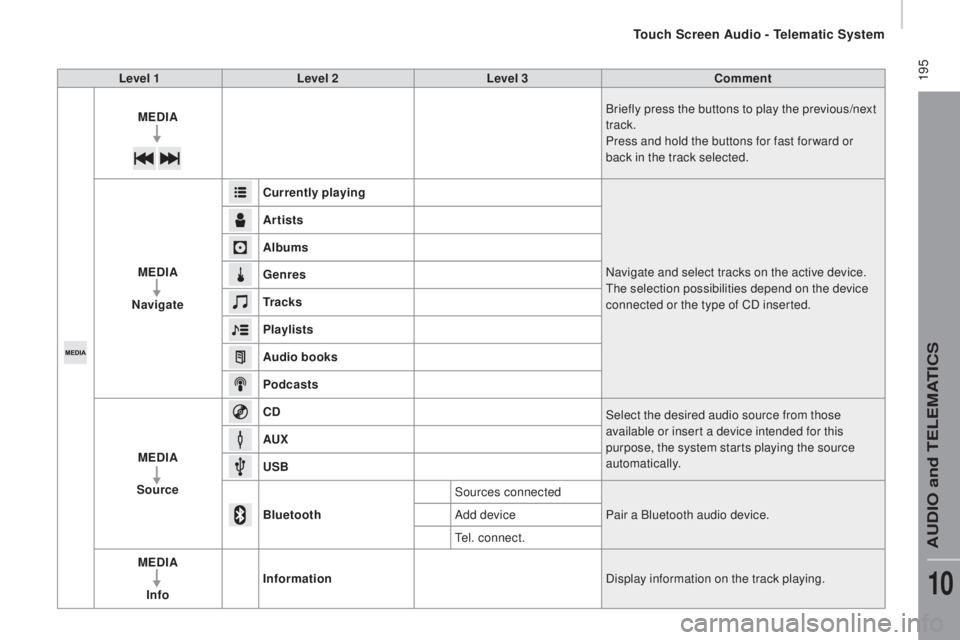
ME
dIA B
riefly press the buttons to play the previous/next
track.
Press and hold the buttons for fast for ward or
back in the track selected.
ME
dIA
na
vigate
curr
ently playing Navigate and select tracks on the active device.
the s
election possibilities depend on the device
connected or the type of CD inserted.
Artists
Albums
Genres
tr a
c k s
Playlists
Audio books
Podcasts
ME
dIA
So
urce
cdSe
lect the desired audio source from those
available or insert a device intended for this
purpose, the system starts playing the source
automatically.
A
u
x
u
S
B
Bluetooth Sources connected
Pair a Bluetooth audio device.
Add device
tel.
connect.
ME
dIA
I
nfo Information
Display information on the track playing.
touch Screen Audio - telematic System
AuDIO and teLeMAtICS
10