ECO mode Peugeot Boxer 2016 Owner's Guide
[x] Cancel search | Manufacturer: PEUGEOT, Model Year: 2016, Model line: Boxer, Model: Peugeot Boxer 2016Pages: 292, PDF Size: 10.07 MB
Page 233 of 292
231
boxer_en_Chap10b_Autoradio_Fiat-4_ed01-2015
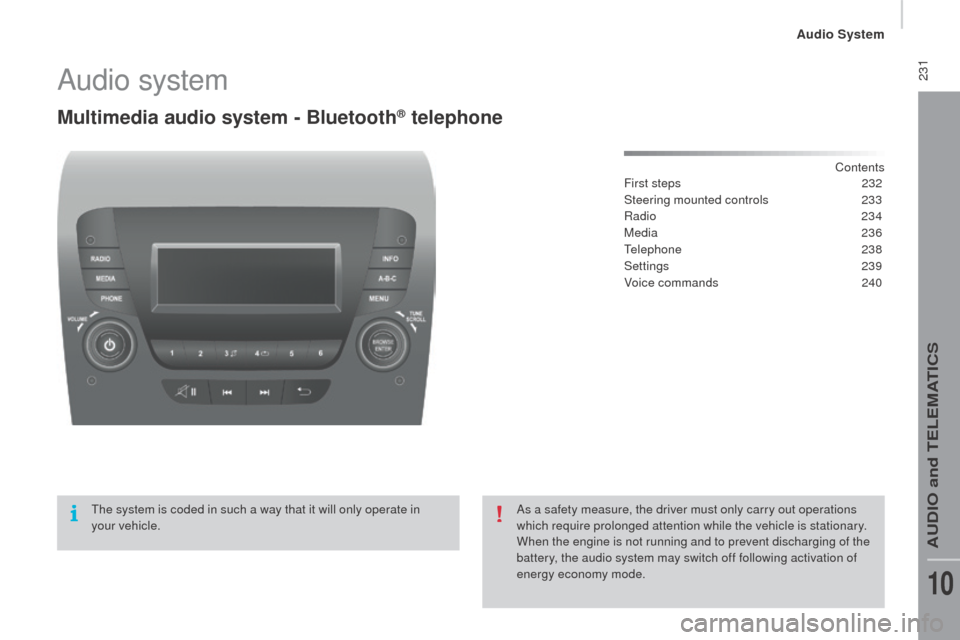
Audio system
Multimedia audio system - Bluetooth® telephone
Contents
First steps 2 32
Steering mounted controls
23
3
Radio
234
Media
236
te
lephone
2
38
Settings
2
39
Voice commands
2
40
th
e system is coded in such a way that it will only operate in
your
vehicle. As a safety measure, the driver must only carry out operations
which require prolonged attention while the vehicle is stationary.
When the engine is not running and to prevent discharging of the
battery, the audio system may switch off following activation of
energy economy mode.
Audio System
AuDIO and teLeMAtICS
10
Page 242 of 292
240
boxer_en_Chap10b_Autoradio_Fiat-4_ed01-2015
Voice commands
Steering mounted controls
Information - using the system
Instead of touching the screen, you can
use your voice to issue commands to
the system. Voice interaction can be quickly used
if these buttons are pressed during
a voice message from the system; It
allows a voice command to be issued
di r e c t l y.
For example, if the system is speaking
a voice help message and if you want
to know the command to give the
system, by pressing these buttons, the
voice message is interrupted and the
desired voice command can be spoken
directly (so avoiding the need to listed
to the complete voice help message).
When the system is waiting for a voice
command from the user, pressing these
buttons closes the voice session.
to e
nsure that your voice commands
are always recognised by the system,
we recommend that you follow the
advice below:
-
s
peak with a normal tone of voice,
-
b
efore speaking, always wait for
the "beep" (audible signal),
-
t
he system is able to recognise
the voice commands delivered,
independent off gender, tone and
inflexion of the voice of the person
speaking,
-
k
eep the noise level inside the
vehicle as low as possible,
-
b
efore speaking a voice command,
ask other passengers not to speak.
As the system recognizes voice
commands whatever is said, when
more than one person speaks
at the same time, it is possible
that the system will recognise
commands different or additional to
the one intended,
ev
ery time a button is pressed, a
"beep" (audible signal) is produced
and the screen displays a page of
suggestions asking the user to speak a
command.
-
f or best operation, it is
recommended that the windows
and opening roof (for versions/
markets where it is available) be
closed to avoid inter ference from
extraneous noises.
th
is button switches on the
"
te
lephone" voice recognition mode,
which makes it possible to start calls,
view the log of recent /received/made,
display contacts, etc.
th
is button switches on the "Radio/
Media" voice recognition mode,
which makes it possible to tune to a
specific radio station radio or specific
AM/FM radio frequency, play a track
or an album on a
u
S
B memory stick /
iPod/MP3 CD.
Audio System
Page 285 of 292
7
4
TECHNOLOGY
on
BOARD
boxer-post-it_en_Chap04_Technologie-a-bord_ed01-2015
Vehicle configuration
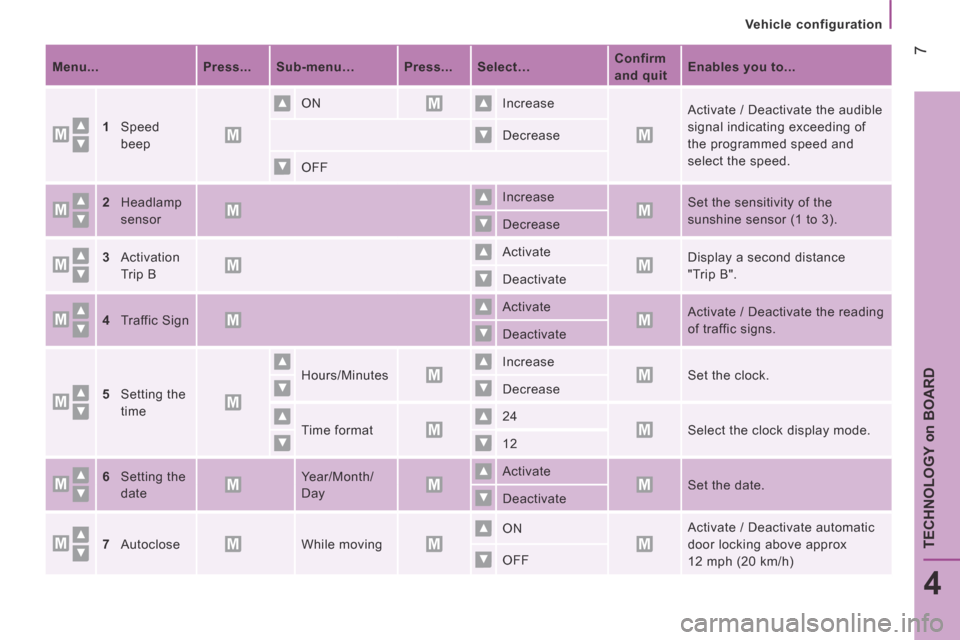
Menu... Press... Sub-menu… Press... Select… Confirm
and quit Enables you to...
1Speed
beep
ON Increase Activate / Deactivate the audible
signal indicating exceeding of
the programmed speed and
select the speed.
Decrease
OFF
2Headlamp
sensor
Increase Set the sensitivity of the
sunshine sensor (1 to 3). Decrease
3Activation
Trip B
Activate Display a second distance
"Trip B". Deactivate
4Traffic Sign Activate Activate / Deactivate the reading
of traffic signs. Deactivate
5Setting the
time
Hours/Minutes Increase Set the clock. Decrease
Time format 24 Select the clock display mode. 12
6Setting the
date
Year/Month/
Day
Activate Set the date. Deactivate
7Autoclose While moving ON Activate / Deactivate automatic
door locking above approx
12 mph (20 km/h) OFF