ECO mode Peugeot Boxer 2016 User Guide
[x] Cancel search | Manufacturer: PEUGEOT, Model Year: 2016, Model line: Boxer, Model: Peugeot Boxer 2016Pages: 292, PDF Size: 10.07 MB
Page 158 of 292
156
boxer_en_Chap08_Aide-Rapide_ed01-2015
Parking the vehicle
Where possible, park the vehicle on level,
stable and non-slippery ground.
Apply the parking brake, switch off the
ignition and engage first gear.
Wear a high visibility vest and position the
warning triangle on the road.
You must ensure that the occupants get out
of the vehicle and wait in a safe location.
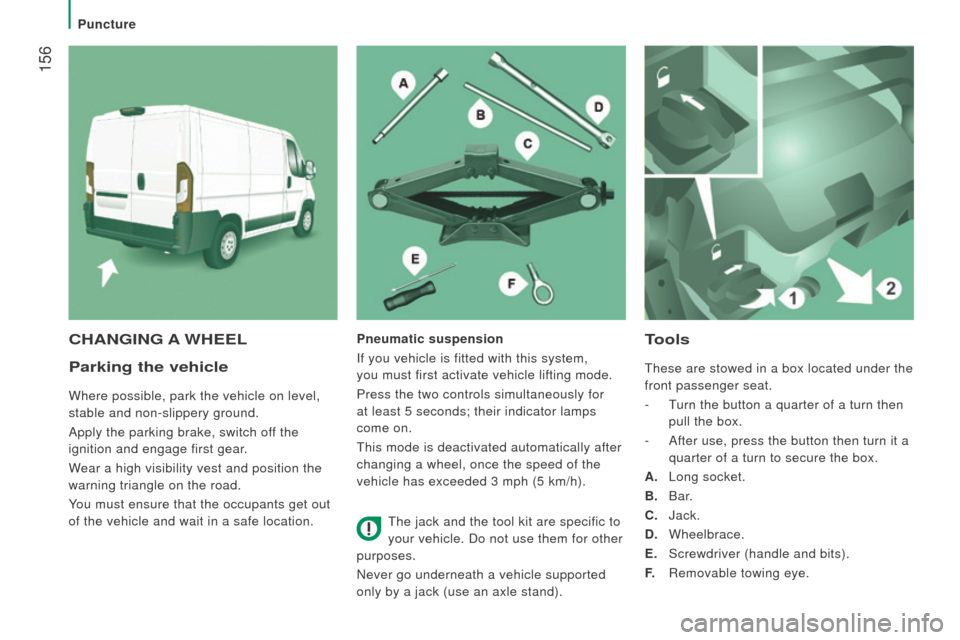
tools
these are stowed in a box located under the
front passenger seat.
-
t
urn the button a quarter of a turn then
pull the box.
-
After use, press the button then turn it a
quarter of a turn to secure the box.
A.
Long socket.
B.
Bar.
c
. Jack.
d
. Wheelbrace.
E.
Screwdriver (handle and bits).
F.
Removable towing eye.
cHAnGInG A WHEELPneumatic suspension
If you vehicle is fitted with this system,
you must first activate vehicle lifting mode.
Press the two controls simultaneously for
at least 5 seconds; their indicator lamps
come on.
t
his mode is deactivated automatically after
changing a wheel, once the speed of the
vehicle has exceeded 3 mph (5 km/h).
t
he jack and the tool kit are specific to
your vehicle. Do not use them for other
purposes.
Never go underneath a vehicle supported
only by a jack (use an axle stand).
Puncture
Page 181 of 292
179
boxer_en_Chap09_Caracteristiques-techniques_ed01-2015
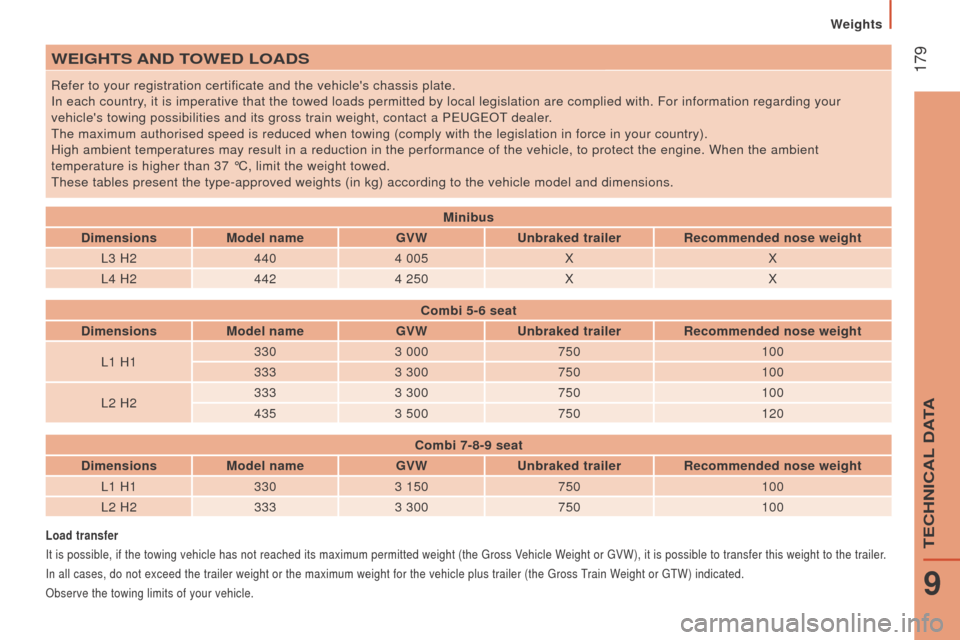
WEIGHtS And to WE d L o A d S
Refer to your registration certificate and the vehicle's chassis plate.
In each country, it is imperative that the towed loads permitted by local legislation a\
re complied with. For information regarding your
vehicle's towing possibilities and its gross train weight, contact a P
euge O t
dealer
.
t
he maximum authorised speed is reduced when towing (comply with the leg\
islation in force in your country).
High ambient temperatures may result in a reduction in the performance o\
f the vehicle, to protect the engine. When the ambient
temperature is higher than 37 °C, limit the weight towed.
t
hese tables present the type-approved weights (in kg) according to the\
vehicle model and dimensions.
Load transfer
It is possible, if the towing vehicle has not reached its maximum permit\
ted weight (the g ross Vehicle Weight or g VW), it is possible to transfer this weight to the trailer.
In all cases, do not exceed the trailer weight or the maximum weight for\
the vehicle plus trailer (the
g ross
train W
eight or gt W) indicated.
Observe the towing limits of your vehicle.
Minibus
d
imensions Model name GVW
u
nbraked trailer
r
ecommended nose weight
L3 H2 4404 005 X X
L4 H2 4424 250 X X
c
ombi 5-6 seat
d
imensions Model name GVW
u
nbraked trailer
r
ecommended nose weight
L1 H1 330
3 000 750 100
333 3 300 750 100
L2 H2 333
3 300 750 100
435 3 500 750 120
c
ombi 7-8-9 seat
d
imensions Model name GVW
u
nbraked trailer
r
ecommended nose weight
L1 H1 3303 150 750 100
L2 H2 3333 300 750 100
Weights
9
teCHNICAL DAtA
Page 182 of 292
180
boxer_en_Chap09_Caracteristiques-techniques_ed01-2015
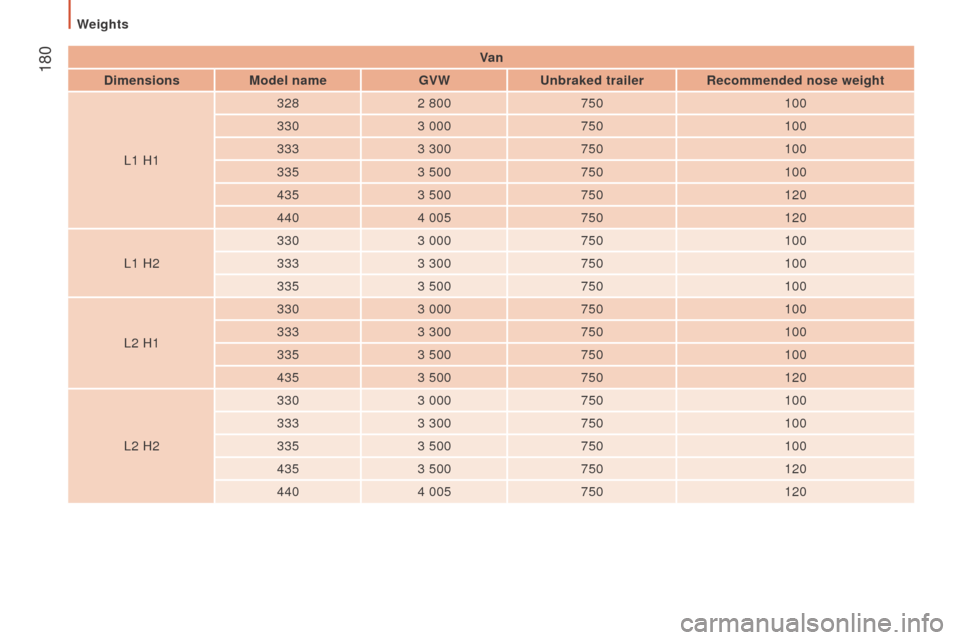
Va n
d
imensions Model name GVW
u
nbraked trailer
r
ecommended nose weight
L1 H1 328
2 800 750 100
330 3 000 750 100
333 3 300 750 100
335 3 500 750 100
435 3 500 750 120
440 4 005 750 120
L1 H2 330
3 000 750 100
333 3 300 750 100
335 3 500 750 100
L2 H1 330
3 000 750 100
333 3 300 750 100
335 3 500 750 100
435 3 500 750 120
L2 H2 330
3 000 750 100
333 3 300 750 100
335 3 500 750 100
435 3 500 750 120
440 4 005 750 120
Weights
Page 183 of 292
181
boxer_en_Chap09_Caracteristiques-techniques_ed01-2015
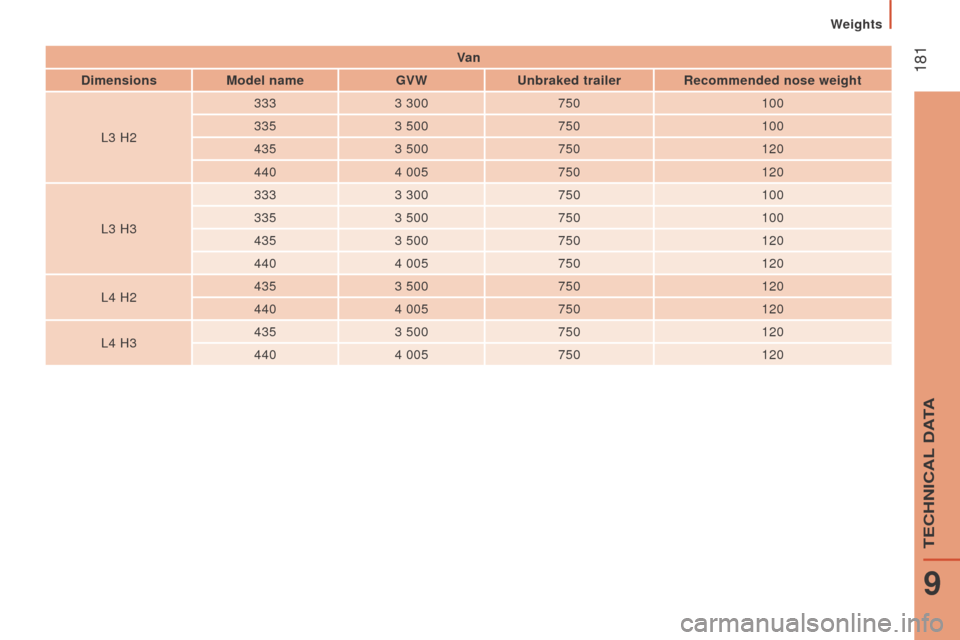
Va n
d
imensions Model name GVW
u
nbraked trailer
r
ecommended nose weight
L3 H2 333
3 300 750 100
335 3 500 750 100
435 3 500 750 120
440 4 005 750 120
L3 H3 333
3 300 750 100
335 3 500 750 100
435 3 500 750 120
440 4 005 750 120
L4 H2 435
3 500 750 120
440 4 005 750 120
L4 H3 435
3 500 750 120
440 4 005 750 120
Weights
9
teCHNICAL DAtA
Page 185 of 292
183
boxer_en_Chap10a_Autoradio_Fiat-tactile-1_ed01-2015
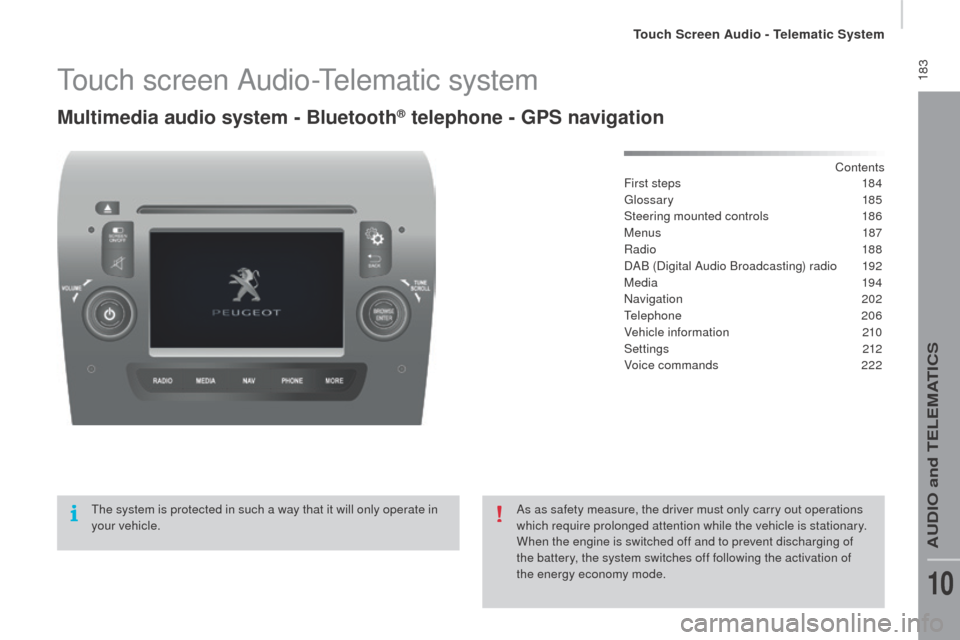
touch screen Audio-telematic system
Multimedia audio system - Bluetooth® telephone - GPS navigation
Contents
First steps
1 84
glos
sary
185
Steering mounted controls
1
86
Menus
187
Radio
188
DAB (Digital Audio Broadcasting) radio
1
92
Media
19 4
Navigation
2
02
te
lephone
206
Vehicle information
2
10
Settings
212
Voice commands
2
22
th
e system is protected in such a way that it will only operate in
your vehicle. As as safety measure, the driver must only carry out operations
which require prolonged attention while the vehicle is stationary.
When the engine is switched off and to prevent discharging of
the battery, the system switches off following the activation of
the energy economy mode.
touch Screen Audio - telematic System
AuDIO and teLeMAtICS
10
Page 201 of 292
199
boxer_en_Chap10a_Autoradio_Fiat-tactile-1_ed01-2015
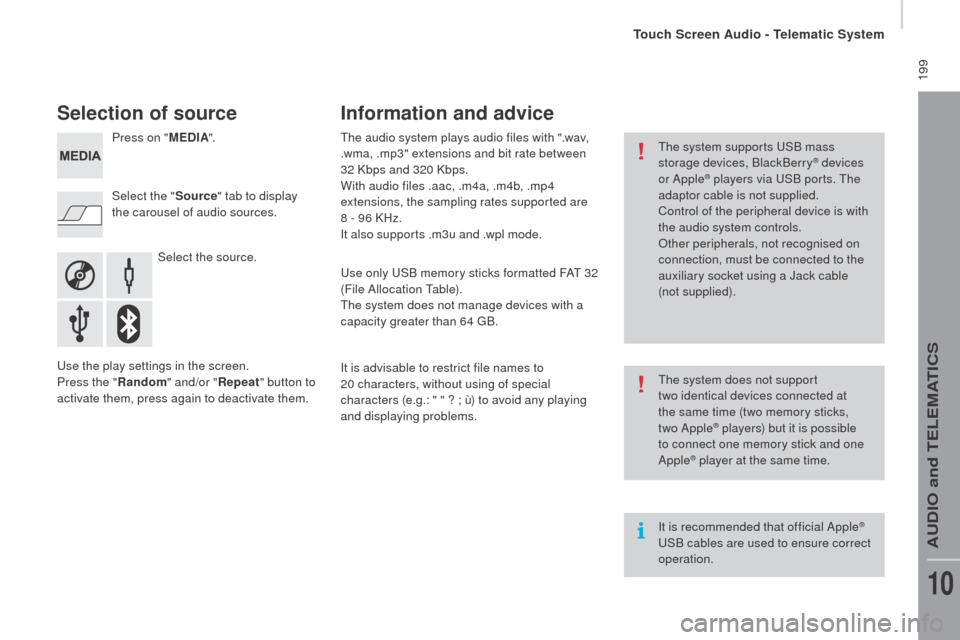
Selection of source
Select the source.
Select the "
Source" tab to display
the carousel of audio sources. Press on " MEd
I
A
".
use
the play settings in the screen.
Press the "
ra
ndom " and/or "
rep
eat" button to
activate them, press again to deactivate them.
th
e audio system plays audio files with ".wav,
.wma, .mp3" extensions and bit rate between
32 Kbps and 320 Kbps.
With audio files .aac, .m4a, .m4b, .mp4
extensions, the sampling rates supported are
8 - 96 KHz.
It also supports .m3u and .wpl mode.us e only uS B memory sticks formatted FAt 32
(File Allocation
t
a
ble).
th
e system does not manage devices with a
capacity greater than 64
g
B.
I
t is advisable to restrict file names to
20
characters, without using of special
characters (e.g.: " " ?
; ù) to avoid any playing
and displaying problems.
Information and advice
the system supports uS B mass
storage devices, BlackBerry® devices
or Apple® players via uS B ports. th e
adaptor cable is not supplied.
Control of the peripheral device is with
the audio system controls.
Other peripherals, not recognised on
connection, must be connected to the
auxiliary socket using a Jack cable
(not supplied).
It is recommended that official Apple
® uS
B cables are used to ensure correct
operation.
th
e system does not support
two
identical devices connected at
the same time (two memory sticks,
two Apple
® players) but it is possible
t
o connect one memory stick and one
Apple
® player at the same time.
touch Screen Audio - telematic System
AuDIO and teLeMAtICS
10
Page 207 of 292
205
boxer_en_Chap10a_Autoradio_Fiat-tactile-1_ed01-2015
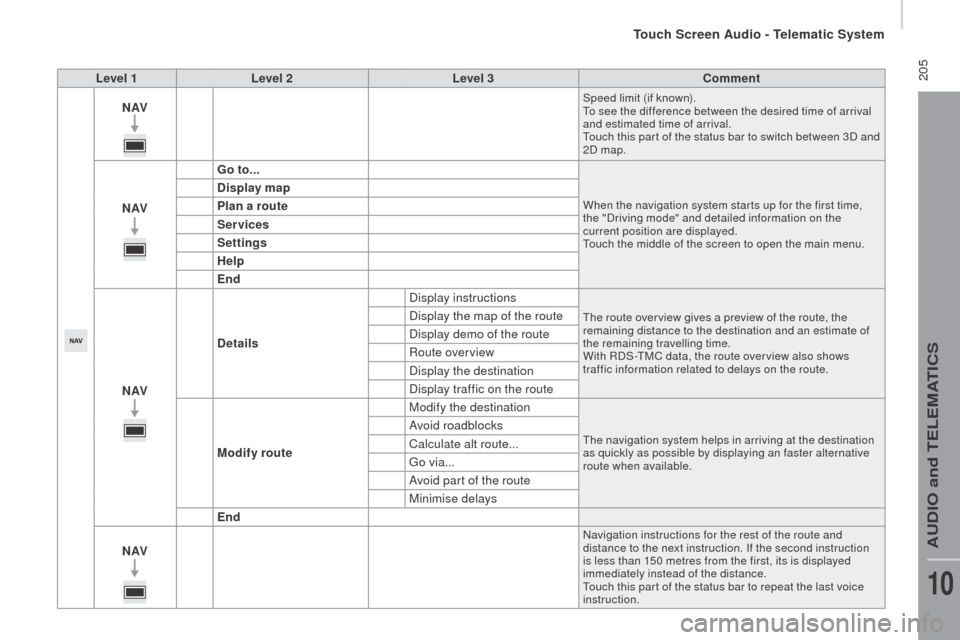
Level 1Level 2 Level 3co mment
nAVSpeed limit (if known).to s
ee the difference between the desired time of arrival
and estimated time of arrival.
to
uch this par t of the status bar to switch between 3D and
2D map.
nAV G o to...When the navigation system star ts up for the first time,
the "Driving mode" and detailed information on the
current position are displayed.
to
uch the middle of the screen to open the main menu.
display map
P lan a route
Services
Settings
Help
End
nAV
de
tails Display instructions
the route over view gives a preview of the route, the
remaining distance to the destination and an estimate of
the remaining travelling time.
With RDS-
tM
C data, the route over view also shows
traffic information related to delays on the route.Display the map of the route
Display demo of the route
Route overview
Display the destination
Display traffic on the route
Modify route Modify the destination
the navigation system helps in arriving at the destination
as quickly as possible by displaying an faster alternative
route when available.Avoid roadblocks
Calculate alt route...
go
via...
Avoid part of the route
Minimise delays
End
nAV
Navigation instructions for the rest of the route and
distance to the next instruction. If the second instruction
is less than 150 metres from the first, its is displayed
immediately instead of the distance.
to
uch this par t of the status bar to repeat the last voice
instruction.
touch Screen Audio - telematic System
AuDIO and teLeMAtICS
10
Page 210 of 292
208
boxer_en_Chap10a_Autoradio_Fiat-tactile-1_ed01-2015
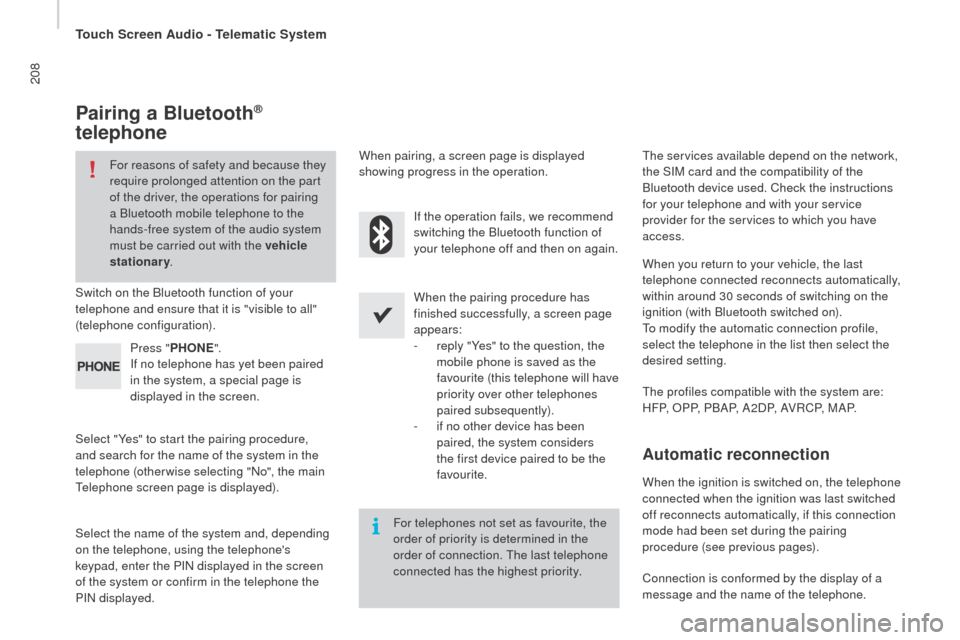
Pairing a Bluetooth®
telephone
For reasons of safety and because they
require prolonged attention on the part
of the driver, the operations for pairing
a Bluetooth mobile telephone to the
hands-free system of the audio system
must be carried out with the vehicle
stationary .
Switch on the Bluetooth function of your
telephone and ensure that it is "visible to all"
(telephone configuration).
Select "Yes" to start the pairing procedure,
and search for the name of the system in the
telephone (otherwise selecting "No", the main
te
lephone screen page is displayed). When the pairing procedure has
finished successfully, a screen page
appears:
-
r
eply "Yes" to the question, the
mobile phone is saved as the
favourite (this telephone will have
priority over other telephones
paired subsequently).
-
i
f no other device has been
paired, the system considers
the first device paired to be the
favourite.
When pairing, a screen page is displayed
showing progress in the operation.th
e services available depend on the network,
the SIM card and the compatibility of the
Bluetooth device used. Check the instructions
for your telephone and with your service
provider for the services to which you have
access.
Select the name of the system and, depending
on the telephone, using the telephone's
keypad, enter the PIN displayed in the screen
of the system or confirm in the telephone the
PIN displayed. Press "
PH
on
E".
I
f no telephone has yet been paired
in the system, a special page is
displayed in the screen. If the operation fails, we recommend
switching the Bluetooth function of
your telephone off and then on again.
For telephones not set as favourite, the
order of priority is determined in the
order of connection.
t
h
e last telephone
connected has the highest priority.
th
e profiles compatible with the system are:
H F P, O P P, P B A P, A 2 D P, A V R C P, M A P. When you return to your vehicle, the last
telephone connected reconnects automatically,
within around 30 seconds of switching on the
ignition (with Bluetooth switched on).
to m
odify the automatic connection profile,
select the telephone in the list then select the
desired setting.
Automatic reconnection
When the ignition is switched on, the telephone
connected when the ignition was last switched
off reconnects automatically, if this connection
mode had been set during the pairing
procedure (see previous pages).
Connection is conformed by the display of a
message and the name of the telephone.
touch Screen Audio - telematic System
Page 224 of 292
222
boxer_en_Chap10a_Autoradio_Fiat-tactile-1_ed01-2015
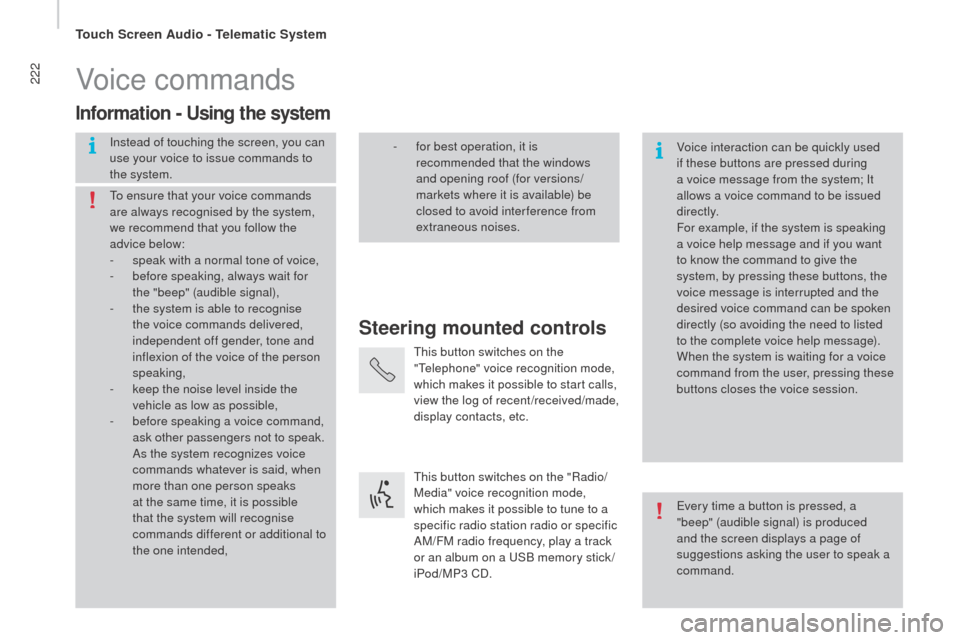
Voice commands
Steering mounted controls
Information - using the system
Instead of touching the screen, you can
use your voice to issue commands to
the system. Voice interaction can be quickly used
if these buttons are pressed during
a voice message from the system; It
allows a voice command to be issued
di r e c t l y.
For example, if the system is speaking
a voice help message and if you want
to know the command to give the
system, by pressing these buttons, the
voice message is interrupted and the
desired voice command can be spoken
directly (so avoiding the need to listed
to the complete voice help message).
When the system is waiting for a voice
command from the user, pressing these
buttons closes the voice session.
to e
nsure that your voice commands
are always recognised by the system,
we recommend that you follow the
advice below:
-
s
peak with a normal tone of voice,
-
b
efore speaking, always wait for
the "beep" (audible signal),
-
t
he system is able to recognise
the voice commands delivered,
independent off gender, tone and
inflexion of the voice of the person
speaking,
-
k
eep the noise level inside the
vehicle as low as possible,
-
b
efore speaking a voice command,
ask other passengers not to speak.
As the system recognizes voice
commands whatever is said, when
more than one person speaks
at the same time, it is possible
that the system will recognise
commands different or additional to
the one intended,
ev
ery time a button is pressed, a
"beep" (audible signal) is produced
and the screen displays a page of
suggestions asking the user to speak a
command.
-
f or best operation, it is
recommended that the windows
and opening roof (for versions/
markets where it is available) be
closed to avoid inter ference from
extraneous noises.
th
is button switches on the
"
te
lephone" voice recognition mode,
which makes it possible to start calls,
view the log of recent /received/made,
display contacts, etc.
th
is button switches on the "Radio/
Media" voice recognition mode,
which makes it possible to tune to a
specific radio station radio or specific
AM/FM radio frequency, play a track
or an album on a
u
S
B memory stick /
iPod/MP3 CD.
touch Screen Audio - telematic System
Page 230 of 292
228
boxer_en_Chap10a_Autoradio_Fiat-tactile-1_ed01-2015
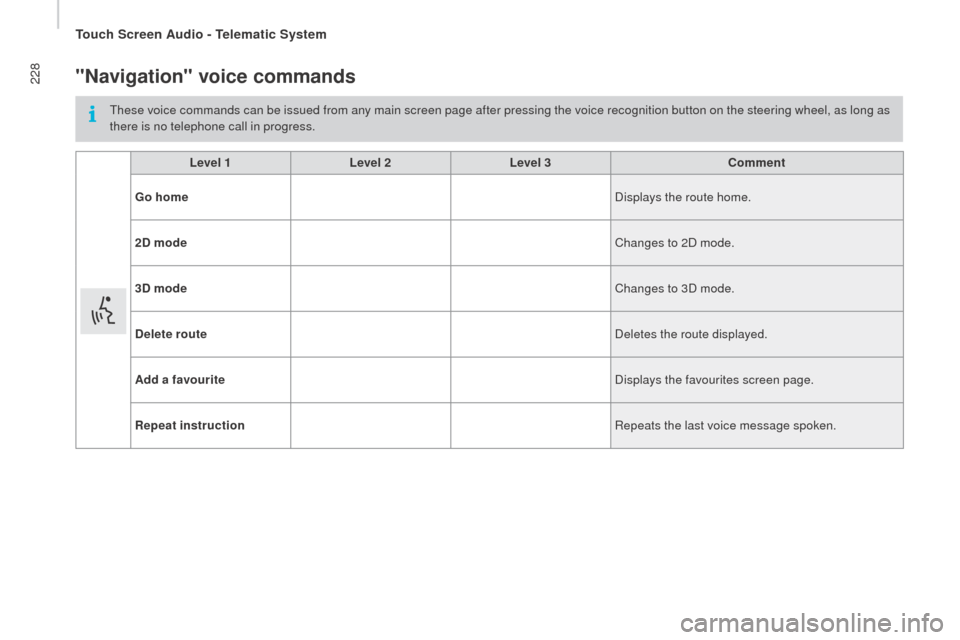
"navigation" voice commands
these voice commands can be issued from any main screen page after pressing the voice recognition button on the steering wheel, as long as
there is no telephone call in progress.Level 1 Level 2Level 3
co
mment
Go home Displays the route home.
2
d
mode Changes to 2D mode.
3
d
mode Changes to 3D mode.
de
lete route Deletes the route displayed.
Add a favourite Displays the favourites screen page.
rep
eat instruction Repeats the last voice message spoken.
touch Screen Audio - telematic System