display Peugeot Boxer 2018 Workshop Manual
[x] Cancel search | Manufacturer: PEUGEOT, Model Year: 2018, Model line: Boxer, Model: Peugeot Boxer 2018Pages: 232, PDF Size: 9.09 MB
Page 204 of 232
18
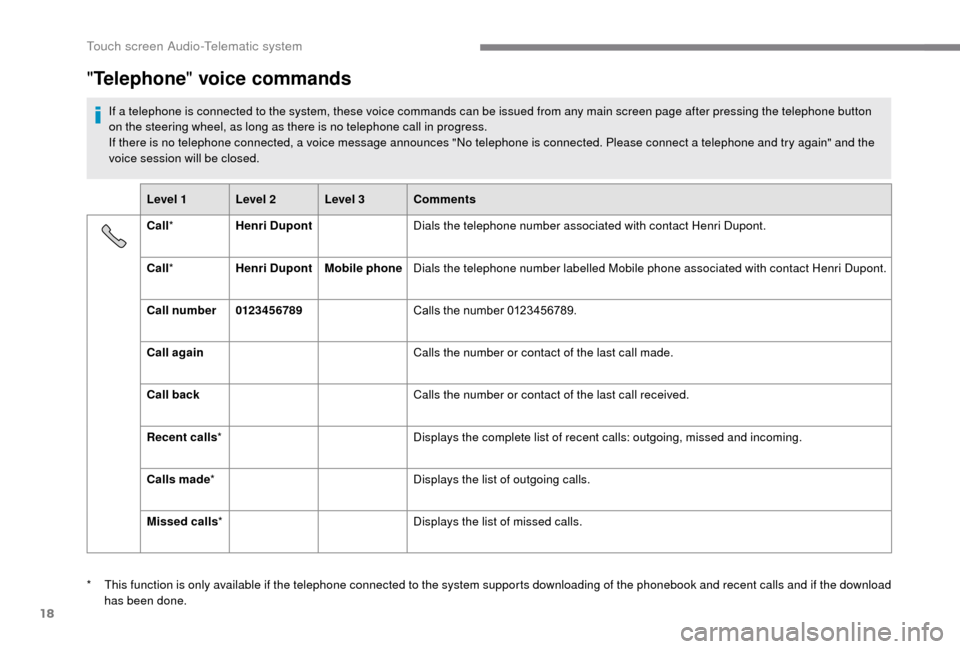
"Telephone " voice commands
If a telephone is connected to the system, these voice commands can be issued from any main screen page after pressing the telephone button
o n the steering wheel, as long as there is no telephone call in progress.
If there is no telephone connected, a voice message announces "No telephone is connected. Please connect a
telephone and try again" and the
voice session will be closed.
Level 1 Level 2 Level 3 Comments
Call * Henri Dupont Dials the telephone number associated with contact Henri Dupont.
Call * Henri Dupont Mobile phoneDials the telephone number labelled Mobile phone associated with contact Henri Dupont.
Call number 0123 4 5 6789 Calls the number 0123456789.
Call again Calls the number or contact of the last call made.
Call back Calls the number or contact of the last call received.
Recent calls * Displays the complete list of recent calls: outgoing, missed and incoming.
Calls made * Displays the list of outgoing calls.
Missed calls * Displays the list of missed calls.
*
T
his function is only available if the telephone connected to the system supports downloading of the phonebook and recent calls and if the download
has been done.
Touch screen Audio-Telematic system
Page 205 of 232
19
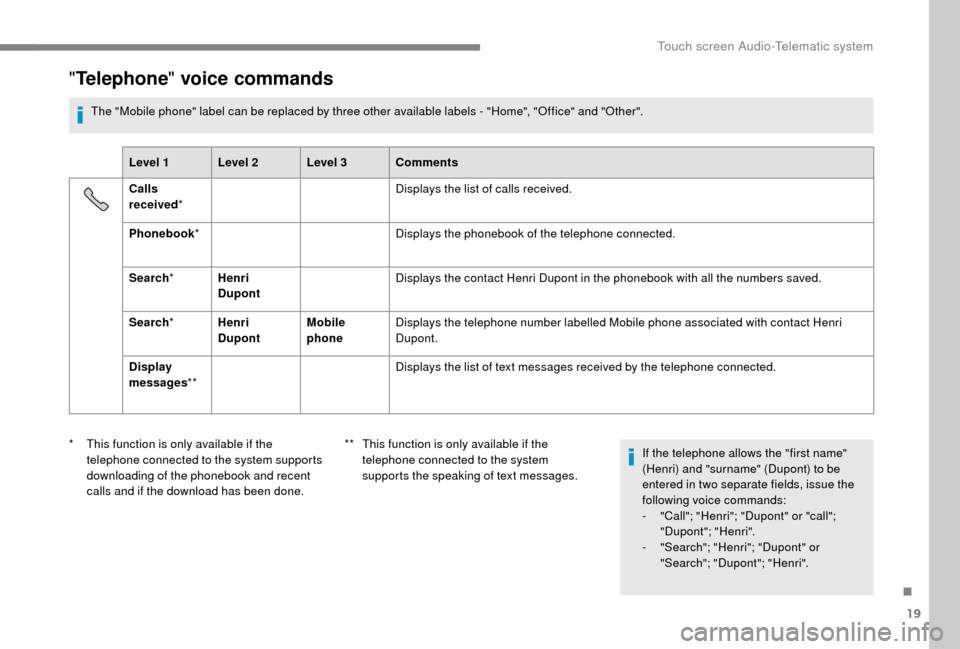
"Telephone " voice commands
The "Mobile phone" label can be replaced by three other available labels - "Home", "Office" and "Other".
Level 1 Level 2 Level 3 Comments
Calls
received * Displays the list of calls received.
Phonebook * Displays the phonebook of the telephone connected.
Search * Henri
Dupont Displays the contact Henri Dupont in the phonebook with all the numbers saved.
Search * Henri
Dupont Mobile
phoneDisplays the telephone number labelled Mobile phone associated with contact Henri
Dupont.
Display
messages ** Displays the list of text messages received by the telephone connected.
*
T
his function is only available if the
telephone connected to the system supports
downloading of the phonebook and recent
calls and if the download has been done. **
T
his function is only available if the
telephone connected to the system
supports the speaking of text messages. If the telephone allows the "first name"
(Henri) and "surname" (Dupont) to be
entered in two separate fields, issue the
following voice commands:
-
"
Call"; "Henri"; "Dupont" or "call";
"Dupont"; "Henri".
-
"
Search"; "Henri"; "Dupont" or
"Search"; "Dupont"; "Henri".
.
Touch screen Audio-Telematic system
Page 207 of 232
21
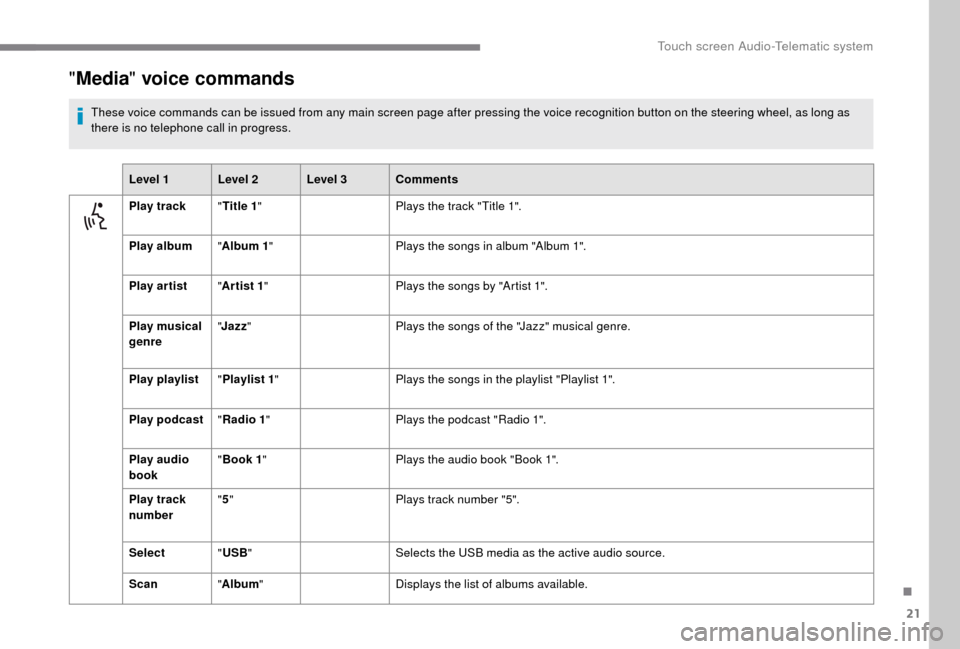
"Media " voice commands
These voice commands can be issued from any main screen page after pressing the voice recognition button on the steering wheel, as long as
there is no telephone call in progress.
Level 1 Level 2 Level 3 Comments
Play track "Title 1 " Plays the track "Title 1".
Play album "Album 1 " Plays the songs in album "Album 1".
Play ar tist "Ar tist 1 " Plays the songs by "Artist 1".
Play musical
genre "
Jazz " Plays the songs of the "Jazz" musical genre.
Play playlist "Playlist 1 " Plays the songs in the playlist "Playlist 1".
Play podcast "Radio 1 " Plays the podcast "Radio 1".
Play audio
book "
Book 1 " Plays the audio book "Book 1".
Play track
number "
5 " Plays track number "5".
Select "USB " Selects the USB media as the active audio source.
Scan "Album " Displays the list of albums available.
.
Touch screen Audio-Telematic system
Page 208 of 232
22
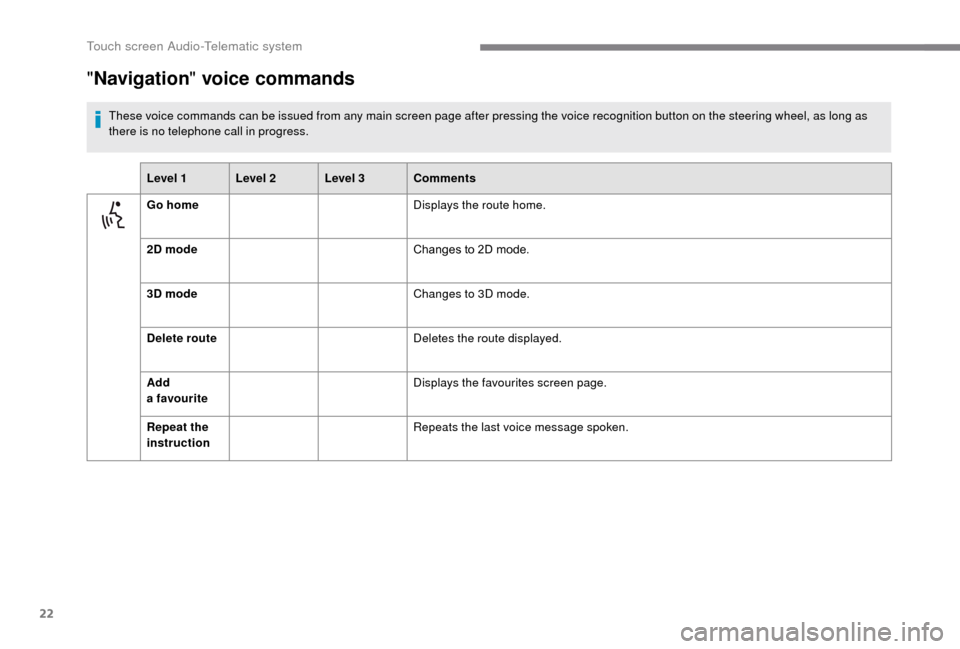
"Navigation " voice commands
These voice commands can be issued from any main screen page after pressing the voice recognition button on the steering wheel, as long as
there is no telephone call in progress.
Level 1 Level 2 Level 3 Comments
Go home Displays the route home.
2D mode Changes to 2D mode.
3D mode Changes to 3D mode.
Delete route Deletes the route displayed.
Add
a
favourite Displays the favourites screen page.
Repeat the
instruction Repeats the last voice message spoken.
Touch screen Audio-Telematic system
Page 209 of 232
23
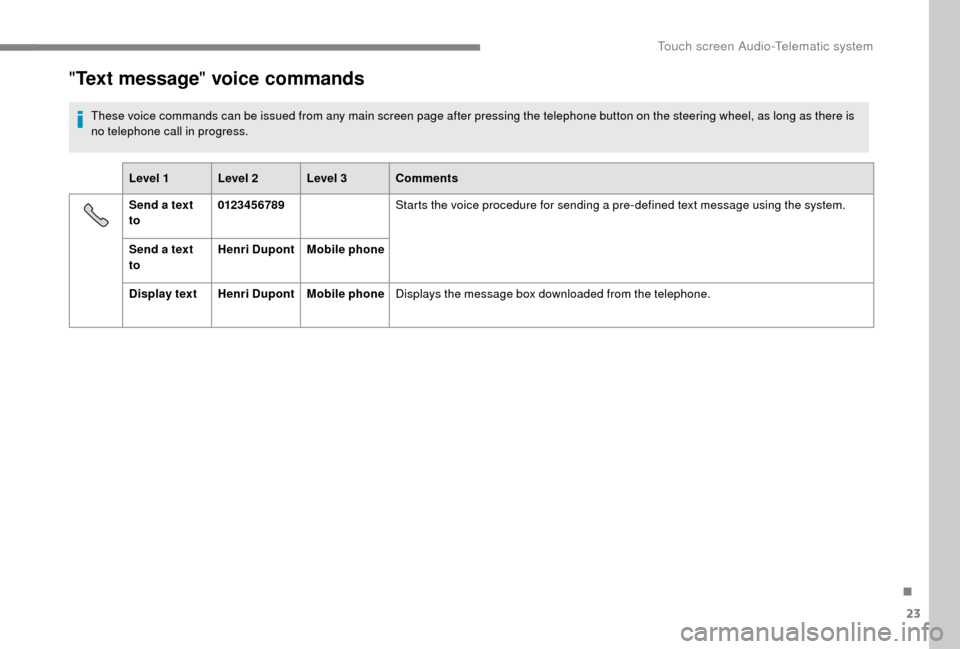
"Text message " voice commands
These voice commands can be issued from any main screen page after pressing the telephone button on the steering wheel, as long as there is
no telephone call in progress.
Level 1 Level 2 Level 3 Comments
Send a
text
to 0123 4 5 6789
Starts the voice procedure for sending a
pre-defined text message using the system.
Send a
text
to Henri Dupont
Mobile phone
Display text Henri DupontMobile phoneDisplays the message box downloaded from the telephone.
.
Touch screen Audio-Telematic system
Page 211 of 232
1
Audio system
Multimedia audio system –
Bluetooth® telephone
Contents
First steps
1
S
teering wheel mounted controls
2
R
adio
2
M
edia
4
T
elephone
5
S
ettings
6
V
oice commands
6T
he system is protected in such a way that
it will only operate in your vehicle.
For safety reasons, the vehicle must
always be stationary for the driver to
perform operations that require close
attention.
When the engine is switched off and to
prevent discharging of the battery, the
system switches off after activation of
energy economy mode.
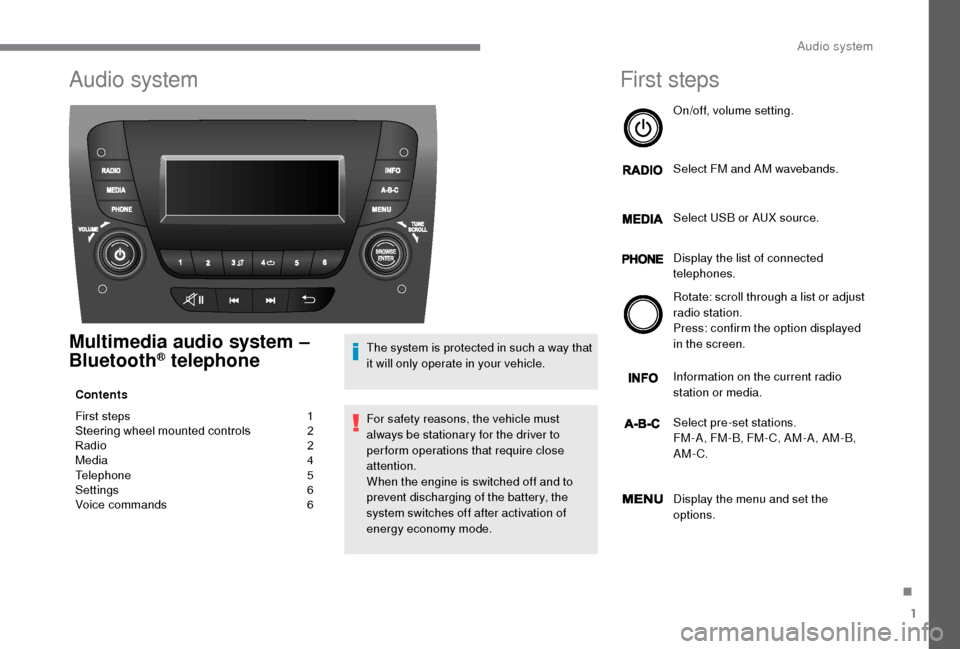
First steps
On/off, volume setting.
Select FM and AM wavebands.
Select USB or AUX source.
Display the list of connected
telephones.
Rotate: scroll through a
list or adjust
radio station.
Press: confirm the option displayed
in the screen.
Information on the current radio
station or media.
Select pre-set stations.
FM-A, FM-B, FM- C, AM-A, AM-B,
AM-C.
Display the menu and set the
options.
.
Audio system
Page 213 of 232
3
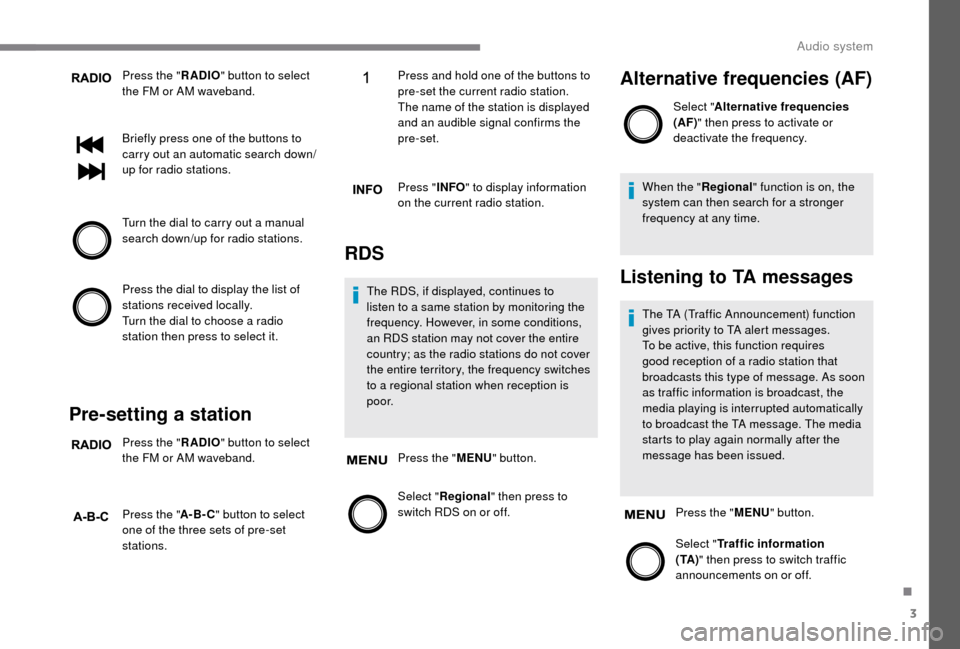
Press the "RADIO" button to select
the FM or AM waveband.
Briefly press one of the buttons to
carry out an automatic search down/
up for radio stations.
Turn the dial to carry out a
manual
search down/up for radio stations.
Press the dial to display the list of
stations received locally.
Turn the dial to choose a
radio
station then press to select it.
Pre-setting a station
Press the " RADIO" button to select
the FM or AM waveband.
Press the " A-B-C" button to select
one of the three sets of pre-set
stations. Press and hold one of the buttons to
pre-set the current radio station.
The name of the station is displayed
and an audible signal confirms the
pre-set.
Press "
INFO" to display information
on the current radio station.
RDS
The RDS, if displayed, continues to
listen to a same station by monitoring the
frequency. However, in some conditions,
an RDS station may not cover the entire
country; as the radio stations do not cover
the entire territory, the frequency switches
to a
regional station when reception is
p o o r.
Press the " MENU" button.
Select " Regional" then press to
switch RDS on or off.
Alternative frequencies (AF)
Select " Alternative frequencies
(AF)" then press to activate or
deactivate the frequency.
When the " Regional" function is on, the
system can then search for a
stronger
frequency at any time.
Listening to TA messages
The TA (Traffic Announcement) function
gives priority to TA alert messages.
To be active, this function requires
good reception of a
radio station that
broadcasts this type of message. As soon
as traffic information is broadcast, the
media playing is interrupted automatically
to broadcast the TA message. The media
starts to play again normally after the
message has been issued.
Press the " MENU" button.
Select " Traffic information
( TA ) " then press to switch traffic
announcements on or off.
.
Audio system
Page 214 of 232
4
Media
USB port
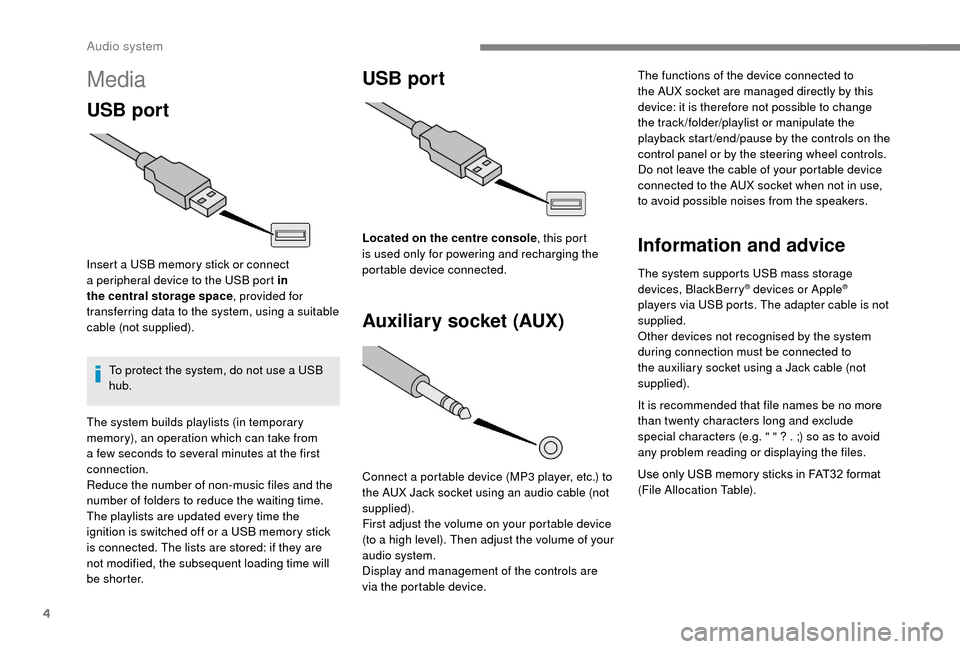
Insert a USB memory stick or connect
a peripheral device to the USB port in
the central storage space , provided for
transferring data to the system, using a
suitable
cable (not supplied).
To protect the system, do not use a
USB
hub.
USB port
Auxiliary socket (AUX)
Connect a portable device (MP3 player, etc.) to
t he AUX Jack socket using an audio cable (not
supplied).
First adjust the volume on your portable device
(to a
high level). Then adjust the volume of your
audio system.
Display and management of the controls are
via the portable device. The functions of the device connected to
the AUX socket are managed directly by this
device: it is therefore not possible to change
the track /folder/playlist or manipulate the
playback start /end/pause by the controls on the
control panel or by the steering wheel controls.
Do not leave the cable of your portable device
connected to the AUX socket when not in use,
to avoid possible noises from the speakers.
Information and advice
The system supports USB mass storage
devices, BlackBerry® devices or Apple®
players via USB ports. The adapter cable is not
supplied.
Other devices not recognised by the system
during connection must be connected to
the auxiliary socket using a
Jack cable (not
supplied).
It is recommended that file names be no more
than twenty characters long and exclude
special characters (e.g. " " ? . ;) so as to avoid
any problem reading or displaying the files.
Use only USB memory sticks in FAT32
format
(File Allocation Table).
The system builds playlists (in temporary
memory), an operation which can take from
a
few seconds to several minutes at the first
connection.
Reduce the number of non-music files and the
number of folders to reduce the waiting time.
The playlists are updated every time the
ignition is switched off or a
USB memory stick
is connected. The lists are stored: if they are
not modified, the subsequent loading time will
b e s h o r t e r. Located on the centre console
, this port
is used only for powering and recharging the
portable device connected.
Audio system
Page 215 of 232
5
To protect the system, do not use a USB
hub .
The system does not support the simultaneous
connection of two identical devices (two
memory sticks or two Apple
® players) but it is
possible to connect one memory stick and one
Apple
® player at the same time.
It is recommended that you use genuine
Apple® USB cables for correct operation.
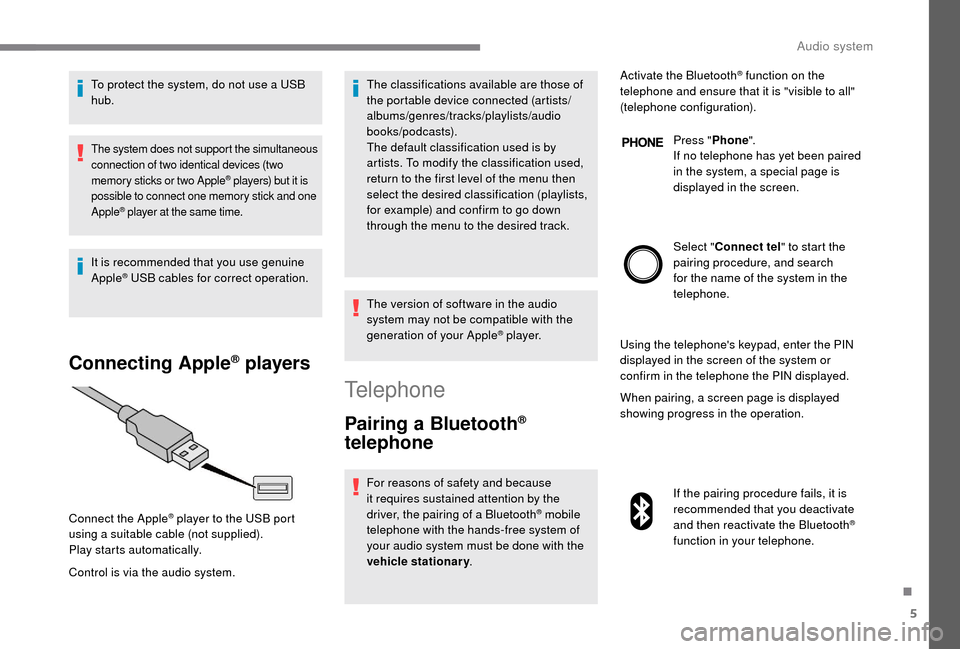
Connecting Apple® players
Control is via the audio system. The classifications available are those of
the portable device connected (artists/
albums/genres/tracks/playlists/audio
books/podcasts).
The default classification used is by
artists. To modify the classification used,
return to the first level of the menu then
select the desired classification (playlists,
for example) and confirm to go down
through the menu to the desired track.
The version of software in the audio
system may not be compatible with the
generation of your Apple
® p l aye r.
Connect the Apple
® player to the USB port
using a
suitable cable (not supplied).
Play starts automatically.
Telephone
Pairing a Bluetooth®
telephone
For reasons of safety and because
it requires sustained attention by the
driver, the pairing of a
Bluetooth
® mobile
telephone with the hands-free system of
your audio system must be done with the
vehicle stationary . Activate the Bluetooth
® function on the
telephone and ensure that it is "visible to all"
(telephone configuration).
Press "Phone".
If no telephone has yet been paired
in the system, a special page is
displayed in the screen.
Select " Connect tel " to start the
pairing procedure, and search
for the name of the system in the
telephone.
Using the telephone's keypad, enter the PIN
displayed in the screen of the system or
confirm in the telephone the PIN displayed.
When pairing, a screen page is displayed
showing progress in the operation.
If the pairing procedure fails, it is
recommended that you deactivate
and then reactivate the Bluetooth
®
function in your telephone.
.
Audio system
Page 216 of 232
6
When the pairing procedure has
finished successfully, a screen page
with "Connection successful"
appears:
Confirm to display the menus.
The telephone menu gives access to
the following functions in particular:
" Calls list ", "Contacts " *,"Digital
keypad ".
Receiving a call
An incoming call is announced by a ring and
a superimposed display in the screen.
Press this button to accept the
incoming call.
Or press this steering wheel
mounted button to reject the call.
Ending a call
To reject a call, press this button
a t the steering wheel mounted
controls.
Making a call
Select "Call log " for access to the
recent calls made.
Select " Contacts " to display your
contacts and use the dial to scroll
through the list.
To dial a
number, use the system's
" Keypad ".
Settings
System settings
Press the " MENU" button.
Select " System settings " then
press to display the list of settings
for activating or deactivating options:
-
"Reset default value "
-
"20
min. delay for switching
off "
-
"Limit initial volume "
-
"Automatic "
Audio
Press the "MENU" button.
Select " Audio" then press to display
the list of settings for activating or
deactivating options:
-
"Tr e b l e "
-
"Mid-range "
-
"Bass "
-
"Balance "
-
"Volume linked to vehicle
speed "
-
"Loudness "
The audio settings are different and
independent for each audio source.
*
I
f your telephone is fully compatible.
Voice commands
Information – Using the
system
Instead of touching the screen, you can
use your voice to issue commands to the
system.
Audio system